
If I had to cut this guide down to one point, it’s this: don’t pick by label alone. In 2026, cloud security monitoring often spans CSPM, CNAPP, cloud SIEM, runtime checks, compliance reporting, and DevOps links. So I’d shortlist tools by coverage, setup time, alert quality, policy depth, reporting, multi-cloud fit, and workflow links.
Here’s the short version:
- Wiz: best for broad multi-cloud visibility with low setup effort
- Orca Security: strong for fast agentless scans across mixed estates
- Datadog Cloud Security: best fit if your team already works in Datadog
- Prisma Cloud: broadest scope, but more setup and tuning work
- Microsoft Defender for Cloud: strongest in Azure-led estates
- CrowdStrike Falcon Cloud Security: good fit for SOC teams that want endpoint and cloud data together
- Sysdig Secure: best match for Kubernetes and container-heavy estates
The article compares all seven across the same seven checks:
- Coverage
- Setup effort
- False-positive control
- Policy support
- Compliance reporting
- Multi-cloud support
- DevOps workflow links
One theme shows up again and again: agentless tools are often easier to start with, while sensor-based tools tend to give more runtime depth. That trade-off affects cost, rollout time, and what your team can see day to day.
::: @figure 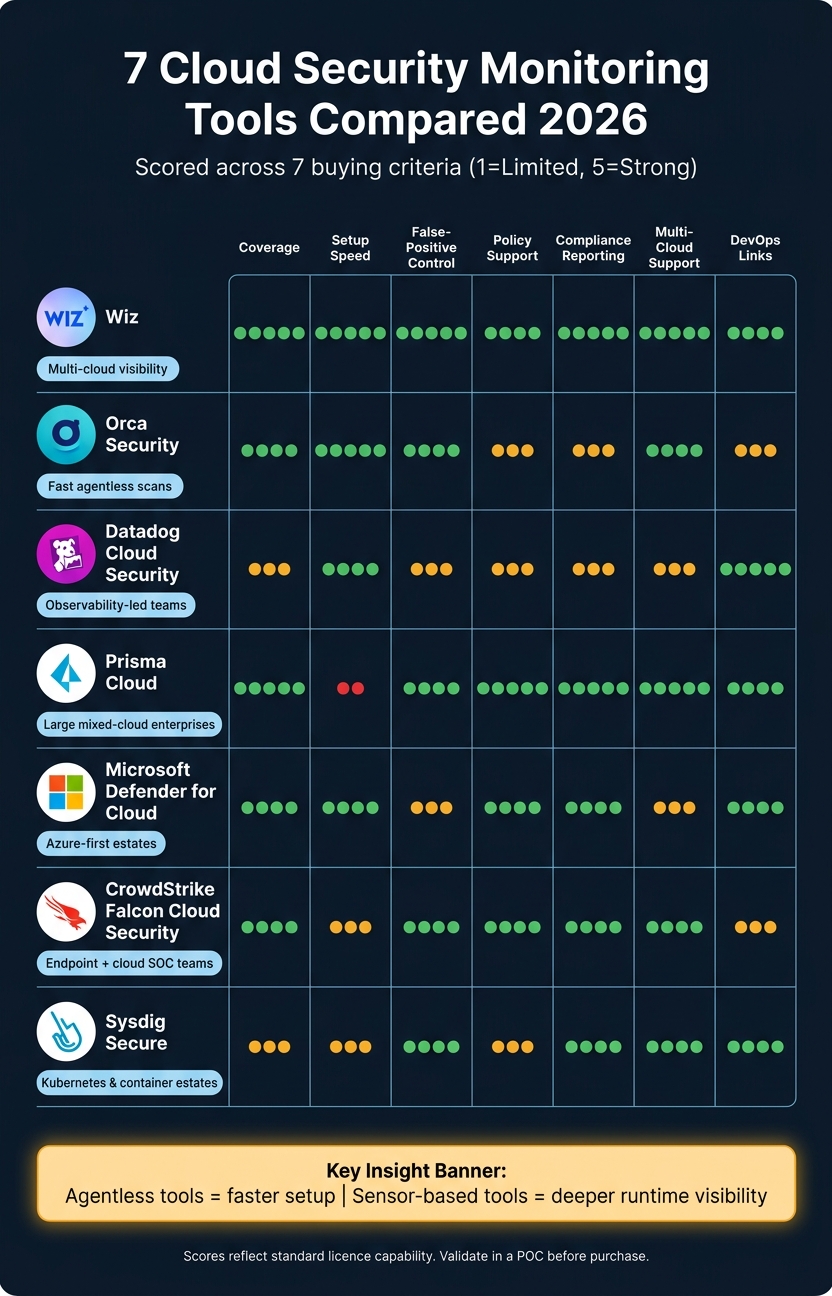 {7 Cloud Security Monitoring Tools Compared: Scores & Best Fit 2026}
:::
{7 Cloud Security Monitoring Tools Compared: Scores & Best Fit 2026}
:::
7 Best Cloud Security Posture Management Tools 2025: Wiz vs Orca vs Prisma Reviewed
Quick Comparison
| Tool | Best fit | Main trade-off | Setup |
|---|---|---|---|
| Wiz | Multi-cloud estates | Deeper runtime may need sensors | Low |
| Orca Security | Fast visibility | Lighter runtime telemetry | Low |
| Datadog Cloud Security | Observability-led teams | Not as deep as CNAPP-first tools in some areas | Moderate |
| Prisma Cloud | Large mixed-cloud estates | More scoping and tuning work | High |
| Microsoft Defender for Cloud | Azure-first teams | AWS/GCP depth can vary | Low in Azure |
| CrowdStrike Falcon Cloud Security | Endpoint + cloud investigations | Sensor rollout adds work | Moderate |
| Sysdig Secure | Kubernetes/container estates | Narrower scope outside cloud-native runtime | Moderate–High |
For UK teams, I’d also check three things early: framework support for ISO 27001, UK GDPR, PCI DSS and Cyber Essentials Plus; evidence exports with timestamps and control mapping; and 3-year cost in £, including agents, ingestion, support, and services.
That gives you the core answer up front. The rest of the piece helps you decide which tool fits your estate, your team, and your audit needs.
Tool-by-tool comparison: strengths, trade-offs and best-fit use cases
The best tool isn’t the one with the longest feature list. It’s the one that gives you the right mix of coverage, setup effort, signal quality and day-to-day fit for your estate. The profiles below use the seven criteria in a practical way, rather than dumping features in isolation.
Wiz, Orca Security and Datadog Cloud Security
Wiz leans into attack-path context, Orca leans into fast agentless visibility, and Datadog leans into observability-led correlation.
Wiz uses agentless API integrations, with optional sensors for deeper runtime visibility.[10] Its main point of difference is contextual prioritisation: it maps vulnerabilities and misconfigurations to attack paths and sensitive assets, so teams can focus on what is most exploitable.[10] If you need more behavioural telemetry, optional eBPF-based sensors add runtime monitoring for Kubernetes and Linux environments.[10] Compliance coverage spans more than 100 frameworks, including ISO 27001, PCI DSS, GDPR, NIST SP 800-53 and SOC 2.[10]
Orca Security uses agentless SideScanning™ to inspect cloud workloads, configurations, identities and data without deploying software to each host.[11] It supports AWS, Azure, Google Cloud and Oracle Cloud, which makes it a good fit for mixed-provider estates.[11] The upside is broad agentless coverage. The trade-off is lighter runtime telemetry than you’d get from sensor-based products.
Datadog Cloud Security tends to make most sense when security findings need to live next to operational telemetry. It supports both agentless and agent-based deployment, with coverage for CIS, PCI DSS, SOC 2 and custom frameworks.[7] That split model affects runtime depth and reporting, which is easier to see side by side in the table below.
| Dimension | Wiz | Orca Security | Datadog Cloud Security |
|---|---|---|---|
| Deployment model | Agentless API, with optional sensors[10] | Agentless SideScanning™[11] | Mixed: agentless and agent-based[7] |
| Onboarding speed | Minutes to hours[10] | Minutes (vendor claim)[11] | Minutes for agentless scanning; longer with agents[7] |
| Contextual prioritisation | Attack paths and sensitive assets[10] | Broad risk-based inspection | Correlates findings with operational telemetry[7] |
| Runtime depth | Deeper with optional sensors[10] | Snapshot-based; limited continuous runtime[11] | Stronger with agents[7] |
| Multi-cloud support | Broad cloud coverage across accounts | AWS, Azure, Google Cloud and Oracle Cloud[11] | Mixed model; verify service-by-service coverage in a proof of concept |
| Compliance/reporting | More than 100 frameworks[10] | Validate exact framework mappings in a proof of concept | CIS, PCI DSS, SOC 2 and custom frameworks[7] |
| Key trade-off | Runtime depth needs sensors | Runtime telemetry is lighter than sensor-based tools | Workflow consolidation does not equal specialist CNAPP depth |
| Best fit | Cloud-first, multi-cloud risk prioritisation | Fast agentless visibility across mixed estates | Teams already using Datadog for observability |
If agentless speed is the top priority, the next three tools start to trade simplicity for broader CNAPP coverage, Azure-native control or endpoint-linked investigation.
Prisma Cloud, Microsoft Defender for Cloud and CrowdStrike Falcon Cloud Security
Prisma Cloud is about breadth, Defender for Cloud is about Azure-native depth, and CrowdStrike Falcon Cloud Security is about endpoint-to-cloud continuity.
Prisma Cloud is a broad CNAPP that covers CSPM, workload protection, Kubernetes, identity, data security, application security and code-to-cloud controls.[8] Its strength is policy breadth and multi-cloud coverage, but that also means more scoping work across modules and policies.[8] For large enterprises with mixed cloud estates and complex compliance demands, it belongs on the shortlist.
Microsoft Defender for Cloud is often the natural pick for organisations with a heavy Azure footprint. Its main strength is tighter Azure alerting and identity context.[8] AWS and Google Cloud support are available, but the depth is lower than in Azure.[8] It’s worth checking early whether the reporting lines up with your internal governance and audit process.
CrowdStrike Falcon Cloud Security fits SOC teams that want endpoint and cloud investigations in one place, though sensor deployment adds rollout overhead.[8]
| Dimension | Prisma Cloud | Microsoft Defender for Cloud | CrowdStrike Falcon Cloud Security |
|---|---|---|---|
| Coverage focus | Broad CNAPP breadth[8] | Azure-native depth with connected AWS/GCP coverage[8] | Endpoint-to-cloud continuity |
| Setup effort | High: module selection, permission scoping and policy tuning[8] | Low in Azure; higher outside Azure[8] | Moderate; sensor rollout may be required[8] |
| Investigation context | Policy breadth and cross-cloud controls | Microsoft ecosystem context | Falcon and endpoint context |
| Key trade-off | Breadth adds complexity | Best depth is in Azure | Runtime depth can add overhead |
| Best fit | Large, mixed-cloud enterprises | Azure-first organisations | SOC teams wanting endpoint-to-cloud continuity |
For container-heavy estates, the comparison gets tighter. At that point, runtime depth, Kubernetes visibility and CI/CD enforcement tend to matter more than broad posture coverage.
Sysdig Secure
Sysdig Secure is the specialist option for container and Kubernetes runtime monitoring. It also offers agentless CSPM and threat detection across AWS, Azure and GCP.[6][9] Its runtime story is closely tied to Falco, the open-source Kubernetes runtime-security project created by Sysdig and now a Cloud Native Computing Foundation incubating-level project.[12]
Sysdig scans container images in registries, CI/CD pipelines and production, then links vulnerability findings to Kubernetes applications and runtime context.[12] Its CI/CD integrations cover common build systems and can fail builds on critical issues.[4] Compliance documentation covers PCI DSS, GDPR and NIST, with automated configuration checks and audit-oriented reporting.[5]
The trade-off is scope. Sysdig is narrower than full CNAPP suites when it comes to posture and data security. So if you need deep identity governance or data-security posture management, compare Sysdig’s posture functions directly against broader platforms before making a call.
| Dimension | Sysdig Secure | Broader CNAPP platforms |
|---|---|---|
| Primary focus | Cloud-native runtime detection for containers and Kubernetes[12] | Broader posture, identity and data coverage |
| Multi-cloud support | AWS, Azure and GCP agentless CSPM and threat detection[6][9] | Varies by platform |
| CI/CD fit | Common build systems with pipeline policy enforcement[4] | Varies by platform |
| Compliance/reporting | PCI DSS, GDPR and NIST with audit-oriented reporting[5] | Varies by platform |
| Best fit | Kubernetes- and container-heavy environments | Teams needing broader enterprise CNAPP coverage |
Decision tables for buyers
The profiles above set out the trade-offs. These tables turn that into something more useful: a shortlist.
No tool comes out top on every line item. The right choice depends on your cloud mix, your team’s skill set, and how you want to deploy. Use the tables below to cut the long list down before you run a POC.
Seven tools across all buying criteria
This table pulls the earlier seven criteria into one shortlist view. Scores use a 1–5 scale, where 1 = limited, 3 = adequate, and 5 = strong. They reflect standard licence capability, not add-ons. Treat them as a starting point for a POC, not the last word.
| Tool | Coverage | Setup effort (1=complex, 5=fast) | False-positive control | Policy support | Compliance reporting | Multi-cloud support | DevOps workflow links | Strongest deployment profile | Principal limitation to validate |
|---|---|---|---|---|---|---|---|---|---|
| Wiz | 5 | 5 | 5 | 4 | 5 | 5 | 4 | Cloud-first, multi-cloud visibility | Runtime depth needs optional sensors |
| Orca Security | 4 | 5 | 4 | 3 | 3 | 4 | 3 | Fast agentless visibility across mixed estates | Runtime telemetry is lighter than sensor-based tools |
| Datadog Cloud Security | 3 | 4 | 3 | 3 | 3 | 3 | 5 | Observability-led DevSecOps teams | Validate code, IaC and runtime connections |
| Prisma Cloud | 5 | 2 | 4 | 5 | 5 | 5 | 4 | Large, mixed-cloud enterprises with complex compliance | Module scoping and deployment complexity |
| Microsoft Defender for Cloud | 4 | 4 | 3 | 4 | 4 | 3 | 4 | Azure-led organisations | AWS and GCP depth is less uniform than Azure |
| CrowdStrike Falcon Cloud Security | 4 | 3 | 4 | 4 | 4 | 4 | 3 | SOC teams wanting endpoint-to-cloud continuity | Sensor rollout adds deployment overhead |
| Sysdig Secure | 3 | 3 | 4 | 3 | 4 | 4 | 4 | Kubernetes- and container-heavy environments | Validate fit for VM-centric estates |
False-positive reduction methods compared
False-positive control comes down to one thing: how well a tool connects assets, vulnerabilities, identities, and permissions into a single risk view. The table below shows which methods each tool supports natively, which ones you can tune, and which ones may need extra modules or manual checking during a POC.
| Method | Wiz | Orca Security | Datadog Cloud Security | Prisma Cloud | Microsoft Defender for Cloud | CrowdStrike Falcon Cloud Security | Sysdig Secure |
|---|---|---|---|---|---|---|---|
| Attack-path analysis | Native | Native | Native | Module-dependent | Native | Native (cloud + endpoint + identity) | POC required |
| Asset criticality | Native | Native | Configurable | Native | Configurable | Configurable | Configurable |
| Identity context | Native | Native | Configurable | Native | Native (Entra ID) | Native | Limited |
| Behavioural detection | With sensors | Limited | Configurable | Configurable | Configurable | Native | Native (Falco-based) |
| Suppression rules | Native | Native | Native | Native | Native | Native | Native |
| Deduplication | Native | Native | Native | Native | Native | Native | Configurable |
| Risk-based prioritisation | Native | Native | Native | Native | Native | Native | Native |
Which tool fits which environment
Start by matching the tool to the environment. Then pressure-test that fit in a POC. That order matters.
| Environment | Tool to investigate first | Key validation point |
|---|---|---|
| Fastest broad visibility | Wiz or Orca Security | Test inventory accuracy and permission scope across all cloud accounts [13][3] |
| Deep code-to-runtime coverage | Prisma Cloud | Validate module scope, deployment complexity and developer workflow fit |
| Azure-led estate | Microsoft Defender for Cloud | Test AWS and GCP parity; confirm total cost across enabled plans [14][3][17] |
| Endpoint-to-cloud security operations | CrowdStrike Falcon Cloud Security | Validate sensor coverage, onboarding and SOC workflow impact [16][18] |
| Kubernetes-heavy platform | Sysdig Secure | Test Falco tuning, version support and incident response workflows [2][15] |
| Observability-led DevSecOps team | Datadog Cloud Security | Validate licensing, alert volume and remediation ownership [1] |
One practical note for UK regulated organisations: whatever you shortlist, test evidence export against the frameworks you actually need - ISO/IEC 27001, UK GDPR security requirements, Cyber Essentials Plus, or PCI DSS. Don’t just take a generic compliance dashboard at face value.
Check whether the tool can handle the parts auditors and internal teams will ask for in plain English: policy violation detection, owner assignment, exception expiry, remediation, and evidence export that an auditor can read without a long guided tour.
Implementation checks before purchase
Once your shortlist is down to two or three tools, run a PoC against your live estate. That shows you what the tool does in your setup, not what a sales deck says it can do.
What to test in a proof of concept
Treat the PoC as a pass/fail exercise, not a polished vendor demo. Before testing starts, record your cloud accounts, subscriptions, regions, assets, hosts, containers, Kubernetes nodes, serverless functions and daily log volume.
Then build a known-risk test pack using authorised resources only. Seed it with a public storage bucket, an exposed management port, an over-permissive IAM role, an unencrypted resource, a vulnerable container image and a known critical CVE. Each issue should be detected, tied to the right asset and owner, and pushed into your ticketing workflow. If that chain breaks at any point, that is a fail, not something to tidy up later.
The next part is where many buying decisions are won or lost: the non-functional checks. For UK organisations, these four areas need close scrutiny:
- Cloud permissions: Ask the vendor for the full permission matrix before you connect production accounts. Keep read-only discovery separate from remediation write access.[19]
- Data residency: Get written confirmation of where metadata, snapshots, logs, vulnerability data and identity data are processed and stored. Check UK or EEA hosting, subprocessors, retention periods and deletion at contract termination.[19]
- Policy-as-code: Test the tool against your live Terraform or CloudFormation repositories. Open a pull request with a banned configuration, then check that an approved exception includes an owner, a reason and an expiry date.
- Total cost: Price your live inventory using the vendor’s charging unit, then model growth. Include implementation labour, agent deployment, log ingestion, retention, query capacity and analyst triage time.[19]
Track time to value all the way through. Record time to first inventory, first finding, first ticket and first remediation. It gives you the clearest view of operational overhead.
Where Hokstad Consulting can support implementation
Those checks can still fall apart without clear ownership and a working process. Picking the tool is one decision. Getting it wired into the way your teams work is another, and often the harder one.
That’s why the operating model matters so much: who owns findings, how remediation gets assigned, how policies are versioned, and how security fits into engineering workflows instead of sitting off to the side.
Hokstad Consulting can support the surrounding implementation work, including DevOps transformation and custom development and automation. If your team needs help shaping the operating model around cloud-security findings, that work can tie the tool into day-to-day engineering processes.
Conclusion: How to choose the right cloud security monitoring tool in 2026
The tables above narrow the shortlist, but the final pick comes down to fit. No tool suits every setup. Base your choice on your actual cloud estate: your cloud providers, workload types, identities, and data stores.
Start with provider and workload coverage. If a tool misses part of your AWS, Azure, or Google Cloud estate, you’re left with blind spots. And blind spots are where trouble tends to hide.
From there, break the decision into two checks: posture and runtime. Keep them separate. Posture helps you spot misconfigurations. Runtime helps you spot active threats. They do different jobs, so it helps to judge them that way.
Alert noise matters too. A tool that floods your team with low-value alerts can slow everything down. When you test prioritisation, look at exposure, sensitivity, and asset criticality - not severity alone.
Then run a PoC in your own estate. Check the exact edition you plan to buy, not a higher-tier version you won’t use. Test asset discovery, finding accuracy, remediation routing, and compliance evidence. That’s the fastest way to find the tool that matches both your risk level and the way your team works.
FAQs
How should I separate posture from runtime needs?
Separate posture from runtime. Treat configuration risk and live workload monitoring as two different jobs.
Use CSPM for your static environment. That covers things like misconfigurations, over-permissioned access, and compliance gaps.
Then use runtime monitoring to watch access patterns and suspicious activity in real time. That gives you deeper visibility into active processes and workloads.
What should a cloud security monitoring proof of concept test?
A cloud security monitoring proof of concept should show that you can see what’s happening from end to end and that the alerts you get are worth acting on. That means pulling logs and telemetry into one place, turning on real-time alerts, and testing both automated misconfiguration scans and runtime monitoring.
It should also check whether false positives stay under control. If every alert looks urgent, teams stop trusting the system. The proof of concept should also confirm that policy-as-code rules are enforced properly, produce compliance-ready reporting for UK needs, and fit into existing DevOps and incident workflows without causing friction.
On top of that, it needs to verify log integrity and track how the setup performs in practice. That includes measuring response times and vulnerability-detection metrics, so you can see not just whether the tooling works, but how well it works under day-to-day conditions.
Which tool type best suits a multi-cloud estate?
For a multi-cloud estate, go with a CSPM or CNAPP-style platform that gives you centralised visibility across AWS, Azure and GCP.
That matters because provider-specific tools often leave you with blind spots. One team looks at AWS, another checks Azure, and GCP ends up in its own lane. A single platform cuts down those visibility silos and makes it easier to spot drift, track compliance, and see what’s happening across the whole estate.