
Cloud audit logging is essential for tracking activities in your cloud environment, especially for UK businesses managing sensitive data under regulations like GDPR and the UK Data Protection Act 2018. Effective logging ensures compliance, identifies security risks, and provides a clear record of actions.
Key Takeaways:
- Compliance: Logs are critical for meeting legal requirements and industry standards (e.g., GDPR, PCI DSS, SOX).
- Security: Logs help detect suspicious activities, such as unauthorised access or unusual behaviour.
- Challenges: Managing costs, standardising formats across platforms, and ensuring logs are secure from tampering.
Best Practices:
- Define Clear Policies: Specify what to log, how long to retain logs, and who can access them.
- Centralise Log Management: Use a unified platform to collect logs from multiple cloud providers for better visibility.
- Secure Logs: Implement immutable storage, encryption, and role-based access controls.
- Optimise Retention: Align retention periods with regulations while managing storage costs.
- Enable Alerts: Use automated monitoring and AI to detect anomalies in real time.
- Test Regularly: Conduct quarterly tests to ensure your logging system captures required data and remains functional.
How to use Cloud Audit Logging
Creating Logging Policies and Procedures
A logging policy outlines what data to record, how long to keep it, who can access it, and the protective measures in place. Having clear guidelines helps prevent data overload while ensuring critical events are logged. For businesses in the UK, these policies must comply with both domestic and international regulations, such as the UK Data Protection Act 2018, GDPR, PCI DSS, and SOX. Aligning your policies with these standards is key to maintaining both compliance and security.
Matching Policies to Compliance Requirements
Different regulations require specific types of logs. For example, GDPR focuses on accountability and transparency in handling personal data. PCI DSS demands detailed audit trails for systems managing payment card information, while SOX requires logs that monitor changes to financial systems to ensure data integrity.
To meet these requirements, your policies should define the exact events to log for each regulation. For GDPR, this might include recording personal data access, with details such as user identity, timestamps, and the type of data accessed. PCI DSS might require logs for cardholder data access, failed login attempts, and changes to user privileges. Your policy should also specify the format and storage of these logs, as well as assign monitoring responsibilities - especially important in multi-cloud setups where accountability can become blurred.
Reviewing and Updating Policies Each Year
To stay effective, logging policies need regular updates. Regulations can change, new cloud services might be introduced, and business operations evolve. A policy designed in 2024 may no longer address the threats or compliance needs of 2026. Annual reviews ensure your policies remain relevant and legally compliant.
During these reviews, check if your logs capture all necessary events, confirm retention periods meet minimum regulatory requirements, and identify whether new cloud services demand additional logging measures. Many UK businesses align these reviews with their financial year-end, often between March and April. Involving teams from IT security, compliance, legal, and operations ensures all critical areas are covered. Document any updates, including the reasons behind them, and ensure the organisation is informed of these changes. This approach turns your logging policies into adaptable frameworks that keep pace with your evolving cloud environment.
For expert guidance on refining your logging framework in complex multi-cloud environments, UK businesses can turn to Hokstad Consulting (https://hokstadconsulting.com).
Centralised Log Management and Integration
Handling logs across various cloud platforms can be a logistical nightmare. Fragmented logs not only obscure visibility but also slow down incident response times. For instance, a financial services company managed to cut investigation times from six hours to under 30 minutes by adopting a centralised logging platform [5]. This shift from scattered logs to a unified system has revolutionised how organisations identify threats and ensure compliance.
Centralized audit logging has moved from best practice to absolute requirement for any security-conscious team. Decentralized logging creates blind spots. Threat actors exploit those blind spots.- hoop.dev [3]
Centralising logs offers a single pane of glass for your entire infrastructure. Instead of juggling multiple consoles for different cloud providers, all audit data flows into one repository. This unified view not only speeds up Mean Time to Detect (MTTD) and Mean Time to Respond (MTTR) but also makes compliance audits far simpler. For UK businesses navigating GDPR requirements, having a single source of truth means auditors can confirm compliance across platforms without needing to piece together data from scattered systems.
Beyond convenience, centralisation also bolsters security with immutable storage and real-time anomaly detection. When logs from different platforms are combined, patterns that were previously hidden become immediately noticeable. For example, a suspicious login on AWS followed by unusual API calls on Azure within minutes stands out in a centralised system. This clarity allows teams to define and monitor critical log events effectively.
Deciding Which Logs to Collect
Not every log is worth collecting. Capturing everything leads to inflated storage costs and overwhelming data volumes. Instead, focus on key events critical for security and compliance: authentication attempts (successful and failed), configuration changes, API calls, data exports, and permission escalations [3][4]. These logs provide vital insights into who accessed what, when, and how they interacted with the system.
For AWS, enable CloudTrail for management events and selectively turn on Data Access logs for sensitive services like S3 buckets containing personal data. In Azure, configure Activity Logs for subscription-level changes and enable Diagnostic Settings for resource-specific logs. On GCP, Admin Activity logs are free and enabled by default, but Data Access logs (tracking reads and writes in services like BigQuery or Cloud Storage) can generate high volumes and should only be enabled when necessary for compliance [9][1].
Centralising Log Collection and Standardising Formats
Each cloud provider has its quirks - different field names, timestamp formats, and severity levels. For instance, AWS might log userId while Azure uses userPrincipalName, and timestamps can vary between Unix epoch and ISO 8601 formats. Without standardisation, cross-platform analysis becomes nearly impossible.
To tackle this, use tools like Vector, Fluentd, or Fluent Bit to process and standardise logs before they reach storage [7][8]. These tools act as translators, aligning field names and converting timestamps to UTC in ISO 8601 format. Opt for structured logging with JSON instead of unstructured text to make querying and analysis more consistent.
Adopt a Common Data Model that defines standard field names, log levels (e.g., TRACE, DEBUG, INFO, WARN, ERROR, FATAL), and metadata requirements across your organisation [8]. By ensuring every log includes fields like timestamp, user_id, action, resource, and result, correlation becomes seamless - no matter which cloud provider generated the event.
Connecting Logs Across Multiple Cloud Platforms
To consolidate logs from various cloud platforms, set up a dedicated Log Archive account [6][11]. This central repository strengthens audit trails, a critical requirement for meeting UK regulatory standards. For AWS, use CloudWatch subscription filters to forward logs to the archive account. In Azure, configure Log Analytics workspaces to gather data from multiple subscriptions. On GCP, use Cloud Audit Logs with aggregated sinks to route logs from child projects to a central observability hub.
Decide between push and pull methods for log collection based on your infrastructure. Push systems actively send logs from sources but require robust retry mechanisms for network failures. Pull systems, on the other hand, retrieve logs at intervals and can resume from the last successful message, making them more reliable during extended outages [10][7]. In Kubernetes environments, deploy sidecar containers or DaemonSets to collect logs automatically from ephemeral pods without altering application code [7].
For cost efficiency and performance, implement regional aggregation points to process logs locally before forwarding them to the central hub [11]. Use cloud-native streaming services like AWS Kinesis, Azure Event Hub, or GCP Pub/Sub for scalable and buffered log ingestion. These services handle high-volume data streams while ensuring reliable delivery.
For organisations navigating the complexities of multi-cloud environments, Hokstad Consulting (https://hokstadconsulting.com) offers expert guidance in designing resilient logging architectures that balance visibility, cost, and operational efficiency.
Protecting Audit Logs: Security, Access, and Retention
::: @figure 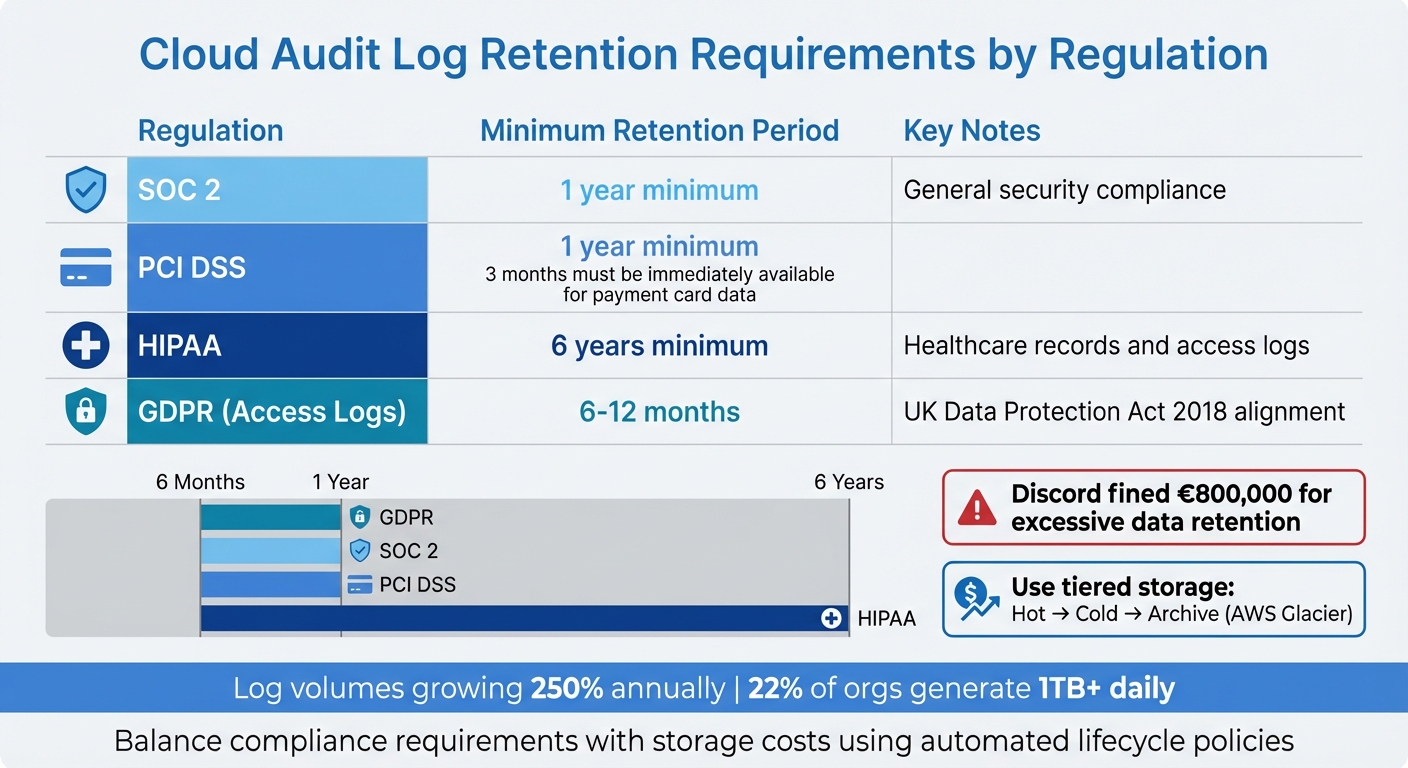 {Cloud Audit Log Retention Requirements by Regulation - UK Compliance Guide 2025}
:::
{Cloud Audit Log Retention Requirements by Regulation - UK Compliance Guide 2025}
:::
After centralising your audit logs, the next step is ensuring they are secure, accessible to the right people, and retained appropriately. Audit logs are often a target for attackers looking to erase evidence. For example, the Target security breach, which compromised 40 million payment cards, ended up costing approximately £158 million in legal fees and settlements. Similarly, Memorial Healthcare Systems faced a £4.3 million penalty for not reviewing their audit logs properly. These examples highlight why safeguarding logs is a priority for organisations in the UK, especially with stringent regulations in place.
The strongest proof of security is evidence that cannot be altered.- hoop.dev [12]
Protecting logs involves several layers: using immutable storage to prevent tampering, implementing role-based access control (RBAC) to manage who can see them, and setting retention policies that comply with regulations while managing costs. Together, these measures create a robust defence against both external and internal threats.
Securing Logs with Immutable Storage
Immutable storage is key to ensuring your logs remain unaltered. Write-once storage solutions, like Amazon S3 Object Lock or Google Cloud immutable buckets, provide built-in protection that prevents even administrators from modifying records [14][1]. This is particularly important when logs need to serve as legal evidence.
To add another layer of security, protect the private keys used for signing logs with hardware-backed security modules (HSM) [12]. This ensures attackers can't forge log entries, even if they gain access to your systems. Regularly automate integrity checks to verify log signatures and ensure logs are stored in a centralised repository. For added durability, keep redundant copies of logs in geographically separate locations. This way, even if one region experiences a failure, your audit trail remains intact [12][13].
Controlling Access with RBAC and Encryption
Access to logs should be tightly controlled. Use RBAC and multi-factor authentication (MFA) to limit who can view them [13][1]. Following the principle of least privilege, only grant users the permissions they need for their specific role. For instance, a developer troubleshooting an app might need access to application logs but not security logs. Additionally, enforce segregation of duties so that the person creating logs is not the same person auditing them [15].
For encryption, opt for Customer-Managed Encryption Keys (CMEK) instead of provider-managed keys. CMEKs give you full control over key lifecycles and rotation schedules, acting as a kill switch
in case of a breach [1][17]. Regularly review access permissions - every 6 to 12 months - to remove unnecessary privileges and deactivate orphaned accounts [15][17]. You can also implement Just-In-Time (JIT) access, which grants temporary elevated permissions for specific tasks, reducing the risk of standing privileged accounts [15].
Since attackers can move laterally across systems in an average of 62 minutes [17], encrypting logs and restricting access can slow their progress and limit the damage.
Setting Retention Periods and Time Synchronisation
Retention policies must strike a balance between legal requirements and reducing storage costs and risks [19][20]. For example, GDPR requires UK organisations to retain access logs for 6–12 months, while HIPAA mandates a 6-year retention period for healthcare records [18]. In one case, Discord was fined €800,000 for keeping user data and logs much longer than necessary [18].
| Regulation | Recommended Retention Period |
|---|---|
| SOC 2 | Minimum 1 year [16] |
| PCI DSS | Minimum 1 year (3 months immediately available) [16] |
| HIPAA | Minimum 6 years [16] |
| GDPR (Access Logs) | 6–12 months [18] |
To manage costs, use tiered storage. Recent logs can stay in high-speed hot
storage, while older logs can be moved to more affordable cold
or archive
storage, like AWS Glacier [19][20]. Automated lifecycle policies can handle these transitions and delete logs once they expire, avoiding penalties for retaining data longer than necessary [18][19]. With log volumes growing at 250% annually and 22% of organisations generating over 1 TB of log data daily [18], tiered storage is a practical way to control expenses while staying compliant.
Finally, ensure all systems are synchronised with a reliable time source, such as an NTP server, to maintain accurate timestamps [12][13]. Timestamps are critical for forensic investigations, as they allow you to correlate events across systems. Use a standardised format, like ISO 8601, and record timestamps in UTC for consistency. This ensures your logs remain reliable and useful when you need them most.
Monitoring, Alerts, and Detecting Anomalies
Once your logs are securely centralised, the next step is ensuring threats are detected before they spiral out of control. In modern cloud environments, attackers can move quickly - on average, they can pivot between systems in just 62 minutes [17]. Relying on manual log reviews simply isn’t practical. That’s where automated monitoring and intelligent alerting step in, offering real-time detection of suspicious activity. By combining rule-based alerts for known risks with AI-powered detection for unusual patterns, you can create a defence system that addresses both familiar and evolving threats. This approach ties centralised logging with proactive monitoring, strengthening your overall cloud security.
Configuring Automated Alerts and Normal Behaviour Baselines
The first step in setting up automated monitoring is defining what normal
activity looks like. Tools like AWS CloudTrail Insights can help by analysing typical API call volumes and error rates. Keep in mind that this process takes time - 36 hours of data collection is needed before the system can deliver its first anomaly alert [21]. Once a baseline is established, deviations can be flagged for investigation. For instance, an unexpected surge in resource deletions or configuration changes might indicate suspicious activity.
For rule-based alerts, Security Information and Event Management (SIEM) tools are invaluable. They allow you to create specific detection rules tailored to your environment. An example? Using Chronicle with YARA-L syntax to trigger alerts when more than five IAM policy changes occur within a 10-minute window [22]. Another key indicator to watch for is 403 Forbidden
errors, as repeated access-denied attempts can signal an attacker probing for permissions [23]. These alerts can also be tied to automated responses - for instance, AWS Lambda can revoke IAM permissions or isolate compromised resources when a high-severity anomaly is detected [17].
Validated log files are invaluable in security and forensic investigations.- AWS CloudTrail Documentation [17]
Don’t forget to enable Data Access audit logs for your cloud services; these are often disabled by default [1]. Pairing rule-based alerts with AI-driven detection provides an even stronger safety net for identifying subtle anomalies.
Using AI to Detect Anomalies
AI-powered detection goes beyond the capabilities of traditional rule-based systems by spotting patterns that are harder to define. Machine learning models analyse historical log data to identify non-linear behaviours, such as unusual access patterns or gradual privilege escalation, complementing the rule-based methods already in place.
| Feature | Rule-Based (Statistical) | AI-Powered (Machine Learning) |
|---|---|---|
| Complexity | Simple; fixed thresholds | Advanced; detects non-linear patterns |
| Flexibility | Static; needs manual updates | Dynamic; adapts to new data |
| False Positives | High; flags predictable spikes | Lower; filters routine fluctuations |
| Speed | Instantaneous | Slower; resource-intensive |
| Best Use Case | Known risks and policy breaches | Unknown threats and behavioural anomalies |
AI tools excel at reducing false positives. Traditional systems might misinterpret predictable events - like a scheduled backup causing a spike in API calls - as threats. Machine learning models, however, learn to distinguish between routine activity and actual risks. This allows your security team to focus on genuine incidents rather than wasting time on false alarms.
Review audit logs regularly. This allows early detection of suspicious activity, bugs, and system errors.- Digital Guardian [17]
Analysing Logs for Compliance and Incident Response
Taking proactive monitoring a step further, log analysis turns raw data into evidence you can act on - essential for meeting compliance standards and responding to incidents. Without this step, you’re left with an overwhelming amount of data and no clear insights to present when auditors show up or a security breach occurs. The key is knowing what patterns to focus on, ensuring log integrity, and integrating logs with tools that link events across your entire cloud environment.
Analysing Logs to Meet Compliance Requirements
Auditors need specific proof, such as records of authentication attempts, changes to authorisation, and access behaviours that align with regulations. To meet these demands, tools like metric filters in your SIEM or CloudWatch can flag high-risk events - think IAM policy updates, security group changes, or failed root logins. To ensure these logs hold up as legal evidence, use cryptographic hashing (e.g., SHA-256) with digital signatures to verify their integrity [17]. At the same time, apply field-level access controls to redact sensitive information like email addresses, ensuring personally identifiable information (PII) is hidden from general viewers but accessible to authorised auditors [1].
Validated log files are invaluable in security and forensic investigations.- AWS CloudTrail Documentation [17]
Don’t overlook multi-region logging. Enable it across all regions, even those you’re not actively using, to avoid blind spots where attackers might operate undetected [17]. If compliance breaches appear in your logs, you can automate responses with tools like AWS Lambda or Azure Functions to quickly lock down resources or revoke access [17].
These strategies not only satisfy compliance requirements but also integrate seamlessly with SIEM tools, enhancing your incident response capabilities.
Connecting Logs to SIEM Tools for Faster Response
SIEM tools take raw log data and weave it into a cohesive security story. Their strength lies in real-time event correlation, linking actions like privilege changes to unusual data access patterns - connections that might go unnoticed in raw logs [22]. By adding context, such as user roles or device locations, SIEM systems transform basic log entries into actionable insights [22].
Security is moving toward prediction. By 2026, leading Security Operations Centres (SOCs) aim to shift from reacting to alerts to predicting and preventing incidents using advanced cloud analytics [22]. SIEM tools support this evolution by creating unified timelines that trace suspicious activities like lateral movements, privilege escalations, or API misuse across multiple cloud services [22]. They also normalise data using frameworks like the Unified Data Model (UDM), cutting through the noise to highlight critical alerts [22].
Collecting audit logs alone won't secure your cloud. To stay ahead, you need to turn data into decisions.- Advait Patel, Data Scientist [22]
Set up log-based alerting policies for high-risk actions, such as SetIamPolicy
or admin activity during off-hours, to trigger immediate investigations [22][1]. Make sure Admin Activity and Data Access logs are enabled across all resources to give your SIEM full visibility [22]. However, keep an eye on storage costs - Data Access logs can be massive, so exclude unnecessary logs from development environments to manage expenses [1].
Testing and Improving Logging Systems
Once you've set up log analysis and monitoring, the next step is regular testing to keep your logging system reliable and effective. Testing isn’t a one-time task - it's an ongoing process that ensures your audit logs stay functional and secure.
Even the best-designed logging systems can weaken over time. Issues like configuration drift, untracked cloud services, or emerging threats can leave gaps in your defences. By conducting quarterly testing, you can confirm that logs are being collected, stored as per your policies, and are accessible when needed [24]. This process ensures your system is ready for audits and any security breaches.
Maintenance is what turns policy into protection.- Optimising IT [2]
Before implementing any changes to your logging setup, always test them in a controlled environment [1][25]. Misconfigurations can lead to blocked access or create exploitable blind spots. Quarterly tests should verify that retention periods align with your policies and that Write-Once-Read-Many (WORM) storage is in place to maintain log integrity [26][27]. It's also vital to test your ability to retrieve and restore archived logs - if logs aren’t accessible during an incident, they serve no purpose [24][29].
Running Quarterly Tests and System Checks
Instead of tackling your entire system at once, break testing into smaller, focused tasks. Start with governance checks to ensure logging is active across all regions and services, even those you don’t use regularly [28]. Next, inspect technical configurations: confirm that Admin Activity logs are enabled and that Data Access logs capture important events without causing unnecessary storage costs [25]. Finally, assess data protection measures like encryption and access controls [28].
Consider this: 32% of cloud assets run on outdated operating systems or lack updates for over 180 days, and 38% of organisations expose sensitive data in databases [28]. Quarterly tests are your chance to catch these vulnerabilities before attackers do. For instance, configure edge buffering on log shippers to avoid data loss during network outages. Use automated pipelines to mask sensitive details, like National Insurance numbers, before logs are stored [29]. These steps help you stay prepared for new challenges.
Updating Practices for New Threats
Testing is just the beginning - your logging practices should evolve as threats change. When new risks appear, like API abuse or cloud-native malware, adjust your logging configuration to capture the right indicators. Use insights from past security incidents to refine your setup, ensuring similar threats can be detected in the future [24]. This feedback loop is crucial: encourage engineers to label anomalies as true or false positives to improve detection accuracy and reduce unnecessary alerts [29].
AI-based anomaly detection can help identify unknown risks, such as zero-day attacks or covert privilege escalations [29][31]. Organisations that fine-tune and unify their security tools report a reduction in alert noise by over 82% [30]. Schedule formal reviews every three months to ensure your logging strategies address current threats, not outdated ones [24][29].
An audit without action is just paperwork.- Optimising IT [2]
Conclusion
This guide highlights the importance of effective cloud audit logging for UK businesses, particularly in the face of modern threats that require quick detection and response. Without real-time logging and multi-region visibility, organisations risk falling behind in their ability to identify and contain breaches swiftly [17].
To build a resilient logging infrastructure, it’s essential to focus on a combination of strategies: aligning policies, centralising management, ensuring log security, and conducting continuous testing. Together, these measures create a strong defence against ever-changing security challenges.
The shift from manual, periodic audits to continuous, automated monitoring marks a major improvement in security practices. Traditional methods often relied on analysing incidents after they occurred, but today’s cloud audit logging allows for proactive threat detection. Automated alerts and instant response tools free up security teams to concentrate on resolving issues rather than gathering data.
While implementing these practices requires an investment, the risks of poorly managed logging far outweigh the costs. Start by enabling multi-region logging, using cryptographic hashing to verify log integrity, and automating retention policies. By integrating audit logs with response tools like AWS Lambda, logging evolves from a compliance task into a strategic security resource.
For tailored advice on enhancing your cloud security and audit logging processes, contact Hokstad Consulting (https://hokstadconsulting.com). Their expertise can help address the specific needs of your organisation.
FAQs
Which cloud logs should we prioritise first?
Audit logs play a crucial role in keeping systems secure and operations transparent. Specifically, logs that monitor administrative activities, user access, and configuration changes are indispensable. These records help organisations maintain security by tracking who does what within a system, ensure compliance with regulatory standards, and provide a clear view of operational changes.
How do we keep audit logs tamper-proof?
To keep audit logs secure and unalterable, opt for write-once storage with immutability features such as Object Lock in compliance mode. Activate versioning and MFA delete on your S3 buckets, set up encryption using AWS KMS, and use bucket policies to limit deletion permissions. These measures ensure logs cannot be tampered with or erased after being created, preserving their integrity and meeting compliance requirements.
How long should we retain audit logs in the UK?
In the UK, it's important to retain audit logs for a period that meets regulatory requirements. Generally, a minimum of 12 months is recommended to ensure compliance and facilitate any necessary investigations. Make sure your retention policies align with both legal obligations and your organisation's specific needs to uphold security and accountability.