
If your CI/CD process feels slow, the problem often is not automation. It is usability.
From what I see in this article, most teams lose time in four places: hard-to-read pipelines, weak failure feedback, too many tools, and unclear approval rules.
A few fixes do most of the work:
- Standardise pipeline setup with shared templates and clear job names
- Make failures obvious with stage-based logs, direct links, and owner-based alerts
- Cut tool switching by making the pull request the main path to release
- Keep environments in code so dev, test, staging, and production stay aligned
- Put governance in the pipeline so access, approvals, and checks are clear
The cost of getting this wrong adds up fast. The article points to a 2025 survey where 75% of IT professionals said tool sprawl costs them 6 to 15 hours a week, and developers used an average of 7.4 tools to build and ship software. That lost time turns into slower releases, repeat builds, and more cloud spend.
Here is the article in one view:
| Issue | What goes wrong | What I’d do first |
|---|---|---|
| Pipeline setup | YAML grows messy and hard to change | Use shared templates and naming rules |
| Failure feedback | Errors are vague and alerts go to everyone | Add stage summaries and route alerts to owners |
| Tool sprawl | People jump across too many systems | Build one release path from PR to deployment |
| Environment drift | Dev, test and prod behave differently | Store environment setup in version control |
| Governance friction | Rules are unclear and approvals pile up | Encode policies in the pipeline and use risk-based approvals |
My short take: if you want better CI/CD, start small and fix the path from PR to production for one team first. Then track deployment frequency, lead time, recovery time, change failure rate, build time, flaky tests, and approval delays before you roll changes out further.
::: @figure 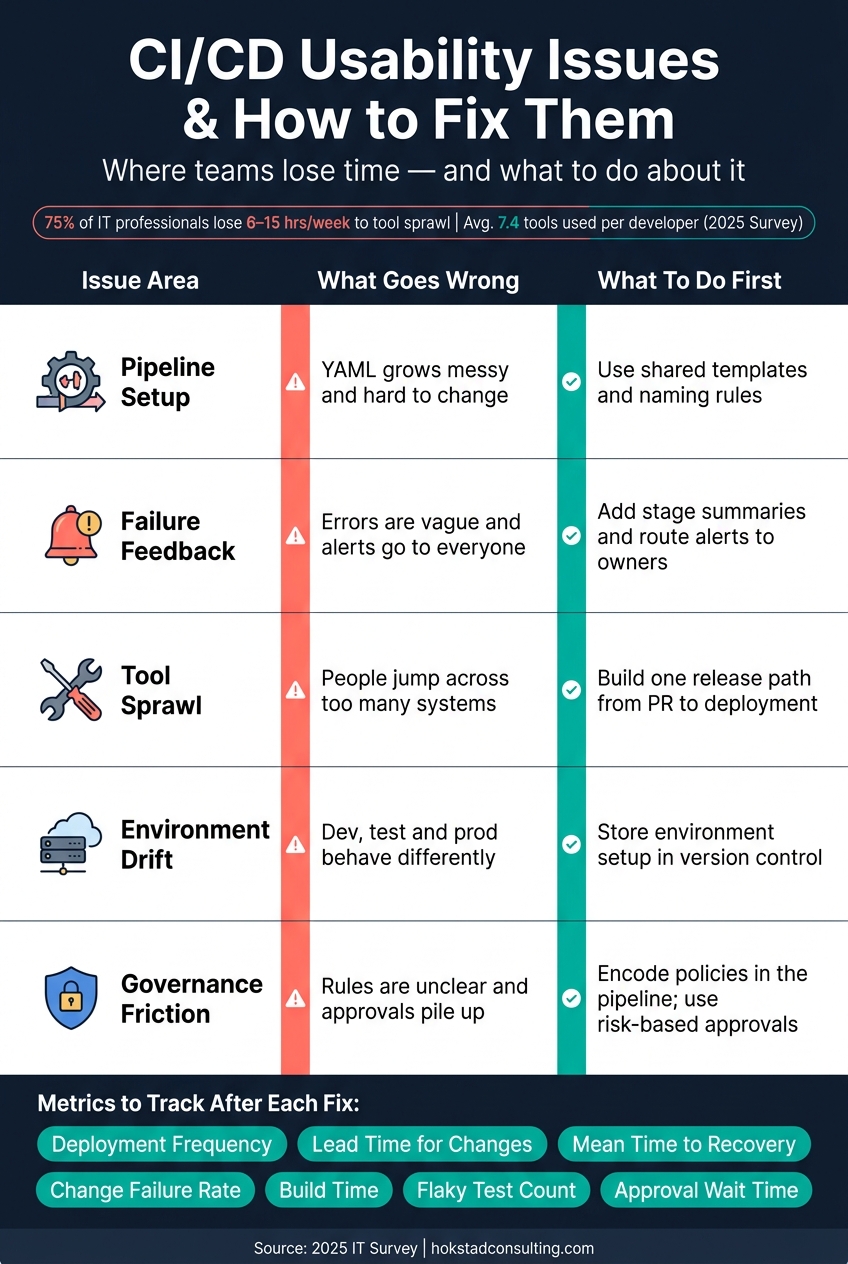 {CI/CD Usability Issues: Problems vs. Fixes at a Glance}
:::
{CI/CD Usability Issues: Problems vs. Fixes at a Glance}
:::
Confusing pipeline setup and unclear failure feedback
Problem: Pipeline definitions are hard to read and maintain
A lot of pipeline trouble starts in the config file.
As services stack up and teams get bigger, YAML files often fill with duplicated snippets, environment-specific overrides, and job definitions that take too long to read. Over time, that clutter slows every change. Something as simple as updating one stage can turn into a hunt across several near-identical blocks.
When a pipeline definition is hard to follow, developers first have to work out what the pipeline is doing before they can fix what failed. Job dependencies get murky, naming starts to drift from team to team, and onboarding drags because every service seems to follow its own setup.
Fix: Use templates, naming standards and visual pipeline flow
One of the fastest ways to cut this mess down is to stop letting every team build a pipeline from scratch.
Instead, define a small set of standard stage structures - for example, build → test → security scan → deploy to staging - and publish them as reusable templates that services can import and extend.
Consistent job naming helps more than people expect. Labels such as build-api, test-api-unit, and deploy-api-prod make a pipeline graph much easier to scan at a glance. Add a centralised template library, versioned and parameterised through environment variables, and teams can work from one shared model with only small changes. The goal is simple: one clear deployment path per service type, not a different custom flow for every team.
Standard structure cuts confusion, but failures still need to be easy to spot.
Fix: Improve logs, test signals and alert routing
Even a tidy pipeline can slow down if failure feedback is noisy, vague, or sent to the wrong place.
A generic failure message does not tell developers which stage broke, what changed, or who needs to deal with it. Structured logging, with clear stage banners and rich metadata such as the service name, version, and environment, makes failures easier to scan and match up [1][2][3].
Alert routing matters just as much. Broad alerts create too much noise to act on. If each pipeline stage maps to a named service owner, and failure notifications go only to the team tied to that repository or stage, the right person can get on the issue faster.
| Usability problem | Practical fix |
|---|---|
| Ambiguous or noisy logs | Structured logs with clear error context |
| Generic failure messages | Stage-specific failure summaries with a direct link to the failed run |
| Unclear ownership | Route alerts by repository or stage to the named service owner |
| Hard-to-follow pipeline flow | Standard stage structure and consistent job naming |
| Duplicated custom logic | Reusable templates and a shared central library |
| Intermittent flaky tests | Quarantine flaky tests so false negatives do not block the main pipeline |
Readable pipelines help, but teams still lose time when delivery depends on too many systems.
Too many tools and inconsistent environments
Problem: Developers switch between too many systems to ship one change
Even with a clear pipeline, tool sprawl still gets in the way.
Shipping one change often means bouncing across five or more systems. A developer may start in a Git platform, move to a CI server, jump into a cloud console to check environment settings, open a ticketing system to update a request, pull credentials from a secrets vault, then switch again to an observability dashboard to make sure the deployment landed cleanly. And that’s all before anything has gone wrong.
That constant switching slows delivery and chips away at focus. It’s a bit like trying to cook dinner while every ingredient is in a different room. You can still get the meal done, but it takes longer and your attention gets pulled apart.
The damage is often most obvious during onboarding and handovers. New engineers can spend weeks figuring out which system holds each step, approval and record instead of learning the product itself. And when a feature squad hands work over to a release manager, key context - test results, config changes and incident notes - is often spread across multiple tools. People end up hunting for information instead of making decisions and moving the release forward.
A 2025 survey of 300 IT professionals found that 75% of respondents lose between six and fifteen hours per week due to tool sprawl, with developers navigating an average of 7.4 tools to build and ship applications [4].
Fix: Create one deployment path and automate environment setup
The fix is simple in principle: give developers one deployment path and automate the rest.
In practice, that usually means treating the pull request as the single starting point. A merge to a protected branch should trigger CI, run tests, apply infrastructure changes, promote to the target environment, update the change record and post a status summary to the team channel - without manual hops between tools.
Once that path is standardised, the next job is making each environment behave the same way. If development, test, staging and production are set up differently - even in small ways - teams run into failures they can’t reproduce locally and incidents caused by manual, undocumented changes instead of code defects.
Environment-as-code (EaC) deals with this by storing each environment definition in version control and pushing changes through the same pipeline used for application code. That makes environments easier to recreate and much easier to debug when something goes sideways.
| Environment approach | Clarity of what's deployed | Drift risk | Ease of debugging |
|---|---|---|---|
| Manual environments | Low - knowledge sits with a few people | High - ad-hoc console changes are rarely recorded | Low - works on my machinefailures are common |
| Scripted provisioning | Medium - scripts describe key steps but not everything | Medium - manual tweaks still creep in over time | Medium - scripts help but gaps remain |
| Fully environment-as-code | High - environments defined in version-controlled code | Low - changes flow through reviewed, repeatable updates | High - issues can be reproduced by reapplying definitions |
Secrets need the same level of care. Instead of copying credentials between systems or storing them in pipeline variables, teams should connect a central vault to both the pipeline and the application runtime. Use environment-specific secret sets and clear naming rules. That cuts down a common source of environment drift and makes it less likely that engineers bypass security controls because the safe route is too awkward.
This setup also works well for regulated teams, where auditability matters just as much as delivery speed. For regulated UK teams, start with the services people use most, then build approvals, audit trails and compliance checks directly into the pipeline.
Security and governance that do not block delivery
Problem: Permissions, approvals and policies are unclear
Once environments are consistent, governance often becomes the next point of friction.
Developers usually do not struggle because controls exist. They struggle because the rules are vague. Permission errors show up late in the pipeline, long after a change has been reviewed and merged. Approval queues grow because every production deployment, no matter the level of risk, needs manual sign-off. Policies sit in separate documents instead of the pipeline itself, so teams read them in different ways and enforcement turns patchy.
In growing UK organisations with multiple squads, this snowballs fast. Teams build slightly different workflows, ownership of pipelines gets muddy, and one-off exceptions start stacking up. The result is slower lead times, more back-and-forth with operations or security, and developers spending time dealing with process instead of shipping working software.
There is a catch here. Governance that is too restrictive can increase risk. If the safe route feels awkward or slow, people look for workarounds: shared credentials, manual deployments outside the pipeline, and undocumented exceptions. That is exactly the kind of behaviour good governance is meant to stop.
Fix: Use clear roles, rules enforced in the pipeline and safe defaults
The starting point is role design that matches who can deploy what, and where. For most UK organisations, a practical setup uses four to six roles: developers, platform or release engineers, QA engineers, and a security or compliance role.
After roles are clear, move policies out of documents and into the pipeline itself. Rules enforced in the pipeline - such as production deployments require a passing security scan and a linked change ticket
- should live in version-controlled configuration files. Engineers can see the rules where they write build steps. Compliance officers can review them through a standard pull request. The platform then applies those rules automatically, without a human gatekeeper sitting in the middle.
Approvals should be based on risk, not applied as a blanket rule. Routine application changes to production during working hours can move forward automatically once automated checks pass. Infrastructure changes, database migrations, or anything that touches payments or personal data should need explicit sign-off, but from a defined role rather than an ad hoc email chain. Those differences should be encoded directly into environment protection rules.
For lower-risk environments, the default should be autonomy with guardrails. Developers should be able to spin up fresh development and test environments on demand, using standardised blueprints with safe defaults built in. That includes isolated networks, non-privileged accounts, masked data, and logging. It helps cut configuration drift and reduces the temptation to reuse production credentials in test environments.
The goal is simple: keep delivery moving while making the rules obvious.
The three models below show the usability trade-offs:
| Governance model | Deployment speed | Developer autonomy | Risk profile |
|---|---|---|---|
| Restrictive | Slow - manual approvals; slow releases | Low | Lower risk per change, but higher risk from large batch releases and manual error |
| Balanced | Moderate to fast - routine changes flow automatically | Medium to high | Automation handles routine checks; humans review only critical changes |
| Loosely controlled | Very fast - minimal friction | Very high | Inconsistent controls and higher risk |
3 Reasons Your CI/CD Pipeline Isn't Working As It Should...
Conclusion: A practical plan to improve CI/CD usability
These problems come from one place: friction between code and production. The best next move is a phased pilot.
For most UK teams, that means starting small. Pick one team and one workflow, get that working better, then roll it out to other teams. A sensible sequence looks like this:
- Run a usability review: speak to 5–10 people and map the path from PR to production.
- Simplify one critical pipeline: use shared templates and consistent naming.
- Improve failure feedback: standardise logs and send alerts to the right team.
- Reduce tool switching: bring the main release path into one place and retire duplicate dashboards.
- Standardise one environment model: line up dev, test and production with infrastructure-as-code.
- Move governance into code: put approvals and access rules into policies-as-code.
Measure each change before you move on. Track deployment frequency, lead time for changes, mean time to recovery and change failure rate - the four core DORA metrics - along with build time, flaky test counts and approval wait times. If the numbers get better, expand the changes further.
The goal is simple: make it easy to ship good software, safely, without unnecessary friction.
If you want help putting this into practice, Hokstad Consulting supports DevOps transformation, automation and cloud cost engineering.
FAQs
How do we know if CI/CD problems are usability issues?
Gather direct feedback from developers, QA teams and release managers through structured interviews. Ask where deployments get slowed down by manual steps, which pipeline failures keep coming back, and how long onboarding takes.
When several teams point to the same bottleneck, that usually signals a usability or process problem rather than just a technical fault. Metrics such as time spent on manual approvals can also show where pipeline design is dragging on productivity.
Which CI/CD fix should a team implement first?
Start with automated testing. It’s the foundation of a reliable pipeline, and it gives developers fast feedback so they can keep moving and trust the system.
Put the fastest checks first, like linting and unit tests, and aim to have them done within two minutes. Leave heavier integration or end-to-end tests until those checks have passed. If the pass rate drops below 95%, stop new feature work and fix what’s causing the failures.
How can we add approvals without slowing releases?
Add approvals without slowing releases by swapping manual bottlenecks for automation and standardisation in your CI/CD workflows.
Hokstad Consulting recommends mapping every manual intervention point in the pipeline and then replacing those steps with automated gates, such as security scanning, quality thresholds, and automated integration tests. That way, releases keep moving while your standards still get checked.