
CI/CD pipelines are powerful, but they can also create headaches if not managed properly.
Here are five common CI/CD mistakes that can disrupt your workflows, along with actionable fixes to get things back on track:
Skipping Automated Testing: Leads to undetected bugs and erodes trust in the pipeline.
Fix: Prioritise reliable, fast tests at every stage and ensure a pass rate above 95%.Overcomplicating the Pipeline: Slows down feedback and creates troubleshooting challenges.
Fix: Simplify by running tasks concurrently and focusing on fast, essential checks.Inconsistent Environments: Causes
it works on my machine
issues and deployment failures.
Fix: Use containerisation (e.g., Docker) and infrastructure automation (e.g., Terraform).Not Monitoring the Pipeline: Silent failures can go unnoticed, leading to production issues.
Fix: Monitor deployments end-to-end with tools like Prometheus and external HTTP checks.Hardcoding Configurations: Exposes sensitive data and makes deployments inflexible.
Fix: Use secret management tools (e.g., HashiCorp Vault) and externalise configurations.
Key takeaway: A well-maintained pipeline ensures smoother deployments, fewer errors, and more reliable releases. Addressing these issues helps teams regain confidence in their automation processes and reduces operational stress.
::: @figure 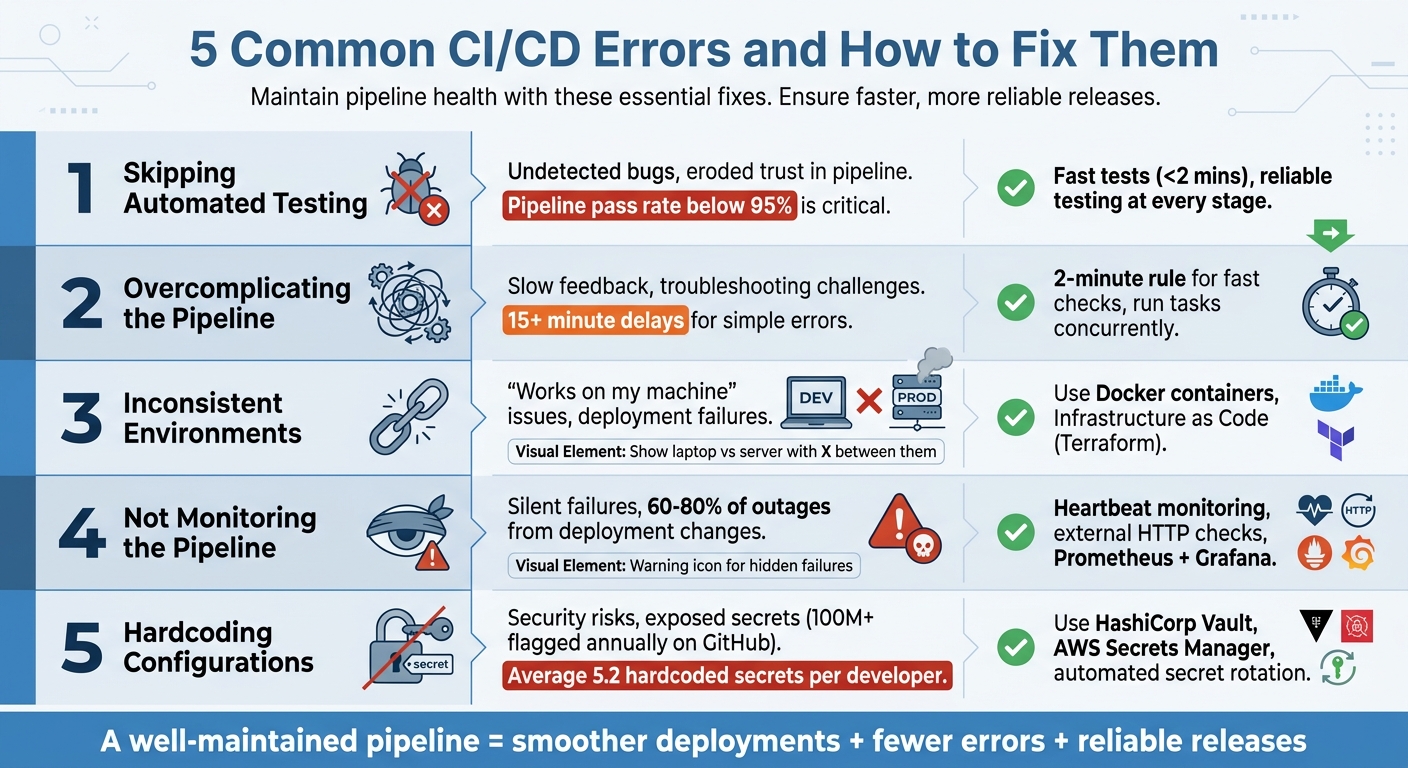 {5 Common CI/CD Pipeline Errors and Their Solutions}
:::
{5 Common CI/CD Pipeline Errors and Their Solutions}
:::
Top CI/CD Pipeline Failures and How to Fix Them Fast
Error 1: Skipping Automated Testing
Automated testing often gets sidelined when deadlines are tight or resources are limited. The immediate fallout? Code heads to production without proper checks, allowing bugs to sneak through - bugs that could have been caught in a matter of minutes. What seems like a quick way to save time can snowball into a much bigger issue: a loss of trust. As Kriedy Systems aptly puts it:
A test that fails intermittently trains your team to re-run the pipeline rather than investigate the failure. Within weeks, a red pipeline stops meaning 'something is broken' and starts meaning 'just re-run it.'[1]
This kind of erosion in confidence is a serious problem. When automated tests become unreliable - or worse, are skipped entirely - teams stop treating pipeline failures as genuine warnings. Instead of digging into the root cause, engineers simply hit retry
and hope the problem resolves itself. This habit leads to pipeline debt, where small issues quietly pile up until the system becomes too fragile to rely on [1].
Skipping tests doesn't just undermine trust. It also leaves room for misconfigurations that only show up in production, creating uncertainty about whether deployments will succeed. Worse still, it traps teams in a risky cycle. Without reliable tests, they avoid frequent deployments, opting instead for large, bundled releases. This approach runs counter to the very idea of continuous delivery, which thrives on small, frequent, and low-risk updates. If your pipeline's pass rate drops below 95% over a seven-day period, it’s as critical as addressing a production outage [1].
Automated testing is more than just a safety net - it’s a cornerstone of a resilient deployment process.
Solution: Prioritising Comprehensive Testing
Testing shouldn’t be an afterthought; it should be baked into every stage of your pipeline. Start by distinguishing between fast feedback and slow validation. For instance, ensure linting and unit tests complete within two minutes, while resource-heavy end-to-end (E2E) tests only run after these initial checks pass [1]. This keeps developers from wasting time waiting for simple errors to surface.
| Pipeline Stage | Primary Tests | Execution Time | Key Benefits |
|---|---|---|---|
| Build | Unit tests, static analysis | 2–5 minutes | Quick feedback, early error detection |
| Integration | Integration, regression, E2E | 15–45 minutes | System validation, performance checks |
| Post-Deployment | Smoke tests, monitoring | 1–3 minutes | Production stability, actionable data |
Reliability is just as important as coverage. Use tools like nock or responses to mock external dependencies, ensuring third-party API outages don’t derail your tests [1]. Replace fixed sleep() commands with polling loops that wait for specific conditions - this makes tests both faster and more consistent [1][2]. For database testing, containerised instances or isolated transactions can help prevent shared state issues that lead to flaky results [1].
Another simple yet effective step? Lock your runtime versions with files like .nvmrc or .python-version. This ensures your CI environment mirrors your development setup, eliminating the works on my machine
headaches [2]. Finally, keep a close eye on your pipeline’s pass rate. If it dips below 95%, halt new feature development and fix the underlying issues [1]. A flaky pipeline encourages bad habits, but a reliable one builds trust and keeps your deployment process running smoothly.
Error 2: Overcomplicating the Pipeline
When pipelines try to handle too many tasks at once, they can become more of a hindrance than a help. Extra steps, like running linting, unit tests, and integration tests sequentially, can eat up valuable time with every commit. This issue gets worse when commits are frequent, leading to compounded inefficiencies [4].
The real problem isn't just the waiting. Overly complex pipelines make it harder to pinpoint the source of failures, turning troubleshooting into a headache. For instance, if a typo or a linting error takes 15+ minutes to appear because it's buried behind slow end-to-end tests, developers lose out on quick feedback [1]. This delay trains teams to ignore early warning signs instead of addressing them. As Kriedy Systems puts it:
Most pipeline problems don't fail loudly. They fail quietly, over months, until your team starts batch-releasing every two weeks because deploying feels risky [1].
This complexity discourages regular deployments. Instead of shipping updates frequently, teams start bundling changes into larger, riskier releases. The deployment process becomes intimidating: the more complex the pipeline, the less often teams deploy, and each deployment feels like a gamble. To break this cycle, simplifying pipeline design is crucial.
Solution: Simplifying Pipeline Design
The key to fixing pipeline inefficiencies is to focus on simplicity. Start with the essentials and only add steps when absolutely necessary. A good guideline is the 2-minute rule
: checks that can fail due to simple errors - like linting, type-checking, or basic unit tests - should provide feedback within two minutes of a code push [1]. This keeps developers productive and reduces waiting time.
Another strategy is running tasks concurrently. For example, linting and unit tests can run at the same time instead of waiting for one another. This alone can save several minutes per run [4]. Adopting a dual-phase feedback approach is also effective: fast checks run first, and only if they pass do slower tests like integration or end-to-end tests begin [1]. This setup avoids wasting resources and ensures developers get immediate feedback when something goes wrong.
| Pipeline Stage | Overcomplicated Approach | Simplified Approach |
|---|---|---|
| Testing Strategy | Running all tests (unit, integration, E2E) on every commit | Fast checks (<2 mins) first; slower tests only if needed [1] |
| Job Execution | Sequential steps where jobs wait for the previous to finish | Parallel execution of independent tasks (e.g., linting/tests) [4] |
| Build Process | Re-downloading dependencies and rebuilding at each step | Use dependency caching and build onceartefact reuse [3][4] |
Lastly, schedule pipeline retrospectives every two to four weeks [3]. Use these sessions to identify recurring failures, pinpoint slow steps, and remove unnecessary processes. A streamlined pipeline not only reduces friction but also empowers teams to deploy more often and with greater confidence.
Error 3: Inconsistent Environments
Ever had your code run perfectly on your laptop, only to crash in production? It’s a frustrating scenario, and it often boils down to environment inconsistencies. These can arise from differences in operating systems - like developing on macOS while production runs on Ubuntu - or from mismatched runtime versions, such as using Node 20 locally but Node 18 in production. Even variations in system libraries like libssl can trigger the dreaded works on my machine
problem [7].
Configuration mismatches add another layer of complexity. A developer might reference an undefined variable, misspell a configuration key, or accidentally use a development database URL in staging. These errors often cause the application to crash during startup, with vague or unhelpful error messages that make debugging a nightmare [6]. Hours can be lost trying to replicate production conditions locally.
These inconsistencies also slow down feedback loops. A simple typo that would be caught in seconds during local development might take 15 minutes to surface in continuous integration (CI) pipelines, simply because the environments don’t match [1][6].
Another common pitfall is configuration drift. For instance, someone might manually tweak a production cluster using kubectl edit but forget to update the Git manifests. The next automated deployment then overwrites the manual changes, leading to unpredictable behaviour [5]. Tests might pass in CI's isolated containers but fail in production due to cluster-specific constraints like Network Policies or RBAC rules, which weren’t accounted for during testing [5]. These discrepancies not only erode trust in the deployment process but also slow down release cycles.
To avoid these headaches, it’s crucial to standardise your environments using containerisation and infrastructure automation.
Solution: Achieving Environment Parity
The key to solving these issues lies in creating consistent environments. Docker is a great starting point. By packaging your application and its dependencies into containers, Docker ensures that your code runs the same way across development, testing, and production. This approach effectively eliminates the works on my machine
problem, as everyone - from developers to CI pipelines to production servers - uses identical runtime environments.
For orchestration, Kubernetes steps in to manage and deploy these containers consistently across all stages of your pipeline. Pair Kubernetes with Infrastructure as Code (IaC) tools like Terraform, and you can automate the creation of identical infrastructure configurations. Terraform templates ensure that every environment is built from a single, version-controlled source of truth, significantly reducing the risk of configuration drift. By replacing manual changes with automated processes, you ensure deployments are both predictable and auditable.
| Approach | Consistency | Risk of Drift | Deployment Speed | Auditability |
|---|---|---|---|---|
| Manual Configuration | Low (prone to human error) | High (manual edits) | Slow | Difficult |
| Infrastructure as Code | High (template-driven) | Low (automated) | Fast | Excellent (via Git history) |
Treat your infrastructure like code: store it in version control, review it with peers, and deploy it through automated pipelines. By routing all environment changes through Git, you gain a complete audit trail, making it easy to roll back problematic configurations - just like reverting a buggy code commit.
If your organisation is grappling with environment inconsistencies or wants to adopt stronger DevOps practices, Hokstad Consulting offers expertise in setting up infrastructure as code workflows. They can help eliminate configuration drift and improve the reliability of your deployments.
Error 4: Not Monitoring the Pipeline
A CI/CD pipeline might appear successful while concealing critical issues. These silent
failures are particularly risky because your dashboard shows everything is fine, but behind the scenes, your deployment has failed. Common causes include registry authentication errors, resource limit breaches, or health check timeouts that don't generate clear alerts [8]. The pipeline might report success, but users could still be interacting with an outdated version of your application - or, worse, experiencing downtime.
Studies indicate that 60–80% of outages arise from deployment, configuration, or infrastructure changes [8]. Without proper monitoring, these moments become the most vulnerable part of your workflow. Teams often find themselves reacting to problems after users have already noticed them, leading to extended downtimes and significantly higher operational costs compared to catching issues early.
The root of the problem often lies in tracking the wrong metrics. Many teams focus on whether their build completed successfully but fail to confirm that the deployment reached production and is functioning as expected. For example, a build might pass every test, push to the registry, and trigger a Kubernetes deployment - but the new pods could still be stuck in crash loops due to a missing environment variable. Without monitoring the entire deployment lifecycle, you won’t catch these issues until users report them.
Just as thorough testing and streamlined pipelines are critical, active monitoring is key to ensuring deployment reliability.
Solution: Implementing Effective Monitoring
To tackle these silent failures, you need to rethink your monitoring approach beyond just examining build logs. Start by focusing on deployment completion rather than just builds. Implement heartbeat monitoring, where your deployment script sends a signal to a monitoring endpoint only after successfully deploying to production [8]. You can also create a /health or /version endpoint that returns the current commit ID, making it easier to confirm that the new code is live and serving traffic [8].
Avoid depending solely on Kubernetes liveness probes - they only verify process activity, not whether users can access your application. Instead, set up external HTTP checks to validate the entire stack, including DNS, SSL certificates, and load balancers, as these components can fail independently [8]. Using correlation IDs to track requests or builds across distributed services can also make troubleshooting much quicker [9].
For centralised visibility and deeper analysis, tools like Loki or the ELK Stack can aggregate logs across your pipeline [9]. Combine these with monitoring platforms like Prometheus and Grafana to track critical metrics such as deployment frequency, failure rates, and rollback times. Configure alerts to notify your team when deployments take longer than expected or when error rates spike after a release.
If your team struggles with pipeline visibility or needs help establishing robust monitoring practices, Hokstad Consulting provides DevOps transformation services. Their expertise in automated CI/CD pipelines and infrastructure monitoring can help you detect and resolve failures before they affect users, reducing downtime and cutting operational costs.
Error 5: Hardcoding Configurations
Mismanaging configurations is another issue that can undermine the reliability of CI/CD pipelines. Hardcoding sensitive data - like API keys, database passwords, or environment-specific settings - directly into your codebase introduces serious security risks and operational headaches. When these credentials are embedded in code, they’re easily accessible to anyone with repository access. This includes third-party contributors or attackers who manage to breach your version control system. Once committed, these secrets linger in the Git history, creating a long-term vulnerability unless painstakingly removed.
Here’s a chilling example: In March 2025, a developer at a mid-sized SaaS company accidentally committed an AWS IAM key to a public GitHub repository. Within just 14 minutes, an automated bot detected the exposed key and spun up 47 EC2 instances to mine cryptocurrency. The result? A staggering £22,400 AWS bill before the key was revoked [10]. Unfortunately, this isn’t an isolated case. GitHub’s secret scanning service flags over 100 million exposed secrets annually in public repositories, with 72% of these secrets still active at the time of detection [10]. Exploits like this happen alarmingly fast.
But the problems don’t stop at security. Hardcoding also creates deployment inflexibility and potential for errors. For example, embedding database connection strings or API endpoints in code means every time you switch between development, staging, and production environments, you need to manually update multiple files. This practice often leads to configuration drift
, where environments diverge slightly over time, resulting in unexpected failures. On average, organisations deal with 5.2 hardcoded secrets per developer [10], amplifying these challenges across teams.
When credentials are hardcoded, rotating them after a breach becomes a painstaking process. You have to edit the code, commit the changes, and redeploy while attackers may still be exploiting the exposed secret. Hardcoding also leaves no audit trail, complicating compliance with regulations like UK GDPR. Addressing these issues not only improves security but also streamlines deployments.
Solution: Securing and Externalising Configurations
A better approach is to externalise sensitive data using secret management tools such as HashiCorp Vault, AWS Secrets Manager, or Azure Key Vault. These platforms store credentials securely and inject them into your pipeline at runtime through environment variables or API calls, ensuring your code only references the secrets instead of containing them.
For smaller teams (1–20 developers), Mozilla SOPS is a lightweight option. It encrypts configuration files while keeping them compatible with Git for version control and diffing. If you’re working with Kubernetes, the External Secrets Operator (ESO) can synchronise secrets from external vaults directly into your cluster, reducing the need for manual secret handling. Additionally, implementing automated secret rotation limits the lifespan of credentials, cutting down the window of opportunity for attackers. When a secret is rotated, your pipeline should automatically retrieve the updated version without requiring code changes.
To prevent hardcoded secrets from slipping through, integrate automated secret scanning tools like HCP Vault Radar into your CI/CD pipeline. Pair this with GitOps tools such as Argo CD to manage configurations in a declarative way, ensuring consistency across development, staging, and production environments. This approach treats both infrastructure and configuration as code while keeping sensitive data out of your repositories.
If your team needs help securing configurations or automating secret management, Hokstad Consulting offers tailored solutions. They bring DevOps expertise to safeguard your infrastructure while maintaining deployment efficiency and flexibility.
Conclusion
CI/CD pipelines are the backbone of modern software delivery, but their effectiveness hinges on following sound practices. We've highlighted five common mistakes: skipping automated testing, making pipelines overly complex, working with inconsistent environments, neglecting monitoring, and hardcoding configurations. If ignored, these issues can slow teams down, increase risks, and turn deployments into high-stress events. This often forces teams to batch releases less frequently, ultimately reducing engineering momentum and efficiency [1]. Addressing these problems can significantly improve both reliability and productivity. As Kriedy Systems aptly states:
A flaky pipeline is a broken pipeline [1].
Beyond technical benefits, refining CI/CD processes can lead to broader business gains. Faster deployments, reduced cloud expenses, and fewer production incidents are just the start. Teams become more confident in their release workflows, allowing for more frequent updates and quicker responses to customer demands. This shift from reactive problem-solving to proactive delivery not only streamlines operations but also creates a lasting competitive edge.
FAQs
Which tests should run first in a CI/CD pipeline?
When setting up a CI/CD pipeline, it's crucial to prioritise tests that catch issues as early as possible. Unit tests come first, as they focus on individual components of the code, helping to quickly identify bugs at a granular level. Alongside these, static code analysis is essential for evaluating code quality and spotting potential issues before the integration phase.
To add another layer of protection, tools like pre-commit hooks and static analysis tools can stop problematic code in its tracks, ensuring only clean, reliable code moves forward in the pipeline. This approach saves time, reduces errors, and keeps the development process efficient.
How do I stop flaky tests from breaking my pipeline?
To keep flaky tests from derailing your CI pipeline, it's crucial to pinpoint, address, and prevent them. Start with root cause analysis (RCA) to uncover problems such as race conditions, timing issues, or unreliable infrastructure. Consistently monitor your test results, flag unstable tests, and apply proven techniques to improve test stability. Automating the detection and isolation of flaky tests can also help maintain a reliable pipeline, reducing the need for manual fixes and ensuring a more seamless workflow.
What’s the safest way to manage secrets in CI/CD?
Managing secrets securely in CI/CD pipelines calls for a cautious and structured approach. The best way to handle this is by using dedicated secret management tools, automating secret rotation, and steering clear of hardcoding secrets directly into your pipelines.
Key practices include:
- Centralising secrets with specialised tools to keep them organised and secure.
- Injecting secrets at runtime, ensuring they are only available when needed and not stored in the codebase.
- Applying strict access controls and adhering to the principle of least privilege, allowing access only to those who truly need it.
It's also important to rotate secrets regularly and avoid common mistakes, such as exposing secrets in logs or granting overly broad permissions. These steps are essential to maintaining a robust security posture in your CI/CD processes.