
If I had to cut this down to one line, it would be this: pick the lightest mesh that still gives you the security, routing and visibility you need. The trade-off is plain enough. Istio sidecar gives the most control but uses the most CPU and memory. Istio ambient cuts that cost a lot. Linkerd stays lean for Kubernetes-only use. Consul Connect and Kuma make more sense when I need VM support, multi-zone traffic, or multi-cloud service-to-service control.
Here’s the short version I’d want upfront:
- Measure cost first: check p95/p99 latency, CPU, memory, startup time, and pod density
- Split features into two groups:
- Basic: auto-mTLS, service metrics, retries, simple traffic splitting
- More advanced: per-route auth, fault injection, header routing, tracing, hybrid VM + Kubernetes, multi-zone control
- Istio sidecar: deepest L7 feature set, but the heaviest runtime cost
- Istio ambient: same Istio control plane, much lower data-plane cost, L7 only where I add waypoints
- Linkerd: low memory and CPU use, but less L7 depth
- Consul Connect: a better fit when services run across Kubernetes and VMs
- Kuma: a better fit for multi-zone, multi-cluster, and multi-cloud estates
- At scale, overhead turns into £ cost: at 500 pods, sidecars can push a cluster from 6–8 nodes to 10–14 nodes, adding about £320–£1,600 per month
- The decision should rest on four checks: latency limit, per-pod resource ceiling, traffic-control needs, and whether I need hybrid or multi-cluster support now
Service Mesh Comparison 2026: Istio, Linkerd, Consul Performance, Security & Features
Need help optimizing your cloud costs?
Get expert advice on how to reduce your cloud expenses without sacrificing performance.
Quick Comparison
| Mesh | Runtime cost | Feature depth | Best fit | Hybrid VM/Kubernetes |
|---|---|---|---|---|
| Istio (Sidecar) | High | High | Teams that need deep L7 control and policy | No |
| Istio Ambient | Lower than sidecar | High, with waypoint for L7 | Teams that want Istio with less per-pod cost | No |
| Linkerd | Low | Lower | Kubernetes-only clusters that care about lean overhead | No |
| Consul Connect | Mid | Mid | Mixed estates with Kubernetes and VMs | Yes |
| Kuma | Mid | Mid to high for multi-zone use | Multi-region, multi-zone, multi-cloud setups | Yes |
| What to compare | Why it matters |
|---|---|
| Latency overhead | Shows the per-hop delay the mesh adds |
| CPU and memory | Affects node count, pod density and cloud spend |
| Control plane cost | Adds cluster load even before app traffic grows |
| Security | Covers mTLS, identity and service-to-service policy |
| Traffic management | Covers retries, canaries, fault injection and routing |
| Observability | Shows how much service insight I get out of the box |
| Topology fit | Tells me if the mesh works for Kubernetes only, or also for VMs, zones and clusters |
In short: if basic mTLS, metrics and retries are enough, I’d lean towards a lighter mesh. If I need fine-grained policy, L7 routing, hybrid support, or cross-zone control, I’d accept more overhead - but only after turning that cost into monthly £ figures.
A practical framework for comparing service meshes
Compare service meshes against the same seven criteria: data-plane overhead, control-plane overhead, security depth, traffic management, observability, operational complexity, and fit for hybrid or multi-zone environments. Start with the part you can measure in hard numbers.
Performance and capacity metrics to measure first
Before you get pulled into feature lists, check what the mesh costs to run. Measure p95 and p99 latency, throughput, per-pod CPU and memory use, and startup time. Compare baseline traffic against mesh-enabled traffic at low, medium, and high concurrency. Also track whether every pod gets a proxy sidecar, and what that does to node density and scaling.
This matters more than it might seem at first glance. A mesh that looks cheap at 10 pods can become a clear cost at 300.
In one 500 rps test, Linkerd consumed approximately 1,700 millicores total versus Istio's 2,100 millicores, and used around 1 GB of memory compared to Istio's nearly 5.5 GB.[10] Control-plane memory showed much the same pattern, with Istio averaging 837 MB against Linkerd's 324 MB - roughly 2.5 times higher.[9] Those gaps are not just lab numbers. At scale, they hit node count and cloud spend directly.
You should also account for control-plane resilience. How many replicas does the mesh need? What happens during a zone failure? How disruptive are upgrades? Version management carries an operational cost that single-service benchmarks often miss.
Once you have a clear cost baseline, it becomes much easier to rank feature depth without kidding yourself about the trade-offs.
Feature categories that change the decision
A simple way to think about mesh features is to split them into two tiers.
Baseline capabilities include automatic mTLS, service metrics, basic traffic splitting, and simple retries. These are now common across all four meshes. If that covers what the platform team needs, overhead and day-to-day operational simplicity should carry a lot of weight.
Advanced capabilities are where the products start to part ways. This is where you look for fine-grained per-route authorisation, fault injection for resilience testing, header-based routing, distributed tracing integration, hybrid VM-plus-Kubernetes support, and multi-zone traffic control. Kuma, for example, requires mTLS for cross-zone communication and uses SNI to pass routing information between zones,[5][6] which makes multi-zone security part of the architecture rather than something added later. Consul Connect is also strong for hybrid estates that span Kubernetes and non-containerised workloads.
The table below shows how those two tiers line up across the main feature areas:
| Feature category | Baseline | Advanced |
|---|---|---|
| Security | Auto-mTLS, workload identity | Per-route authorisation, identity federation, OPA integration |
| Traffic management | Load balancing, retries, timeouts | Fault injection, header-based routing, canary releases |
| Observability | Golden metrics, basic dashboards | Distributed tracing, service dependency maps, per-hop latency attribution |
| Platform support | Kubernetes-only | Hybrid VM + Kubernetes, multi-zone, multi-cluster |
Use these tiers as a filter when reading the mesh-by-mesh comparison that follows.
Mesh-by-mesh comparison: overhead versus feature depth
::: @figure 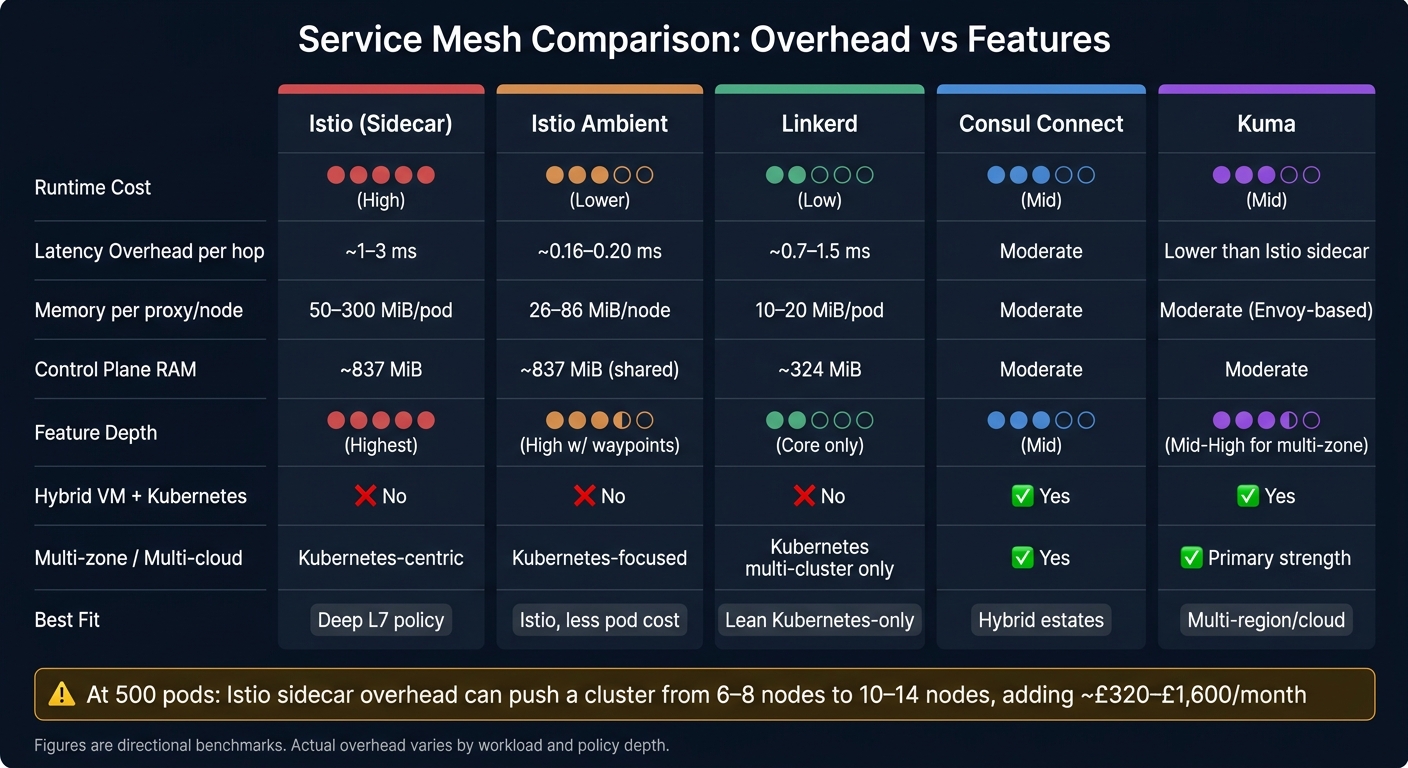 {Service Mesh Comparison: Overhead vs Features (2024)}
:::
{Service Mesh Comparison: Overhead vs Features (2024)}
:::
These figures are directional. Actual overhead changes with workload, policy depth and traffic shape. So read the table for what it is: a trade-off between runtime cost and operational depth.
| Metric | Istio (Sidecar) | Istio Ambient | Linkerd | Consul Connect | Kuma |
|---|---|---|---|---|---|
| Latency overhead | Around 1–3 ms per hop | Much lower; around 0.16–0.20 ms p90/p99 | Typically lower than Istio; around 0.7–1.5 ms in low-load tests | Moderate; increases with mixed estates | Lower than Istio sidecar in multi-cluster tests |
| Memory per proxy | Roughly 50–300 MiB per pod | - | About 10–20 MiB per pod | Higher than Linkerd in mixed estates | Comparable to other Envoy-based meshes |
| Memory per node | - | About 26–86 MiB per node | - | - | - |
| CPU per proxy/node | Roughly 50–500 millicores, load-dependent | Lower; node-level ztunnel | Much lower than Istio | Moderate | Moderate |
| Control plane overhead | Around 837 MiB RAM / 379 millicores CPU in one benchmark | Same control plane, lighter data plane | Around 324 MiB RAM / 82 millicores CPU in one benchmark | Moderate | Moderate |
| Security | mTLS, fine-grained authorisation, JWT | mTLS via ztunnel, waypoint policies | Auto-mTLS, workload identity | mTLS, service intentions, ACLs | mTLS, global policies, RBAC |
| Traffic management | Advanced L7: canary, fault injection, header routing | Selective L7 via waypoints | Core traffic splitting, retries and timeouts | Basic L4/L7 across mixed environments | Best for multi-zone routing and failover |
| Observability | Deep L7: Prometheus, Grafana, Jaeger | Same tooling, lower overhead | Golden metrics, tap/Top | Standard observability stacks, often fitting existing HashiCorp or Kong setups | Standard observability stacks |
| Multi-zone and multi-cluster | Multi-cluster, Kubernetes-centric | Kubernetes-focused | Multi-cluster Kubernetes; no VM focus | Strong: Kubernetes + VMs | Strong: multi-zone, multi-cloud, VMs |
| Hybrid VM/Kubernetes | No | No | No | Yes | Yes |
Put simply, Istio sidecar gives you the deepest feature set, but it also costs the most at runtime. Ambient strips down that data-plane cost. Linkerd stays lean. Consul Connect and Kuma make more sense when your estate stretches across VMs, zones or clouds.
Istio and Istio ambient: the richest feature set at the highest resource cost
Istio gives you the broadest set of features in this comparison: fine-grained per-route authorisation, fault injection, header-based routing, deep L7 observability and multi-cluster support. The catch is resource use. At 1,000 pods, Istio sidecars alone consume roughly 60 GiB of RAM and 200 vCPUs before any application work begins [3][17]. That's the pain point ambient is meant to ease.
The table below puts the two Istio modes side by side, because this is often the first big platform choice teams need to make.
| Metric | Istio Sidecar | Istio Ambient |
|---|---|---|
| Data-plane model | Per-pod Envoy proxy | Per-node ztunnel (L4) + optional waypoint (L7) |
| P90/P99 latency overhead | Around 0.63–0.88 ms | Around 0.16–0.20 ms |
| Memory overhead | +255–355 MiB per pod | +26–86 MiB per node |
| CPU overhead | +0.74–0.81 cores per pod | +0.23 cores per node |
| mTLS impact | +166% latency increase | +8% latency increase |
| L7 features | Full, always available | Requires waypoint proxy per namespace or service |
| Onboarding | Pod restarts needed | No pod restarts or init containers |
| Operational disruption | Higher | Lower |
Ambient keeps Istio's control plane but swaps per-pod sidecars for node-level ztunnels and optional waypoints. The ztunnel handles L4 encryption at node level. Then, if you need L7 controls for a service, you add a waypoint proxy only where needed. That selective model is why ambient can cut allocated CPU and memory by around 90% in L4-only scenarios compared with full sidecar mode [15][19][20].
If you need Istio's policy depth but want to avoid paying the full sidecar bill across every pod, ambient is usually the cleaner route.
Linkerd, Consul Connect and Kuma: lighter, hybrid and multi-zone trade-offs
These three meshes sit in very different parts of the market. Treating them as interchangeable is where teams often go wrong.
Linkerd fits low-overhead, Kubernetes-only clusters. Its Rust-based micro-proxies use roughly one-ninth the memory and one-eighth the CPU of Istio's Envoy sidecars, and one benchmark measured Linkerd's control plane at 324 MiB of RAM and 82 millicores of CPU, compared with Istio's 837 MiB and 379 millicores [4][8][11][7]. mTLS enforcement adds about 33% latency overhead with Linkerd, versus 166% with Istio sidecar [1][17][18]. The trade-off is simple enough: less L7 depth, much less overhead.
Consul Connect suits organisations that can't standardise on Kubernetes alone yet. It extends mTLS and service-intentions policies across both Kubernetes pods and virtual machines. That matters for UK organisations still running a mix of containerised workloads and older VM estates, and it can remove the need for separate VPN or legacy service-discovery tooling [12].
Kuma is aimed at multi-zone and multi-cluster deployments. In AWS EKS and Equinix Metal tests, Kuma was 1.8× faster than Istio in AWS and 2.4× faster in Equinix Metal for cross-cluster connectivity, with better QPS and lower p90/p99 latency [14][16]. Its built-in multi-zone control plane gives teams one place to manage governance across regions, data centres and clouds [13].
| Metric | Linkerd | Consul Connect | Kuma |
|---|---|---|---|
| Data-plane proxy | Rust micro-proxy | Envoy | Envoy |
| Memory per proxy | ~10–20 MiB | Higher than Linkerd in mixed estates | Comparable to Envoy-based meshes |
| Control-plane memory | ~324 MiB in one benchmark | Moderate | Moderate |
| mTLS latency overhead | ~33% increase | Moderate | Moderate |
| Traffic management | Core traffic splitting, retries and timeouts | Basic L4/L7 across mixed environments | Best for multi-zone routing and failover |
| Hybrid VM/Kubernetes | No | Yes | Yes |
| Multi-zone and multi-cluster | Kubernetes multi-cluster only | Yes | Yes (primary strength) |
| Best fit | Low-overhead, Kubernetes-only | Hybrid estates | Multi-region, multi-cloud, multi-zone |
Those gaps start to matter a lot more once you map them against pod count and cluster size.
Cost and operational impact for UK organisations
Mesh overhead stops being an abstract performance issue the moment it shows up on your cloud bill. Once it changes node count, eats engineer time, or adds compliance work, it becomes a money problem.
How sidecar overhead scales from 50 to 500 pods
A classic Istio sidecar uses roughly 0.20 vCPU and 60 MiB of RAM per pod at around 1,000 requests per second[2][3]. At 50 pods, that works out to about 10 vCPU and 3 GiB of RAM just for mesh overhead.
At 500 pods, the picture changes fast. Sidecar overhead can climb to 25–75 vCPU and 25–100 GiB of RAM[24][25]. On nodes with 4–8 vCPU and 16–32 GiB of RAM, that can push a cluster from 6–8 nodes to 10–14 nodes and add roughly £320–£1,600 per month[21][22].
Pod density drops too. In a cluster without this extra load, teams may fit 80–100 application pods per node. With full Istio sidecars and enough autoscaling headroom, that often falls to 50–70 pods per node[24][25]. That gap matters. Fewer pods per node means more nodes, and more nodes mean a bigger bill.
Then there's engineer time. Teams running a feature-heavy sidecar mesh can spend 4–6 engineer-weeks per month on mesh upkeep, including certificate rotation, policy changes, and sidecar debugging. Simpler ingress and monitoring setups tend to sit closer to 0.5 engineer-weeks per month[23].
That frames the cost side pretty clearly. The next step is deciding when those extra features earn their keep.
When added features justify the spend
More overhead only makes sense when the feature set cuts risk you can measure or protects income in a direct way. For UK organisations, three outcomes usually make the case.
Compliance and risk reduction. In financial services, healthcare, or central government, service-to-service mTLS and per-service policy enforcement can help meet regulatory rules and reduce the need for custom networking controls.
Release safety. Canary deployments and per-tenant routing give SaaS teams a safer way to test changes and roll back without downtime. If a bad release can hit sales or customer trust, that matters.
Recovery speed. Multi-cluster estates, common in UK organisations that span on-premises data centres and public cloud regions, can gain from mesh-native cross-cluster service discovery. That can remove the need for ad-hoc DNS workarounds and VPN setups.
The clearest sign that a richer mesh is worth the spend is simple: you can tie each major feature to one of those outcomes. If that link is clear, the extra cost and day-to-day complexity are easier to defend. If it isn't, a lighter setup is often the better choice.
Use those numbers to test whether the mesh's features pay back their runtime cost.
How to choose the right mesh and what to do next
A short decision checklist for CTOs and platform teams
Use the metrics above to turn the comparison into a shortlist. For each question, answer with a clear number or a firm yes or no across four decision axes: latency, memory, traffic control and deployment topology.
- Do you need advanced traffic control within 12–18 months? If not, a lighter mesh is the safer place to start.
- What is your p99 per-hop latency limit? Set a ceiling and rule out meshes that go past it.
- What is your per-pod memory and CPU ceiling? Put a hard number in place before you shortlist anything.
- Do you need hybrid or multi-cluster support now? If not, don’t let it steer the decision.
Then label each feature as must-have, nice-to-have or not needed before you narrow the list. If a mesh misses any must-have threshold, drop it.
Conclusion: match mesh complexity to workload and budget
Choose the lightest mesh that gives you the control you need. Then test the shortlisted options on real workloads, measure CPU, memory and latency at pod counts that match normal use, and turn that overhead into a monthly £ cost before you commit.
FAQs
How do I decide if sidecar overhead is acceptable?
Benchmark your mesh under normal and peak traffic, and track CPU and memory use for each proxy. Then multiply those numbers by your total instance count to estimate your infrastructure cost.
That gives you a plain view of what the mesh adds. If the overhead means moving to pricier instance types or puts pressure on your budget, it may be too much. In that case, go with the simplest option that does the job.
When is a lighter mesh enough?
A lighter service mesh makes sense when your setup is fairly simple, your team wants something easier to run, or the budget is tight.
It tends to fit smaller teams, or teams that are just getting started with service meshes. You still get the core pieces you need, like basic observability and secure service-to-service communication, without the steep learning curve or extra resource use that often comes with more involved options.
If you don't need advanced multi-cluster traffic management or fine-grained security policies, going lean can make things run more smoothly, cut infrastructure costs, and lower the number of things that can go wrong.
Should I choose for today’s needs or future scale?
Balance today’s operational simplicity against the overhead of future scalability. Start with the simplest setup that meets your current needs. If you build for problems you might have later, you can end up adding extra complexity and pushing up cloud costs for no good reason.
For smaller teams or simpler setups, lighter options are often easier to run and maintain. As your architecture grows, benchmark performance on a regular basis and adjust your approach as your technical needs change and future growth comes into view.