
Scaling in the cloud can quickly become expensive if not managed properly. Here's how you can scale efficiently while keeping costs under control:
- Audit Current Usage: Analyse your cloud spend and identify inefficiencies like oversized instances or unused resources.
- Tag Resources: Use consistent tagging to track costs by project, team, or department.
- Set Budget Alerts: Monitor spending with alerts at thresholds like 50%, 80%, and 100% of your budget.
- Right-Size Resources: Match instance types and storage to actual demand, avoiding over-provisioning.
- Use Cost-Effective Pricing Models: Combine Reserved Instances for steady workloads with Spot Instances for flexible, fault-tolerant jobs.
- Optimise Storage: Automate data tiering and regularly clean up unused volumes and snapshots.
- Enable Auto-Scaling: Configure scaling policies based on demand metrics like CPU usage or request count.
- Automate Processes: Use Infrastructure as Code (IaC) tools for consistent deployments and idle resource cleanup.
- Governance: Assign cost ownership, conduct regular reviews, and track spending with dashboards.
- Continuous Monitoring: Test changes in staging environments and schedule FinOps reviews to adjust strategies.
Scaling Smart: Practical Cost Optimization Without Sacrificing Reliability
Pre-Scaling Assessment
Before jumping into any scaling strategy, it’s crucial to have a solid understanding of your current cloud setup. You need to know where your money is going, what resources are driving those costs, and how to control unexpected spending. Without this foundation, scaling becomes little more than guesswork. Here’s how to get your cloud environment ready for efficient scaling.
Conduct Cloud Cost Audits
Start by analysing your current cloud usage and spending patterns. Tools like AWS Cost Explorer, Azure Advisor, and Google Cloud Recommender can help you pinpoint inefficiencies. These might include oversized instances, unused storage, or resources operating in pricier regions than necessary. Establish a baseline for your spending so you can identify areas to optimise before scaling. Decide whether horizontal scaling (adding more instances with costs growing linearly, including network fees) or vertical scaling (upgrading existing instances with costs tied to CPU and RAM) is the better fit for your needs.
Implement Resource Tagging
Tagging your resources is an effective way to turn raw billing data into actionable insights. By tagging resources with details like cost centre, environment, project ID, or owner, you can break down expenses by team, department, or project. This visibility is key for identifying resource-heavy projects and implementing cost-sharing models like showback or chargeback.
It’s best to establish a tagging policy before provisioning new resources. Retrofitting tags onto existing resources can be a headache. Use Infrastructure as Code (IaC) tools to automatically apply tags during deployment, and stick to a consistent format like camelCase for clarity across multi-cloud setups. Be aware of provider-specific limits: AWS supports 50 tags with 128-character keys, while Google Cloud allows 64 tags but limits both keys and values to 63 characters. Regularly audit your tagging coverage to ensure no resources are left untagged.
Set Budget Alerts
Set budget thresholds at different levels - such as 50%, 80%, 90%, and 100% of your allocation - to catch spending increases early. Cloud providers offer basic alerting tools, but for better visibility, integrate these alerts with platforms like Slack or email. For more advanced monitoring, consider AI-powered anomaly detection to spot unusual spending patterns quickly. This can help you catch issues like misconfigured auto-scaling or experimental development projects that have gone out of control. Also, keep an eye on unit economics, such as cost per transaction or cost per user. This metric helps you determine whether your scaling efforts are creating real value or just driving up costs inefficiently.
Rightsizing and Resource Optimisation
::: @figure 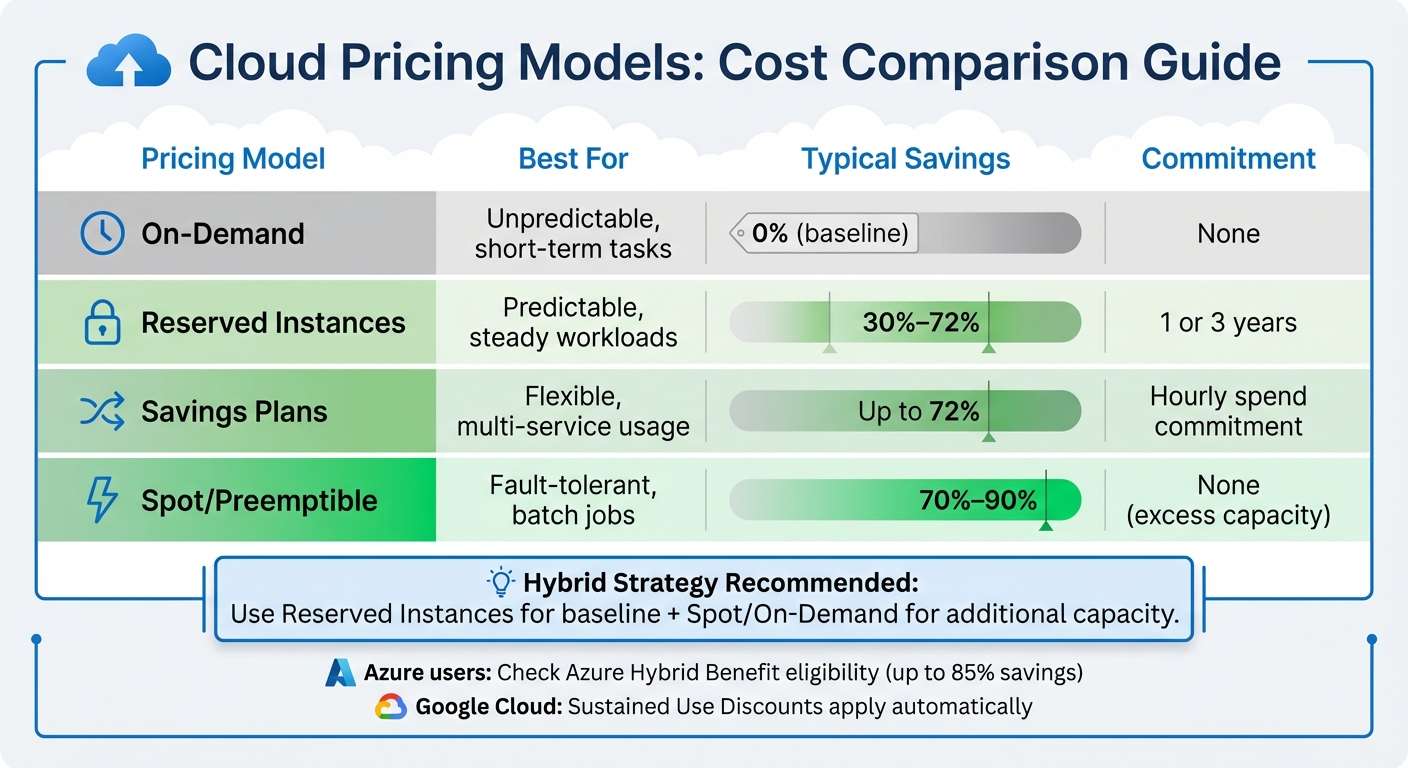 {Cloud Pricing Models Comparison: Savings and Best Use Cases}
:::
{Cloud Pricing Models Comparison: Savings and Best Use Cases}
:::
After conducting a detailed pre-scaling assessment, it's time to adjust your resource allocation to align with actual demand. The goal? Balance infrastructure capacity with real-world needs while maintaining a performance buffer - no need to over-provision for worst-case scenarios.
Right-Size Compute Instances
Right-sizing means selecting instance types that meet workload demands without overspending [9]. Keep an eye on metrics like vCPU, memory, network, and disk I/O [7]. Track these over two to four weeks to capture workload peaks and cycles [7].
If an instance's maximum usage consistently stays below 40% over a four-week period, consider downsizing [8]. For example, with AWS EC2 instances, dropping from a c4.8xlarge to a c4.4xlarge can often suffice [8]. Just ensure the resized instance's peak usage doesn't exceed 80% of its capacity [7]. This approach can significantly cut compute costs while maintaining performance.
In non-production environments, automate stopping of development or testing instances during off-hours. For a 50-hour work week, this simple adjustment can slash costs by up to 70% [8]. If an instance has been idle for two weeks, stop or terminate it. Don't forget to delete or snapshot attached EBS volumes to avoid unnecessary storage charges [8]. Always test new instance configurations in a non-production environment to verify compatibility with virtualisation types and architecture [8][10].
Switch to Cost-Effective Pricing Models
Use audit data to pick pricing models that maximise savings. For steady workloads, commitment-based options like Reserved Instances or Savings Plans can save up to 72% compared to on-demand pricing [12][13]. Monitor performance metrics for at least a month to confirm consistent demand patterns before committing [7].
For workloads that can handle interruptions - like batch processing or data analysis - Spot Instances (AWS/Azure) or Preemptible VMs (Google Cloud) are a cost-effective choice, with savings of 70% to 90% [13]. For unpredictable or short-term workloads, stick with on-demand pricing [11][13]. A hybrid strategy often works best: use Reserved Instances for the baseline load and supplement with Spot or On-Demand instances for additional capacity [11][3].
| Pricing Model | Best For | Typical Savings | Commitment |
|---|---|---|---|
| On-Demand | Unpredictable, short-term tasks | 0% | None |
| Reserved Instances | Predictable, steady workloads | 30%–72% [12][13] | 1 or 3 years |
| Savings Plans | Flexible, multi-service usage | Up to 72% [13] | Hourly spend commitment |
| Spot/Preemptible | Fault-tolerant, batch jobs | 70%–90% [13] | None (excess capacity) |
For Microsoft workloads on Azure, check for Azure Hybrid Benefit eligibility to reuse existing licences, which can cut costs by up to 85% [13]. Google Cloud users can take advantage of Sustained Use Discounts, which apply automatically for consistent monthly use - no commitments required [13].
Optimise Storage Costs
Storage costs can spiral if left unchecked. One effective strategy is separating storage from compute, allowing each to scale independently [11][3].
Set up automated data tiering to move older or less frequently accessed data to lower-cost storage classes. For example, Google Cloud's Autoclass automates this process based on usage patterns, saving time and money [2][4]. Regularly clean up unused volumes and snapshots to eliminate unnecessary expenses [12].
For databases, techniques like partitioning and clustering in platforms like BigQuery can minimise the amount of data scanned during queries, directly lowering processing costs [2]. Additionally, caching strategies or Content Delivery Networks (CDNs) can store frequently accessed data closer to users, reducing the need for costly database calls [1]. If you're using AWS and notice ephemeral storage disk I/O below 3,000, switching to Amazon EBS often provides better cost efficiency [7].
Auto-Scaling and Automation
Efficiently managing resources is key to reducing manual effort and aligning costs with demand. Implementing dynamic auto-scaling and automation can help achieve this balance.
Configure Auto-Scaling Policies
Start by choosing the right scaling strategy. For example, target-tracking policies can maintain a specific utilisation level, like 50% CPU usage, while predictive scaling requires at least 24 hours of data and works well for workloads with consistent patterns. For predictable workloads, such as those operating during business hours, schedule-based scaling ensures resources are provisioned ahead of time, eliminating delays when demand spikes [14][6].
Select metrics that reflect your workload's demand. Popular options include CPU usage, memory, request count, or queue depth. These metrics should scale proportionally with the number of instances. To ensure timely adjustments, enable one-minute monitoring, which prevents decisions based on outdated data [14].
Set practical minimum and maximum limits for replicas, and define cooldown periods to avoid over-provisioning or leaving resources idle after demand spikes. For burstable instances like T2 or T3, set realistic utilisation targets or configure them as unlimited
to prevent CPU credit exhaustion [15][14].
Once your scaling policies are configured, automate deployment and maintenance to streamline operations further.
Use Infrastructure as Code (IaC)
Automation becomes even more effective when combined with Infrastructure as Code (IaC). Tools like Terraform, AWS CloudFormation, and Azure Bicep allow you to define infrastructure configurations in code, ensuring consistent and automated deployments [16]. These declarative models specify the desired state of your infrastructure, leaving the cloud provider to figure out the most efficient way to achieve it [16][17].
Manual infrastructure management is time-consuming and prone to error - especially when you manage applications at scale. Infrastructure as code lets you define your infrastructure's desired state without including all the steps to get to that state.– AWS [17]
By integrating IaC into your CI/CD pipelines, you can synchronise infrastructure scaling with application releases. This approach also allows for early testing and validation of changes, with the option to quickly roll back to a stable configuration if needed [16][17]. For containerised workloads, tools like Karpenter can optimise resource usage by consolidating workloads onto fewer instances. Additionally, configure autoscaling to prioritise cost-effective options like Spot Instances before falling back on more expensive On-Demand resources [19].
Automate Cleanup of Idle Resources
Cost savings can be further enhanced by automating the removal of idle resources. Design workloads to handle resource termination gracefully, and for non-production environments, consider tools like AWS Instance Scheduler to automate instance start/stop cycles. CloudWatch alarms can also help terminate instances with low CPU usage [21][18].
Fine-tune autoscaler settings, such as a 50% utilisation threshold or a 10-minute scale-down timer, to promptly remove underused nodes. Always test these adjustments in a non-production environment first. A descheduler can be used to optimise pod placement, enabling the cluster autoscaler to eliminate empty nodes. For critical batch jobs, use do-not-evict
annotations to prevent premature termination [19].
Before permanently decommissioning a resource, apply restrictive controls, such as removing DNS records temporarily, to confirm the resource is no longer needed. Don’t forget to clean up associated resources like Elastic IP addresses, EBS volumes, and snapshots to avoid hidden costs [20].
Need help optimizing your cloud costs?
Get expert advice on how to reduce your cloud expenses without sacrificing performance.
Governance and Continuous Optimisation
Once scalable, automated solutions are in place, governance becomes essential to sustain these efficiencies over time. By building on pre-scaling assessments and rightsizing strategies, effective governance ensures long-term cost savings. Without clear ownership and regular reviews, cloud expenses can spiral out of control as teams continue adding resources or neglect to retire outdated ones.
Assign Cost Ownership
To maintain accountability for cost optimisation, assign a Directly Responsible Individual (DRI) to each cost item[23]. Organise your cloud accounts to mirror your organisational structure, making it easier to track and allocate costs[24].
Consider implementing showback or chargeback models, which connect spending to business value using metrics like cost per transaction[23][22]. This approach ties financial responsibility to measurable outcomes.
Conduct Regular Spending Reviews
Set up monthly or quarterly reviews to compare spending against budgets, identify anomalies, and make necessary adjustments to resource allocations. Gaining executive sponsorship for these reviews helps ensure that the resulting actions are implemented effectively[22]. These reviews, combined with continuous monitoring, form a strong foundation for maintaining cost efficiency.
Use Hokstad Consulting Services

To maximise the benefits of these strategies, consider enlisting expert support. Hokstad Consulting offers cloud cost engineering services designed to uncover additional savings. Their methods often deliver cost reductions of 30–50%, achieved through audits, rightsizing recommendations, and architectural refinements. With flexible engagement options, including a no savings, no fee
model - where fees are capped as a percentage of actual savings - they provide a low-risk way to optimise your cloud infrastructure.
Monitoring and Review
Governance and fine-tuning only deliver consistent results when backed by ongoing monitoring. Without keeping a close eye, scaling configurations can lead to unexpected expenses. As the Microsoft Azure Well-Architected Framework highlights:
Cost optimization is a continuous process in which you optimize workload costs and align your workload with the broader governance discipline of cost management.[4]
These monitoring strategies work hand-in-hand with the governance and automation measures discussed earlier.
Set Up Centralised Dashboards
Build dashboards that bring all workload costs into one place, breaking them down by technical details (like resource types), organisational units (such as departments or teams), and business models (projects or cost centres) [23]. Tools like AWS Cost Explorer or Azure Monitor can help track spending, making it easier to pinpoint what’s driving costs [25][26]. Tailor these dashboards to suit both technical teams and management. To go a step further, integrate machine learning-based anomaly detection to automatically flag unusual spending patterns, removing the need to rely solely on manual checks [26][4].
Test Changes in Staging Environments
Before applying scaling or optimisation changes in production, test them in a staging environment that replicates real-world conditions. This step ensures that any adjustments won’t undermine cost efficiency. Use tools like Azure Load Testing to simulate traffic and compare different scaling strategies [1]. Testing also allows you to refine autoscaling policies, such as tweaking thresholds and cooldown periods, to avoid unnecessary scaling triggered by temporary traffic spikes [1]. Create preproduction environments specifically for testing purposes, and shut them down immediately after to keep costs down [5].
Schedule FinOps Reviews
Close the loop on cost management by setting up regular financial operations (FinOps) reviews to analyse spending trends and update policies. Use tools like AWS Budgets to set alerts that notify you before costs exceed limits [26]. During these reviews, compare forecasted spending with actual costs, evaluate cost per transaction, and measure resource usage [22][4]. Organisations that don’t prioritise proactive cost monitoring expose themselves to medium risks [26], while failing to organise and track usage data through billing tools can result in even higher risks [25].
Conclusion
Managing cloud costs isn't a one-and-done task - it’s an ongoing commitment. As the Microsoft Azure Well-Architected Framework aptly states: Cost optimisation is a continuous process... What's important today might not be important tomorrow.
[4] With cloud environments evolving so quickly, what seems efficient now could easily become a financial drain later.
The steps outlined here - from pre-scaling audits and rightsizing to automation and continuous monitoring - work best when approached as a cohesive strategy rather than isolated actions. By combining these practices, you can maintain efficiency over the long term. Scale only as demand dictates [1], and ensure governance, automation, and monitoring are in sync to spot inefficiencies before they grow into larger problems.
Taking a proactive approach to cost management turns cloud spending from a necessary expense into a strategic advantage. This involves shifting from reactive monitoring to forward-thinking planning, ensuring your technical resources align with measurable business goals.
For organisations grappling with the challenges of multi-cloud or hybrid environments, expert guidance can make a significant difference. Hokstad Consulting offers specialised cloud cost engineering services, helping businesses cut costs by 30–50% without sacrificing performance. Their methodology integrates cost management directly into DevOps and CI/CD processes, embedding efficiency at every stage of development. With flexible engagement models, including a no savings, no fee
approach, they ensure their clients see tangible results, with fees capped as a percentage of the actual savings achieved.
FAQs
How can I monitor and control cloud costs effectively across multiple teams or projects?
To keep cloud costs under control across teams or projects, start by using a consistent tagging system. Make sure every resource - like servers or storage - is tagged with key details such as the project name, team, environment (e.g., dev, test, prod), and cost centre. This makes it easier to track and report expenses through tools like AWS Cost Explorer, Azure Cost Management, or Google Cloud Billing. You can also set up automated alerts to flag when spending goes over your set budgets.
Incorporating FinOps practices is another essential step. Assign specific team members to take ownership of costs, include cost checks in your deployment pipelines, and hold regular reviews to compare actual spending with forecasts. Real-time dashboards and anomaly detection tools can help you spot unexpected cost spikes early, avoiding budget surprises.
Lastly, establish clear governance policies. Set project-level budgets, automate spending alerts, and review resource usage every quarter. This approach enables you to trim costs by resizing instances, retiring unused resources, or renegotiating contracts. With a structured and disciplined strategy, you can ensure transparency, distribute costs fairly, and achieve lasting cost efficiency.
What are the best ways to automate cloud resource management for cost efficiency?
Automating cloud resource management is a smart way to cut costs and boost efficiency by reducing the need for manual effort. This process leverages scripts, tools, and cloud-native services to handle tasks like provisioning, scaling, monitoring, and retiring resources.
Here are some key approaches to make it work:
- Consistent tagging: Use clear, machine-readable tags to track spending and enforce compliance automatically. This ensures resources are organised and easy to manage.
- Right-sizing resources: Regularly review usage data to adjust resource sizes or switch to more cost-effective options like Reserved or Spot instances.
- Dynamic scaling: Set up auto-scaling tools to manage capacity in real time based on demand. This prevents over-provisioning while ensuring performance stays on track.
- Budget alerts: Establish budgets and enable alerts to keep an eye on spending. This helps identify and address anomalies before they become costly.
- AI-driven optimisation: Use machine learning to predict usage trends, shut down idle resources, and eliminate waste.
By incorporating these strategies, businesses can streamline their cloud infrastructure, save money, and maintain strong performance. Hokstad Consulting provides tailored solutions to help UK organisations put these practices into action effectively.
How can I choose between horizontal and vertical scaling for my cloud infrastructure?
Choosing between horizontal scaling (adding more instances) and vertical scaling (upgrading the resources of an existing instance) depends largely on your workload, as well as your priorities around performance, cost, and resilience.
Horizontal scaling works best when you need to handle fluctuating traffic or ensure high availability. By spreading the load across multiple smaller instances, you can add or remove resources dynamically to match demand. This approach is particularly effective for stateless applications and workloads where fault tolerance is a priority, as it reduces the risk of a single point of failure.
On the other hand, vertical scaling is simpler and often a better fit for monolithic applications or databases that are difficult to split across multiple nodes. While it can deliver better performance on a single instance, it comes with limitations - like hitting the maximum capacity of the instance or being vulnerable to a complete failure if that instance goes down.
When deciding which approach to take, consider the following:
- Traffic patterns: If your traffic is unpredictable or spikes often, horizontal scaling is more flexible. For steady, consistent growth, vertical scaling might be sufficient.
- Application architecture: Stateless systems are naturally suited to horizontal scaling, while stateful systems may require vertical scaling for simplicity.
- Cost considerations: Horizontal scaling allows you to use smaller, more affordable instances, while vertical scaling might push you into higher-cost tiers as you upgrade.
- Resilience: Distributing workloads across multiple instances (horizontal scaling) reduces the risk of downtime compared to relying on a single, larger instance.
By weighing these factors against your business priorities, you can decide whether horizontal scaling, vertical scaling, or a mix of both is the right choice for your cloud infrastructure. Hokstad Consulting offers expert guidance to help you create a scaling strategy that balances cost and performance while meeting your unique needs.