
Rolling out new software can be risky, but Istio simplifies canary deployments, making them safer and more efficient. By controlling traffic routing independently of pod scaling, Istio enables precise traffic allocation to test new versions without disrupting the entire system. Here's what you need to know:
- What is a Canary Deployment? A method to direct a small percentage of traffic (e.g., 1%-10%) to a new version while keeping the rest on the stable version. This helps catch issues early.
- Why Istio? Istio’s VirtualServices and DestinationRules allow fine-grained traffic control, independent of pod scaling, and support advanced routing like header-based or cookie-based targeting.
- Key Steps:
- Prepare your Kubernetes cluster (v1.20+).
- Use Istio to split traffic between stable and canary versions.
- Start with a small percentage (e.g., 10%) and gradually increase.
- Monitor metrics like error rates and latency using Prometheus or Grafana.
- Automate rollbacks with tools like Argo Rollouts or Flagger if issues arise.
- Best Practices: Start small, align with service level objectives (SLOs), and use resilience features like outlier detection and circuit breakers.
::: @figure 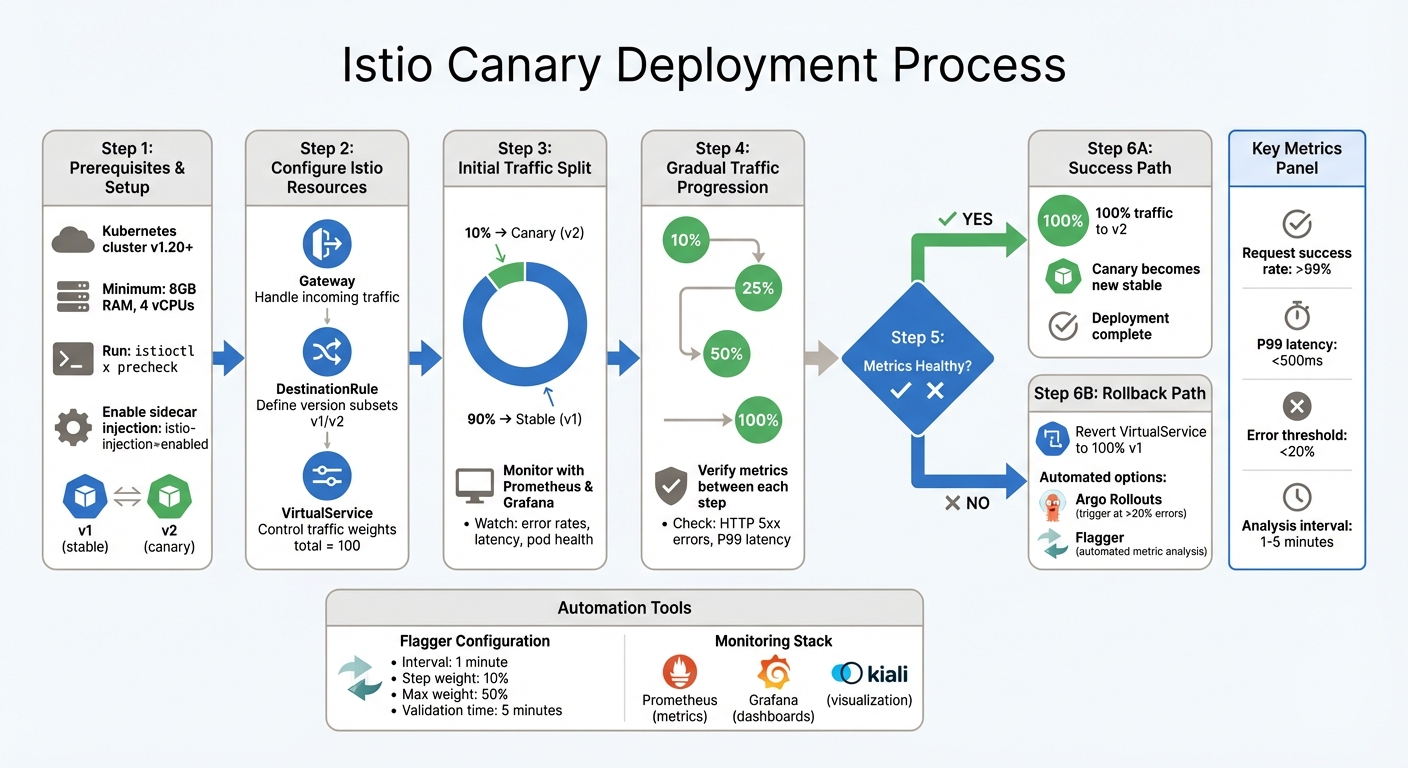 {Istio Canary Deployment Implementation Steps and Traffic Progression}
:::
{Istio Canary Deployment Implementation Steps and Traffic Progression}
:::
Preparing for Istio Canary Deployments
Prerequisites and Setup
Before diving into an Istio canary deployment, make sure your Kubernetes cluster (v1.20 or later) meets Istio's requirements. To ensure smooth operations, your cluster should have at least 8GB of available memory and 4 vCPUs [3].
Run the following command to check if your Kubernetes environment is ready for Istio:
istioctl x precheck
This step will confirm compatibility before you proceed [4]. Once Istio is installed, label your namespace with istio-injection=enabled to enable automatic sidecar injection. Then, restart your deployments using:
kubectl rollout restart deployment
This ensures the sidecars are correctly injected into your pods [4].
Next, deploy two versions of your application: one stable version (e.g., v1) and one canary version (e.g., v2). These should be set up as separate Kubernetes Deployments. Use a shared app label for both versions so your Service can target them, but ensure each has a unique version label to allow Istio to differentiate between them [5].
For better visibility and control during the rollout, consider integrating monitoring tools like Prometheus and Grafana. These tools can help you track metrics and quickly identify any issues. If error rates exceed acceptable thresholds, you can automate rollbacks. Additionally, if you're managing multiple Istio control planes, use revision tags (e.g., prod-stable and prod-canary) to point to specific Istio versions, reducing the risk of errors during upgrades [4].
Configuring Istio for Traffic Splitting
With your environment set up and sidecar injection enabled, it's time to configure Istio to manage traffic splitting. Istio relies on three key resources for this: Gateway, DestinationRule, and VirtualService. These work together to control traffic flow between your stable and canary versions.
- Gateway: Handles incoming traffic at the edge of your mesh, specifying which ports and hosts to accept [5].
- DestinationRule: Defines subsets - groupings of pods based on their version labels. This allows Istio to differentiate between the stable and canary versions [5].
- VirtualService: Controls traffic splitting by assigning weights (totalling 100) to each subset. For example, you can configure a 90/10 split, where 90% of traffic goes to the stable version and 10% to the canary [7].
In addition to percentage-based splits, Istio allows routing traffic based on HTTP headers, cookies, or URIs. This feature can be particularly useful for targeting specific user groups or internal teams during testing [5]. For example, you could route traffic from a specific user segment to the canary version while keeping the majority of users on the stable version.
Implementing Canary Deployments with Istio
Initial Traffic Splitting
After setting up your DestinationRule and VirtualService, deploy the canary version alongside the stable release. Start cautiously - allocate 10% of traffic to the canary and 90% to the stable version [8][1]. This approach reduces risk while still providing enough data to identify any early issues.
Istio offers a distinct advantage over Kubernetes by separating traffic routing from pod scaling. As Frank Budinsky from Istio explains:
With Istio, traffic routing and replica deployment are two completely independent functions. The number of pods implementing services are free to scale up and down based on traffic load, completely orthogonal to the control of version traffic routing[6].
This flexibility allows you to direct as little as 1% of traffic to a single canary pod without needing to scale up to 100 replicas. It provides granular control while keeping resource usage efficient [6].
To implement this, apply the VirtualService configuration using kubectl and use tools like Kiali to visualise the traffic split. Keep a close eye on key metrics through Grafana, particularly the performance of the v2 workload, to ensure everything is running smoothly [8][1]. Once satisfied with the initial split, you can move on to gradually shifting more traffic.
Gradual Traffic Shifting
When the 10% traffic allocation proves stable, begin increasing the traffic incrementally - try moving to 25%, then 50%, and eventually 100%. Adjust the weight parameter in your VirtualService manifest at each stage, but only proceed after verifying that latency and error rates remain within acceptable limits [8][2].
Between each traffic increase, allow time for metrics to stabilise. Use Prometheus to monitor HTTP 5xx error rates and 99th percentile latency. If autoscaling is enabled, Istio ensures that traffic management operates independently, so your pods will scale based on actual demand without interfering with the rollout process [6][1]. This separation ensures smooth scaling while maintaining control over the deployment.
Rollback Strategies
If metrics show problems during the traffic shift, roll back immediately. Elevated error rates or latency spikes can be addressed by updating your VirtualService to direct 100% of traffic back to the stable version and 0% to the canary [8][2]. This process is faster than replacing pods in Kubernetes.
If anything goes wrong along the way, we abort and roll back to the previous version[6].
For automated rollbacks, tools like Argo Rollouts and Flagger can be invaluable. Argo Rollouts, for instance, can integrate with an AnalysisTemplate to monitor Prometheus metrics. If error rates exceed 20% or three consecutive checks fail, traffic reverts automatically to the stable version [9]. Similarly, Flagger can pause the rollout and trigger a rollback if the canary fails to meet predefined stability criteria [10]. Whatever method you choose, always test your rollback strategy in a staging environment before deploying it in production [9].
| Rollback Strategy | Trigger Mechanism | Rollback Speed | Complexity |
|---|---|---|---|
| Manual VirtualService Update | Manual update via monitoring alerts | Fast (once applied) | Low |
| Argo Rollouts Analysis | Automated Prometheus metric thresholds | Near-Instant | Medium |
| Flagger Automation | Automated metric analysis and webhooks | Near-Instant | Medium |
Automation and Monitoring for Canary Deployments
Automating Canary Analysis with Flagger
Flagger streamlines canary releases by gradually shifting traffic while continuously evaluating key performance indicators (KPIs) [11]. It leverages a Kubernetes Custom Resource Definition (CRD) called Canary, which defines the deployment strategy, analysis intervals, and success criteria. By doing so, Flagger automatically creates the necessary Istio objects - like VirtualServices, DestinationRules, and ClusterIP services - removing the need for manual YAML file updates [11][12][14]. Stefan Prodan, OSS Maintainer and Principal Engineer at ControlPlane.io, explains it well:
Running a service mesh like Istio on top of Kubernetes gives you automatic metrics, logs, and traces but deployment of workloads still relies on external tooling. Flagger aims to change that by extending Istio with progressive delivery capabilities[14].
To control traffic shifts, you can configure parameters such as interval, threshold, maxWeight, and stepWeight. For example, setting an interval of 1 minute, a step weight of 10%, and a max weight of 50% results in a canary validation time of 5 minutes [11]. If the number of failed metric checks exceeds the defined threshold, Flagger will automatically stop the deployment and revert traffic to the stable version [11].
For frontend applications, session affinity can be enabled to ensure users stay connected to the canary during analysis. Alternatively, for idempotent services, the mirror: true option can duplicate live traffic without impacting the user experience [11]. These automated features work seamlessly with the gradual traffic shifting process, offering a robust approach to canary deployments.
Monitoring Metrics with Istio's Telemetry
While Flagger automates the release process, effective monitoring through Istio's telemetry is crucial for validating each traffic shift. Flagger integrates with Istio's telemetry by querying Prometheus for metrics such as HTTP request success rates, latency, and pod health [11][12].
To enable this, ensure Istio is installed with Prometheus support so Flagger can access metrics like request-success-rate and request-duration [12]. Adding Grafana to your setup provides pre-configured dashboards tailored for monitoring the progress of canary deployments [14]. Additionally, pre-rollout and rollout webhooks can be used to generate sufficient traffic for reliable metric analysis, allowing you to fine-tune thresholds according to your service level objectives (SLOs) [13].
Need help optimizing your cloud costs?
Get expert advice on how to reduce your cloud expenses without sacrificing performance.
Canary Deployments with Istio and Argo Rollouts | HPA | Demo
Best Practices for Canary Deployments in Production
These steps are essential for ensuring your canary deployments meet production standards while maintaining system stability and reliability.
Starting Small and Scaling Gradually
Begin by directing a small portion of traffic - around 1–5% - to the new version, then slowly increase this percentage. Tools like Istio allow you to control traffic distribution precisely without needing to scale pod numbers. By using VirtualService weights, you can send just 1% of traffic to the canary version, regardless of the number of pods, keeping traffic management separate from scaling decisions [6].
Before a full rollout, consider using header-based routing to target internal users or beta testers. This allows you to test performance without affecting the wider user base. For changes with higher risk, traffic mirroring (or shadowing) can be a great option. In this method, 100% of live traffic is duplicated to the canary version, which processes the requests while its responses are discarded. This approach helps validate metrics with no impact on real users [13].
Starting cautiously like this creates a solid foundation for aligning deployments with your Service Level Objectives (SLOs).
Aligning Deployments with SLOs
As you gradually increase traffic, make sure your deployment targets align with production standards. Your canary criteria should directly reflect your SLOs to ensure automated decisions meet business needs. For instance, set thresholds such as a request success rate above 99% and P99 latency under 500 milliseconds [13]. These thresholds enable automated rollbacks if the canary fails to meet expectations during analysis intervals.
Configure the number of failed checks carefully, often allowing 5 to 10 consecutive failed intervals before triggering a rollback [13][12]. To manage scaling, use Horizontal Pod Autoscalers (HPAs) for both primary and canary releases, allowing each to scale independently [6][12].
Ensuring Resilience and Fault Tolerance
To protect your gradual rollouts, implement measures to enhance resilience. Use a DestinationRule to configure:
- Outlier detection and circuit breakers: These automatically remove unhealthy canary pods from the load-balancing pool, preventing a single failing pod from skewing results or affecting user experience [2].
- Retry policies: For instance, setting three retries with a one-second timeout can help maintain stability during intermittent connection failures [13].
Enable cookie-based session affinity during traffic shifts, ensuring users maintain a consistent experience instead of switching between stable and canary versions mid-session [13]. Keep spare capacity equal to the canary's load to handle potential issues or additional resource demands. Finally, use pre-rollout webhooks to run acceptance tests on the canary before routing live traffic, adding an extra layer of validation before exposing the new version to production [13].
Conclusion
Istio makes canary deployments more straightforward by separating traffic routing from replica scaling, which helps minimise risks during deployments. This separation allows for precise traffic control without needing to scale pods unnecessarily. As Frank Budinsky explains, Istio's service mesh provides the control necessary to manage traffic distribution with complete independence from deployment scaling
[6].
Beyond traffic management, Istio combines fine-grained routing with robust monitoring tools. Features like VirtualServices and DestinationRules enable precise traffic routing, while tools such as Prometheus, Grafana, and Kiali offer real-time metrics on latency, error rates, and resource usage. This level of visibility ensures that issues can be identified early, allowing for quick action - whether that’s an automated rollback or manual intervention.
Adopting best practices, such as starting with small traffic percentages, aligning deployments with service level objectives (SLOs), and leveraging automation tools like Flagger, creates a strong foundation for validating releases. These methods help maintain system stability and ensure a smooth user experience during progressive rollouts.
Whether you're rolling out application updates or upgrading Istio's control plane, the service mesh supports safe, incremental deployments. At Hokstad Consulting, we’re committed to guiding businesses in adopting best practices to keep their production environments resilient and dependable.
FAQs
How does Istio manage traffic routing during canary deployments, regardless of pod scaling?
Istio handles traffic routing during canary deployments through traffic management objects, like VirtualService weight rules. These rules let you send a defined percentage of traffic to the canary version, completely separate from Kubernetes' pod scaling processes.
By keeping traffic splitting independent of pod scaling, Istio allows you to test new versions in a controlled and stable environment. This method gives you more control and accuracy when managing canary rollouts.
Which tools are best for monitoring metrics during a canary deployment with Istio?
When it comes to monitoring metrics during canary deployments with Istio, Prometheus and Grafana are top choices. Prometheus specialises in gathering and storing time-series data, while Grafana shines with its ability to create detailed visualisations that help track traffic patterns and performance.
These tools integrate effortlessly with Istio, allowing you to keep a close eye on critical metrics like latency, error rates, and request volumes. This level of monitoring makes it easier to ensure a smooth rollout of new features or updates, as you can quickly spot and resolve any issues that arise during the deployment process.
What are the key best practices for resilient canary deployments with Istio?
To maintain stability and reliability during canary deployments with Istio, follow these practical tips:
- Upgrade with revisions: Install a new Istio control-plane revision and run
istioctl x precheckto validate the setup. This approach helps reduce the risk of disruptions. - Set up traffic splitting: Use weighted traffic splits in your VirtualService configuration. Include health checks and circuit-breaking mechanisms to keep your system stable during the process.
- Prioritise security and monitoring: Enable mutual TLS (mTLS) for secure communication between services. Ensure observability tools are in place to track traffic flows and identify potential issues.
- Keep an eye on metrics: Monitor critical indicators like error rates and latency. Set up automated rollbacks to kick in if these metrics exceed acceptable thresholds.
By following these steps, you can achieve smooth canary deployments while maintaining system performance and availability.