
If I set cache expiry well, I can cut origin traffic, lower compute use, trim database load, and reduce cloud spend. The article’s core point is simple: TTL is not just a cache setting; it is a cost control.
Here’s the short version:
- Long TTLs for versioned assets such as JS, CSS, images, and fonts can push cache hit rates above 90% and strip out a large share of origin requests.
- Short TTLs and micro-caching for semi-dynamic pages and APIs can absorb bursts in 30–300 seconds, which cuts peak load and trims function, server, and database use.
- A move from 90% to 95% cache hit ratio can halve origin load.
- Research in the article points to 17–40% lower total cost in some dynamic setups, and 40–60% lower origin traffic and bandwidth at the same demand.
- The main bill lines affected are egress, compute, database reads/capacity, and API request volume.
What matters most is matching expiry to content type:
- Immutable, versioned files: use long TTLs
- Pages updated now and then: use medium TTLs plus purge on publish
- Fast-changing endpoints: use short TTLs or micro-caching
- Personal data: avoid shared caching; use private rules or
no-store
A single rule across the whole site usually wastes money. I’d treat browser cache, CDN, reverse proxy, and app cache as separate layers, each with its own job.
If I wanted to prove the savings, I’d track:
- Request hit ratio
- Byte hit ratio
- Origin requests avoided
- Egress volume
- CPU or function usage
- Database queries reduced
Then I’d compare before and after for one content group at a time and tie the change to invoice lines in £.
| Content type | Best expiry approach | Main cost effect | Main risk |
|---|---|---|---|
| Versioned static assets | Long TTL | Lower origin egress and compute | Old file if versioning is poor |
| Pages updated daily/weekly | Medium TTL | Lower repeat origin traffic | Stale page until purge |
| APIs and semi-dynamic pages | Short TTL / micro-cache | Lower burst load and backend cost | More tuning needed |
| Personal or sensitive data | Private cache or no-store
|
Little shared-cache saving | Data leakage if cached badly |
Bottom line: I’d use long TTLs where files rarely change, short TTLs where requests repeat in bursts, and measure the result against cloud bill lines. That is where the savings show up.
What research shows about cache expiry and cost reduction
Research and case studies point in the same direction: well-set TTLs can push cache hit ratios from the mid-60s to above 90%, which cuts origin requests and bandwidth by 40–60% at the same traffic volume.[5][6][11] That shows up in two places straight away: less traffic hitting the origin and lower spend.
Fastly gives a good example of how sharp the effect can be. Moving cache hit ratio from 90% to 95% can halve origin load.[1] That jump matters because the payoff is non-linear. When the hit ratio is already high, each extra point strips out more origin work than it did earlier. In practice, the biggest savings usually come from two kinds of content: long-lived immutable assets and short-lived but reusable semi-dynamic content.
Research also shows that TTL changes save money in two separate ways: offloading immutable assets, and soaking up bursts on semi-dynamic services.
Longer TTLs for immutable assets cut origin traffic
For versioned JavaScript, fingerprinted CSS, images and fonts, long TTLs make sense because these files only change when you deploy something new. Provider guidance often starts at 24 hours and can stretch to a month or more for binaries and packages.[3][9][14]
CDN migration case studies show what this looks like in the wild. Using long s-maxage values with stale-while-revalidate for static assets pushed edge cache hit ratios from about 50–70% to 90–97%, while egress savings came to roughly £95,000 per year at the same traffic levels.[6]
There’s also a neat analytical result behind this. A Poisson-based model shows that if an asset gets 0.01 requests per second at an edge location, a TTL of about 230 seconds can deliver a 90% reduction in origin requests at that point of presence.[2]
That same idea applies to content that changes more often, but the best TTL is far shorter.
Short TTLs and micro-caching reduce load on semi-dynamic services
Micro-caching with TTLs of 30–300 seconds can absorb repeated requests during traffic bursts, so those requests stay at the CDN or reverse proxy instead of reaching the origin.[4][8][10][12] It’s a simple move, but it can take a lot of pressure off systems that would otherwise get hammered by many near-identical requests in a short window.
Research on TTL-based elastic provisioning adds another layer here. It shows that dynamic TTLs and cache capacity can cut total costs by 17–40% in highly dynamic workloads by smoothing peaks and reducing the need for excess origin capacity.[13][15]
Savings depend on workload type and pricing model
The return depends heavily on the workload. Savings change with traffic profile, cacheability, pricing model and system design.[2][7][13][15] The clearest gains tend to show up in workloads with:
- high read traffic
- expensive database queries
- large-scale media delivery
Economic studies make the reason pretty plain. Providers with high egress charges, such as object storage or CDN data transfer, and high database query costs tend to gain the most from origin offload, because each cache hit avoids a mix of CPU, I/O and data transfer charges.[7][11]
On the other hand, write-heavy or heavily personalised workloads usually see smaller savings, since fewer responses can be reused. The firms that get the best results usually separate immutable assets from semi-dynamic content and already send responses with headers that allow caching.
Which cache expiry strategies produce the best financial results
::: @figure 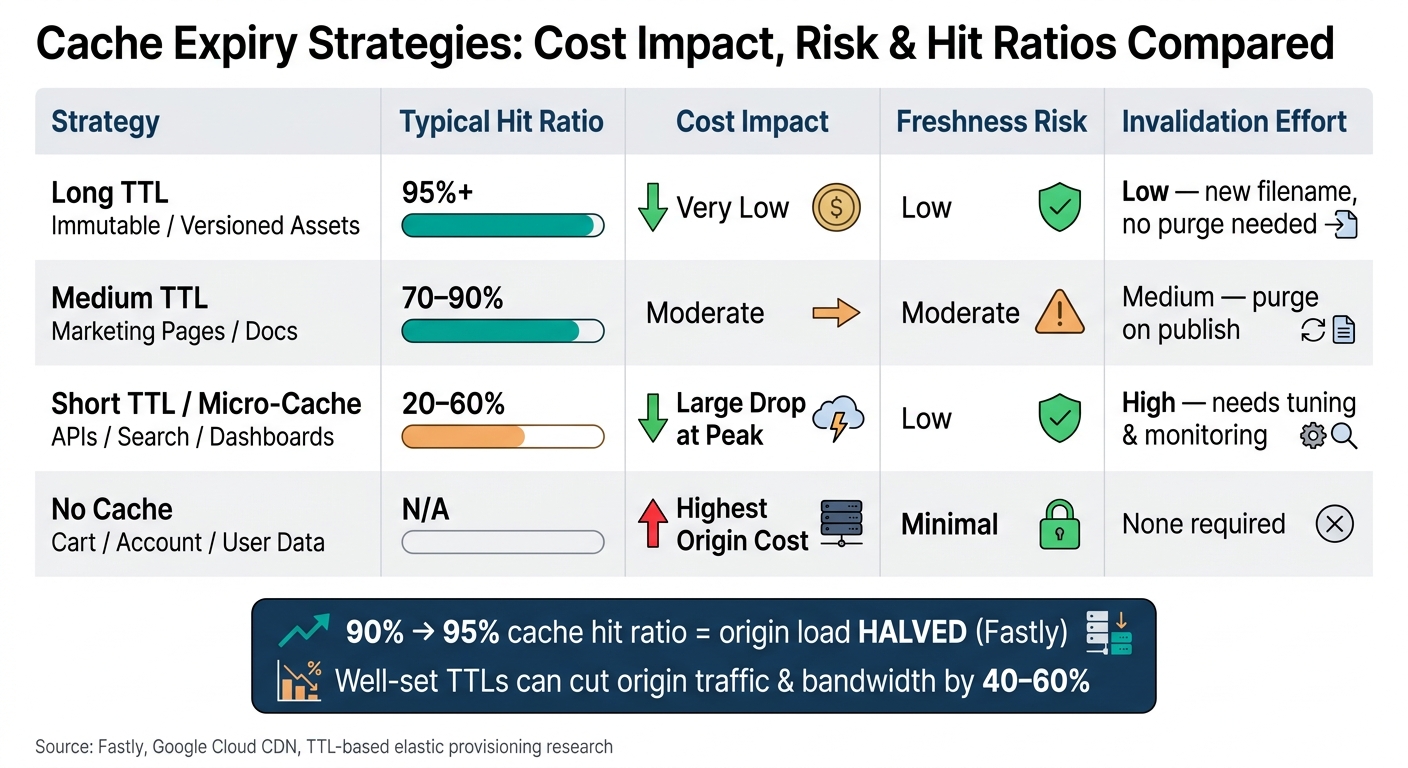 {Cache Expiry Strategies: Cost Impact, Risk & Hit Ratios Compared}
:::
{Cache Expiry Strategies: Cost Impact, Risk & Hit Ratios Compared}
:::
Using one TTL across your whole site usually leaves money on the table. The best savings come from matching cache expiry to the type of content you serve.
Match TTL to how often content changes
Immutable assets - versioned JavaScript bundles, fingerprinted CSS, hashed images and fonts - should get long TTLs. When you ship updates by changing the filename, the risk of stale files is low. And the payoff is big: you can get a high cache hit ratio in both the browser and CDN layers.[19][21]
Occasionally updated content - marketing pages, documentation, and product detail pages that change daily or weekly - tends to work well with TTLs from several hours up to one day. If you also purge or invalidate cache on publish, you keep pages current without sending as much traffic back to origin. Google Cloud CDN guidance treats about one day as a sensible upper limit for client TTL in this group.[18]
Frequently changing content such as search listings, dashboards, and API responses that update every few minutes needs a different approach. Here, short TTLs or micro-caching make more sense. Even a brief cache window can soak up repeat requests and shield origin capacity when traffic spikes.
Personalised responses - cart contents, account data, and user-specific dashboards - should stay private. That usually means no-store, or very short TTLs with revalidation through ETag or Last-Modified. Long TTLs in this area can serve one user’s data to another, which is a risk you don’t want.[19][21]
Use layered caching rather than a single cache
The hit-ratio gains shown in the research do not come from one cache doing all the work. They come from setting different expiry rules for different content types and applying them across several layers.
Each layer cuts cost earlier in the request path:
- Browser cache trims repeat visits from the same user
- CDN edge cache cuts origin egress and network charges
- Reverse proxies such as NGINX or Varnish stop repeat requests before they hit application code
- Application caches such as Redis reduce database read load[16][17][20]
Put together, these layers lower spend across the whole chain - browser → CDN → reverse proxy → application cache → database - in a way a single cache just can’t.
The trade-off is pretty simple: longer TTLs reduce cost, but only when the risk of stale content stays low.
TTL approaches compared by cost, risk and effort
| Strategy | Typical fit | Cost impact | Freshness risk | Invalidation effort |
|---|---|---|---|---|
| Long TTL (immutable, versioned assets)[19][21] | 95%+ hit ratio | Very low | Low (with versioning) | Low - long TTLs plus versioning keep invalidation cheap: no purge, just a new filename |
| Medium TTL (occasionally updated content)[18] | 70–90% hit ratio | Moderate | Moderate | Medium - purge on publish |
| Short TTL / micro-caching (frequently changing)[19][21] | 20–60% hit ratio | Large drop at peak | Low | High - needs tuning and monitoring |
| No cache (personalised, sensitive data)[19][21] | Not applicable | Highest | Minimal | None required |
The next question is whether the cost reduction shows up in hit ratio, origin load, and database spend.
How to measure savings from cache expiry changes
Track the metrics that map directly to cloud bills
Once you’ve picked a TTL strategy, the next job is simple: tie cache data to what appears on the cloud bill. If you want to show savings, you need a straight line from cache behaviour to invoice lines.
The most useful metrics are request hit ratio, byte hit ratio, origin requests avoided, database queries reduced, CPU usage and egress volume. Each one points to a cost driver. Byte hit ratio matters most when cached files differ a lot in size. A page might show only a small lift in request hit ratio, while still cutting a large amount of egress traffic.
Google Cloud CDN charges for cache egress, cache fill and lookup requests as separate items.[23] That’s why it helps to track each metric on its own. You get a much cleaner view of where the saving came from, instead of lumping everything into one cache score.
Build a simple before-and-after cost model
The safest way to measure impact is to change TTLs for one content group at a time, then record the same metrics before and after over a matching time window.
Seasonality can throw the numbers off, so compare like-for-like periods and use per-1,000-request or per-GB measures. That keeps the analysis grounded. In one study, dynamic TTLs cut total cost by up to 17% compared with a fixed TTL baseline.[22][15]
For the business case, include:
- baseline metrics
- post-change metrics
- tested TTLs
- content scope
- period covered
- affected invoice lines
Finance teams usually respond best to a clear chain: change made → metric moved → cost line improved. A cache report on its own may look nice, but it doesn’t answer the one thing they care about - did spend go down?
These figures show whether the expiry change reduced costs, not just whether cache performance improved.
When outside support helps validate the business case
If attribution is murky, outside support can help back up the business case.
Conclusion: cache expiry is a low-risk way to reduce cloud costs
Cache expiry isn't just a small technical setting. It's a direct cost lever.
When you set cache expiry well, you move spend away from origin traffic, compute, and database work. And the research points in one direction: the best savings come from setting expiry based on how content behaves, not from doing what you've always done.
The clearest gains show up in two situations: immutable assets and bursty, read-heavy endpoints. Trace-based studies found that cost-aware TTLs and elastic caching cut total cost by 17–40% compared with static settings.[24] For immutable, versioned assets, longer TTLs can reduce origin requests by 70–90%.[25] At scale, that can mean a meaningful drop in monthly cloud spend. Short TTLs and micro-caching can also lower burst load on read-heavy endpoints without making data stale.[26]
Of course, cost claims only matter if you can prove them. The simplest way is to change TTLs for one content group at a time, then compare origin request rates, data transfer volumes, and compute use across like-for-like periods. That gives you a clean before-and-after view and ties the technical change back to the invoice.
Key takeaways for decision-makers
The practical response is straightforward:
- Treat TTLs as a finance control: match expiry to content change rate, and review the rules on a regular basis.
- Track origin bytes, request rates, and compute use, then turn those drops into monthly and annual £ savings.
- Use external support when attribution is unclear. External support can help when ownership sits across teams or when the cost model is hard to pin down.
FAQs
How do I choose the right TTL for each content type?
Match TTL to each content type and how often it changes. Static assets like images, CSS, and JavaScript usually work well with longer TTLs, especially if you use versioned filenames. That way, when you ship an update, people get the new file straight away instead of hanging on to an old cached copy.
Dynamic content needs a shorter TTL. In most cases, one hour to one day is a sensible range. Check how people use the page or resource, then balance speed with freshness so you don't end up serving stale content.
When should I use micro-caching instead of a longer TTL?
Use micro-caching for dynamic content that changes often. If the TTL is too long, you risk serving old or wrong data.
Longer cache periods make more sense for static assets like images and CSS files. Hokstad Consulting recommends analysing your data access patterns to balance performance, cost savings, and accuracy.
How can I prove cache expiry changes reduced cloud spend?
Compare performance metrics and billing data before and after the change. A higher cache hit ratio usually means more requests are served from the edge, which cuts origin traffic and lowers cost.
Track:
- egress volume
- origin request count
- cost per GB
- CPU and resource utilisation
Use billing reports and access logs to check that costs have gone down and origin fetches have dropped.