
Building scalable CI/CD pipelines for microservices is essential for managing independent services efficiently. The key is to create modular workflows where each service can be built, tested, and deployed independently, avoiding bottlenecks and ensuring faster delivery.
Key Takeaways:
- Independent Pipelines: Each microservice should have its own pipeline to prevent failures from impacting the entire system.
- Automation: Use tools like Docker for containerisation, Kubernetes for orchestration, and GitOps for managing deployments. Automate rollbacks and integrate security checks.
- Testing Strategies: Follow the test pyramid model - 70% unit tests, 20% integration tests, 5% contract tests, 5% end-to-end tests - for faster feedback and robust quality control.
- Progressive Delivery: Use canary or blue-green deployments with tools like Argo CD to ensure smooth rollouts and quick rollbacks if issues arise.
- Resource Efficiency: Optimise costs with dynamic resource allocation, multi-stage builds, and infrastructure-as-code tools.
High-performing teams using microservices deploy 208x more frequently and achieve 106x faster lead times than those with monolithic systems. By combining independent pipelines, automated workflows, and efficient testing, businesses can achieve faster, more reliable software delivery while reducing costs.
How to Build CI/CD Pipelines for a Microservices Applicatio – Sasha Rosenbaum
Need help optimizing your cloud costs?
Get expert advice on how to reduce your cloud expenses without sacrificing performance.
Prerequisites for Building Scalable CI/CD Pipelines
To create pipelines that can effectively manage dozens of independent microservices, you need the right tools and infrastructure in place. Without technologies like containerisation, orchestration, and GitOps, it becomes difficult to achieve the speed and reliability that microservices demand. These tools form the groundwork for scaling your CI/CD processes, as outlined below.
Containerisation with Docker
Docker simplifies the deployment of microservices by packaging them - along with their dependencies - into lightweight, standardised containers. This ensures consistent behaviour across development, testing, and production, eliminating the headaches of environment mismatches.
One of Docker’s key benefits is its resource efficiency. By sharing the host OS kernel, Docker allows you to run more services on the same hardware, which can help cut costs. When building Docker images, using multi-stage Dockerfiles is a smart move. This approach separates the build environment (which includes tools like SDKs) from the runtime environment, reducing the final image size by over 70% in many cases. Smaller images not only speed up deployments but also reduce security risks by limiting the attack surface [4].
Faster release cycles are one of the major advantages of microservices architectures. But without a good CI/CD process, you won't achieve the agility that microservices promise.- Microsoft [1]
It's important to tag your images with specific version numbers or Git commit SHAs instead of using latest
. Build your container image once during the CI stage and promote that same image through development, QA, and production. This approach ensures traceability and reduces the chances of unexpected issues [4].
Kubernetes for Orchestration
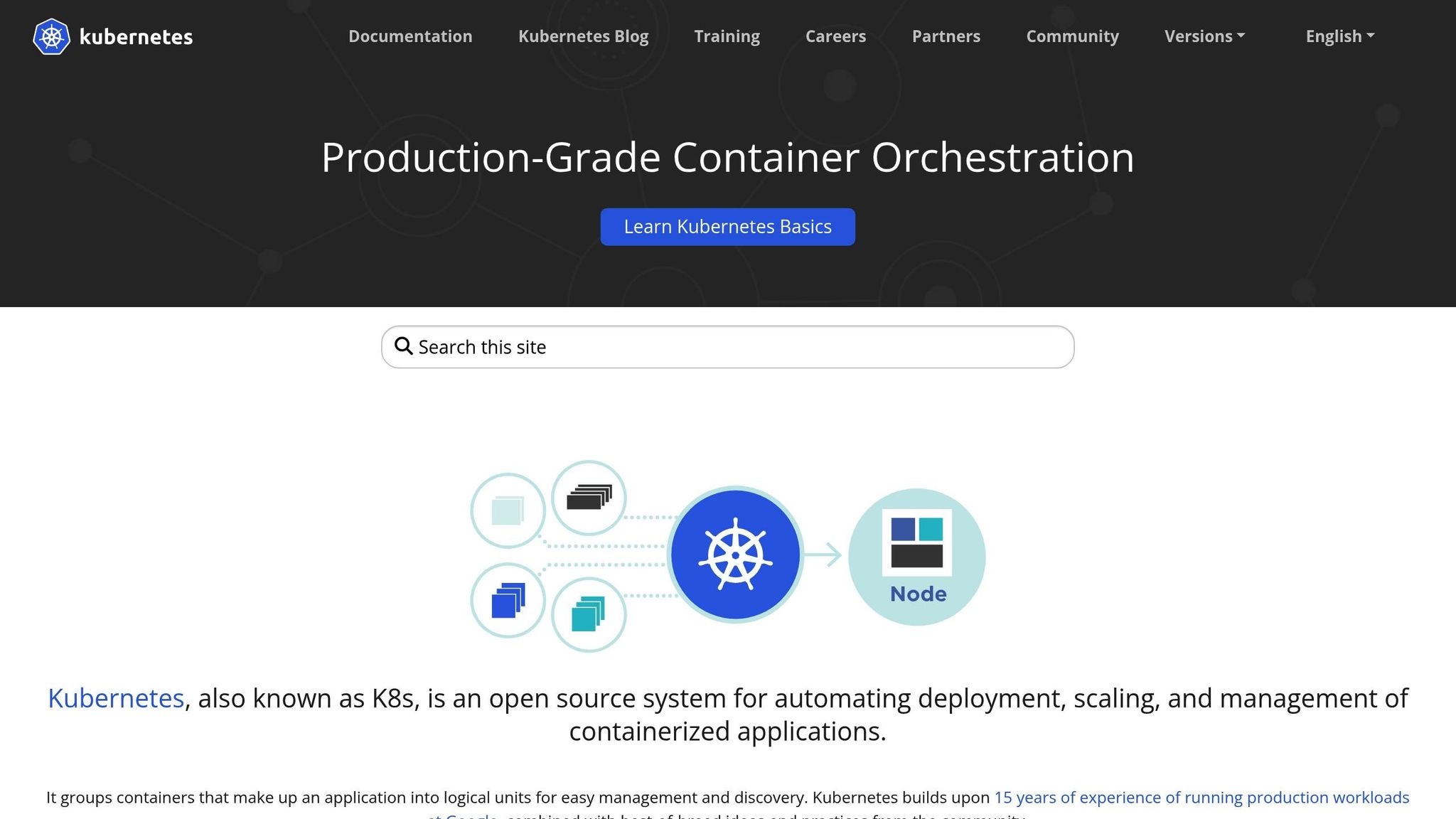
Kubernetes takes container management to the next level by automating tasks like scaling and self-healing. With tools like the Horizontal Pod Autoscaler, Kubernetes adjusts the number of running containers based on CPU usage or custom metrics, making it easy to handle traffic spikes or dips. By defining your desired state in YAML files, Kubernetes works to maintain that state, automatically restarting or rescheduling containers if something goes wrong.
For UK-based organisations managing multiple environments, Kubernetes namespaces and network policies offer a way to isolate development and testing environments logically. Production environments, which often have stricter security and compliance needs, can be kept in separate clusters. To further secure your pipeline, store container images in trusted registries such as Amazon ECR, Azure Container Registry, or Google Artifact Registry. These registries not only integrate seamlessly with CI/CD workflows but also support vulnerability scanning.
GitOps Tools and Automation
Once you have containerisation and orchestration in place, GitOps simplifies deployment and configuration management. With GitOps, your Git repository becomes the single source of truth for both application code and infrastructure configuration. Tools like Argo CD and Flux operate directly within your Kubernetes cluster, continuously monitoring your repository. When changes are merged, these tools automatically synchronise your cluster to match the updated configuration.
GitOps uses a pull-based model, which provides an added layer of security. CI/CD systems don’t need direct access to production, and any unauthorised changes are reverted to match the Git-stored configuration. This ensures complete auditability.
GitOps is the concept of declarative infrastructure stored in Git repositories... ensuring that all changes to your applications and clusters are stored in source repositories and are always accessible.- Google Cloud [9]
Managing complex Kubernetes manifests becomes easier with tools like Helm or Kustomize. These tools allow you to parameterise configurations, making it simple to deploy the same application with different settings across environments. Pairing them with infrastructure-as-code tools like Terraform or Pulumi enables automated provisioning of resources like VPCs, databases, or load balancers. Together, these tools create an automated, version-controlled deployment pipeline that supports independent service pipelines seamlessly.
Designing Independent Pipelines for Each Service
Managing dozens of microservices can quickly become chaotic if they're all lumped together in a single pipeline. To avoid bottlenecks and ensure smooth operations, each service should have its own dedicated pipeline. This setup allows for quicker builds, minimises risks from failures, and ensures each service can be deployed without impacting others. By isolating services, you prevent a single failure from stalling the entire delivery process.
Separating Builds and Tests
Independent pipelines work best when the build and test processes are also separated. For microservices, this starts with configuring proper triggers. If you're using a monorepo, path-based triggers are a must. Set up your CI/CD tool - whether it's GitHub Actions, GitLab CI/CD, or another platform - to trigger pipelines only when changes occur in a specific service directory, such as /src/payment-service/ or /src/user-authentication/. This approach avoids unnecessary builds, saving both time and costs.
Containerisation plays a vital role in the build process. Use multi-stage Docker builds to separate the build environment from the runtime environment. This not only reduces image size but also adds a layer of security. Build your container image once in the CI phase and reuse it across all environments. Avoid rebuilding images as they move through environments to prevent introducing untested code or environment-specific issues [9].
Testing should follow the same container-based approach. Package your test runner in a Docker container to ensure tests run in an environment identical to production. This also makes scaling your build agents easier. Stick to the test pyramid model: aim for 70% unit tests, 20% integration tests, 5% contract tests, and 5% end-to-end tests [7]. Run unit tests during the CI stage inside the build container, and include automated security scans to catch vulnerabilities before any code is merged.
Creating Reusable Pipeline Templates
Once you've isolated builds and tests, the next step is standardising your pipeline configurations. Instead of crafting unique pipelines for every service, use reusable templates. Tools like Codefresh make this straightforward by allowing variables in a single pipeline definition. For example, a codefresh.yml file can include variables like ${{CF_REPO_NAME}} and ${{CF_REPO_OWNER}} [10]. When a Git trigger fires for a specific service, these variables are automatically populated, enabling the same pipeline logic to handle multiple services. This approach is especially useful in organisations with extensive microservices - imagine managing 500 configurations manually for 50 applications, each with 10 services!
To simplify adoption, provide development teams with starter repositories tailored to common languages like Go, Python, or Java. These repositories can include pre-configured CI/CD templates and optimised container images. For instance, Google Cloud’s reference architecture offers starter repositories like app-template-python, which come with pre-configured kustomize bases, cloudbuild.yaml for CI, and skaffold.yaml for CD [8]. This setup ensures developers can hit the ground running while adhering to organisational best practices.
The whole pipeline is essentially the re-usable unit.- Codefresh [10]
When deploying to Kubernetes, Helm charts are a great tool for standardisation. They allow you to bundle multiple Kubernetes resources into a single versioned package with parameterised labels, selectors, and image tags [4]. This approach not only maintains consistency across microservices but also reduces the time required to set up new services.
Testing Strategies for Microservices
Testing microservices is a different ball game compared to testing monolithic applications. With distributed systems, it’s not just about ensuring individual components work - you also need to confirm that services communicate effectively. Striking the right balance between thorough test coverage and quick feedback is key. Ideally, your CI pipeline should finish in 10 minutes or less to keep developers moving efficiently [9]. This approach ensures developers get the feedback they need without unnecessary delays.
A solid testing strategy often follows the test pyramid model: 70% unit tests, 20% integration tests, 5% contract tests, and 5% end-to-end tests [7]. Unit tests focus on isolated functions, integration tests check communication between services and databases, and contract tests ensure APIs stay compatible as services evolve independently.
Unit, Integration, and Contract Testing
Contract testing plays a critical role in microservices. When different teams independently develop and deploy services, you need to ensure API changes don’t disrupt consumers. Consumer-Driven Contract (CDC) testing flips the usual approach by letting consumers define their expectations, which producers then guarantee. Tools like Pact can automate this process in your CI pipeline, catching potential issues before code merges [11].
Contract tests ensure that microservices adhere to their contract. They do not thoroughly test a service's behavior; they only ensure that the inputs and outputs have the expected characteristics.
Integration tests, on the other hand, should use real interfaces rather than mocks. This helps uncover issues like missing headers or mismatched data structures [11]. Component testing goes deeper, examining how a microservice behaves as a whole while mocking external dependencies. This can be done in-process
for speed or out-of-process
for a more thorough check, where the service is deployed in a test environment. End-to-end tests, while important for validating complete user journeys, should be kept to a minimum. They’re the slowest to run and the hardest to maintain.
Together, these testing methods ensure your CI/CD pipelines are robust, allowing services and their interactions to meet quality expectations.
Service Mesh for Canary Deployments
Once you’ve verified service functionality through testing, you can take it a step further with controlled canary deployments in production. A service mesh like Istio or Linkerd makes this possible by managing traffic at the infrastructure level. For example, you can route 10% of traffic to a new version while keeping an eye on error rates and latency [6]. If errors exceed 1%, the mesh can automatically roll back the changes - no manual intervention needed [5].
Testing in production with real user traffic bypasses the limitations of staging environments. A service mesh provides real-time metrics like latency, error rates, and throughput, and it can automatically promote a canary version if service level objectives (SLOs) are met [12]. This approach separates deployment from release, giving you precise control over who experiences new features while allowing instant rollbacks if something goes wrong [5][12].
Progressive Delivery with GitOps
GitOps redefines how releases are managed by using Git as the central source of truth for deployments. Instead of manually tweaking configurations or traffic routing, everything is outlined in Git manifests. Tools like Argo CD and Flux continuously monitor your repository, ensuring your live cluster aligns with the committed state [16].
For blue-green deployments, the process involves deploying the new version alongside the current one. Traffic is then switched instantly by updating a service selector or ingress configuration in Git. Canary releases, on the other hand, gradually route a small percentage of traffic to the new version while the majority continues to use the stable release. GitOps tools integrate seamlessly with service meshes like Istio or ingress controllers, allowing you to manage traffic weights directly from Git manifests [1][7]. Tools such as Flagger or Argo Rollouts automate this process, incrementally increasing traffic only if real-time metrics remain within acceptable limits. This tight integration brings together deployment strategies, rollback capabilities, and monitoring in a single workflow.
Drift occurs when the actual system state diverges from the desired state.
- Oussama ACHOUR, Platform Engineer [16]
GitOps' reconciliation loop addresses configuration drift by constantly comparing the live system against the desired state in Git. Any manual changes made to the cluster are automatically overwritten, ensuring the system stays aligned with your intended configuration [16]. This approach makes your production branch a complete, traceable history of all successful deployments [14].
Automated Deployments and Rollbacks
GitOps enforces consistency and traceability, much like independent pipelines. Rollbacks are straightforward - essentially just a Git operation. Instead of relying on dashboards or emergency scripts, you simply revert to a previous commit in your repository. The GitOps agent picks up the change and automatically updates the cluster to match the earlier, stable state [4][14][9].
The workflow revolves around pull requests (PRs). Any changes to your environment are proposed through PRs in the GitOps repository, allowing for automated checks like linting and policy validation before deployment [17][13][15]. This process not only ensures quality but also creates an audit trail for every change. To maintain traceability and enable reliable rollbacks, always tag container images with specific versions (e.g., v1.1.0) or Git commit SHAs instead of using latest
[16][7].
For more complex deployments involving multiple services, annotations like argocd.argoproj.io/sync-wave help coordinate the deployment order. This ensures that dependencies, such as databases, are ready before updating application layers [7]. Additionally, separating your application’s source code repository from the GitOps configuration repository enhances security and allows different lifecycles for code and infrastructure [13][14].
Adjust sync intervals to suit your environment. In development, frequent syncs (every 1–5 minutes) support rapid iteration, while production environments benefit from longer intervals (15+ minutes) or manual approvals to prioritise stability [16].
Once your deployments are automated, monitoring their performance becomes crucial.
Monitoring and Observability
Progressive delivery relies on real-time performance monitoring to ensure success. Define key performance indicators (KPIs) like latency, throughput, and error rates. Automated rollback mechanisms are often triggered when error rates exceed 5% or if p95 latency doubles during deployment [7].
Tools like Prometheus and Grafana provide the metrics needed to compare canary versions against stable baselines. Service meshes such as Istio or Linkerd offer detailed telemetry data, enabling precise traffic control by percentage or HTTP headers while collecting valuable performance insights [1][16].
Monitor drift and reconcile frequently: Use tools like Flux or Argo CD to continuously monitor for drift between the desired state in Git and the actual state in your environment. Ensure frequent reconciliation to maintain consistency and detect issues early.
- Dan Garfield, VP of Open Source, Octopus Deploy [18]
Tools like Flagger and Kayenta further enhance monitoring by comparing metrics and shifting traffic gradually as health checks are passed. For example, Prometheus alerts can be configured to trigger automatic rollbacks if latency thresholds are breached, such as ensuring 95% of requests stay under 200 milliseconds.
Post-deployment, validation steps like smoke tests and health endpoint checks are essential immediately after traffic shifts. With GitOps, every cluster change is logged, providing a detailed audit trail that is invaluable for troubleshooting and post-mortem analysis after failed deployments [18].
Scaling and Optimising CI/CD Pipelines
::: @figure 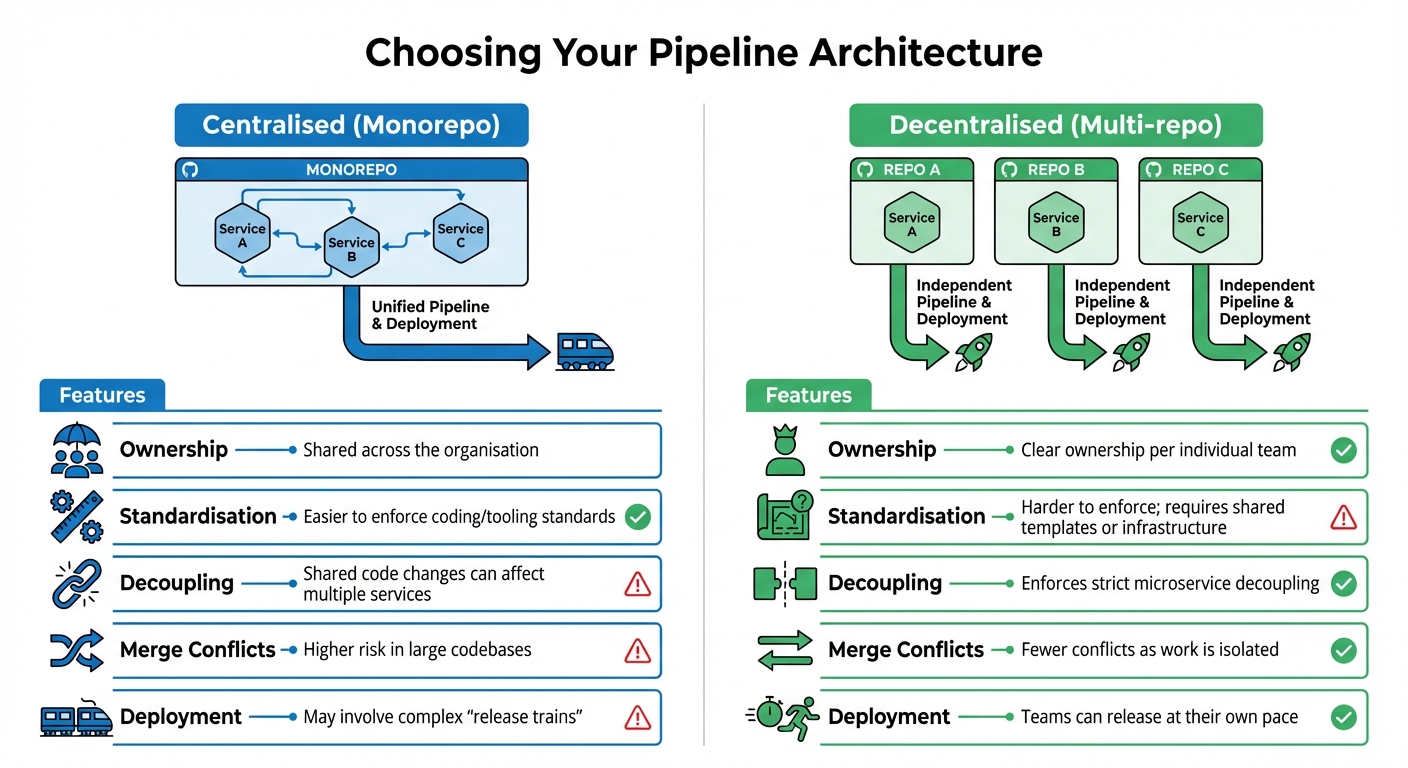 {CI/CD Pipeline Architecture Comparison: Centralised vs Decentralised Microservices}
:::
{CI/CD Pipeline Architecture Comparison: Centralised vs Decentralised Microservices}
:::
Once you've established robust, independent pipelines and embraced progressive delivery, the next challenge is scaling and fine-tuning your CI/CD setup. As microservices ecosystems grow, efficient pipelines and cost-conscious scaling become crucial. Whether your architecture is centralised (monorepo) or decentralised (multi-repo), it will directly impact team workflows and scalability.
Centralised vs Decentralised Pipelines
A centralised pipeline, often tied to a monorepo, houses all microservices within a single repository. This setup simplifies tool standardisation and shared code refactoring. However, it can lead to bottlenecks as teams may face delays when merging changes. On the other hand, decentralised pipelines, built around a multi-repo strategy, give individual teams clear ownership and the freedom to deploy independently without disrupting others’ workflows [1].
To strike a balance, consider adopting a unified framework that standardises core processes while allowing flexibility for service-specific needs.
| Feature | Centralised (Monorepo) | Decentralised (Multi-repo) |
|---|---|---|
| Ownership | Shared across the organisation | Clear ownership per individual team |
| Standardisation | Easier to enforce coding/tooling standards | Harder to enforce; requires shared templates or infrastructure |
| Decoupling | Shared code changes can affect multiple services | Enforces strict microservice decoupling |
| Merge Conflicts | Higher risk in large codebases | Fewer conflicts as work is isolated |
| Deployment | May involve complex release trains |
Teams can release at their own pace |
To minimise the challenges of decentralised pipelines, use a unified pipeline framework that standardises builds while allowing for service-specific customisations. Golden images - pre-configured parent images with essential settings and security dependencies - are another way to maintain central governance without stifling team autonomy [3].
Dynamic Resource Allocation
Dynamic resource allocation is a smart way to cut costs by only provisioning compute resources as needed. Tools like AWS CodeBuild and Google Cloud Build automatically scale to handle multiple builds simultaneously [3][19]. Multi-stage Docker builds are another effective technique, helping you create smaller, more efficient production containers [4].
For faster feedback, keep feature branch pipelines short (under 10 minutes) and reserve more comprehensive pipelines for merges into the main branch [9]. A great example is Webbeds, which reduced cloud costs by 64% and improved CPU performance by 40% by migrating non-critical tasks to spot instances. These strategies ensure your pipelines remain agile and cost-effective, even as demand fluctuates.
Hokstad Consulting's Optimisation Services

Hokstad Consulting specialises in helping UK businesses optimise their DevOps practices. They focus on implementing automated CI/CD pipelines and Infrastructure as Code strategies, delivering measurable results like:
- 30–50% reductions in infrastructure costs without compromising performance
- 75% faster deployment times
- 90% fewer errors
- 95% reduction in infrastructure-related downtime
- Annual savings of up to £96,000
Their services include real-time monitoring with AI-powered dashboards to detect anomalies early, robust disaster recovery plans with automated rollback mechanisms, and resource optimisation strategies like removing unused snapshots or using spot instances for non-critical tasks. They even offer flexible engagement models, including a no savings, no fee
option, where fees are capped as a percentage of the savings achieved. This ensures businesses only pay for tangible results.
Conclusion
Creating scalable CI/CD pipelines for microservices is about more than just automation - it’s about building independent, resilient systems that support quicker, more reliable deployments. By setting up individual pipelines for each service, implementing thorough testing strategies, and embracing progressive delivery methods like GitOps, teams can work independently and efficiently. In fact, high-performing teams using microservices deploy 208 times more frequently and achieve 106 times faster lead times compared to those relying on monolithic architectures [2].
Striking the right balance between standardisation and adaptability is key. Reusable pipeline templates and dynamic resource allocation ensure strong governance while keeping infrastructure costs under control. Given that 87% of production container images contain at least one known vulnerability [2], incorporating automated security scanning into pipelines is no longer optional - it’s essential. These measures lay the groundwork for scaling systems effectively.
However, as your microservices grow, so does the complexity of managing multiple pipelines. Scaling requires thoughtful architectural decisions and continuous optimisation to keep everything running smoothly in an increasingly intricate ecosystem.
FAQs
How do independent CI/CD pipelines minimise risks in microservices architecture?
Independent CI/CD pipelines give each microservice its own separate build, test, and deployment process. This means that if something goes wrong - whether it's during testing or deployment - it only affects the specific service in question, while the rest of the system continues to function as normal.
This separation allows for quick rollbacks or fixes without jeopardising the system's overall performance or availability. It's a key strategy for ensuring the reliability and scalability of applications built on microservices architecture.
How does GitOps improve security and auditability in CI/CD pipelines?
GitOps strengthens security and improves auditability in CI/CD pipelines by treating a Git repository as the single source of truth for both application code and infrastructure configurations. Changes are handled via version control workflows like pull requests, branch protections, and role-based access controls. This means deployment artefacts undergo the same thorough review process as your codebase. Plus, Git's immutable history provides a transparent audit trail, making it easy to track and reverse unauthorised or accidental changes.
Tools like Flux v2 play a key role by continuously monitoring and aligning the live environment with the configurations stored in Git. If unauthorised changes are detected, the system automatically reverts them, ensuring the environment stays compliant and consistent. This automated drift detection and self-healing mechanism not only minimises manual errors but also creates a detailed log of all changes. These logs can support audits and integrate into security monitoring systems, adding another layer of reliability to your operations.
How does dynamic resource allocation help reduce costs in microservices deployment?
Dynamic resource allocation helps cut costs by automatically adjusting the number of microservice instances to match real-time demand. This way, you're only charged for the computing power you actually use, eliminating waste from idle resources.
By scaling services up during busy periods and reducing them when demand drops, businesses can make better use of resources without compromising performance or reliability. This method works especially well in microservices architectures, where workloads often fluctuate significantly between services.