
Workload orchestration tools simplify and automate the management of cloud services, tasks, and resources into efficient workflows. These tools are essential for handling fluctuating workloads, optimising cloud costs, and supporting DevOps practices.
Here’s a quick look at the top 7 tools:
- ActiveBatch: Centralised orchestration for hybrid and multi-cloud setups with machine learning-driven scalability.
- Apache Airflow: Open-source, Python-based tool with strong community support, ideal for hybrid and multi-cloud environments.
- RunMyJobs by Redwood: SaaS platform tailored for hybrid environments, offering strong SAP integration and scalability.
- Prefect: Python-native orchestration tool with flexible deployment options and a focus on dynamic workflows.
- Azure Data Factory: Microsoft's cloud-based platform for data integration with serverless scaling and broad Azure ecosystem integration.
- Argo Workflows: Kubernetes-native orchestration designed for containerised workloads and event-driven triggers.
- Control-M: Enterprise-grade workload automation platform with strong hybrid cloud and legacy system support.
Key Features to Consider:
- Deployment Models: On-premises, cloud-native, hybrid, or Kubernetes-native.
- Scalability: Ability to handle workload spikes with features like auto-scaling or dynamic provisioning.
- Integration Options: Compatibility with cloud platforms, databases, and CI/CD tools.
- Pricing: Open-source, pay-as-you-go, or enterprise subscription models.
Quick Comparison
| Tool | Deployment Model | Scalability | Integration Options | Pricing Model |
|---|---|---|---|---|
| ActiveBatch | Hybrid, multi-cloud | Predictive scaling | 300+ native adapters | Custom enterprise quotes |
| Apache Airflow | Open-source, cloud | High via executors | 1,000+ integrations | Free; managed services fee |
| RunMyJobs | SaaS-first, hybrid | Scalable architecture | 1,000+ technologies | Usage-based pricing |
| Prefect | Self-hosted or managed | Decoupled execution | Python-native APIs | Free core; subscription |
| Azure Data Factory | Managed cloud (Azure) | Serverless | 200+ connectors | Pay-as-you-go |
| Argo Workflows | Kubernetes-native | Container-based | Kubernetes ecosystem | Free, open-source |
| Control-M | Hybrid, multi-cloud | AIOps-powered | 600+ technologies | Custom enterprise quotes |
Choosing the right tool depends on your team's skills, infrastructure, and workload needs. Whether you prefer open-source flexibility or managed simplicity, these tools can help streamline operations and reduce inefficiencies.
::: @figure 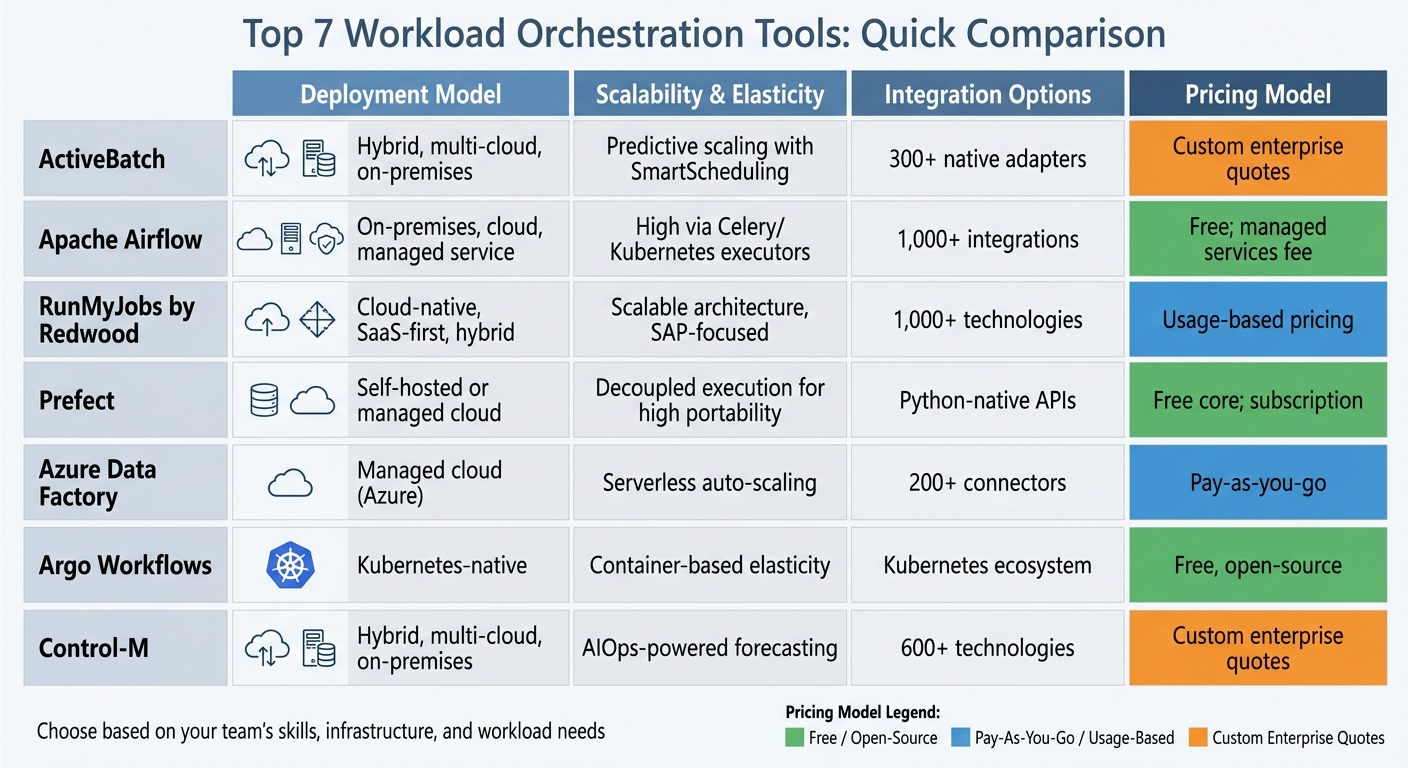 {Workload Orchestration Tools Comparison: Features, Deployment & Pricing}
:::
{Workload Orchestration Tools Comparison: Features, Deployment & Pricing}
:::
Choose the Right Data Orchestration Tool for Your Needs
Need help optimizing your cloud costs?
Get expert advice on how to reduce your cloud expenses without sacrificing performance.
1. ActiveBatch

ActiveBatch serves as a centralised orchestration tool designed to manage fragmented IT workloads. Recognised as a Leader in the 2024 Gartner Magic Quadrant for Service Orchestration and Automation Platforms, it simplifies the management of complex hybrid and multi-cloud environments through its unified orchestration capabilities [5].
Support for Hybrid and Multi-Cloud Environments
ActiveBatch bridges the gap between on-premises data centres and major cloud providers like Amazon EC2, Microsoft Azure, VMware, and Google Cloud. Its agentless design supports over 50 platforms, including Windows, Linux, IBM i, and mainframes, making administration more straightforward. The platform also features a library of more than 175 pre-built job steps and a REST API adapter, enabling seamless integration with cloud platforms and custom applications [5].
Scalability for Bursting Workloads
ActiveBatch is built to handle workload surges with ease. Its SmartScheduling feature uses predictive analysis to allocate virtual resources on demand. The system dynamically adjusts capacity by scaling virtual systems up or down across environments such as VMware, Amazon EC2, and Microsoft Azure. Using machine learning, Heuristic Queue Allocation assigns workflows to the most suitable machines, while generic queues ensure balanced job distribution. The distributed, client-server architecture allows Job Schedulers and Execution Agents to operate across multiple machines, supporting high-volume processing [5].
Integration with Existing Systems and Tools
ActiveBatch works seamlessly with existing ITSM systems and custom applications. With its Super REST API Adapter and PowerShell module, it orchestrates custom applications and emerging technologies like IoT. It also offers two-way integration with ITSM tools such as ServiceNow and includes a business user self-service portal to reduce IT bottlenecks. For instance, a wealth management company automated 99% of its jobs using ActiveBatch, while the government entity Vero Skatt achieved a 90% reduction in manual tasks through automated workflows and triggers [5][6].
Automation and Scheduling Features
ActiveBatch goes beyond traditional time-based scheduling by offering event-driven triggers that activate workflows based on specific system conditions. This approach ensures resources are only used when required, helping to reduce cloud costs. The platform also includes SLA monitoring with real-time alerts, ensuring service level agreements are maintained even during workload spikes. ActiveBatch operates on a usage-based pricing model and provides a 30-day free trial for users to explore its capabilities [7].
2. Apache Airflow
Building on ActiveBatch's enterprise-level orchestration, Apache Airflow provides an open-source, developer-focused alternative backed by a strong community.
Apache Airflow is a popular tool for orchestrating workloads, widely used across industries. As of April 2025, it records over 30 million monthly downloads and is utilised by more than 80,000 organisations worldwide [14]. Licensed under Apache Licence 2.0, it is free to use, though managed services are available from providers like AWS and Google Cloud, billed on a usage-based model [8][15].
Support for Hybrid and Multi-Cloud Environments
Airflow's modular design and provider-based system make it highly adaptable for orchestrating workloads across multiple environments. It features plug-and-play operators for leading cloud platforms, including AWS, Google Cloud, Microsoft Azure, and IBM Cloud [8]. By abstracting infrastructure differences, it can coordinate cloud services, containers, and APIs using Directed Acyclic Graphs (DAGs) [12].
The release of Airflow 3.2.0 on 7 April 2026 brought major updates, including Multi-Team Deployments (AIP-67). This feature allows organisations to operate isolated teams within a single deployment, each using different executors like Celery, Kubernetes, or AWS ECS, depending on their cloud environment [10]. This setup supports hybrid models by creating a provider-neutral orchestration layer while enabling tasks to run on dynamically provisioned hardware across various clouds [12][13].
Scalability for Bursting Workloads
Airflow's architecture supports scaling to handle fluctuating workloads. It leverages Kubernetes, Celery, or Edge Executors to manage bursty demands. For example:
- The Kubernetes Executor dynamically creates individual pods for each task.
- The Celery Executor scales through distributed worker pools.
- The newer Edge Executor runs tasks on edge devices outside central data centres [8].
With Airflow 3.0, a Task Execution Interface was introduced, separating task execution from the core scheduler. This client-server setup enhances security and scalability across hybrid and multi-cloud environments. Backfills were also integrated into the scheduler, enabling better control and diagnostics when processing historical data [14].
Integration with Existing Systems and Tools
Airflow boasts a vast library of pre-built operators, enabling seamless integration with major cloud services, databases, and data tools like Snowflake, dbt, Databricks, and BigQuery [8][17]. It supports containerisation via Kubernetes and Docker, integrates with secret managers for secure operations, and includes features like Role-Based Access Control (RBAC) and Kerberos authentication [17].
Workflows are defined in Python, making it easy to use version control, test pipelines, and collaborate on development [9]. This pipelines as code
approach supports CI/CD workflows and modular development. Recent updates, such as the Common AI Provider for native integration with large language models (LLMs), reflect Airflow's readiness for AI-driven workloads [8][10]. These capabilities pave the way for advanced, event-driven scheduling.
Automation and Scheduling Features
Airflow 3.0 introduced event-driven scheduling through Watchers
and a Common Message Bus
, allowing DAGs to respond to external events like messages in AWS SQS [14]. The platform has also shifted towards asset-centric orchestration, focusing on data assets (e.g., S3 paths or BigQuery tables) rather than individual tasks [10][11].
Airflow 3.1 puts humans at the centre of automated workflows. 3.2 brings that same precision to data.
- Rahul Vats, Apache Airflow [10]
With the asset partitioning feature in Airflow 3.2.0, downstream DAGs trigger only when specific data slices are updated. This reduces unnecessary compute costs [10]. The platform has earned a 4.4/5 rating on G2. Users appreciate its flexibility and the strong community backing, though some highlight the steep learning curve for self-hosted setups [11].
3. RunMyJobs by Redwood
RunMyJobs by Redwood is a SaaS platform tailored for businesses handling complex, mission-critical workloads across hybrid environments. It's built to ensure reliability and performance, making it a standout choice for enterprise automation.
The platform processes billions of jobs yearly, maintaining an impressive 99.95% uptime. It has also earned recognition as a Leader in the 2025 Gartner Magic Quadrant for SOAP for the second year in a row [18][21]. Additionally, it took the top spot in all five Use Cases in Gartner's Critical Capabilities report [18][21]. RunMyJobs uses a value-based pricing model, combining a single platform fee with capacity-based scaling. Enterprises can also take advantage of a trial period, which includes dedicated onboarding support to ensure a smooth evaluation process [18][7].
Support for Hybrid and Multi-Cloud Environments
RunMyJobs offers a centralised control plane, allowing organisations to manage applications, data, and infrastructure seamlessly across on-premises, public cloud, and private cloud setups [18][19]. Its agentless architecture relies on a secure gateway to bridge these environments [18][22].
The platform includes native integrations for major cloud providers like AWS (EventBridge, EC2, SQS), Microsoft Azure (Service Bus, Event Grid, Synapse), and Google Cloud Platform through its hyperscaler connector catalogue [18][22]. It supports a wide range of operating systems, including Windows, Linux, macOS, AIX, HP-UX, Solaris, and IBM i [18]. With over 500 pre-built connectors and compatibility with REST, SOAP, and OData APIs, it integrates easily into existing hybrid setups. For custom needs, the low-code connector wizard simplifies deployment [18][20][22].
Scalability for Bursting Workloads
RunMyJobs' SaaS-native design makes it easy for enterprises to scale automation without worrying about infrastructure limits or manual hardware adjustments [19][7]. Built-in workload routing and load balancing ensure smooth performance, even during high-demand periods. Users can set execution priorities to maintain service levels during spikes in workload. For instance, Whitbread leverages the platform to handle 1.3 million critical file transfers monthly without any errors [18].
The platform also excels at managing high-volume batch jobs, with lightweight, self-updating agents enabling quick deployment and scaling across hybrid environments.
Integration with Existing Systems and Tools
RunMyJobs integrates seamlessly into existing IT ecosystems. Its API-first approach allows for smooth integration into CI/CD pipelines via native connectors and Directed Acyclic Graphs (DAGs) [20]. It supports over 25 scripting languages, such as Python, PowerShell, Java, and R [18][21].
The platform's bi-directional integration with ITSM tools like ServiceNow automates service requests and can trigger incident reports or self-recovery actions [18]. As the only SAP-endorsed Premium certified orchestration platform in the SOAP category, it offers deeper integration capabilities than standard job schedulers [19][22]. Developers can choose between a low-code visual workflow studio or a programmatic approach to adapt workflows as requirements evolve [20].
Redwood is the crucial process automation component that acts as the glue holding together the entire solution.
- Thierry Schafflützel, IT Project Manager, UBS [18]
Automation and Scheduling Features
RunMyJobs supports event-driven orchestration, enabling workflows to trigger based on real-time events, file arrivals, or data updates [19][21]. The platform includes Redwood RangerAI
, an intelligence layer that offers AI-driven script generation, predictive SLA monitoring, and automated self-recovery [18][19].
At Epson, these automation capabilities saved 84 man-hours per quarter - equivalent to 10.5 days - allowing specialists to focus on other priorities [18]. The AI Automation Co-pilot can generate scripts from natural language and document workflows with a single click. Moreover, its high availability and disaster recovery features ensure consistent performance, even during workload surges [18][23].
4. Prefect
Prefect stands out among orchestration tools with its flexible, Python-native design tailored for dynamic workflows. With over 11.3 million downloads monthly and 22.3k stars on GitHub [24], it’s a popular choice for teams handling data-heavy processes. Prefect offers an open-source core alongside a managed cloud service, giving users the freedom to customise deployment and scale as needed.
Prefect Cloud uses a developer-based pricing model, charging per user instead of by workflow volume or task execution [27]. It includes a free hobby tier for small teams (2 users and 5 workflows), with Pro and Enterprise tiers available for larger organisations needing advanced features like single sign-on and governance tools. With a 99.99% uptime guarantee and the ability to handle over 100,000 tasks per minute, Prefect is built for reliability and performance [24][27].
Scalability for Bursting Workloads
Prefect’s architecture separates the control plane from execution, allowing workflows to independently manage their task graphs [26]. It supports dynamic task creation using features like mapping and works with pluggable runners such as DaskTaskRunner and RayTaskRunner, enabling over 20,000 parallel tasks [26]. Some users have reported throughput improvements of up to 20× thanks to asynchronous processing [29].
The platform also supports push and managed work pools, which allow workflows to run directly on serverless infrastructures like AWS ECS, Azure Container Instances, or Google Cloud Run. These infrastructures can scale to zero when idle and expand on demand, eliminating the need for a persistent worker fleet [25][27]. This flexibility makes Prefect a strong choice for managing workloads that require rapid scaling.
Integration with Existing Systems and Tools
Prefect integrates easily into Python workflows. Using simple decorators, any Python function can be converted into an orchestrated task - no complex DSLs or YAML configurations required [24][27]. It also supports event-driven automation via an active event bus, enabling workflows to respond in real time to triggers like webhooks, cloud events, or Kafka topics [13].
Prefect’s hybrid execution model ensures that sensitive data remains within your infrastructure while using Prefect Cloud as the control plane. Workers poll the Prefect API for instructions, enabling execution across diverse environments like Kubernetes, Amazon ECS, Docker, or on-premises machines, all while maintaining centralised management [28][30].
We took all the Prefect features and designed an architecture that really works for our infrastructure provisioning and our organisation- Wendy Tang, Machine Learning Engineer, Cash App [24]
Cash App saw a 2× increase in deployment speed using Prefect Cloud [24]. Endpoint also benefited significantly, cutting invoice costs by 73.78% after switching from Astronomer to Prefect. Sunny Pachunuri, Data Engineering and Platform Manager at Endpoint, noted:
The Data Engineering and MLOps teams were impressed by the elimination of retrofitting requirements- Sunny Pachunuri, Data Engineering and Platform Manager, Endpoint [24][27]
These integration features highlight Prefect’s ability to streamline automation and scheduling across various systems.
Automation and Scheduling Features
Prefect simplifies automation with built-in retry logic, customisable delay and jitter settings, and automated backup launches [13][26]. Dynamic task mapping allows workflows to create thousands of individual task runs at runtime, each with its own retry lifecycle and observability [13].
For high-scale operations, Prefect recommends tasks run for at least a few seconds. For shorter operations, batching (e.g., processing 100 items per task) can reduce orchestration overhead [26]. As Smit Shah, Director of Engineering at Snorkel AI, shared:
We improved throughput by 20× with Prefect. It's our workhorse for asynchronous processing - a Swiss Army knife. We run about a thousand flows an hour- Smit Shah, Director of Engineering, Snorkel AI [29]
5. Azure Data Factory
Azure Data Factory (ADF) is Microsoft's cloud-based platform for data integration, tailored to manage and automate large-scale data movement and transformation. With over 15,014 companies using it and holding a 4.68% share of the data integration market, ADF is the second-largest player in this sector [32]. Microsoft has also been named a Leader in the Gartner Magic Quadrant for Data Integration Tools for five consecutive years as of 2025 [32]. The platform enjoys high user ratings, scoring 4.5/5 on G2 and Gartner Peer Insights, and 8.2/10 on TrustRadius [32].
ADF operates on a consumption-based pricing model, allowing users to pay as they go, with discounts for long-term commitments. For example, the Azure Hybrid Benefit can lead to savings of up to 88% [32][33]. However, some users have flagged unpredictable billing as a concern, especially since failed runs still incur costs. Running small proof-of-concept projects is often recommended to estimate monthly expenses before scaling up [32]. Beyond cost efficiency, ADF dynamically manages resources, ensuring smooth handling of workload spikes. Here's a closer look at its capabilities, from hybrid connectivity to automation.
Support for Hybrid and Multi-Cloud Environments
ADF provides three types of Integration Runtime (IR) to fit various deployment needs: Azure-hosted for cloud-based transfers, Self-hosted for hybrid setups, and Azure-SSIS for running older SSIS packages [32]. The Self-hosted IR is particularly useful for securely connecting on-premises databases like SQL Server or Oracle to the cloud without needing to open firewall ports [32]. While ADF works seamlessly within the Azure ecosystem, connecting to other cloud services such as AWS or GCP can sometimes require additional configuration due to limited connector options [32]. Nevertheless, the platform offers over 90 built-in connectors for SaaS applications, databases, and file systems, with Microsoft guaranteeing up to 5 Gbps of network throughput for data ingestion [32][33].
Scalability for Bursting Workloads
ADF's serverless design means compute resources are automatically scaled based on workload demands, removing the need for manual adjustments [32]. The Azure-hosted IR handles scaling on demand, while Mapping Data Flows run on managed Apache Spark clusters capable of processing data ranging from gigabytes to terabytes [31][32]. For even heavier tasks, ADF can integrate with Azure Databricks to trigger on-demand cluster provisioning [31]. Microsoft also ensures that scheduled activities begin within four minutes 99.9% of the time, making ADF a strong choice for organisations with varying data processing requirements [33].
Integration with Existing Systems and Tools
ADF supports both visual (GUI-based) and code-driven (JSON/Python) orchestration methods [36]. While it previously offered a managed Apache Airflow service, Microsoft now encourages users to transition to Microsoft Fabric for new workloads [34]. Many users appreciate the platform's low-code visual builder [32]. However, some have noted issues like vague error messages and a laggy interface when working with larger pipelines [32]. Donal Tobin from Integrate.io commented:
The classic ADF product has received minimal feature updates... New capabilities - mirroring, copy jobs, enhanced monitoring - are shipping exclusively in Fabric Data Factory.
[32]. In March 2026, Microsoft introduced a migration assistant for ADF pipelines in public preview, signalling a shift towards the Fabric platform. Teams starting new projects might want to consider Fabric, as newer features like mirroring and copy jobs are only available there [32].
Automation and Scheduling Features
ADF uses pipelines to group related tasks, simplifying workflows [35]. Automation is driven by three types of triggers: wall-clock schedules for routine intervals, tumbling windows for periodic processing, and event-based triggers for actions like file uploads or custom events [35]. The platform also supports advanced orchestration, such as activity chaining, branching, looping with For-each iterators, and conditional logic [35]. Pipelines allow for flexibility by incorporating parameters for configuration and variables for temporary values, enabling arguments to pass between tasks [35]. Users can monitor activity runs visually and set up proactive alerts through Azure alert groups to quickly address issues [33]. Additionally, ADF supports full CI/CD processes via Azure DevOps and GitHub, enabling incremental development and automated deployments [35].
6. Argo Workflows
Argo Workflows is an open-source orchestration engine designed specifically for Kubernetes, widely recognised among cloud teams. As a project under the Cloud Native Computing Foundation (CNCF), it has been adopted by over 200 organisations, including Adobe, Google, GitHub, and IBM [37]. Operating as a Kubernetes Custom Resource Definition (CRD), it runs each workflow step as a container, making full use of Kubernetes' scalability [37]. By early 2021, the project had gained significant traction, with over 373 contributors and 7,300 GitHub stars [40]. Alex Collins, Principal Software Engineer on Argo at Intuit, describes it as:
Argo Workflows is a cloud-native workflow engine that can run tens of thousands of concurrent workflows with thousands of steps each.[40]
This capability makes Argo particularly effective for handling workloads that spike unpredictably across diverse setups.
Support for Hybrid and Multi-Cloud Environments
Argo's design allows it to function on any Kubernetes cluster, whether hosted on-premises or in public clouds such as AWS, GCP, or Azure [37]. It integrates seamlessly with storage solutions like AWS S3, Google Cloud Storage, Azure Blob Storage, Alibaba Cloud OSS, and Git [37]. With Argo Events, workflows can be triggered by a variety of sources, including AWS Lambda, Azure Event Hubs, GCP Pub/Sub, and messaging systems like SNS or SQS [39]. Furthermore, Argo supports running workflows across multiple Kubernetes clusters, enabling hybrid cloud strategies. This flexibility ensures that organisations can maintain efficient orchestration regardless of their infrastructure setup.
Scalability for Bursting Workloads
Argo Workflows is built to scale horizontally, with its server capable of handling high volumes of API and webhook requests through load balancing. The Workflow Controller supports high availability via leader election and multiple replicas [41]. To reduce strain on the Kubernetes control plane during peak loads, Argo can delete pods automatically upon completion using the OnPodCompletion strategy [42]. For workflows that exceed Kubernetes' 1MB etcd object limit, status data can be offloaded to external databases [43]. Teams can also set limits on the number of concurrent pods or workflows to prevent overloading cluster resources [41]. Additionally, Workflow TTL strategies help by automatically cleaning up completed workflows after a specified time [42].
Integration with Existing Systems and Tools
Argo Workflows integrates smoothly with existing tools and systems, enhancing its usability. It connects directly with the Kubernetes API and CLI while supporting popular artifact repositories like Amazon S3, Google Cloud Storage, Azure Blob Storage, Artifactory, and HTTP [45]. It also works with version control platforms such as GitHub, GitLab, and Bitbucket for triggering workflows via webhooks. Moreover, it pairs with tools like BuildKit for image creation, Trivy for vulnerability scanning, and Kubescape for manifest security [46]. Developers can leverage client libraries in languages like Python, Java, Golang, and TypeScript [45]. A notable example of its efficiency is Riskified's Full Stack team, which used Argo Workflows in September 2022 to reprocess billions of historical records. By switching from a manual EC2-based process to parallelised Argo workflows, they reduced processing time from weeks to just a few days, integrating PostgreSQL, Elasticsearch, and AWS Spot Instances to optimise costs [47].
Automation and Scheduling Features
Argo supports a variety of automation and scheduling options, allowing workflows to be triggered through Argo Events, REST APIs, or CronWorkflows, making it suitable for both event-driven and time-based tasks [45]. It accommodates complex dependencies using Directed Acyclic Graphs (DAGs) or step-based workflow declarations [44]. To simplify reuse, Workflow Templates
and Cluster Workflow Templates
allow teams to store and share workflow definitions across namespaces or clusters [37]. Argo provides nine template types, including Container, Script, Resource (for Kubernetes operations), and HTTP templates for web requests [38]. Its user interface enhances usability, offering visualisation tools for both DAG and step-based workflows, alongside an event-flow page to map out connections between event sources and sensors [37]. Additionally, Kubernetes Persistent Volume Claims (PVCs) enable file sharing between workflow steps, such as cloning a repository in one step and building it in another [48].
7. Control-M
Control-M, developed by BMC Software, is an enterprise workload automation platform designed to streamline workflows across a variety of IT environments. It acts as a centralised control hub, managing workflows that span on-premises data centres, cloud platforms like AWS, Azure, and Google Cloud, as well as legacy systems such as mainframes running z/OS. This ensures seamless coordination and oversight, no matter where the workloads operate [50].
Support for Hybrid and Multi-Cloud Environments
Control-M simplifies workflow management across both traditional and modern infrastructures. It connects mainframes, private clouds, and public cloud providers, offering a unified solution for organisations juggling legacy systems alongside newer cloud services. By bridging the gap between outdated and contemporary technologies, it ensures consistent monitoring and governance across all platforms [50].
What’s more, Control-M adapts effortlessly to varying workload demands, making it ideal for businesses with fluctuating operational needs.
Scalability for Bursting Workloads
The platform is built to handle unpredictable workload spikes with ease. It keeps a close eye on job run times, dependencies, and resource availability, ensuring critical workflows are completed on schedule. If deadlines are at risk, it automatically escalates issues. Predictive analytics identify potential bottlenecks, while its API-first design allows workflows to be triggered dynamically by external events, offering real-time adaptability.
Control-M also includes self-healing automation, which resolves issues automatically, maintaining smooth performance even during high-demand periods. With over 500 native integrations and near-perfect uptime, it’s a reliable solution for managing complex workloads [49][50].
Integration with Existing Systems and Tools
Seamless integration is one of Control-M’s standout features. It works with CI/CD tools like Azure DevOps and Jenkins to automate the building, testing, and deployment of job definitions. Developers can use its Jobs-as-Code feature to define, version, and deploy workflows in JSON or YAML, treating automation as part of the DevOps pipeline [51].
Jagmohan Singh, a Data Engineer, highlights its value:
Control-M provides an end-to-end view of data pipelines, allowing users to manage business SLAs and ensure data pipeline service delivery.[52]
Workflows can also be managed using tools like Git for version control, encouraging collaboration between development and operations teams. With over 500 pre-built integrations for services like AWS Lambda, Azure Functions, Databricks, GCP, SAP, and Snowflake, Control-M ensures workflows are smoothly automated. Additionally, its automated conversion tools can cut migration times from legacy schedulers by up to 99% [50].
Automation and Scheduling Features
Control-M offers robust automation capabilities through its RESTful Automation API, enabling external tools to trigger, manage, and monitor workflows programmatically [51]. Its user-friendly web and mobile interfaces allow teams to oversee workflows from anywhere. Deploy Descriptors simplify transitions through the CI/CD pipeline by automatically adjusting job properties like hostnames or file paths.
To top it off, real-time dashboards and predictive analytics provide a clear view of workflow execution and flag potential issues, ensuring operations run smoothly [50].
Comparison Table
The table below provides a side-by-side look at how seven tools compare in terms of deployment, scalability, integrations, and pricing.
| Tool | Deployment Model | Scalability & Elasticity | Integration Options | Pricing Model |
|---|---|---|---|---|
| ActiveBatch | Hybrid, multi-cloud, on-premises | Enterprise-grade with robust SLA monitoring | 300+ native adapters | Custom enterprise quotes based on volume |
| Apache Airflow | On-premises, cloud, managed service | High via Celery/Kubernetes executors | Extensive library of operators (1,000+ integrations) | Open-source (free); managed versions incur service fees |
| RunMyJobs by Redwood | Cloud-native, SaaS-first, hybrid | Scalable hybrid architecture; SAP-focused | 1,000+ technologies | Consumption-based pay-per-use model |
| Prefect | Self-hosted or managed cloud | Decoupled execution for high portability | Python-native with clear APIs | Open-source core; managed cloud subscription for advanced features |
| Azure Data Factory | Managed cloud (Azure) | High (serverless/auto-scaling) | Native Azure plus 200+ connectors | Consumption-based (pay-as-you-go) |
| Argo Workflows | Kubernetes-native | High elasticity (container-based) | Kubernetes ecosystem (Helm, Istio) | Open-source (free) |
| Control-M | Hybrid, multi-cloud, on-premises | AIOps-powered forecasting; superior scalability | 600+ technologies | Custom enterprise quotes based on complexity |
Each tool brings distinct advantages to the table. Apache Airflow and RunMyJobs by Redwood excel in integration variety, with over 1,000 options, making them ideal for businesses managing diverse technology ecosystems. Meanwhile, Control-M shines with its AIOps-powered forecasting and scalability, which has earned it an impressive 9.4/10 rating [4].
For teams dealing with fluctuating workloads, Kubernetes-native solutions like Argo Workflows and Apache Airflow (when deployed with Kubernetes executors) offer top-notch elasticity [16][1]. This highlights the value of tools that feature smart auto-scaling capabilities.
When it comes to pricing, the options vary widely. Open-source tools such as Apache Airflow and Argo Workflows are free to deploy, though managed versions come with service fees. On the other hand, enterprise-focused platforms like Control-M, ActiveBatch, and RunMyJobs require tailored quotes based on factors like workload volume and complexity. Azure Data Factory, however, adopts a pay-as-you-go consumption-based pricing model [4][2].
Conclusion
Workload orchestration has grown beyond simple task scheduling to become a central tool for managing cloud costs and enabling DevOps transformations. Poor coordination can lead to significant inefficiencies - studies show that only 13% of requested CPU capacity is utilised across Kubernetes clusters, leading to an estimated 21% of cloud infrastructure spending being wasted. This could amount to roughly £44.5 billion by 2025 [2][53].
The solutions discussed here tackle these inefficiencies in different ways. Apache Airflow and Argo Workflows provide extensive flexibility, ideal for teams with strong Python and Kubernetes skills. Meanwhile, Azure Data Factory and RunMyJobs by Redwood offer managed services that reduce operational complexity. For hybrid environments that combine legacy systems with modern cloud setups, Control‑M and ActiveBatch stand out. All these tools support DevOps practices by integrating governance‑as‑code and Git‑based workflows, which allow for safer pre-production testing.
Choosing the right tool requires balancing technical capabilities against costs. Open-source tools, for instance, avoid licensing fees but require significant engineering resources for maintenance and customisation. Managed services, on the other hand, ease this burden but come with subscription costs. Organisations must also assess whether they need pure workflow orchestration or data orchestration with additional features like lineage tracking - an especially important consideration in regulated industries.
Hokstad Consulting specialises in helping organisations navigate these decisions. Their services include auditing existing architectures to pinpoint integration needs and optimising resource allocation to boost CPU utilisation. They also implement automated scaling policies to better align resource usage with demand, reducing the inefficiencies of static provisioning. Recognising the skill demands of tools like Kubernetes, they address the challenges smaller teams face, where maintaining such systems can require up to one senior engineer [2].
With 90% of organisations expected to adopt Service Orchestration and Automation Platforms by 2026 [3], having the right orchestration strategy is now essential. The key lies in aligning tool capabilities with your hybrid cloud architecture, team expertise, and cost management objectives.
FAQs
How do I choose between open-source and managed orchestration?
Choosing between open-source and managed workload orchestration depends on what your organisation values most: control, flexibility, or ease of use. Open-source tools are great if you need transparency and the ability to customise your setup. They also benefit from community-driven updates and ideas. However, they require skilled in-house teams to handle maintenance and troubleshooting.
On the other hand, managed solutions are designed for simplicity. With vendor support, straightforward setup, and built-in scalability, they’re perfect for teams that lack extensive DevOps resources. Ultimately, it’s about finding the right balance between control and convenience while considering your team’s technical skills and your operational goals.
Which tool fits best for bursting workloads on Kubernetes?
KEDA is a strong option for handling bursting workloads on Kubernetes. It provides event-driven autoscaling, supporting a wide range of triggers and workload types. This allows resources to scale efficiently based on demand, making it ideal for managing dynamic workloads.
What should I watch for with pay-as-you-go orchestration costs?
Pay-as-you-go orchestration costs can sometimes catch you off guard because they depend heavily on how much you use certain resources. The main areas to keep an eye on are compute, storage, and network consumption. These can change a lot depending on the demands of your workloads. By monitoring these factors closely, you can stay on top of your spending and avoid surprises.