
Traffic shaping is essential for rolling out application updates safely and efficiently. It allows teams to control how traffic is distributed between different versions, enabling gradual deployments, testing, and quick rollbacks. Here’s a quick look at five tools that excel in this area:
- Istio: Offers precise traffic control with features like percentage-based traffic splitting, traffic mirroring, and fault injection. Ideal for complex setups requiring advanced routing.
- Linkerd: A lightweight service mesh focused on simplicity and performance. It supports dynamic routing and detailed observability.
- Argo Rollouts: A Kubernetes-native controller that automates progressive rollouts, supporting canary and blue-green deployments.
- NGINX Ingress Controller: Provides Layer 7 traffic management with weighted routing, header-based rules, and low resource consumption.
- LaunchDarkly: Operates at the application layer using feature flags for user-specific traffic control, bypassing infrastructure changes.
Each tool caters to different needs, from Kubernetes-native solutions to application-layer traffic management. Below is a quick comparison to help you choose the right one.
Quick Comparison
| Tool | Traffic Control Features | Deployment Strategies Supported | Integration with Observability | Kubernetes Support | Resource Usage |
|---|---|---|---|---|---|
| Istio | Traffic splitting, mirroring, fault injection | Canary, Blue-Green, A/B testing | Prometheus Metrics | High (CRDs, Gateway API) | Moderate (sidecar proxies) |
| Linkerd | Dynamic routing, mTLS security | Canary, Blue-Green | Built-in metrics (Viz) | High (CRDs) | Low (lightweight proxy) |
| Argo Rollouts | Automated traffic shifts, header-based routing | Canary, Blue-Green | Prometheus, Datadog, others | High (K8s-native) | Low (controller-based) |
| NGINX Controller | Weighted routing, header/cookie-based rules | Canary, Blue-Green | Prometheus Metrics | High (Ingress, Gateway) | Very Low |
| LaunchDarkly | Feature flags, user-specific routing | Canary, Targeted Rollouts | Application-layer metrics | Not Kubernetes-native | Minimal (no infra changes) |
Choose a tool based on your team’s expertise, infrastructure needs, and traffic control requirements.
::: @figure 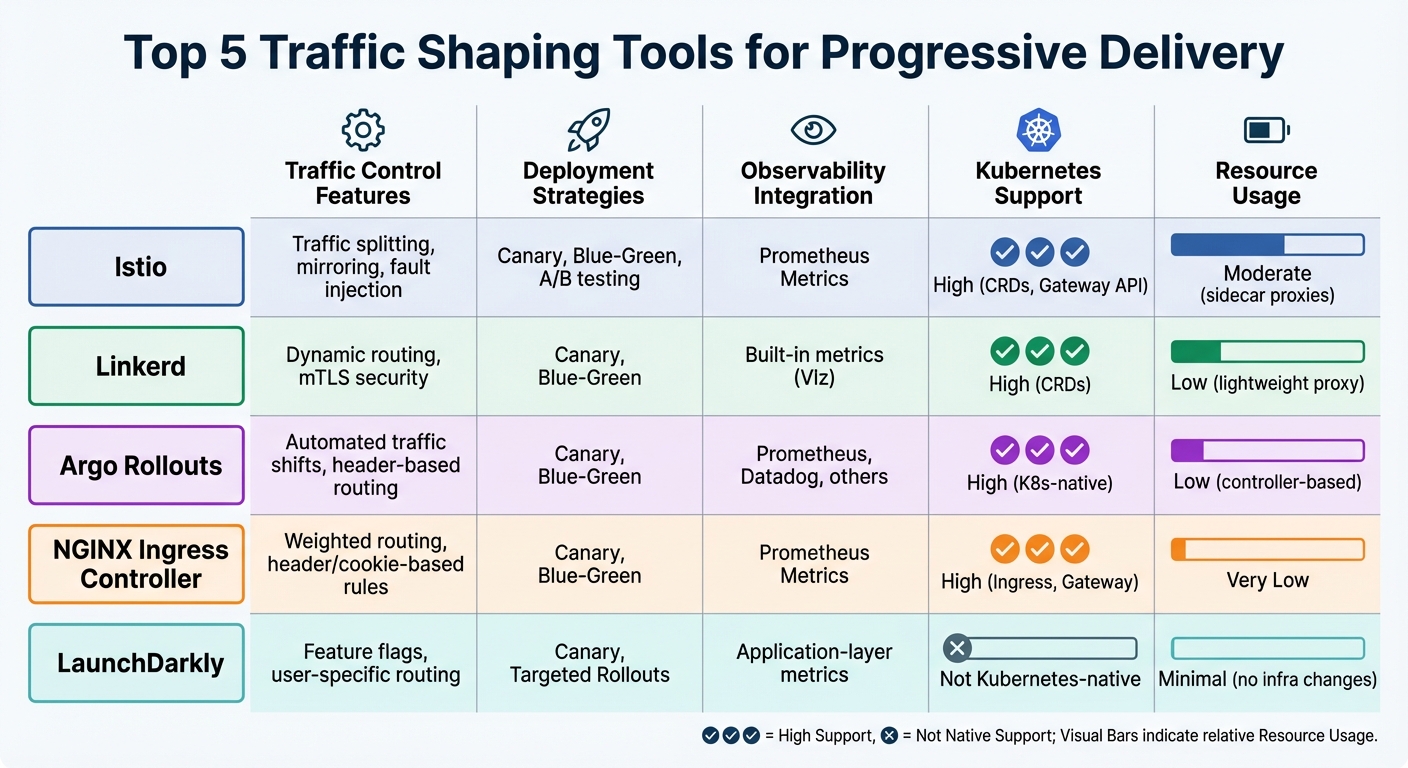 {Traffic Shaping Tools for Progressive Delivery: Feature Comparison Chart}
:::
{Traffic Shaping Tools for Progressive Delivery: Feature Comparison Chart}
:::
How to Do Traffic Splitting in Kubernetes
Need help optimizing your cloud costs?
Get expert advice on how to reduce your cloud expenses without sacrificing performance.
1. Istio
Istio simplifies progressive delivery by separating traffic routing from instance scaling. Unlike Kubernetes, which bases traffic distribution on pod numbers (e.g., three v1 pods and one v2 pod equals a 75/25 split), Istio allows teams to direct a precise percentage of traffic - like 1% - to v2, no matter how many pods are running [5][7]. This level of control ensures smoother, more predictable rollouts, addressing many deployment challenges.
Traffic routing capabilities
Istio leverages Envoy proxies, deployed either as sidecars or in ambient mode, to handle all traffic [5]. Routing is defined through Virtual Services, which enable rules based on headers, URIs, or ports, while Destination Rules group instances and determine load balancing methods [5][2].
With traffic mirroring, Istio duplicates live production traffic to test new versions in real-world conditions without affecting users [6][2]. Fault injection allows teams to simulate delays or errors, testing system resilience under controlled conditions [5][2]. These tools give teams precise control over traffic behaviour, enabling a variety of deployment strategies.
Deployment strategies supported
Istio’s advanced routing capabilities support several deployment approaches:
- Canary releases: Gradual traffic shifts (e.g., 1%, 5%, 10%) while monitoring health metrics [1][2].
- A/B testing: Directing specific user groups to different versions based on request metadata like cookies or headers [1][5].
- Blue-green deployments: Switching 100% of traffic between versions in one step [1].
Progressive delivery with Istio transforms deployments from risky, all-or-nothing events into a step-by-step, observable process [1].
Integration with progressive delivery workflows
Istio integrates seamlessly into CI/CD pipelines using Kubernetes Custom Resource Definitions (CRDs), configured through YAML files and managed with GitOps tools [5][10]. Tools like Flagger and Argo Rollouts automate traffic adjustments based on live Prometheus metrics [10][11]. For instance, during a Flagger-managed canary rollout with Istio, teams often set success thresholds at 99% before increasing traffic [8]. When using GitOps workflows with Argo CD, it’s essential to configure ignoreDifferences for VirtualService weights. This prevents Git controllers from undoing automated traffic changes during active rollouts [10].
2. Linkerd
Linkerd stands out as a simpler, lightweight alternative to Istio, offering a streamlined approach without compromising on performance. It reduces overhead by using a high-performance data plane proxy, which not only minimises resource usage but also ensures mTLS security and detailed observability [17]. With these features, Linkerd provides precise traffic control, making it a solid choice for progressive delivery.
Traffic routing capabilities
Linkerd handles traffic routing through the Kubernetes Gateway API, using HTTPRoute and GRPCRoute resources to dynamically manage traffic loads. This method replaces the outdated Service Mesh Interface (SMI) TrafficSplit API, which is no longer updated or supported [15][20]. Notably, Linkerd’s traffic shifting is client-side, meaning it applies only to mesh services. For external traffic, the ingress controller must be part of the Linkerd mesh [12][14].
For more tailored rollouts, Linkerd supports header-based routing. This allows requests with specific headers (like x-canary: always) to be routed to a new version, while other traffic continues to flow to the existing version [16][19]. Additionally, Linkerd-Viz provides critical metrics such as success rate, latency, and throughput, which progressive delivery controllers can use to automate traffic decisions. These automated workflows monitor performance and can roll back changes if success rates dip below 99% [12][14]. This combination of routing flexibility and monitoring tools makes Linkerd highly effective for managing deployments.
Deployment strategies supported
Linkerd supports a wide range of deployment strategies, including canary releases, blue-green deployments, and A/B testing [12][13][15]. During automated rollouts, traffic is shifted incrementally - often by 5% or 10% - with canary analysis running as frequently as every 10 seconds [12][19]. For A/B testing, Linkerd enables dynamic routing to specific user groups based on HTTP properties like headers or cookies. Teams can also configure monitoring to ensure error rates, such as 404s, stay below thresholds like 3% of total traffic [19].
Integration with progressive delivery workflows
Linkerd integrates seamlessly with tools like Flagger and Argo Rollouts to create automated, closed-loop deployment systems. Flagger uses a Canary CRD to manage rollouts, while Argo Rollouts leverages a Rollout resource and a dedicated Gateway API routing plugin to work with Linkerd [12][18].
By combining traffic splitting with Linkerd's metrics, it is possible to accomplish even more powerful deployment techniques that automatically take into account the success rate and latency of old and new versions.- Linkerd Documentation [20]
These integrations allow controllers to automate resource adjustments, monitor metrics, and manage traffic shifts through GitOps workflows [18]. For new implementations, relying on HTTPRoute and GRPCRoute is recommended over the older SMI-based approach [15].
3. Argo Rollouts
Argo Rollouts is a Kubernetes controller designed to automate service mesh and ingress management (e.g., Istio VirtualServices, NGINX Ingress) to align with rollout requirements [4][10]. By automating traffic shifts, it eliminates the need for manual coordination. Let’s dive into how it simplifies traffic routing, deployment strategies, and resource management.
Traffic Routing Capabilities
Argo Rollouts provides flexible traffic routing options, including percentage-based splitting, header-based routing, and traffic mirroring. These routing rules are prioritised based on their definition order. When paired with Istio, it even supports TCP traffic splitting, extending its utility beyond just HTTP workloads [4][10].
Traffic mirroring stands out as a risk-free way to test performance or handle database migrations since mirrored responses aren’t processed. In May 2024, Mufaddal Shakir from Infraspec highlighted the benefits of header-based routing combined with Argo Rollouts and Argo CD:
The fear of introducing bugs into production has been significantly reduced, instilling confidence in our deployment process. [4]
Deployment Strategies Supported
Argo Rollouts supports both canary and blue-green deployment strategies.
- Canary deployments involve incremental traffic shifts, defined through steps such as
setWeight: 10followed bypause: {duration: 1h}. This method gradually increases traffic to the new version [22][25]. - Blue-green deployments use active and preview services, enabling last-minute testing on a preview URL before directing all production traffic to the new version. For teams new to Argo Rollouts, starting with blue-green deployments is often recommended before moving to canary strategies [21][24].
The rollout process can be paused for manual checks. Engineers can issue commands like kubectl argo rollouts promote to proceed to the next step or abort to revert changes if needed [21][25]. To ensure smooth transitions, the default scaleDownDelaySeconds is set to 30 seconds, allowing traffic to fully reroute before the old pods are terminated [23].
Resource Efficiency
Argo Rollouts also addresses resource usage challenges. Canary updates often double resource requirements, but with the dynamicStableScale: true feature, the stable ReplicaSet scales down automatically as the canary scales up, avoiding unnecessary overhead [22]. Additionally, teams can use setCanaryScale to temporarily scale the canary version before adjusting traffic weights with setWeight. This approach not only limits potential risks but also helps manage infrastructure costs more effectively.
4. NGINX Ingress Controller
The NGINX Ingress Controller offers Layer 7 load balancing and advanced traffic management, making it a strong choice for progressive delivery without requiring the complexity of a full service mesh. As noted in the NGINX documentation:
NGINX Ingress Controller gives you a way to manage NGINX through the Kubernetes API, and is built to handle the continuous change that happens in Kubernetes environments. [26]
This solution routes traffic directly to pods using Ingress objects, while also providing advanced routing features to enhance progressive delivery workflows [28].
Traffic Routing Capabilities
The controller supports weighted traffic splitting through percentage-based annotations, enabling scenarios like sending 10% of traffic to a canary version while the rest flows to the stable deployment [28][29]. It also supports header- and cookie-based routing via canary-by-header and canary-by-cookie annotations, simplifying A/B testing setups [28][30]. For more advanced use cases, the VirtualServer custom resource definition provides enhanced content-based routing. This includes support for protocols beyond HTTP, such as WebSocket, gRPC, TCP, and UDP [26].
Integration with Progressive Delivery Workflows
The NGINX Ingress Controller integrates smoothly with tools like Argo Rollouts and Flagger, leveraging its advanced routing features. When paired with Argo Rollouts, a secondary canary Ingress
object is created, inheriting settings from the primary Ingress. According to the Argo Rollouts documentation:
The canary Ingress ignores any other non-canary nginx annotations. Instead, it leverages the annotation settings from the primary Ingress. [28]
For fully automated workflows, Flagger can incrementally increase canary traffic by as little as 5% per minute, while monitoring Prometheus metrics to ensure success rates stay above 99% before proceeding [31][32]. Version 1.0.2 or newer of the controller is required for these Flagger-automated deployments, and enabling controller.metrics.enabled=true ensures real-time traffic health monitoring [32].
Resource Efficiency
The NGINX Ingress Controller is designed to optimise performance while keeping resource usage low. It eliminates the need for sidecars by enabling precise traffic adjustments through annotations and centralising SSL/TLS termination, which reduces backend load [9][30][27][26]. Unlike scaling ReplicaSets up and down, the controller allows precise traffic weight adjustments, making it a more efficient alternative to modifying standard Kubernetes Services [9][30]. Additionally, it can scale horizontally to handle traffic surges, with performance further enhanced by features like connection pooling, keepalive settings, and compression [27].
5. LaunchDarkly
LaunchDarkly operates differently from traditional infrastructure-level tools by working at the application layer. It uses feature flags to control how code is executed, rather than managing server instances. This means teams can determine which code paths are activated for specific users - all within a single deployment. By focusing on user experiences instead of server configurations, LaunchDarkly adds a valuable layer to progressive delivery. For example, teams can release features to a subset of users without needing canary servers or tweaking load balancers.
Traffic Routing Capabilities
LaunchDarkly excels in routing traffic based on user-specific details like location, subscription level, or device type. It processes over 45 trillion flag evaluations daily and ensures global updates are delivered in under 200 milliseconds, thanks to its network of over 100 CDN locations [33][34]. This precise control allows for audience segmentation through both simple percentage splits and more advanced user group definitions. Unlike traditional network-based methods, this approach enables highly targeted, application-level routing.
Deployment Strategies Supported
The platform supports progressive rollouts, where traffic gradually increases over a set period - such as moving from 0% to 100% in 24 hours. For high-stakes releases, LaunchDarkly offers guarded rollouts that monitor metrics like latency and error rates, automatically rolling back if performance issues arise. Companies like HP have reduced deployment times by 98% with feature flags, while Dior has achieved near-instant updates for its markets. Additional strategies include ring deployments, canary releases, and targeted rollouts, all managed through flexible flag rules rather than infrastructure adjustments [34].
Integration with Progressive Delivery Workflows
LaunchDarkly integrates smoothly with CI/CD pipelines by separating code deployment from feature activation. Teams can merge incomplete code into production behind feature flags, leaving product managers to decide when to activate features via an intuitive interface. For enterprises, Release Pipelines standardise complex release paths by incorporating approval workflows and automated rollout plans. As Jim DeMercurio, Director of Mobile Solutions at General Motors, explained:
We found a number of issues that, in the past, we would've never found until our customers got their hands on it.
Between 2020 and 2023, one enterprise reported a 97% drop in overnight and weekend releases and a 300% increase in production deployments by using these workflows [34].
Resource Efficiency
LaunchDarkly’s approach eliminates the need for duplicate infrastructure, such as blue-green setups or per-user sidecar proxies. Its streaming architecture caches flag data locally within SDKs, allowing millions of flag changes to be processed with minimal latency. Users have reported significant improvements, including an 84% increase in deployment frequency, a 48% boost in software reliability, and a 63% reduction in pre-production testing time. Paramount, for instance, enhanced developer productivity by 100× and increased their deployment cadence to six or seven releases per day by leveraging feature flags to safely merge and ship code [34].
Comparison Table
Choose the tool that aligns best with your goals, whether it's resource efficiency, Kubernetes-native capabilities, or integrated observability.
| Tool | Traffic Routing Capabilities | Supported Deployment Strategies | Integration with Metrics/Observability | Kubernetes-Native Support | Resource Efficiency |
|---|---|---|---|---|---|
| Istio | Precise traffic splitting, traffic mirroring (shadowing), fault injection (delays and aborts) [2] | Canary, Blue-Green, A/B testing via VirtualService and DestinationRule [3][2]
|
Prometheus integration with Istio Service Metrics Dashboard [2] | High (CRDs and Gateway API support) [39] | Improved with Ambient Mesh (sidecarless architecture) [40][42] |
| Linkerd | Dynamic request routing via HTTPRoute and GRPCRoute, service-to-service mTLS, traffic splitting [35][40]
|
Canary, Blue-Green [40] | Automatic golden metrics telemetry (success rate, latency, throughput) with Linkerd-Viz [12][40] | High (CRDs) [40] | High (lightweight design) [40] |
| Argo Rollouts | Precise traffic splitting with integration to service meshes and ingress controllers | Canary, Blue-Green, progressive rollouts | Works with Prometheus, Datadog, New Relic, CloudWatch, Graphite for automated analysis [[36]](https://docsopensource.github.io/docs/CNCF Projects/5.34_Flagger) | High (native Kubernetes resource) | Minimal overhead (controller-based) |
| NGINX Ingress Controller | L7 routing, weighted traffic distribution | Canary, Blue-Green (via Flagger or Argo Rollouts integration) | Prometheus metrics including HTTP request success rates and average duration [38] | High (Ingress and Gateway API support) [39] | Very high (minimal resource consumption, high performance) [41] |
This table captures the primary features of Istio, Linkerd, Argo Rollouts, and NGINX Ingress Controller, helping you weigh their strengths in progressive delivery scenarios. Each tool offers a Kubernetes-native approach to traffic management, tailored to different needs.
Jenn Gile, Head of Product Marketing at NGINX, highlights the importance of efficiency:
The best Kubernetes tools have a small footprint, which allows for appropriate resource consumption with minimal impact to throughput, requests per second, and latency [41].
For teams aiming to streamline operations with automated metrics, the Argo Project documentation provides this advice:
Do not rely on humans manually checking logs or traces for hours; prioritise automated metrics that provide rapid feedback.
An example of this in action comes from Blinkit in February 2024. They successfully extended Flagger's functionality with custom webhooks, enabling automated rollbacks based on specific business logic [37].
Conclusion
Choosing the right traffic shaping tool comes down to understanding your control requirements and team’s capacity. For internal communication, service meshes like Istio and Linkerd are strong candidates, while ingress controllers such as NGINX are better suited for managing external traffic at the cluster edge. If your team needs application-level user targeting without overhauling infrastructure, platforms like LaunchDarkly provide a straightforward option. The key is to balance operational demands with your team’s expertise.
Evaluate your technical needs carefully. While Istio offers a wide range of features, it demands significant resources and often a dedicated platform team. On the other hand, tools like Linkerd and Argo Rollouts are more manageable for smaller teams with fewer operational resources. As journalist Neel Vithlani aptly puts it:
Istio pursues breadth, while Linkerd optimises for light operation. Understanding how those philosophies translate into day‑to‑day management will help you avoid costly migrations later [43].
This highlights the importance of aligning tool complexity with your team’s capabilities to prevent unnecessary challenges in the future.
Begin with blue-green deployments to build confidence and gradually move to canary releases as your experience grows. For high-risk changes, traffic mirroring provides a safety net by testing in real-world scenarios without impacting users. Mufaddal Shakir from Infraspec explains:
By integrating header-based routing with Argo Rollout and ArgoCD, we've effectively safeguarded our production environment against potential bugs [1].
Integration and automation are equally critical. Ensure your chosen tool works seamlessly with GitOps workflows and observability platforms to enable automated rollbacks. Opting for tools that support the Kubernetes Gateway API can also help ensure your deployments are prepared for future developments.
Resource constraints should not be overlooked. Linkerd’s Rust-based proxy, for example, has demonstrated 40% to 400% lower p99 latency compared to Istio's Envoy-based proxy under similar conditions [43]. This makes Linkerd an excellent choice for edge clusters or environments with limited resources. Ultimately, selecting the right tool means aligning it with both your current infrastructure and your goals for progressive delivery.
FAQs
Do I need a service mesh or an ingress controller for traffic shaping?
When deciding between the two, it comes down to how much control and complexity your setup demands. Ingress controllers, such as NGINX or Traefik, are great for handling straightforward tasks like routing and load balancing. On the other hand, service meshes like Istio or Linkerd provide more advanced capabilities, including features like percentage-based routing, traffic mirroring, and automated rollbacks. If you're aiming for precise control in progressive delivery, a service mesh is often the better choice. It’s worth noting that these can also complement an ingress controller for more advanced traffic management strategies.
How can I automate canary rollouts using metrics and GitOps?
To set up automated canary rollouts using metrics and GitOps, tools like Flagger are a great choice when paired with GitOps workflows such as Flux or Argo CD. With Flagger, you can manage deployments in a declarative way by defining canary resources. These resources include traffic-shifting rules and metric thresholds that guide the rollout process. By linking Flagger to a metrics provider, you can monitor the health of your deployment in real time.
Flagger takes care of adjusting traffic dynamically. If the metrics indicate any issues - like failing thresholds - it can automatically roll back changes. This ensures a controlled and reliable progressive delivery process.
When should I use feature flags instead of traffic splitting?
Feature flags are perfect when you need precise control over specific features. They allow you to roll out updates gradually, toggle features in real time, and quickly roll back changes if needed. This makes them ideal for tasks like progressive rollouts, A/B testing, or implementing kill switches for certain features.
On the other hand, traffic splitting is more suited for managing traffic between different versions of an application or service. It focuses on routing users to various versions rather than controlling individual features.