
Multi-environment CI/CD pipelines are essential for ensuring software progresses smoothly from development to production. Each stage - development, testing, staging, and production - serves a distinct purpose, helping to catch issues early and maintain quality. Key challenges include configuration drift, inconsistent environments, and manual processes, but these can be addressed with automation, Infrastructure as Code (IaC), and strict access controls.
Key Takeaways:
- Environment isolation: Use separate infrastructure or namespaces to avoid resource conflicts and improve security.
- Role-Based Access Controls (RBAC): Limit access to environments based on roles to reduce risks.
- Prevent configuration drift: Use IaC tools like Terraform and GitOps tools like Argo CD to maintain consistency.
- Immutable snapshots: Deploy from fixed, tested baselines to ensure reliability and speed up recovery.
- Automation: Automate testing, deployments, and rollbacks to reduce human error and improve efficiency.
- Configuration management: Separate sensitive data using secrets management and ensure non-sensitive configurations are version-controlled.
- Observability: Monitor all environments centrally and use automated tagging for traceability.
By focusing on these practices, teams can build pipelines that are reliable, efficient, and secure.
::: @figure 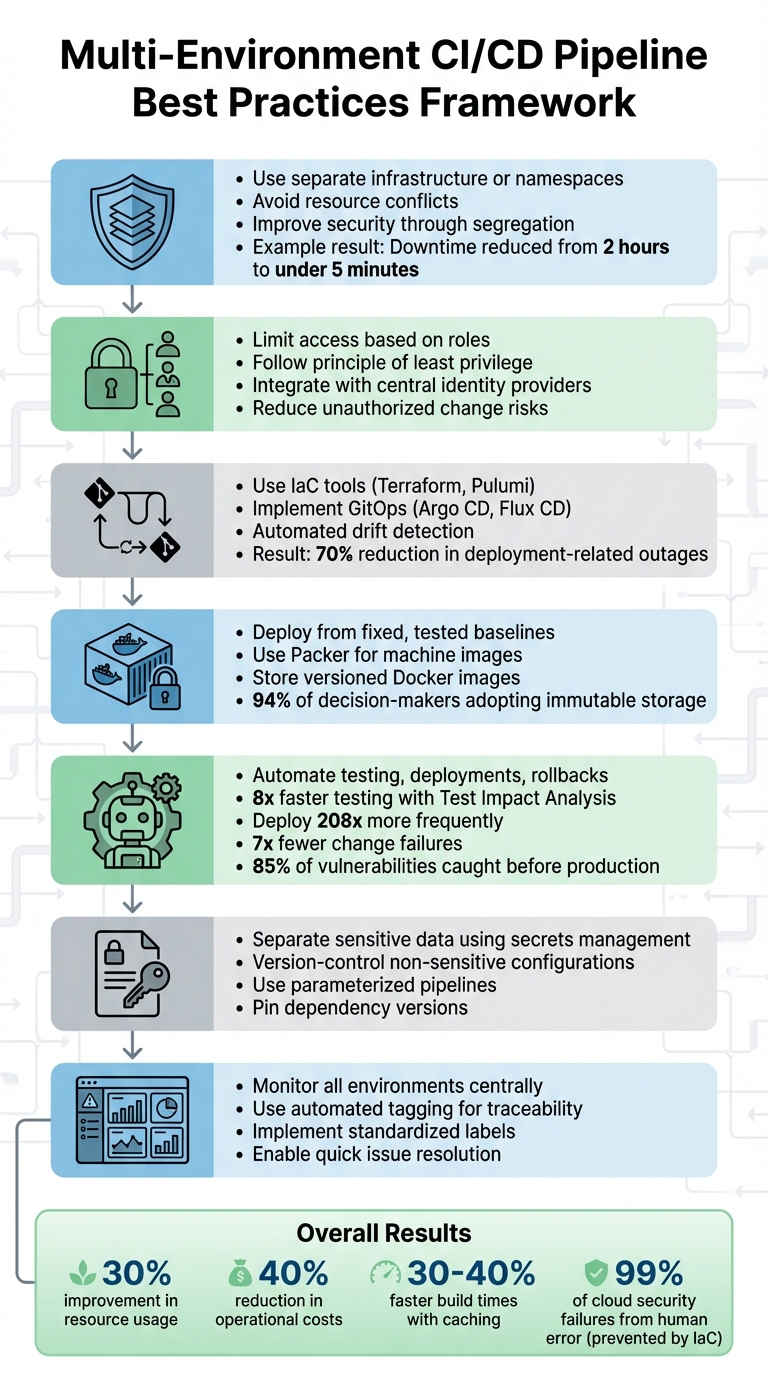 {Multi-Environment CI/CD Pipeline Best Practices Framework}
:::
{Multi-Environment CI/CD Pipeline Best Practices Framework}
:::
Environment Segregation and Isolation Best Practices
Using Separate Infrastructure for Each Environment
Keeping each environment - development, staging, and production - on separate infrastructure is a smart way to ensure your pipeline remains reliable. By isolating these environments, you can prevent issues like security breaches or operational failures in one area from spilling over into others. It also avoids resource bottlenecks. For example, heavy testing loads in a shared cluster could hog CPU or memory, leaving production services struggling. With dedicated infrastructure, each environment gets the resources it needs without interference.
Real-world deployments back this up. In 2022, a fintech company used Kubernetes and Crossplane to manage workloads across AWS and Azure. The results? Downtime per incident dropped from 2 hours to under 5 minutes, resource usage improved by 30%, and operational costs fell by 40% [1].
The best segregation method depends on your specific needs. Using namespaces within a single cluster works for logical separation, but separate clusters are better for keeping production and non-production workloads from competing for resources. Separate cloud accounts offer even greater isolation, especially for security and billing purposes. If you need to meet data residency requirements under UK GDPR, deploying resources in different regions can help.
Once infrastructure is isolated, the next step is to lock it down with strict access controls.
Implementing Role-Based Access Controls (RBAC)
Role-Based Access Controls (RBAC) are essential for limiting access to only what’s necessary. By following the principle of least privilege, you reduce the risk of unauthorised changes. In Kubernetes, you can assign permissions at the namespace level using RoleBindings instead of ClusterRoleBindings, making it easier to confine access to specific environments like dev, stage, or prod.
Avoid using wildcards when defining permissions, as they can lead to privilege escalation. Instead, specify permissions explicitly. For CI/CD tools, create dedicated ServiceAccounts with restricted permissions. Disable the automatic mounting of service account tokens to stop compromised pods from stealing credentials. To simplify management and ensure consistent access controls, integrate RBAC with central identity providers like Active Directory or OAuth. This approach also makes offboarding straightforward.
With access controls in place, it’s time to tackle configuration drift.
Preventing Configuration Drift Across Environments
Infrastructure as Code (IaC) tools like Terraform or Pulumi are game-changers for keeping infrastructure consistent. By defining resources in version-controlled files, you ensure that environments across AWS, Azure, and Google Cloud are provisioned uniformly. Many of these tools also include automated drift detection, which compares the live state of resources to the desired configuration and alerts you to unauthorised changes.
GitOps takes this a step further by making Git the single source of truth. Tools like Argo CD or Flux CD continuously reconcile your live clusters with the configurations stored in Git.
A great example comes from Booking.com. In June 2023, under the guidance of DevOps expert Maria Ivanova, they implemented blue-green deployments and canary releases across AWS and Azure. Thanks to automated rollbacks and real-time monitoring, deployment-related outages dropped by 70%, and they moved from weekly to daily deployments [2].
Policy as Code tools, such as Open Policy Agent (OPA) or HashiCorp Sentinel, can also help enforce compliance. For instance, they can block the creation of unencrypted storage buckets before they’re even provisioned. Combine this with strict version controls and automated policies to maintain consistency and reliability across all your environments.
Need help optimizing your cloud costs?
Get expert advice on how to reduce your cloud expenses without sacrificing performance.
Using Infrastructure as Code (IaC) and Immutable Baselines
Benefits of Infrastructure as Code
Infrastructure as Code (IaC) simplifies the process of setting up and managing environments by using configuration files like YAML, JSON, or HCL. This means teams can reliably recreate identical environments for development, staging, and production without manual intervention. The best part? Every change is tracked alongside application code, providing a built-in audit trail for accountability and transparency [5].
IaC also tackles some of the biggest challenges in cloud security and efficiency. Did you know that by 2025, 99% of cloud security failures are predicted to come from human error? And up to 70% of cloud security incidents are linked to resource misconfigurations? IaC helps minimise these risks by removing manual configuration errors. Plus, when something does go wrong, rolling back to a previous stable version is as simple as reverting to an earlier commit in your version control system [4][5]. For organisations juggling hybrid or multi-cloud environments, IaC can streamline processes and reduce operational overhead by 20% [5].
On the financial side, IaC offers a clear advantage. With 94% of organisations reporting avoidable cloud costs, it’s clear that better resource management is a must. By defining infrastructure explicitly, IaC prevents over-provisioning and makes it easier to spot unnecessary resources during reviews, saving both time and money.
The consistency offered by IaC pairs perfectly with immutable snapshots, creating a solid foundation for reliable deployments.
Creating Immutable Environment Snapshots
Using immutable snapshots in your CI/CD pipelines can significantly reduce risks and speed up recovery times. The idea is simple: treat servers and environments as fixed units that you replace entirely rather than updating or patching them. By starting every deployment from a known-good baseline, you avoid configuration drift and ensure each deployment is clean and tested.
Automation tools make this approach practical. For instance, Packer can build machine images, while container registries store versioned Docker images that act as immutable snapshots. If something goes wrong - whether it's a failure or a deployment issue - you don’t waste time trying to fix the problem. Instead, you simply redeploy from a previous snapshot. This process is especially valuable for disaster recovery and rollback scenarios, where speed and dependability are critical. The numbers back this up: 94% of decision-makers are already using or planning to adopt immutable data storage within the next year.
How to Design a Multi-Environment CI/CD Pipeline in Jenkins | DevOps Interview Question Explained
Automation in CI/CD Pipelines
Building on the importance of maintaining consistent environments and effective configuration management, automation plays a critical role in improving both the reliability and speed of CI/CD pipelines. By reducing reliance on manual processes, automation not only speeds up testing and deployment but also reduces the likelihood of human error. This approach strengthens a multi-environment CI/CD strategy.
Integrating Automated Testing at Every Stage
An effective testing strategy involves running specific types of tests at different stages of the pipeline. Unit tests focus on catching basic code issues early, integration tests check if components work together, and end-to-end tests ensure the entire system functions as intended. The goal is to prioritise speed by running only the tests that matter at each stage.
FastAPI offers a great example of this concept in action. By using Test Impact Analysis with Tach, they achieved an 8-fold improvement in testing speed. For instance, when a developer modified a particular file, the system ran only 750 relevant tests out of a total of 2,012, completing the process in just 11.69 seconds compared to the 88.32 seconds required for a full test suite run [5]. This selective testing approach allows developers to get immediate feedback without wasting time on unnecessary tests.
Parallelisation is another game-changer. Buildkite reduced the runtime of its RSpec suite from three hours to under five minutes by running tests in parallel [3]. This shift transformed testing from a time-consuming bottleneck into a seamless part of the deployment process.
These automated testing strategies lay the groundwork for smoother and more efficient deployment workflows.
Orchestrating Continuous Deployment Workflows
A well-defined five-stage pipeline - comprising Lint/Validate, Test, Build, Staging, and Production - ensures quality control at every step. For example, Lint/Validate typically takes under two minutes, Test completes in under eight minutes, Build wraps up in under five minutes, Staging deploys automatically, and Production involves either manual approval or automated validation [6]. Each stage acts as a checkpoint, catching potential issues early in the process.
Teams with advanced CI/CD pipelines deploy 208 times more frequently and encounter 7 times fewer change failures [6]. This success comes from combining automated deployments with intelligent safeguards, ensuring a balance between speed and reliability.
Reducing Human Error Through Pipeline Automation
Manual deployments often lead to mistakes - skipped steps, inconsistent configurations, or rushed changes during inconvenient hours. Automation eliminates these risks by codifying each deployment step, addressing the issues of configuration drift and human error discussed earlier. For instance, automated health-check rollbacks can revert to the last stable version if error rates exceed 1% [6].
Security scanning integrated into the CI/CD pipeline identifies 85% of vulnerabilities before they reach production [6]. Additionally, optimisations like dependency and Docker layer caching can cut build times by 30–40% [6]. This combination of safety and efficiency ensures that deployments are both faster and more reliable.
Managing Configuration and Data Across Environments
After implementing automation, the next hurdle is managing configurations and data effectively to ensure smooth deployments. Each environment - whether development, staging, or production - requires the correct setup to avoid deployment issues and security risks. Mismanaging configurations can lead to failures, vulnerabilities, and inconsistencies between environments.
Handling Environment-Specific Configurations
Using parameterised pipelines is a smart way to handle environment-specific configurations. By defining target environments as parameters, you can dynamically adjust settings for development, staging, or production without needing separate pipelines [7]. This keeps things streamlined while maintaining flexibility.
For non-sensitive details like API endpoints, database URLs, or feature flags, store them in version-controlled files such as YAML, JSON, or .env. This approach makes it easy to track changes and roll back if necessary [7]. However, sensitive data such as API keys and passwords should be handled using secrets management systems to ensure security. Additionally, pinning dependency versions helps maintain consistency and prevents unexpected changes [10].
To further tighten security, apply registry-level controls as a dependency firewall. This blocks unauthorised or risky third-party components from entering the pipeline, reducing potential vulnerabilities across environments [8].
Once configurations are in order, the next step is to standardise test data across environments.
Synchronising Test Data Across Environments
Test data plays a vital role in validating deployments, but it must be handled carefully. For compliance and security, Personally Identifiable Information (PII) should only exist in production. Lower environments should use sample or synthetic data instead [9]. This ensures regulatory compliance while still enabling rigorous testing.
Introduce push-button operations to reset test data to a clean, predefined state. This eliminates the need for manual dataset recreation, saving time and making test runs more reliable and repeatable [11]. With just one action, teams can restore environments to a baseline configuration, ensuring consistency and reducing setup time for testing.
Observability and Environment Parity
Once you've tackled configuration and test data management, the next step is to ensure visibility and consistency across all your environments. Without proper observability, it becomes challenging to track which versions are running where, slowing down issue resolution. Similarly, when environments drift apart, deployments can become unpredictable. This focus on visibility strengthens the pipeline's reliability, building on earlier discussions about automated testing and immutable snapshots.
Monitoring Deployment Versions Across Environments
Keeping tabs on deployed versions is a cornerstone of efficient pipeline management. When version identifiers are unclear, resolving issues quickly becomes a headache. By implementing automated tagging, you can make every deployment traceable. Whether you use Semantic Versioning or commit hashes post-build, tagging creates a clear audit trail. This makes it easy to identify exactly what’s running in development, staging, or production at any moment and ties in well with automated rollback strategies.
Centralised observability is key. By pulling together logs, metrics, and traces from all your clusters into a single observability platform, teams can spot issues and patterns faster. Use standardised labels like k8s.cluster.name or environment across all environments. This makes it easier to compare behaviours between staging and production and correlate problems across clusters.
Maintaining Consistency Between Environments
Keeping environments consistent builds on your earlier automation efforts, reducing the risk of unexpected behaviour during deployment. Environment drift is a frequent culprit behind deployment failures, so it’s crucial to actively prevent it.
Tools like GitOps (e.g., Argo CD and Flux) are invaluable here. They monitor Git repositories as the single source of truth, automatically ensuring that live environments match the desired state. This keeps staging and production aligned without manual intervention. On top of this, running automated parity validation scripts regularly can help. These scripts compare database schemas, configurations, and service versions between environments, flagging any discrepancies immediately. To avoid surprises, steer clear of using 'latest' tags and instead pin exact versions (e.g., node:20.11.0-alpine3.19) for better stability and predictability.
Conclusion
Summary of Best Practices
Creating a dependable CI/CD pipeline hinges on following key best practices. These include maintaining strict separation of environments through dedicated infrastructure and role-based access controls, using version-controlled infrastructure as code with immutable snapshots, automating testing and deployment processes, managing configurations meticulously, and ensuring robust observability throughout the pipeline [12][13]. By addressing issues like configuration drift and reducing manual interventions, these strategies significantly improve pipeline reliability.
Building Reliable CI/CD Pipelines
A strong pipeline foundation isn't just about technical soundness - it also brings measurable business advantages. Implementing these practices can speed up deployment cycles, lower remediation costs, and support rapid scaling to meet evolving business demands [12][13].
To achieve this, focus on maintaining environment parity through automated configuration tools and version-controlled infrastructure definitions, which help prevent deployment errors [12]. Incorporating infrastructure as code (IaC), automation, and observability ensures consistency across environments [12], reduces reliance on manual processes [13], and leads to fewer production issues. This not only enhances software quality but also shortens the time it takes to deliver new features to market.
For organisations aiming to optimise their DevOps strategies, cut cloud expenses, and streamline deployment cycles, Hokstad Consulting provides tailored solutions. Their expertise spans public, private, and hybrid cloud environments, offering DevOps transformations and custom automation aligned with these best practices.
FAQs
When should we use separate clusters instead of namespaces?
When strong isolation, security, or managing resources for specific environments is a priority, it's better to use separate clusters rather than namespaces. For example, in production settings, separate clusters can shield production systems from issues that might arise in development or testing. This approach improves containment and ensures reliability across different environments.
How can we detect and fix configuration drift automatically?
To keep configuration drift in check automatically, rely on continuous monitoring paired with automated remediation workflows. Tools like Terraform plan, Puppet, or AWS Config Rules are great for spotting any discrepancies between the current setup and the desired state. Once these deviations are flagged, automation tools - like Lambda functions or Terraform - can step in to correct them effortlessly. By embedding drift detection into your CI/CD pipelines and maintaining thorough audit logs, you can ensure configurations stay consistent while meeting compliance requirements.
What’s the safest way to manage secrets across environments?
The best way to handle secrets in CI/CD pipelines is by relying on centralised tools such as HashiCorp Vault, AWS Secrets Manager, or Azure Key Vault. These tools provide a secure method to store, rotate, and manage access to sensitive information like API keys and passwords.
It's also crucial to make secrets specific to their environment - whether that's development, staging, or production. Inject these secrets at runtime and always follow the principle of least privilege, ensuring that access is limited to only what's necessary. Additionally, automating the rotation and expiry of secrets reduces risks and helps maintain compliance with regulations like GDPR.