
When managing rollbacks in multi-cluster environments, the process is far more complex than single-cluster deployments. Issues like synchronisation problems, configuration drift, and stateful workload inconsistencies can cause significant disruptions. Here's how to handle them effectively:
- Automate Rollbacks: Use GitOps tools like ArgoCD or Flux to revert clusters to stable states using Git commits. Automation reduces human error and ensures consistency.
- Plan Ahead: Create detailed, version-controlled rollback runbooks that outline steps for various failure scenarios, including non-pod resources like ConfigMaps and Secrets.
- Test Regularly: Simulate failures in staging environments to identify potential issues with synchronisation or timing.
- Monitor Metrics: Set baseline performance metrics and use them to trigger automated rollbacks during rolling updates or canary releases.
- Choose the Right Tools: Tools like ArgoCD (centralised control) and Flux (distributed approach) offer different benefits depending on your infrastructure and security needs.
Key takeaway: A structured, well-tested rollback strategy can minimise downtime, maintain consistency across clusters, and safeguard user experiences. For UK organisations, ensuring compliance and reducing costs is also critical. Hokstad Consulting provides tailored solutions to help businesses achieve these goals efficiently.
Automated Multi-Cloud, Multi-Flavor Kubernetes Cluster Upgrades Using Operators - Ziyuan Chen
Need help optimizing your cloud costs?
Get expert advice on how to reduce your cloud expenses without sacrificing performance.
Main Challenges in Multi-Cluster Rollbacks
Handling multi-cluster rollbacks comes with its fair share of hurdles, and several recurring issues make this process especially tricky.
Synchronisation problems often lie at the heart of rollback failures. When clusters update at varying speeds, they can fall out of sync. For example, one cluster might successfully roll back to a stable version, while others remain stuck on the problematic release. This mismatch can disrupt traffic routing as clusters handle production traffic differently, leading to partial service degradation [1]. Without proper synchronisation, other issues like dependency conflicts and timing misalignments can escalate.
Divergent dependencies add another layer of complexity. Resources like container images or configuration manifests may vary between clusters, making it difficult to roll back uniformly. To manage this, teams often rely on git revert instead of git reset to maintain history and avoid synchronisation errors [2]. However, GitOps tools like ArgoCD or Flux, which reconcile changes independently for each cluster, can introduce drift if all clusters don’t synchronise simultaneously [2][3][4].
Timing and sequencing issues are another major challenge. Without a coordinated rollback plan, teams risk cascading failures. For instance, failing to pause auto-sync during an emergency or neglecting to stage rollbacks by cluster or region can amplify problems. Best practices recommend using ArgoCD’s immediate app rollback for critical situations, followed by a git revert. However, without predefined stages, this approach can inadvertently spread failures across all clusters [1][2].
Stateful workloads make rollbacks even riskier. Blue/green deployments often involve data migration between environments, and any delay in synchronisation can lead to data inconsistencies, potentially corrupting the rollback process. Since Kubernetes doesn’t support cluster downgrades, managing stateful rollbacks requires extra caution. The safest method involves taking etcd snapshots before upgrades and restoring them if needed [1][5].
Finally, regional network latency can delay data replication, causing some clusters to revert while others do not. This fragmentation disrupts transaction integrity and user sessions, making it harder to trace requests and verify whether the rollback has resolved distributed transaction errors. These delays can leave teams struggling to restore consistency across clusters.
Approaches to Multi-Cluster Rollbacks
::: @figure 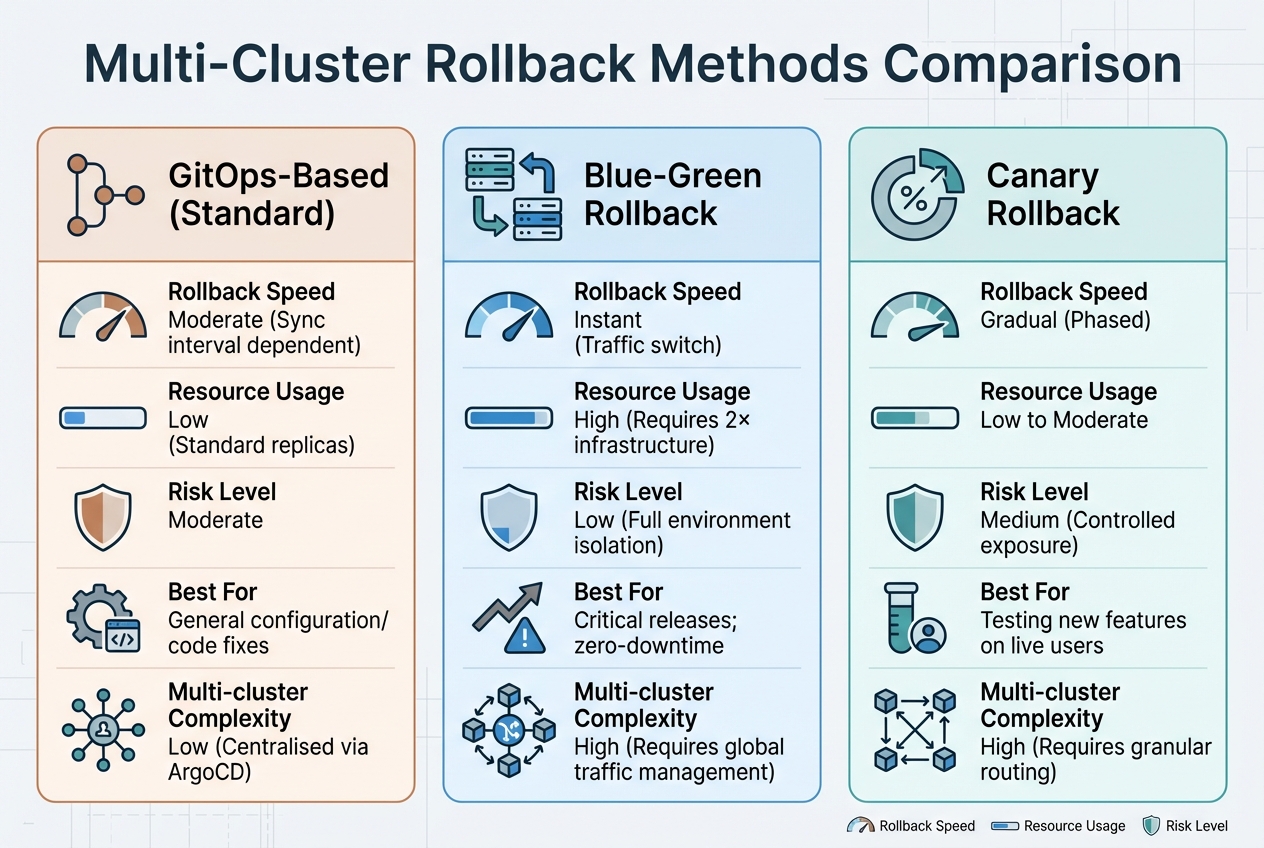 {Multi-Cluster Rollback Methods Comparison: GitOps vs Blue-Green vs Canary}
:::
{Multi-Cluster Rollback Methods Comparison: GitOps vs Blue-Green vs Canary}
:::
When multi-cluster rollbacks fail, sticking to reliable methods is essential to restore stability. The right approach depends on your infrastructure setup, how much risk you’re willing to accept, and your tolerance for downtime. These methods tackle the synchronisation, dependency, and timing challenges previously discussed.
GitOps-based rollbacks rely on Git as the definitive source for your cluster's state. Tools like ArgoCD and Flux ensure that the running configuration in your clusters mirrors what's defined in your Git repository. If something goes wrong, you can simply revert your clusters to an earlier commit.
Nawaz Dhandala from OneUptime explains,
Every cluster state corresponds to a Git commit. Roll back by pointing to a previous commit, not by editing live resources[7].
To avoid complications, use git revert rather than git reset --hard, which can rewrite history and create synchronisation issues [2]. If necessary, you can trigger a rollback manually via the ArgoCD UI - but remember to disable auto-sync first, so the faulty state isn’t redeployed [6][7]. ApplicationSets also simplify consistency by allowing you to deploy the same configuration across multiple clusters using a single template [9].
Automated rollbacks during rolling updates use health checks to detect failures and automatically revert to a previous, stable version. This method reduces timing and synchronisation issues. Hooks like PostSync and SyncFail can run post-deployment tests and revert changes automatically if problems arise [8]. This approach works well for setups with fewer than 20 clusters, especially in a hub-and-spoke topology where one central ArgoCD instance manages rollbacks [9]. However, keep in mind that GitOps tools sync periodically, so delays might occur unless you trigger a manual sync [7].
Blue/green deployments allow for nearly instant rollbacks by switching traffic between two identical environments. While this provides a quick solution, it requires double the infrastructure and adds complexity, especially in global traffic management. This can be a costly option for multi-cluster environments, particularly when coordinating traffic switches across multiple regions.
Canary releases test changes on a small group of users before rolling out to everyone. This approach minimises risk by catching issues early, but it requires precise traffic routing to control which users see the new version. In multi-cluster environments, maintaining consistent user experiences while coordinating canary percentages across regions can introduce additional operational challenges.
| Feature | GitOps-Based (Standard) | Blue-Green Rollback | Canary Rollback |
|---|---|---|---|
| Rollback Speed | Moderate (Sync interval dependent) | Instant (Traffic switch) | Gradual (Phased) |
| Resource Usage | Low (Standard replicas) | High (Requires 2× infrastructure) | Low to Moderate |
| Risk Level | Moderate | Low (Full environment isolation) | Medium (Controlled exposure) |
| Best For | General configuration/code fixes | Critical releases; zero-downtime | Testing new features on live users |
| Multi-cluster Complexity | Low (Centralised via ArgoCD) | High (Requires global traffic management) | High (Requires granular routing) |
Each of these methods has its strengths and trade-offs, making it important to choose the one that best aligns with your deployment goals and operational constraints. The next section will delve into planning and testing procedures to further strengthen your rollback strategy.
Planning and Testing Rollback Procedures
When a deployment goes wrong across multiple clusters, the last thing you want is to scramble for a solution. Without a well-thought-out and tested rollback procedure, things can spiral out of control quickly. That’s why having a clear, reliable plan in place is critical.
Pre-Deployment Rollback Planning
Start by defining what will trigger a rollback, and document every step in version-controlled runbooks. These runbooks serve as your team’s playbook during high-pressure situations, ensuring consistent responses to incidents [10]. Make sure they cover specific failure scenarios, like partial database migration failures or rollbacks when ConfigMaps or Secrets are updated. Standard Kubernetes rollbacks often overlook these non-pod resources, so your plan must address the entire deployment bundle [11].
Using GitOps principles can simplify this process. By mapping each cluster state to a specific commit, you create a clear recovery point. This approach ensures you can identify known-good states without adding unnecessary procedural complexity.
Once your plan is solid, the next step is to put it to the test.
Testing Rollback Scenarios
With your rollback strategy documented, it’s time to simulate failures in a controlled environment. Use staging environments that replicate production as closely as possible, including resource limits, network policies, and RBAC settings [10][11]. This is crucial because issues like insufficient CPU quotas or overly restrictive network policies often only appear under real-world conditions.
Make sure your tests cover all resources, not just pods. Rollbacks should restore everything - ConfigMaps, Secrets, database schemas, and more - to their previous state [11]. Test different scenarios, including rollbacks during mid-deployment, after partial traffic routing, or in specific clusters. This helps uncover potential timing or synchronisation problems that could derail your recovery efforts.
Monitoring and Metrics for Rollback Triggers
Deciding when to roll back isn’t about guesswork - it relies on solid data. Without proper monitoring, you could either miss critical warning signs or roll back unnecessarily.
Start by setting baseline metrics before deploying anything. Keep an eye on latency, error rates, resource usage (like CPU and memory), and user experience indicators such as success rates across all your clusters [1]. These baselines act as a yardstick to measure performance during rollouts. For example, you can configure queries to track these metrics and set thresholds that automatically trigger an abort. This initial data ensures rollback decisions are precise and automated.
Automated systems are key to quick responses when thresholds are exceeded. Rollouts often happen in increments - starting with 20% of traffic, pausing for analysis, then moving to 50%, and so on. At each step, metrics are checked. If any threshold is breached, the system can automatically roll back across all clusters, no human input needed. This layered approach provides a complete view that’s critical for managing multi-cluster rollbacks.
It’s important to monitor two layers simultaneously: resource usage to catch infrastructure problems and application metrics to spot user-facing errors. This dual focus helps prevent cascading failures that might be missed if you only look at one perspective.
For a more manual approach, blue/green deployments offer another way to determine rollback triggers. Here, the key indicator is performance after switching environments. When traffic shifts to the green environment, monitor for latency spikes. If response times exceed acceptable thresholds, you can instantly revert to blue [1][2]. Using performance metrics in this way helps refine and improve your rollback processes over time.
Tool Comparison for Multi-Cluster Rollbacks
When choosing a multi-cluster rollback tool, it’s essential to weigh factors like centralised control, security isolation, and governance across fleets. The main tools to consider are Argo CD, Flux CD, Plural, and Helm-based workflows.
Argo CD operates on a hub-and-spoke model, with a single instance managing multiple remote clusters. This setup provides a centralised interface that’s ideal for visibility, troubleshooting, and handling complex rollouts [14][9]. It’s a powerful option for teams needing a visual web interface, though performance can dip when managing between 3,000 and 5,000 deployments via its UI. Impressively, it scales to oversee up to 50,000 applications across 1,000 clusters and supports Git rollbacks and manual syncs to specific Git revisions [13][6]. Features like ApplicationSets can also speed up multi-cluster operations significantly [12].
Flux CD, on the other hand, takes a distributed, agent-based approach, with each cluster handling its own reconciliation independently [14]. This design prioritises security isolation and limits the impact of any single failure, making it a strong choice for edge computing, IoT, or environments with limited resources. With around 6,500 GitHub stars, Flux adheres strictly to the GitOps model, using git revert to manage rollbacks and keeping the repository as the ultimate source of truth. Unlike Argo CD, Flux directly uses the Helm SDK, respecting all lifecycle hooks, while Argo treats Helm as a templating engine, converting charts into YAML before application [14][15].
James Walker from Spacelift highlights:
Flux's toolkit approach makes it easier to customise... there are also signs that the DevOps ecosystem is leaning towards Flux as the default tool for Kubernetes GitOps[13].
Plural offers a unified control plane that integrates Argo CD and Flux while maintaining a secure, agent-based architecture. It eliminates the need to store credentials centrally, appealing to organisations that prioritise enterprise-grade security. Plural’s automated PR-based workflows, complete with approval gates, streamline multi-stage rollouts across clusters.
As Plural explains:
The Argo CD vs. Flux decision is effectively about where you place control and trust: a hub-and-spoke model versus a distributed, agent-based system[14].
Comparison Table
| Feature | Argo CD | Flux CD | Plural | Helm-based |
|---|---|---|---|---|
| Architecture | Centralised (Hub-and-Spoke) | Distributed (Agent-based) | Unified Control Plane | Client-side CLI |
| Primary Rollback Method | UI/CLI History or Git Revert | Git Revert | Automated Pipelines / PR-based |
helm rollback command |
| Multi-Cluster Support | High (Centralised Management) | High (Autonomous Clusters) | High (Global Services) | Manual per-cluster |
| User Interface | Fully-featured Web UI | Optional (3rd party) | Secure Enterprise Dashboard | None (CLI only) |
| RBAC | Custom internal RBAC + SSO | Native Kubernetes RBAC | Dynamic RBAC + Native SSO | Kubernetes RBAC |
| Best For | Large enterprises, visual teams | Edge, security isolation | Fleet-scale governance | Simple deployments |
For practical rollback strategies, tools like Argo CD allow you to disable auto-sync during emergencies to prevent immediate re-syncing to problematic commits [6]. In multi-cluster setups, avoid granting cluster-admin rights; instead, use dedicated service accounts with restricted RBAC permissions on target clusters [9][15].
Choosing the right tool can make all the difference in addressing synchronisation and timing challenges in multi-cluster environments.
Hokstad Consulting's Multi-Cluster Rollback Services
Once you've explored the challenges of rollbacks and compared tools, it becomes clear that managing rollbacks across multiple Kubernetes clusters demands expertise. Hokstad Consulting provides tailored solutions for UK organisations, combining DevOps practices, cloud infrastructure efficiency, and automation to create multi-cluster rollback strategies that match specific risk and compliance needs.
Their DevOps transformation services focus on creating unified fleet management systems with centralised control planes, ensuring consistent GitOps-driven configurations, and enhancing observability to prevent rollout failures [1]. These strategies address key issues like synchronisation, dependencies, and timing. For example, they configure automated rollback policies that activate based on health checks and performance metrics. They also establish Git workflows that prioritise auditability - like using git revert instead of git reset --hard - and integrate monitoring tools to track deployment success rates [2]. In addition, they tackle cost concerns, which are a critical part of any effective rollback strategy.
For organisations worried about cloud infrastructure expenses, Hokstad Consulting offers cloud cost engineering services to reduce the high costs associated with multi-cluster deployments, such as blue/green rollouts that require duplicated environments [1]. By minimising the frequency and duration of failed deployments, they help organisations cut wasted compute resources while maintaining robust recovery capabilities. Their methods have helped UK businesses lower cloud spending by 30–50% through smarter rollout planning and automated rollback systems.
Beyond cost and efficiency, compliance and auditability are central to organisations managing sensitive data. Hokstad Consulting leverages GitOps practices to maintain complete audit trails through Git history, ensuring every rollback is documented and traceable [2]. This approach not only supports UK data protection regulations but also provides the detailed records necessary for post-incident analysis.
Their process begins with a thorough assessment of existing multi-cluster infrastructure and rollback capabilities. They then create a tailored transformation plan that includes establishing GitOps workflows, configuring automated rollback tools like ArgoCD and Flux, implementing advanced monitoring and alerting systems, and training teams through rollback drills [2]. This structured approach strengthens proactive rollback strategies and monitoring systems. Hokstad Consulting offers flexible engagement options, from strategic advisory to full implementation support, with pricing models that include custom project fees, retainers, and a 'no savings, no fee' option for cost optimisation work.
Conclusion
Executing rollbacks across multiple clusters requires careful preparation, rigorous testing, and the right tools. By leveraging GitOps practices with tools like Argo CD or Flux, teams can rely on Git as their central source of truth. This approach allows organisations to revert to a stable state simply by rolling back a Git commit, ensuring continuity while maintaining a detailed audit trail - crucial for UK businesses navigating compliance requirements.
Key strategies, such as automated rollbacks during rolling updates, blue/green deployments, and canary releases, hinge on metric-based triggers and thorough pre-deployment plans. For example, in February 2026, OneUptime shared a workflow where a team used the command argocd app rollback my-app 2, followed by git revert a1b2c3d and re-enabling auto-sync. This process allowed them to achieve an auditable rollback with no downtime [2]. Combining manual steps with GitOps principles showcases how speed and traceability can be achieved together.
Regular testing of rollback procedures is vital to ensure they function smoothly during real incidents. Establishing clear KPIs, such as Prometheus metrics that track HTTP 2xx success rates (e.g., ≥ 95%), and creating detailed runbooks can help teams respond effectively under pressure [2]. Additionally, tools like Argo Rollouts can automate the process of aborting and reverting canary deployments when metrics indicate failures, helping to reduce recovery times across clusters.
For organisations looking to strengthen their rollback strategies, expert guidance can make a difference. Businesses in the UK can turn to Hokstad Consulting for tailored support in adopting GitOps workflows, implementing automated rollback tools, and training teams. Their services not only enhance recovery processes but also help reduce infrastructure costs by 30–50%, all while prioritising compliance and operational resilience.
Ultimately, successful multi-cluster rollbacks rely on repeatable processes that safeguard deployments and minimise disruption during unexpected incidents.
FAQs
How do I keep all clusters in sync during a rollback?
To keep clusters synchronised during a rollback, rely on automated solutions like GitOps tools, which use Git as the definitive source of truth. This approach ensures consistent and accurate reversions.
Pair this with centralised monitoring tools like Prometheus and Grafana to spot issues quickly and address them before they escalate. It's also a good idea to routinely test rollback procedures in controlled settings. This helps confirm that clusters can successfully revert while preserving their configurations.
What should a multi-cluster rollback runbook include?
A multi-cluster rollback runbook needs to include specific rollback triggers, detailed steps for reverting to stable versions, and validation checks to confirm the rollback has been successful. Comprehensive documentation is essential to reduce downtime and enable a swift recovery process. By covering these aspects, you can maintain system stability and simplify workflows during rollbacks.
How do I safely roll back stateful apps across clusters?
To ensure safe rollbacks for stateful apps across clusters, it's crucial to automate recovery processes. This approach helps minimise downtime and reduces the risk of errors. Start by defining clear recovery objectives, such as Recovery Point Objective (RPO) and Recovery Time Objective (RTO). These benchmarks guide your approach to data restoration and system uptime.
Automating backups is another essential step. Regular, automated backups ensure you always have access to recent data, making recovery faster and more reliable. Additionally, implementing failover mechanisms can help maintain service continuity during disruptions.
Tools like Kubernetes Federation and Velero are particularly useful for maintaining data consistency across clusters. These tools simplify the process of managing and synchronising data, even in multi-cluster environments.
Don't forget to regularly test your recovery plans. Simulated recovery scenarios can expose potential weaknesses and help refine your strategy. Lastly, establish well-defined failover policies to ensure your system remains resilient and rollbacks are handled swiftly and efficiently.