
Cloud audit logs are essential for tracking activity in your cloud environment. They help ensure security, compliance, and operational visibility. However, managing these logs can be challenging due to risks like tampering, high storage costs, and delayed threat detection. Here's what you need to know:
- Types of Logs: Admin Activity and System Event logs are enabled by default. Data Access logs must be activated manually and may incur costs.
- Key Challenges:
- Weak access controls can lead to tampering or breaches.
- Excessive retention inflates storage costs; too little retention risks losing critical data.
- Limited default settings and high data volumes delay threat detection.
- Best Practices:
- Use least privilege access to secure logs.
- Protect log integrity with cryptographic hashing and secure storage.
- Optimise retention policies to balance costs and compliance.
- Automate monitoring and alerts for quicker threat identification.
- Scalability: Structured logging and scalable pipelines ensure performance under high log volumes.
Properly managing cloud audit logs ensures a safer, more efficient cloud environment while controlling costs.
How to use Cloud Audit Logging
Common Challenges in Managing Cloud Audit Logs
Managing cloud audit logs effectively is critical to avoid security risks, compliance issues, and spiralling costs. Below, we explore the key challenges organisations face in this area.
Unauthorised Access and Data Breaches
Weak access controls leave audit logs vulnerable to tampering or deletion, a common strategy attackers use to erase traces of their activities [3]. Alarmingly, attackers can move laterally within a network in just 62 minutes, making quick detection essential [3]. Audit logs often contain sensitive information, such as personally identifiable information (PII), metadata, and system configurations. If these logs are compromised, the consequences can be severe [1][2]. As noted in AWS CloudTrail documentation:
Validated log files are invaluable in security and forensic investigations [3].
Attackers frequently exploit under-monitored cloud regions where oversight is less robust, allowing unauthorised activities to go unnoticed [3].
High Storage Costs and Poor Retention Policies
Balancing data retention is a tricky act. Retaining too little data can leave teams without the historical context needed for investigations, while excessive retention inflates storage costs and slows down queries. For example, with attackers often remaining undetected for an average of 181 days [4], short retention periods may result in losing vital evidence.
One fintech platform, managing 5–7 million API requests daily, saw its storage costs triple within a year. By revising its retention policy - keeping payment and authentication logs for 180–365 days and application logs for just 7–14 days - it cut costs by 35% while retaining essential data [4]. Compliance requirements add another layer of complexity. For instance, PCI DSS requires at least one year of retention, HIPAA mandates six years, and SOX demands up to seven years [4].
Delayed Threat Detection
Cloud providers often disable critical logging features by default to manage costs. For example, while AWS CloudTrail enables management events by default, logs for S3 object access, Lambda executions, and VPC flow remain disabled unless manually configured [6]. Similarly, GCP and Azure have limited default settings, with GCP sometimes retaining audit logs for as little as 30 days [6].
The sheer volume of telemetry data further complicates detection. Red Canary, for instance, processes around 6 billion telemetry records daily to identify cloud threats [5], noting:
Cloud telemetry can be extremely voluminous and repetitive [5].
Without correlating events over time, isolated alerts may fail to identify sophisticated attack patterns. Additionally, high false-positive rates can overwhelm security teams, leading to genuine threats being overlooked [5][7]. Compounding this, default retention periods of just 30 to 90 days [6] risk losing critical forensic data before an investigation even begins. These challenges underscore the need for proactive strategies, which will be discussed in the next section.
Best Practices for Managing Cloud Audit Logs
::: @figure 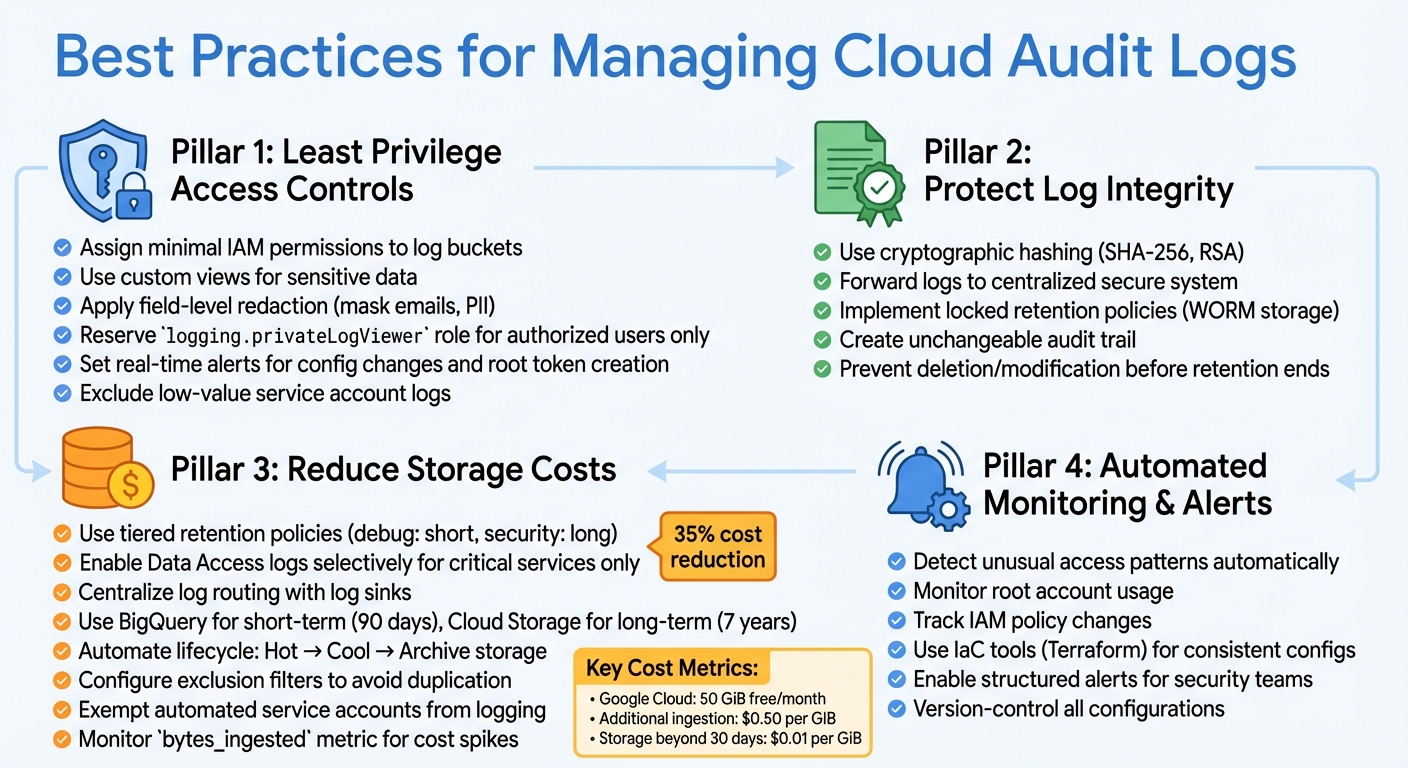 {Cloud Audit Log Management Best Practices Framework}
:::
{Cloud Audit Log Management Best Practices Framework}
:::
Tackling issues like unauthorised access, high storage expenses, and delayed threat responses requires a thoughtful approach. The following strategies can help organisations secure their audit logs while keeping costs under control.
Use Least Privilege Access Controls
Limiting access to audit logs is a key step in preventing tampering and unauthorised exposure. Assign only the necessary IAM permissions to log buckets and use custom views to restrict access to sensitive information [1][9].
For instance, apply field-level redaction to mask details such as email addresses or personal data. Reserve roles like logging.privateLogViewer for individuals who genuinely need access to sensitive Data Access logs [1][2][9]. To catch issues early, set up real-time alerts for changes to audit log configurations or the creation of root tokens, which may signal unauthorised privilege escalation [10]. Additionally, identify service accounts that generate low-value logs and exclude them from logging to reduce noise and focus on human-driven access [8].
Protect Log Integrity and Prevent Tampering
Keeping logs unaltered is essential for forensic investigations and meeting compliance requirements. Use cryptographic hashing methods like SHA-256 and RSA to create an unchangeable log trail [3]. Forward logs to a secure, centralised system for analysis and long-term storage. This ensures the audit trail remains intact even if the primary environment is compromised. For sensitive data, implement locked retention policies (e.g., WORM storage) to prevent deletion or modification of logs before the retention period ends [11][13].
Reduce Retention and Storage Costs
Managing storage costs without compromising compliance is crucial. Use tiered retention policies - retain debug or application logs for shorter durations while keeping security logs longer [11][12]. Enable high-volume logs, such as Data Access logs, selectively for critical services like BigQuery or Cloud Storage, rather than enabling them globally, to avoid unnecessary costs [13][14]. As Nawaz Dhandala from OneUptime points out:
Comprehensive audit log collection is one of those things that seems boring until you actually need it [13].
Centralise log routing using log sinks to direct logs to appropriate destinations. For example, use BigQuery for short-term analysis (e.g., 90 days) and Cloud Storage for long-term archiving (e.g., 7 years) [13]. Automate lifecycle management to move logs from Hot
storage to more affordable Cool
or Archive
tiers as they age [12][13]. Avoid duplication by configuring exclusion filters on default log buckets, ensuring logs routed to custom buckets aren't stored twice, which could double costs [11]. Exempt automated service accounts performing frequent, low-risk operations from generating Data Access logs to further reduce volume [8][14].
Google Cloud offers 50 GiB of audit log ingestion free each month, with additional ingestion priced at $0.50 per GiB and storage beyond 30 days charged at $0.01 per GiB [8]. To manage costs effectively, set up alerts for metrics like bytes_ingested to detect unexpected spikes in log volume [13][14].
Configure Automated Monitoring and Alerts
Automating log monitoring is essential for detecting critical events like unusual access patterns, root account usage, or IAM policy changes. Structured alerts ensure security teams are promptly notified of suspicious activities. Use Infrastructure as Code (IaC) tools like Terraform to manage log buckets, sinks, and exclusions. This approach ensures consistent, version-controlled configurations across your environments [11][13]. Together, these practices create a strong framework for managing cloud audit logs efficiently.
Scalability and System Health Monitoring
As organisations grow, audit logging must keep up without compromising performance. A well-thought-out system architecture and clear performance metrics are key to maintaining reliability.
Building Scalable Systems for High Log Volumes
Handling millions of audit logs daily requires a system built for efficiency. Start with structured logging frameworks like Log4j or Python logging to produce JSON-formatted logs, which are easier to parse and process [15]. For environments with high throughput, streaming pipelines such as Google Cloud Pub/Sub or Amazon Data Firehose are excellent tools for separating log generation from storage [13][16].
To prevent bottlenecks, adopt asynchronous processing. This can be achieved using message queues like Amazon SQS, which can handle log notifications while integrating seamlessly with analytics platforms such as OpenSearch or Athena [16]. For organisations managing multiple cloud projects, centralising logs with organisation-level sinks provides a unified and manageable view [13][2][16].
When dealing with massive log volumes, incremental ingestion strategies help. For example, medallion architectures paired with tools like Auto Loader allow you to load raw logs into queryable tables without needing to reprocess historical data [15]. As log tables grow into the millions of rows, employing managed tables with features like Predictive Optimisation or Liquid Clustering ensures query performance remains consistent [15]. Keep an eye on your pipeline for performance warnings, such as Garbage Collection overhead or Spark spill, which signal that resources may be under strain [15].
Scaling your log pipelines is just the first step; next comes ensuring the health of the entire system.
Tracking System Health and Performance Metrics
Robust monitoring helps identify potential problems before they affect compliance or security. For instance, track failure rates in audit logs: spikes in vault.audit.log_request_failure or vault.audit.log_response_failure often point to malfunctioning audit devices [10]. In cloud-based systems, monitor Pub/Sub throughput to ensure you don’t hit quota limits, which could disrupt log delivery to external monitoring solutions [18]. Since CloudTrail events typically deliver within five minutes, setting alerts for gaps longer than 30 minutes can help catch pipeline failures early [13][17].
Infrastructure metrics are equally important. Monitor disk space, disk IOPS, and log rotation status for file-based audit devices [10]. Tools like logrotate can automate log rotation, and configuring logging services to accept an HUP signal ensures smooth transitions to new files without data loss [10]. When using multiple audit devices, avoid redundant storage by deduplicating entries with unique identifiers such as .request.id [10]. Finally, set automated alerts for critical events like spikes in authentication failures or changes to audit configurations, so security teams can act quickly to mitigate risks [10].
Conclusion and Key Takeaways
Summary of Challenges and Solutions
Cloud audit logs come with their own set of challenges that can threaten both security and compliance. Issues like unauthorised access and data breaches can be tackled by implementing strict least privilege access controls. To manage high storage costs, organisations can adopt smart retention policies that archive or delete logs in line with regulatory requirements. For delayed threat detection, automated monitoring and real-time alerts provide a proactive way to identify suspicious activities as they occur.
Maintaining log integrity is another critical focus area, achievable through tamper-proof mechanisms. Scalability concerns can be addressed by using structured logging frameworks and streaming pipelines, ensuring your system can handle growing log volumes. Regular health checks of your infrastructure are also essential to confirm its ability to support these increasing demands. For businesses needing tailored solutions, consulting with experts can make navigating these challenges much simpler.
How Expert Consultation Can Help
Overcoming these challenges often requires a deep understanding of the technical landscape. Expert consultation can streamline the process of building a robust audit logging strategy. For example, Hokstad Consulting offers tailored solutions to optimise cloud infrastructure and DevOps workflows. Their services - ranging from cloud cost engineering to strategic migrations and custom automation - are designed to enhance security and cut costs, ensuring your audit logging approach aligns with both regulatory needs and business objectives.
FAQs
Which cloud audit logs should I enable first?
To start, make sure Admin Activity logs are enabled. These logs automatically track administrative actions, are always active, and come at no extra cost. They play a crucial role in monitoring resource changes and maintaining security.
For more detailed tracking, consider enabling Data Access logs. These logs capture data read operations and are often necessary for meeting compliance requirements. However, they may lead to additional costs depending on the volume. Begin with Admin Activity logs and then enable Data Access logs if your organisation requires deeper insights.
How long should I keep audit logs to meet compliance without overspending?
The length of time you need to retain audit logs usually depends on regulations such as GDPR or PCI DSS, which might require retention periods ranging from 6 months to several years. To manage this effectively, it's important to regularly review these requirements and set up automated retention policies. This approach ensures you stay compliant while keeping storage costs under control. Additionally, retaining logs only for the legally required duration helps avoid unnecessary expenses.
How can I prove audit logs haven’t been altered or deleted?
To make sure audit logs remain intact and unaltered, consider using immutability features, such as immutable audit logs in Kubernetes. Additionally, set up a detailed audit log collection system with long-term retention. These steps help protect logs from tampering and ensure they can be trusted for verification purposes.