
A CI/CD tool update can break builds, logins, plugins, runners, and deployments in one change window. I’d treat every version bump the same way: check compatibility first, test it in staging, prove rollback works, and verify the platform after release.
If I wanted the short version, it would be this:
- Map what changes: controller, runners, plugins, APIs, config rules, and linked services
- Set pass/fail rules first: failure rates, queue times, auth issues, and rollback limits
- Read every release note in the upgrade path: not just the target version
- Test with production-like staging: same plugin set, runner type, and key integrations
- Rehearse rollback: backup restore, image reversion, config restore, or package downgrade
- Check production after go-live: at 30 minutes, 2 hours, and 24 hours
- Write down lessons after the change: fix the runbook before the next update
Research often links change work and third-party updates to a high share of production incidents. And if delivery stops, the cost can hit £1,000s per hour. So the goal is simple: keep the upgrade, or roll it back fast based on facts, not guesswork.
What follows is a plain process I’d use to cut failure risk, keep change windows under control, and make version updates less stressful for the teams involved.
::: @figure 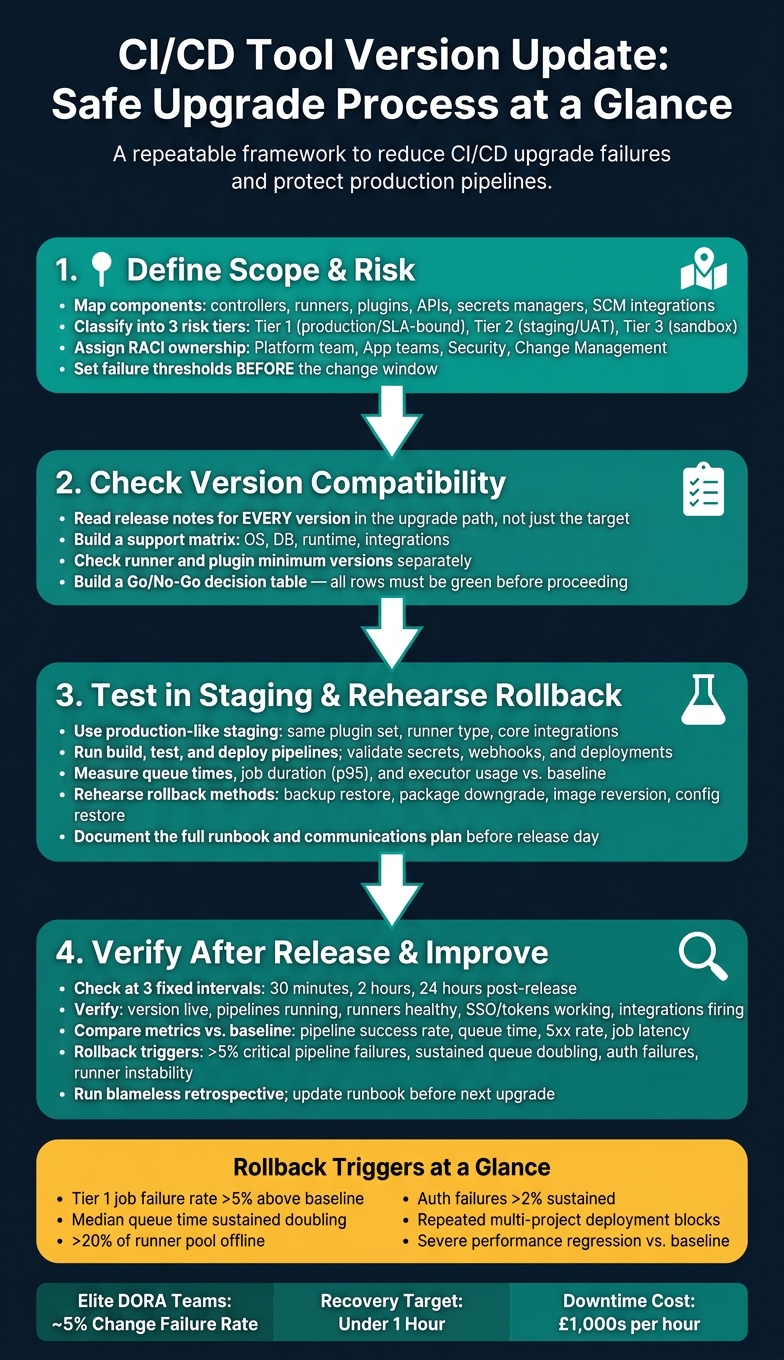 {CI/CD Tool Version Update: Safe Upgrade Process at a Glance}
:::
{CI/CD Tool Version Update: Safe Upgrade Process at a Glance}
:::
1. Define upgrade scope, ownership and risk
Before you test compatibility, pin down the blast radius and the owner for each change.
Map the components and dependencies that can break pipelines
Before you approve any version update, write down every component the change could touch. A CI/CD stack usually spans controllers, runners, shared pipeline libraries, plugins or extensions, base container images used by jobs, internal package registries, authentication and authorisation services, secrets managers, SCM integrations and deployment targets such as Kubernetes clusters. Miss one, and you leave a failure point out of view.
After that, map how those components depend on each other. Pull version data from your IaC repositories, CI/CD config files and platform admin dashboards. Then add any documented version limits between them. For example, GitLab supports the current and previous two major versions, so organisations on older releases need a fixed upgrade plan if they want to stay supported[1][3]. A version matrix helps here. With each row showing a component, its current version, target version and any known incompatibilities, unsupported combinations stand out before anyone makes the change[2].
Classify each component into three risk tiers based on business impact:
- Tier 1 covers customer-facing or SLA-bound production pipelines.
- Tier 2 covers staging, UAT and shared internal tools.
- Tier 3 covers sandboxes and experimental workloads.
Tier 1 components need tighter controls. If you're changing a production controller or a secrets manager tied to revenue-generating deployments, that change should face stricter testing, more approvals and a tested rollback plan before sign-off.
This map gives you the baseline for compatibility checks and staging tests.
Once the scope is clear, set the guardrails for the change window.
Set maintenance windows, change controls and failure thresholds
Ownership has to be explicit. A clear RACI model stops the usual “I thought someone else had it” problem during a live change window. The DevOps or Platform team plans and executes the upgrade. Application teams validate their own critical pipelines during testing. Security and InfoSec review any change that touches authentication, secrets or privileged access. Change management gives the final go/no-go for production, especially in regulated UK sectors such as financial services or healthcare[4][5]. For high-risk upgrades, name a Head of Platform or senior engineering manager as the final approver.
Set failure thresholds before the maintenance window starts, not in the middle of it. That way, rollback calls rely on agreed signals instead of gut feel. The table below shows practical starting points, and you should tune them against your own historical metrics[4]:
| Signal | Investigation threshold | Rollback threshold |
|---|---|---|
| Tier 1 failed job rate | >2% above baseline for 15 min | >5% above baseline confirmed upgrade-related |
| Median queue wait time | Doubles for 20 minutes | Sustained doubling |
| Runner availability | >10% of pool offline | >20% of pool offline or unresponsive |
| Auth/integration failures | >1% of attempts across multiple teams | Sustained >2% with no clear fix |
Link the change record to the related IaC or configuration pull request so each decision is peer-reviewed, traceable and auditable[4].
2. Check version compatibility before changing anything
Compatibility is the next approval checkpoint. Check every dependency, not just the controller. One mismatch is enough to break pipelines after release.
Use this review as the formal approval gate before any staging work starts.
Review supported versions, dependencies and breaking changes
Start with the release notes for every version between your current release and the target version, not just the end point. Pull out anything marked breaking changes, deprecated, migration required or supported platforms into one working document.
That matters most in multi-hop upgrades. If you skip intermediate versions, you can run into schema or API conflicts that don't show up until much later.
Next, build a support matrix. Map your CI/CD server version against your OS, database engine, runtime such as Java, Node or .NET, and your key integrations. This gives you a quick view of anything sitting outside the vendor's documented support range.
For example, Jenkins LTS 2.555.x requires Java 21 or Java 25 on both the controller and agent JVMs[7]. So if part of the estate is still on an unsupported Java release, that's a hard blocker before testing even starts. Treat this matrix as the single source of truth for approval.
Check runner and plugin minimum versions separately. Some need to be upgraded before the controller, while others must wait until after. And don't assume plugin support carries over. Check each one against its compatibility matrix for the target release.
Then confirm whether the upgrade changes configuration formats or triggers database schema migrations. GitLab upgrades can involve background database migrations that must finish before the next upgrade step[6]. If a schema change is in play, run a dry test in staging with production-like data before touching production.
Build a go/no-go decision table before approval
Once the compatibility review is done, pull the findings into a decision table. It turns the upgrade call into something clear and easy to review. Change approvers get a structured record instead of a quick verbal update.
| Signal or Risk | What to Check | Why it Matters | Upgrade Decision |
|---|---|---|---|
| Supported plugin matrix confirmed | Each plugin verified against its compatibility matrix for the target version | Unsupported plugins break SCM integration, secret access or artefact publishing | Go if all critical plugins are supported and tested |
| Deprecated authentication method detected | Scan pipeline configs and release notes for removed or deprecated auth flows | Removed auth methods prevent runners, SCM integrations or deployment steps from authenticating | No-go until affected flows are migrated to supported methods |
| Runner image mismatch | Confirm runner OS and agent version meet new requirements | Incompatible runners cause job failures, queue build-up or inability to execute specific tools | No-go until validated images are deployed and tested |
| Schema migration not rehearsed | Confirm whether upgrade triggers mandatory DB schema changes; rehearse in staging with backup and rollback tested | Failed migrations can corrupt data or render the CI/CD system unusable | No-go until migration is rehearsed and recovery proven |
| Packages unavailable in approved repositories | Verify target CI/CD binaries and dependencies are available in internal or approved repositories | Missing packages can halt an upgrade mid-way, leaving systems in an inconsistent state | No-go until repository and policy issues are resolved |
Before the change record goes to the change advisory board, every row in this table should show a clear pass or fail. Any item marked no-go is a blocker. The upgrade stops there until the issue is fixed and checked again.
Only when every row is green should the change move to staging tests and rollback rehearsal.
3. Test in staging and prepare rollback before release
Once the change is approved, move it into staging and validate it properly. The goal is simple: show that the upgrade works and show that you can get back out fast if it doesn’t.
Staging should prove both compatibility and recoverability before anything goes live.
Run production-like upgrade tests and pipeline checks
Staging only helps if it stays close to production. That means the same platform version, plugin set, runner type, and core integrations. Security controls should be close enough too, so permission or sign-in issues appear before release instead of during it. You do not need the same scale, but you do need the same behaviour. If staging drifts too far from production, it stops being a useful test bed.
Once that parity is in place, run a scripted validation suite based on how your teams use the platform day to day. Run build, test, and deployment pipelines that reflect each main workload type. Add smoke tests for key projects so you can check stage execution, artefact publishing, and notifications without guesswork.
You should also confirm that:
- secret retrieval works across namespaces and key vaults
- SCM webhooks fire on push, merge request, and tag creation events
- deployment jobs can reach staging infrastructure and pass basic health checks
Performance needs attention as well. Measure queue times, average job duration, p95 job duration, and executor use and auto-scaling behaviour against the baseline you recorded before the upgrade. If something slips in a meaningful way, investigate it before go-live. That is far better than finding out after engineers start missing builds.
Prepare tested rollback methods for each component
A rollback plan on paper is not enough. Before any production change, run the rollback in staging and time how long it takes.[9] GitLab is clear on this point: backups must be created under the exact same version and edition you plan to restore to, because schema migrations can block a clean restore if they do not match.[8] Jenkins also says that downgrading is not generally supported after some migrations, which makes pre-upgrade backup discipline even more important.[10]
Each component should have its own rollback method, a named owner, and versioned artefacts ready to use when the pressure is on.
| Rollback method | When to use it | Prerequisites | Expected recovery speed | Key limitations |
|---|---|---|---|---|
| Restore from backup | Schema changes, data corruption, or when downgrade is unsafe | Recent verified backup; restore procedure tested; correct version/edition match | Medium to slow | Possible data loss since backup time; may require downtime |
| Package downgrade | New version introduces critical bugs and data is intact | Previous packages or images; vendor-supported downgrade path | Medium | Not always supported; schema changes may be one-way |
| Plugin/extension downgrade | A single plugin causes job failures or API errors | Previous plugin versions; plugin management access | Fast | Does not fix core platform issues; dependency conflicts possible |
| Runner/agent image reversion | Widespread job failures tied to a new OS or runtime image | Immutable images; auto-scaling or deployment controls | Fast | Only addresses worker-side problems; leaves controller issues unresolved |
| Config restore | Misconfiguration after upgrade breaks pipelines or permissions | Configuration in version control; tested restore scripts | Fast | Settings changed only in the UI may be missed; will not solve database corruption |
Write every rollback step into the runbook before release day. If people have to piece it together during the incident, the plan is already failing.
Document the release runbook and communications plan
The runbook stops the team from making it up as they go along during the change window. It pulls the tested cut-over and rollback steps into one live document people can actually use.
At a minimum, include a numbered deployment sequence, pause points with clear go/no-go criteria, the smoke tests to run at each checkpoint, and links to each component rollback path. Set a firm time box for troubleshooting before you switch to full rollback. For example, if more than 5% of critical pipelines fail within 15 minutes of scheduling being turned back on, start rollback.
For UK organisations, timing needs extra care. Plan production cut-overs outside core business hours, usually weekday evenings or weekends, and make sure on-call cover is confirmed before the change window starts. Send notice to affected engineering teams and service owners at least five to ten working days before a major change. Include the planned date and time in UK local time so nobody has to translate it at the last minute.
Your escalation route should also be written down in plain terms: who gets called first, who can approve a rollback, and which channel the team will use for live coordination.
Store the runbook in a shared, version-controlled location, then update it after every release based on what happened in practice. That habit is what turns a one-off checklist into something teams can use again with confidence.
After go-live, use the same checklist to verify jobs, integrations, and performance against baseline.
4. Verify the update after release and improve the process
Check jobs, logs, integrations and performance after go-live
Once the release is live, move straight from deployment control to verification. Do it at once after go-live, and use a fixed check window: review the platform at about 30 minutes, 2 hours and 24 hours after pipelines restart.
Begin with the basics. Make sure the right version is live, then run a set of representative pipelines: build-only, build-and-test, deploy, scheduled and approval jobs. Check that runners are registered, healthy and taking work from different queues. It also helps to queue several jobs at the same time, because that can show starvation or queue delays that a single test job might miss.
Next, verify access. Test SSO logins and service account tokens with a small group before opening things up more broadly. At the same time, confirm that CI job logs, audit logs and application logs are reaching your logging backend with the expected fields and UK-formatted timestamps.
Then go through integrations one by one. Trigger known events and confirm delivery to source control, chat, issue tracking, ITSM, scanners, registries and artefact stores. Run one pipeline that fails on purpose so you can check the alert fires as expected. After that, run another that publishes artefacts or container images, then pull them from a separate environment to confirm upload and retrieval both work end to end.
Compare platform behaviour against the pre-upgrade baseline. Watch pipeline success rate, queue time, 5xx rate, job start latency, page response time and API latency. The thresholds below are a practical place to start:
| Metric | Baseline range (typical) | Warning signal | Rollback trigger |
|---|---|---|---|
| Pipeline success rate | 92–95% | Falls outside the baseline range | Sustained below 85% for 30–60 minutes |
| Mean queue time | 10–20 seconds | Noticeably above baseline | Sustained above 60 seconds |
| HTTP 5xx error rate | Near zero | Any new spike | Sharp, sustained increase in new error codes |
| Job start latency and duration | Pre-upgrade median | More than 20–30% above median | Several times above baseline |
Keep watching for 2 hours, then check again at 24 hours. That second pass matters because scheduled jobs, nightly security scans and environment-specific deployments often run outside core business hours. If a regression holds, treat it as a rollback call, not something to tweak on the fly.
Define rollback triggers and capture lessons learned
If verification finds a serious issue, act on rollback criteria that were agreed in advance. Put those triggers in the runbook and make sure the on-call engineer has clear authority to use them. The rules need to be plain, agreed before release and easy to apply under pressure.
Roll back for repeated multi-project failures, blocked deployments, persistent authentication failures, runner instability, severe performance regressions, or audit and access-control issues. For smaller, isolated problems - such as one failing job or a minor UI glitch - keep monitoring, apply mitigation where you can, and stay ready to roll back if the picture gets worse.
A few working days later, run a blameless retrospective. Look at what worked, what the runbook missed, and the root cause of any incidents. The point is simple: trace problems back to gaps in compatibility, staging or configuration, not people. Turn each finding into a specific action with a deadline, give it an owner, and track it in your usual work management system. Then feed those updates back into the runbook before the next upgrade.
DORA research consistently shows that elite-performing teams keep their Change Failure Rate around 5% and recover from failed deployments in under an hour.[11][12] Both results rely heavily on disciplined post-release verification and fast, practised rollback.
Conclusion: a repeatable process for safer CI/CD updates
The steps in this guide form a closed loop: define scope and risk, confirm compatibility before approval, test in staging, prepare and rehearse rollback, verify production behaviour after release, and refine the runbook each time. Each step blocks a different kind of failure.
For UK delivery teams, the aim is straightforward: fewer failed changes, shorter disruption windows, and pipelines that stay reliable as tools change. In practice, that means scheduling cut-overs outside core business hours, communicating in UK local time, and holding a short lessons-learned session after every upgrade.
If your organisation is trying to move from ad hoc upgrades to a consistent, auditable process, Hokstad Consulting can help. Their DevOps transformation work includes designing upgrade frameworks, building automated verification pipelines, and implementing rollback automation - so the CI/CD platform is managed with the same rigour as the software it delivers.
FAQs
How often should CI/CD tools be updated?
There’s no fixed timetable for updating CI/CD tools.
Instead, tie updates to major release cycles or big pipeline changes, and review pipeline configurations and documentation every quarter.
When you update a tool, check the related documentation for new features, removed functions, and configuration changes. Automated configuration snapshots can help keep everything in sync without adding extra work.
What should a rollback plan include?
A rollback plan should set clear failure criteria for problems like HTTP error rates, latency, or crash loops. It also needs automated steps to roll deployments back, restart services, and check that key endpoints are working as expected.
It should also account for database schema changes, configuration updates, and service dependencies. On top of that, it needs named roles, clear communication protocols, and proper documentation. And it shouldn't just sit on a shelf - it needs a clear structure and regular testing in controlled environments.
Which metrics matter most after an upgrade?
Prioritise a mix of technical, business, and user experience metrics to assess system health after an upgrade.
That matters because a system can look fine on the surface while trouble is building underneath. Fast servers don’t help much if revenue drops. And strong sales numbers can hide a poor experience that sends users away later.
Track metrics across these three areas:
- Technical: response times, error rates, CPU and memory usage, and disk space
- Business: conversion rates, transaction volumes, and revenue
- User experience: page load times, feature adoption, bounce rates, and support tickets
This mix gives you a clearer picture of what changed after the upgrade and where to look first if something feels off.