
If I had to boil this down to one point, it would be this: automate the base layer first, then move workloads through the same checked path every time. That means I would put networking, identity, access, approved images, policy checks, tagging, patching, and rollback steps into code before anything goes live.
The article makes a clear case for this approach. 73% of UK IT leaders are weighing up moving workloads from public cloud to private cloud, while 54% of UK and Irish IT leaders say they still lack clear visibility of cloud spend. So the fix is not just faster deployment. It is a setup that gives you audit trails, cost control in £, repeatable builds, and fewer surprises in production.
Here’s the short version of what matters most:
- Write the platform baseline in code: networks, subnets, firewalls, storage, compute pools, RBAC, SSO, and MFA
- Use approved golden images only and scan them before release
- Enforce policy in the pipeline with tools such as OPA or Sentinel, including data residency and security rules
- Register and tag every asset at creation with owner, environment, cost centre, application, and data classification where needed
- Use IaC and CI/CD with one promotion path from dev to production, with stricter checks for higher-risk changes
- Automate patching and drift checks so deployed systems stay aligned with the approved state
- Build cost checks into delivery with tagging, dashboards in £, shutdowns for non-production, and approval gates for higher-cost changes
- Track delivery and incident metrics such as deployment frequency, lead time, change failure rate, and MTTR
- Roll out in stages: pilot, limited production, then full production
- Review exceptions and results on a set cycle, then feed fixes back into version-controlled templates and pipelines
What I like about this article is that it does not treat automation as a tooling exercise. It treats it as a control model. In plain terms: if your private cloud setup is not defined, checked, tagged, and logged from the start, automation will just repeat bad setups at scale.
So if you are starting from scratch, I would prioritise work in this order:
- Security and access baseline
- Approved images and policy checks
- Modular IaC and controlled promotion
- Tagging, budgets, and spend visibility in £
- Drift correction, incident links, and staged rollout rules
That gives you a private cloud setup that is simpler to run, easier to audit, and less likely to depend on one person who “just knows how it works”.
::: @figure 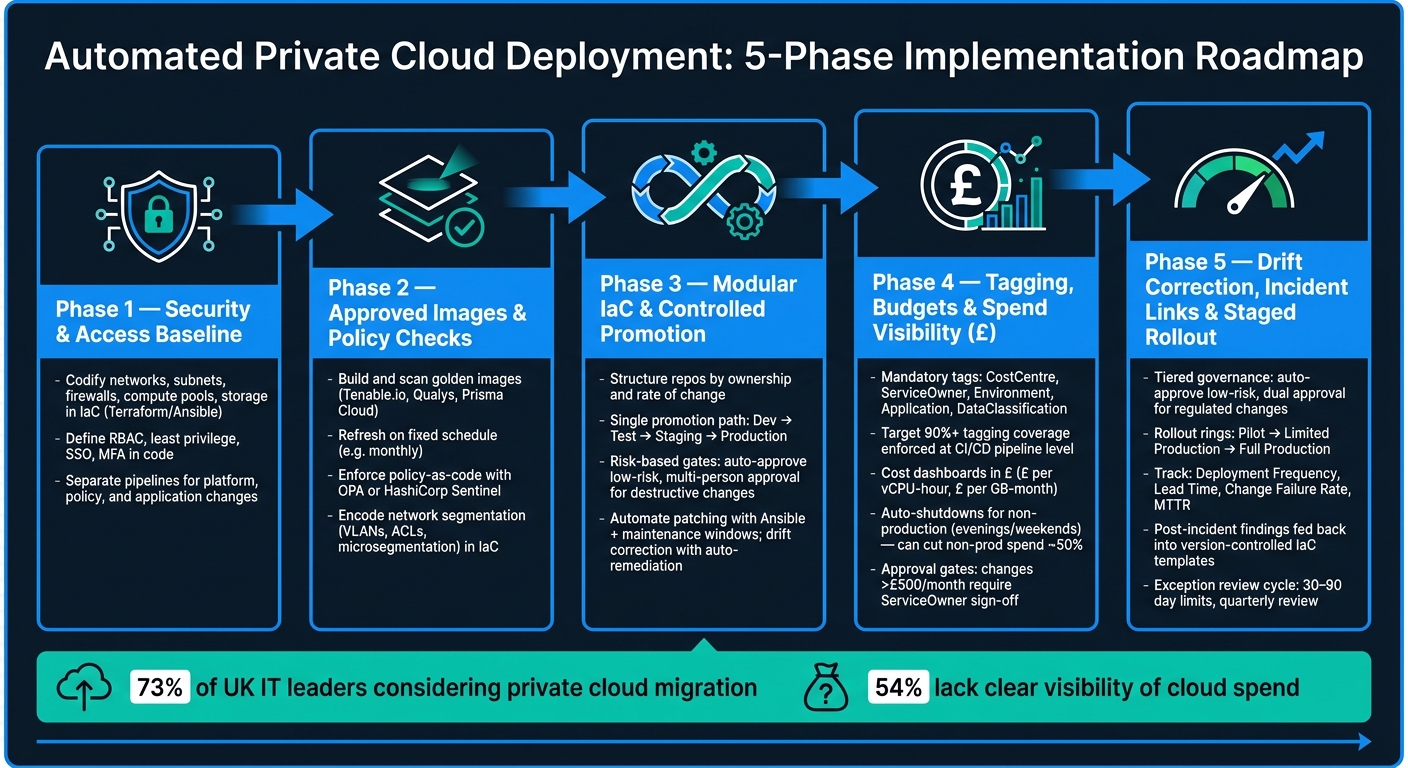 {Automated Private Cloud Deployment: 5-Phase Implementation Roadmap}
:::
{Automated Private Cloud Deployment: 5-Phase Implementation Roadmap}
:::
2. Build a secure automation baseline before deploying workloads
Before you deploy a single workload, put your networking, identity and security controls into code. That means the security baseline, access model and approved build pattern from the previous section must exist as tested, version-controlled code - not loose agreements or tribal knowledge. If the base layer hasn't been checked properly, automation just helps you repeat mistakes at speed.
2.1 Codify core infrastructure and access controls
Write core infrastructure as version-controlled IaC modules. That includes network segments, subnets, gateways, firewall rules, compute pools, storage and identity providers. Tools like Terraform or Ansible fit well here. The aim is simple: build reusable modules that teams can use without reinventing the wheel each time.
Split delivery into separate pipelines for platform foundations, policy changes and application workloads, with different approvers for each. That way, one change can't quietly ripple through the whole stack without review.
RBAC should also be defined in code. Set up job-based roles, least privilege, SSO and MFA, and give production pipelines tighter permissions than non-production. When access is codified, platform, security and application changes can't sidestep one another.
These controls form the secure base that your deployment pipelines will apply by default.
2.2 Approved images, network segmentation and policy-as-code
Build approved golden images and scan them before release. Run vulnerability scanning - tools such as Tenable.io, Qualys or Prisma Cloud fit neatly into image build pipelines - and reject any image that fails checks.[1][2][3][4] Refresh golden images on a fixed schedule, such as monthly, so patches stay current. Then enforce a rule that only workloads based on approved image IDs can be launched.
Encode network segmentation in IaC templates, including VLANs, security groups, network ACLs and firewall rules. Put microsegmentation policies into code as well, whether that's HCL, YAML or JSON. When segmentation lives in code, it stays aligned across environments.[5][6][11][13]
Use policy-as-code to enforce NCSC Cloud Security Principles and data-residency rules at pipeline level. Frameworks like Open Policy Agent (OPA) or HashiCorp Sentinel, tied into Terraform and your CI/CD pipeline, can check every planned change against security and compliance rules before anything is deployed.[8][10][12] Keep separate pipelines for validating infrastructure, policy and workloads before deployment.[8] Data-residency rules should also be encoded in policy.[7][9]
Once approved images, segmentation and policy checks are set, each workload moves through the same guardrails every time.
2.3 Automatic asset and change registration
Register every VM, container and service in the asset inventory and configuration database as part of the process. At provisioning time, tag each one with owner, environment, cost centre and data classification, so ownership, classification and cost data are there from the start - and cost tagging begins on day one.[7][8]
These controls then become the default inputs for repeatable promotion in the next stage.
3. Set up repeatable deployment with IaC, CI/CD and environment controls
With your secure baseline in place, the next move is to build a deployment process that behaves the same way every single time, no matter who runs it or which environment it targets. In practice, that means well-structured repositories, tested code, clear promotion paths, and automated day-two operations.
3.1 Structure repositories and modules for scale
Building on the secure baseline, structure repositories so automation stays repeatable as the estate grows. Organise your infrastructure code around ownership and rate of change, not just by tool type. Keep core services in versioned modules, and use thin environment overlays. Shared modules should stay separate from environment overlays, so platform changes are versioned once instead of being copied around.
A monorepo can work well when one platform team owns most of the estate and needs atomic changes across modules and environments. Separate repositories are often a better fit when different teams own different stacks or release on different cadences, because they cut the blast radius and let each team version its work on its own terms.
Whatever pattern you choose, each module needs a single owner, semantic versioning, and automated pull request checks. That includes terraform fmt, terraform validate, and a plan step that shows reviewers exactly which resources will be created, changed, or destroyed. Spotting a destructive change before merge is much cheaper than cleaning up after one in production.
That setup makes promotion through each environment far more predictable.
3.2 Promote changes across dev, test, staging and production
Keep the promotion path simple and consistent. The same code revision should move through each environment, with environment-specific values injected only through approved configuration layers. Use one controlled route from dev to production.
Risk-based gates help keep that flow safe as things grow. Development can move fast with lighter checks. Test proves functional behaviour. Staging should mirror production as closely as possible. Production needs the strongest controls: mandatory plan review, multi-person approval for destructive changes, scheduled maintenance windows, and an automatic rollback playbook if health checks fail after apply. Low-risk changes can be automated. Destructive ones should need approval.
Once production is live, drift correction keeps those same controls in place.
3.3 Automate configuration, patching and drift correction
After promotion, use day-two automation to keep deployed systems aligned with the approved state. Terraform provisions infrastructure. Ansible handles configuration and drift. For Azure-native estates, use Terraform for provisioning, Bicep or ARM where they fit best, and Ansible for configuration and drift.
For patching in production, pair Ansible runs with maintenance windows and canary-style rollout groups so failures are contained before they hit every node. Drift correction should compare actual state against policy and either auto-remediate or open an incident based on criticality.
4. Build scalability and cost control into the deployment workflow
Once your deployment pipeline is stable, the next mistake is pushing cost and capacity down the road. That almost never ends well. Non-production environments tend to stay up longer than anyone planned, resources pile up with no clear owner, and by the time someone spots the waste, the bill has already grown. The fix is simple in principle: build cost and capacity checks into the deployment workflow from day one.
4.1 Start small, reserve capacity and monitor growth
Start with a small private cloud footprint. Keep it to core shared services only: identity, networking, logging, monitoring, and a modest compute and storage pool sized for current workloads with about 20–30% headroom [19]. Then scale capacity through the same pipeline you use for deployments.
In shared estates that support several teams or business units, quotas and reservations stop one team from swallowing shared capacity. Kubernetes resource limits and virtualisation-layer guarantees can be written straight into deployment manifests, so customer-facing services stay at the front of the queue. When setting reservations or commitments, begin at 60–70% of measured steady-state usage [19], then adjust as monitoring data gives you a clearer picture.
Observability needs to cover infrastructure metrics, application performance, and pipeline telemetry together. And the alerts should focus on early warning signs such as rising queue lengths, latency trends, and storage nearing capacity, instead of waiting for an outage to make the issue obvious.
That only holds up if every resource is tagged and costed from the moment it is created.
4.2 Enforce tagging, budgets and cost visibility in £
Tagging underpins everything else in this section. Without it, about 40% of a typical cloud bill has no clear owner [14][16][19]. That makes cost allocation, waste detection, and accountability much harder than they need to be.
Mandatory tags should include at least:
-
CostCentremapped to your internal finance codes -
ServiceOwner -
Environment(Dev,Test,Staging,Production) -
Application
If your organisation handles sensitive data, add DataClassification too. It adds a little overhead, but it pays for itself.
The key point: enforce tags at creation, not after the fact. Pre-deployment checks in the CI/CD pipeline should fail any change that misses a required tag or labels it wrongly. Policy-as-code controls should also block non-compliant resources at runtime. Aim for 90%+ tagging coverage [15][16][19], while accepting that some items, such as data transfer, cannot be tagged. Surface compliance weekly in dashboards so gaps don't sit hidden for months.
Cost dashboards should convert tagged resource use into £ with agreed internal unit prices, such as £ per vCPU-hour or £ per GB-month of storage. Those dashboards should show monthly spend, utilisation, and budget variance by CostCentre, Environment, and Application. Break out non-production spend on its own, because that's often where the easiest savings are hiding.
Once you can see the spend clearly, non-production waste is usually the first place to tackle.
4.3 Automate waste reduction and cost-aware approvals
When tagged spend is visible, automated shutdowns and rightsizing get much easier. Non-production is usually the simplest place to cut cost. Development, staging, and sandbox environments often make up 30–40% of total spend [14][17][20], even though they are mostly used during normal UK working hours.
That creates an obvious opening. Schedule automatic shutdowns on weekday evenings and at weekends. Add opt-out tags for services that do need to run 24/7, plus a self-service way to extend capacity for a short period when needed. Done well, this can cut non-production spend by about half within a month [20] without causing much friction for delivery teams.
Use monitoring to find idle compute, unattached storage, and over-provisioned instances for rightsizing, then feed those recommendations back into IaC modules. Cost estimation should also sit inside the CI/CD pipeline. Each planned change should show an estimated monthly cost in £ alongside the technical diff.
A simple approval model works well here:
- Changes below a set threshold move ahead automatically and are logged
- Changes above that threshold - for example, an increase of more than £500 per month for a single service - go to the
ServiceOwneror cost-centre manager for approval before rollout [18][20]
Feed these controls into governance rules and rollout limits before broad production rollout.
5. Govern, measure and improve your automated private cloud
5.1 Set governance rules and rollout limits
Start with tiered governance. Low-risk changes that meet policy can be auto-approved. Regulated or high-impact changes should need dual approval. The key is to put those rules into Git-based branch protection and peer review settings, not messy email chains that are hard to track.
Use rollout rings: pilot, limited production, then full production. Only move forward when error rates and SLOs stay inside the agreed thresholds [22][25].
It also helps to run new automation in recommendation-only mode at first. That gives you a safe way to watch the pattern before switching to full automation. Once it proves itself, turn it on with audit logs and rollback guardrails in place.
Keep a central record of exceptions. Put a clear time limit on each one, usually 30 to 90 days, and review them every quarter alongside CI/CD and IaC audit logs. Then check whether those controls are working by looking at deployment and incident data.
5.2 Track results and respond to incidents
To measure governance, track the core delivery metrics:
Alongside those, watch compliance violations per month, tagging coverage, budget variance in £, and the share of under-used resources.
When a new configuration goes live, add the deployment ID to dashboards and logs. That way, if errors or latency jump, you can tie the issue to that change straight away. Failed deployments, policy violations, and cost threshold breaches should open tickets in your ITSM or issue-tracking tool on their own. Those tickets should include the affected service, environment, recent changes, and suggested remediation steps [23].
Link runbooks and rollback steps straight from alerts and tickets. Keep them ready for peak trading and month-end processing. And don't wait for a live outage to test them. Run periodic game days so teams can practise responses to automation failures before they hit production [23].
Post-incident reviews should look at automation behaviour, safeguards, and rollback performance. The findings then need to go back into version-controlled IaC repositories and pipeline templates, so the fixes can be repeated and audited later [23].
5.3 Conclusion: which practices to prioritise first
Go in stages. Foundation first, then broader governance, then deeper automation.
Begin with your secure baseline, approved images, least-privilege access, and core policy-as-code checks. After that, build modular IaC with controlled CI/CD promotion and basic cost controls. In the next phase, add governance metrics, cost visibility dashboards in £, and phased rollout patterns. Then move towards policy-driven automation and self-service workflows.
For most UK organisations, the best fit is mixed ownership: platform-level guardrails with team-level automation. Review priorities every quarter using incident data, cost trends, and stakeholder feedback.
FAQs
Where should we start with private cloud automation?
Start by standardising your infrastructure and completing an asset inventory of virtual machines, containers and storage.
Then look for high-impact workflows where manual tasks slow things down or lead to mistakes, and pick one as your first pilot. Infrastructure as Code (IaC) is a must here. It replaces manual configuration with version-controlled, declarative files, which makes change easier to track and far less messy.
If you want hands-on help, Hokstad Consulting offers expertise in DevOps transformation and private cloud optimisation.
How do we stop configuration drift after deployment?
Use immutable infrastructure where you can. That means shipping new instances when you need an update, instead of tweaking the ones already running.
Also, define each environment with Infrastructure as Code in version-controlled files. This keeps the target state consistent and easy to check.
It also helps to compare the live environment against those templates on a regular basis, ideally with automated checks in your CI/CD pipeline. On top of that, enforce strict role-based access control so people can’t make manual, one-off changes outside the normal process.
How can we build cost control into the pipeline?
Build cost control into the pipeline by shifting from manual checks to automated, proactive governance. A good way to do that is with Policy as Code, using tools such as Open Policy Agent to enforce financial guardrails in CI/CD workflows.
In practice, that means pipelines check configurations against set rules before anything goes live. For example, they can verify instance size limits and make sure cost-centre tagging is in place before deployment.
If a request breaks those rules, the pipeline can either block it or flag it for approval. On top of that, automated shutdowns, rightsizing, and continuous monitoring help keep spend under control without relying on someone to catch every issue by hand.