
Most Kubernetes rightsizing tools do one of three jobs: show changes, apply changes, or tie changes to cost. If your cluster is over-requested, lower requests can help with bin-packing, but you only save money when that leads to fewer nodes or less unused capacity.
I’d sum this article up like this:
- Goldilocks, Robusta KRR, and VPA fit teams that want recommendations first
- StormForge, CAST AI, ScaleOps, and PerfectScale fit teams that want policy-led automation
- Kubecost fits teams that need cost visibility, ownership, and rightsizing in the same place
- Rollout risk matters more than savings claims
- CPU and memory changes should be checked against HPA, PodDisruptionBudgets, and node scaling
- A lower request does not always mean a lower cloud bill
The article also makes one point very clear: rightsizing is not a stand-alone fix. It works with:
A few numbers frame the problem fast:
- A 2026 CAST AI report says the average cluster is over-provisioned by 69% for CPU and 79% for memory
- The 2025 State of FinOps report puts workload optimisation and waste reduction at the top of the agenda
- CAST AI’s look-back window can be set from 3 hours to 7 days, with 24 hours as the default
If I were choosing from this list, I’d use a simple filter:
- Do I want recommendations only, or auto-apply changes?
- Do I need cost ownership and chargeback, or just pod sizing?
- Can my workloads handle restarts, evictions, or in-place resize limits?
- Will lower requests lead to fewer nodes and lower spend in £?
::: @figure 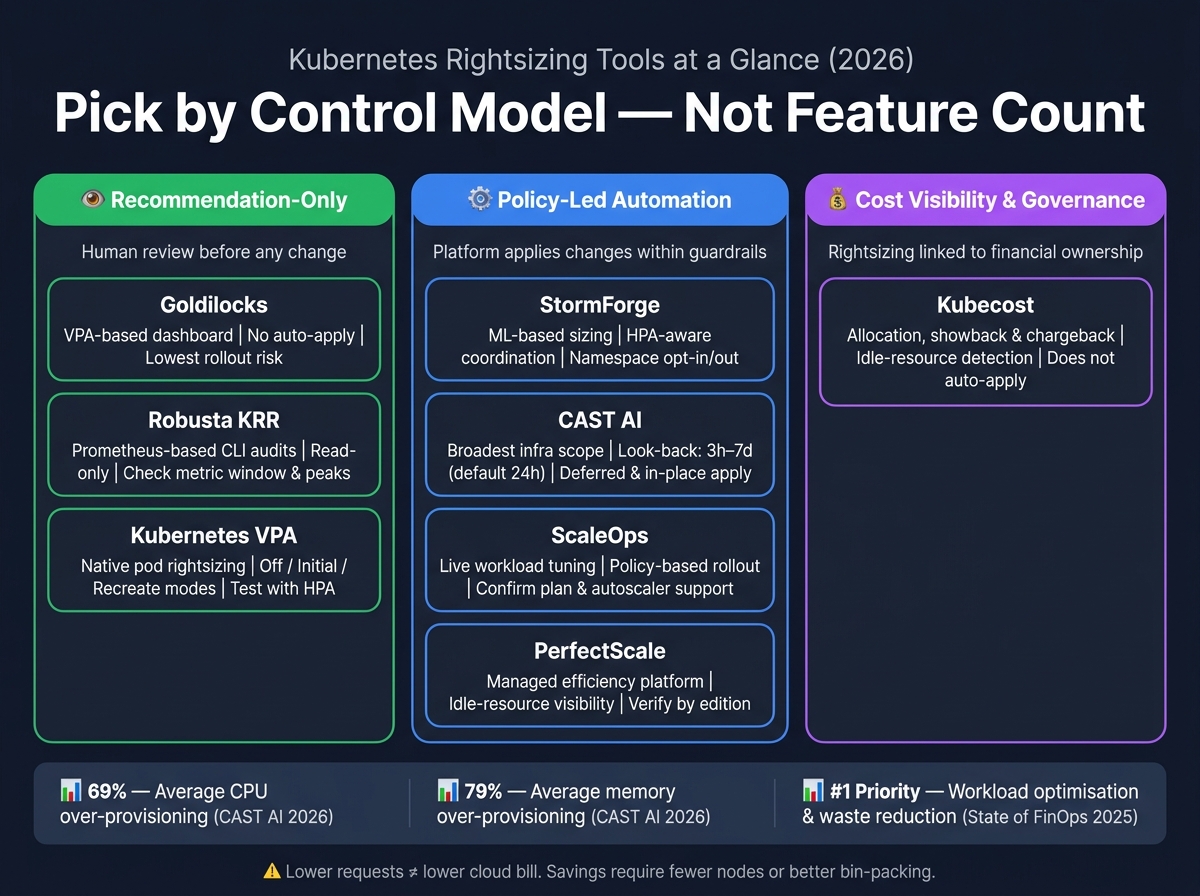 {Kubernetes Rightsizing Tools Compared: Control Model, Automation & Cost Scope (2026)}
:::
{Kubernetes Rightsizing Tools Compared: Control Model, Automation & Cost Scope (2026)}
:::
Kubernetes Rightsizing: Beyond CPU and Memory, with Andy Suderman | KubeFM
Quick comparison
| Tool | Best for | Change model | Main watch-out |
|---|---|---|---|
| Goldilocks | VPA-based reviews | Recommendation-only | No auto-apply |
| Robusta KRR | Prometheus-based audits | Recommendation-only | Check metric window and peaks |
| Kubernetes VPA | Native pod rightsizing | Manual or automatic | Pod eviction and HPA conflicts |
| Kubecost | Cost plus rightsizing insight | Reports and recommendations | Does not focus on auto-apply |
| StormForge | Rightsizing with HPA awareness | Policy-controlled automation | Check edition and rollback details |
| CAST AI | Automated workload and node efficiency | Policy-controlled automation | Pick the right look-back and rollout mode |
| ScaleOps | Live workload tuning | Policy-controlled automation | Check plan and autoscaler support |
| PerfectScale | Managed efficiency platform | Recommendation or automation by edition | Check edition limits |
Bottom line: I’d pick the tool by control model, not feature count. If you want a safe first step, start with read-only recommendations. If you want automation, make sure you can track throttling, OOM kills, latency, error rates, node use, and spend in £ across at least one full billing cycle.
The seven Kubernetes rightsizing tools
Goldilocks, Robusta KRR, and Kubernetes Vertical Pod Autoscaler
Goldilocks is a recommendation-only tool. It creates or exposes Vertical Pod Autoscaler objects for workloads and shows CPU and memory recommendations in a dashboard. By default, VPA update mode is set to Off, so nothing changes on its own.[5] Engineers review the output and then apply changes through manifests, Helm values, or GitOps.
That setup works well for teams that want a clear audit trail and human sign-off before anything goes into production. In practice, the quality of those recommendations depends on the VPA setup, the metrics you have, how much history is available, and how the workload behaves over time.
Robusta KRR runs as a CLI tool against your cluster, pulls historical use data from Prometheus, and produces a report with suggested request values across namespaces or even a whole fleet. It is read-only.
That makes KRR handy for scheduled fleet audits, CI/CD checks, or sorting workloads for review before a quarterly review. If you use filters, leave out system namespaces and critical workloads, compare the output with PodDisruptionBudgets, and check recommendations against peak usage rather than average usage. It also makes sense to confirm the release-specific metric window before using it in production.
Kubernetes VPA is the native starting point that many other tools build on or plug into. The recommender calculates target, lower, and upper bounds. The updater applies changes. The admission controller sets values on new pods.
If you run VPA in Off mode, you get recommendations without automatic changes. Switch to an automatic mode and the updater can evict pods to apply new values, which is where PodDisruptionBudgets, replica counts, readiness probes, and disruption tolerance start to matter. You should not run VPA and HPA on the same resource dimension without compatibility testing.[11]
| VPA Mode | Automation Level | Disruption Risk | Best Use Case |
|---|---|---|---|
| Off | Manual | None | Testing and baselining |
| Initial | At pod creation only | None for running pods | Routine CI/CD updates |
| Recreate | Automatic | High (pod restarts) | Stateless microservices |
The next group goes past pod settings and pulls cost data into the picture.
Kubecost and StormForge by CloudBolt
Kubecost is mainly a cost-visibility and allocation platform, not just a pod-tuning tool. Its rightsizing features sit next to cost allocation, budget tracking, showback, chargeback, and idle-resource analysis. So it can answer a question that recommendation-only tools usually cannot: which team owns the cost? Kubecost 3.1 added resource-quota rightsizing, with recommendations that can be applied straight from the UI.[10]
| Scope | Kubecost relevance |
|---|---|
| Pod rightsizing | Identifies over- and under-requested CPU and memory; applied recommendations depend on edition and configuration |
| Cost allocation | Strong focus: attributes shared and unused costs to teams, namespaces, and workloads |
| Idle-resource visibility | Savings Insights identifies abandoned workloads and underused nodes |
| Node and cloud-financial scope | Extends beyond pod settings into cluster, node, and cloud-cost analysis |
StormForge by CloudBolt uses historical workload data and machine-learning models to recommend request and limit values.[10] It starts in read-only mode.
One detail stands out here: its handling of HPA is quite exact. It can preserve the scale point for workloads that are actively scaling, treat idle or saturated HPAs differently, and optionally stop changes to resources that HPA already controls, all without changing the HPA configuration itself.[9] That matters because if you change CPU requests on a workload that HPA is scaling on CPU utilisation, you also change the scaling trigger point.
Namespace-level opt-in and opt-out controls, approval workflows, and policy-based rollout controls make gradual adoption far easier across a large cluster. Even so, it is worth checking edition-specific automation, supported autoscalers, and rollback behaviour against the release you plan to use.
These tools go further into policy-led automation and live workload control.
CAST AI Workload Autoscaler, ScaleOps, and PerfectScale
CAST AI Workload Autoscaler continuously generates recommendations from historical and forecast data, with policy controls for vertical rightsizing, horizontal scaling, optimisation targets, overhead, look-back periods, minimums, maximums, and apply thresholds.[2][3] The look-back period can be set from 3 hours to 7 days, with 24 hours as the default, so the right choice depends on whether the workload follows daily or weekly traffic patterns.[4][7]
A February 2026 update added two useful controls: recommendations now respect Kubernetes ResourceQuota hard limits, and there is an option to preserve the existing request-to-limit ratio when producing new values.[6] Immediate application can cause pod restarts. Deferred application avoids forced restarts. And on Kubernetes 1.33 and later, in-place resizing may let some changes happen without a restart at all.[7]
ScaleOps works on live workloads and keeps evaluation separate from application, while still giving teams policy-based rollout controls over workload resources and autoscaling behaviour. A common path is to start in read-only mode, measure possible savings and risk without touching production, and then turn on policy-based rollout controls for selected workloads or namespaces.
For variable workloads, the main settings are minimum and maximum resource bounds, change sensitivity, and cooldown periods that stop thrashing. Any capability tied to a specific ScaleOps plan, agent version, or supported autoscaler version should be checked before production use.
PerfectScale takes a similar efficiency-first route, but as a managed platform.
PerfectScale is a managed Kubernetes efficiency platform. It combines rightsizing recommendations with efficiency analysis and idle-resource visibility, which makes it a reasonable fit for teams that want a managed view across workload use and waste without building a full internal VPA or reporting workflow. It identifies idle workloads and efficiency waste, but removal or node reduction still depends on the product edition and automation settings.
Comparison table: how each tool fits
The big decision here is simple: do you want recommendations, automation, or cost control? The table below trims that down to the bits that matter most: control level, autoscaling fit, and cost scope.
| Row | Goldilocks | Robusta KRR | Kubernetes VPA | Kubecost | StormForge | CAST AI Workload Autoscaler | ScaleOps | PerfectScale |
|---|---|---|---|---|---|---|---|---|
| Control model | Recommendation-only; displays VPA output for review | Recommendation-only by default; automation requires explicit opt-in | Recommendation-first; optional automation via update modes | Reports and recommends; does not apply changes | Automation with policy controls; read-only start available | Automation with policy controls; supports deferred and in-place application | Automation with policy controls; policy-based rollout controls | Automation with policy controls; varies by edition |
| CPU and memory coverage | VPA-derived targets | Memory recommendations use recent Prometheus usage with a buffer | Uses VPA targets and bounds | Reports CPU and memory; does not apply them | Adjusts CPU and memory allocations | Adjusts CPU and memory allocations | Adjusts CPU and memory; can also manage replica count bounds | Adjusts CPU and memory; varies by edition |
| Autoscaling fit | Not an autoscaler | Not an autoscaler | Vertical autoscaler; test carefully alongside HPA | Not an autoscaler | Coordinates with HPA | Works alongside broader scaling controls | Works alongside broader scaling controls | Works alongside broader scaling controls |
| Idle-workload visibility | Indirect only | Indirect only | Indirect only | Native idle detection via Savings Insights [13] | Indirect only | Indirect only | Indirect only | Indirect only |
| Rollout risk | No automated changes; very low risk | No automated changes by default; very low risk | May evict pods when applying updates; test with PodDisruptionBudgets [12][14] | No automated changes; very low risk | Namespace opt-in/out; approval workflows; policy-based controls [9] | ResourceQuota-aware; deferred or in-place application options [8][7] | Policy-based controls; confirm in-place support by edition | Policy-based controls; confirm in-place support by edition |
| Cost scope | Pod efficiency only; needs a separate cost system | Pod efficiency only; needs a separate cost system | Pod efficiency only; needs a separate cost system | Allocation, showback, chargeback, and budgets [13] | Workload-focused; reduces waste through better packing | Broadest infrastructure scope: node, instance, Spot, and on-demand optimisation | Between pod-level and broader platform efficiency | Between pod-level and broader platform efficiency; verify by edition |
Recommendation-only, automated, and cost-management categories
Goldilocks, KRR, and VPA in recommendation mode fit teams that want proof before making changes in production. That usually means more manual work for operators, but far less rollout risk.
StormForge, CAST AI, ScaleOps, and PerfectScale are a better match for teams that are ready to let a platform make changes within guardrails. The split between them comes down to scope. CAST AI reaches furthest into node and capacity choices. StormForge stands out when close coordination with HPA matters. ScaleOps and PerfectScale sit nearer to workload efficiency, without going as far into the full infrastructure layer.
Kubecost sits in a different lane. Its rightsizing features matter, but its main job is financial governance. If engineering and finance both need the same picture of Kubernetes spend, Kubecost is often the better fit.
In practice, the deciding factors are less about one headline feature and more about day-to-day operations: how mature your team is, how much pod disruption you can live with, how good your observability data is, and whether you're happy to give a platform write access.
That’s the lens to use before moving on to rollout safety: how much control are you willing to hand over?
Choosing and adopting a tool safely
Once you know which type of tool you need, the next call is rollout risk.
Matching tool to operating model
Pick the tool that fits the way your team makes changes, not the one with the longest feature list.
| Operating model | Best-fit tools | Main concern |
|---|---|---|
| Manual, GitOps-controlled rightsizing | Goldilocks, Robusta KRR, VPA in Off mode |
Engineers must implement every change |
| Native VPA control | Kubernetes VPA | Pod recreation can affect availability [1] |
| Cost visibility plus rightsizing analysis | Kubecost | Cost insight does not enforce rightsizing changes |
| Coordinated workload and autoscaling optimisation | StormForge | HPA coordination is required |
| Continuous automated optimisation | CAST AI, ScaleOps | Needs mature rollback discipline |
| Managed optimisation with broader governance | PerfectScale | Needs governance across clusters |
Recommendation-only tools work well for review-heavy teams where every change is checked before it reaches production. Automated tools are a different story. They need solid rollback steps, clear observability, and clear workload ownership before you let them touch live services.
The next job is to prove the choice safely in production.
Safe rollout and measuring results
Before you change anything, get a baseline.
Collect one representative week of CPU and memory data. That week should cover weekdays, weekends, batch windows, and peak traffic. Include p95 and p99 CPU figures, memory working-set and peak values, throttling counts, OOM-kill events, pod evictions, replica counts, and Kubernetes spend in £ by cluster, namespace, and workload. If the window is too short, a recommendation can look lean on paper while missing a monthly batch run or a seasonal traffic spike.
Start in read-only mode before applying any changes. For VPA, that means updateMode: Off. Review the proposed values first. Keep certain workloads out of scope at the start: stateful databases, message brokers, JVM-based services with tricky heap behaviour, latency-sensitive workloads, and anything without steady readiness, liveness, latency, or error-rate telemetry.
When you begin applying changes, set minimum and maximum CPU and memory bounds so recommendations stay inside tested limits. Put Pod Disruption Budgets in place, check that readiness probes are working, and start with a small group of stateless services that are easy to observe. Then expand by namespace or service owner only after that canary group meets your agreed service-level and cost targets.
One more thing: lower requests do not automatically cut your bill. You only see savings when lower requests lead to fewer nodes, better bin-packing, or less unused committed capacity. So track the numbers that matter: throttling, OOM kills, latency, error rates, node utilisation, and spend in £ across one full billing cycle.
Conclusion: match the tool to your control model
Rightsizing is one part of Kubernetes cost optimisation, not the whole answer. Savings also depend on node packing, idle workloads, scheduling, storage, and autoscaling.
So the final decision comes down to control, not feature count.
If your team wants recommendations that can be reviewed before anything changes, Goldilocks, Robusta KRR, and native VPA are a good fit. If you need rightsizing linked to allocation and chargeback, Kubecost makes more sense. And if your goal is policy-led automation, StormForge, CAST AI, ScaleOps, and PerfectScale sit at different points on the automation spectrum.
Once you’ve picked a tool, don’t get distracted by big savings claims. Safety matters more. Go with the option that gives clear, explainable recommendations and keeps changes inside policy limits your team can manage with confidence.
FAQs
How do I choose between recommendations and auto-apply?
Balance stability against the amount of hands-on work your team can handle. A sensible starting point is Vertical Pod Autoscaler in Off mode. That lets you review its recommendations without changing live workloads, then compare those suggestions with actual usage over at least a week.
Once you’re happy with what the data shows, you can move to automated modes. Use Initial if you want slower changes during deployment cycles. Or use Recreate and InPlaceOrRecreate for continuous rightsizing, with Pod Disruption Budgets in place to help protect availability.
Will rightsizing actually reduce my Kubernetes bill?
Yes. Rightsizing can cut your Kubernetes bill by bringing resource requests and limits closer to what workloads actually use. That trims over-provisioning and reduces idle capacity.
It also helps with bin-packing. Put simply, you can fit more pods onto fewer nodes instead of paying for spare room you don't need.
The savings can be big. Studies show businesses can cut cloud costs by 30–50%, with many enterprises saving thousands of pounds each month.
What should I check before enabling automated rightsizing?
First, set a baseline using at least two weeks of CPU and memory usage data. Check that Metrics Server is running, then use Prometheus or Grafana to look at both peak and idle usage patterns.
Start with your tool in Off or recommendation mode. That lets you review its suggestions without disruptive pod restarts.
It also helps to set minAllowed and maxAllowed limits, so recommendations don’t come in too low or too high for your cluster.