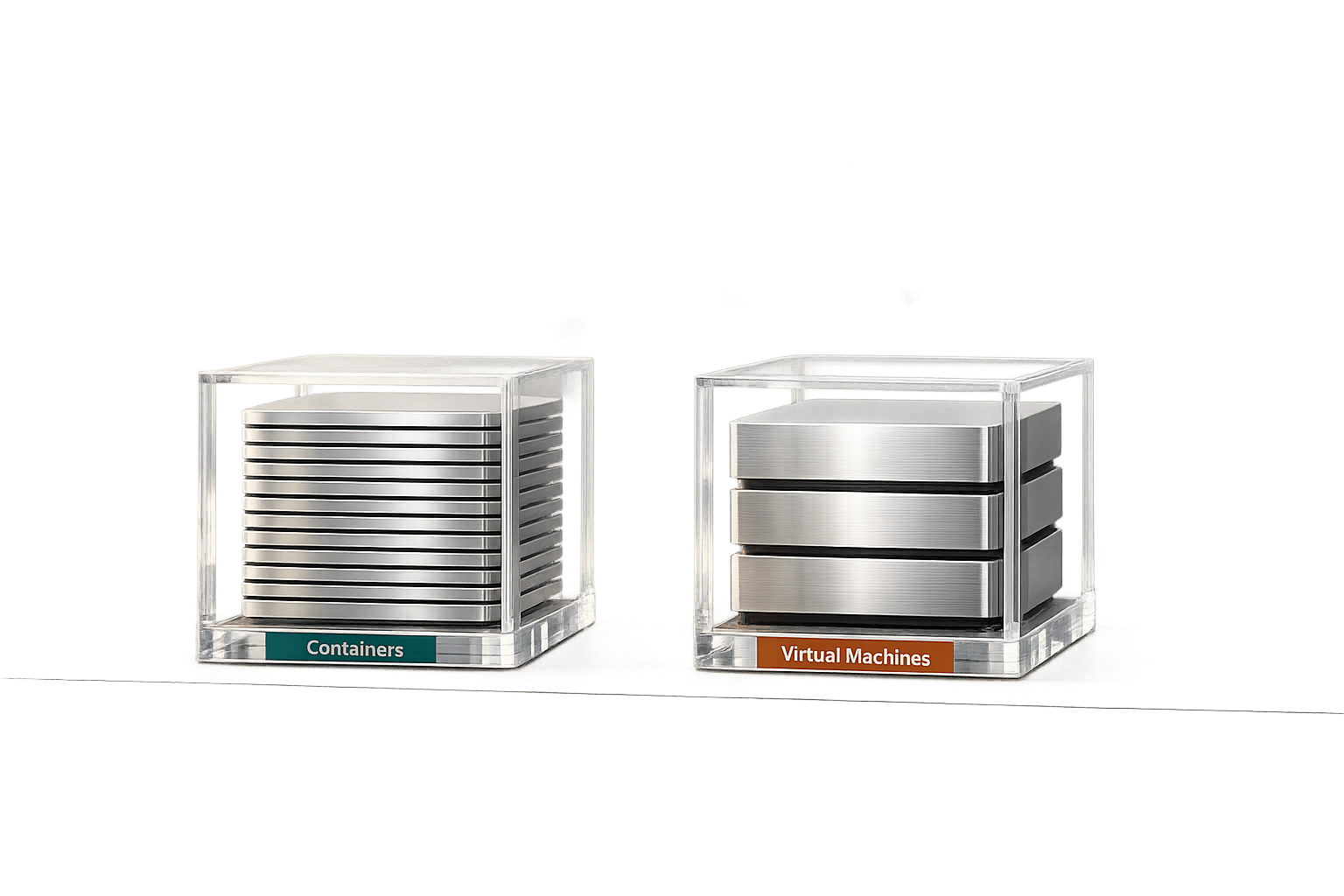
Choosing between containers and virtual machines (VMs) can significantly affect performance, cost, and scalability. Here's what you need to know:
- Startup Speed: Containers start in 50–500 milliseconds, while VMs take 20–60+ seconds.
- Resource Usage: Containers need 15–25 MB of memory and minimal CPU overhead, compared to VMs requiring 400–900 MB of memory and higher CPU usage.
- Application Performance: Containers deliver 90–99% of native performance, often outperforming VMs in efficiency and throughput.
- Density: A server can run 400–500 containers versus 60–80 VMs, reducing hosting costs by up to 10×.
- Reliability: Containers restart in under a second, but VMs offer stronger isolation for multi-tenant or compliance-heavy environments.
Quick Comparison
| Metric | Containers | Virtual Machines (VMs) |
|---|---|---|
| Startup Time | 50–500 ms | 20–60+ seconds |
| Memory Usage | 15–25 MB per instance | 400–900 MB per instance |
| CPU Overhead | 1–2% | 5–20% |
| Instance Density | 400–500 per server | 60–80 per server |
| Performance | 90–99% of native | 80–95% of native |
| Isolation | Shared kernel | Full OS isolation |
| Restart Time | <1 second | 20–60 seconds |
Conclusion: Containers excel in speed, resource efficiency, and scalability, making them ideal for microservices, web APIs, and CI/CD pipelines. VMs are better suited for workloads requiring strict isolation, multiple OS environments, or specific compliance needs. A hybrid approach (containers within VMs) combines the strengths of both.
::: @figure 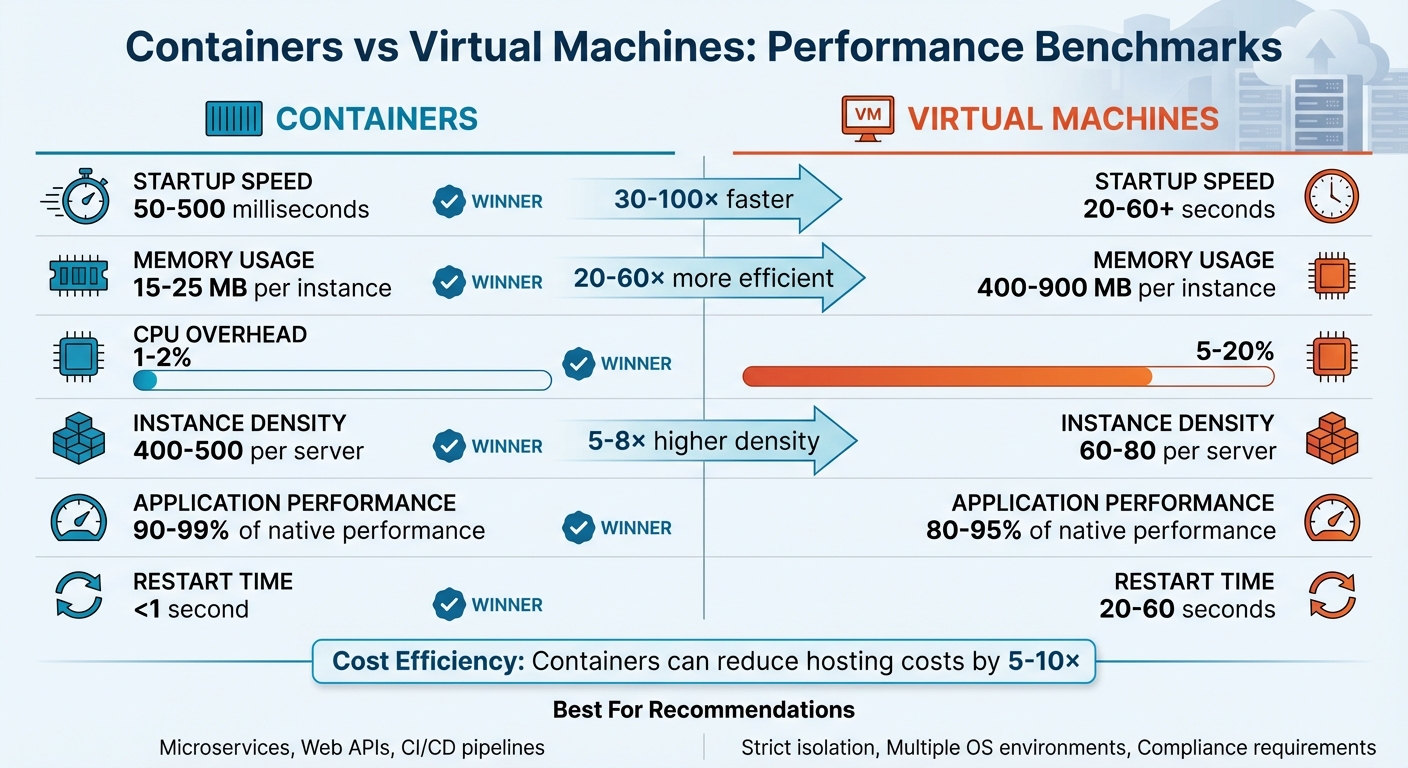 {Containers vs Virtual Machines Performance Comparison}
:::
{Containers vs Virtual Machines Performance Comparison}
:::
Docker vs Virtual Machines: The Complete DevOps Guide
Need help optimizing your cloud costs?
Get expert advice on how to reduce your cloud expenses without sacrificing performance.
Startup Time Benchmarks
Virtual machines (VMs) take 20–60+ seconds to cold boot, while containers start up in just 50–500 milliseconds [1]. This means containers are 30 to 100 times faster to start compared to VMs [1].
Performance Differences in Startup Times
Why is there such a big difference in startup times? The answer lies in how each system operates. VMs need to go through a full boot process, including BIOS/UEFI initialisation, bootloader execution, kernel loading, and starting system services. Containers, on the other hand, skip all that. They only need to set up namespaces and control groups, a process that takes just 10–30 milliseconds [1].
This difference becomes even more obvious when scaling. For instance:
- Containers can serve traffic within 1 to 5 seconds, while VMs typically take 30 to 90 seconds [1].
- Deploying 100 containers takes roughly 2 to 3 minutes, but deploying 100 VMs can take anywhere from 30 to 60 minutes [1].
Research by INRIA highlights this further. On standard HDD storage, booting 16 VMs simultaneously takes over 60 seconds, while starting 16 Docker containers only takes 10.5 seconds [6].
This speed is especially important for microservices and CI/CD pipelines. As Aditya Bhuyan, a Cloud Native Specialist, explains:
This [container startup] is particularly beneficial for applications that need to be deployed and scaled rapidly, such as microservices architectures.
Being able to handle traffic spikes in seconds rather than minutes can make a huge difference, helping prevent service slowdowns and potential revenue losses during peak times.
Storage type also plays a role in this performance gap. While SSDs can cut VM boot times to about 2.5 seconds, containers still hold the upper hand because they generate much less I/O overhead. VMs rely on a copy-on-write
mechanism, which can result in 2 read and 3 write operations for every single write to the disk image, dramatically increasing I/O demands [6]. Containers, with their lightweight processes, avoid this bottleneck entirely.
Resource Overhead: Memory and CPU Usage
When it comes to resource efficiency, containers stand out compared to virtual machines (VMs). A lightweight Linux VM typically needs between 400–900 MB of memory, while a container only requires around 15–25 MB, plus the memory footprint of the application itself. This makes containers 20 to 60 times more memory-efficient than VMs [1]. The difference lies in the way resources are allocated: VMs require memory for the guest OS kernel (100–200 MB), system services (50–100 MB), and additional hypervisor overhead (70–150 MB). Containers, on the other hand, share the host's kernel and do not need separate system services, avoiding these extra costs.
Memory Usage Comparisons
Let’s put this into perspective. On a server with 128 GB of RAM, you could run 60–80 VMs for typical workloads. However, the same hardware could support 400–500 container instances. The difference becomes even more striking when you look at storage. Containers utilise shared, read-only base layers through union filesystems like OverlayFS. For example, 100 containers might only use about 777 MB of storage, while 100 VMs would require close to 50 GB [1].
As Nawaz Dhandala from OneUptime explains:
The 10x density advantage of containers over VMs isn't marketing hype - it's architectural reality.
This efficiency translates to higher instance density and reduced hosting costs, which is a significant advantage for organisations aiming to optimise their infrastructure.
CPU Overhead Comparisons
The CPU story is just as compelling. Idle VMs consume between 2–5% of CPU capacity due to background guest OS tasks and hypervisor management. In contrast, containers - operating as native Linux processes - only use about 0.1–0.5% of CPU when idle. The gap widens under active workloads. For instance, running Nginx on containers results in a CPU overhead of just 1.7%, compared to 15.8% for VMs. Similarly, Redis operations show a 1.7% overhead for containers versus 19.1% for VMs [1].
A major reason for this disparity is the cost of VM Exits.
These occur when the hypervisor takes control from the guest OS for tasks like I/O operations or interrupt handling, consuming 1,000–10,000 CPU cycles each time. Containers avoid these exits entirely, keeping their CPU impact minimal. Wes Felter, a Research Staff Member at IBM Research, summarises it well:
Containers result in equal or better performance than VMs in almost all cases.
Application Performance Benchmarks
When it comes to understanding how containers and virtual machines (VMs) handle actual application workloads, performance benchmarks provide invaluable insights. A 2017 VMware study used the open-source Weathervane benchmark to evaluate an enterprise auction application in different environments. This application included Nginx web servers, Apache Tomcat application servers, and PostgreSQL databases. In the tests, a standard vSphere 6.5 VM supported 40,062 concurrent users. Meanwhile, the same application in Docker containers (without any tuning) managed 35,969 users - roughly 90% of the VM baseline. With proper configurations, the gap narrowed considerably. By using the host network driver, the containerised setup reached 98% of the VM’s performance. Interestingly, vSphere’s scheduler allowed containerised workloads to outperform bare-metal Docker deployments by about 5%, thanks to better NUMA awareness and CPU scheduling [7]. These benchmarks offer a detailed comparison of performance metrics across typical applications.
Performance Metrics for Common Applications
Containers consistently deliver performance close to native levels across various workloads. For example, Nginx web servers running in containers achieve 99–100% of native throughput, compared to VMs, which typically reach 90–95%. The contrast becomes more noticeable with databases and caching systems. PostgreSQL and MySQL in containers operate at 98–99% of native performance, while VMs manage only 85–95%. NoSQL databases like Redis and MongoDB show even sharper differences - containers maintain 99% or better efficiency, whereas VMs drop to 80–90% [3].
| Type | Application | Container (% Native) | VM (% Native) | Primary Performance Factor |
|---|---|---|---|---|
| Web Server | Nginx | 99–100% | 90–95% | Network Stack Latency |
| Relational DB | PostgreSQL/MySQL | 98–99% | 85–95% | Disk I/O Overhead |
| NoSQL / Cache | Redis/MongoDB | 99%+ | 80–90% | Memory Latency |
| App Server | Apache Tomcat | 99–100% | 90–95% | CPU Scheduling |
The edge containers have comes from their ability to sidestep the hypervisor overhead inherent to VMs. For every I/O operation, VMs must pass through extra abstraction layers, which can become a bottleneck for applications with high-frequency, low-latency demands. Containers avoid this entirely. This distinction becomes especially critical in microservices architectures, where inter-service communication is frequent. However, it’s worth noting that Docker’s default bridge networking can introduce its own bottlenecks when handling high packet rates [7].
Density and Resource Efficiency
Instance Density Comparisons
The architectural design of containers allows for a far greater number of instances per server compared to virtual machines (VMs). Take a server with 128 GB of RAM as an example: it can typically manage 60–80 VMs, but that same machine can handle around 400–500 containers. This translates to a 5–8× increase in capacity. The key difference lies in resource usage. Containers share the host kernel and require only about 15–25 MB of overhead per instance. In contrast, each VM needs a full guest operating system, which takes up approximately 600 MB, plus an additional 100 MB for the hypervisor.
As Nawaz Dhandala explains:
The 10x density advantage of containers over VMs isn't marketing hype - it's architectural reality. By sharing the kernel, using copy-on-write storage, and eliminating virtualisation overhead, containers let you do more with less hardware.
Another efficiency boost comes from layered, copy-on-write filesystems like OverlayFS. These allow containers to share a read-only base image, with only unique changes consuming extra space. This approach not only saves storage but also reduces hosting expenses. On the performance side, containers typically add just 1–2% CPU overhead, while VMs often face a heavier performance hit of 5–20% due to hypervisor involvement [1]. This improved density translates directly into lower infrastructure costs.
Impact on Hosting Costs
The high density of containers doesn't just save space - it significantly reduces operational expenses. By running containerised workloads instead of VMs, businesses can cut the number of required physical servers or cloud instances by 5–10×. As Dhandala highlights:
If you're still running most workloads in VMs, you're likely paying 5–10x more than you need to - in hardware, electricity, cooling, and operational overhead.
For organisations focused on optimising cloud spending, these efficiencies bring tangible benefits: lower monthly bills, reduced energy use, and easier management. Containers also shine in dynamic environments. Their quick startup times make them ideal for auto-scaling, enabling businesses to handle traffic surges efficiently and only pay for resources when they're needed.
In microservices-based architectures, the advantages are even more pronounced. A server that could support just 14 services with VMs might host 35 or more services using containers. This represents a capacity increase of over 10×, making containers a compelling choice for modern workloads [1].
Reliability and Scalability
Fault Tolerance and Scalability at Scale
When it comes to reliability, quick recovery is essential for production workloads. Containers hold a distinct advantage here, as they share the host operating system kernel, enabling them to restart in less than a second. In contrast, virtual machines (VMs) generally take between 20 and 60 seconds to reboot. This speed difference is especially critical during traffic spikes. Tools like Kubernetes can instantly detect a container failure and deploy a replacement, ensuring seamless auto-scaling and uninterrupted service.
However, VMs shine in fault containment. Each VM operates in isolation through a hypervisor, meaning that a failure in one instance remains contained, leaving other instances and the host system unaffected. Containers, which share the host kernel, can pose a security risk in multi-tenant environments if one becomes compromised. To address this, many organisations use a hybrid approach - running containers within VMs. This setup combines the strong isolation and fault tolerance of VMs with the rapid scaling and deployment efficiency of containers. Both approaches, however, need careful tuning to handle I/O-heavy workloads reliably in production [2].
Isolation vs Efficiency in Production
Deciding between containers and VMs often comes down to balancing security needs with operational efficiency. VMs offer stronger isolation, as each runs its own full guest operating system via a hypervisor. This makes them a better fit for environments with strict compliance requirements or multi-tenant setups. Containers, on the other hand, rely on Linux namespaces and cgroups for isolation. While this is adequate for many scenarios, it doesn’t provide the same level of security as VMs.
This architectural difference also impacts performance. Containers are lightweight, adding only 1–2% CPU overhead, whereas VMs can incur a 5–20% performance hit due to hypervisor overhead and device emulation [1]. For workloads like stateless microservices, web APIs, and CI/CD pipelines, containers excel by enabling rapid scaling and supporting high instance density, which leads to more cost-efficient hosting. On the flip side, VMs are better suited for situations requiring different operating systems on the same hardware, specialised hardware passthrough (like GPUs or FPGAs), or strict regulatory isolation [1].
Conclusion
Studies reveal that containers often match or even outperform virtual machines (VMs) while consuming significantly fewer resources [2][1]. IBM Research summarised it well:
Containers result in equal or better performance than VMs in almost all cases.
For businesses focused on cost efficiency, containers can reduce hosting expenses by 5–10× [1].
These advantages influence deployment decisions, but the right choice depends on your application's needs and compliance requirements [1][4]. Containers are ideal for microservices, web APIs, and CI/CD pipelines, where rapid scaling, minimal resource usage (1–2% CPU), and near-instant startup times make a real difference. On the other hand, VMs are better suited for scenarios requiring strict kernel-level isolation, support for multiple operating systems on the same hardware, or adherence to stringent compliance standards.
For many organisations, a hybrid model strikes the perfect balance. Running containers within VMs combines the robust isolation and fault tolerance of hypervisors with the efficiency of containers, adding only minimal extra overhead. This approach has gained traction in cloud environments where both security and flexibility are priorities [4].
Ultimately, the best strategy comes down to balancing performance, cost, and security. Fine-tuning infrastructure - especially for I/O-heavy applications - can make a significant difference [2]. Additionally, the choice of container engine plays a crucial role in scaling performance [5].
Hokstad Consulting offers expertise in DevOps and cloud infrastructure optimisation, helping organisations cut hosting costs while improving deployment efficiency. Whether you're exploring containerisation, considering hybrid solutions, or refining existing setups, professional advice can help you fully realise the benefits highlighted in these benchmarks.
FAQs
When should I choose a VM over a container?
When you need strong isolation and a fully independent operating system, a virtual machine (VM) is the way to go. VMs offer complete separation at the OS level, which makes them perfect for situations where security, compatibility, or custom operating system setups are a priority. They're especially useful for running legacy systems, applications that depend on specific OS versions, or when strict security policies require full resource isolation. While containers may provide lower overhead and greater density, VMs are a better choice for these specialised needs.
Why do containers start faster than VMs?
Containers are quicker to start than virtual machines because they use the host operating system's kernel. Unlike VMs, containers don't require a full guest operating system to boot. This eliminates extra overhead and makes the startup process much faster. As a result, containers are lightweight and can be deployed in no time.
Is running containers inside VMs worth it?
Running containers within virtual machines (VMs) can make sense depending on your specific deployment requirements. Research indicates that this setup offers advantages such as better workload isolation and efficient resource use, though there are minor performance trade-offs. Containers typically experience about a 5% performance dip, while VMs see around a 10% reduction compared to bare-metal setups.
While containers are known for being lightweight, VMs provide stronger isolation and broader compatibility. This pairing can be a smart choice for environments where you need to balance performance, security, and resource management effectively.