
If I size batch and on-demand workloads the same way in Kubernetes, I usually pay too much or hurt service response times.
Here’s the short answer: batch jobs should chase high utilisation, while on-demand services should keep spare capacity ready. That changes how I set requests and limits, priority classes, node pools, taints and tolerations, and autoscaling.
At a glance, the article comes down to this:
- Batch workloads are queue-based jobs such as ETL, backups, reports, and ML training.
- On-demand workloads are live services such as APIs, auth, payments, and web apps.
- Batch work can often run on Spot or pre-emptible nodes because delays and restarts are usually acceptable.
- On-demand services need headroom before traffic jumps, so teams often target 50–60% CPU in HPA.
- PriorityClasses protect live services by letting Kubernetes evict low-priority batch pods first.
- Taints, tolerations, and separate node pools stop live services from landing on interruptible machines.
- Queue depth is often a better scaling signal for batch than CPU.
- Common mistakes include:
- setting requests = limits for every workload
- using
BestEffortwithout strong priority rules - forgetting DaemonSet and sidecar overhead
- running HPA and VPA on the same CPU signal
A few numbers matter here. In many clusters, node overhead from logging, monitoring, and sidecars can take 500m to 1,500m CPU and 512 MiB to 2 GiB memory per node. If I ignore that, I can think I have spare room when I don’t.
::: @figure 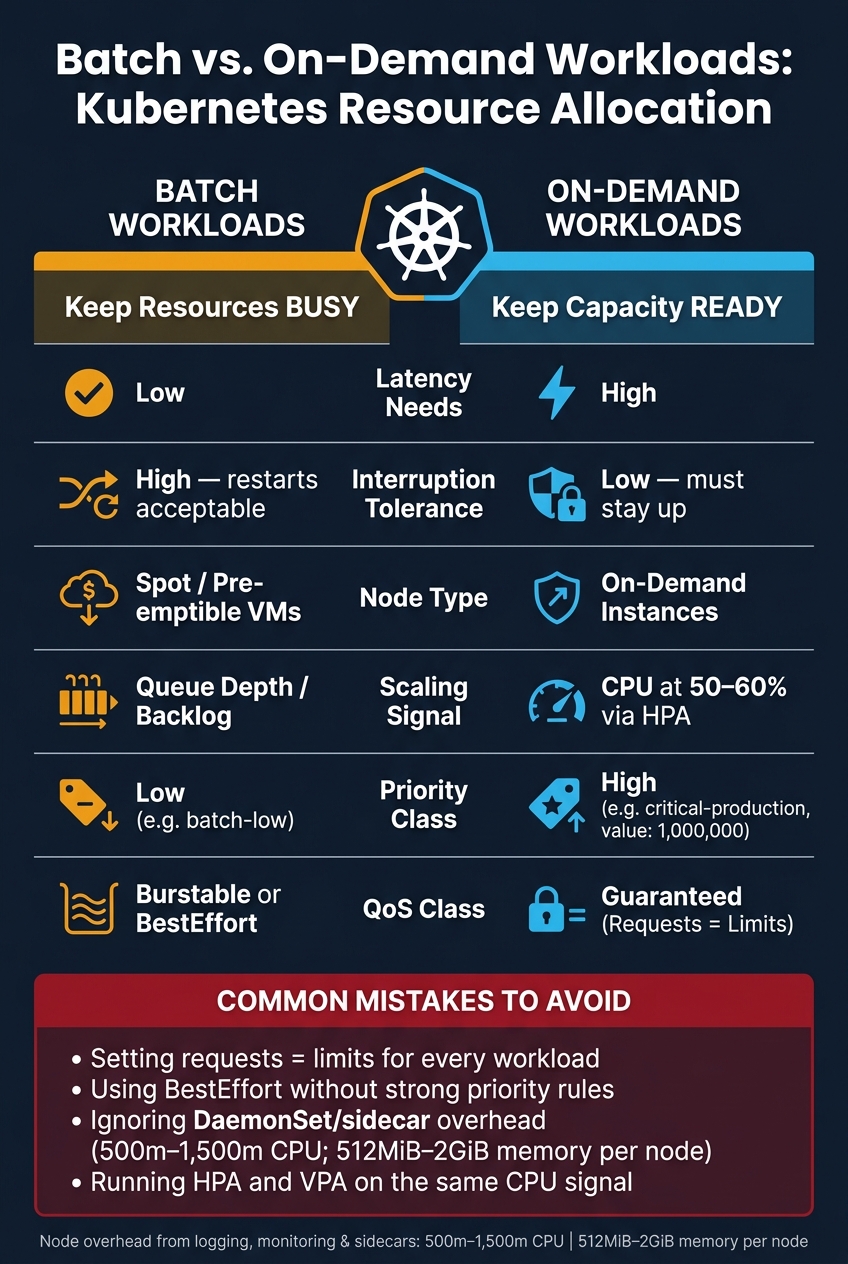 {Batch vs. On-Demand Workloads: Kubernetes Resource Allocation at a Glance}
:::
{Batch vs. On-Demand Workloads: Kubernetes Resource Allocation at a Glance}
:::
Efficient Resource Utilization for Batch Compute on Kubernetes - Amit Kumar & Kevin Xu, Uber
Quick comparison
| Criteria | Batch workloads | On-demand workloads |
|---|---|---|
| Main goal | Keep resources busy | Keep capacity ready |
| Latency needs | Low | High |
| Interruption tolerance | High | Low |
| Cost focus | Strong | Moderate |
| Best node type | Spot / pre-emptible | On-demand instances |
| Scaling signal | Queue depth / backlog | CPU or traffic |
| Scheduling priority | Low | High |
So if I want lower spend and steady service performance, I need to match the allocation policy to the workload instead of treating every pod the same.
How resource allocation differs between batch and on-demand workloads
Batch workloads want resources busy. On-demand workloads want them ready. That one difference shapes most allocation choices you make in Kubernetes.
Batch workloads: utilisation and flexible timing
Batch jobs usually wait in a queue, then burn through a lot of CPU and memory in a short stretch. Because they can be retried or pre-empted without affecting users, they fit lower-priority scheduling on interruptible nodes. The aim is simple: pack work tightly onto each node and avoid paying for idle compute between runs.
That tolerance for delay also gives you a cost lever. Batch jobs are often moved onto Spot or pre-emptible VMs to improve the cost-to-completion trade-off, because the job can just restart if a node gets reclaimed. In practice, that means scheduling policy matters more than raw capacity.
On-demand workloads: stability and immediate capacity
On-demand services play by a different rule. Traffic can jump fast, so capacity needs to be there before demand shows up. That usually means leaving headroom on purpose - nodes that may seem underused, but are there to handle the next burst.
That headroom isn't waste. It's what helps protect latency when traffic spikes. When batch and serving workloads share the same nodes, batch work can starve serving pods. And if batch jobs don't have limits, they can eat CPU and memory that live traffic needs. Kubernetes turns that headroom into policy through requests, limits, placement, and autoscaling.
Kubernetes controls for resource allocation
Kubernetes gives you a few clear ways to split, protect, and scale workloads. Each one deals with a different issue: placement, eviction, or scaling. Put simply, these controls help you do three things: protect on-demand latency, pack batch work onto spare capacity, and scale both without paying for waste.
Here’s a quick reference for how the main controls fit different workload types:
| Control | On-Demand (APIs/Services) | Batch (Jobs/Workers) |
|---|---|---|
| Requests & Limits | Requests = Limits (Guaranteed QoS) | Requests below limits for burstable jobs; no requests or limits only for expendable jobs |
| Priority Class | High (e.g., critical-production) |
Low (e.g., batch-low) |
| Preemption Policy | PreemptLowerPriority |
Never |
| Node Pool | On-demand instances | Spot / interruptible VMs |
| Taints & Tolerations | No Spot toleration |
spot=true:NoSchedule toleration |
| Autoscaling | HPA at 50–60% CPU utilisation | Scale from queue depth or backlog |
Requests, limits, and priority classes
Requests decide scheduling. Limits put a ceiling on runtime usage. For critical on-demand services, keep requests and limits close together to protect availability. One common mistake is setting CPU limits too low, which can lead to throttling at the worst time.
Batch jobs are different. They can usually handle interruption, so a Burstable or BestEffort class is often enough. That makes them a good fit for spare cluster capacity.
Priority classes are the main guardrail for customer-facing services when the cluster is under pressure. If you give a revenue-critical API a high priority value, such as 1,000,000, Kubernetes can evict lower-priority batch pods to make room when capacity gets tight. Batch jobs should use preemptionPolicy: Never, so they don’t push out production services during a squeeze.
Node pools, taints, and tolerations
Separate node pools help keep interruptible batch work away from on-demand traffic. If batch jobs run on Spot VMs, put them on a dedicated pool and taint it with something like spot=true:NoSchedule. That stops on-demand services from landing on interruptible machines by accident, which would be bad for uptime and bad for spend.
Batch jobs can run as BestEffort or Burstable and soak up idle capacity left behind by Guaranteed on-demand services. Separate pools make the most sense when you use things like GPUs, or when Spot interruptions would cause too much disruption.
Autoscaling and queue-aware scheduling
Placement protects capacity. Autoscaling decides when you need more of it. For on-demand services, headroom should be kept for traffic spikes, so HPA thresholds usually belong around 50–60% CPU utilisation. That way, new pods can come up before traffic peaks arrive instead of after the damage is done.
Batch workers should scale from queue depth or backlog. HPA only makes sense when CPU use maps closely to demand. If it doesn’t, CPU-based scaling can give you the wrong signal and leave jobs waiting.
For batch workloads in particular, Kueue is worth a look as a native queuing layer. It handles fair-sharing and quotas between teams, and decides when a batch job should wait, start, or be preempted based on actual cluster availability [2]. Pair it with the Cluster Autoscaler’s optimize-utilization profile to remove idle nodes sooner and cut the cost of unused batch capacity between runs.
Choosing the right resource mix for cost, performance, and risk
Getting allocation right is a cost decision. If you overprovision, spend climbs fast. And when Kubernetes clusters aren't tuned well, cloud bills tend to creep up with them.
Once your controls are in place, the next call is simple on paper but tricky in practice: do you share capacity, or keep it separate?
When to share a cluster and when to separate capacity
Share capacity only when contention is under control. Separate it when isolation matters more than utilisation.
A shared cluster usually gives you better bin-packing and lower cost. But that only works if the guardrails are doing their job. Without them, a batch job can quietly eat the capacity your revenue-critical services need during peak hours. That's the kind of problem that doesn't shout straight away. It just shows up later in slower response times, missed scaling windows, and unhappy users.
This table gives a simple way to judge how much isolation a workload needs:
| Factor | Shared Cluster | Separate Capacity |
|---|---|---|
| Cost | Lower - better bin-packing | Higher - idle headroom in both |
| Risk | Higher - noisy neighbour contention | Lower - physical isolation |
| Complexity | High - requires PriorityClasses and taints | Low - simple scheduling |
| Best for | General microservices and small batch jobs | High-security or very large batch jobs |
Separate capacity tends to make more sense when workloads have strict security boundaries, when batch jobs are big enough to create real scheduling contention, or when the effort of managing isolation inside a shared cluster just isn't worth the saving. The same applies to specialised resources like GPUs, where mistakes can get expensive fast.
Even if you split workloads across separate pools, bad sizing and autoscalers that work against each other can still leave a lot of capacity sitting there unused.
Common resource allocation mistakes to avoid
The worst mistakes are often the quiet ones. Teams set resource requests based on instinct, or copy values from another service, and then those numbers stick around for years with no proper review.
A few patterns come up again and again.
- Setting requests equal to limits for every workload wastes capacity. It can make sense for workloads that need tight protection, but for general services it's usually too blunt.
-
BestEffortshould only be used for non-critical batch work. Without the right priority classes, low-priority batch jobs can still starve revenue-critical services [1]. - Ignoring daemon and sidecar overhead leads to bad sizing. In a typical production cluster, DaemonSets such as logging and monitoring can consume 500m to 1,500m CPU and 512Mi to 2Gi of memory per node [4]. If you're sizing from app usage alone, contention will hit sooner than your dashboards suggest.
One more trap is easy to miss: don't run VPA and HPA on the same CPU metric. They fight each other and make scaling noisy [3][4]. A safer approach is to run VPA in recommendation-only mode first. That lets it surface data-driven sizing suggestions without kicking off disruptive pod restarts, and gives you a better basis for right-sizing workloads.
Conclusion: match allocation policy to workload behaviour
The trade-off is pretty simple: batch workloads need high utilisation, while on-demand workloads need capacity ready to go. A batch job can often wait a bit longer for compute. An API service usually can't. It needs low-latency headroom.
That’s why requests, limits, placement, and autoscaling should match how the workload behaves.
From there, the policy choice is practical, not theoretical. Pick QoS, priority, node type, and sharing boundaries based on latency tolerance, interruption risk, cost goals, and the amount of day-to-day work your team can handle.
When those signals line up, Kubernetes stops treating every pod as if it has the same needs. If your cluster is wasting capacity, look again at requests, limits, priority, and autoscaling as one system, not as separate settings.
Match the allocation policy to the workload, and the cluster gets cheaper, faster, and easier to run.
FAQs
How do I decide whether to share or separate capacity?
In Kubernetes, the right choice comes down to three things: how critical the workload is, how sensitive it is to delay, and how much interruption it can take.
Use separate capacity for workloads that need steady performance or tight latency. That usually means customer-facing services or real-time transactional systems, where even a short dip can cause problems.
Use shared capacity for workloads with more breathing room, such as batch jobs, development environments, or background tasks. These can usually cope with pre-emption or short-term changes in performance.
When should batch jobs use Spot nodes?
Batch jobs should use Spot nodes when they can handle interruptions without causing much trouble. They work well for tasks that can be retried, resumed, or paused and picked up again with checkpointing.
The catch is simple: cloud providers can take back Spot instances at short notice. So these jobs need to recover fast or cope with pauses. To reduce risk, run them in a dedicated node pool with taints and tolerations. That helps keep critical services on stable on-demand infrastructure.
What is the best scaling signal for batch workloads?
For batch workloads, the best scaling signal is scheduler-driven: queue depth, backlog age, or partition counts.
CPU and memory are lagging indicators. They only trigger scaling after performance has already started to slip.
Queue-based telemetry gives the orchestrator an earlier heads-up. That means it can request workers sooner, which leads to steadier cost control and helps batch jobs avoid starving latency-sensitive services.