
AWS offers four support plans tailored to different needs: Basic, Business Support+, Enterprise Support, and Unified Operations Support. Each plan varies in features, response times, and pricing. Here’s a quick breakdown:
- Basic: Free, includes account and billing support, access to AWS documentation, and system health alerts. No technical support.
- Business Support+: Starts at £29/month, provides 24/7 technical help, a 30-minute response for critical issues, and over 500 Trusted Advisor checks.
- Enterprise Support: Minimum £5,000/month, adds a dedicated Technical Account Manager (TAM), 15-minute response for critical issues, and strategic reviews.
- Unified Operations Support: Starts at £50,000/month, offers 5-minute response times, 24/7 monitoring, and advanced operational support for mission-critical workloads.
Choose a plan based on your workload's complexity, response time needs, and budget. Basic suits testing environments, while Business Support+ is ideal for production workloads. For critical systems, consider Enterprise or Unified Operations to minimise downtime and access tailored guidance.
::: @figure 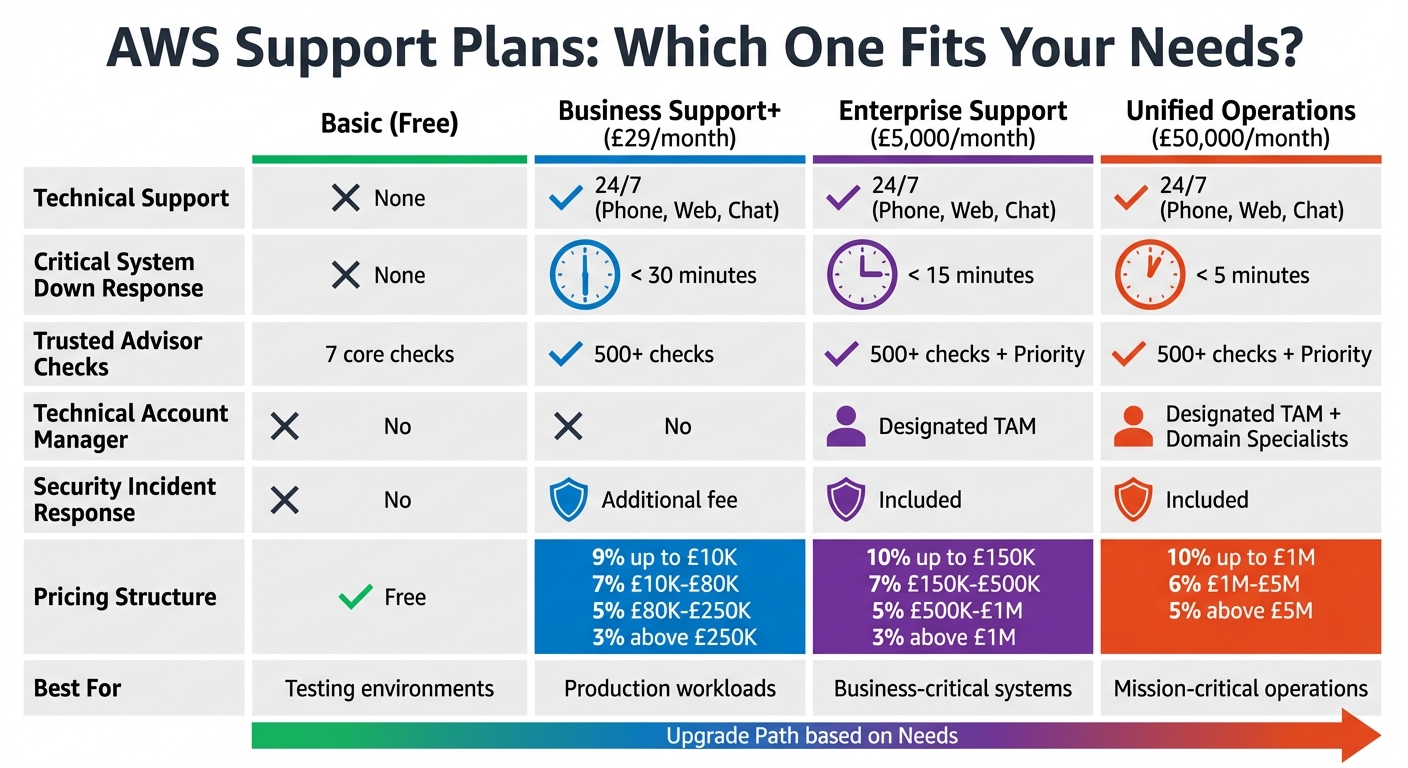 {AWS Support Plans Comparison: Features, Response Times and Pricing}
:::
{AWS Support Plans Comparison: Features, Response Times and Pricing}
:::
AWS Support Plans Explained (Update 2026)| Which AWS Support Plan Is Right for You?
Need help optimizing your cloud costs?
Get expert advice on how to reduce your cloud expenses without sacrificing performance.
AWS Support Plan Features and Benefits
Here’s an overview of the AWS support plans, breaking down their features and which types of operations they are best suited for.
Basic Support Plan
The Basic Support plan comes at no extra cost with every AWS account. It includes 24/7 customer service for account and billing inquiries, unlimited access to AWS documentation and whitepapers, community support through AWS re:Post, and system health alerts via the AWS Health Dashboard. Additionally, it provides seven core Trusted Advisor checks [1].
This plan is ideal for non-production environments or testing scenarios. However, it does not include technical support for specific applications - only general system-wide health notifications. For production workloads or situations requiring direct AWS engineer support, a paid support plan is a better fit.
Business Support+ Plan
For organisations running production workloads, the Business Support+ plan is the recommended starting point. It offers 24/7 access to AWS Cloud Support Engineers via phone, chat, and email, with a response time of up to 30 minutes for business-critical issues [1].
Key features include:
- Access to over 500 Trusted Advisor checks
- The AWS Support API for automating case management
- AI-driven troubleshooting tools powered by generative AI [5]
Pricing begins at £29 per month, or 9% of monthly AWS charges up to £10,000, with the percentage decreasing as usage increases [5]. This plan also provides guidance on configuring third-party software on AWS and integrates seamlessly with Slack, allowing users to manage support cases directly.
Enterprise Support Plan
The Enterprise Support plan is tailored for organisations requiring strategic operational guidance. A dedicated Technical Account Manager (TAM) works closely with you to conduct Well-Architected Reviews and connect you with AWS subject matter experts [7]. For business-critical system failures, the response time is less than 15 minutes [1][3].
Additional benefits include:
- AWS Security Incident Response at no additional cost, with 24/7 access to security engineers and automated threat monitoring
- Trusted Advisor Priority for enhanced insights
- AWS Countdown for critical event planning
- FinOps guidance for optimising costs [7]
Enterprise Support provides a designated Technical Account Manager who delivers architectural guidance, Well-Architected Reviews, and security optimisation aligned with your objectives.– AWS [2]
The cost starts at £5,000 per month, calculated as the greater of this minimum or a percentage of your monthly AWS charges [4]. This plan is designed for organisations operating business-critical workloads that demand proactive monitoring and top-tier security.
Unified Operations Support Plan
The Unified Operations Support plan provides the fastest response times across all AWS support tiers, with a response time of under 5 minutes for mission-critical failures [1]. It includes 24/7 proactive workload monitoring by dedicated Incident Management Engineers and access to additional domain experts [1].
This plan is aimed at large-scale enterprises running mission-critical operations where even minimal downtime can lead to significant financial or regulatory consequences. Features include the same Security Incident Response offered in the Enterprise Support plan.
The cost is a minimum of £50,000 per month, reflecting the high level of bespoke operational support and resilience features [4]. This plan is ideal for organisations that require unparalleled reliability and operational support.
AWS Support Plan Comparison
Features and Response Times Table
Seeing AWS support plans compared side by side highlights the key differences in features, particularly response times for critical issues and access to specialised resources.
| Feature | Basic | Business Support+ | Enterprise Support | Unified Operations |
|---|---|---|---|---|
| Technical Support | None | 24/7 (Phone, Web, Chat) | 24/7 (Phone, Web, Chat) | 24/7 (Phone, Web, Chat) |
| Critical System Down Response | None | < 30 minutes | < 15 minutes | < 5 minutes |
| AI-Powered Troubleshooting | No | Unlimited 24/7 contextual | Unlimited 24/7 contextual | Unlimited 24/7 contextual |
| Trusted Advisor Checks | 7 core checks | 500+ checks | 500+ checks + Priority | 500+ checks + Priority |
| Technical Account Manager | No | No | Designated TAM | Designated TAM + Domain Specialists |
| Security Incident Response | No | Additional fee | Included | Included |
| Strategic Reviews | No | No | Strategic Business Reviews | Continuous Resiliency Reviews |
The response time differences are especially important for organisations where downtime can disrupt operations, impact revenue, or risk compliance.
Pricing Structure
After comparing features, it's essential to understand how AWS structures its support plan pricing. Faster response times and additional services naturally come with increased costs, calculated through a tiered percentage model. This model applies to gross AWS charges before any discounts or credits, with rates decreasing as usage increases.
-
Business Support+ starts at £29 per month, with fees calculated as:
- 9% for charges up to £10,000
- 7% for charges between £10,000 and £80,000
- 5% for charges between £80,000 and £250,000
- 3% for charges above £250,000
For instance, if your AWS bill is £15,000, the fee would be £1,250 (£900 for the first £10,000 at 9%, plus £350 for the remaining £5,000 at 7%).
-
Enterprise Support requires a minimum monthly fee of £5,000 (reduced from £15,000 in AWS's 2026 pricing update[5]). Its tiered pricing is:
- 10% on charges up to £150,000
- 7% for charges between £150,000 and £500,000
- 5% for charges between £500,000 and £1 million
- 3% for charges above £1 million
-
Unified Operations, designed for mission-critical needs, starts at £50,000 per month. Its pricing tiers are:
- 10% on charges up to £1 million
- 6% for charges between £1 million and £5 million
- 5% for charges above £5 million
This plan also requires a 90-day minimum commitment, compared to the 30-day minimum for other tiers.
It’s worth noting that Business Support+ fees apply per account, while Enterprise Support and Unified Operations calculate fees based on the total usage across all linked accounts[6].
How to Choose the Right AWS Support Plan
Evaluating Your Business Requirements
Selecting the right AWS support plan starts with understanding your workload priorities and how quickly you need issues resolved. For beginners or those experimenting with AWS, the Basic support plan is often sufficient. But as soon as you shift to running production workloads, Business Support+ becomes a more practical choice. Higher-tier plans are designed to minimise response times, which can significantly reduce the impact and cost of downtime [8].
Think about how downtime affects your business. If an outage could lead to lost revenue, harm your reputation, or even cause regulatory issues, a one-hour response time might not be enough. Analysing your past incidents can provide insight into whether an upgrade is necessary [10].
Another key factor is whether your team needs ongoing, proactive guidance or mainly reactive support. Business Support+ offers reliable reactive assistance for resolving issues. However, if you need strategic inputs like Well-Architected reviews or help from dedicated Technical Account Managers (TAMs), the Enterprise or Unified Operations plans might be better suited. These plans are particularly helpful if your team struggles to keep up with AWS updates or lacks the expertise for advanced architectural decisions. A TAM can fill those gaps and help prevent issues from arising in the first place [1][11].
To make an informed decision, use the AWS Support Plans pricing calculator. Compare the cost of faster response times and strategic guidance to your projected monthly AWS expenditure. Keep in mind, Business Support+ charges are per account, while Enterprise and Unified Operations fees are based on total usage across all linked accounts [9]. As your business grows or changes, regularly review these metrics to ensure your support plan continues to meet your needs.
When to Change Support Plans
Your AWS support plan should evolve alongside your workloads. For example, moving from development to production usually means upgrading from Basic support to Business Support+. If your production systems become critical to your business - where downtime could disrupt key operations - consider stepping up to Enterprise Support [10].
Changes within your team can also signal a need to reassess. Losing an experienced cloud specialist or dealing with rapid growth may require the expertise that higher-tier plans provide. On the flip side, if premium features like a TAM are not being fully utilised, it might be worth reviewing your support usage quarterly to identify opportunities to downgrade.
Keep an eye on your support case history and response needs. If you’re frequently facing critical issues that demand faster resolutions or paying extra for services like Infrastructure Event Management, it might make sense to upgrade [8]. To downgrade from Enterprise Support, you’ll need to contact your TAM directly. For Business Support+, downgrades can be handled through the AWS Support Plans console [9].
Conclusion
Choosing the right AWS support plan is a decision that directly affects your operational reliability and cost management. The level of support you select should align with how critical your workloads are. For experimental projects, Basic Support might suffice. However, for production environments, Business Support+ is generally the minimum recommended option [1]. When dealing with critical operations where downtime is not an option, Enterprise or Unified Operations plans offer the proactive monitoring and rapid response times necessary to maintain continuity.
Take WHOOP, for instance. They managed to achieve 100% uptime during a scaling event that increased their workload by tenfold. This was made possible through AWS Unified Operations, which provided proactive monitoring and identified risks before they could cause disruptions [12]. This example highlights how essential it is to align your support plan with your operational needs. As Sudeep Devkota, Founder of ShShell.com, puts it:
Choosing the right AWS Support Plan is a strategic decision that directly impacts the reliability, operational efficiency, and cost-effectiveness of your AWS environment[10].
The key takeaway? Your support plan should match your immediate and future operational requirements. Assess factors like workload criticality, acceptable response times, and whether your team needs reactive troubleshooting or proactive architectural guidance. And remember, as your business grows, your support needs may evolve too.
If you're unsure which plan best fits your needs, Hokstad Consulting can help. They specialise in cloud cost engineering and strategic planning, ensuring you only pay for what you need while maintaining the right level of support. Visit Hokstad Consulting to explore how their tailored solutions can refine your AWS support strategy and optimise your cloud spending.
FAQs
Can I change my AWS support plan mid-month?
Yes, you can switch your AWS support plan at any point during the month through the AWS Support Plans console. However, if you're planning to downgrade to the Basic Support plan, you might need to wait at least 30 days after subscribing to a paid plan. Make sure to verify your eligibility before making any changes.
What qualifies as a 'critical' or 'mission-critical' support case?
When dealing with a 'critical' or 'mission-critical' support case, it means a production system is either completely down or severely impaired. These situations demand an immediate response - sometimes within just 15 minutes for enterprise-level plans, depending on the support tier. The exact response times and severity levels can differ based on the specific support plan selected.
How are support fees calculated for multiple linked AWS accounts?
When it comes to support fees for linked AWS accounts, each account is typically billed separately. However, if you're using AWS Enterprise Support, you have the option to group multiple accounts under one unified support plan. This setup not only streamlines billing but also provides consistent support across all linked accounts, making management much easier.