
Managing AWS IAM evidence effectively can save time, reduce errors, and ensure compliance with standards like GDPR, PCI DSS, and SOC2. Many organisations still rely on manual methods like screenshots and scripts, which are slow and prone to mistakes. Automating evidence collection with tools like AWS Audit Manager, CloudTrail, and Config can simplify processes and keep you prepared for audits.
Key takeaways:
- Automate evidence collection: Use AWS tools to gather logs and compliance data continuously.
- Organise storage: Maintain a clear folder structure in S3 for quick evidence retrieval.
- Enable full logging: Activate CloudTrail and Config for a complete audit trail.
- Stay audit-ready: Schedule regular checks and use tools like IAM Access Analyzer to identify risks.
IAM Auditing hands on session | AWS Audit Manager resources
Common Problems in AWS IAM Evidence Management
Organisations often encounter three main hurdles when managing IAM evidence: errors from manual processes, disorganised storage systems, and compliance gaps in rapidly evolving cloud settings. These issues highlight the need for more efficient, automated solutions, which will be discussed in the next section.
Manual Evidence Collection Creates Errors and Delays
Relying on manual methods for gathering evidence introduces both delays and mistakes. The AWS Cloud Operations Blog points out:
Gathering configuration evidence for an audit can be a challenging process if done manually, as it's error prone and slow [7].
This approach often leads to errors in human interpretation and relies on point-in-time snapshots, which fail to capture the dynamic nature of cloud environments. Auditors are then left to sift through API calls and CloudTrail logs to verify information [9]. For example, a seemingly harmless 'read-only' policy might unintentionally grant write permissions [1]. If tools like AWS Config or Security Hub are not active, evidence may be labelled as inconclusive
, creating extra work and delaying compliance [9] [10]. Common oversights include failing to flag users inactive for over 90 days, unrotated access keys, or roles with excessive privileges [12]. Tackling these manual shortcomings is essential before addressing storage and compliance concerns.
Missing or Disorganised Evidence
Disorganised evidence storage and configuration errors make retrieval a frustrating and time-consuming task. Issues such as deeply nested folders, timing mismatches, or the absence of AWS Config or Security Hub in the audited region can complicate the process [3] [13]. Additionally, custom controls may fail due to case-sensitive errors like incorrect keywordValue
entries [13].
IAM’s inherent complexity exacerbates the problem. Permissions often come from a mix of identity-based and resource-based policies, making it nearly impossible to assemble a complete set of evidence for a single user or role [1]. Running audit tools in a region different from the one hosting your services can also result in gaps, leaving critical data unaccounted for [13].
Compliance Gaps During Audit Preparation
Maintaining compliance can become a challenge when organisations lose continuous oversight of their IAM configurations. Outdated IAM entities and over-reliance on automation for record-keeping contribute to these gaps [1] [13]. Timing mismatches add another layer of complexity. For instance, AWS Audit Manager’s automated evidence typically becomes available 24 hours after creating an assessment [13], while Security Hub’s compliance checks run about every 12 hours [13]. During these intervals, non-compliant resources - like unencrypted S3 buckets - might go unnoticed [11]. Additionally, exclusions for service-linked rules can confuse auditors, as Audit Manager intentionally skips most service-linked AWS Config rules to avoid duplication, leaving some evaluations unexpectedly absent [13].
Solutions for Better Evidence Management
::: @figure 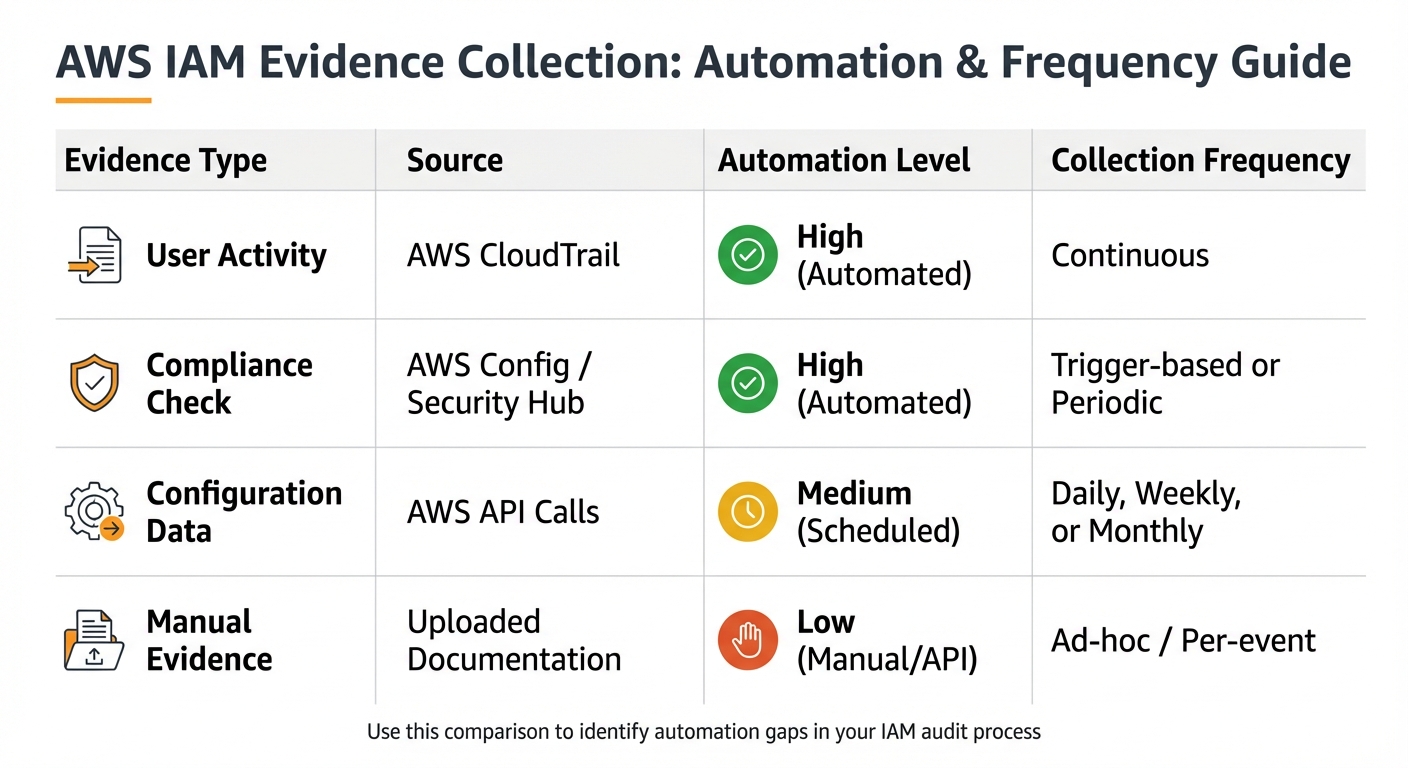 {AWS IAM Evidence Collection: Data Sources, Automation Levels, and Collection Frequencies}
:::
{AWS IAM Evidence Collection: Data Sources, Automation Levels, and Collection Frequencies}
:::
Managing evidence effectively can be a challenge, but automated systems like AWS Audit Manager help simplify the process. Acting as a central hub, it automates the collection of evidence required for industry standards and regulations [7]. This not only eliminates the need for manual snapshots but also reduces the risk of human error. By combining AWS tools with structured storage, you can create a dependable audit trail. Below, we’ll explore some AWS tools that can streamline evidence management through automation.
Automate Evidence Collection with AWS Tools
AWS Config plays a key role in minimising errors during evidence collection. It evaluates IAM resources against desired states using either managed or custom rules [7][18]. The Guard domain-specific language makes rule creation straightforward, eliminating the need for complex coding in Python or Java [8]. Once the rules are set, AWS Config can automatically evaluate configurations whenever changes occur or at specified intervals, with findings sent directly to Amazon S3.
To ensure evidence remains secure and unaltered, enable S3 Object Lock on the buckets where audit data is stored [7]. This feature enforces write once, read many
(WORM) policies, preventing modifications or deletions during the retention period. For organisations managing multiple accounts, you can store S3 bucket names in AWS Systems Manager Parameter Store, allowing Lambda-backed rules to dynamically retrieve them [7].
Enable Full IAM Logging
For a comprehensive record of IAM activity, AWS CloudTrail captures API calls like CreateUser, AddUserToGroup, and CreateRole [15][16]. To maintain a complete audit trail, set up a trail that continuously delivers events to an S3 bucket across all regions [2][15]. Additionally, CloudTrail Lake extends event data retention for up to 10 years (3,653 days) [15].
Another essential tool is IAM Access Analyzer, which identifies unused roles and logs its findings for audit purposes [17]. It can review up to 90 days of CloudTrail history to ensure entities adhere to the principle of least privilege [20]. Together, these tools provide auditors with a detailed view of who accessed which resources, when, and how.
Organise Evidence Storage for Quick Retrieval
A consistent and logical folder structure in Amazon S3 makes it easier to locate evidence across multiple accounts and resources. For example, adopt a hierarchy such as:
RULE_NAME/ACCOUNT/DATE/TIME/EVIDENCE_FILE for audit rules, or include the resource ID for configuration-change-based rules:
RULE_NAME/ACCOUNT/RESOURCE_ID/DATE/TIME/EVIDENCE_FILE [7]. This organised approach ensures auditors can quickly find specific files without wading through disorganised data.
| Data Source Type | Evidence Type | Collection Frequency |
|---|---|---|
| AWS CloudTrail | User actions | Continuous [4] |
| AWS Config | Compliance checks | Trigger-based [4] |
| Security Hub | Compliance checks | Schedule-based [4] |
| AWS API calls | Configuration data | Daily, weekly, or monthly [4] |
To preserve a historical timeline of compliance, enable S3 versioning on evidence buckets. This feature maintains incremental versions of reports, allowing you to track changes over time [19]. For organisations managing multiple accounts, AWS Config’s data aggregators provide a centralised view of compliance scores, making it easier to access high-level audit data [14].
Need help optimizing your cloud costs?
Get expert advice on how to reduce your cloud expenses without sacrificing performance.
Best Practices for Audit-Ready IAM Evidence
To keep your organisation consistently prepared for audits, combining automated evidence management with strategic practices is key. By setting clear schedules and organising evidence systematically, you can maintain what AWS refers to as a perpetual
audit-ready state - where compliance is continuously validated instead of being rushed at the last minute [7].
Set Evidence Collection Schedules
Tailoring evidence collection schedules to the volatility of your data can help minimise costs and reduce manual work. For instance, high-churn data like CloudTrail logs, which record every API call in real time, should be captured continuously [4]. For compliance checks, AWS Config rules can be set to trigger immediately when configurations change. This real-time evaluation helps catch policy violations as they happen, rather than relying on periodic scans [7].
For configuration data, schedule API snapshots daily or weekly, depending on how frequently your resources change [4]. Manual audits should be reserved for critical moments, such as employee departures, software rollouts, or suspected unauthorised access [1]. This event-driven approach ensures evidence collection is not just tied to a calendar but also responsive to potential risks.
Compare Evidence Types to Streamline Automation
The table below provides an overview of key evidence sources, their automation levels, and recommended collection frequencies. Use it to pinpoint areas where automation could save time and effort.
| Evidence Type | Source | Automation Level | Collection Frequency |
|---|---|---|---|
| User Activity | AWS CloudTrail | High (Automated) | Continuous [4] |
| Compliance Check | AWS Config / Security Hub | High (Automated) | Trigger-based or Periodic [4] |
| Configuration Data | AWS API Calls | Medium (Scheduled) | Daily, Weekly, or Monthly [4] |
| Manual Evidence | Uploaded Documentation | Low (Manual/API) | Ad-hoc / Per-event [10] |
This table can help you identify gaps in your processes. If you notice a reliance on manual evidence, consider using tools like AWS Audit Manager or creating custom Lambda functions to automate those tasks [10].
How Hokstad Consulting Can Help with IAM Audit Preparation

Hokstad Consulting provides tailored solutions to simplify and enhance IAM audit preparation for UK businesses. With a focus on regulatory frameworks like GDPR, ISO 27001, and PCI DSS, their services are designed to address specific compliance challenges while improving efficiency.
One of their key tools is AWS Audit Manager, which automates evidence collection from sources like CloudTrail, AWS Config, and Security Hub. This approach can cut audit preparation time by up to 80% for small and medium-sized businesses [21]. For organisations managing complex environments with multiple AWS accounts, Hokstad configures AWS Organizations to centralise evidence collection in a single delegated administrator account, streamlining oversight [6].
To address unique compliance needs, Hokstad creates custom AWS Lambda–backed Config rules. These rules generate detailed privilege reports covering managed policies, inline policies, and group-assigned permissions [19]. Their solutions integrate seamlessly with AWS Audit Manager, automatically capturing compliance evidence without the need for manual intervention. For UK organisations, data residency requirements are met through evidence storage in UK/EU regions, secured with AWS KMS encryption [21].
Hokstad’s expertise in cloud cost management goes hand in hand with compliance. They optimise evidence collection schedules based on data volatility, reducing unnecessary API calls and storage costs while ensuring continuous audit readiness. Reports are customised to align with UK standards, using DD/MM/YYYY date formats, 24-hour time notation, and British Pound (£) currency [21]. This secure and efficient setup forms part of their comprehensive strategy for audit readiness.
Whether you need one-off support or ongoing assistance, Hokstad offers flexible options, including a no savings, no fee
model. Their approach prioritises least-privilege access, mandatory resource tagging, and cryptographic verification to ensure your audit evidence remains secure and tamper-proof throughout the process [21].
Conclusion
Managing IAM evidence for AWS audits doesn’t have to be a chaotic process filled with manual screenshots and scattered files. By embracing automation, you can replace these tedious tasks with continuous monitoring. Tools like AWS Audit Manager, CloudTrail, and AWS Config work together seamlessly to track user activity, ensure compliance checks, and log configuration data 24/7 [4][5].
Storing evidence in an organised, cryptographically verified manner that aligns with compliance standards not only speeds up audit preparations but also minimises disruptions [6][5]. Features such as Evidence Finder make it easy to locate relevant IAM evidence across multiple accounts using SQL-like queries. This eliminates the need to sift through endless nested folders manually [3].
To take it a step further, combining automated processes with best practices - like scheduling periodic re-evaluations, enabling multi-account auditing through AWS Organizations, and mapping custom Config rules to specific controls - ensures your organisation is always audit-ready. This proactive approach can significantly reduce compliance risks and slash audit preparation time by as much as 80% [19][6][21].
If you need expert guidance, Hokstad Consulting specialises in IAM audit preparation for UK compliance frameworks. Their services include automating evidence collection, optimising cloud costs, and meeting data residency requirements, helping you shift from a reactive to a proactive audit strategy.
FAQs
How does AWS Audit Manager help simplify evidence collection for compliance audits?
AWS Audit Manager takes the hassle out of compliance audits by automating assessments using either pre-built or custom frameworks. It works by continuously gathering data from your specified AWS accounts and services, including CloudTrail, Config, Security Hub, and API activity. This data is then transformed into audit-ready evidence linked directly to relevant controls.
By automating this process, Audit Manager minimises the need for manual work. This not only keeps your evidence well-structured and aligned with compliance standards but also helps you save time while improving accuracy.
How can automated tools like CloudTrail and AWS Config simplify IAM audits?
Automated tools like CloudTrail and AWS Config can make IAM audits much easier by providing detailed and reliable records of activity. CloudTrail works by continuously logging IAM API calls, capturing essential information such as the user involved, their IP address, and the exact timestamps. This creates a dependable, unchangeable record of actions, which simplifies tracking who did what and when.
Meanwhile, AWS Config adds another layer by automatically monitoring changes to IAM users, groups, roles, and policies. It also helps maintain compliance by enforcing best-practice configurations through Config Rules. When used together, these tools provide a powerful way to efficiently manage audit evidence and confirm compliance as it happens.
How can organising evidence in Amazon S3 improve audit preparation?
Storing audit evidence in Amazon S3 offers a central hub for secure and efficient data management. With tools like versioning, encryption, and bucket logging, your files remain protected and can be retrieved without hassle whenever required.
This setup streamlines audit preparation by keeping evidence well-organised, easy to search, and readily accessible for auditors, helping to minimise delays and smooth out compliance processes.