
Cross-region replication can double parts of your AWS bill fast. If I were budgeting this on 19 August 2026, I’d start with three cost lines: data transfer out, storage in the second Region, and service charges such as S3 PUT requests, RDS replica instance-hours, Aurora replicated write I/O, or EBS snapshot copy and retention fees.
In plain terms, that means:
- S3 often costs more than expected when you replicate millions of small objects, because request charges stack up alongside transfer and storage.
- RDS and Aurora can cost far more than snapshots, because you are paying for always-on database compute in another Region.
- EBS snapshot copies look cheap at first, but retention, first full copies, and Fast Snapshot Restore can keep adding to the monthly bill.
- For many UK teams, the main route to lower spend is simple: replicate less, store replica data in a lower-cost tier where recovery targets allow it, and review old rules before they keep running for months.
- If prices are shown in USD, I’d convert them into £ using one agreed internal FX rate so forecasts and chargeback reports stay aligned.
A few numbers make the point fast:
- Cross-region transfer is often around $0.01 to $0.02 per GB for common setups.
- Cutting replica retention from 365 days to 90 days can reduce replicated storage by about 75% for log-heavy data.
- With S3 IA-style classes, the 128 KB minimum billable size can wipe out expected savings for tiny files.
If you want the short version, it’s this:
- S3 replication is usually driven by GB transferred + destination storage + object request count.
- RDS and Aurora replication add full replica compute costs on top of storage and transfer.
- EBS cross-region copies remove replica compute, but storage growth and restore settings can still push spend up.
- Your RPO and RTO should decide the method, not habit or old DR designs.
| Service | Main cost drivers | Where teams often overspend |
|---|---|---|
| Amazon S3 | Transfer, destination storage, replication requests | Small-file log buckets, broad rules, long retention |
| Amazon RDS | Replica instance-hours, storage, transfer, backups | Idle replicas left running |
| Amazon Aurora | Cluster/instance-hours, storage, replicated write I/O | High-write workloads, oversized secondaries |
| Amazon EBS snapshots | Copy transfer, destination snapshot storage, FSR | First full copies, old snapshots kept too long |
So if I had to sum up the article in one line, I’d say this: cross-region replication spend is less about the feature itself and more about how much data you copy, how often it changes, how long you keep it, and whether you are paying for live compute in the target Region.
::: @figure 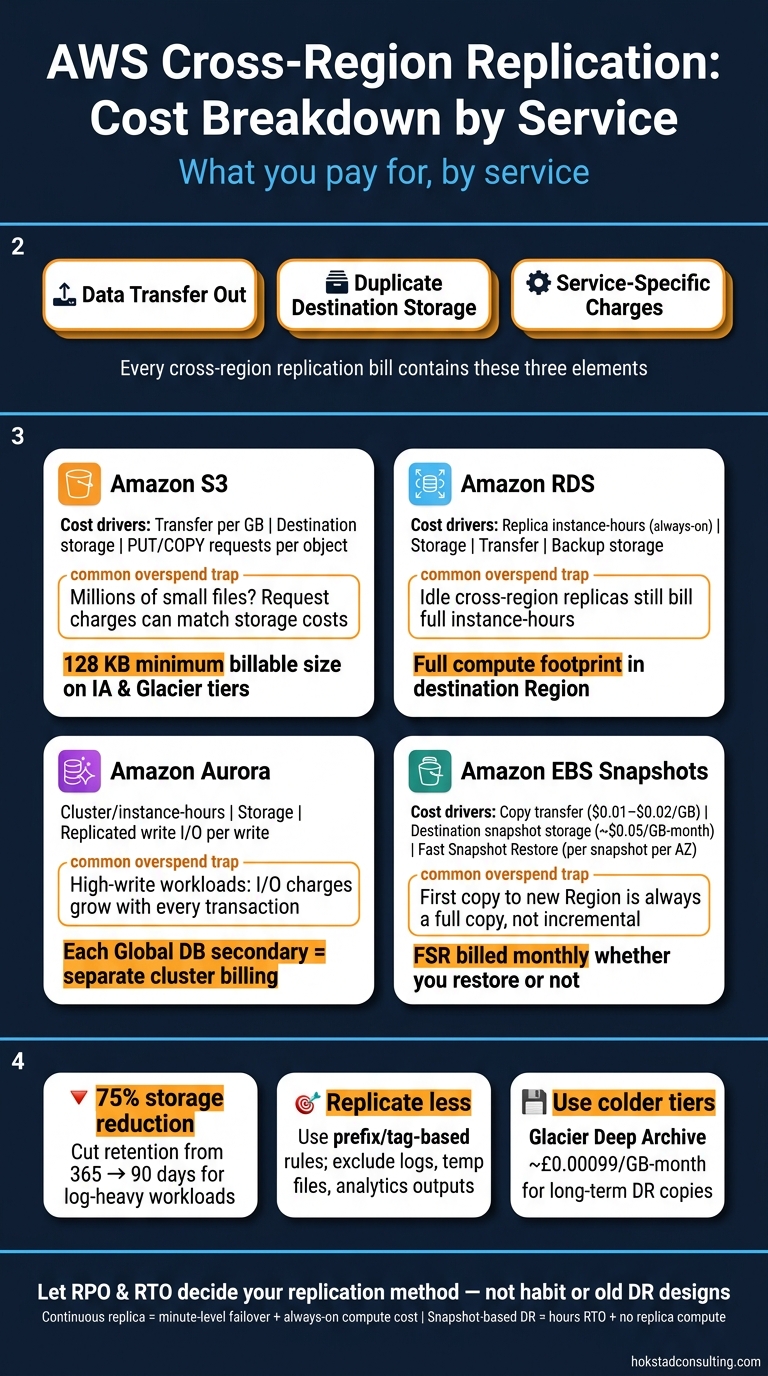 {AWS Cross-Region Replication: Cost Breakdown by Service}
:::
{AWS Cross-Region Replication: Cost Breakdown by Service}
:::
AWS S3 Cross-Region Replication (CRR) | Automatically Replicate Your Data Across AWS Regions
S3 cross-region replication: transfer, storage and request charges
S3 is one of the easiest places to see how AWS replication pricing works. With S3 CRR, you pay for three things: data transfer out, storage in the destination region, and replication PUT/COPY requests for every object that gets copied[4][15][17].
For UK teams, the pattern is simple. Transfer is charged per GB from the source region. Ingress into the destination region is free. Then the destination bucket has its own storage bill. There are also two extra features that can push costs up. S3 Replication Time Control (RTC) adds per-GB and per-request charges in exchange for a 15-minute replication SLA[5][16][19]. That can make sense for a tight recovery target, but not for every bucket.
How S3 replication costs build up month to month
Monthly cost comes down to three things: object count, object size, and how often data changes.
Application logs show this best. Say a bucket creates 10 million log objects per month at about 50 KB each. That works out to roughly 500 GB of replicated data, but it also means 10 million destination PUT requests. In that setup, request charges can match or even beat storage costs, even if the replica uses a cheaper storage class.
Media assets look very different. A workload with 100,000 objects at about 5 MB each is also roughly 500 GB of replicated data. Same data volume, very different bill shape. Because the object count is much lower, request charges matter far less. In this case, storage and transfer do most of the heavy lifting, and the monthly spend follows how many new assets land each month and how long you keep them. Backups and archival datasets sit at the far end of the scale: not many objects, each one large, so total GB and retention period matter more than request count.
Update frequency adds another layer. Every overwrite or new version becomes a new replicated object. That pushes up both transfer and request totals. So if a workload has lots of small, frequent updates, costs tend to creep up month after month even when the replication setup stays exactly the same.
S3 replication options and storage class cost trade-offs
Storage class choice affects the storage part of the bill more than the transfer part, so it's usually the main lever after you tighten replication scope. The table below shows the main options.
| Destination storage class | Storage cost (per GB-month) | Min. billable size | Best suited for | Cost driver |
|---|---|---|---|---|
| S3 Standard | About £0.023[8][10] | None | Active media, frequently accessed replicas | Storage + transfer |
| S3 Standard-IA | Lower than Standard[7][8] | 128 KB | DR copies accessed rarely | Storage, with retrieval risk |
| S3 One Zone-IA | Lower than Standard[7][8] | 128 KB | Non-critical replicas where a single AZ is acceptable | Storage |
| S3 Glacier Instant Retrieval | Very low[11][12] | 128 KB | Cold DR, fast recovery needed | Storage |
| S3 Glacier Deep Archive | About £0.00099[8][9] | N/A | Long-term compliance archives | Storage, with costly retrieval |
The 128 KB minimum billable size on IA classes and Glacier Instant Retrieval matters a lot for log-heavy workloads[6][8][11][12]. If you replicate millions of small objects, each one gets billed at that minimum size. On paper, those tiers can look cheap. In practice, they may not save much at all for tiny files. For large backup objects or media files, though, colder tiers can cut the storage bill in a much more noticeable way.
A simple way to think about it: when the bill is driven by GB-month, storage class changes tend to help most. When the bill is driven by PUT volume, the better move is often to trim object count or narrow the replication scope. Database and snapshot replication move those cost pressures around again.
RDS, Aurora and EBS replication: costs beyond storage
Unlike S3, RDS, Aurora and EBS come with costs that go past storage alone. With databases in particular, you’re often paying for compute that stays on all the time, or for snapshot features that keep ticking over in the background. A cross-region RDS read replica, for example, is billed as a running database instance even when it’s sitting idle.
RDS and Aurora cross-region replica cost components
An RDS cross-region read replica adds several bill lines at once: instance-hours, storage in the destination Region, cross-region data transfer, and backup storage. If the replica is encrypted, there are also small KMS charges.[23][26][20][3][20][1][21][27]
RDS Multi-AZ within eu-west-2 uses cross-AZ replication. That tends to be cheaper per GB, and part of that cost is wrapped into Multi-AZ pricing.[1][22][27] Cross-region disaster recovery is a different beast. You’re paying for a full second compute footprint in another Region, plus higher transfer rates. So this isn’t just a storage decision - it adds an always-on compute cost.
Aurora works in much the same way, but with one extra wrinkle: per-write replicated I/O. Aurora Global Database follows the same model too, except each secondary Region runs as a separate cluster with its own instance-hours, storage charges, and replicated write I/O fees.[2][22][25][24] At low write volumes, instance-hours usually make up most of the cost. As write volumes climb, replicated write I/Os and cross-region data transfer start to take a bigger slice of the monthly bill.[2][22][24][25]
EBS snapshot copy costs and overlooked monthly charges
EBS avoids replica compute, which sounds simpler. But snapshot retention and restore settings can still add up.
EBS snapshot copies don’t carry compute charges, but you still pay for transfer and storage in the destination Region. If you copy a snapshot from eu-west-2 to another Region, there’s a one-off cross-region data transfer fee, often around $0.01–$0.02 per GB depending on the Region pair, followed by destination snapshot storage at about $0.05 per GB-month in the standard tier.[28][29][30][31][32] The first copy to a new Region is always a full copy rather than an incremental one, so the first storage bill in that Region reflects the full volume size.[28][33][35]
Two charges often slip under the radar until someone checks the bill closely:
- Fast Snapshot Restore (FSR), which is billed per snapshot per Availability Zone where it’s turned on each month, whether you restore from it or not.[34][35]
- Orphaned snapshots, such as copies created for a project or a DR test and never deleted, which keep building up per-GB storage charges.[34][35]
Comparing database and snapshot replication approaches by cost
| Cost component | No cross-region replica | Same-region resilience (Multi-AZ) | Cross-region replication (DR) | Scales with |
|---|---|---|---|---|
| Replica compute | None | Included in Multi-AZ pricing | Full instance-hours in destination Region | Fixed |
| Storage | 1× storage fee | Service-specific / bundled | Primary + replica storage | Data volume |
| Replication data transfer | £0 | Lower intra-region rate | Cross-region transfer charge | Write volume |
| Snapshot storage | Local only | Local only | Destination storage + transfer | Retention period |
| Fast Snapshot Restore | None | None | Optional, per snapshot per AZ | Number of snapshots × AZs |
| KMS / encryption overhead | Optional | Optional | Per key per Region + API calls | Fixed, small |
Cross-region replicas give you minute-level failover, but you pay for that with always-on compute. Snapshot-based DR cuts out compute spend, though your RTO shifts into hours and your RPO depends on how often snapshots run.
How to cut cross-region replication spend without reducing resilience
The biggest savings usually come from being stricter about what you replicate and how long you keep it. A lot of teams copy far more data than their recovery targets call for, and that extra cost stacks up across three areas: transfer, storage and service-level overhead. S3 makes this easy to spot because transfer, storage and request charges are listed separately.
Replicate less: focus on what your recovery targets actually require
The most effective move is simple: stop replicating everything by default. In many AWS estates, replication rules build up over time and then just stay there, even when nobody has checked whether that data still needs cross-region cover.
Start with a workload inventory tagged by criticality. Then map each workload to a clear RPO and RTO. Once you do that, the picture gets a lot clearer. Some datasets need near-continuous replication. Others can cope with periodic snapshot copies.
For S3, use prefix-based and tag-based replication rules so only critical data, such as customer records, financial data and core configuration, is copied cross-region. Leave out logs, transient files and intermediate analytics outputs. Then pair that with lifecycle rules that delete or transition non-critical replicas after a set retention window. If you cut cross-region retention from 365 days to 90 days for log-heavy workloads, replicated storage can drop by 75%.[16] It also helps to compress database dumps, JSON and CSV before writing to S3, which reduces replicated size and lowers both transfer and storage charges.[14][18]
Database and snapshot replication change the cost mix, because compute and backup overhead also enter the bill.
Use lower-cost storage tiers and right-size your replicas
Store rarely accessed DR copies in S3 Glacier Flexible Retrieval or Glacier Deep Archive when your RTO is measured in hours rather than minutes. S3 One Zone-IA can cut storage spend even more, but it makes sense only for non-critical replicas that can sit in a single AZ.[13]
For RDS and Aurora, review replica use every quarter by checking CPU, connections and read traffic in CloudWatch and Performance Insights. Replicas that stay close to idle in normal conditions may be good candidates for a smaller instance class, or for replacement with a scheduled snapshot copy approach. If a system can handle recovery times in the tens of minutes, along with a small amount of data loss, periodic snapshots are often enough and remove the always-on compute cost tied to replica infrastructure.
For EBS, keep cross-region snapshot copies focused on volumes that hold stateful data, like databases and key configuration stores. Skip ephemeral or cache volumes that you can rebuild from code and configuration management tools.
So the main savings tend to come from scope, storage class and replica count.
Use tagging, reporting and periodic review to stop bill drift
Replication costs have a habit of creeping up quietly. New buckets get pulled into old replication rules, test replicas never get removed, and snapshot schedules expand with no review. The only dependable way to keep control is to make the spend visible.
Enforce tagging across S3 buckets, RDS instances and EBS volumes with keys such as Application, Environment, Owner and DR-Criticality. With steady tagging in place, AWS Cost Explorer and Cost and Usage Reports can show how much cross-region transfer, snapshot storage and replica compute each workload uses each month.[36][37][38] Add CloudWatch dashboards that track replication-focused metrics, such as S3 replication bytes, RDS replica lag and snapshot counts, by tagged workload. That gives engineering and finance teams a shared view of what each application is costing from a DR standpoint.
Hokstad Consulting can audit replication spend and build cost-aware DR controls into infrastructure as code.
The last step is turning these controls into a monthly budget and review cycle.
Conclusion: Build a cross-region replication budget that matches your risk appetite
The question isn’t whether to replicate. It’s how much resilience you need, and what you can justify paying for it.
In most cases, cross-region replication costs come from three main areas: data transfer out, duplicate storage in the destination Region, and service-specific charges. The exact mix depends on the service.
There’s no one-size-fits-all setup for every workload. That’s why replication is as much a budget choice as a technical one. Your replication plan should line up with recovery needs. Some business-critical workloads may warrant continuous cross-region copies. Most won’t.
Start with RTO and RPO. Then pick the lightest replication model that still meets those targets. When you apply that same discipline across S3 buckets, RDS instances, Aurora clusters, and EBS volumes, you’re far less likely to let costs creep up as your infrastructure grows.
If you want an independent review of replication spend against recovery targets, Hokstad Consulting can assess your AWS estate and highlight where cost and resilience are out of step.
FAQs
Which AWS service is usually the most expensive to replicate cross-region?
For AWS cross-region replication, network transfer between regions is often the main cost driver. As data volumes grow and replication happens more often, it can end up costing more than storage and other day-to-day overheads.
How do I choose between live replication and snapshot-based DR?
Choose based on your RPO/RTO and the data tiers that need constant protection.
Live replication works best for Tier 0 and Tier 1 workloads that need near-zero RPO and faster failover. The trade-off is simple: you pay steady monthly costs, and after failover you’ll also need to cover compute.
Snapshot-based DR fits Tier 2 and Tier 3 data better. It usually costs less, but your recovery points depend on when snapshots run, and recovery often takes more time.
When do cheaper S3 storage classes stop saving money?
Cheaper S3 storage classes can stop being cheaper once you factor in the rules attached to them.
The biggest ones are minimum storage periods of 30 to 180 days and a minimum billable object size of 128 KB. In plain English, that means you can end up paying for more storage than you actually use. If your objects are small, or your data is deleted or moved after a short time, those lower-cost classes can quietly cost more than expected.
Savings can also shrink when replication increases how much data you store. Each time an object changes, S3 can create new versions, and those versions add to your storage bill. Unless lifecycle policies move old versions to another class or remove them, the extra copies keep stacking up.