
Automating compliance vulnerability scanning is a game-changer for UK businesses aiming to protect sensitive data and meet regulatory requirements like UK GDPR, Cyber Essentials, and ISO 27001. Manual methods are slow, prone to errors, and struggle to keep up with modern cloud environments. Automation addresses these challenges by enabling:
- Continuous scanning: Real-time monitoring identifies vulnerabilities as they emerge, reducing risks of exploitation.
- Faster remediation: Automated workflows cut patching times by up to 80%, ensuring quicker responses to high-risk issues.
- Error reduction: Automation minimises human mistakes by standardising processes like risk scoring and tracking.
- Regulatory compliance: Automated tools maintain detailed records, making audits simpler and ensuring alignment with frameworks like PCI DSS and NIST SP 800-53.
- Risk prioritisation: By using real-time threat intelligence and asset criticality, automation focuses resources on the most pressing vulnerabilities.
For example, Barclays reduced critical vulnerability remediation time from 14 days to 5 days by adopting automation in 2024, leading to a 30% drop in security incidents within six months.
Automation doesn’t replace human oversight but allows security teams to focus on high-value tasks like strategic decision-making and complex remediation. Whether integrated into DevOps pipelines or IT management platforms, automation ensures businesses stay secure, compliant, and efficient.
Webinar - How to automate vulnerability detection & reporting for SOC 2
Need help optimizing your cloud costs?
Get expert advice on how to reduce your cloud expenses without sacrificing performance.
Benefits of Automating Vulnerability Scans for Compliance
::: @figure 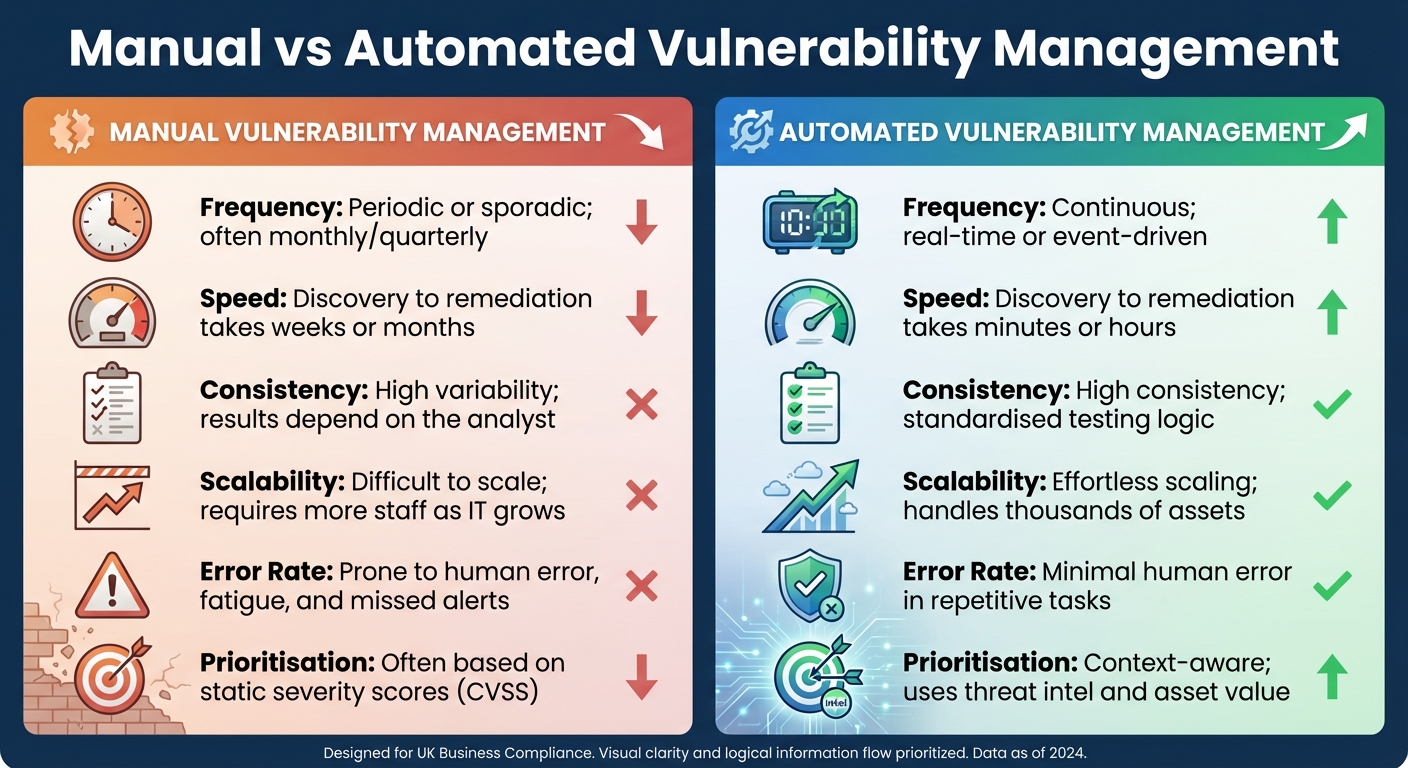 {Manual vs Automated Vulnerability Management: Key Differences}
:::
{Manual vs Automated Vulnerability Management: Key Differences}
:::
Switching to automated vulnerability scanning transforms vulnerability management into a proactive process. Instead of relying on sporadic scans that might miss emerging risks, automated tools offer continuous, real-time monitoring across your entire infrastructure. This approach delivers three primary benefits: quicker detection with fewer errors, consistent compliance, and improved risk management.
Faster Detection and Fewer Errors
Automated tools run uninterrupted scans, spotting threats as soon as they arise - whether in cloud environments, containers, or on-premises systems. Unlike manual processes, which create gaps between assessments, automation ensures there’s no window for attackers to exploit newly discovered vulnerabilities.
For example, organisations adopting automated workflows report 30% faster patching of critical vulnerabilities compared to manual methods. Automation can also cut the mean time to remediation (MTTR) by up to 80%, with a study by Expel noting an 87.5% reduction in remediation time [3][5][10].
These tools also minimise human error by standardising testing and automating repetitive tasks, like vulnerability classification and risk scoring. This reduces the manual effort needed for processing and tracking vulnerabilities by 60–80% [4].
Automation doesn't eliminate human oversight but instead focuses human expertise on high-value activities like strategic decision-making, exception handling, and complex remediation scenarios.– NinjaOne [4]
By accelerating detection and remediation, automation not only improves security but also ensures compliance with strict regulatory standards.
Maintaining Compliance with Standards
UK organisations subject to frameworks like Cyber Essentials, UK GDPR, ISO 27001, and PCI DSS are required to conduct regular vulnerability assessments. Automation helps meet these obligations by performing continuous scans and maintaining detailed, time-stamped records of discovery, risk evaluations, and remediation actions. This documentation ensures you’re always audit-ready [7][9].
Automated tools also support frameworks such as NIST SP 800-53 Rev. 5, CIS Benchmarks, and STIG. By integrating compliance checks into CI/CD pipelines - a practice called Compliance as Code (CaC) - automation turns compliance into an ongoing process rather than a last-minute scramble [6][7].
In addition to ensuring compliance, automation helps organisations allocate resources more effectively by prioritising threats based on their potential impact.
Better Risk Management
Automation enables risk-based prioritisation by combining CVSS scores with real-time threat intelligence (like EPSS), asset criticality, and network exposure. This ensures that resources are focused on vulnerabilities most likely to be exploited [3][8][10].
The results speak for themselves. Users of automated exposure management platforms report a 30% improvement in threat prevention and 40 times faster threat validation [10]. By integrating with IT Service Management platforms like ServiceNow or Jira, automated systems can generate and assign remediation tickets based on risk thresholds, eliminating the need for manual handoffs between security and IT teams [3][8].
The table below highlights the key differences between manual and automated vulnerability management:
| Feature | Manual Vulnerability Management | Automated Vulnerability Management |
|---|---|---|
| Frequency | Periodic or sporadic; often monthly/quarterly | Continuous; real-time or event-driven |
| Speed | Discovery to remediation takes weeks or months | Discovery to remediation takes minutes or hours |
| Consistency | High variability; results depend on the analyst | High consistency; standardised testing logic |
| Scalability | Difficult to scale; requires more staff as IT grows | Effortless scaling; handles thousands of assets |
| Error Rate | Prone to human error, fatigue, and missed alerts | Minimal human error in repetitive tasks |
| Prioritisation | Often based on static severity scores (CVSS) | Context-aware; uses threat intel and asset value |
Automated vulnerability management replaces sporadic scanning cycles with real-time discovery, risk-based prioritisation, and orchestrated remediation across hybrid cloud environments.– Palo Alto Networks [3]
Steps to Implement Automation in Compliance Vulnerability Scanning
Transitioning from manual to automated vulnerability scanning requires a clear plan. Below, we’ll walk through the steps to create a seamless, compliance-ready workflow that identifies assets, prioritises risks, addresses vulnerabilities, and ensures continuous monitoring.
Step 1: Continuous Asset Discovery and Scanning
Automation starts with continuous asset discovery - tracking and cataloguing resources as they’re deployed. Tools like AWS Inspector can automatically identify EC2 instances, ECR container images, and Lambda functions, assigning risk scores based on factors like CVE data, network accessibility, and exploitability [11].
Different environments call for tailored scanning methods:
- Network scanning tools (e.g., Nessus, Qualys) uncover infrastructure risks like open ports and misconfigurations.
- Application scanning tools (e.g., OWASP ZAP, Burp Suite) detect flaws such as SQL injection and cross-site scripting.
- Container scanning tools (e.g., Trivy, Clair, Amazon Inspector) secure containers and CI/CD pipelines by flagging vulnerabilities in image layers or outdated packages.
AWS Inspector offers both agent-based and agentless scanning. Agent-based scanning (via SSM Agent) activates when packages change, while agentless scanning (via EBS snapshots) typically runs every 24 hours [15]. For Linux-based EC2 instances, enabling Deep Inspection extends detection capabilities to application-level vulnerabilities, such as issues in Python or Java packages [15].
| Scanning Type | Focus Area | Example Tools | Benefits |
|---|---|---|---|
| Network | Open ports, misconfigurations | Nessus, Qualys | Identifies infrastructure-level risks |
| Application | Web app flaws (e.g., SQLi) | OWASP ZAP, Burp Suite | Prevents application-layer attacks |
| Container | Image vulnerabilities | Trivy, Clair | Secures containerised environments |
The frequency of scans should align with the environment’s criticality. Production systems often need daily scans, while development environments may require less frequent checks depending on risk tolerance.
Once assets are continuously scanned, the next step is to prioritise vulnerabilities based on their risk levels.
Step 2: Risk-Based Vulnerability Prioritisation
Automated tools consolidate data from multiple scanners into a unified database, filtering and ranking vulnerabilities so only high-risk issues require immediate action [10]. By combining CVSS scores with real-time threat intelligence (e.g., Exploit Prediction Scoring System), asset importance, and network exposure, organisations can focus on the most pressing threats.
AWS Inspector uses an Inspector Score
to prioritise vulnerabilities by considering exploitability and network reachability rather than relying solely on CVSS scores [15]. Additionally, automated systems can map vulnerabilities and remediation actions to specific regulatory frameworks, simplifying audit preparation [14][10].
The days of fixing security issues 'when time allows' are over. You are expected to patch vulnerabilities within defined time windows and show evidence that these timelines are being met.
– Aikido Security [14]
Critical vulnerabilities often require automated prioritisation followed by a manual review to ensure stability. On the other hand, low-to-medium risk issues can be fully automated. Suppression rules help filter out minor or accepted risks, ensuring workflows focus only on vulnerabilities that exceed a set threshold [15][10].
Step 3: Automated Remediation Workflows
Once vulnerabilities are prioritised, automated workflows can handle remediation without human intervention. Event-driven triggers initiate patching automatically. For instance, a scanner finding might trigger Amazon EventBridge to execute an AWS Lambda function, which then applies patches [12][13].
AWS Systems Manager Patch Manager streamlines updates by deploying patches or running install override
lists to address specific vulnerabilities identified during scans [12][13]. For more complex scenarios, Custom Actions in AWS Security Hub allow security teams to launch tailored remediation playbooks with a single click [13].
Integrating IT Service Management platforms like ServiceNow or Jira enables auto-ticketing, where tickets are created and assigned based on risk thresholds. This eliminates manual handoffs and speeds up response times.
| Workflow Stage | Tools & Technologies | Compliance Examples |
|---|---|---|
| Discovery | AWS Inspector, Lansweeper | NIS2 (Asset Management), ISO 27001 (A.8) |
| Prioritisation | Snyk, Cymulate | GDPR (Risk Assessment), NIS2 (Risk Management) |
| Auto-Ticketing | Jira, ServiceNow | ISO 27001 (Change Management) |
| Execution | Ansible, Patch Manager | Cyber Essentials (Patch Management) |
| Verification | Automated re-scans, Vanta | SOC2, HIPAA, GDPR (Validation and Reporting) |
Every remediation workflow should include a validation loop. This involves rescanning or refreshing software inventories (e.g., using AWS-GatherSoftwareInventory) to confirm vulnerabilities have been resolved [10][13]. Time-stamped logs of each step - discovery, prioritisation, and remediation - provide essential evidence for audits [14][10].
Step 4: Monitoring, Reporting, and Continuous Rescanning
After remediation, continuous monitoring ensures vulnerabilities remain under control and compliance is maintained. For instance, AWS Inspector scans Windows instances every six hours by default to uphold compliance [15].
Key metrics provide visibility into your security posture:
- Mean Time to Remediate (MTTR): Measures the average time to fix vulnerabilities, targeting under 30 days.
- Patch Coverage Rate: Reflects the percentage of assets with current patches, aiming for over 95%.
- Open Critical Vulnerabilities: Tracks unresolved high-risk issues, with a goal of fewer than 10.
| Metric | Measures | Target | Value |
|---|---|---|---|
| MTTR | Time to fix vulnerabilities | < 30 days | Shows efficiency in risk reduction |
| Patch Coverage Rate | % of assets with current patches | > 95% | Indicates infrastructure health |
| Open Critical Vulnerabilities | Unresolved high-risk issues | < 10 | Highlights immediate risk exposure |
Automated reporting tools like AWS Security Hub and Inspector can align findings with standards like CIS Benchmarks, PCI-DSS, and HIPAA [15][16]. Regularly using the create-sbom-export API via a Lambda function ensures an up-to-date Software Bill of Materials for supply chain compliance [15].
Vulnerability scanning is only effective at reducing the risk to an organisation when used as part of a larger vulnerability management programme (VMP).
– NCSC [2]
Dashboards should track trends, such as whether vulnerabilities are decreasing and remediation times are improving. This data not only supports audits but also demonstrates progress to stakeholders and regulators.
Hokstad Consulting's Approach to Automation in Compliance Scanning

Hokstad Consulting takes automated scanning to the next level by embedding it within broader DevOps and cloud optimisation strategies. Instead of viewing vulnerability scanning as an isolated activity, they make it an integral part of DevOps transformations and cloud processes. This approach ensures compliance efforts not only meet regulatory standards but also enhance operational efficiency and reduce costs - practical benefits of automation in action.
Tailored DevOps Automation
Hokstad Consulting bridges the gap between compliance frameworks like ISO 27001, SOC 2, and NHS DSPT and real-world implementation. They transform these frameworks into actionable technical policies, such as Kubernetes RBAC configurations, network policies, and CI/CD pipeline checks, ensuring security is enforced from development through to production.
By embedding scans directly into CI/CD pipelines, Hokstad Consulting enables early detection of vulnerabilities. This reduces the need for manual intervention and ensures compliance is maintained consistently across development, staging, and production environments. This integration also supports detailed cloud audits, which further streamline costs and compliance efforts.
Cloud Security Audits and Cost Efficiency
Hokstad Consulting complements automated scanning with thorough cloud security audits. These audits uncover hidden risks, such as forgotten EC2 instances, orphaned storage volumes, or misconfigured S3 buckets - issues that can jeopardise compliance and unnecessarily inflate costs. By ensuring 100% asset coverage, they provide a complete view of vulnerabilities across the infrastructure.
Cost-saving measures are built into their automation processes. For example, remediation scripts can limit the use of expensive instance types or schedule updates during off-peak times, cutting down on cloud expenses without compromising security. Hokstad Consulting’s approach can deliver cloud cost reductions of 30–50%, backed by a No Savings, No Fee
model. Their fees are capped at a percentage of the savings achieved, ensuring businesses only pay based on the results delivered.
This combined focus on compliance and cost management ensures that UK businesses don’t have to choose between meeting regulatory demands and staying within budget. With Hokstad Consulting, they can achieve both through smart automation.
Conclusion
Automation is reshaping compliance vulnerability scanning by enabling faster threat detection, minimising errors, and maintaining continuous audit-readiness. The advantages are evident: quicker identification of vulnerabilities, fewer manual mistakes, and reliable alignment with standards like ISO 27001 and SOC 2. Robin Tatam from Puppet highlights that a well-built vulnerability management programme covers everything from detection to patching to documentation, reporting, and ongoing measurement
[1]. Automation turns this comprehensive approach into a practical, manageable reality.
To maximise these benefits, a structured implementation is key. This ensures automation supports a proactive and cohesive security framework. Sonja Schweigert from Anchore underscores this point: identifying vulnerabilities, security issues, and compliance policy failures early in the software development process is crucial... rather than having them discovered by a customer or during an external audit
[17]. This level of early detection and prevention is only possible through automation.
The financial advantages further strengthen the case for automation. Leveraging security AI and automation can reduce breach costs by approximately £1.5 million and help identify and contain breaches about 100 days faster than manual methods [18].
Beyond cost reductions, embedding automated processes into daily operations is vital. Hokstad Consulting, for example, integrates automated scanning into DevOps and cloud workflows, achieving compliance and cost savings of 30–50% under a No Savings, No Fee
model. Their approach demonstrates how regulatory compliance can enhance operational efficiency rather than obstruct it, addressing the challenge of maintaining continuous security while meeting UK regulatory requirements.
For businesses in the UK, automation is no longer optional - it’s a critical tool for securing operations, achieving compliance, and managing costs effectively.
FAQs
Which systems should we scan first for compliance?
Start by examining your cloud assets, including virtual machines, containers, EDI gateways, supplier portals, and order management systems. Focus on systems that have the greatest impact and are most critical to your operations. This approach ensures that compliance efforts are directed where they will make the biggest difference.
How do we reduce false positives in automated scans?
To cut down on false positives in automated vulnerability scans, it's essential to adjust scanning rules so they align closely with your specific environment. This helps avoid triggering unnecessary alerts. Using machine learning models can also make detection smarter, filtering out as much as 96% of false positives. On top of that, frameworks like the Swiss Cheese Model or tools like VEX can help focus on actual threats, cutting through the noise and making it easier to address real vulnerabilities efficiently.
How do we prove scan and patch compliance to auditors?
To show scan and patch compliance to auditors, organisations need to keep thorough records of automated vulnerability scans, the steps taken for remediation, and subsequent re-scans. Dashboards and reports can be helpful tools for tracking key metrics such as remediation timelines and overall compliance status. It's crucial to maintain continuous monitoring and ensure all documentation is audit-ready, following best practices in automated vulnerability management.