
Managing pod security in Kubernetes can be overwhelming, especially as clusters grow. Here's the solution: Kyverno automates security enforcement, ensuring compliance with Pod Security Standards (PSS) across namespaces without manual intervention.
Key Points:
- Pod Security Standards (PSS) define three levels of security: Privileged, Baseline, and Restricted.
- Kyverno, a Kubernetes-native policy engine, simplifies PSS enforcement using YAML policies and CEL expressions.
- It validates, rejects, or modifies non-compliant pods and generates detailed PolicyReports for monitoring.
- Starting with Kubernetes v1.25, PSS enforcement became stable, but Kyverno adds automation for namespaces lacking configurations.
- Kyverno supports Kubernetes v1.30 and above, with Helm recommended for installation.
- Policies can enforce PSS at different levels, auto-label namespaces, and provide feedback to developers.
Why it matters: Kyverno saves time, reduces errors, and ensures consistent security enforcement in Kubernetes environments. It integrates easily into CI/CD pipelines and supports gradual policy adoption with audit modes. Start by testing policies and monitoring compliance via PolicyReports before moving to enforce mode.
Kubernetes Security Policies Made Easy with Kyverno
Need help optimizing your cloud costs?
Get expert advice on how to reduce your cloud expenses without sacrificing performance.
Prerequisites for Setting Up Kyverno
::: @figure 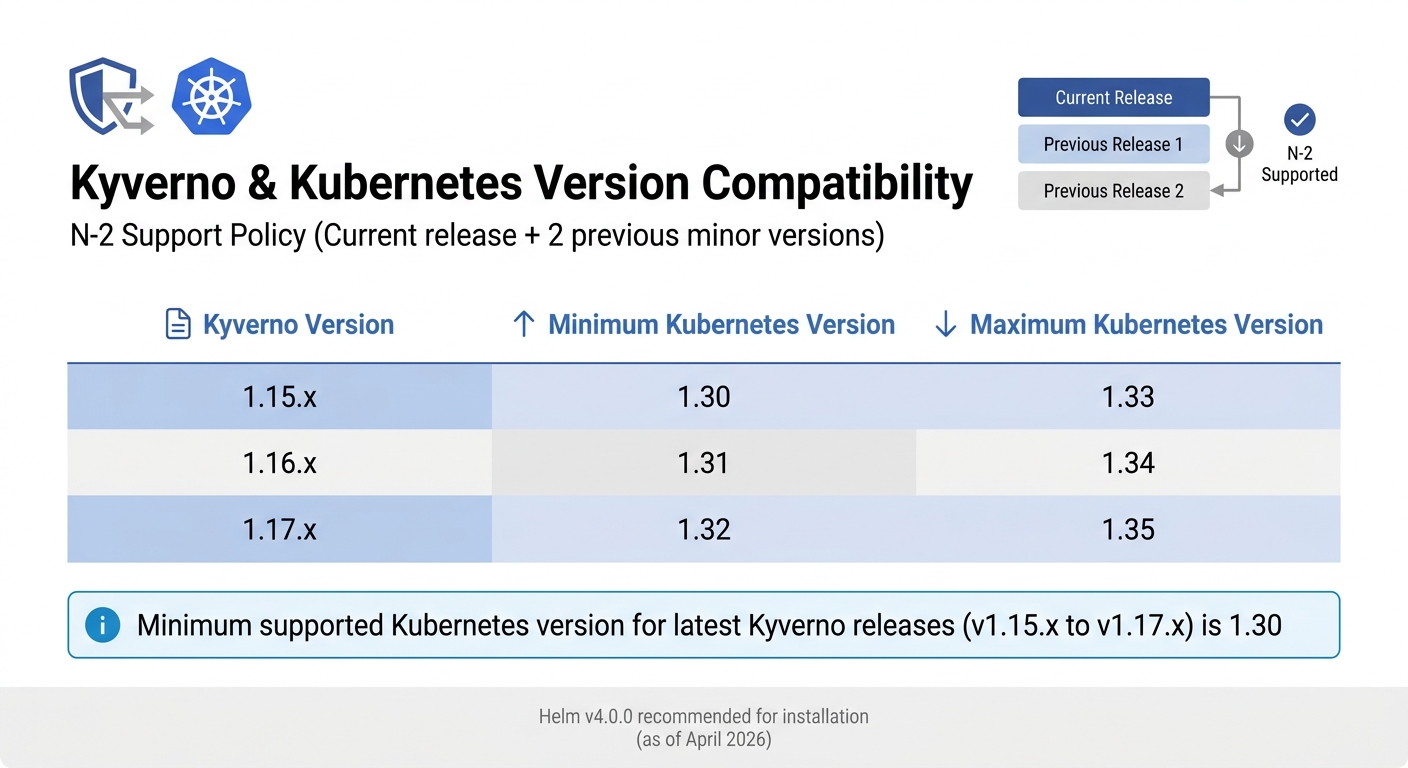 {Kyverno Version Compatibility with Kubernetes Releases}
:::
{Kyverno Version Compatibility with Kubernetes Releases}
:::
Before you dive into deploying Kyverno, make sure your Kubernetes environment meets the necessary conditions and that your namespaces are properly set up for policy enforcement.
Kubernetes and Helm Requirements
Kyverno adheres to an N-2 support policy, meaning it works with the current Kubernetes release and the two previous minor versions [6][7]. For the latest Kyverno releases (v1.15.x to v1.17.x), the minimum supported Kubernetes version is 1.30 [6][8]. Here's a quick compatibility breakdown:
| Kyverno Version | Minimum Kubernetes Version | Maximum Kubernetes Version |
|---|---|---|
| 1.15.x | 1.30 | 1.33 |
| 1.16.x | 1.31 | 1.34 |
| 1.17.x | 1.32 | 1.35 |
Helm is the recommended tool for installing Kyverno in production. It allows for flexible configuration tailored to your platform’s needs [6][7]. As of April 2026, Helm v4.0.0 is the latest stable version [9]. When deploying Kyverno, make sure to install it in its own namespace and label the namespace with kubernetes.io/metadata.name. This ensures Kyverno itself is excluded from enforcement, avoiding potential fail-closed scenarios.
Once your Kubernetes cluster and Helm environment are ready, you can move forward with installing the Kyverno CLI and configuring namespaces for Pod Security Standards (PSS).
Installing the Kyverno CLI
After verifying your environment, the next step is to install the Kyverno CLI. This tool is essential for testing and validating policies before they’re applied to your cluster. It’s particularly useful in CI/CD pipelines, where you can test policies against resources in advance [5].
You can install the Kyverno CLI in several ways:
- As a standalone binary
- Using the krew plugin (
kubectl krew install view-webhook[12]) - Through GitHub Actions with
kyverno/action-install-cli
The CLI offers commands like apply, test, and jp. To enable experimental features, set the KYVERNO_EXPERIMENTAL=true environment variable. If you’re working with external clusters, use the --kubeconfig flag.
Configuring Namespaces for PSS
Once the CLI is installed, you need to label your namespaces to reflect the desired PSS enforcement level. These labels define which Pod Security Standard applies to workloads in each namespace [1]. The enforcement modes include:
- Enforce: Blocks non-compliant pods
- Audit: Allows pods but logs any violations
- Warn: Allows pods but returns warnings to users
Before applying labels, use the --dry-run=server flag to preview changes. For example:
kubectl label --dry-run=server --overwrite ns <namespace> pod-security.kubernetes.io/enforce=baseline
To find unlabelled namespaces, run:
kubectl get namespaces --selector='!pod-security.kubernetes.io/enforce'
Avoid labelling critical namespaces like kube-system [10][2]. If you’re using EKS with VPC CNI, ensure kube-system is excluded from webhooks to prevent node bootstrapping issues [11]. For AKS clusters, set the Helm option config.webhookAnnotations to include "admissions.enforcer/disabled": true. This prevents the AKS Admission Enforcer from removing Kyverno webhooks [11].
For tailored advice on optimising your Kubernetes environment and integrating Kyverno seamlessly, you can reach out to Hokstad Consulting (https://hokstadconsulting.com), specialists in DevOps, cloud infrastructure, and automated security compliance.
Installing and Configuring Kyverno
Installing Kyverno with Helm
Start by adding the Kyverno Helm repository to your system:
helm repo add kyverno https://kyverno.github.io/kyverno/
helm repo update
Then, install Kyverno in a dedicated namespace using the following command:
helm install kyverno kyverno/kyverno -n kyverno --create-namespace
This will deploy the Admission controller for validation, along with optional controllers for background tasks, policy reporting, and resource cleanup.
Regardless of the method, Kyverno must always be installed in a dedicated Namespace; it must not be co-located with other applications in existing Namespaces including system Namespaces such as kube-system.– Kyverno Documentation
For production environments, ensure high availability by setting replicas for the controllers:
--set admissionController.replicas=3 --set backgroundController.replicas=2
If you want to install the Pod Security Standard (PSS) policies separately, use this command:
helm install kyverno-pss kyverno/kyverno-policies --namespace kyverno-policies --create-namespace --set policyGroups=pod-security
This will deploy a comprehensive set of PSS-aligned policies, covering both Baseline and Restricted standards.
Once Kyverno is installed, you can move on to configuring it for effective policy enforcement across your cluster.
Configuring Kyverno for PSS Enforcement
After installation, the next step is ensuring your cluster is secure by configuring Kyverno to enforce policies consistently. This includes protecting critical system namespaces and aligning with Pod Security Standards (PSS).
Kyverno's webhooks default to a fail closed
mode, which means requests are blocked if the Admission controller is unavailable. To maintain cluster stability, exclude critical namespaces - like kube-system, kube-public, kube-node-lease, and the kyverno namespace itself. You can achieve this by using the webhooks.namespaceSelector setting in your Helm values. Leverage the immutable kubernetes.io/metadata.name label and the NotIn operator to prevent users from bypassing restrictions by altering labels.
There is a tradeoff between security by default and operability regardless of which option is chosen.– Kyverno Documentation
Before enabling Enforce mode for policies, deploy them with validationFailureAction set to Audit. This allows you to log violations without blocking resources, helping you identify non-compliant workloads without disrupting operations. Additionally, enable background scanning by setting background: true in your policies. This ensures Kyverno continuously reviews both existing and newly created resources.
For expert guidance on fine-tuning your Kubernetes environment and seamlessly integrating Kyverno, Hokstad Consulting (https://hokstadconsulting.com) offers services in DevOps, cloud infrastructure, and automated security compliance.
Creating and Managing Kyverno Policies for PSS
Now that you've configured Kyverno, it's time to dive into creating and managing policies for Pod Security Standards (PSS). These policies can enforce standards like Privileged, Baseline, and Restricted, either across the entire cluster or for specific workloads.
Auto-Labelling Namespaces for PSS
You can streamline namespace labelling for PSS by using a mutate rule in a ClusterPolicy. This ensures the native Pod Security Admission controller enforces your PSS settings automatically.
Here's an example policy to add PSA labels to new namespaces:
apiVersion: kyverno.io/v1
kind: ClusterPolicy
metadata:
  name: add-psa-labels
spec:
  rules:
  - name: add-baseline-labels
    match:
      any:
      - resources:
          kinds:
          - Namespace
    mutate:
      patchStrategicMerge:
        metadata:
          labels:
            +(pod-security.kubernetes.io/enforce): baseline
            +(pod-security.kubernetes.io/warn): restricted
The +(label_name) syntax ensures labels are added only if they don't already exist. This policy sets enforce: baseline to block non-compliant pods and warn: restricted to notify users of stricter violations without blocking them.
ClusterPolicy for Enforcing Restricted PSS
In production environments, enforcing the Restricted PSS cluster-wide is often a priority. Instead of writing individual policies for each control, you can deploy the official policy set using Helm:
helm install kyverno-pss kyverno/kyverno-policies --namespace kyverno-policies --create-namespace --set podSecurityStandard=restricted
This installs a full set of policies that check pod specifications against the Restricted PSS level. For example, these policies ensure settings like runAsNonRoot: true and block privileged containers.
If there are workloads that need exemptions - such as monitoring agents or critical system components - you can use the exclude block in your policy. For instance, to exempt the kube-system namespace or a trusted container image:
apiVersion: kyverno.io/v1
kind: ClusterPolicy
metadata:
  name: restrict-privileged-containers
spec:
  validationFailureAction: Enforce
  rules:
  - name: check-privileged
    match:
      any:
      - resources:
          kinds:
          - Pod
    exclude:
      any:
      - resources:
          namespaces:
          - kube-system
      - resources:
          kinds:
          - Pod
        selector:
          matchLabels:
            app: trusted-monitoring
    validate:
      message: "Privileged containers are not allowed"
      pattern:
        spec:
          containers:
          - =(securityContext):
              =(privileged): false
Creating Policies for Specific Workloads
Kyverno policies can be tailored to specific workloads using match and exclude blocks. These blocks let you target resources by attributes like kinds, names, namespaces, selector (labels), or annotations. This level of detail gives you precise control over which resources a policy applies to.
When you target the Pod kind, the rules automatically extend to higher-level controllers like Deployments, StatefulSets, Jobs, and CronJobs. This eliminates the need to create separate policies for each controller type.
You can also enforce different PSS levels for different namespaces using namespaceSelector. For example, you might apply the Restricted level to production namespaces while allowing Baseline for development:
spec:
  rules:
  - name: restrict-production
    match:
      any:
      - resources:
          kinds:
          - Pod
          namespaceSelector:
            matchLabels:
              environment: production
Before enforcing new PSS levels, test them with kubectl label --dry-run=server. This ensures your policies work as intended and aligns with earlier configuration steps, offering a more granular approach to policy enforcement.
Testing and Monitoring Kyverno Policies
Before deploying Kyverno policies, it's essential to test them to avoid potential lockouts and ensure they enforce the desired security standards. This testing phase is crucial for aligning Kyverno's automated enforcement of Pod Security Standards with your broader security goals. The Kyverno CLI offers two main methods for offline testing: the apply command for quick checks on specific resources, and the test command for comprehensive unit testing.
Testing Policies with Kyverno CLI
The kyverno apply command allows you to validate Kubernetes resource manifests against your policies. This helps determine whether the resources would be allowed, denied, or modified in a live cluster. For more structured testing, the kyverno test command works with a test manifest (e.g., kyverno-test.yaml) to confirm whether the outcomes align with expectations (pass, fail, or skip).
In February 2026, Nawaz Dhandala from OneUptime showcased a complete unit testing workflow for a require-labels policy. The test suite included three scenarios: a compliant good-pod expected to pass, and two non-compliant Pods (bad-pod-no-labels and bad-pod-missing-env) expected to fail. Running kyverno test tests/ validated the policy logic offline, with the CLI reporting pass: 1, fail: 0
, confirming the policy's accuracy in all scenarios [14].
The Kyverno CLI provides a testing framework that validates policies against test cases before deployment, catching policy errors early in the development cycle.
– Nawaz Dhandala, Author, OneUptime [14]
To streamline testing, organise your repository into separate directories for policies, resources, and tests. Bulk tests can be run with commands like kyverno test <directory_path>, and the --detailed-results flag provides granular rule-specific outcomes. For mutation policies, include a patchedResource YAML file to confirm that the policy modifies resources as intended. You can also automate policy testing in your CI/CD pipeline using the kyverno/action-install-cli GitHub Action, which blocks pull requests that violate security policies.
After completing offline tests, deploy test Pods to observe real-time enforcement of the policies.
Deploying Test Pods to Validate Policies
Once CLI testing is complete, deploy test Pods to verify policy enforcement within the cluster. Start by applying the policy with kubectl apply -f <policy-file>, then create compliant and non-compliant test Pods. In Enforce mode, non-compliant Pods are blocked with a validation error, while in Audit mode, they are created but violations are logged in a PolicyReport.
For a safer approach, use kubectl apply --dry-run=server to simulate how the cluster would handle a Pod manifest without actually creating it. For policies in Audit mode or during background scans, review the relevant PolicyReport (or ClusterPolicyReport for a cluster-wide view) to identify violations. Once testing is done, delete the test Pods, and Kyverno will automatically clear their entries from the PolicyReport.
Using PolicyReports for Monitoring
After testing at the Pod level, use PolicyReports to monitor compliance across the cluster. These reports provide a snapshot of compliance by aggregating results from admission events (CREATE, UPDATE, DELETE) or periodic background scans, typically every hour. Run kubectl get policyreport -A -o wide to get a cluster-wide compliance summary and pinpoint specific resources linked to each report entry.
To focus on actionable issues, filter failures using a JSONPath expression like:
kubectl get polr <report-name> -o jsonpath='{.results[?(@.result=="fail")]}'.
The summary object in the report aggregates totals for outcomes such as pass, fail, warn, error, and skip. Additionally, monitoring fields like severity (low, medium, high, critical) and category (e.g., Pod Security Standards (Baseline)
or Best Practices
) helps prioritise remediation efforts.
Policy reports are an ideal way to observe the impact a Kyverno policy may have in a cluster without causing disruption.
– Kyverno Documentation [15]
PolicyReports are independent of the policies themselves, enabling the use of Kubernetes RBAC controls to separate policy management from compliance monitoring. For a visual representation of these metrics, you might consider using the Policy Reporter tool.
Advanced Configurations and Best Practices
Once you've completed testing, it's time to fine-tune Kyverno for more complex deployments. These advanced options build on earlier configurations to improve enforcement accuracy and make cluster management smoother and more secure.
Overriding PSA Labels with Kyverno
Kyverno can automatically apply or override Kubernetes Pod Security Admission (PSA) labels using ClusterPolicy with mutate rules. This feature is a game-changer if you're looking to enforce consistent security standards across your cluster without manually labelling every namespace. By using a strategic merge patch, you can inject labels like pod-security.kubernetes.io/enforce and pod-security.kubernetes.io/warn directly into namespace metadata.
There are two main approaches here:
- Add labels only if they’re missing by using the
+(label)syntax. - Force-override existing labels to maintain compliance.
For instance, you could create a mutation policy that automatically applies pod-security.kubernetes.io/enforce: restricted to all new namespaces. This setup ensures that no workload is deployed without a proper security profile. You can also take it a step further by using validate rules to check for PSA labels and generate reports for namespaces lacking the required security configurations. This method boosts consistency and strengthens security enforcement across your cluster.
Using Audit Mode for Policy Testing
Before rolling out policies in production, it’s a smart move to start with audit mode. This allows you to monitor the policy's effects without disrupting resource creation. To enable this, set validationFailureAction: audit in your policy and turn on background scanning with background: true. This will catch any pre-existing violations that might otherwise go unnoticed during admission control.
For better troubleshooting, you can use messageExpression to provide detailed failure messages, making it easier to diagnose issues. Additionally, you can add custom metadata using auditAnnotations, such as severity levels or team ownership, to help prioritise fixes. Once you're confident that all violations have been resolved and the policy is functioning as intended, switch to enforce mode. This ensures active blocking and consistent enforcement across all namespaces.
Integrating Kyverno into CI/CD Pipelines
Kyverno can play a crucial role in securing your CI/CD workflows by validating resources before they even reach the cluster. The Kyverno CLI makes this possible, enabling commands like kyverno apply or kyverno test to be integrated into pipelines such as GitHub Actions or GitLab CI. This setup helps catch non-compliant Pods early, giving developers instant feedback on policy violations. By addressing these issues upfront, you reduce manual intervention and speed up deployment cycles.
For infrastructure-as-code workflows, Kyverno can even validate non-Kubernetes files like Terraform plans by setting spec.evaluation.mode to JSON in a ValidatingPolicy. When introducing new Pod Security Standard policies in your pipeline, it’s wise to begin with validationFailureAction: Audit. This logs violations without blocking builds, allowing for a gradual transition to Enforce. These integrations not only streamline your security processes but also ensure continuous compliance with minimal manual effort.
Conclusion
Kyverno offers a straightforward way to secure Kubernetes deployments, building on the configuration and testing steps discussed earlier. By avoiding the need for manual security policy configuration or outdated tools, Kyverno integrates seamlessly into workflows with its native YAML approach. As a well-established tool, it stands alongside trusted technologies like Prometheus and Envoy, demonstrating its readiness for large-scale, production use [3][16].
Key Takeaways
Kyverno's main strength lies in its ability to simplify compliance while improving security. By utilising standard Kubernetes YAML, it lowers the barrier to adoption and speeds up implementation [3][16].
Kyverno goes beyond basic validation by offering mutation and generation features that automatically apply fixes. Instead of merely rejecting non-compliant Pods, it can inject security contexts, create default NetworkPolicies, or add Pod Security Admission (PSA) labels to namespaces. This reduces the need for manual intervention, ensuring security measures are applied without slowing down deployments [13][16].
Starting in audit mode allows organisations to test policies without impacting workloads, gradually transitioning to enforce mode for full compliance. In practice, most rules - about 90% - are deployed as ClusterPolicy to maintain consistency across clusters, while critical namespaces are excluded to avoid accidental lockouts [16]. For production environments, running at least three replicas of the Kyverno admission controller ensures high availability and keeps the API server responsive [13][16].
Next Steps
These insights provide a clear path for action.
To strengthen your Kubernetes security, begin by deploying Kyverno in audit mode. This will help identify policy violations without disrupting workloads. Start with the Baseline Pod Security Standard and gradually move towards the more restrictive Restricted profile [4]. Use tools like PolicyReports or Prometheus to monitor compliance [4][13][16].
For businesses looking for expert guidance, Hokstad Consulting offers tailored support in areas like DevOps transformation, cloud optimisation, and automation strategies. Whether you're transitioning from deprecated PodSecurityPolicy, integrating Kyverno into CI/CD pipelines, or building a GitOps-driven security framework, their expertise can help you achieve a secure and efficient Kubernetes environment.
FAQs
When should I use Baseline vs Restricted PSS?
The decision to use Baseline or Restricted Pod Security Standards (PSS) comes down to your specific security requirements.
Baseline: Offers minimal restrictions, focusing on preventing common privilege escalations while maintaining compatibility with most workloads. It's a good fit for non-critical applications or development environments where flexibility is key.
Restricted: Implements stricter controls designed for high-security scenarios, enforcing practices like running containers without root privileges. This is best suited for sensitive workloads where security is a top priority.
Choose Baseline for simplicity and flexibility, and go with Restricted when you need tighter security measures.
How do I avoid breaking kube-system with Kyverno?
When working with Kyverno, it's crucial to avoid complications with the kube-system namespace. To do this, make sure your Pod Security Standards policies exclude it. You can achieve this by using the match clause to explicitly omit kube-system. Alternatively, configure policies using namespaceSelector and resourceRules to target specific workloads instead.
Before applying any policies, always test them in a staging environment. This ensures they won't interfere with critical system components. By taking these precautions, you can protect essential namespaces while maintaining security across other areas.
What’s the safest path from Audit to Enforce?
Defining policies as code within Kubernetes is a smart way to maintain security. Tools such as Kyverno automatically assess and enforce security standards before deployment. This ensures that any non-compliant resources are blocked from being scheduled, simplifying compliance while improving overall security.