
Manual patch management is too slow to keep up with modern cyber threats. Vulnerabilities are exploited within hours, yet manual patching takes an average of 32 days. This gap leaves systems exposed, increasing the risk of ransomware attacks and compliance failures.
Automation solves this by:
- Detecting vulnerabilities faster: Automated tools continuously monitor for issues, scanning open-source components, containers, and infrastructure.
- Prioritising risks intelligently: Automation uses metrics like CVSS and EPSS to focus on critical vulnerabilities.
- Ensuring consistent patching: Infrastructure as Code (IaC) eliminates manual errors, while orchestration tools manage staged rollouts and reduce downtime.
- Testing and rollback safety: Automated pipelines validate patches in staging environments and provide quick recovery options if something goes wrong.
- Streamlining compliance: Policy-as-Code ensures patches meet regulatory deadlines, while automated reporting creates audit-ready records.
For example, companies using automation have reduced patch times from 72 hours to under 6 hours, cut manual effort by 85%, and saved thousands annually. By integrating automation into your CI/CD pipeline, you can close security gaps, meet compliance standards, and reduce operational workload.
::: @figure 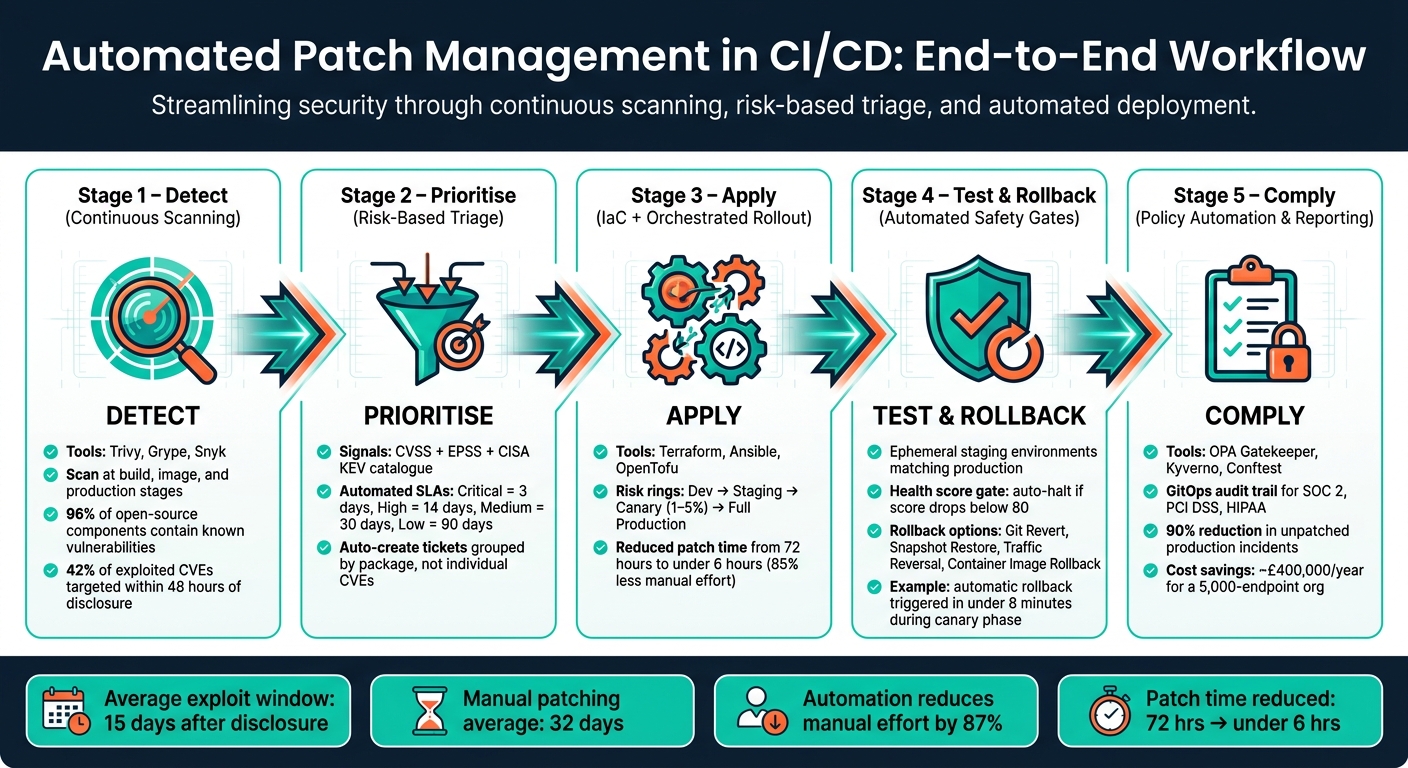 {Automated Patch Management in CI/CD: End-to-End Workflow}
:::
{Automated Patch Management in CI/CD: End-to-End Workflow}
:::
Automated Patch Management With Progress Chef
Need help optimizing your cloud costs?
Get expert advice on how to reduce your cloud expenses without sacrificing performance.
Slow Patch Detection and the Case for Automated Monitoring
The earlier discussion highlighted how long it can take to apply patches after a vulnerability is identified. But spotting vulnerabilities in the first place is no less daunting. Traditional methods like weekly scans or quarterly audits simply can't keep up with the pace of modern vulnerability disclosures. In fact, in 2023, CISA reported that 42% of exploited vulnerabilities were targeted within just 48 hours of disclosure [3].
Adding to the complexity, modern applications often depend on multiple layers of open-source components. Shockingly, 96% of downloaded open-source components contain known vulnerabilities [5]. Keeping track of transitive dependencies manually is nearly impossible. Then throw in forgotten virtual machines, unmonitored containers, and Shadow IT endpoints, and you've got significant gaps in coverage that aren't even visible.
Automated Vulnerability Scanning
The solution? Automated scanning tools that integrate directly into your CI/CD pipeline, turning vulnerability detection into a continuous process rather than a periodic one. Here's a quick look at some popular tools:
| Tool | Strengths | Best For |
|---|---|---|
| Trivy | Scans OS, language dependencies, IaC, containers | All-in-one CI/CD scanning [3] |
| Grype | Strong vulnerability matching, SBOM-native | SBOM-first workflows [3] |
| Snyk | Developer-friendly, automated fix pull requests | Teams wanting a managed solution [3] |
The secret is to scan at multiple stages of the development lifecycle. For example, you can:
- Run a filesystem scan during development.
- Perform an image scan after each build.
- Schedule daily rescans of production artefacts.
Why is this important? A container image that was clean on Tuesday might become vulnerable by Friday as new CVEs are published. Tools like Trivy allow you to automate this process. For instance, using the --exit-code 1 flag can automatically fail a CI build if vulnerabilities exceed a certain severity threshold - no need for manual intervention [3].
To avoid overwhelming developers with irrelevant alerts, you can use the --ignore-unfixed flag to filter out vulnerabilities that lack vendor fixes. Alert fatigue is a real issue - when scans return hundreds of irrelevant findings, it's easy for developers to start ignoring them altogether [5].
This type of continuous scanning lays the groundwork for smarter, risk-based prioritisation.
Risk-Based Prioritisation
While automated scans ensure vulnerabilities are detected quickly, deciding which ones to address first is just as important. Not every vulnerability demands immediate action. Automated systems can help categorise vulnerabilities by combining multiple risk signals. These include:
- CVSS: Measures theoretical severity.
- EPSS: Predicts the likelihood of exploitation within 30 days (provided by FIRST.org).
- CISA KEV catalogue: Highlights vulnerabilities actively exploited in the wild [7].
By combining these signals, you get a clearer picture of actual risk than CVSS scores alone can provide.
To streamline remediation, you can set automated SLAs based on severity levels. For example:
- Critical: 3 days
- High: 14 days
- Medium: 30 days
- Low: 90 days [6]
Automated triage systems can then create tickets or pull requests, grouping findings by package rather than individual CVEs. This approach is efficient because a single package update often resolves multiple vulnerabilities at once [6]. It keeps the remediation process manageable while ensuring the most critical issues are tackled first.
Reducing Errors in Patch Application Through Automation
Once patches are detected automatically, the next step is ensuring they are applied consistently. Manual patching across varied environments often leads to mistakes. A minor error in one setup can snowball into inconsistencies elsewhere, making your staging environment behave differently from production. In fact, research shows that 44% of organisations experience configuration drift due to manual provisioning [8]. Using Infrastructure as Code (IaC) can help maintain uniformity in patch application across all environments.
The gap between 'patch released' and 'patch applied across every machine' is where most breaches happen.- Kestra Resources [1]
Infrastructure as Code for Consistent Patching
To avoid manual errors, define your system's desired state in version-controlled files using IaC tools like Terraform, OpenTofu, or Ansible. This ensures every environment is built from the same blueprint, allowing patches applied to the base configuration to propagate automatically. This approach reduces the risk of human errors that lead to drift.
By storing these configurations in Git, you also gain a full audit trail, showing who made changes and when. If a patch causes issues, rolling back to a stable version is straightforward. Tools like terraform plan or tflint allow you to preview changes and catch potential misconfigurations before they affect live systems [9][10]. Another effective method is the repave
strategy, where systems are replaced with fresh, pre-patched images on a regular schedule (often every 30 days) instead of patching in-place [10].
For example, between 2022 and 2024, a digital payment platform transitioned from manual operations to a fully automated AWS setup using Terraform. By adopting modular IaC and integrating terraform plan into their CI/CD pipeline, they achieved PCI DSS certification and scaled to handle over 10 million monthly transactions. Staging and production environments could then be deployed in minutes rather than days [8].
Orchestrated Patch Rollout
While IaC determines what to patch, orchestration manages how patches are deployed, further minimising manual errors. Automated workflows classify systems based on OS, role, and environment, applying patches in a controlled sequence. Using risk rings, patches are deployed to development first, followed by staging, a small canary group (1–5% of production traffic), and finally the full production environment, with automated health checks at each stage [1][2].
This method significantly reduces the time it takes to apply patches. For instance, in Q3–Q4 2025, a global SaaS company introduced an automated virtual-patching pipeline with signed patch feeds and Gatekeeper policies. This reduced the time-to-mitigate for critical CVEs from 72 hours to under 6 hours, cutting manual intervention by 85% [2]. Similarly, in February 2026, Elastic transitioned to Argo Workflows for managing dependencies across thousands of repositories. They increased daily scans from under 1,000 to over 10,000 while reducing compute costs by 54% [11].
Container Image Patching
Orchestration works well for dynamic systems, but container environments need a different approach. Since container images are fixed at build time, a clean image today may become vulnerable tomorrow as new CVEs are discovered. Automating image rebuilds in your CI pipeline ensures vulnerabilities flagged as High or Critical are addressed promptly, removing delays caused by manual decision-making [14][17].
In scenarios where rebuilding isn’t feasible - perhaps due to lack of access to the original build pipeline - tools like Copacetic (Copa) can apply OS-level patches directly to existing images without requiring the source code [12][15]. To keep Kubernetes clusters updated, tools like Flux and ArgoCD automate the process of updating image references in Git manifests. These tools scan registries for new tags and commit updates automatically [13][16].
One practical tip: always pin production images using their SHA256 digest rather than a mutable tag. Tag-rewriting attacks are a genuine risk. For example, the TeamPCP campaign in March 2026 successfully hijacked 75 out of 76 version tags for the trivy-action security tool [18].
Safer Patch Deployment with Testing and Rollback Automation
Applying patches without thorough testing is a risky move. Even updates from trusted sources can cause unexpected issues - for example, Microsoft's January 2026 Windows security update led to some devices failing to shut down or hibernate properly [19][20]. The best way to avoid such problems is to validate every patch automatically before deploying it to production. Equally important is having an automated rollback plan in place if things go south.
Automated Testing Pipelines
Manual testing often causes delays, which is why automated pipelines are now the go-to solution. These pipelines validate patches in a staging environment that matches production as closely as possible - same operating system, hardware setup, and network configurations. This approach helps catch compatibility issues or performance problems before they impact actual users.
Synthetic monitoring plays a key role here. By simulating user actions - like API logins, transactions, or shutdown processes - it helps identify operational issues such as hung services or boot failures. For instance, testing a graceful shutdown (using shutdown /s /t 0 and confirming the virtual machine powers down within 120 seconds) is now a standard practice for OS-level updates [19][20].
Automated decision gates add another layer of protection. These gates evaluate a patch's health score based on factors like availability, error rates, and resource usage. If the score drops below 80, the pipeline halts automatically, no human intervention required.
A handy tip: use ephemeral test environments that are recreated for every test run. This eliminates the risk of configuration drift and ensures patches are always tested against a clean, consistent setup. Once a patch passes these rigorous tests, a controlled rollout further reduces potential risks.
Staged Rollout Strategies
After passing automated tests, patches should be deployed gradually. A multi-tiered canary strategy is a great way to limit the impact of any unexpected issues. Typically, this starts with a micro-canary of just 1–5 devices, then expands to 1% of the fleet, followed by 5%, 10%, 20%, 40%, and finally the entire deployment [20][22].
At each stage, automated health gates determine whether the rollout can proceed. For example, error rates might need to stay within 10%, and synthetic transaction success rates above a defined threshold. These clear, numerical criteria keep the process objective and straightforward.
One detail often overlooked is the importance of rotating canary hosts. If the same machines are always used for canary testing, you might miss issues tied to specific hardware models or regional zones. Rotating devices helps capture a broader range of potential problems.
If anything goes wrong during the rollout, pre-defined rollback mechanisms can quickly restore system integrity.
Rollback Mechanisms for Safety
A solid rollback plan turns cautious rollouts into safer deployments. For example, in late 2025, a global SaaS provider used a two-stage canary pipeline for kernel updates. During the 2% deployment phase, synthetic tests flagged a 30% increase in latency. The health score dropped below 80, triggering an automatic rollback across the entire cohort in under 8 minutes, preventing a major outage [20].
The best rollback method depends on your environment. Here's a quick comparison of common options:
| Mechanism | Best For | Key Trade-off |
|---|---|---|
| Git Revert | Infrastructure as Code (IaC) and configuration changes | Tracks changes well but can't recover lost data |
| Snapshot Restore | Virtual machines or legacy apps | Quick recovery but risks losing data since the last snapshot |
| Traffic Reversal | Blue/Green or canary deployments | Zero downtime but requires duplicate infrastructure |
| Container Image Rollback | Kubernetes and containerised workloads | Easy execution but relies on proper image tagging |
| In-Place Uninstallation | OS-level patches (e.g., Windows KB updates) | Precise removal but not always available for every update type |
For IaC setups, enabling S3 versioning for Terraform state files lets you revert to a previous infrastructure state easily. Adding lifecycle { prevent_destroy = true } guards to stateful resources like databases can also prevent accidental deletions during a failed patch cycle [23].
One last recommendation: run quarterly rollback drills. Test processes like snapshot restores and Blue/Green traffic flips under controlled conditions. This ensures your automation works smoothly when it really matters, rather than discovering flaws during a live incident [21].
Closing Compliance Gaps with Policy Automation
Building on automated testing and rollback strategies, policy automation takes compliance management to the next level. With rollback mechanisms in place, the focus shifts to ensuring audit-ready, consistently managed patch processes. The sheer complexity of today's multi-service environments makes manual methods ineffective - policy automation integrates compliance checks seamlessly into every stage of the pipeline.
Policy-as-Code Enforcement
Instead of relying on sporadic manual reviews, many teams now turn to tools like Open Policy Agent (OPA), Gatekeeper, and Kyverno to enforce patching requirements automatically. These tools can block deployments that lack required patch attestations or include unpatched images [2].
The benefits of this approach are clear. For example, in late 2025, a global SaaS provider, Acme Cloud
, implemented an automated virtual-patching pipeline using OPA Gatekeeper policies alongside signed patch feeds. The results? Their average mitigation time for critical CVEs plummeted from 72 hours to under 6 hours. Manual intervention for image rebuilds dropped by 85%, and incidents involving unpatched vulnerabilities in production workloads were reduced by 90% [2].
For a practical edge, consider running tools like Conftest or Checkov at the pull request stage. This flags non-compliant configurations early, before they even enter the pipeline [2]. Combine this with Kubernetes Admission Controllers as a final safeguard, and you’ve built a layered enforcement system that’s tough to bypass, even accidentally.
Predictive AI and automation have moved defensive operations from reactive playbooks to proactive risk prevention.- World Economic Forum, Cyber Risk in 2026 [2]
Automated Compliance Reporting
Automated reporting creates a real-time, tamper-proof audit trail. Using a GitOps approach, CVE remediation statuses are tracked through Git-managed ConfigMaps and manifests. This ensures the entire remediation history is version-controlled, reproducible, and ready for audits against standards like SOC 2, PCI DSS, or HIPAA. Tools like Jira or ServiceNow can automatically document approvals and exceptions, streamlining the process even further [1][4][25].
Here’s how common compliance controls align with automated implementation methods:
| Compliance Control | Implementation Method |
|---|---|
| NIST 800-53 SI-2 | Automated flaw remediation with a full audit trail [26] |
| CMS ARS | Environment-segregated patching with automated records [26] |
| Audit Logging | Centralised logging of all patching runs to CloudWatch or SIEM [26] |
| Least Privilege | Restricting IAM/SSM roles to patching actions [26] |
Metrics like Mean Time to Patch (MTTP) are vital for assessing the effectiveness of your automated patching processes [1]. Additionally, the consistent data generated by automation can help refine patching schedules for better efficiency.
Cost-Aware Patching Schedules
Policy automation doesn’t just improve compliance - it can also cut costs. By aligning patching operations with low-cost periods, such as off-peak hours, you can lower compute expenses in cloud environments while maintaining compliance [1][24]. This approach is especially useful for serverless or auto-scaling architectures, where running patch workloads during quieter times can significantly reduce monthly cloud bills.
Automated discovery tools can also identify forgotten virtual machines or shadow IT assets - resources often overlooked in manual inventories. These assets may be driving up costs while remaining unpatched and non-compliant [1]. Automating their identification and either patching or decommissioning them in one sweep tackles both security and cost challenges simultaneously.
Conclusion: Building a Reliable Automated Patch Management Process
Creating an automated patch management system isn't about relying on a single tool or a one-time effort. It's a structured approach built on consistent and repeatable practices. The process involves multiple layers, including vulnerability scanning, risk-based prioritisation, Infrastructure as Code (IaC) rollouts, and policy enforcement.
Consider this: the average time between the disclosure of a vulnerability and its active exploitation is now just 15 days [27]. Organisations that have embraced automated patch management have seen an 87% reduction in manual operational effort [27]. For example, a financial services firm managing 5,000 endpoints slashed its zero-day response time from 12 days to under 4 hours after moving away from manual processes. This shift also saved them approximately £400,000 annually in IT costs [27]. These numbers highlight the critical need for a streamlined and automated approach.
Start by automating non-critical, internal patches to establish a stable process before addressing high-risk production systems [1]. Once the process is proven, scale up with phased rollouts and implement policy-as-code to safeguard sensitive environments. By combining continuous scanning, orchestrated rollouts, and policy-based controls, your CI/CD pipeline can better withstand emerging threats.
If you're looking for tailored guidance to enhance your CI/CD pipeline, consider reaching out to Hokstad Consulting. They specialise in DevOps transformation and custom automation services, offering solutions that align with your specific needs - whether you're operating in public cloud, private, or hybrid environments. Their expertise can help integrate the scanning, orchestration, and compliance measures discussed in this article.
FAQs
Where should I start automating patch management in CI/CD?
To get started, incorporate virtual patching solutions directly into your development pipeline. Begin by ensuring secure feed ingestion - subscribe to signed patch feeds, verify their signatures, and map the patches to relevant CVEs. Next, automate the patch application process during builds, which helps streamline updates and minimise manual intervention. Additionally, enforce compliance by using policy-as-code and validating infrastructure as code (IaC). By embedding patch management into your CI/CD pipeline, you can cut down on delays and reduce the likelihood of human errors.
How do I decide which vulnerabilities to patch first?
When managing vulnerabilities, it's essential to focus on the actual risk they pose to your environment rather than relying solely on severity scores like CVSS. To do this effectively, consider key factors such as exposure, exploitability, and the potential impact on your business.
For vulnerabilities that are internet-facing or have a broad attack surface, immediate action is crucial, as these are often prime targets for attackers. On the other hand, when dealing with internal systems, evaluate the level of isolation and existing protective measures to determine the genuine level of risk.
By prioritising critical issues first, you can allocate resources wisely and ensure patching efforts are both efficient and impactful.
How can I automate patching without risking production outages?
To ensure patching is automated safely, adopting a phased deployment strategy is crucial. This means incorporating testing, monitoring, and rollback processes into your workflow. Here’s how:
- Automated testing: Run tests in staging environments to catch potential issues before patches reach production.
- Gradual deployment: Roll out patches incrementally, starting with a small subset of systems to limit risk.
- Vulnerability scans: Embed these scans into your CI/CD pipeline to identify and address security flaws early.
Additionally, continuous monitoring helps spot problems quickly, while automated rollback mechanisms reduce downtime and keep systems stable.