
Manual compliance processes are outdated. They’re slow, error-prone, and can’t keep up with modern development speeds. Automating compliance in CI/CD pipelines solves this by embedding checks directly into development workflows, ensuring faster, consistent, and scalable adherence to regulations.
Key Takeaways:
- Why automate compliance? Manual methods delay releases, increase errors, and can’t handle the pace of modern development.
- Benefits: Automating compliance saves time, reduces fines, and cuts manual efforts by up to 65%.
- How it works: Tools like Open Policy Agent (OPA) and Policy as Code (PaC) enforce rules across pull requests, builds, and deployments.
- Results: Companies report fewer misconfigurations (down by 68%), quicker issue resolution, and reduced compliance costs.
Automation ensures compliance checks are part of every step, from code commits to production. This approach not only prevents costly errors but also simplifies audits and improves security across the board.
::: @figure 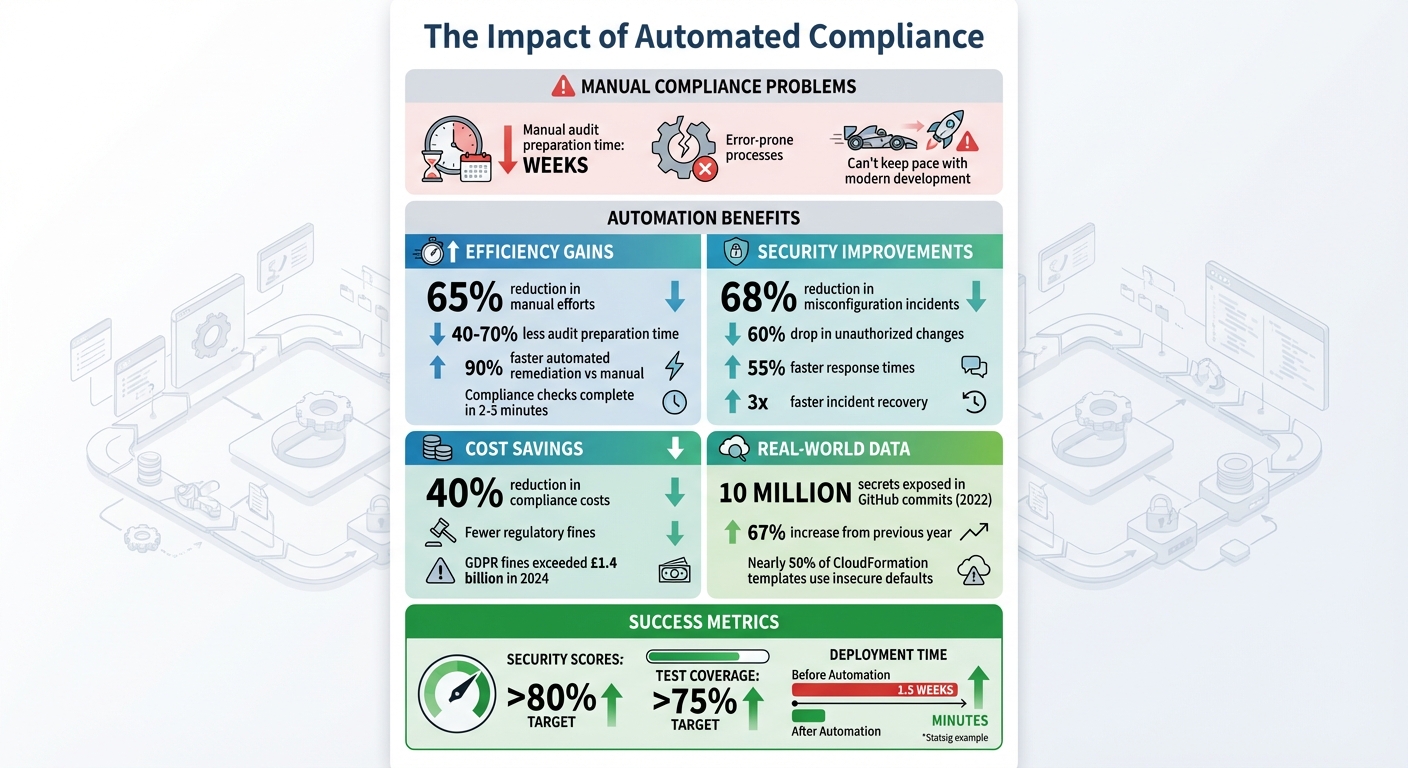 {Benefits and Impact of Automated Compliance in CI/CD Pipelines}
:::
{Benefits and Impact of Automated Compliance in CI/CD Pipelines}
:::
DevSecOps Governance: Automate Compliance Checks in Your CI/CD Pipeline
What is Policy as Code for Compliance
Policy as Code (PaC) transforms security rules and compliance requirements into machine-readable formats, embedding these checks directly into your CI/CD pipeline. This means compliance can be versioned, tested, and deployed just like your application code [5][7]. Instead of treating compliance as an afterthought, PaC makes it an integral part of the development process, catching potential issues before they ever reach production [1]. This proactive approach aligns perfectly with modern CI/CD workflows.
Traditional compliance methods, like manual reviews and audits, often happen post-deployment and can take weeks to flag issues [1]. In contrast, PaC enables your pipeline to flag compliance violations within minutes - right at the pull request stage. Developers can address problems immediately, rather than discovering them during a quarterly audit [1]. This approach turns compliance into a seamless safeguard rather than a roadblock that delays releases.
Compliance isn't optional, but traditional approaches - manual reviews, static audits and post-deployment checks - are fundamentally at odds with modern DevOps workflows.– Manvitha Potluri, DevOps.com [5]
Automation is at the heart of PaC. When a pull request is made, policies validate infrastructure plans, and final checks are performed before deployment to production [1]. Because these policies are written as code, they remain consistent across all environments - whether it's development, staging, or production. This consistency eliminates the risk of configuration drift that often arises with manual processes [9].
Benefits of Policy as Code
The advantages of PaC go beyond just speed; it also brings consistency and better traceability to compliance efforts. Organisations adopting PaC have reported reducing manual audit preparation time by 40–70% [5]. When a misconfiguration is detected, automated remediation can resolve it up to 90% faster compared to manual methods [5]. This speed ensures issues are caught and fixed earlier, enhancing overall security.
Consistency is another major benefit. With compliance rules codified, every deployment follows the same standards, regardless of who is reviewing or which team is involved. For instance, a policy that prevents an S3 bucket from being publicly accessible in development will enforce the same rule in production.
PaC also simplifies audit processes by creating automatic, version-controlled logs. Every policy change is tracked, showing who made modifications and when. When auditors request evidence of compliance, you can provide immutable logs documenting every deployment that passed the required checks.
Collaboration is another key advantage. By using a shared policy codebase, Development, Security, and Operations teams gain better visibility and reduce friction [5]. Security teams can update policies independently of application releases, and developers receive instant feedback on compliance issues. To ensure these policies meet regulatory requirements, it’s a good idea to involve auditors early in the process [5].
Using Open Policy Agent (OPA) for Policy Management
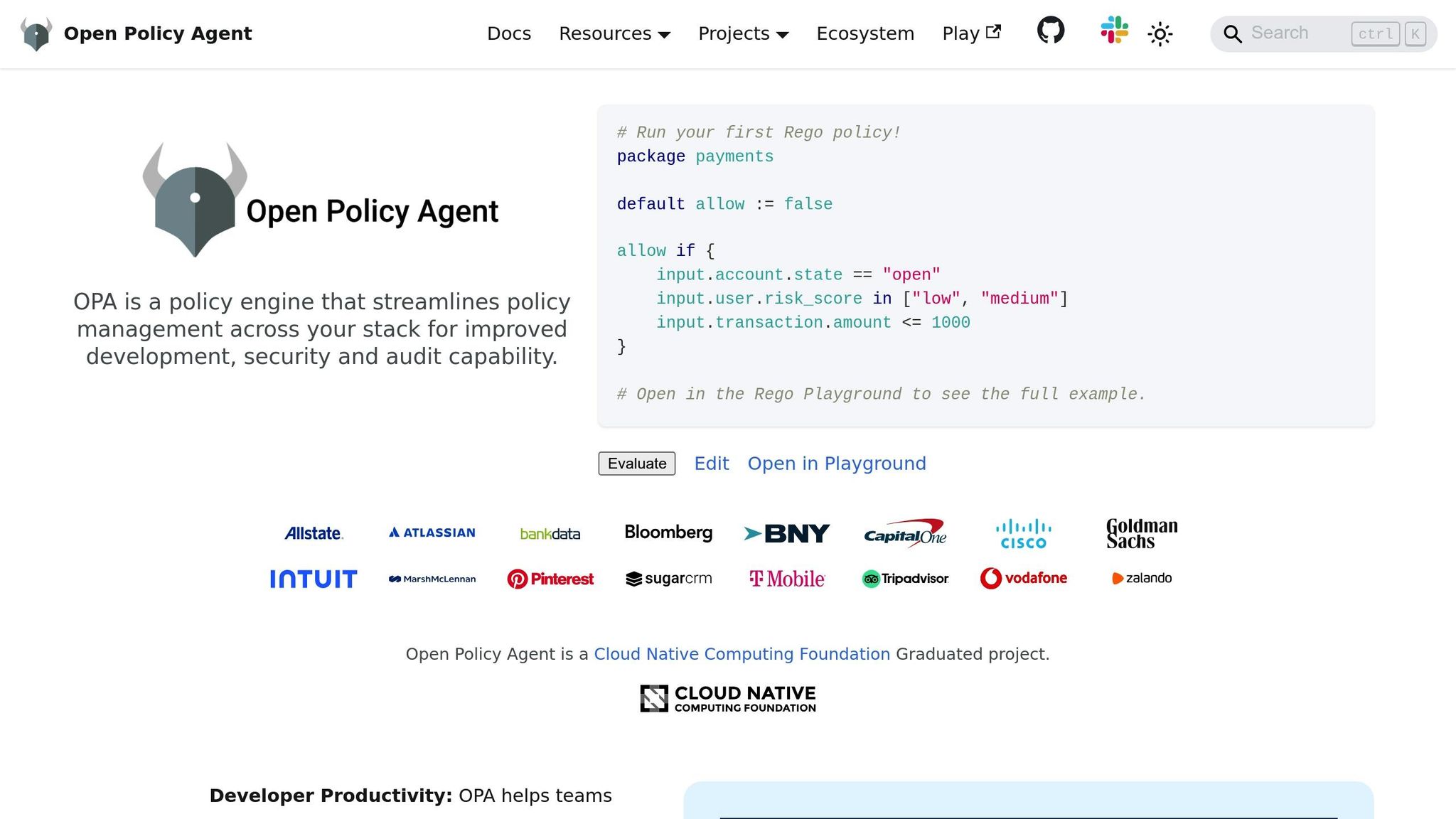
Open Policy Agent (OPA) has become a popular tool for implementing Policy as Code. As a graduated project within the Cloud Native Computing Foundation (CNCF) [8], OPA provides a flexible, domain-agnostic engine that separates policy decision-making from enforcement. When your CI/CD pipeline needs to determine compliance, it queries OPA with structured data - like a Terraform plan or Kubernetes manifest - and OPA evaluates whether the change aligns with defined policies [8].
OPA uses a declarative language called Rego to define these policies. While Rego may have a learning curve, it’s specifically designed to handle complex data structures like JSON or YAML [8]. Its flexibility is a standout feature, allowing it to validate infrastructure configurations, check for container vulnerabilities, and enforce Kubernetes admission controls [6].
OPA serves as a powerful 'swiss army knife' for implementing custom checks required by your organisation that might be difficult to implement in a script or in another tool.– Open Policy Agent Documentation [6]
In practice, OPA works with tools like Conftest to validate configuration files during pull requests, ensuring Terraform plans meet security standards before merging [6]. For Kubernetes environments, OPA integrates with Gatekeeper to enforce policies at the cluster level. A key advantage is that security teams can update policies without requiring changes to application code.
If you’re new to PaC, start small. Focus on a high-impact use case, such as enforcing encryption for storage buckets or restricting specific container registries, before scaling to broader compliance frameworks [5][9]. When rolling out new policies, consider using an Advisory
mode initially. This mode warns developers about violations without breaking builds, giving teams time to adapt before moving to stricter enforcement [1]. With tools like OPA, embedding automated compliance checks into your pipeline becomes not only feasible but highly efficient.
Adding Compliance Checks to CI/CD Pipelines
Embedding compliance checks throughout your CI/CD pipeline ensures issues are caught early, saving time and reducing the effort needed for fixes. By adopting a shift-left approach, you can validate policies right at the commit or pull request stage. Instead of relying on quarterly audits to identify compliance breaches, your pipeline can flag violations within minutes, enabling developers to address them immediately.
At the commit stage, tools like TFLint can identify obvious issues before code even enters the repository. The pull request stage serves as a critical enforcement point, where CI servers run comprehensive policy checks using tools such as OPA and Conftest. These checks can evaluate proposed changes, including Terraform plans or Kubernetes manifests. During the build phase, the pipeline performs important validations like scanning container images for vulnerabilities and ensuring dependencies listed in files such as package.json or go.mod comply with licensing and security standards [6]. Finally, at the deploy stage, pre-deployment checks verify that configurations align with the specific requirements of the target environment.
To maintain development speed, ensure that policy validation completes within 2–3 minutes [1]. Any failed checks should clearly explain the issue, its impact, and how to resolve it. Below, we explore how compliance checks can be integrated into the build, test, and deployment stages.
Compliance Checks During Build and Test Stages
The build and test stages are vital for ensuring compliance before code reaches deployment. With supply chain security becoming increasingly critical, these stages can help prevent vulnerabilities. For example, in 2022, public GitHub commits exposed 10 million hard-coded secrets - a staggering 67% increase from the previous year. Using OPA to validate package manager configurations like package.json or go.mod ensures that dependencies meet your organisation's security and licensing requirements [6].
Container images should also be scanned for vulnerabilities, and only approved registries should be used. Automated checks are essential, especially given that nearly half of CloudFormation templates rely on insecure default settings. Tools like HashiCorp Vault or AWS Secrets Manager can further enhance security by detecting and blocking hard-coded credentials before they become a problem.
A two-layer enforcement strategy can be particularly effective. The first layer involves validations in the CI pipeline, while the second layer uses Kubernetes Admission Controllers to enforce compliance at the admission level. Naming policy files to reflect specific regulatory controls (e.g., pci_dss_3_4_1.rego) helps create a clear audit trail [2][10]. These validations should also extend into deployment to ensure production environments remain secure.
Enforcing Compliance in Deployment Stages
The deployment stage is your final checkpoint for ensuring that configurations meet all environment-specific and security requirements before release. Start by running compliance checks in Advisory mode, which allows you to test new guardrails without disrupting workflows. Once validated, you can switch to Blocking mode to enforce these policies. Observing new guardrails against existing workloads is another effective way to prevent unexpected failures in production-ready code [11].
Compliance doesn’t stop at deployment. Configuration drift detection helps maintain security over time by identifying manual changes that violate compliance policies. Tools like Cloud Custodian can perform real-time scans of live environments, complementing static checks to ensure continuous compliance [4]. To strengthen audit processes, store policy decision logs in immutable locations, such as S3 buckets with Object Lock enabled. This ensures both the integrity and accessibility of records for inspections [2].
Setting Up Compliance Gates and Audit Logs
After discussing automated compliance checks earlier, let's dive into the next step: setting up compliance gates and audit logs. These tools ensure your workflows remain aligned with policies while providing a clear, verifiable trail of compliance. Compliance gates act as barriers to block non-compliant code, while immutable audit logs serve as tamper-proof records of compliance activity. Here's how you can set them up and integrate them into your CI/CD pipeline.
Configuring Compliance Gates
Compliance gates are designed to stop your CI/CD pipeline whenever a policy violation is detected. The most effective placement for these gates is during the pull request stage, where developers can receive feedback in minutes instead of waiting weeks [1]. For example, tools like Open Policy Agent (OPA) can use flags such as --fail or --fail-defined to trigger a non-zero exit code when violations occur, immediately halting the pipeline [8][6].
Policies can be enforced at two levels:
- Blocking mode: This stops the pipeline entirely, preventing merges or deployments. It's ideal for critical policies like security or cost management.
- Advisory mode: Here, the pipeline continues, but a warning is logged. This is useful for testing new policies or flagging non-critical best practices [1][12].
A great example comes from Statsig's team, led by Tyrone Wong, who implemented Pulumi CrossGuard in September 2025. This change reduced deployment times from 1.5 weeks to just minutes and eliminated their ticket backlog [12].
The magic was turning 'talk to the infra person' into 'ship with guardrails'[12].
To ensure clarity, blocked deployments should provide detailed failure messages. These messages should explain the issue, its associated risks, and how to resolve it [1][12]. For enterprise environments, publishing policies to a centralised platform ensures consistent governance and prevents teams from bypassing rules using local CLI flags [12].
Creating Immutable Audit Logs
While compliance gates enforce policies, immutable audit logs provide the evidence. Storing policy decision logs in tamper-proof locations, such as Amazon S3 buckets with Object Lock enabled, ensures they remain secure [2]. These logs should include the input data, the policy version applied, and the resulting decision [2][10].
To track changes over time, store your policies in Git. Git's commit history acts as an audit trail, showing who made changes, what was altered, and when [10][12]. To make policies easier to map to regulatory requirements, name files to reflect specific controls (e.g., pci_dss_3_4_1.rego) or include references within comments [2][10].
A log showing a `deny` for a non-compliant resource, followed by a `pass` after the developer fixed it, is a perfect audit trail of a control operating effectively[10].
For a more comprehensive view, create a centralised evidence pipeline. Collect data from CI/CD logs, policy engine decision logs, and cloud activity logs (like CloudTrail), and store it in a queryable data lake or SIEM. Tools like Grafana or Splunk can then visualise this data in real-time dashboards, giving you a continuous view of your compliance posture [2][10]. This setup also simplifies generating compliance reports for frameworks like SOC 2, as all evidence is pre-correlated and ready to pull from your central log store [2].
Need help optimizing your cloud costs?
Get expert advice on how to reduce your cloud expenses without sacrificing performance.
Monitoring, Reporting, and Common Challenges
Continuous Monitoring of Compliance
Instead of relying on periodic audits, continuous compliance takes a real-time approach, enforcing standards across four key phases: Prevent (blocking non-compliant infrastructure-as-code), Detect (scanning live environments for configuration drift), Remediate (triggering automated rollbacks or alerts), and Report (compiling data for auditors) [2][4]. Real-time scanning is particularly effective at catching manual changes or non-standard deployments that bypass your CI/CD pipeline entirely [4]. To maintain efficiency, automated checks should complete in under three minutes [1]. This proactive method not only strengthens compliance but also lays a solid foundation for effective reporting and tackling challenges.
Compliance Reporting Best Practices
Strong compliance reports focus on showing trends and consistency over time, rather than offering isolated snapshots [2]. To achieve this, centralise data from sources like cloud APIs, policy logs, CI/CD systems, and vulnerability scanners. This allows you to generate on-demand, framework-specific reports with pre-correlated evidence [2]. Key success metrics often include maintaining security scores above 80% and test coverage exceeding 75% [13]. These reports build on the automated checks discussed earlier, ensuring continuous visibility and accountability.
The continuous compliance workflow helped us scale our security and operational compliance checks across all our development teams in a short period of time with a limited staff.– Gary Smith, Group Vice President Digital Enablement and Quality Engineering, Truist Financial Corporation [15]
Overcoming Common Compliance Automation Challenges
While monitoring and reporting offer clarity, integrating these processes can be technically demanding. For instance, when native plugins are unavailable, you can rely on CLI binaries or REST APIs to initiate scans and fetch reports [14]. Compatibility issues with tools and the risk of false positives also need careful handling. One effective strategy is to run only the relevant policy suites based on modified files, reducing unnecessary alerts [6]. When rolling out new compliance checks, start with an advisory or observation mode to provide feedback without disrupting builds. Once teams adapt, you can transition to blocking mode [1][14]. Tools like cucumber-sandwich can convert JSON outputs into clean, graphical HTML reports, making results easier to interpret [11]. Additionally, shifting compliance checks earlier in the development cycle can cut compliance costs by up to 40% [16].
Tools for Compliance Automation
Incorporating specialised tools into your CI/CD pipeline ensures compliance is not only automated but also effectively enforced across both infrastructure and application layers.
Using Terraform for Infrastructure Compliance
Terraform helps enforce compliance by providing resource-level checks and integrating Policy-as-Code frameworks. For instance, you can include precondition and postcondition blocks in your Terraform modules to enforce specific configuration standards, such as limiting instance sizes [17]. To expand security coverage, tools like Checkov can perform static analysis, while OPA Conftest allows you to define custom governance policies [31,32].
You can convert your Terraform plan to JSON using the command terraform show -json plan.tfplan > plan.json, enabling policy engines to evaluate it [18]. In your CI/CD workflows, configure hard fail
conditions for critical security violations, while allowing soft fail
warnings for less critical issues, such as style inconsistencies or optional tagging [18]. HashiCorp's HCP Terraform Run Tasks
feature also allows you to integrate third-party tools, like vulnerability scanners, between the plan and apply stages [17].
By automating validation and enforcement, you can programmatically ensure compliance and consistency in your infrastructure.– HashiCorp [17]
Using Snyk for Security Compliance
Snyk automates the identification of known security vulnerabilities and manages licence compliance for third-party libraries [19]. For example, a payment processing application requiring PCI DSS compliance utilised Snyk within a GitHub Actions workflow (.github/workflows/pci-compliance.yml) to automate Requirement 6.5.1 checks. This setup used the snyk/actions/node@master action, triggered by code pushes to the main and develop branches, to run real-time vulnerability scans [19].
To enhance security further, include Snyk scans at the pull request stage. This allows developers to address vulnerabilities before merging code. Configure your CI/CD pipeline to block builds or deployments if vulnerabilities exceed a certain severity level, and use secrets management tools (like GitHub Secrets) to securely store the SNYK_TOKEN [19]. Pairing Snyk with both static and dynamic analysis tools creates a robust security compliance process. Additionally, using dynamic testing tools like OWASP ZAP complements static analysis for more comprehensive security coverage.
Using OWASP ZAP for Application Security
OWASP ZAP is a dynamic application security testing (DAST) tool designed to scan live applications for vulnerabilities [20]. You can automate these scans by integrating security scanner templates into your CI/CD configurations, such as .gitlab-ci.yml. Platforms like GitLab even offer features like Auto DAST
, enabling you to catch security misconfigurations before they reach production environments. By embedding OWASP ZAP into your pipeline, you strengthen your application’s security posture.
Conclusion
Automated compliance is changing the way organisations approach regulatory requirements. Instead of dreading audits as sporadic, high-stress events, automation enables continuous compliance by generating daily, verifiable evidence of adherence to regulations [2][10]. This proactive approach addresses potential misconfigurations early on - at the pull request stage - minimising both remediation time and associated risks [1][3].
The advantages of continuous compliance go beyond improved security; they also bring measurable business gains, especially for UK-based companies. Automated checks have been shown to reduce misconfiguration incidents by 68%, cut response times by 55%, and enable incident recovery to happen three times faster [3]. With GDPR fines exceeding £1.4 billion in 2024 alone [3], the financial stakes are high. Organisations that automate policy evaluation also see a 60% drop in unauthorised changes [3]. These numbers highlight the tangible benefits of embracing automation.
A practical starting point is to automate the 10–15 most critical controls within a single framework. By mapping policy files to specific regulatory controls - such as pci_dss_3_4_1.rego - companies can create clear, transparent audit trails. This approach turns audit preparation from a frantic exercise into a seamless, almost routine process [2][10].
Compliance automation shifts the paradigm from periodic, stressful audits to a state of continuous, provable compliance.– Policyascode.dev [2]
As we've explored, automated compliance isn't just about ticking regulatory boxes. It delivers real operational improvements that can transform how businesses function. The strategies outlined here are key components of effective CI/CD automation, an area where Hokstad Consulting excels. With expertise in DevOps transformation and cloud infrastructure optimisation, Hokstad Consulting helps organisations build automated compliance frameworks that lower deployment risks while ensuring regulatory requirements are met.
FAQs
How does Policy as Code enhance compliance in CI/CD pipelines?
Policy as Code simplifies compliance by converting regulatory requirements into automated, version-controlled rules that seamlessly integrate with CI/CD pipelines. These automated checks are executed early in the development process, offering instant feedback to developers and minimising the chances of human error.
This approach not only ensures consistent alignment with standards but also streamlines remediation efforts and boosts efficiency across development workflows.
What are the advantages of using Open Policy Agent for automating compliance in CI/CD pipelines?
Open Policy Agent (OPA) helps ensure automated compliance enforcement by allowing you to define and apply policies as code. This approach guarantees consistent governance across your CI/CD pipelines, infrastructure, and runtime environments. By identifying compliance issues early in the development cycle, OPA minimises manual mistakes, provides faster feedback to developers, and enhances overall workflow efficiency.
OPA’s unified method for managing policies streamlines governance, making it easier to meet compliance standards while cutting down on time and operational challenges.
How do compliance gates and audit logs improve security in CI/CD pipelines?
Compliance gates function as automated checkpoints within your CI/CD pipeline. Their job? To ensure that every code or configuration change aligns with predefined policies before it heads to production. This process helps block non-compliant updates, reducing the likelihood of security issues or regulatory violations slipping through the cracks.
Audit logs play a crucial supporting role by meticulously recording every decision made by these compliance gates, along with all pipeline activities. These logs are immutable, providing a reliable record that can be used during security investigations, regulatory assessments, or internal audits. Together, compliance gates and audit logs work to bolster security and maintain accountability throughout the entire development process.