
Automated vulnerability detection is a critical part of securing your CI/CD pipeline. It identifies security weaknesses in code, dependencies, and infrastructure early, preventing costly issues in production. To evaluate these tools effectively, focus on four key metrics:
- Detection Rate: Measures how many vulnerabilities are identified before deployment. Aim for over 90% for critical issues.
- Mean Time to Detect (MTTD): Tracks how quickly vulnerabilities are identified after being introduced. Faster detection reduces exposure and costs.
- False Positive Rate: Indicates the percentage of flagged issues that aren’t actual threats. Lower rates mean less wasted time on unnecessary reviews.
- Pipeline Impact: Assesses how security scans affect build times, reliability, and costs. Strive to keep added time minimal (e.g., under 10–15%).
For UK organisations, aligning with regulatory frameworks like UK GDPR and NCSC guidance is vital. Tools like SAST, SCA, and IaC scanners can support compliance and improve security without slowing down development. Start with basic metrics and gradually expand as your security needs grow.
Vulnerability Management Benchmarking: Metrics and Practices of Highly Effective Organizations
Key Metrics for Evaluation
When selecting an automated vulnerability detection tool, it’s crucial to focus on metrics that truly matter for your CI/CD pipeline. Four key metrics can help you assess the effectiveness of security controls: Detection Rate, Mean Time to Detect (MTTD), False Positive Rate, and Pipeline Impact. Each one sheds light on how well your tools secure code, dependencies, and infrastructure without disrupting the delivery process.
Detection Rate
Detection Rate refers to the percentage of actual vulnerabilities that your tools catch in code, dependencies, or infrastructure before deployment [2][8]. A higher detection rate means fewer issues slip into production, lowering the risk of breaches and reducing the costs of fixing problems later.
You can measure this rate by running periodic penetration tests or red-team exercises to identify known vulnerabilities and then comparing these results to what your tools - like SAST, SCA, and IaC scanners - detect [2]. Post-deployment findings from bug bounties, incident response, or manual testing can also highlight gaps. Breaking down vulnerabilities by asset type can pinpoint the strengths and weaknesses of each tool [2][11].
Different tools excel in specific areas. For example, SCA is particularly effective for spotting known issues in third-party libraries, container images, and operating system packages using CVE databases. However, it won’t catch vulnerabilities in custom code. Similarly, IaC scanning is great for identifying misconfigurations like exposed storage buckets or overly permissive IAM policies but may overlook risks introduced later through manual changes.
Setting clear goals, such as detecting over 90% of critical vulnerabilities before production, and tracking these rates across releases can help ensure your tools meet industry standards [8].
Mean Time to Detect
Mean Time to Detect (MTTD) measures the average time between when a vulnerability is introduced and when it’s identified by automated or manual processes [3]. A shorter MTTD translates to quicker feedback, reducing the window of exposure and lowering remediation costs.
To improve MTTD, shift security scans earlier in the development process. Running SAST and IaC scans on pull requests and feature branches allows issues to be flagged within minutes [11][12]. Including SCA checks in every build ensures vulnerabilities in libraries are caught immediately [11]. Integrating findings directly into developer workflows - like through Git comments or issue trackers - also speeds up feedback [1][12]. For near real-time detection, consider adding continuous penetration testing or DAST stages alongside functional tests. Correlating scanner logs with SIEM or SOAR platforms can further prioritise critical detections while filtering out noise [2][3][6].
These improvements in detection speed naturally lead to the next challenge: ensuring the accuracy of alerts.
False Positive Rate
Fast detection is important, but the accuracy of alerts is just as critical. False Positive Rate measures the percentage of flagged issues that turn out to be non-exploitable vulnerabilities upon review [11][1]. It’s calculated as:
False Positive Rate = (Number of false findings ÷ Total findings reviewed) × 100%
High false positive rates can lead to alert fatigue, delaying responses to genuine issues and even hiding critical vulnerabilities [1][6]. Additionally, time spent reviewing false positives increases both labour costs (in GBP) and delivery times [11]. Excessive noise may even lead teams to bypass important checks.
To reduce false positives, fine-tune rulesets - disable overly noisy checks or adjust severity mappings based on your tech stack [1][12]. Modern tools using machine learning or behavioural analysis can also help filter out extraneous findings [1][6]. Over time, implementing workflows to suppress or whitelist validated false positives can significantly lower noise. Companies like Hokstad Consulting often focus on minimising false positives to maintain efficient deployment cycles without compromising security.
Pipeline Impact
Finally, Pipeline Impact evaluates how security measures affect the performance, reliability, and cost of your CI/CD pipeline. This includes metrics like pipeline duration, failure rates, queue times, compute costs (in GBP), and how often releases are delayed [11][7][2][8].
Monitor job durations - both median and 95th-percentile - before and after enabling security scans. Configuring severity thresholds, such as failing builds only after detecting multiple high-severity issues, can help balance security with delivery speed [7]. To minimise disruptions, optimise scan settings to balance speed and depth, and consider offloading resource-intensive analyses to dedicated infrastructure. Hokstad Consulting, for example, often helps organisations streamline their DevOps workflows and manage cloud costs effectively.
For UK organisations, setting practical goals is key. For instance, you might aim to detect critical vulnerabilities in business-critical services within 24 hours (MTTD) or keep the false positive rate for critical findings below 10% per quarter [11][3]. Establishing security guardrails - such as configurable break conditions based on severity - and setting acceptable pipeline impact budgets, like limiting security checks to a 10–15% increase in build time, ensures robust security without slowing down deployment.
1. SAST Tools
Static Application Security Testing (SAST) tools are designed to analyse source code for vulnerabilities before deployment. By understanding how these tools perform in key areas, you can integrate them into your development process without causing unnecessary delays or complications.
Detection Rate
With proper configuration, SAST tools can detect 80–90% of source code vulnerabilities in enterprise environments. They are particularly effective at spotting issues like authentication flaws, SQL injection, and input validation problems. To ensure robust security, compare SAST findings with penetration testing results, and for critical systems, aim for detection rates exceeding 90% [1][2][8].
Mean Time to Detect
Studies highlight that embedding SAST into every build cycle significantly cuts detection times compared to relying on periodic reviews [3]. Running SAST during critical build checks can provide feedback within minutes, while more detailed scans can be scheduled during off-peak hours [1]. Integration with tools like Jira can automatically generate tickets for identified vulnerabilities, turning them into actionable tasks and streamlining resolution times [1][10].
False Positive Rate
When configured correctly, SAST tools can achieve false positive rates below 15% [1][2]. Techniques like machine learning and regular rule updates - such as disabling overly sensitive checks and adjusting severity levels - help reduce unnecessary alerts. Automated regression testing ensures that previously resolved issues aren’t flagged again, further improving workflow efficiency [1].
Pipeline Impact
On average, SAST scans add about 2–5 minutes to each pipeline run [1]. To minimise delays, incremental scans can focus on modified code, and security gates can be set to fail builds if critical vulnerabilities or multiple high-severity issues are detected [7]. This approach ensures strong security while keeping pipeline disruptions minimal. Hokstad Consulting offers tailored solutions to optimise SAST integration, balancing security needs with cost and efficiency.
Next, we’ll explore SCA tools to address vulnerabilities in third-party components.
2. SCA Tools
Software Composition Analysis (SCA) tools are designed to scan open-source dependencies for known vulnerabilities. They integrate into CI/CD pipelines after dependency resolution, using reachability analysis to prioritise issues - focusing on whether the vulnerable code is actually used. These tools also offer automated remediation suggestions, helping development teams concentrate on addressing the most relevant risks [5]. Let’s break down how these tools perform across key metrics.
Detection Rate
For managing vulnerabilities in third-party components, SCA tools need to excel in detection. They identify issues by comparing dependencies to databases of known vulnerabilities, ensuring problems are flagged before deployment. Effectiveness is often benchmarked against penetration testing to uncover any blind spots [2]. When paired with reachability analysis, these tools reduce noise by targeting vulnerabilities in code paths actually used by the application [5]. Teams that include SCA in their pipeline security experience fewer vulnerabilities reaching production and improve their response times to incidents [5].
Mean Time to Detect
Embedding SCA tools into every build significantly cuts down the mean time to detect (MTTD). Incremental scans of modified dependencies can identify vulnerabilities within minutes rather than days [1][3]. Additionally, integrating SCA with tools like Jira allows for the automatic creation of tickets, streamlining the process of tracking and addressing vulnerabilities [1].
False Positive Rate
Modern SCA tools, especially those leveraging machine learning, typically maintain false positive rates below 10–20% when properly configured [1]. Strategies to keep noise low include fine-tuning settings for API-specific needs, regularly reviewing and suppressing validated repeat alerts, and incorporating behavioural analysis [1]. AI-driven prioritisation further helps by focusing on the most critical vulnerabilities, reducing alert fatigue in busy CI/CD environments [6].
Pipeline Impact
The impact of SCA tools on pipeline performance is minimal. Scans usually add just 2–5 minutes per run, which is far quicker than manual processes [1]. These tools integrate smoothly with platforms like Jenkins, GitHub Actions, and GitLab CI, enforcing security gates without slowing down development when configured with severity thresholds [1][7]. For example, builds can be set to fail on critical vulnerabilities or when exceeding a certain number of high-severity findings, while allowing lower-severity issues to pass with justification [5][7]. Pairing SCA tools with dependency updaters like Dependabot further simplifies patching and supports continuous improvement in security [5].
Need help optimizing your cloud costs?
Get expert advice on how to reduce your cloud expenses without sacrificing performance.
3. IaC Scanning Tools
Infrastructure as Code (IaC) scanning tools play a key role in securing cloud environments by identifying configuration risks. Tools like Checkov, Terrascan, tfsec, and KICS scan Terraform, CloudFormation, and Kubernetes manifests to detect misconfigurations before deployment [10]. Unlike SAST or SCA tools, which focus on code vulnerabilities, IaC scanners target misconfigurations and policy violations. Examples include open security groups, public S3 buckets, unencrypted storage, missing logging, and overly permissive IAM roles [10]. Given that misconfigurations are a leading cause of cloud breaches, IaC scanning is one of the most effective controls in the DevSecOps toolkit [10]. This approach complements SAST and SCA tools, ensuring security is maintained throughout the pipeline.
Detection Rate
The effectiveness of IaC scanning tools largely depends on the quality of their rule sets and baseline coverage [9][10]. To improve detection, teams can enable vendor-provided baselines and customise rules to meet specific UK compliance standards [9][10]. Running scans at multiple stages - such as pre-commit hooks, pull requests, and CI builds - helps catch misconfigurations early, reducing the risk of issues making it into production [2][10]. Additionally, the speed of detection is critical for enabling swift remediation.
Mean Time to Detect
Integrating IaC scanning into pre-merge checks can drastically reduce the mean time to detect (MTTD) critical issues. Many organisations report cutting MTTD from weeks to minutes [3][9]. This metric is calculated by comparing the timestamp of when a misconfiguration was introduced to when it was detected in version control [3][4]. Tools like GitHub Actions, GitLab CI, and Jenkins can export these metrics, which can then be visualised alongside other DevOps data, such as MTTR and deployment frequency [2][8]. Faster detection ensures vulnerabilities are addressed before they impact production environments.
False Positive Rate
False positives in IaC scanning often occur when generic rules fail to account for specific business contexts. For instance, internal-only services might be flagged as public
, or permissive IAM roles in controlled environments could trigger alerts [9][10]. To minimise noise, teams can customise rules by adjusting severity levels, creating context-aware exceptions (e.g., allow-lists for specific CIDR blocks), and suppressing validated false alarms [1][6][10]. Over time, fine-tuning policies and managing exceptions can significantly reduce false positives, allowing security teams to focus on real risks [1][6]. The false positive rate is calculated as the percentage of flagged issues that are later marked as not a security issue
or accepted risk
out of the total findings within a given period [1][2]. Lowering this rate improves trust in the scanning results and streamlines security efforts.
Pipeline Impact
When optimised, IaC scans typically add less than five minutes to CI/CD pipelines [1][9][10]. To keep this impact minimal, teams can run lightweight checks on pull requests, reserve full scans for nightly workflows, execute scans in parallel with unit tests, and cache dependencies to limit rescanning to modified files [1][2][10]. Results from these scans can feed into policy-driven gates, where pipelines automatically fail on critical issues - like publicly exposed storage or missing encryption - while lower-severity findings generate warnings without blocking the build [7][10]. Setting service level objectives, such as ensuring pull request checks stay under 10 minutes, helps balance security needs with engineering efficiency [2][8]. This approach ensures strong security measures without slowing down deployments.
Strengths and Weaknesses
::: @figure 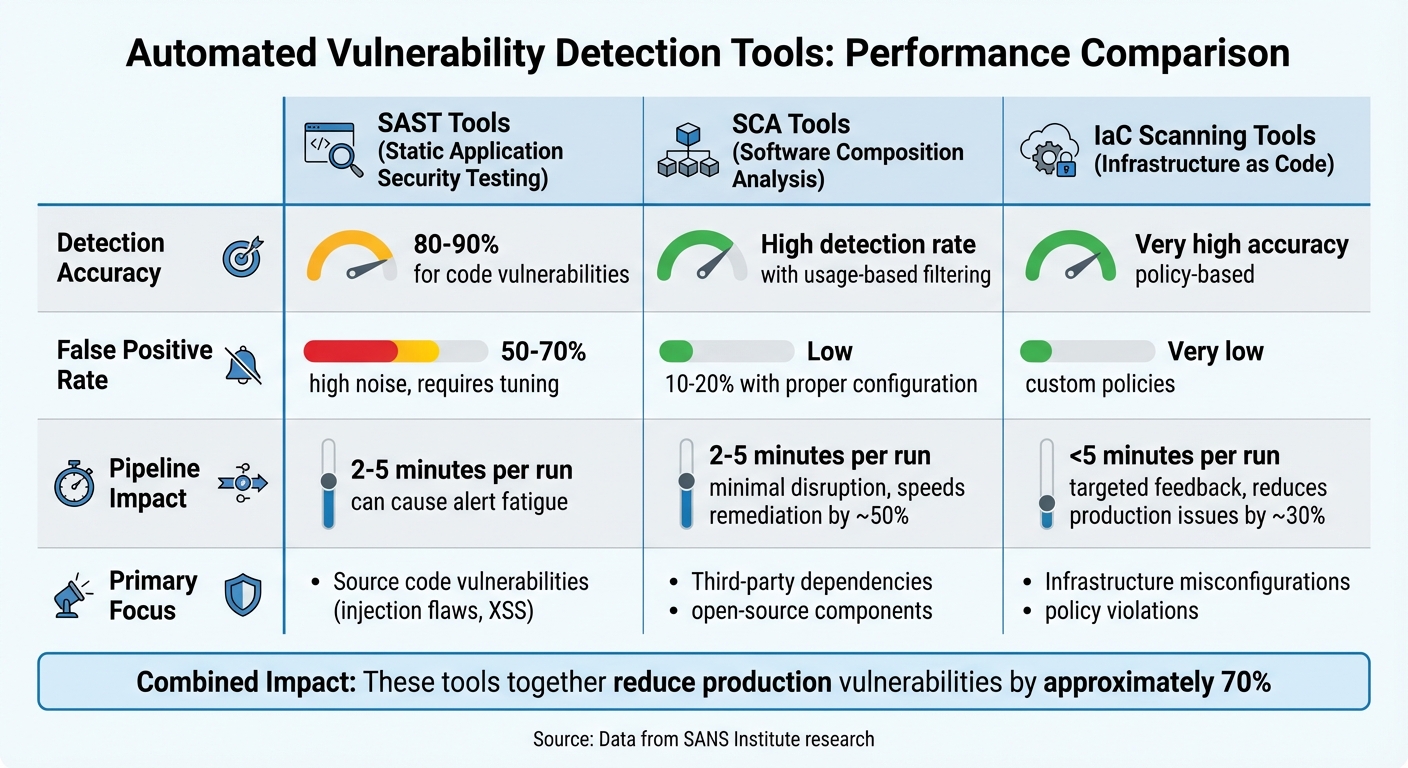 {Comparison of SAST, SCA, and IaC Scanning Tools: Detection Rates, False Positives, and Pipeline Impact}
:::
{Comparison of SAST, SCA, and IaC Scanning Tools: Detection Rates, False Positives, and Pipeline Impact}
:::
This section dives into the key strengths and limitations of SAST, SCA, and IaC tools within CI/CD pipelines, building on the metrics discussed earlier.
SAST tools are effective at identifying 80–90% of code-level vulnerabilities, such as injection flaws and cross-site scripting. However, when applied to legacy code, they can generate a high false positive rate - up to 50–70%. This can overwhelm developers with unnecessary alerts. While machine learning-enhanced SAST tools help reduce these false positives, fine-tuning is still required to maintain the speed of CI/CD processes [1].
SCA tools excel at pinpointing vulnerabilities in open-source components, benefiting from usage-based filtering and reachability analysis. These features ensure a low false positive rate and speed up remediation efforts by 40–60%. However, when dealing with complex dependency graphs, low-severity issues may still demand manual review [1].
IaC scanners are highly accurate in detecting configuration issues that align with standards like CIS Benchmarks and GDPR. They integrate seamlessly into pull-request workflows, automatically failing builds when critical issues are detected. Yet, their scope is limited to infrastructure vulnerabilities, and developers unfamiliar with policy-as-code may encounter a steeper learning curve [5].
The table below highlights the comparative strengths and weaknesses of these tools:
| Tool Type | Detection Accuracy | False Positive Rate | Workflow Impact |
|---|---|---|---|
| SAST | 80–90% for code vulnerabilities [1] | 50–70% (high noise) [1] | Can cause alert fatigue; requires fine-tuning |
| SCA | High detection rate [1] | Low (usage-based filtering) [1] | Minimal disruption; speeds up remediation by ~50% |
| IaC Scanning | Very high accuracy [5] | Very low (custom policies) [5] | Targeted feedback; reduces production issues by ~30% [5] |
When used together, these tools can reduce production vulnerabilities by approximately 70%, as shown by research from the SANS Institute [3]. However, to fully optimise CI/CD workflows, it's crucial to balance these security measures with targeted developer training [8].
Conclusion
Detecting vulnerabilities effectively hinges on a handful of critical metrics: vulnerability detection rate, false positive rate, mean time to detection (MTTD), mean time to remediation (MTTR), and scan coverage. These metrics strike a balance between security and productivity. High detection rates ensure issues are identified, low false positives keep processes efficient, and quick MTTD and MTTR help resolve vulnerabilities before they impact production environments. This balance is particularly vital for UK organisations, where regulatory standards demand rigorous compliance [1][2][3].
For organisations in the UK, selecting tools that align with both regulatory and operational demands is essential. Compliance metrics, high detection rates for critical vulnerabilities, swift MTTR for severe issues, and comprehensive audit trails are often non-negotiable. For sectors like financial services and healthcare, tools should adhere to frameworks such as CIS Benchmarks, NCSC guidance, and industry-specific standards, even if this slightly increases build times [2][4].
Smaller or early-stage teams can start by focusing on core metrics like detection rates, false positives, and MTTR. A straightforward setup with one tool per category - such as SAST, SCA, or IaC scanning - combined with a basic 'fail on critical vulnerability' gate is often enough to begin with [7][9]. Larger, more mature organisations can go further by introducing additional metrics, environment-specific policies, and trend tracking, such as monitoring vulnerabilities per 1,000 lines of code or compliance rates over time. These steps not only improve security but also help demonstrate progress to auditors and boards [4][8].
Metrics should also inform pipeline policies. For instance, builds should fail on critical vulnerabilities, numeric thresholds can be set for high-severity issues, and scanners can be linked to ticketing systems to automatically track and manage validated vulnerabilities. Regular reviews of detection rates against penetration test results ensure tools remain effective, while policy adjustments help avoid unnecessary noise or overlooked risks [1][7][10].
For organisations lacking in-house DevSecOps expertise, partnering with a consultancy can be a smart move. Expert support can help align security metrics with operational goals, ensuring both strong security practices and efficient delivery. For example, Hokstad Consulting provides services like automated CI/CD pipeline implementation, Infrastructure as Code, and monitoring solutions. These foundational capabilities are critical for integrating security scanning effectively. Their approach, which balances cost, performance, and security in cloud environments, is well-suited to UK organisations navigating the dual pressures of regulatory compliance and operational efficiency.
FAQs
What are the best methods for detecting vulnerabilities automatically in a CI/CD pipeline?
Automated vulnerability detection becomes a powerful ally in your CI/CD pipeline when you leverage tools like static application security testing (SAST), dynamic application security testing (DAST), and software composition analysis (SCA). These tools are specifically designed to spot security flaws early in the development lifecycle, ensuring that potential risks are addressed before they escalate. Plus, they enable continuous monitoring, offering peace of mind as your code evolves.
For real-time protection, runtime application self-protection (RASP) steps in by detecting and mitigating vulnerabilities as your application runs. By integrating these tools into your CI/CD workflows, you can simplify security checks and maintain a strong defence throughout every stage of your development process.
How can organisations minimise false positives in automated vulnerability detection?
To cut down on false positives in automated vulnerability detection, organisations should prioritise customising detection tools to suit their unique environments. Using machine learning models built on accurate, relevant data can significantly boost precision.
Adding contextual analysis into the mix helps differentiate real vulnerabilities from harmless anomalies. Keeping detection algorithms updated and fine-tuned is crucial for staying accurate and keeping up with shifting threat landscapes.
How do security scans affect the performance of CI/CD pipelines?
Security scans can cause a temporary slowdown in CI/CD pipelines by increasing processing times and consuming extra system resources. This might lead to minor delays during deployment.
That said, the advantages of running these scans far surpass the small inconveniences. Catching vulnerabilities early helps deliver stronger and more dependable releases. Plus, with the right optimisations in place, you can reduce performance impacts without compromising on security.