
Automating IAM roles using Infrastructure as Code (IaC) simplifies access management, improves security, and ensures compliance. Instead of manually creating roles, IaC tools like Terraform or AWS CloudFormation allow you to define and deploy access controls programmatically. This approach reduces errors, provides version control, and creates a clear audit trail for regulatory requirements like GDPR.
Key takeaways:
- Why It's Needed: Manual IAM management often leads to overly broad permissions, configuration drift, and audit challenges.
- How It Works: IAM roles and policies are written as code, stored in version control, and integrated into CI/CD pipelines for automated validation and deployment.
- Benefits: Consistency, traceability, and reduced risks of insider threats or credential misuse.
- Best Practices: Use least privilege principles, create reusable modules, and automate role deprovisioning for unused roles.
This method not only secures your cloud environment but also aligns with UK compliance standards, making it a practical solution for modern organisations.
Solving AWS IAM Challenges at Scale With Terraform – HashiConf Global 2021
Planning Your IAM Role Provisioning
Before diving into code, it's crucial to map out a clear strategy for roles and permissions. The aim is to create IAM configurations that are narrowly focused on specific tasks while being reusable. This groundwork will make the technical steps that follow much smoother.
Mapping User Roles to Task-Based Permissions
When assigning permissions, focus on the specific actions users need to perform rather than their job titles. This aligns with the principle of least privilege, which ensures users only have the minimum access required to complete their tasks[5]. For instance, instead of a broad developer
role, create separate roles for distinct tasks, such as one for running terraform plan and another for executing terraform apply[3].
Microsoft Learn explains this principle succinctly:
Least privilege is a principle in identity governance that involves assigning users and groups only the minimum level of access and permissions necessary to perform their duties.[5]
Adopt a default-deny policy, where access is only granted for approved purposes[5]. When designing trust policies, limit role assumptions to specific GitHub repositories and branches. For example, permit only the main branch to deploy to production, ensuring branch protection and review workflows are in place before changes reach live environments[3][7].
Building Reusable IAM Modules
Standardising IAM modules can save time and reduce errors. Separate trust relationships from permission policies to make configurations easier to manage[3][7]. Use Terraform's aws_iam_policy_document data source instead of hardcoded JSON strings. This approach supports HCL-based error checking, simplifies resource ARN interpolation, and allows for merging or overriding policies as needed[6].
You might also consider adopting a Role Vending Machine
(RVM) pattern. This centralised repository lets developers request roles through Infrastructure as Code (IaC), with security teams reviewing changes as necessary[3][7]. AWS Prescriptive Guidance highlights the value of this setup:
The value of the RVM solution is that it creates a central location where new pipeline roles can be reviewed. However, this design is only useful if there are guardrails that help ensure secure, high-quality code is committed.[3]
To further enhance security, enforce naming conventions within your modules. For example, use a pattern like arn:aws:s3:::myorg-myapp-dev-* to automatically limit permissions and ensure roles only access the resources they are meant to[3].
Using Version Control for IAM Code
Once your IAM modules are well-defined, managing them through version control becomes essential. Store all configurations in Git to maintain a complete audit trail of changes[8]. For any merge requests involving IAM updates, require at least one approval from a security or senior DevOps team member. Additionally, integrate automated scanning tools like Checkov or IAM Access Analyzer into your CI/CD pipeline to validate policies during the Plan
phase[1][3].
To eliminate the need for long-lived access keys, use OpenID Connect (OIDC) to allow systems like GitHub Actions or GitLab to assume temporary IAM roles[2][3]. As Spacelift explains:
Using Terraform to manage IAM roles provides consistent, scalable, and auditable infrastructure management. It allows teams to define IAM configurations as code, improving control and reducing manual errors.[8]
These practices ensure your IAM setup is secure, automated, and fully integrated into your IaC workflow. With these foundations in place, you're ready to move on to implementing the provisioning workflow.
Implementing IAM Role Provisioning Step-by-Step
::: @figure 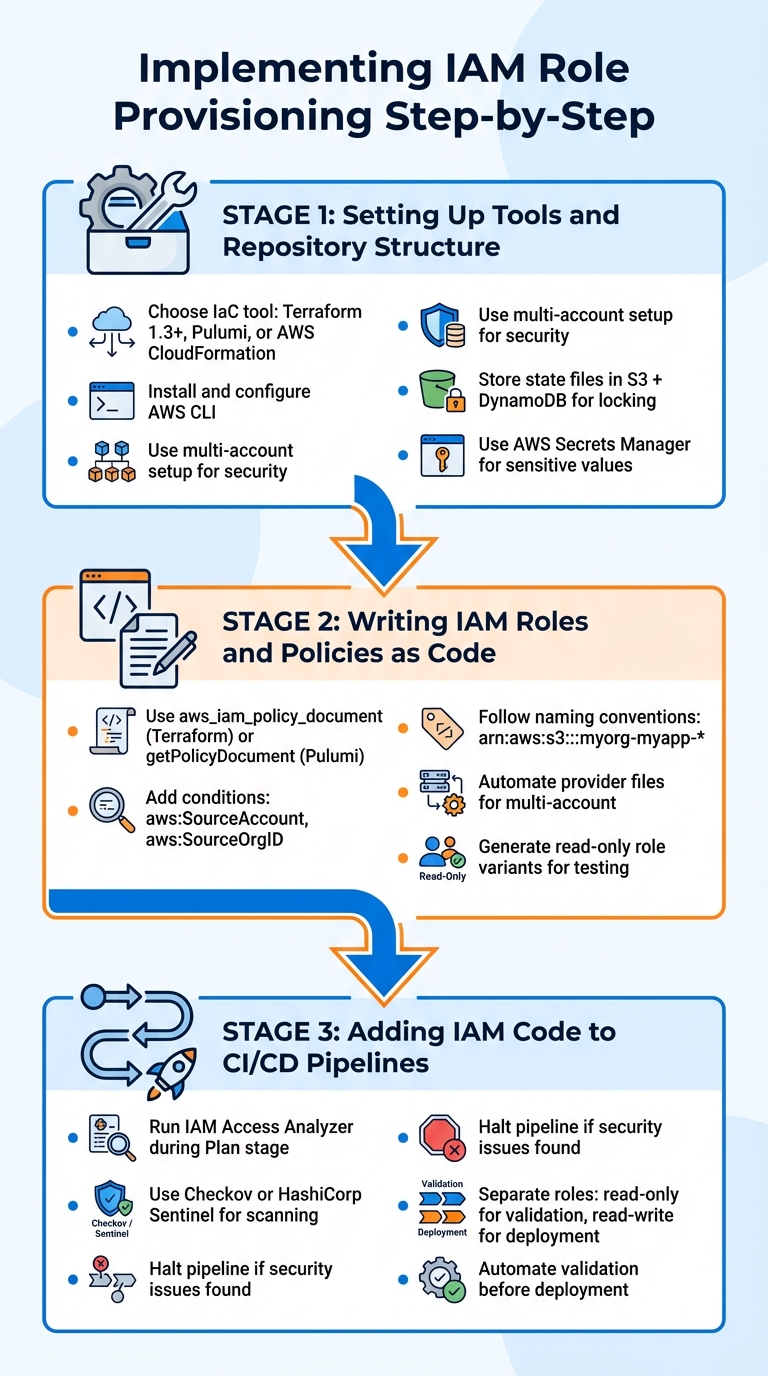 {Step-by-Step Guide to Automated IAM Role Provisioning with Infrastructure as Code}
:::
{Step-by-Step Guide to Automated IAM Role Provisioning with Infrastructure as Code}
:::
Now that you've completed the planning phase, it's time to turn those ideas into a functional setup. Here's a practical guide to setting up automated IAM provisioning - from selecting tools to integrating changes into your pipeline.
Setting Up Tools and Repository Structure
Start by choosing your Infrastructure as Code (IaC) tool. Terraform (version 1.3 or later) is a popular choice, but Pulumi and AWS CloudFormation are also effective alternatives. Once you've made your selection, install the AWS CLI and configure it using aws configure.
For better security, use a multi-account setup to separate provisioning tasks from workloads. This setup reduces the risk of damage if credentials are ever compromised. Store your IaC state files in a remote backend - combining Amazon S3 with DynamoDB for state locking. This prevents state corruption when multiple team members collaborate on the same codebase.
Avoid embedding credentials directly in your IaC files. If sensitive values need to be stored, use AWS Secrets Manager to keep them secure. This ensures your IAM provisioning aligns with best practices for cloud security and automation.
Writing IAM Roles and Policies as Code
When defining IAM roles and policies, rely on programmatic tools like aws_iam_policy_document in Terraform or getPolicyDocument in Pulumi. These tools simplify the process of writing policies, making it easier to catch syntax errors during the planning phase. They also streamline the management of trust policies compared to handling raw JSON.
For trust relationships, include conditions such as aws:SourceAccount or aws:SourceOrgID to restrict role assumptions and prevent misuse across accounts. Stick to consistent naming conventions in your policies. For example, use identifiers like arn:aws:s3:::myorg-myapp-* to limit the scope of permissions, even when wildcards are involved.
If you're managing roles across multiple AWS accounts, automate the creation of Terraform provider files and account variables. This reduces the need for manual configuration. Additionally, generate read-only role variants for requests to enable safe testing and auditing. These steps establish a secure foundation for integrating IAM provisioning into your pipelines.
Adding IAM Code to CI/CD Pipelines
Once your IAM roles are defined as code, integrate them into your CI/CD workflows for automated validation and deployment. Use validation tools in your pipeline to catch errors before deployment. For example, running IAM Access Analyzer during the Plan
stage can highlight overly permissive policies or unintended external access. If any security issues are found, the pipeline should halt automatically. Similarly, tools like Checkov or HashiCorp Sentinel can scan your configuration for misconfigurations or exposed credentials.
The value of the RVM solution is that it creates a central location where new pipeline roles can be reviewed. However, this design is only useful if there are guardrails that help ensure secure, high-quality code is committed.
- AWS Role Vending Machine Documentation
Separate pipeline roles by stage to enhance security. Use a read-only role for validation steps and reserve a read-write role exclusively for deployment. This separation ensures that even if a validation job is compromised, it cannot alter your live infrastructure. This approach supports the security and compliance objectives critical to automated IAM provisioning using IaC.
Automating IAM Role Deprovisioning and Lifecycle Management
Automating the removal of unused IAM roles not only simplifies audits but also reduces security risks. Here's how time-limited roles and automated drift detection can keep your IAM role lifecycle secure and efficient.
Time-Limited Roles and Automatic Revocation
One of the best ways to manage IAM roles effectively is through activity-based revocation. AWS makes this possible using the RoleLastUsed metadata in the IAM API, which tracks when a role was last assumed. By leveraging tools like Amazon EventBridge, AWS Lambda, and AWS Step Functions, you can create a serverless pipeline to identify roles that haven’t been used within a set timeframe - typically 90 days.
Before fully deleting inactive roles, consider a deny-before-delete
approach. Attach a DenyAll policy to disable the role while preserving the option to recover it if necessary. This is particularly useful when a valid use case resurfaces later [10].
For emergency situations, you can implement temporary break glass
roles using the Role Vending Machine (RVM) pattern. These roles are provisioned on demand and come with strict limitations - a console sign-in URL valid for 15 minutes and a maximum session duration of 1 hour [7].
This approach \[Break Glass Access\] reduces the attack surface and operational overhead of managing break glass user and roles across all accounts.- AWS Samples, Role Vending Machine [7]
When designing your deletion workflows, include an allowedlist for roles that need to remain dormant for specific purposes, such as disaster recovery or emergency access [10]. AWS Step Functions also supports callback tasks with a maximum duration of 1 year, which can be useful for pausing workflows while awaiting human approval [10].
Once roles are disabled, it’s essential to monitor for configuration drift to ensure compliance.
Detecting and Correcting Configuration Drift
Configuration drift happens when manual changes to IAM roles create inconsistencies with your intended security setup, as defined in Infrastructure as Code (IaC). To catch and fix these deviations, use AWS Config rules and IAM Access Analyzer [2][11].
For roles already in use, Access Analyzer can evaluate CloudTrail logs to generate refined, least-privilege policies based on actual usage. This replaces overly permissive policies with narrower ones that align with real-world activity, reinforcing the security posture defined by your IaC [9].
To automate drift detection and correction, combine AWS Config, AWS Security Hub, and Lambda-triggered remediation [2]. Your IaC repository should always act as the single source of truth - manual changes will be overwritten during the next deployment cycle [1].
Proactively and frequently revoking obsolete access minimises the credentials that might be at risk during a breach.- AWS Prescriptive Guidance [2]
Finally, review IAM credential reports regularly to identify and revoke access keys that have been inactive for more than 90 days [2]. This ensures your IAM environment remains lean and secure.
Governance, Compliance, and Cost Management
Automating IAM provisioning doesn’t just bolster security - it’s a cornerstone for ensuring compliance for organisations in the UK. By defining IAM roles as code, every change becomes traceable, auditable, and reversible, strengthening governance at its core.
Meeting UK Regulatory Requirements
The UK GDPR requires organisations to implement 'Data Protection by Design and Default', which includes embedding access controls. Automated IAM provisioning supports this by enforcing highly specific, task-based roles that limit access to only what’s absolutely necessary. This aligns perfectly with GDPR’s data minimisation principle. Considering that 74% of data breaches originate from overprivileged access, this approach drastically reduces risk[13].
Centralised logging through AWS CloudTrail provides a full audit trail, essential for meeting accountability standards like ISO 27001. This capability ensures readiness for audits, which is critical given GDPR’s steep penalties - up to €20 million or 4% of annual global turnover, whichever is higher[13].
IAM is not just a cybersecurity tool - it's a compliance enabler.- Wallix[12]
Automation also addresses data residency requirements by embedding region-specific restrictions directly into IAM policies, preventing accidental data transfers that could breach UK GDPR sovereignty rules. Furthermore, automated lifecycle management ensures that access is revoked immediately when employees leave, reducing the risk of insider threats.
What’s more, these compliance measures integrate seamlessly with strategies aimed at controlling costs.
Building Security and Cost Controls into IAM Automation
Automating IAM provisioning creates a synergy between security and cost management. For example, the Role Vending Machine pattern centralises Terraform role requests, allowing for security reviews without causing delays in development.
Least privilege is a fundamental security principle... Not following least privilege opens up major security risks \[and\] goes against security best practices and regulatory compliance requirements.- AWS Prescriptive Guidance[2]
Automated tagging plays a key role here, associating IAM roles with metadata such as owner, cost centre, and project. This enables precise cost tracking and attribution. Additionally, configuration drift detection ensures that unauthorised changes, which could lead to rising cloud costs, are automatically corrected by reverting resources to their intended state. Tools like IAM Access Analyzer can be integrated into CI/CD pipelines to validate policies before deployment, stopping processes if permissions are too broad[1][2].
Static access keys should be avoided wherever possible. Instead, organisations should rely on IAM roles with OIDC federation for services like GitHub or GitLab Actions. Short-lived tokens that expire automatically offer an added layer of security. If static keys are unavoidable, they should be rotated every 45 days, deactivated after 60 days, and deleted after 90 days[14].
This governance framework not only enhances security but also ensures the efficiency and compliance of automated IAM provisioning when implemented with IaC. It aligns seamlessly with best practices and UK regulatory requirements.
Conclusion
Automating IAM provisioning through Infrastructure as Code (IaC) brings a new level of control and reliability to cloud security and compliance. By treating access controls as code, organisations can achieve version control, auditability, and repeatability, reducing the risk of manual errors. This approach underscores the importance of automated, rigorous controls in modern cloud environments[4].
For UK businesses, particularly those navigating GDPR, ISO 27001, and data sovereignty requirements, automated IAM provisioning is no longer optional. Embedding least privilege principles into every role, maintaining detailed audit trails, and automatically revoking access when needed ensures a strong foundation for both regulatory compliance and operational efficiency. Beyond security, this strategy enables precise cost tracking through automated tagging, detects configuration drift to avoid unauthorised changes, and centralises governance - leading to more predictable and streamlined cloud spending.
Make the right way easy and the wrong way hard – Make it easy to do the right thing. If developers are struggling with the RVM provisioning process, they might attempt to create roles through other means.- AWS Prescriptive Guidance[3]
To implement this effectively, organisations must focus on accurate role mapping, reusable modules, and seamless CI/CD integration. The transition from static, long-term access keys to modern solutions like OIDC federation and temporary credentials, paired with automated lifecycle management, enhances security while keeping developers productive.
Hokstad Consulting offers tailored solutions to help UK businesses adopt these automated IAM strategies. With expertise in cloud cost optimisation, custom automation, and security improvements, they support organisations in reducing cloud expenses while strengthening security. Whether managing multi-cloud setups or meeting complex compliance requirements, their comprehensive approach ensures your IAM automation aligns with both technical needs and regulatory mandates. This creates a secure, efficient, and compliant cloud infrastructure that addresses today’s challenges head-on.
FAQs
How does using IaC to automate IAM role provisioning improve security and compliance?
Automating IAM role provisioning through Infrastructure as Code (IaC) boosts security by keeping role definitions in version-controlled code. This reduces the chances of manual errors and limits the risk of privilege escalation. It also supports the enforcement of least-privilege access policies, which helps to minimise exposure to potential vulnerabilities.
On the compliance front, IaC provides immutable audit trails, making it easier to verify and demonstrate compliance with regulations like GDPR and ISO 27001. This approach not only strengthens security but also simplifies the ongoing management of compliance in ever-changing cloud environments.
What are the best practices for assigning permissions to user roles in an IAM setup?
To maintain security and compliance, always adhere to the principle of least privilege when assigning permissions. This involves granting users or roles only the minimum access they need to complete their tasks. Clearly define each role and pair it with narrowly scoped policies that specify exact permissions, avoiding any unnecessary access. This approach minimises the risk of privilege creep and reduces potential vulnerabilities.
For consistency and easier management, consider using Infrastructure as Code (IaC) tools like Terraform or CloudFormation. These tools allow you to store role definitions and policies as code, enabling version control, auditability, and consistent deployment across different environments. Whenever possible, opt for short-lived, assumable roles that can be issued on demand to users or pipelines.
To improve reliability, incorporate role and permission updates into a CI/CD pipeline. This ensures that changes are automatically validated and deployed in a controlled manner, helping you stay compliant with UK-specific regulations like GDPR and ISO 27001. Regularly reviewing and monitoring permissions is also crucial to ensure they continue to meet business needs while maintaining a secure setup.
How can version control simplify managing IAM roles with Infrastructure as Code?
Version control plays a crucial role in managing IAM roles as code. By storing configurations - such as CloudFormation templates, Terraform modules, or Pulumi programmes - in a Git repository, you create a system where every change is tracked, reviewed, and auditable. This approach provides a transparent record of who made changes, when they occurred, and why they were implemented, while also allowing for easy rollbacks if things go wrong.
Incorporating branches and pull requests into your workflow enables peer reviews of changes, ensuring a second set of eyes checks for potential issues. To strengthen this process, automated tools like policy linters or access analysers can be integrated into CI pipelines. These tools help identify and address potential problems before deployment. Once the code passes validation, deploying the same version-controlled code ensures that live configurations remain consistent with the repository.
For organisations looking to streamline role provisioning, a role-vending-machine
model can be implemented. With this approach, a service validates and provisions roles based on version-controlled definitions. This not only simplifies management but also supports compliance with regulations like GDPR and ISO 27001 by maintaining audit trails and enabling quick rollbacks when needed. Hokstad Consulting offers expertise in setting up these workflows, helping organisations keep IAM roles secure, compliant, and aligned with their business objectives.