
Automating unit tests in your CI/CD pipeline ensures that every code change is tested immediately, reducing the risk of bugs slipping into production. Here's how to make it work:
- Set Up the Basics: Keep your test code in the same repository as your application code. Use a reliable testing framework (e.g., pytest, JUnit) and standardise your build environment with tools like Docker.
- Pipeline Configuration: Run tests early in the pipeline during the build or pre-merge stage. Use YAML-based CI/CD tools like GitHub Actions or Jenkins to automate test execution.
- Speed and Reliability: Isolate dependencies using mocks and avoid shared states to prevent flaky tests. If your suite is slow, split tests across multiple runners for faster feedback.
- Test Reporting: Output test results in JUnit XML format for easy integration with CI/CD platforms. Store reports for 7–30 days for debugging purposes.
- Maintenance: Regularly review and update tests to reflect code changes. Monitor metrics like pass rates and execution times to identify flaky or slow tests.
Automating unit tests not only saves time but also improves code quality by catching bugs early. A well-maintained test suite ensures reliable feedback, making your CI/CD pipeline efficient and dependable.
::: @figure 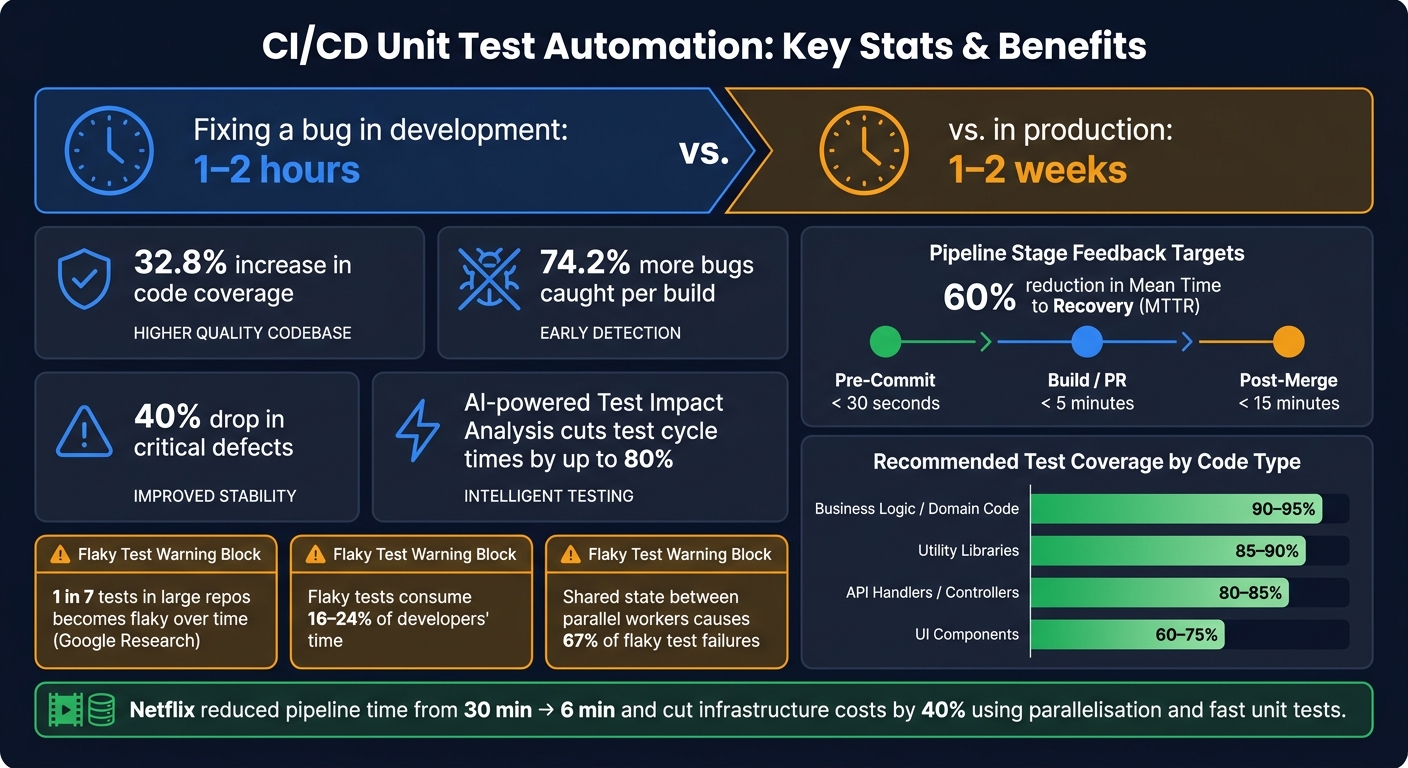 {CI/CD Unit Test Automation: Key Stats & Benefits}
:::
{CI/CD Unit Test Automation: Key Stats & Benefits}
:::
What Is The Best Way To Automate Python Unit Tests In CI/CD? - Python Code School
Prerequisites for Unit Test Automation in CI/CD
Before diving into pipeline configuration, it's essential to set up a solid groundwork. These steps ensure your testing process is consistent and dependable, avoiding issues that could lead to unreliable results.
Source Control and Test Code Setup
Keep your test code and application code in the same repository. This approach ensures that when a developer checks out a specific commit, they have access to both the application and its tests. It also guarantees that the CI runner has everything it needs to execute tests effectively.
Organise your project with a clear directory structure, like a tests/ folder. This allows CI tools to automatically discover and execute test suites without needing extra configuration. Also, version-control your pipeline configuration files (e.g. .github/workflows/ci.yml or Jenkinsfile) alongside your source code. This practice makes it easier to review, update, and maintain them as your codebase evolves.
Automation - wherever possible - helps us to reduce errors and makes predictable processes more efficient.- Steve Crouch, SSI Research Software Group lead
Unit Test Framework and Build Environment
Choose a reliable unit test framework that aligns with your programming language, such as pytest, JUnit, or Jest. These frameworks handle how tests are discovered, executed, and reported, so selecting one with strong CI/CD support can save time and effort.
For a clean and consistent build environment, start with a fresh checkout of the code and install dependencies using frozen lockfiles (e.g. npm ci or pnpm install --frozen-lockfile). Containerised environments, like Docker, can further standardise builds across different teams and eliminate local environment issues.
CI/CD Platform Access and Test Data Preparation
Use a CI/CD platform that triggers jobs automatically based on code events like pushes or pull requests. Popular platforms such as GitHub Actions, GitLab CI/CD, and Jenkins support YAML-based job definitions, making configuration straightforward.
When it comes to test data, ensure your unit tests are isolated. Avoid relying on shared databases, live APIs, or external states. Instead, use mocking tools like pytest-mock for Python or WireMock for Java to simulate external dependencies. By applying the Arrange-Act-Assert pattern, you can keep tests predictable and prevent interference between them.
Once these essentials are in place, you’ll be ready to configure your CI/CD pipeline to run unit tests smoothly and reliably.
Configuring Unit Tests in the CI/CD Pipeline
Integrating unit tests into your CI/CD pipeline ensures they run automatically with every commit. This step is crucial for catching bugs early and maintaining a seamless delivery process, aligning perfectly with the CI/CD principles discussed earlier.
Where to Place Unit Tests in the Pipeline
The best approach is to run tests as early as possible - a practice known as the shift-left strategy. By doing this, you can cut bug-fixing costs by up to 80% [3].
Unit tests should be part of the Build or Pre-Merge stage, triggered on every push and pull request. These tests act as a quality checkpoint, preventing flawed code from reaching the main branch. Here's a breakdown of pipeline stages, their triggers, and the expected feedback time:
| Pipeline Stage | Trigger Event | Feedback Target |
|---|---|---|
| Pre-Commit | Local save/commit | < 30 seconds |
| Build / PR | Push / pull request | < 5 minutes |
| Post-Merge | Merge to main | < 15 minutes |
The value of a test is directly proportional to how quickly it gives feedback.- HelpMeTest [5]
If your unit test suite takes longer than 5 minutes, consider splitting it across multiple runners to keep feedback within the recommended time frame.
Once test placement is sorted, focus on configuring execution to ensure quick and effective feedback.
Automating Test Execution and Result Handling
To catch compatibility issues early, set up a matrix strategy in your YAML file to test across multiple runtime versions (e.g., Node.js 20 and 22) [4].
Enable a fail-fast approach, and in GitHub Actions, use cancel-in-progress: true to halt older runs when a new commit is pushed to the same branch. This ensures the pipeline focuses on the latest changes and avoids wasting time on outdated commits [4].
Caching package manager directories, like .npm or pnpm-store, can dramatically reduce pipeline startup times. This small optimisation can make a big difference for teams with frequent commits [4].
Once tests are running efficiently, configure your pipeline to capture and store results effectively.
Adding Test Reporting and Artefact Storage
Set your testing tool to output JUnit XML, which is widely supported by CI/CD platforms like GitHub Actions, GitLab CI/CD, CircleCI, and Jenkins.
| Language | Testing Tool | JUnit Output Command |
|---|---|---|
| Python | pytest | --junitxml=report.xml |
| JavaScript | Jest | --reporters=jest-junit |
| Java | Maven | Automatic in target/surefire-reports/
|
| Go | gotestsum | --junitfile report.xml |
| PHP | PHPUnit | --log-junit report.xml |
Make sure the pipeline is configured to upload these reports consistently. In GitLab, for example, this involves setting artifacts:when: always. Store these artefacts for at least 7–30 days to allow your team enough time to review failures without needing to re-run the pipeline [4] [6]. On CircleCI, using both store_test_results and store_artifacts provides an interactive Tests
tab for easier debugging, alongside raw files for more detailed investigations [7].
Keeping Tests Reliable and Fast
Once your pipeline is set up and results are being tracked, the next hurdle is ensuring your tests remain dependable and quick. A pipeline that’s fast but unreliable can do more harm than good - it undermines trust and slows down teams. Reliability and speed go hand in hand for effective continuous delivery.
Isolating Dependencies and Resetting State
To keep tests reliable within a CI/CD setup, strict isolation is key. As HelpMeTest explains:
Isolation is the defining property of a unit test. If your test hits a database, a file system, or an external API, it's an integration test - and it will be 100x slower and 10x flakier.[8]
To maintain this isolation, mock external services, databases, and file systems. The table below outlines common test doubles and their uses:
| Type | What It Does |
|---|---|
| Mock | Tracks calls and allows you to verify how it was used [8][2] |
| Stub | Provides predefined responses to the code under test [8][2] |
| Fake | A simplified but working replacement, like an in-memory database [8][2] |
| Spy | Observes calls to a real function without altering its behaviour [8] |
For parallelised tests, it’s crucial to avoid resource conflicts. Use strategies like per-worker resource scoping - such as ephemeral databases or dynamically assigned ports - to ensure tests don’t interfere with one another [9][10].
Fixing Flaky Tests and Timing Problems
Consistency is non-negotiable for reliable testing. Flaky tests, which produce inconsistent results on identical code, are a major obstacle. Research from Google found that approximately 1 in 7 tests in large repositories becomes flaky over time [10]. Common causes include timing issues, shared state leaks, and non-deterministic data.
Craig Cook, Founder of CI/CD Watch, highlights the importance of addressing flaky tests:
A flaky test is not noise to filter out. It is signal that branching, test ownership, or environment hygiene is weaker than it looks.[9]
To tackle flakiness, avoid sleep() or fixed delays. Instead, use explicit waits that check for specific conditions. Always seed random number generators and set TZ=UTC in your CI environment to prevent timezone-related failures [10]. If you identify a flaky test, isolate it from the main suite until it’s resolved. Don’t let it block the build or rely on blind reruns. Limiting automatic retries to a single attempt ensures failures remain visible [9].
Running Tests in Parallel and Caching Dependencies
Efficient test execution is critical. Aim to complete 500 tests in under 10 seconds. If this feels out of reach, parallelisation can make a big difference.
Netflix offers a great example. By focusing on fast unit tests (2 minutes) before integration tests (8 minutes) and leveraging service-level parallelisation, they reduced their pipeline time from 30 minutes to 6 minutes, while also cutting infrastructure costs by 40% [11]. However, parallelisation only works when tests are properly isolated, as shared state between parallel workers causes 67% of flaky test failures [11][1].
To determine the number of shards you need, divide your total test time by your target time per shard. For instance, a 45-minute suite aiming for 6-minute shards would require around 8 shards [11].
Up next: learn how to write tests that adapt easily as your codebase evolves.
Writing Tests That Are Easy to Maintain
Fast and isolated tests are a great start, but they’re not enough. Tests that are difficult to read or prone to breaking can slow you down. The goal? Build a test suite that grows alongside your codebase without becoming a burden.
Writing Small, Focused Tests
The golden rule of testing: keep it focused on one behaviour. If you find yourself using 'and' or 'or' in a test name, that’s your cue to break it into separate tests. Each test should fail for only one reason - this makes debugging straightforward.
A great way to structure your tests is by following the Arrange, Act, Assert (AAA) pattern:
- Arrange: Set up the inputs or preconditions.
- Act: Execute the code you’re testing.
- Assert: Confirm the outcome matches your expectations [12].
This three-step format keeps tests clear and helps pinpoint issues quickly. Avoid adding unnecessary control logic or complexity within your tests - simplicity is your friend.
Unit tests are the most valuable documentation you can write. Unlike comments, they're executable and always accurate.- HelpMeTest [8]
Stick to the simplest inputs necessary to demonstrate the behaviour you’re testing. Overcomplicated setups can obscure your intent and make the code harder to follow [14].
Test Coverage and Naming Conventions
Clear, descriptive test names are a lifesaver when something fails. Using a format like MethodName_Scenario_ExpectedBehavior (e.g., AddItem_ExistingItem_ShouldIncreaseQuantity) makes it obvious what the test is checking. This saves time since you won’t need to dig into the test file to figure out what went wrong [12].
The name of the test should be written in a way that is extremely easy for the developer to quickly understand what exactly went wrong or when the test fails.- TestRail Team [12]
When it comes to test coverage, aim for these benchmarks:
| Code Type | Recommended Coverage |
|---|---|
| Business logic / domain code | 90–95% |
| API handlers / controllers | 80–85% |
| Utility libraries | 85–90% |
| UI components | 60–75% |
While 80% line coverage is a good baseline, critical parts of your application - like business logic - should aim higher, around 90–95%. That said, don’t chase 100% coverage blindly. What matters more is having meaningful assertions that validate behaviour, not just executing every line [8].
Updating and Refactoring Tests with Code Changes
Tests, like the rest of your code, can become outdated. Tests that no longer reflect how your application behaves can create a false sense of security and waste time. To avoid this, focus on testing behaviours and contracts rather than internal implementation details [13].
The goal isn't tests that never change. The goal is tests that adapt naturally to code changes.- Mario Frohlich, Manual Software Tester [15]
When your code changes - like a field name or data structure - update your test helpers and data builders first. For example, if you use a helper method like createTestUser(), updating it once will automatically apply the change across all relevant tests. This approach reduces manual edits and keeps your suite consistent.
If you’re fixing a bug, write a test that reproduces the issue before applying the fix. This ensures the problem is resolved and helps prevent it from reappearing in the future [8].
A well-maintained test suite doesn’t just support your current work - it sets you up for smoother code changes and reliable CI/CD pipeline monitoring down the road.
Monitoring and Improving the CI/CD Pipeline
Keeping a close eye on your test suite is critical to ensuring fast and reliable feedback. Once your unit tests are automated, the next step is to track their performance over time and adjust as your codebase evolves. These metrics help you refine your workflow as your project grows.
Tracking Pass Rates, Duration, and Flaky Tests
Pay attention to metrics like pass/fail rates, execution times, and the frequency of flaky tests. Pass rates can reveal if certain features or modules are becoming unstable. Meanwhile, trends in execution time help identify bottlenecks in your pipeline. Flaky tests, which consume 16–24% of developers' time on false failures and reruns, are particularly disruptive [16].
Flaky tests are like smoke alarms that go off for no reason. Eventually, your entire test suite stops being an early warning system and becomes background noise.- Harness Blog [16]
When you identify a flaky test, classify it carefully: is it Healthy (always passing), Flaky (inconsistent results on identical code), or Broken (always failing)? This classification determines your next steps. For flaky tests, move them to a quarantine stage. They’ll still run but won’t block the pipeline, keeping your main test suite reliable without slowing down the team [16]. A flip rate exceeding 5% between consecutive runs is a strong indicator that a test needs attention [9].
By monitoring these metrics, you can confirm that efforts like dependency isolation and test parallelisation are paying off with consistent and actionable results.
Updating the Pipeline as Your Workflow Changes
As your team expands and your codebase grows, older pipelines may become a drag on development. A powerful way to keep things running smoothly is by using Test Impact Analysis (TIA). This approach runs only the tests affected by recent code changes rather than the entire suite, saving time. AI-powered TIA can cut test cycle times by up to 80% [2], which is a game-changer for large test suites.
Keep your pipeline configuration in version-controlled YAML files. This ensures that changes to the pipeline go through the same review process as your application code, making it easier to catch and fix problems. As you scale, consider adding quality gates - automated checks that block builds if certain thresholds aren’t met, like line coverage dropping below 80% or the detection of a critical issue. Tools like JaCoCo, Istanbul, and SonarQube integrate seamlessly with most CI platforms to enforce these checks.
Routine Maintenance and Issue Resolution
Pipeline maintenance is just as important as monitoring metrics. Schedule quarterly audits to remove outdated tests and consolidate duplicates. Outdated tests not only waste time but also reduce confidence in your test suite. Running tests in identical Docker containers can eliminate environment-specific issues, ensuring consistency across runs. Also, keep an eye on your time-to-feedback metric - unit test results should ideally be available in under five minutes to maintain developer momentum.
Conclusion
Automating unit tests within a CI/CD pipeline is a game-changer for development efficiency. Consider this: fixing a defect during development might take just 1–2 hours, but that same issue in production can stretch to 1–2 weeks [1]. The earlier bugs are caught, the smoother the entire process becomes.
The strategies discussed - from running pre-merge tests early and isolating dependencies, to enforcing coverage thresholds and managing flaky tests - all aim to create something every team needs: a pipeline they can rely on. As Chris Faraglia from TestRail aptly points out:
Automated unit testing stops small bugs from turning into expensive production issues.[1]
The benefits of these practices are clear. Teams that adopt automated testing frameworks report a 32.8% increase in code coverage and catch 74.2% more bugs per build [2]. Additionally, organisations implementing automated unit testing have seen a 60% reduction in mean time to recovery (MTTR) and a 40% drop in critical defects [2] [3].
But it doesn’t stop there. A reliable system requires regular monitoring, consistent maintenance, and a proactive approach to refactoring both tests and pipeline configurations. Keeping your test suite healthy is not a one-off effort - it’s an ongoing commitment.
For teams looking to go even further - whether it’s cutting cloud costs, speeding up deployment cycles, or refining their DevOps practices with robust CI/CD unit test automation - Hokstad Consulting offers tailored solutions to help you optimise every step of the way.
FAQs
How do I choose what counts as a unit test in CI/CD?
Unit tests in a CI/CD pipeline are all about verifying that specific parts of your code - like functions or classes - behave as intended when tested individually. The goal is to test these components in isolation, ensuring they perform exactly as expected without interference from other parts of the system.
These tests should prioritise being:
- Fast: Quick execution is crucial to keep the CI/CD process efficient.
- Independent: Each test should run on its own without relying on the results of others.
- Free from external dependencies: Use tools like mocks or stubs to simulate external systems, avoiding reliance on real databases, APIs, or other integration points.
By steering clear of external systems and focusing on isolated testing, unit tests remain precise and efficient. Tests involving external dependencies or integration points are better suited for integration or end-to-end testing, where the interplay between components is the primary focus.
What’s the quickest way to stop flaky tests breaking the pipeline?
The fastest way to stop flaky tests from disrupting your pipeline is to tackle them head-on. Automated tools like rerun analysis and historical tracking can help you spot these unreliable tests early. Implementing retry mechanisms to rerun tests and flagging inconsistencies can further isolate problematic areas. On top of that, conducting a root cause analysis is key to addressing underlying issues such as timing conflicts or environment dependencies. This approach ensures your CI/CD pipeline remains stable and reliable.
How can I cut CI test time without skipping important coverage?
To cut down CI test time while maintaining thorough coverage, you can rely on strategies like smart test selection, parallelisation, and caching.
- Smart test selection focuses on running only the tests impacted by recent code changes, skipping those unrelated to the latest updates.
- Parallelisation allows multiple tests to run at the same time, significantly reducing the overall runtime.
- Caching ensures unchanged tests aren't rerun unnecessarily, saving time and resources.
By blending these approaches, you can keep your CI process efficient without compromising on test coverage.