
Spot instances offer a cost-effective way to use cloud computing, with savings of up to 90% compared to On-Demand prices. However, they come with the risk of interruptions, as cloud providers can reclaim them with as little as 30 seconds' notice. Automation is essential to manage these challenges, enabling businesses to maintain performance while reducing costs.
Key takeaways:
- Savings: Spot instances can reduce costs by 70%-90%, but require automation to handle interruptions effectively.
- Use cases: Best suited for tasks like batch processing, containerised workloads, and CI/CD pipelines.
- Automation tools: AWS Auto Scaling Groups, Ansible, Terraform, and AutoSpotting simplify management.
- Preparation: Configure cloud environments with proper IAM roles, multiple instance types, and Availability Zones.
- Interruption handling: Use features like Capacity Rebalancing and Amazon EventBridge to manage risks.
::: @figure 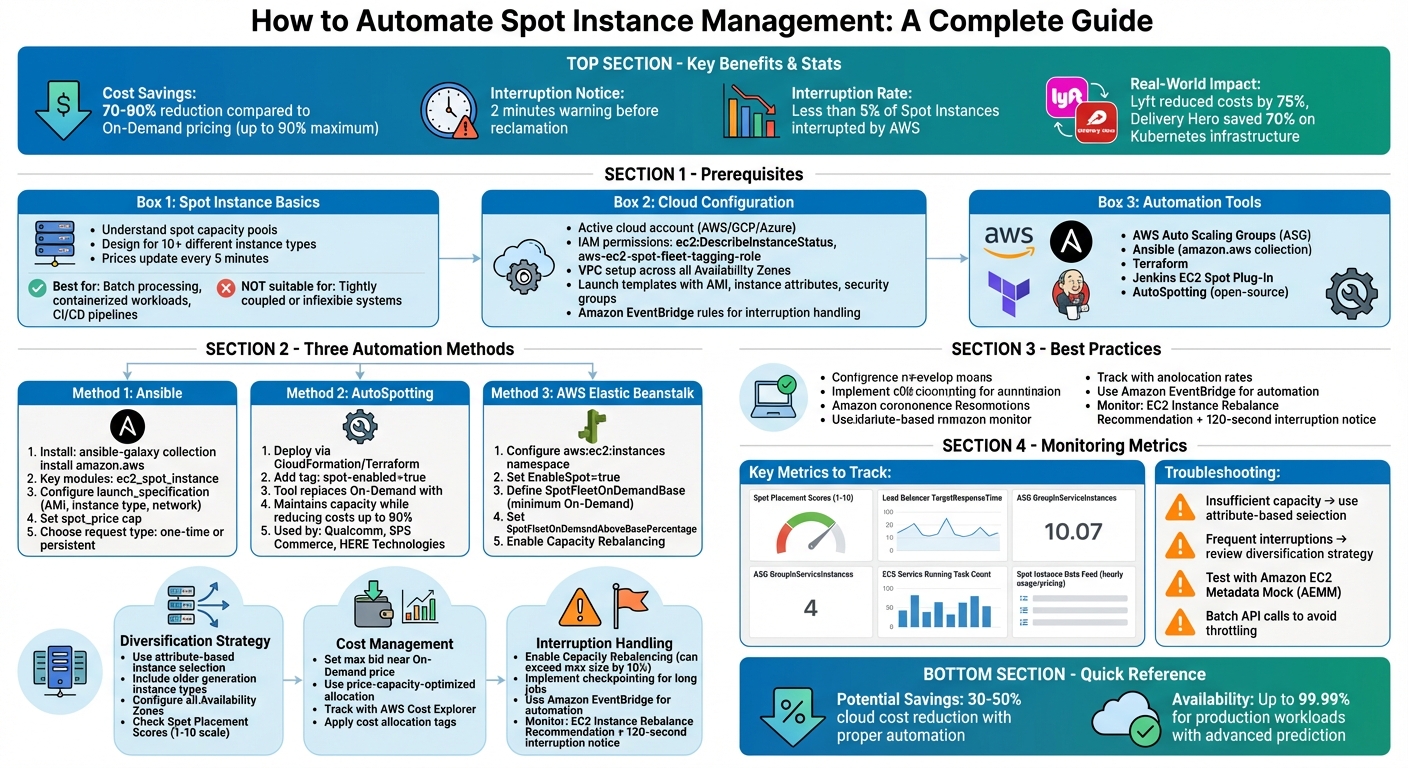 {Complete Guide to Automating Spot Instance Management: Prerequisites, Methods, and Best Practices}
:::
{Complete Guide to Automating Spot Instance Management: Prerequisites, Methods, and Best Practices}
:::
Amazon EC2 Spot Instances: Automating 2min Notifications
Prerequisites for Automating Spot Instance Management
Before jumping into automation, it's crucial to lay the groundwork. This involves understanding how spot instances work, setting up your cloud environment properly, and choosing the right tools. Getting these basics right will save you time and headaches later. Once you're comfortable with spot instance fundamentals, you can move on to configuring your cloud setup and selecting automation tools.
Spot Instance Basics
Spot instances operate differently from standard On-Demand instances. They rely on unused cloud capacity and are priced based on supply and demand, with rates that can change hourly[5][8]. The upside? You can save up to 90% compared to On-Demand prices[1][9]. The downside? Providers can reclaim these instances when they need the capacity back.
To make the most of spot instances, you need to understand spot capacity pools. Each pool represents a specific instance type in a particular Availability Zone, with its own pricing and availability that can change independently. Amazon EC2 updates spot prices every five minutes[5]. A good rule of thumb is to design your workloads to work across at least 10 different instance types. This increases your chances of securing capacity[1].
Amazon EC2 provides access to spare EC2 compute capacity in the AWS Cloud through Spot Instances at savings of up to 90% compared to On-Demand prices.- Amazon Web Services[1]
Unlike On-Demand instances, which run until you shut them down, spot instances can be interrupted with just two minutes' notice[1]. This makes them a great fit for stateless and fault-tolerant workloads like batch processing, containerised applications, or CI/CD pipelines. However, they’re less suitable for tightly coupled or inflexible systems. If an instance is marked for reclamation, you’ll have two minutes to wrap up critical tasks[1]. Additionally, rebalance recommendations act as early warnings, letting you know when there's an increased risk of interruption before the formal two-minute notice arrives[1][4].
Cloud Provider Access and Configuration
To automate spot instance management, you'll need to configure your cloud environment. Start by ensuring you have an active account with a cloud provider like AWS, Google Cloud Platform, or Microsoft Azure. You'll also need specific IAM permissions to allow services to request, launch, and terminate instances on your behalf[10].
IAM roles and permissions are the backbone of automation. Your tools will need permissions such as ec2:DescribeInstanceStatus and fleet roles like aws-ec2-spot-fleet-tagging-role[11]. Without these, your automation scripts won’t be able to interact with the cloud provider's APIs.
Your VPC setup is also critical. Configure all Availability Zones in your Region within your VPC, so automation tools can search across multiple capacity pools[1]. Ensure your network includes multiple subnets spanning different zones to maximise availability[1].
Launch templates are another key component. These templates define your AMI, instance attributes (like vCPUs and memory), key pairs, and security groups[10,12,13]. They act as blueprints for provisioning new instances. To stay flexible, configure your templates to include a range of instance attributes, so they remain effective even as new instance types are introduced[1].
To handle interruptions effectively, set up Amazon EventBridge rules to capture rebalance recommendations and interruption notifications[1][4]. You can also use lifecycle hooks in Auto Scaling groups to give applications extra time for tasks like draining SQS workers or uploading logs before termination[4].
Automation Tools and Frameworks
Automation tools can simplify spot instance management significantly. AWS Auto Scaling Groups (ASG) and EC2 Fleet are excellent starting points, while tools like Ansible and Terraform let you define and version your configurations[1][7].
AWS Auto Scaling Groups are particularly useful for managing multiple instances. They handle lifecycle management and horizontal scaling automatically[1]. By integrating ASGs with launch templates, you can maintain your desired capacity across various instance types and zones. Using the price-capacity-optimized
allocation strategy ensures instances are provisioned from the most available pools at the best prices, reducing the risk of interruptions[1][4].
Ansible provides spot-specific modules through the amazon.aws collection. For example, the ec2_spot_instance module lets you create or terminate spot requests, while ec2_spot_instance_info gathers details and filters requests by state or type[7]. This allows you to manage spot instances using version-controlled playbooks instead of manual console operations.
If your organisation uses Jenkins, the EC2 Spot Plug-In can automatically scale build agents based on job volume[9]. This is particularly useful for CI/CD workloads, where cost savings typically range from 70% to 90%.
To minimise disruptions, enable Capacity Rebalancing in your Auto Scaling groups. This feature proactively replaces instances that receive a rebalance recommendation, even before the two-minute interruption notice arrives[1][4]. Additionally, use spot placement scores (rated 1–10) to evaluate the likelihood of successfully placing spot requests in a specific Region or Availability Zone[1].
Methods for Automating Spot Instance Management
Streamlining spot instance management can save time and reduce costs. Tools like Ansible, AutoSpotting, and Elastic Beanstalk offer various ways to automate the process, depending on your setup and requirements.
Using Ansible for Spot Instance Automation
Ansible simplifies spot instance automation with its amazon.aws collection, which includes two essential modules:
-
ec2_spot_instancefor managing the lifecycle of spot instances. -
ec2_spot_instance_infofor retrieving request details [7][12].
To get started, install the collection:
ansible-galaxy collection install amazon.aws
When crafting a playbook, include a launch_specification that specifies your AMI ID, instance type, key pair, and network settings. The spot_price parameter is crucial for capping your maximum bid, helping you avoid unexpected charges during high-demand periods. If you're working in a VPC, use launch_specification.security_group_ids instead of group names for better compatibility.
Ansible supports two types of requests:
- One-time requests, which aren't resubmitted if interrupted.
- Persistent requests, which automatically resubmit to maintain capacity.
To terminate instances and their associated requests simultaneously, set state: absent and include terminate_instances: true. The ec2_spot_instance_info module allows filtering requests by criteria like image ID, state (e.g., open, active, or cancelled), or instance type. This feature is especially useful for managing large-scale deployments.
Spot Instances are a cost-effective choice if you can be flexible about when your applications run and whether your applications can be interrupted.
– Mandar Vijay Kulkarni, Software Engineer, Red Hat [7]
Now, let’s see how AutoSpotting can optimise Auto Scaling Groups.
Implementing AutoSpotting for Auto Scaling Groups
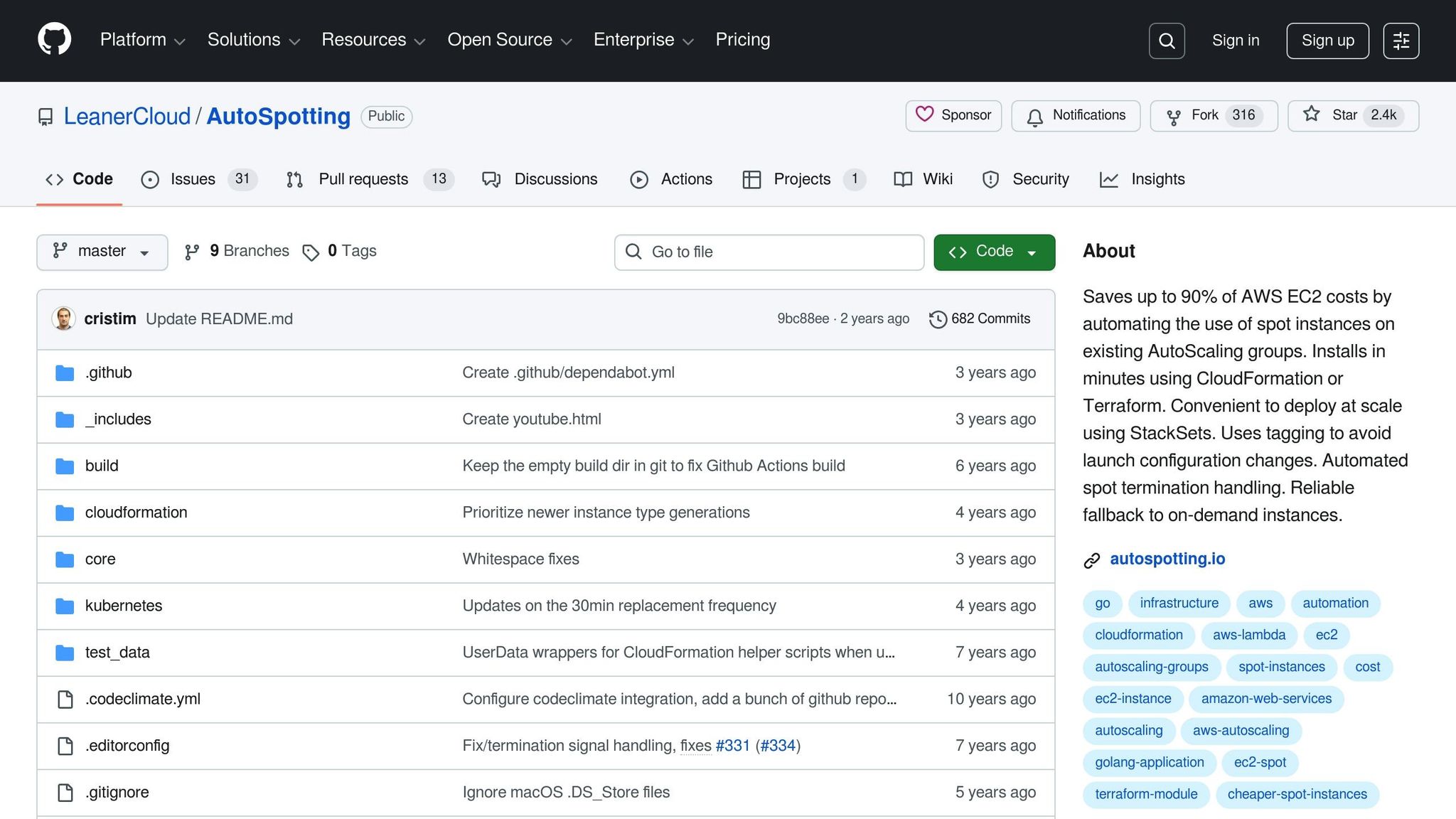
AutoSpotting is an open-source tool designed to replace On-Demand instances in Auto Scaling Groups with more affordable Spot instances [13]. It works by replicating the configuration of existing On-Demand instances to launch equivalent or better Spot instances. Once the Spot instance clears health checks and integrates into the group, AutoSpotting detaches and terminates the original instance. This process ensures capacity remains stable while cutting costs - potentially by up to 90%.
You can deploy AutoSpotting using CloudFormation or Terraform templates in a matter of minutes. To enable it for an Auto Scaling Group, simply add a tag with the key spot-enabled and the value true. Additional tags can specify a minimum number or percentage of On-Demand instances that should always remain in the group.
Companies like Qualcomm, SPS Commerce, HERE Technologies, Remind, and Realestate.co.nz have successfully used AutoSpotting to optimise their AWS costs as of January 2026.
Disabling AutoSpotting is straightforward. Remove the spot-enabled tag or set it to false for a specific group, or delete the CloudFormation or Terraform stack entirely. If you prefer a more managed approach, AWS Elastic Beanstalk might be a better fit.
Configuring AWS Elastic Beanstalk for Spot Instances
Elastic Beanstalk allows you to create a mixed fleet of On-Demand and Spot instances within a single Auto Scaling Group, offering a balance between cost savings and uptime [14]. Configuration is handled through the aws:ec2:instances namespace, using three key options:
-
EnableSpot: Activates Spot Instance requests for your environment. -
SpotFleetOnDemandBase: Sets the minimum number of On-Demand instances to maintain. -
SpotFleetOnDemandAboveBasePercentage: Defines the percentage of On-Demand instances for capacity beyond the base.
For instance, if your MinSize is 10, and you set SpotFleetOnDemandBase to 4 and SpotFleetOnDemandAboveBasePercentage to 50%, you'll end up with 7 On-Demand instances (4 base + 50% of the remaining 6) and 3 Spot instances.
AWS advises against using Spot instances in single-instance production environments, as losing the instance would result in a total capacity loss. To mitigate risks, enable Capacity Rebalancing
in your Auto Scaling Group. Additionally, opt for the price-capacity-optimized allocation strategy instead of the lowest-price option. This approach prioritises pools with a lower likelihood of interruptions [4].
For tailored infrastructure solutions, Hokstad Consulting provides expert guidance to meet your cloud needs.
Need help optimizing your cloud costs?
Get expert advice on how to reduce your cloud expenses without sacrificing performance.
Strategies for Reliable Spot Instance Automation
When it comes to automating spot instances, flexibility is the key to success. The more instance types and Availability Zones you can incorporate, the greater the number of distinct spot capacity pools you can tap into. As AWS experts Pranaya Anshu and Sid Ambatipudi explain:
The fundamental best practice when using Spot Instances is to be flexible[3].
This principle forms the foundation of the strategies outlined below.
Diversifying Spot Instance Types and Zones
Every combination of instance type and Availability Zone represents a unique capacity pool. Including older generation instance types in your selection can be a smart move - these often have more capacity available because newer generations tend to attract more On-Demand usage [1][3]. Instead of manually specifying instance types, adopt attribute-based instance selection. By defining your requirements (such as vCPUs, memory, and storage), Auto Scaling groups can automatically include new instance types as they are introduced [1][3].
To broaden your options further, configure all Availability Zones in your Region for use with your VPC. This increases the number of capacity pools you can access [1]. You can also leverage spot placement scores (rated from 1 to 10) to identify Regions or Availability Zones with the highest likelihood of meeting your capacity needs [1][3]. This approach strengthens the resilience of your spot instance automation strategy.
Setting Pricing Caps and Managing Interruptions
Diversification is just one piece of the puzzle - cost management and interruption handling are equally important. Set your maximum bid price close to the On-Demand price. This ensures your instances remain active as long as capacity is available, while still benefiting from the lower spot market price (which is all you pay, regardless of your bid) [8]. Spot prices are updated every five minutes, but they typically change gradually, reflecting longer-term supply and demand trends [5].
Enable capacity rebalancing in your Auto Scaling groups to address interruptions proactively. This feature identifies at-risk instances before the official two-minute interruption notice and starts replacing them. It can even temporarily exceed your group's maximum size by up to 10% to ensure the replacement instance is fully operational before terminating the old one [1][4]. For batch jobs that run over extended periods, use checkpointing to save progress to persistent storage (like Amazon S3 or EBS). This allows you to resume work from the last save point after an interruption [2][15].
To streamline handling of interruptions, integrate Amazon EventBridge to capture interruption notices. Use these to trigger automated actions, such as draining containers or deregistering instances from load balancers [2][4]. Combining these pricing and interruption management tactics with diversification ensures your spot instance automation remains reliable and efficient.
Monitoring, Troubleshooting, and Cost Analysis
Tracking Spot Instance Performance
Keeping tabs on capacity, interruptions, and cost is key when managing Spot Instances [16][18][1]. Start by checking Spot Placement Scores in CloudWatch. These scores, ranging from 1 to 10, reflect the likelihood of successfully securing capacity in a specific Region or Availability Zone. A score of 10 indicates a high probability of success based on current and historical capacity trends [16][18][1].
AWS offers two important interruption signals to help you manage risks. The EC2 Instance Rebalance Recommendation warns when an instance is at a higher risk of interruption, while the Spot Instance Interruption Notice gives a definitive 120-second warning before an instance is reclaimed [1][5]. As Chad Schmutzer, Solutions Architect at AWS, puts it:
The two-minute Spot Instance interruption notice is a powerful tool when using Spot Instances[17].
Instead of obsessing over how often interruptions occur, focus on service-level metrics to gauge reliability. Scott Horsfield, Sr. Specialist Solutions Architect at AWS, explains:
Tracking interruptions often results in misleading conclusions... look to track metrics that reflect the true reliability and availability of your service[2].
Metrics like Load Balancer TargetResponseTime, ASG GroupInServiceInstances, and ECS Service Running Task Count are better indicators of overall reliability [2]. For financial insights, use the Spot Instance Data Feed, which provides hourly usage and pricing data directly to an S3 bucket. Tools like Amazon Athena can help you query this data for detailed analysis [18]. To track costs effectively, apply cost allocation tags (e.g., createdBy
) to categorise automation project expenses in your billing reports [18].
These metrics and tools allow you to fine-tune your setup to maintain performance and address potential issues before they escalate.
Troubleshooting Common Spot Instance Automation Issues
Performance data is also essential for troubleshooting automation challenges. One common issue is insufficient capacity errors, which occur when the requested instance type or Availability Zone lacks spare capacity [5]. To reduce this risk, use attribute-based selection that defines requirements like vCPUs or RAM, rather than locking into specific instance types. This approach lets your fleet automatically draw from any matching instance pool [18][1]. Additionally, the price-capacity-optimised allocation strategy helps you secure instances from the most available pools at the lowest cost [1][2].
If you're dealing with frequent interruptions, batch API calls (like DescribeInstances) to avoid throttling [2]. You can test how your automation handles interruptions using the Amazon EC2 Metadata Mock (AEMM). This tool simulates interruption notices without impacting actual capacity, allowing you to refine your response strategies [2]. It's worth noting that fewer than 5% of Spot Instances are interrupted by AWS before customers terminate them, so if your interruption rates are higher, it's time to revisit your diversification and allocation strategies [2].
For a clear picture of your spending, use AWS Cost Explorer with the Purchase Option
filter to isolate Spot costs and analyse trends over time [18]. The AWS Cost and Usage Reports (CUR) provide detailed resource-level data, including specific columns for Spot usage pricing, enabling precise savings calculations [18].
Conclusion
The automation strategies we've explored offer more than just cost savings - they bring resilience and efficiency to cloud operations. For instance, automating spot instance management not only reduces expenses but also simplifies workflows. Businesses can access compute capacity at discounts of up to 90% compared to On-Demand pricing [6]. Real-world examples highlight the impact: Lyft slashed its monthly compute costs by 75% with a simple four-line code change, while Delivery Hero achieved a 70% reduction in Kubernetes infrastructure costs through automated spot management [6].
Automation also streamlines the entire lifecycle, from provisioning to handling interruptions. Advanced tools can predict interruptions up to 15 minutes in advance, allowing workloads to migrate seamlessly and ensuring up to 99.99% availability for production tasks [19]. This transforms spot instances from an unpredictable resource into a reliable option for demanding applications like big data processing, CI/CD pipelines, and fault-tolerant systems.
By optimising instance selection, managing capacity, and integrating fallback options to On-Demand capacity, automation significantly reduces operational overhead. These strategies complement the techniques discussed earlier, making spot instances a practical and efficient choice for cost optimisation.
If you're looking for tailored solutions to automate spot instance management and cut cloud costs, consider reaching out to Hokstad Consulting. Their expertise in DevOps transformation, cloud cost engineering, and custom automation can help reduce cloud expenses by 30–50% while enhancing deployment cycles. Learn more at Hokstad Consulting.
FAQs
How can I keep my spot instances stable despite potential interruptions?
To keep your spot instances running smoothly, it's essential to plan for potential interruptions and build your system to handle them effectively. One smart move is enabling Capacity Rebalancing in Auto Scaling. This feature identifies spot instances that might be interrupted and replaces them proactively, helping to ensure a seamless transition.
Another important step is keeping an eye on interruption notices, which give you a two-minute warning before an instance is terminated. With these alerts, you can automate critical tasks like saving data, detaching workloads, or migrating tasks to other instances. For added reliability, store essential data outside your local instances - options like Amazon S3, EBS, or DynamoDB work well. Additionally, design your workloads to be fault-tolerant by breaking tasks into smaller units or using checkpointing methods.
By following these strategies, you can reduce disruptions and make the most of spot instances while keeping costs under control. Hokstad Consulting is available to guide you through implementing these solutions and customising them to fit your cloud infrastructure.
What are the key strategies for choosing instance types and Availability Zones for Spot Instances?
To get the most out of Spot Instances and cut down on costs, it's crucial to use a flexible and well-thought-out approach when picking instance types and Availability Zones. By spreading your workload across multiple instance types and Availability Zones, you can improve both availability and resilience. Attribute-based selection also helps you align your choices with your workload needs while keeping your options open.
Tools like Spot placement scores are another great way to pinpoint the best Regions and Availability Zones for your workload. This not only boosts availability but also helps you save money. By building a fleet that taps into multiple capacity pools and includes a range of instance types, you allow the system to automatically pick the most efficient and reliable options available.
How can I use automation tools to manage Spot Instances in my cloud environment?
Tools like Ansible and AutoSpotting simplify the management of Spot Instances in your cloud environment, helping you cut costs while keeping things running smoothly.
With Ansible's amazon.aws.ec2_spot_instance module, you can automate key tasks like requesting, stopping, or cancelling Spot Instances in AWS. This gives you more control over your cloud resources without needing to manage everything manually.
Meanwhile, AutoSpotting, an open-source solution, takes a different approach. It automatically converts your on-demand EC2 instances into Spot Instances, handling interruptions by replacing any terminated instances. This way, your workloads stay reliable while keeping expenses in check.
By combining these tools, you can streamline the provisioning, management, and recovery of Spot Instances, making your cloud infrastructure more efficient and cost-effective.