
If I want GitOps repo maintenance to stop eating team time, I automate four things first: validation, update PRs, drift control, and policy checks.
That gives me a simple workflow:
- Check manifests before merge with linting, rendering, and schema tests
- Open small update PRs on a schedule for images, charts, and stale repo clean-up
- Keep clusters aligned with Git using Argo CD or Flux CD drift reconciliation
- Block bad changes early with policy and secrets checks in CI and at admission
- Review the system every week and month so problems do not pile up
Why does this matter? Because manual review does not scale well. In many teams, a large share of pull request comments still cover basic YAML errors, missing labels, schema failures, or risky image tags. Even one bad manifest can delay a release, and stale resources can add wasted cloud spend month after month.
Here is the short version of what I’d take from the article:
- Put the repo into a fixed path structure so scripts and CI jobs can target the right files
- Run the same checks locally and in CI
- Keep auto-generated PRs small, clear, and low risk
- Turn on self-heal first, then add prune with care
- Enforce rules before merge, not after an incident
- Track a few simple signals, such as failed checks, drift events, and merged maintenance PRs
In short: I would treat GitOps repo maintenance like a repeatable pipeline, not a set of ad hoc clean-up tasks.
The rest of the piece then walks through how to set that up in a clear order, from repo layout through to controller settings and review cadence.
::: @figure 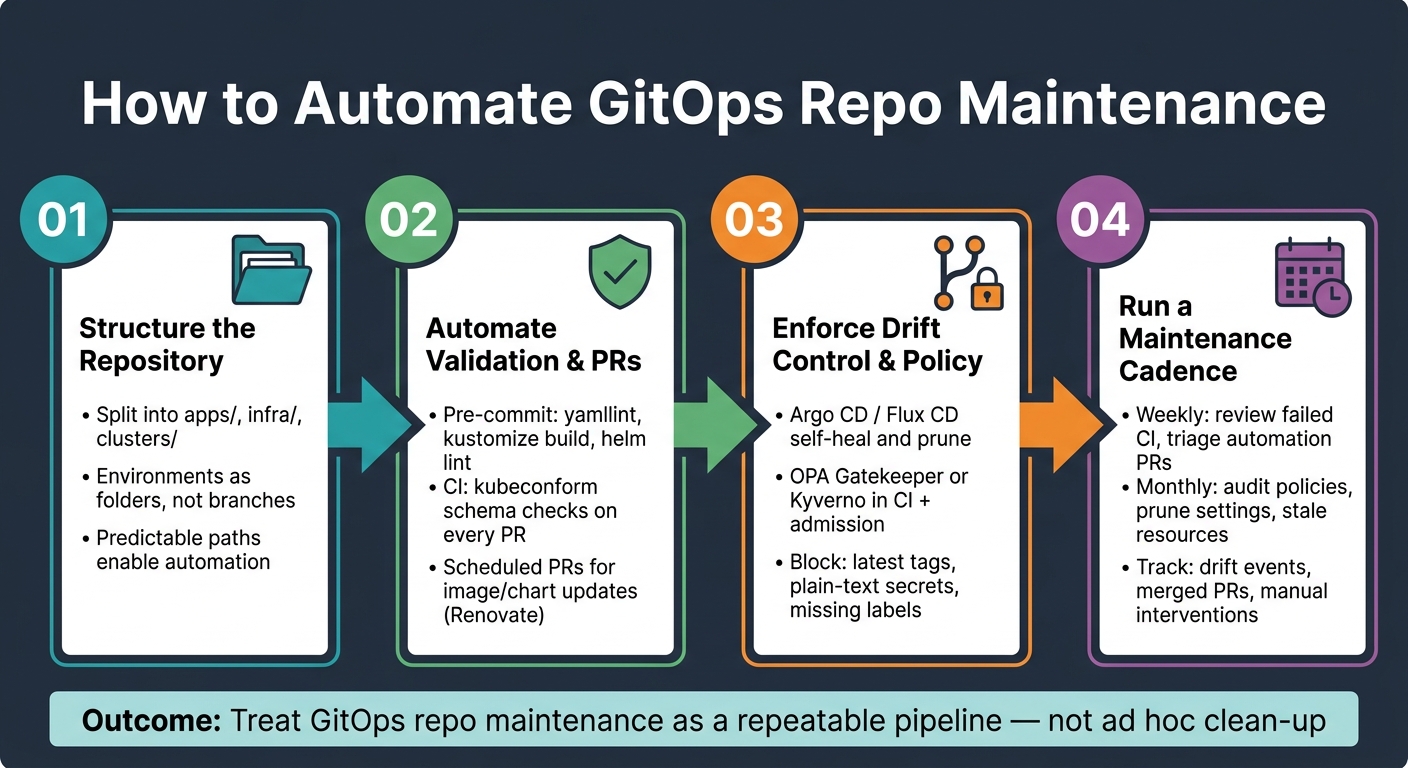 {GitOps Repo Maintenance Automation: 4-Step Workflow}
:::
{GitOps Repo Maintenance Automation: 4-Step Workflow}
:::
GitOps Best Practices Every DevOps Team Should Follow in 2025 [Webinar]
Need help optimizing your cloud costs?
Get expert advice on how to reduce your cloud expenses without sacrificing performance.
Step 1: structure the repository so automation can be applied cleanly
Before you write scripts or set up CI jobs, sort out the repository layout. Automation works on paths. If the tree is predictable, maintenance jobs hit the right files and steer clear of the wrong ones. That matters for image refreshes, drift checks and prune jobs.
Use a clear layout for apps, infrastructure and environments
A solid starting point is to split the repo into three top-level directories:
-
apps/for application deployments -
infra/for cluster-wide components such as ingress controllers, cert-manager and monitoring stacks -
clusters/for per-cluster definitions that tie everything together
Inside apps/, group by service and keep environments in folders, not branches. For example, apps/payments-api/overlays/prod/ and apps/payments-api/overlays/staging/. This keeps every environment on the same branch, which means one CI pipeline can check all of them in a single run.
Branch-per-environment setups tend to copy pipeline logic and make cross-environment drift harder to spot.
The clusters/ directory should store the Kustomize or GitOps definitions that map app and infra overlays to each cluster, such as clusters/prod-uk-1/ or clusters/staging-eu-1/. That split gives each job a clear lane: prune jobs can stay focused on clusters/, while image update jobs work in apps/.
Choose Kustomize or Helm patterns that support repeatable validation
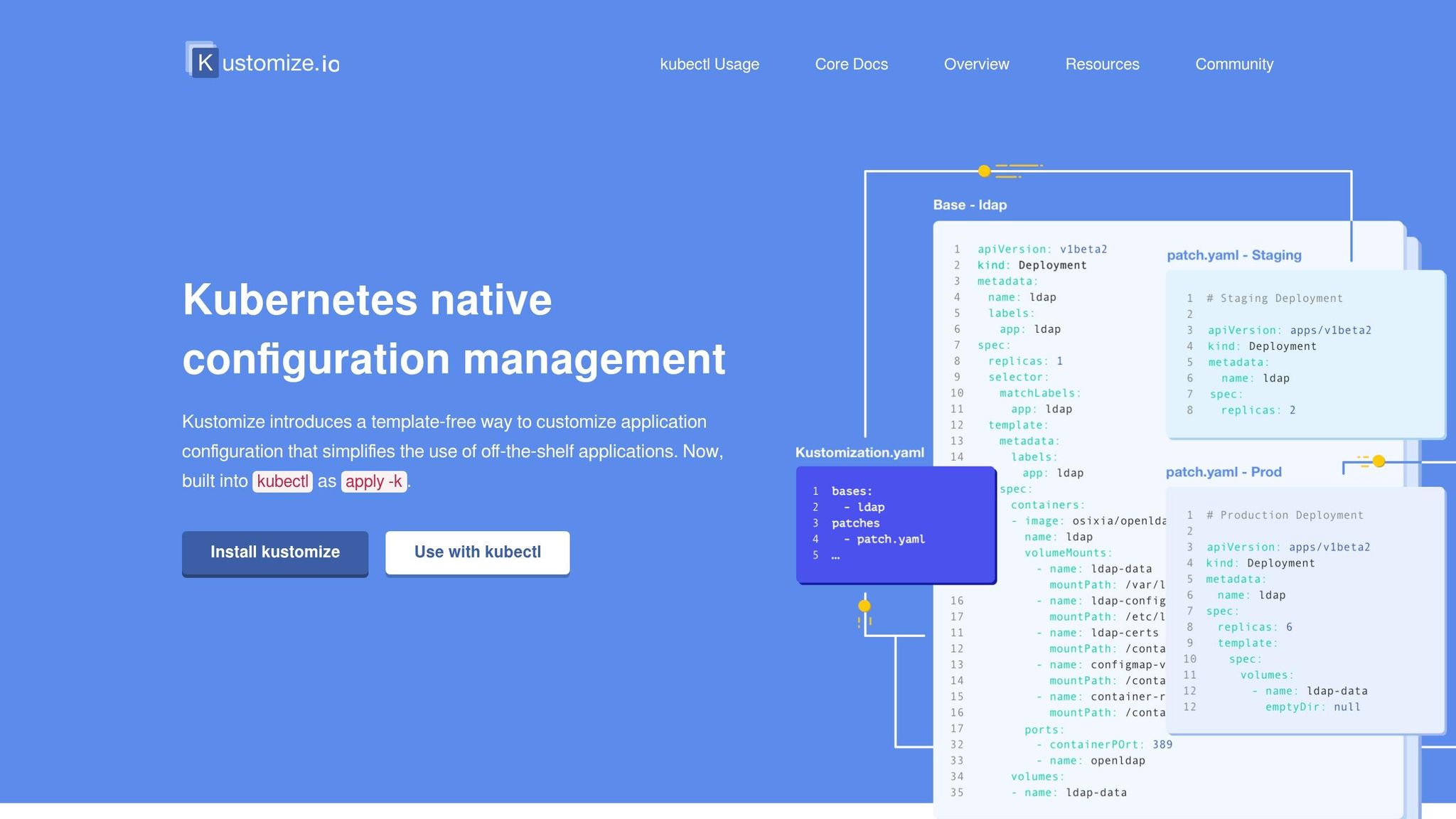
Once the top-level layout is in place, the inner structure of each service decides how reliably CI can render and check manifests.
With Kustomize, keep shared manifests in a base/ directory with no environment-specific values. Then place environment differences in overlay patches under paths like overlays/prod/ and overlays/staging/. CI can run kustomize build for each overlay and send the output to schema checks or policy tools. That way, every overlay can be rendered and tested in CI.
With Helm, keep charts in a set path such as apps/my-service/chart/, and store environment-specific values in clearly named files like values-staging.yaml and values-prod.yaml. CI can render each environment with helm template . -f values-prod.yaml and run the same checks after that. This gives image update jobs one field to change and CI one render path to test.
ApplicationSets and Flux Kustomizations can use the same directory rules. An ApplicationSet git generator can enumerate apps/*/overlays/* to create one Application for each service-environment pair. Flux Kustomizations can mirror the same shape too: a top-level Kustomization for clusters/prod-uk-1/ can point to child Kustomizations for infra/ and apps/. That gives both the controller and your maintenance scripts clear boundaries.
Once the tree is fixed, validation, image updates and prune jobs can run against the same paths every time. Then you’re in a much better place to automate validation, formatting and routine Git changes against those paths.
Step 2: automate validation, formatting and routine Git changes
With a clean repo structure in place, the next move is to stop bad manifests before they ever get near the cluster. Most Kubernetes stability and security problems start with simple config mistakes, so it pays to catch them before merge.
Add pre-commit checks for YAML quality and manifest rendering
The pre-commit framework lets you run local checks before code is pushed. Stick with the same apps/, infra/ and clusters/ paths from Step 1 so the hooks stay easy to follow.
A good starting set of hooks should cover:
- YAML syntax checks with
yamllintorcheck-yaml - End-of-file checks
- A
kustomize buildstep to make sure overlays render without errors - For Helm-based services,
helm lint --strictand thenhelm templatefor each chart
One small but important detail: exclude Helm templates from yamllint. Go templating syntax will break a strict YAML parser. That one catches people out all the time.
These checks give developers fast feedback before they open a pull request. It’s a simple habit, but it saves a lot of back-and-forth later.
Run CI pipelines for schema validation and scheduled maintenance commits
Local hooks do a lot of the heavy lifting, but CI should run the same checks again. Every pull request should trigger a pipeline that runs kustomize build or helm template across all overlays and environments, then pipes the rendered output into kubeconform for schema validation against the target cluster version.
That matters because kubeconform catches schema errors that plain YAML linting won’t see. A file can look fine as YAML and still be wrong for the Kubernetes API. CI is where you want to find that out, not after deployment. These same checks also support drift control and prune automation in the next step.
Once validation is set up, automate the routine work that doesn’t need manual review. A nightly or weekly workflow can scan for unused or orphaned manifests, flag stale branches for removal, and open PRs for dependency or image tag bumps.
Keep those automated PRs tight and easy to review. One change type per PR works best. Each PR should run the same validation suite as a normal pull request and include a plain summary of what changed. Auto-merge should be limited to clearly low-risk updates. Anything that touches production-facing overlays should still need human approval.
It also helps to schedule low-risk maintenance jobs outside core UK working hours, such as overnight or at weekends. That cuts down contention and makes CI spend easier to manage.
| CI Stage | Tool | Purpose |
|---|---|---|
| YAML lint |
yamllint, check-yaml
|
Catch syntax and style errors |
| Template render |
kustomize build, helm template
|
Confirm all overlays generate valid output |
| Schema validation | kubeconform |
Validate rendered manifests against Kubernetes API schemas |
| Automated maintenance | Renovate, custom scripts | Open PRs for version bumps and stale branch tidy-up |
Step 3: automate drift correction, pruning and policy enforcement
Once Step 2 is in place with validation and automated PRs, the next layer is the controller layer. This is where you keep the live cluster in line with Git and stop risky changes before they’re merged. Put simply, this is the enforcement layer for the manifests validated in Step 2.
Enable Argo CD or Flux CD drift detection and safe prune settings
Both Argo CD and Flux CD keep checking the live cluster against Git and fix drift when they find it. In Argo CD, an application marked OutOfSync means the cluster no longer matches the repo. That could come from a manual kubectl edit, a failed sync, or a resource left behind after a feature was turned off. If selfHeal: true is enabled, Argo CD rolls back those manual changes on the next reconciliation.
A safe starting point is stateless, low-risk workloads such as front-end services and internal tools. Before you switch on aggressive prune for anything stateful, get comfortable with the behaviour on services where deletion risk is lower.
For stateless services, a sensible Argo CD Application manifest looks like this:
spec:
  syncPolicy:
    automated:
      prune: true
      selfHeal: true
    syncOptions:
      - CreateNamespace=true
      - ApplyOutOfSyncOnly=true
For databases, queues, or critical back-office systems, take the slower route. Use selfHeal: true, but leave prune: false. Keep destructive changes behind manual sync, and test them in test and staging before production. Argo CD also offers Prune=confirm, which adds a manual confirmation step before deletion. That’s a good middle ground early on. A common rollout pattern is to turn on prune: true in dev first, watch what happens over one or two release cycles, then extend it to staging and a small set of production services with extra controls in place.
Flux CD handles this in a similar way through its Kustomization resource. With prune: true, Flux garbage-collects resources that were applied before but are no longer in Git. In production namespaces with stateful workloads, you can protect single resources from deletion by using the kustomize.toolkit.fluxcd.io/prune: disabled label or annotation, even if pruning is enabled across the board.
| Aspect | Argo CD | Flux CD | Conservative setting | Aggressive setting |
|---|---|---|---|---|
| Drift detection | OutOfSync status via UI, CLI and metrics | Reconciliation status via Kubernetes events and metrics | Use for stateful apps and regulated services needing human review | Use for stateless apps where fast correction is acceptable |
| Self-healing |
selfHeal: true reverts manual changes to match Git |
Reconciliation loop reapplies desired state on each interval | Enable broadly, but monitor for conflicts with other controllers | Key in highly automated environments |
| Prune behaviour |
prune: true deletes resources absent from Git, per Application |
prune: true in Kustomization removes untracked resources |
Default for production until deletion impact is understood | Use in dev/staging and for stateless workloads to remove unused resources |
| Operational visibility | Rich UI with app dashboards, sync history and diff views | Git-centric via CRDs and logs; integrates with observability stacks | Useful where ops teams need clear application views and approval flows | Fits teams comfortable with Git-driven, controller-based workflows |
Apply policy-as-code and secrets checks before merge
Drift correction deals with what’s already in the cluster. Policy-as-code deals with what should never get there.
OPA Gatekeeper and Kyverno are two common choices. Gatekeeper runs as a Kubernetes admission webhook and uses ConstraintTemplate and Constraint resources written in Rego. Those same Rego policies can run in CI with conftest, which lets you block non-compliant pull requests before merge.
Kyverno takes a different route. Its policies are plain YAML and look much closer to normal Kubernetes manifests. That makes them easier for many platform teams to work with and maintain beside their existing resources. Kyverno can also mutate manifests, which means it can inject default resource limits or required labels on its own. In practice, that turns repeated maintenance rules into quiet automation.
Both tools can enforce the guardrails that matter most for repo maintenance:
- required labels such as
cost-centreandenvironment - minimum and maximum CPU and memory requests per namespace
- blocking
latestimage tags - blocking plain-text Secrets, with external secret stores or sealed secrets used instead
| Aspect | OPA Gatekeeper | Kyverno | Repo-maintenance implication |
|---|---|---|---|
| Policy style | Rego with ConstraintTemplates and Constraints
|
YAML policies aligned with Kubernetes resource syntax | Gatekeeper suits central policy engineering; Kyverno suits day-to-day platform teams |
| CI integration | Rego bundles run via conftest in CI pipelines |
Kyverno CLI validates manifests against policies in CI | Both can block non-compliant PRs; Kyverno often easier for developers to edit alongside manifests |
| Typical guardrails | Complex multi-tenant rules, compliance policies, cross-namespace constraints | Resource quotas, labels, image tag rules, security context checks, secret usage | Gatekeeper for organisation-wide controls; Kyverno for application-level guardrails |
| Learning curve | Higher, due to Rego syntax | Lower, due to YAML and Kubernetes-native constructs | Impacts how quickly teams can roll out policy-as-code across repositories |
Run the policy engine in CI and at admission so non-compliant manifests never reach the cluster.
Use maintenance automation to control cloud costs
Use prune, quotas, and scheduled scale-downs to clear out orphaned resources and cut idle spend. Then feed those controls into the weekly and monthly maintenance runbook in the next step.
Step 4: combine the checks into a repeatable maintenance workflow
Once your repo, validation, and enforcement layers are set up, the next job is to turn them into a routine your team can stick to.
Build a weekly and monthly maintenance runbook
A fixed cadence stops maintenance from drifting down the to-do list. On a weekly basis, review failed CI jobs, triage automation PRs, and confirm that reconciliation is still healthy. If the same drift alerts keep coming back, adjust prune or self-heal settings. Then feed those repeat failures back into the right guardrail, whether that's pre-commit, CI, or a controller rule.
Each weekly check should have:
- a named owner
- a simple decision path: auto-retry, developer review, or escalate to platform engineering
Monthly, shift attention to slower-moving governance work. Review and update policy-as-code rules, check whether prune settings still fit each service's risk level, and look for stale namespaces, Helm releases, or secrets that have outlived their use.
It's also worth comparing this month's automation metrics with last month's, including:
- merged maintenance PRs
- failed policy checks
- drift incidents
- manual interventions avoided
Those trends help you decide whether next month's rules should be tighter or looser.
For production changes, set clear maintenance windows for higher-risk work such as cluster-wide policy updates or mass dependency upgrades. Match approval thresholds to blast radius. A change affecting one application might need sign-off from one maintainer. A platform-wide policy update should need approval from both platform engineering and a service owner. Write down which changes are safe to merge automatically and which ones must stay human-approved.
Conclusion: the minimum automation stack to start with
You don't need to do everything in one go. A strong starting point is a clean repo structure, pre-commit validation, CI-based PR checks, and GitOps controller reconciliation with cautious drift and prune settings. Scheduled maintenance jobs, policy-as-code, and leadership reporting can come later, once the baseline is stable and the team trusts it.
FAQs
Where should I start with GitOps repo automation?
Start with a dedicated Git repository that acts as the single source of truth for your Kubernetes manifests, Helm charts, and infrastructure-as-code files. Keep that repository tidy, easy to scan, and separate from your application source code.
Next, connect it to a GitOps controller such as Argo CD or Flux. Add strict access controls and branch protection, and make sure your CI/CD pipeline includes automated validation and security scanning.
How do I enable pruning safely in production?
Enable pruning with care. Don’t prune blindly. Use your GitOps tool’s built-in safety checks instead.
In Argo CD, turn on auto-prune alongside self-healing. That way, if something drifts in the cluster, Argo CD can pull it back to the state defined in Git.
For production changes, add controls around who can change what. Use branch protection, and require pull requests or approvals before anything lands.
During rollout, put guardrails in place, such as:
- freeze windows
- rollback on failing health checks
- close monitoring of drift
- close monitoring of sync failures
This gives you pruning with a safety net, instead of crossing your fingers and hoping for the best.
Which checks should run locally and in CI?
Balance checks between local development and CI. On your machine, run manifest validation like kubectl --dry-run=client to catch YAML mistakes before you commit.
In CI, use automated checks to stop insecure code early. That includes kube-score, Checkov, kubescape, and container scans with Trivy or Grype. CI should also run unit, integration, and policy compliance checks before deployment.