
Encryption compliance reporting ensures your organisation meets data protection regulations like GDPR, HIPAA, and PCI DSS. Manual methods are slow, error-prone, and insufficient for dynamic cloud setups. Automating this process can save time, reduce risk, and provide continuous monitoring.
Here’s how to get started:
- Key Management: Use tools like AWS KMS, Azure Key Vault, or HashiCorp Vault to manage encryption keys securely and log activities.
- Logging and Monitoring: Implement AWS CloudTrail or centralised log systems (e.g., Splunk) to track encryption events and create audit trails.
- Automation: Set up AWS Config for resource monitoring, Security Hub for compliance checks, and EventBridge or Lambda for automated fixes.
- Reporting: Generate audit-ready reports using tools like AWS Backup Audit Manager or visualise compliance data with dashboards (e.g., Amazon QuickSight).
- Alerts: Use CloudWatch Alarms and SNS for real-time notifications of compliance issues.
Automating encryption compliance transforms periodic audits into a continuous, efficient process, helping organisations avoid fines, secure sensitive data, and streamline operations.
How To Automate Cloud Security Compliance Integration?
What You Need Before Starting
To automate encryption compliance reporting, you’ll need to set up key management platforms and logging systems. These tools work together to capture encryption events and create the audit trails required for meeting standards like HIPAA, PCI DSS, and GDPR. Think of them as the groundwork for streamlining compliance validation and reporting.
Key Management Tools
AWS Key Management Service (KMS) offers centralised control over cryptographic keys and logs every API call to AWS CloudTrail, making it easier to track a key’s lifecycle for auditing purposes [6][7]. AWS KMS is particularly useful for encrypting Primary Account Numbers (PAN) without requiring you to manage local encryption libraries [10].
Azure Key Vault provides secure storage and management of sensitive keys and secrets in the cloud. It integrates seamlessly with HashiCorp Vault, which automates key rotation and deletion [8]. If your organisation operates across multiple cloud providers, HashiCorp Vault is a great option. Its Key Management Secrets Engine (KMSE) handles the lifecycle of keys across AWS, Azure, and Google Cloud. Additionally, its Managed Keys feature allows external keys to be used for signing and encryption without the key material leaving the provider [8].
For continuous compliance, AWS Security Hub and AWS Audit Manager are invaluable. They monitor KMS usage and automate evidence collection. As AWS explains:
A continuous compliance solution is one that has the ability to monitor resources for a configuration change, evaluate and report on the change, remediate if needed, record evidence of this full transaction and finally re-evaluate to update the status [4].
These tools lay the cryptographic groundwork for automating compliance workflows.
Logging and Monitoring Systems
AWS CloudTrail logs every API call to encryption services, capturing details like the user, timestamp, and actions taken [7]. This comprehensive audit trail is crucial for verifying compliance.
Amazon CloudWatch acts as a central hub for log storage and analysis. You can set up alarms based on thresholds, such as unauthorised attempts to use a key marked for deletion [6][7]. Additionally, Amazon EventBridge can route encryption events - like key rotations or expirations - to specific functions for automated handling [7].
If you’re managing multiple cloud providers or on-premises infrastructure, centralised log management tools like Splunk and the ELK Stack can aggregate logs across environments, providing unified security analytics [11][12].
Before diving into automation, it’s essential to establish a baseline by monitoring API activity in both the data and control planes to identify normal patterns and anomalies [6]. Also, make sure to configure key policies to grant the necessary permissions. For instance, AWS Backup Audit Manager requires permissions like kms:GenerateDataKey and kms:Decrypt in the key policy [1][13].
Once you’ve set up your key management and logging systems, you’re ready to start automating and validating encryption compliance.
How to Automate Encryption Compliance Reporting
::: @figure 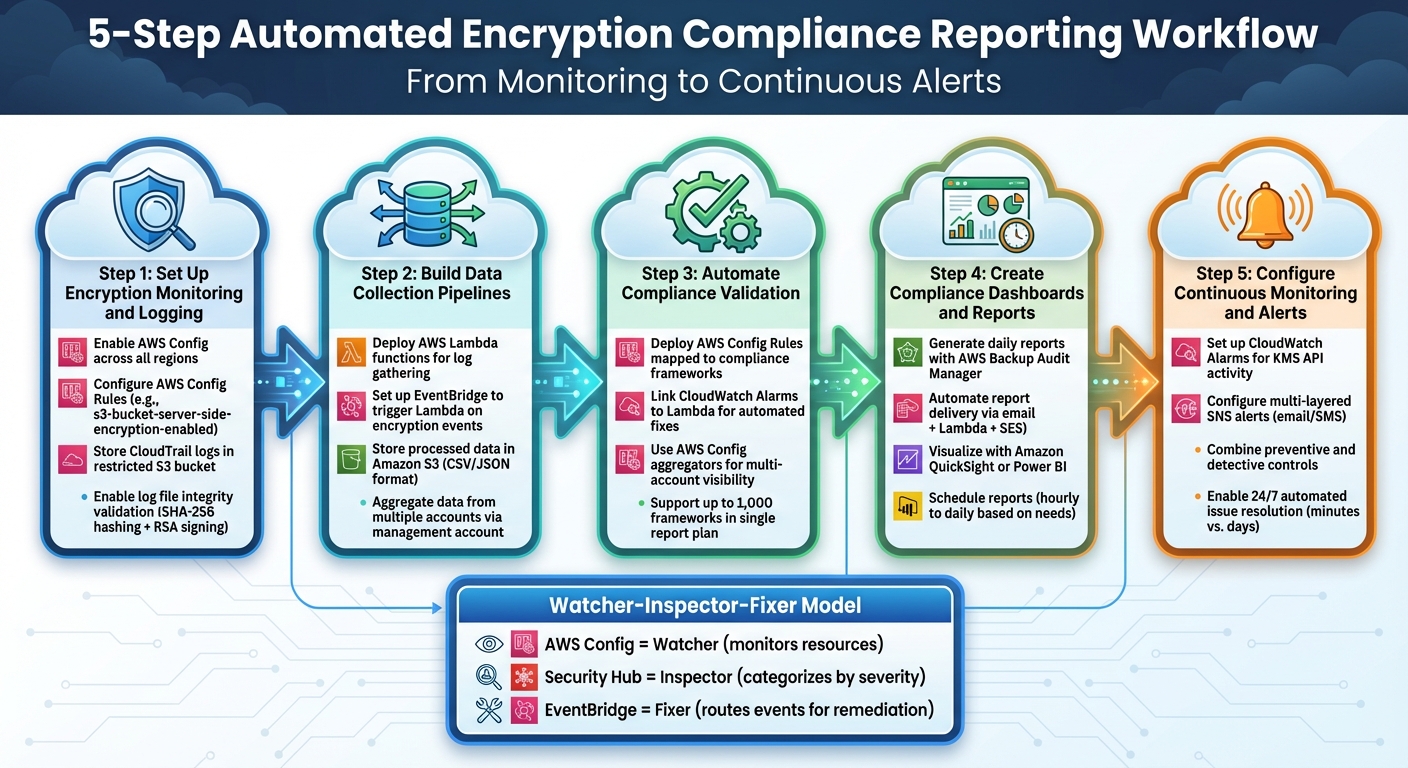 {5-Step Automated Encryption Compliance Reporting Workflow}
:::
{5-Step Automated Encryption Compliance Reporting Workflow}
:::
Once you've set up key management and logging, the next step is to create an automated system that keeps an eye on your resources, ensures compliance, and generates audit-ready reports - without needing manual input. This setup continuously checks for non-compliant configurations and addresses them promptly.
The system follows a Watcher-Inspector-Fixer
model. Here’s how it works:
- AWS Config acts as the
Watcher
, monitoring your resources across regions. - Security Hub serves as the
Inspector
, collecting findings and categorising them by severity (Critical, High, Medium, Low). - Amazon EventBridge acts as the
Fixer
, routing compliance events to scripts or workflows for remediation and reporting [3][16].
This event-driven approach ensures compliance violations are resolved in minutes instead of days. For example, in October 2025, Cloud Security Engineer Eric Nyuydze Wiryenkfea implemented a fully automated encryption enforcement system on AWS. It used AWS Config to monitor S3 buckets, Security Hub to flag HIGH
severity encryption issues, and EventBridge-triggered Lambda functions to automatically apply AES256 encryption to non-compliant buckets. The system operated 24/7, resolving issues within minutes and notifying stakeholders via Amazon SNS [3].
Let’s break down the steps to build this automation workflow. The process involves five key elements: setting up encryption monitoring, building data pipelines, automating compliance checks, creating dashboards, and configuring alerts. Each step builds on the last to create a complete compliance solution.
Step 1: Set Up Encryption Monitoring and Logging
Start by enabling AWS Config to track resource configurations across all regions. Make sure to select Include global resources
to capture events related to IAM encryption [3]. This ensures you’re monitoring both regional resources (like S3 buckets and EBS volumes) and global ones (such as IAM policies).
Next, configure AWS Config Rules to enforce security best practices. For instance, the s3-bucket-server-side-encryption-enabled rule checks whether S3 buckets have encryption enabled. While AWS now encrypts all new S3 buckets by default, older buckets may still need updating [3].
To centralise your audit logs, store CloudTrail logs in a restricted S3 Log Archive
bucket. Enable log file integrity validation to ensure that logs remain unaltered. This uses SHA-256 for hashing and RSA for digital signing, giving auditors confidence that the logs are authentic [17][6].
Step 2: Build Data Collection Pipelines
Deploy AWS Lambda functions to gather encryption logs. Use environment variables for SNS ARNs or S3 bucket names, making the code reusable across multiple environments [3]. Lambda’s pricing model - based on requests and execution time - makes it a cost-effective choice for compliance workflows [16].
Set up EventBridge to trigger Lambda functions when specific encryption events occur. For example, if metadata encryption is disabled on an S3 bucket, EventBridge can detect this and invoke a Lambda function to log the event or initiate a fix [16].
Store processed compliance data in Amazon S3 in formats like CSV or JSON. Ensure the bucket policy allows s3:PutObject access for service-linked roles to avoid delivery issues. If the bucket uses a custom KMS key, update the key policy to include permissions like kms:GenerateDataKey and kms:Decrypt [1][9].
For organisations with multiple AWS accounts, use the management account to aggregate compliance data from all member accounts. This gives you a unified view of encryption compliance across your infrastructure [5][9].
Step 3: Automate Compliance Validation
Use infrastructure-as-code tools to deploy automated validation controls. For example, AWS Config Rules can map encryption checks to specific compliance frameworks. The secretsmanager-rotation-enabled-check rule flags secrets or keys without rotation settings [18]. AWS Backup Audit Manager supports up to 1,000 frameworks in a single report plan, making it ideal for complex compliance needs [9].
Link CloudWatch Alarms or EventBridge rules to Lambda functions for automated fixes. If encryption is disabled on a resource, the Lambda function can restore compliance immediately [16]. This self-healing setup reduces manual intervention and minimises non-compliance risks.
For organisations managing multiple accounts, use AWS Config aggregators to centralise compliance data in one account. This makes it easier to spot trends and prioritise issues [18].
Step 4: Create Compliance Dashboards and Reports
Once you’ve automated validations, use the data to build compliance dashboards. Tools like AWS Backup Audit Manager can generate daily reports that show evidence of compliance over time [5][14]. For high-compliance environments, you can use EventBridge Scheduler to generate reports more frequently, such as hourly [5].
AWS Backup Audit Manager can also automate report delivery via email. By deploying a CloudFormation stack, you can set up a Lambda function triggered by S3 Event Notifications to send CSV or JSON reports directly to your inbox. This streamlines compliance tracking and ensures timely actions [5].
Before using Amazon SES for email delivery, verify all sender and recipient email addresses to avoid failed deliveries. For visualisation, tools like Amazon QuickSight or Power BI can create interactive dashboards that display compliance metrics, trends, and detailed insights.
Step 5: Configure Continuous Monitoring and Alerts
Set up Amazon CloudWatch Alarms to monitor KMS API activity and alert you to unusual behaviour, such as unauthorised attempts to use a key marked for deletion [6]. Multi-layered Amazon SNS alerts can provide instant notifications via email or SMS, while CloudWatch Logs serve as your primary audit trail [3].
Combine preventive and detective controls for a more robust system. For example, EventBridge rules can detect changes in encryption settings (detective), while Lambda functions can immediately fix non-compliance issues (preventive) [16]. As noted in the Integration & Automation Blog:
Automation is your best friend when it comes to compliance and auditing [15].
For IAM credential reports, keep in mind that AWS generates these reports up to once every four hours. If you request one sooner, you’ll receive the most recent report [15]. Plan your monitoring schedule accordingly to avoid unnecessary API calls.
Finally, automating IAM credential report generation across an organisation can cost as little as £0.80. This low-cost solution provides a comprehensive view of user credential status, proving that you don’t need to spend a fortune to achieve effective compliance automation [15].
Need help optimizing your cloud costs?
Get expert advice on how to reduce your cloud expenses without sacrificing performance.
Custom Automation Solutions with Hokstad Consulting

When it comes to handling more intricate, hybrid environments, off-the-shelf tools often fall short. While AWS-native tools provide a solid starting point, many organisations need tailored automation workflows to address their unique compliance challenges. This is where Hokstad Consulting steps in, crafting customised solutions that align with the specific compliance demands of businesses operating in hybrid cloud, multi-cloud, and private infrastructure setups. Their approach blends DevOps transformation with cloud cost optimisation, ensuring compliance automation doesn’t come at the expense of performance or budget.
Take, for instance, a UK-based SaaS company that discovered £120,000 in annual waste due to redundant resources after a detailed audit by Hokstad Consulting. By introducing rightsizing and automated scaling policies, they eliminated these costs while maintaining compliance. Similarly, a London-based e-commerce business saw a 50% improvement in performance and a 30% reduction in cloud expenses through targeted infrastructure tweaks and automated deployment pipelines.
The growing market for privacy management software reflects the increasing compliance challenges businesses face today [22].
Workflows for Hybrid Cloud Environments
Hybrid and multi-cloud environments often complicate compliance, particularly when it comes to encryption standards. Resources spread across on-premises data centres, AWS, Azure, and private clouds may follow different encryption protocols and logging formats. Hokstad Consulting addresses this complexity by designing workflows that unify compliance data from these varied sources, creating a centralised and reliable system for audits.
Their solutions integrate seamlessly into existing CI/CD pipelines and DevOps workflows, automating compliance checks during deployment. This proactive approach ensures that encryption issues are flagged and resolved before they hit production. For organisations with stringent regulatory obligations - like financial firms governed by UK GDPR and PCI DSS - this continuous compliance model replaces the inefficiency of periodic audits.
For example, a global financial services firm adopted a Secure DevOps
toolkit, automating resource creation with Terraform and centralising log analytics to enable automated healing and compliance alerts. Hokstad Consulting applies these principles while tailoring each implementation to the client’s infrastructure and regulatory needs. This approach also lays the groundwork for AI-driven anomaly detection, which we’ll explore next.
AI-Driven Anomaly Detection
Traditional rule-based tools are great at catching known violations, but they often miss unusual or emerging patterns that could signal security breaches or compliance lapses. Hokstad Consulting incorporates AI and machine learning into their solutions to analyse real-time data and detect anomalies that standard tools might overlook [19][20].
This AI-driven system spots unusual access behaviours, unexpected encryption failures, or suspicious key usage across hybrid cloud setups. Instead of overwhelming teams with alerts, it prioritises findings based on risk and business impact, allowing security teams to address the most pressing issues first. By combining visibility with automation, Hokstad Consulting helps organisations maintain compliance in fast-changing cloud environments [19][21].
| Feature | Custom Solution | Standard Automated Tools |
|---|---|---|
| Environment Support | Specialised for hybrid and multi-cloud setups | Often limited to specific providers |
| Detection Method | AI-driven anomaly and behaviour analysis | Rule-based or signature-based |
| Integration | Embedded deeply into CI/CD and DevOps workflows | Standalone or API-based integration |
| Reporting | Customised for UK/global regulations | Generic pre-built templates |
| Response | Automated prioritisation and fixes | Basic alerts and notifications |
For businesses looking for tailored compliance solutions that fit their infrastructure and regulatory landscape, Hokstad Consulting offers flexible engagement options. These include hourly consulting, retainer-based support, and even a No Savings, No Fee
model for cost optimisation projects.
Comparison of Encryption Key Management Tools
Key Features and Capabilities
When comparing encryption key management tools, it’s essential to align your choice with your organisation's infrastructure and compliance needs. For those working within isolated environments, AWS KMS and Azure Key Vault offer strong logging and monitoring capabilities that integrate seamlessly with their respective ecosystems. However, businesses operating in hybrid or multi-cloud setups often find that relying on a single provider can create challenges in maintaining a unified view across platforms.
This is where HashiCorp Vault Enterprise stands out. It provides a consistent workflow for managing keys across AWS KMS, Azure Key Vault, and Google Cloud KMS [24]. Its unified dashboard is especially helpful for organisations seeking centralised control while still utilising the native cryptographic features of each provider [24][25]. Furthermore, Vault's Advanced Data Protection module enhances its ability to meet enterprise-level compliance standards [23]. This comparison highlights the importance of automated logging and reporting features in these tools.
- AWS KMS integrates with CloudTrail and CloudWatch, offering real-time API tracking.
- Azure Key Vault relies on Azure Monitor and Activity Logs for similar capabilities.
- HashiCorp Vault uses CLI-driven JSON snapshots, allowing flexible reporting options [26].
For organisations needing specialised compliance reporting, AWS Backup Audit Manager provides automated CSV or JSON reports that can be directly delivered to S3 buckets [9].
The growing complexity of encryption compliance is mirrored by the rapid expansion of the privacy management software market, which is expected to grow from £3.5 billion in 2023 to a projected £50 billion by 2032, with an annual growth rate of 35% [22]. The table below provides a quick overview of the key differences among these tools.
| Feature | AWS KMS | Azure Key Vault | HashiCorp Vault (Enterprise) |
|---|---|---|---|
| Hybrid Cloud Support | Native to AWS; limited cross-cloud | Native to Azure; limited cross-cloud | Manages AWS, Azure, and GCP keys [24] |
| Primary Logging | CloudTrail (API-level) | Azure Monitor and Activity Logs | Vault Server Logs & CLI snapshots [26] |
| Automation Support | Automated rotation (native keys) and Backup Audit Manager reports [9] | Automated rotation and policy-based access | Automated distribution, rotation, and lifecycle management [24] |
| Reporting Formats | CSV, JSON (via AWS Backup/Audit Manager) [9] | JSON via Azure Monitor | JSON snapshots [26] |
| Compliance Alignment | SOC, PCI, HIPAA, FedRAMP | SOC, ISO, HIPAA, GDPR | FIPS 140-2/3, ADP module [23] |
| Key Lifecycle Management | Full automation for AWS-generated keys | Full automation for Azure-managed keys | Centralised lifecycle across multiple providers [24][25] |
Conclusion and Next Steps
Shifting to automated encryption compliance reporting is changing the way organisations handle regulatory compliance. By moving from manual, periodic audits to continuous monitoring, businesses can cut down on workloads and get detection and reporting done in just minutes [3]. This efficiency not only helps avoid penalties and data breaches but also uncovers wasted cloud resources that might otherwise remain hidden.
The benefits of automation rely on the workflows mentioned earlier [2][3]. Treating compliance as code helps eliminate human error and ensures policies are applied consistently, even across complex, multi-region setups [2]. Issues like configuration drift or encryption violations can be spotted almost immediately, with automated evidence collection making audits far less stressful [2][3].
To get started, focus on automating the top 10–15 controls for frameworks such as GDPR, PCI DSS, or HIPAA [2]. Store policies, detection scripts, and reporting queries in version control systems, and treat them with the same rigour as application code - peer reviews and testing included [2]. This approach not only creates a reliable audit trail but also empowers developers by giving them clear compliance requirements before deployment [2].
For organisations with hybrid cloud setups or custom automation needs, Hokstad Consulting offers tailored solutions. They implement a four-phase automation loop - Prevent, Detect, Remediate, and Report - while helping reduce cloud costs by 30–50%. With expertise in DevOps transformation and cloud cost engineering, they ensure automation fits seamlessly into your infrastructure. Plus, their no savings, no fee
model caps fees based on the savings they deliver.
Investing in automation doesn’t just secure compliance; it also boosts operational agility, freeing up teams to focus on strategic goals. By adopting these measures, your organisation can simplify compliance and concentrate on what truly matters.
FAQs
What are the main advantages of automating encryption compliance reporting?
Automating encryption compliance reporting brings a host of advantages, starting with cutting down on manual work and reducing the chances of human error. It offers real-time, audit-ready insights into compliance status, ensuring organisations can keep a constant eye on potential risks and address them proactively.
On top of that, automation accelerates the reporting process, improves precision, and boosts transparency. By simplifying workflows, it not only reduces labour costs but also ensures compliance standards are consistently met. This makes it an efficient and dependable choice for businesses looking to manage compliance effectively.
How does AI-driven anomaly detection improve encryption compliance?
AI-powered anomaly detection plays a crucial role in keeping encryption compliance on track. It works by spotting unusual patterns in encryption settings or how keys are being used. When something out of the ordinary is detected, it sends instant alerts and initiates corrective measures to ensure encryption controls stay aligned with required standards.
By automating this process, the chances of human error are significantly lowered, compliance checks become faster, and round-the-clock monitoring helps meet regulatory demands with greater efficiency.
What are the steps to automate encryption compliance reporting?
Automating encryption compliance reporting simplifies the process of meeting regulatory requirements while cutting down on manual tasks. Here's how you can approach it:
Start by establishing a control model and saving your desired configurations in version-controlled templates like Terraform or CloudFormation. Then, translate compliance rules into reusable policies (think policy-as-code) and link them to your CI/CD pipelines to prevent non-compliant changes from being deployed.
Make it a habit to check for drift between your current environment and the established baseline. Tools like AWS Config or Terraform can help with this. If discrepancies arise, set up automated workflows to correct issues by reinstating the proper encryption settings.
Ensure your system is set to collect evidence - this could include audit logs or configuration snapshots - and use this data to create reports for stakeholders. Keep an eye on the outcomes and adjust your process to stay in step with evolving regulations and organisational priorities.
By following this method, you can maintain efficient and reliable encryption compliance that aligns with UK regulatory standards.