
Auditing cloud cost allocation policies ensures your organisation can accurately track and assign cloud expenses to the right teams, products, or projects. Without proper policies, costs can become unclear, disputes arise, and financial reporting suffers. Here's what you need to know:
- Set Clear Objectives: Define goals like allocating 95% of spend with verified tags and reconciling totals within a ±0.5% margin.
- Scope the Audit: Cover all environments (production, non-production) and ensure costs are converted to GBP with consistent exchange rates.
- Check Tagging Quality: Ensure mandatory tags (e.g., cost centre, owner) are applied to resources, aiming for less than 5% untagged spend.
- Review Allocation Methods: Validate how direct, shared, and unallocated costs are distributed using fair and consistent rules.
- Test Automation and Controls: Verify tools, alerts, and governance processes to maintain accuracy and prevent errors.
- Monitor Continuously: Conduct monthly and quarterly checks, track key metrics (e.g., unallocated spend), and address issues promptly.
Accurate cost allocation reduces unallocated expenses, improves financial transparency, and supports better decision-making. For UK organisations, reconciling costs in GBP and aligning with financial cycles is critical. External experts can assist if internal resources are limited.
::: @figure 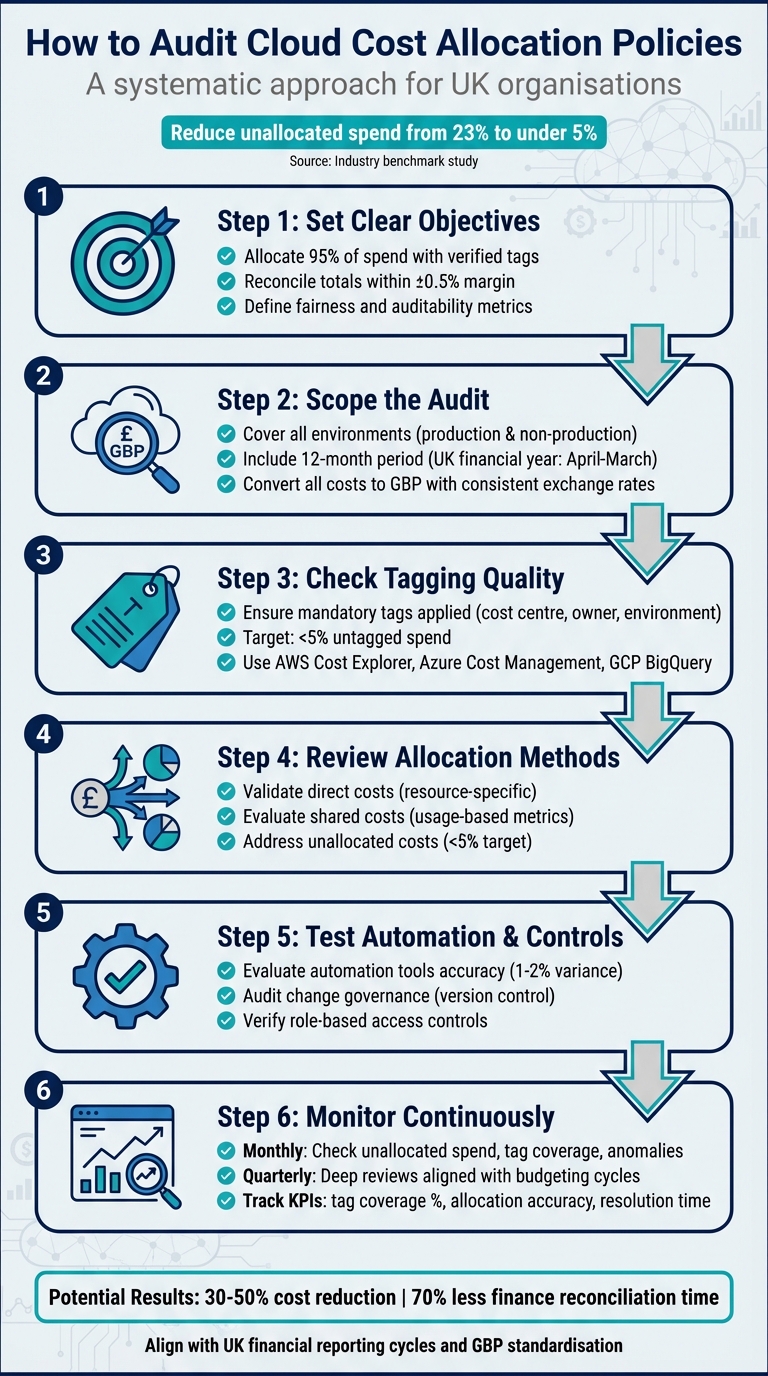 {6-Step Cloud Cost Allocation Audit Framework for UK Organisations}
:::
{6-Step Cloud Cost Allocation Audit Framework for UK Organisations}
:::
Set Objectives, Scope, and Governance
Define Audit Objectives
Start by establishing clear metrics for what success looks like in your audit. Accuracy is about ensuring a specific percentage of cloud spend is correctly attributed - for instance, aiming for at least 95% of monthly cloud spend to be allocated using verified tags. Use FinOps metrics, like the percentage of unallocated spend, to track progress. Completeness means including all relevant cloud providers, accounts, and services, ensuring reconciled totals match supplier invoices within a defined margin, such as ±0.5%. Fairness focuses on transparent rules for allocating shared service costs, such as platform or security expenses, using metrics like usage, seats, or revenue contribution instead of arbitrary percentages. Auditability requires a clear evidence trail, including documented policies, version-controlled allocation rules, automated tagging reports, and reproducible allocation processes that link every invoice line item to a cost centre. [3][5]
Ensure these objectives align with your organisation's priorities. For example, they should support quarterly GBP reporting and variance analysis. If your organisation tracks unit economics, validate that your allocation model supports metrics like cost per customer or transaction. Over time, as your FinOps practices evolve, incorporate discount allocation metrics into your analysis. [2][3][6]
With objectives in place, the next step is defining the scope of your audit.
Set Scope of Analysis
Once you've established your audit goals, outline the scope to ensure thorough coverage. Include production and shared platform accounts, as well as non-production environments like development, testing, and staging. For environments with minimal spend, consider grouping or sampling them. Focus on high-spend accounts, business-critical products, and areas with poor tagging or frequent cost disputes. Ensure the scope covers all direct resource usage, network costs, support plans, marketplace services, and discounts. [1][3][6]
Your audit should span a full 12-month period, aligned with the UK financial year (April–March). Standardise billing data by converting all invoices to GBP using centrally defined exchange rates for invoices issued in USD or EUR. Map your allocation model to cost centres and business units, ensuring that tags (e.g. cost_centre, product, BU) align with finance ledger dimensions. [3][6]
A well-defined scope and clearly measurable objectives are essential for effective cloud cost allocation audits, forming a solid foundation for broader cost management strategies.
Create a Governance Framework
Identify key stakeholders across Finance, IT, product management, and Compliance. Many organisations formalise these responsibilities under a FinOps or Cloud Cost Management function, which acts as a bridge between teams. Document roles, allocation methods, and tagging standards in a centralised, version-controlled repository. Use tools like a RACI matrix to clarify responsibilities, and review metrics - such as unallocated spend and tag exceptions - during monthly FinOps meetings and quarterly steering reviews.
Your Cloud Cost Allocation Policy should cover objectives, scope, allocation methods, shared cost treatment, tagging standards, and approval requirements. Include effective dates and assign ownership to ensure accountability. Version control is crucial: any changes to allocation logic should go through a formal change control process, with clear documentation of the rationale, approver, and implementation date. This ensures auditors can trace and reconstruct historical allocations when needed. [3][4][5]
Collect and Reconcile Billing Data
Gather Billing and Allocation Data
Once you’ve set your objectives and governance in motion, the next step is to organise and reconcile your billing data. This ensures every pound spent is accounted for and tracked properly.
Start by enabling detailed billing exports from your cloud providers. Each provider offers tools to help you with this:
- AWS: The Cost & Usage Report (CUR) includes line-item charges with resource IDs, tags, pricing details, and savings plan information.
- Azure: Azure Cost Management + Billing exports usage and cost data to CSV or Azure Storage, complete with resource groups, tags, and subscription metadata.
- Google Cloud: Billing data can be exported to BigQuery or CSV, including labels, projects, and committed use discount details.
Once you’ve gathered this data, consolidate it into a single repository, such as a data warehouse or a FinOps platform. Index the data by provider, account, service, region, and date. This centralised store becomes your go-to source for audits and reporting. To streamline this process, maintain a mapping table that links accounts, subscriptions, or projects to their respective business units and cost centres. By joining this reference data to your billing records, you can trace every pound of spend back to its rightful owner.
To simplify reconciliation, enforce tagging or labelling standards for key attributes like cost centre, application, environment, and owner. Use cloud-native tools to block or flag resources that lack these tags. Standardising tag keys (e.g., using a consistent key like cost_centre) across all cloud environments reduces the complexity of matching and reconciling data.
Reconcile Data with Invoices
At the end of each month, compare your detailed usage records against the official invoices or statements provided by each cloud vendor. Your goal is to match totals within a 0.5% variance to ensure accuracy. Conduct this reconciliation at multiple levels: the overall invoice total, by account or subscription, by major service (e.g., AWS EC2, S3; Azure VMs; or Google Compute Engine), and by region if applicable.
If discrepancies arise, investigate them immediately. Common culprits include untagged or mis-tagged resources, unrecorded credits, marketplace charges, support fees, or timing differences. Define clear tolerance thresholds and timelines to finalise reconciliations - for example, aim to complete this process within five working days of receiving the invoice. This approach supports UK financial close processes and ensures timely reporting.
A mid-sized UK SaaS company saw a dramatic improvement by standardising tags and automating monthly reconciliations. Their unallocated spend dropped from 12% to under 3%, and they halved the effort required for Finance reconciliation. [3][6]
Report Consistently in GBP
Reporting in GBP keeps your cloud spending aligned with budgets, forecasts, and statutory accounts. This consistency makes it easier for Finance teams and budget holders to make informed decisions. On the other hand, mixed-currency reporting can create challenges like foreign exchange fluctuations, which obscure real usage changes, complicate variance analysis, and make reconciliation with the general ledger more difficult. It can also distort cost changes if exchange rate movements mask or amplify underlying spending trends.
Where possible, opt for GBP as the billing currency for new accounts and subscriptions if the provider offers it. For older accounts billed in USD or EUR, apply a consistent exchange rate, such as the monthly average rate from the Bank of England. Record the FX rate used for each line item so totals can be recreated and audited when needed. Finance and FinOps teams should agree on whether to use spot, average, or corporate treasury rates and apply this policy consistently across all providers and billing periods. This ensures your reports, budgets, and trend analyses remain clear and comparable over time.
For organisations with complex multi-cloud or hybrid setups, specialist firms like Hokstad Consulting can help. They can design tailored data models, automation processes, and allocation rules, ensuring billing reconciliation and GBP normalisation are handled effectively. This creates a robust foundation for audits and guarantees accurate financial data for all future reporting.
Check Tagging and Attribution Quality
Audit Tagging Policies
After reconciling your data, it's crucial to verify tagging accuracy to ensure costs are allocated correctly across teams. Define a set of mandatory tags with specific, pre-approved values and assign ownership for each. Common tags include cost_centre, owner, environment, application, business_unit, and project [3][5].
To measure tagging effectiveness, calculate what percentage of your monthly cloud spend (in £) is tied to resources with all mandatory tags [3][5]. Tools like AWS Cost Explorer and Cost Allocation Tags, Azure Cost Management, and GCP Billing export with BigQuery can help you generate reports identifying untagged resources and the portion of spending they represent [3][6]. Set clear goals for improvement - organisations with mature practices often aim for less than 5% of monthly spend being untagged or unallocated [5].
One financial services company successfully reduced unallocated costs from 23% to under 5% by implementing automated tagging [9].
Validate Mapping Accuracy
Once you've ensured broad tagging coverage, the next step is to validate how your tags and accounts map to cost centres and teams. Use a central mapping table that connects each tag value (e.g., cost_centre=1234
) and account ID to a specific cost centre, business unit, and reporting hierarchy [2][6]. This table should be jointly managed by FinOps and Finance teams, version-controlled, and updated whenever changes occur - such as the creation, merging, or retirement of teams or cost centres [2][4].
Pay close attention to high-cost and high-growth areas, such as the top 10 services or projects by monthly spend (in £). Collaborate with product owners and finance partners to confirm the accuracy of ownership and cost_centre values [6]. Exception reports can also highlight issues like spending linked to deprecated cost centres, unrecognised team names, or generic categories like misc
or shared
, helping you spot potential misallocations [3].
Once mapping accuracy is confirmed, implement enforcement measures to maintain consistency in tagging.
Enforce Tagging Standards
To prevent recurring tagging issues, enforce tagging standards using built-in governance tools from cloud providers. On AWS, for instance, you can use Tag Policies and Service Control Policies (SCPs) to require specific tags and block resources that lack them. AWS Config rules can monitor compliance and trigger remediation actions [10][11]. Azure offers Azure Policy, which can mandate tags on specific resource types, append default tags when they're missing, and deny non-compliant deployments. Dashboards can then track resource compliance [3][11]. On GCP, Organisation Policy constraints and labels help enforce and standardise key tags at the project and folder level [6][7].
Start by using these tools in audit mode to identify gaps, and then transition to deny mode for production environments [3][4]. To integrate tagging into your workflows, embed required tags into automation tools like Terraform, CloudFormation, and Bicep modules. Add CI checks to block changes that don't comply with tagging standards [9][10]. If you're managing a complex multi-cloud environment, consider working with consultancies like Hokstad Consulting. They can help design tagging strategies, governance frameworks, and enforcement processes tailored to UK financial and reporting requirements.
Cost Allocation Models and Chargeback
Review Cost Allocation Logic
Accurate tagging and mapping are just the starting point. To ensure fairness and transparency in cost assignment, it’s essential to audit the allocation logic thoroughly. This involves verifying that direct, shared, and unallocated costs are distributed according to established rules. Take time to review each cost category against your organisation's allocation policies.
Analyse Direct Costs
Direct costs are those tied exclusively to a specific product, project, team, or cost centre, often identified through tags, accounts, or subscriptions. To ensure accuracy, reconcile provider reports with UK cost centres and project codes, keeping everything aligned in pounds (£). For instance:
- AWS: Cross-check Cost and Usage Reports by linked accounts and mandatory tags like
CostCenter,Environment, andApplication[9]. - Azure: Validate that Management Groups, subscriptions, and Azure Cost Management views mirror your organisational structure. Sample invoices to confirm that each subscription’s spending aggregates correctly in pounds [9].
- Google Cloud: Confirm that billing accounts, projects, and labels align with monthly VAT invoices [3].
To ensure fairness, check that projects using similar resource types and volumes incur proportionate charges on internal showback or chargeback reports [2][13]. High-cost resources should be spot-checked to confirm their tags and cost centres are accurate and agreed upon with stakeholders [3][8]. Document each direct cost category - such as compute, storage, managed databases, or third-party SaaS - alongside its allocation rule. This ensures consistency in monthly reconciliation with the general ledger [3].
Evaluate Shared Costs
Shared costs, like those for multi-tenant Kubernetes clusters, shared databases, networking, security tools, or central observability platforms, require careful allocation to ensure fairness. Common methods include:
- Usage-based metrics (e.g., CPU hours, RAM GB-hours, storage GB, API calls, data transfer)
- Request or traffic volume
- Business drivers, such as allocating a percentage of product revenue when technical usage is harder to quantify [3][13].
Usage-based methods are generally preferred when reliable telemetry is available, aligning with FinOps recommendations [5]. Compare driver metrics, such as CPU hours versus API calls, to ensure the allocation methods distribute costs equitably [13]. If discrepancies arise, consult Finance and FinOps stakeholders to address inconsistencies [5]. The chosen method should always be objective, supported by logs or metrics, and applied consistently, with any exceptions documented under your governance framework [3][5].
Watch for allocation patterns that might discourage cost optimisation. For example, if shared platforms are assigned equally across teams regardless of usage, heavy users may lack motivation to optimise since their additional consumption barely impacts their internal bill [13]. Similarly, if central security or observability tools are absorbed entirely by an infrastructure cost centre, product teams may see their usage as free
, reducing incentives to eliminate unnecessary logs or metrics [3]. Over-aggregated allocations, like platform
or miscellaneous
, can also obscure costly workloads, making it harder to make informed decisions about rightsizing or decommissioning [9]. These issues may signal a need for more granular and usage-aligned allocation methods [3][13].
Address Unallocated Costs
Unallocated costs can quickly become a headache, so it’s crucial to minimise them by tracking and documenting resources that lack required tags or use unapproved accounts. Provider tools can help flag and monitor unallocated spending [9][3]. The FinOps Foundation recommends tracking the percentage of unallocated spend as a maturity metric, with high-performing organisations keeping this figure in the low single digits [5]. Many aim for less than 5% unallocated spend and have action plans in place if this threshold is exceeded [9][5].
If retrospective attribution is necessary, use clear rules based on historical usage or deployment data [3]. When precise attribution isn’t possible, temporarily assign costs to a Platform
or Unclassified
cost centre and work with Finance to redistribute them using a one-off rule, such as splitting costs by revenue share or headcount. Clearly label these adjustments in reports [5]. Ensure all retrospective allocations are well-documented, including date ranges, methods, and approvals, and communicate these changes to affected teams to maintain trust and avoid disputes over budgets or performance metrics [2][5].
If unallocated spending remains high despite internal efforts - or if your organisation is transitioning to more complex allocation models - external expertise may be helpful. Firms like Hokstad Consulting can benchmark your allocation logic against industry practices, offering guidance to optimise cloud infrastructure and hosting costs [9][5].
The next step is to test the controls and automation you've implemented to ensure ongoing accuracy in cost allocation.
Need help optimizing your cloud costs?
Get expert advice on how to reduce your cloud expenses without sacrificing performance.
Test Controls, Automation, and Governance
Once you’ve reviewed your allocation logic, it’s time to test your controls, automation, and governance processes to ensure they’re up to the task. Even the best allocation rules can fail if the systems enforcing them are weak. This part of the audit checks whether your tools, change processes, and access controls are doing their job effectively.
Evaluate Automation Tools
Begin by listing all the cost-management tools you’re using - whether it’s AWS Cost Explorer, Azure Cost Management, Google Cloud Billing, or third-party FinOps platforms. Test each tool for critical aspects like full data coverage, detailed granularity, and billing reconciliation accuracy (aiming for a variance of no more than 1–2%). Make sure anomaly detection and budget alerts are set up at meaningful levels, such as by product or cost centre, instead of broad, global account levels. If any tools fall short, document the gaps - like missing shared-cost logic or the inability to replay historical tags - and outline steps to address these issues.
To assess alert effectiveness, simulate a cost spike by temporarily launching extra instances. Verify that alerts are triggered and routed to the correct teams and cost centres. Ensure alerts are configured in GBP and are mapped to the relevant business units. These tests naturally lead into checking the robustness of your change processes and access controls.
Audit Change Governance
All allocation logic - such as tag dictionaries, cost allocation rules, shared-cost distribution methods, and mapping tables - should be stored in version control systems like Git. Each change should be linked to a ticket, pull request, and approver. Check that recent changes include documented rationale, evidence of review, and clear effective dates. For major changes - like introducing a new shared-cost allocation method or a mandatory tag for production workloads - ensure these are communicated to UK stakeholders in advance, with examples showing the impact on budgets in pounds.
For teams operating at a higher maturity level, treat allocation logic as infrastructure as code. This means using code reviews, automated tests (e.g., ensuring no rule results in negative allocations), and CI pipelines to validate changes before deployment. During the audit, confirm that every change can be traced from the original policy definition, through the code change and deployment, to its reflection in reports. If your organisation lacks expertise in FinOps or automation, specialists like Hokstad Consulting can assist in implementing infrastructure-as-code for allocation logic and integrating tailored anomaly detection for GBP-based financial reporting.
Verify Role-Based Access Controls
Map out all roles that can view or modify cost data and allocation rules across cloud platforms, cost-management tools, and business intelligence systems. Ensure that only a small, well-defined group - such as the FinOps team, Finance, or specific engineering leads - has permission to modify allocation logic or tagging standards. Broader teams should only have read-only access to the cost data relevant to their roles. Regularly review access roles, with quarterly recertification being a common practice, and ensure that joiners, movers, and leavers processes promptly update permissions.
Test role-based access scenarios using sample user profiles. For instance, confirm that product team leads, developers, FinOps engineers, and Finance partners can only access the data they’re authorised to see and cannot modify allocation rules. Check that restricted actions, like downloading or sharing raw account-wide data, are appropriately blocked. Review IAM policies for providers like AWS, Azure, and GCP to ensure permissions - such as billing export access - are tightly controlled. For third-party tools, verify that admin roles are limited, SSO and multi-factor authentication are enforced, and all administrative actions related to allocation logic are logged and auditable. Finally, ensure that all allocation-related systems produce immutable logs that record changes, timestamps, and interfaces. These logs should be centralised (e.g., within a SIEM) and secured with proper access controls.
Execute the Audit and Prioritise Fixes
Once your controls and automation are in place, it’s time to conduct the audit. This is where preparation turns into action - generating reports, identifying problem areas, and creating a clear plan to tackle them. The aim is to produce findings that are easy for finance, engineering, and leadership teams to understand and act on.
Perform the Audit
Start by using your established objectives and verified controls to carry out a thorough audit. Create a 12–18 month baseline of cloud spending, broken down by provider, account, service, and business category (like product or cost centre). Convert all costs into GBP for consistency. Compare this baseline with your allocation policy and chart of accounts to spot mismatches, unexplained differences, or unallocated expenses. Run tagging accuracy reports to identify the most expensive untagged or mis-tagged services. Dive deeper into high-impact workloads to ensure their allocation aligns with actual usage.
Group the issues into categories: untagged, mis-tagged, misallocated, or tooling errors. For large unallocated spend buckets, trace sample line items back to their source to identify whether the issue stems from missing tags, overridden tags, or services that don’t support tagging. Cross-check current tag values and account ownership against your CMDB, organisational structure, and product catalogue to determine which team should own the cost. Review your IaC templates and CI/CD pipelines to confirm that tagging and account routing are set up correctly, and ensure cost-allocation rules reflect these configurations.
Focus on the highest areas of spending by team, product, environment, and service over the last three to six months. Highlight resources with incomplete or missing tags and track how much of your monthly spend remains unallocated, both as a percentage and in absolute GBP terms. Run anomaly and spike reports to flag sudden changes in spending, which might indicate misconfigurations or allocation errors. Identify idle or underused resources - like low-CPU instances, unattached storage volumes, or oversized configurations - and calculate the potential monthly savings if these resources were resized or removed.
Prioritise Remediation Actions
After gathering insights from the audit, prioritise the issues based on their financial impact, risk level, required effort, and urgency. High-priority items often include large unallocated costs, misallocations that distort team budgets, and issues that hinder accurate chargeback or showback. Rank each issue by its potential monthly or annual financial impact and its effect on critical workloads or compliance requirements. Focus on quick wins, like fixing common tagging errors in an IaC module or removing a few costly unused resources, to demonstrate immediate value.
Document each issue as a clear, actionable task. Assign a specific service or team owner, set deadlines aligned with sprint or release cycles, and track these tasks in your work management system (e.g., Jira or Azure DevOps). Link each task to the relevant cost report and financial impact to ensure teams understand the stakes. For broader initiatives - like implementing global tagging policies or shared-cost rules - assign responsibility to a central team, such as FinOps or platform engineering, with approval from finance and security teams. Define success criteria for each action, such as achieving a certain tagging coverage percentage, reducing unallocated costs below a set threshold, or reconciling all variances against invoices. Regularly review progress in FinOps or cloud governance meetings. If you lack in-house expertise, consider bringing in specialists like Hokstad Consulting to help design solutions and implement automation.
A financial services company with several business units successfully reduced unallocated costs from 23% to under 5% in just six months by using account-based allocation for specific workloads, usage-based allocation for shared services, automated tagging through infrastructure as code, and monthly stakeholder reviews between 2023 and 2024. This approach also cut the finance team’s allocation time by 70%. [9]
Document Findings
Compile an Audit Report that summarises the scope, methodology, key findings, and financial impact. Create an Allocation Methodology Document to outline tagging standards, account structures, shared-cost drivers, exchange-rate handling, and reconciliation processes. Maintain a Findings and Remediation Register that lists each issue, its root cause, the affected cost in GBP, the assigned owner, priority, and current status. Keep an evidence pack with reports, screenshots, and corrected allocation samples to demonstrate your processes to external auditors. Update governance documents to reflect new practices, ensuring future audits can verify compliance with clear, version-controlled policies.
Translate technical findings into business-focused insights. For example, highlight metrics like £X per month currently unallocated
, £Y in potential savings from idle resources
, or Z% of spend now accurately attributed to products.
Use simple visuals to show trends in tagging coverage, unallocated spend, and realised savings over time. Include specific examples where improved allocation led to smarter business decisions, making the impact clear to all stakeholders.
Set Up Continuous Monitoring and Improvement
Once you've completed a thorough audit, the next step is to ensure your allocation practices stay on track with continuous monitoring. An audit lays the groundwork, but it's the ongoing checks that keep your data accurate as your cloud usage evolves. Cloud environments are dynamic - new services emerge, team structures shift, and workloads scale. Without regular monitoring, allocation accuracy can drift, potentially leading to financial inaccuracies and reduced accountability over time. Continuous monitoring helps you stay on top of these changes and maintain control.[3]
Set an Audit Cadence
Establish a regular schedule for audits to catch issues early and keep your processes running smoothly. Conduct light checks every month to identify obvious problems, focusing on metrics like unallocated spend, tag coverage, and any major anomalies flagged by tools such as AWS Cost Explorer, Azure Cost Management, or GCP Billing. Address critical issues - like misallocated expenses exceeding £5,000 - within five to seven working days.
In addition to monthly checks, plan for more detailed reviews on a quarterly basis, aligning these with your budgeting and forecasting cycles. These deeper reviews should validate allocation rules for shared services, ensure tagging accuracy at the resource level, and confirm that cost reports reflect your organisation’s structure and product offerings. Quarterly workshops with stakeholders from finance, engineering, and product teams can also be invaluable. These sessions can help refine tagging strategies and shared-cost models, ensuring policies reflect real-world usage patterns.
Track Key Metrics
Keep an eye on key performance indicators such as tag coverage and unallocated costs, measured both as percentages and in GBP. Pay attention to allocation accuracy, which indicates the proportion of spending that needs reclassification each period. Additionally, track how long it takes to resolve allocation issues once identified, as well as the number of allocation-related queries raised by stakeholders.
Set clear targets to guide your efforts - such as achieving 80% tag coverage, keeping unallocated spend under 10%, and resolving critical issues within ten working days. As your processes mature, you can aim for tighter thresholds. Use dashboards to display monthly spend in GBP, broken down by cost centre, product, and environment. Include trends in tag coverage and unallocated spend to provide a clear picture of performance. Monthly showback or chargeback reports, aligned with your chart of accounts, help keep stakeholders informed and engaged throughout the process. These metrics form a solid foundation for further refinement and optimisation.
Get Expert Support
If your team is stretched thin or lacks the expertise to build a sustainable FinOps model, external support can bridge the gap. Hokstad Consulting offers tailored solutions for UK organisations, helping to establish audit schedules, automate data collection and tagging, and set up dashboards and alerts in GBP. Their services include designing allocation frameworks, integrating cost views with existing BI or ERP tools, and using infrastructure-as-code and CI/CD integrations to enforce tagging standards automatically.
Hokstad Consulting also provides guidance on complex challenges like shared-cost models, multi-cloud normalisation, and leveraging AI-driven tools to detect anomalies and recommend cost-saving actions. They often operate on a no savings, no fee
basis, with fees capped as a percentage of realised savings - making it easier to justify the investment in continuous improvement and automation.
Conclusion
Regular audits of cloud cost allocation policies are essential for maintaining accurate financial reporting and keeping cloud expenses under control. The process involves setting clear objectives, reconciling billing data in GBP, auditing the quality of tagging, reviewing allocation logic, testing controls, and documenting findings. By doing so, organisations can foster transparency and accountability across Finance, Engineering, and Product teams.
These efforts deliver tangible results. Studies suggest that consistent audits can reduce cloud costs by 30–50% [12], while improving performance through right-sizing and efficient resource use. For UK organisations, this means clearer unit economics, fairer chargeback and showback systems, and enhanced stakeholder confidence - every pound spent on cloud services is directly linked to the business units, products, or cost centres driving it.
Start small. Focus on a few critical tags, select cost centres, and establish a straightforward shared-cost model. Pilot the process with one or two significant business units, validate outcomes with Finance, and expand coverage gradually. Regular reviews in GBP, combined with simple and consistent allocation, improve visibility and control. Set explicit goals, such as reducing unallocated spend to below 5% and minimising discrepancies between cloud invoices and internal reports. Monitor progress monthly or quarterly, aligning with UK financial reporting cycles.
If internal expertise is limited, external specialists can provide valuable support. Many UK organisations lack dedicated FinOps or cloud cost engineering resources. Hokstad Consulting, for example, specialises in helping UK businesses optimise DevOps and cloud infrastructure costs. They assist with designing tagging schemes, developing allocation models, automating reporting, and implementing continuous monitoring - all tailored to local financial and operational requirements. Their no savings, no fee
approach, with fees capped by realised savings, offers a low-risk way to drive improvement.
FAQs
How can we maintain accurate tagging for all cloud resources?
To keep your cloud resources properly tagged, it's crucial to set up clear and consistent tagging rules that match your organisation's specific requirements. Leverage automated tagging tools within your cloud management platform to simplify the process of applying and tracking tags. Make it a habit to carry out routine audits to check tag accuracy, and back this up with governance policies and staff training to ensure compliance. Incorporating these steps into your daily processes helps maintain accurate tagging, making it easier to manage costs and resources effectively.
What are the best practices for managing cloud costs in GBP?
To keep cloud costs under control in GBP, start by using automated cost tracking tools to keep an eye on your spending as it happens. Regularly go through your invoices and match them with the resources you've allocated to ensure everything lines up correctly. Establish a consistent approach to cost categorisation across your organisation to make tracking and reporting easier.
Schedule regular audits to catch any discrepancies and identify opportunities to optimise how resources are used. Techniques like right-sizing resources and using automation can help cut down on unnecessary spending. Make sure your cost policies are well-documented and aligned with your organisation’s budget to stay compliant and maintain accuracy.
How frequently should we review cloud cost allocation policies?
To keep your cloud expenses under control, it's a good idea to review your cost allocation policies every three months. These regular checks help maintain precision, ensure compliance with policies, and spot areas where you can reduce costs.
If your business operates in a rapidly changing or expanding cloud environment, it might be worth considering monthly reviews. This way, you can stay updated on changes and avoid spending money where it's not needed.