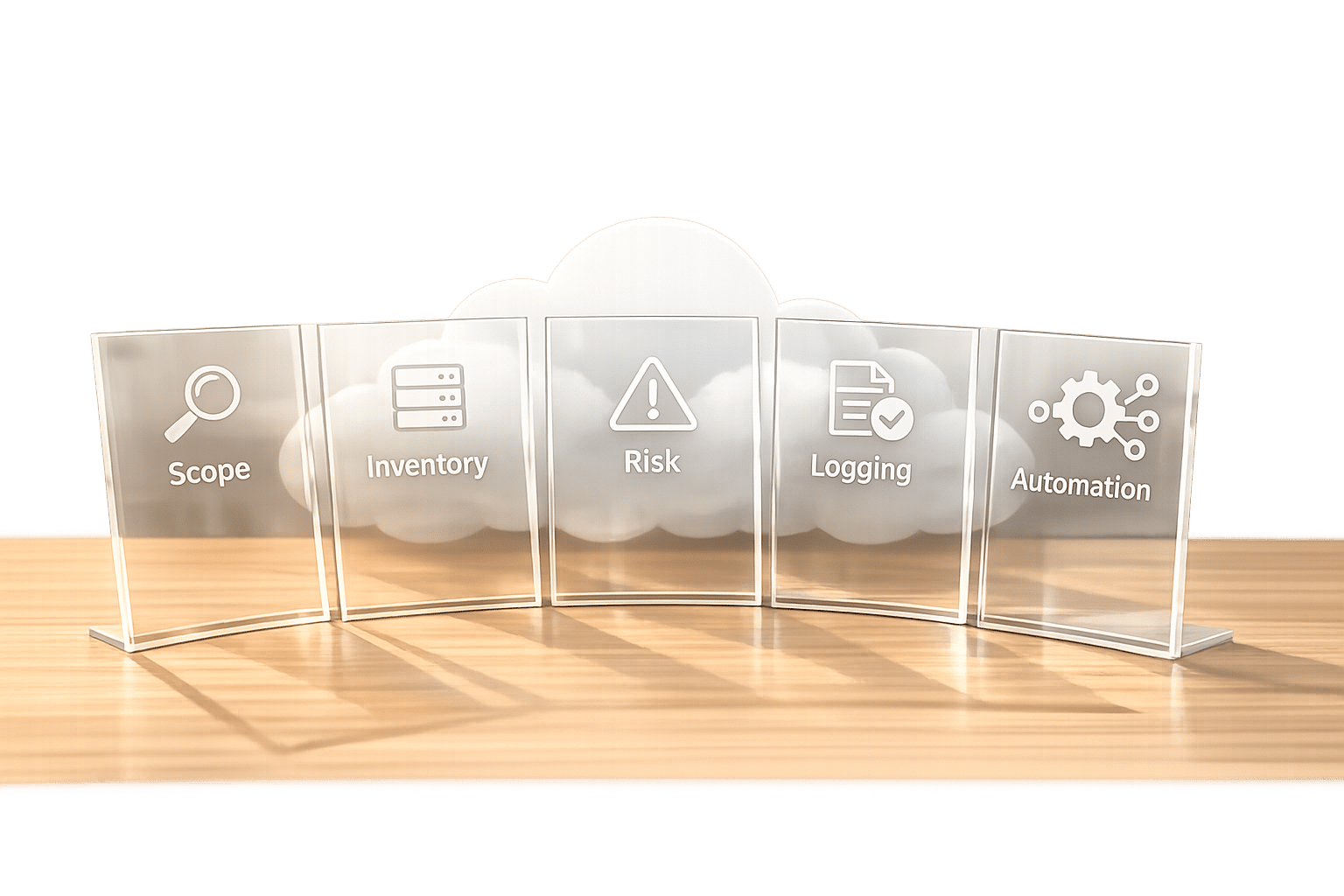
Cloud configuration audits are essential for preventing security breaches, ensuring compliance, and managing costs effectively. Misconfigurations account for 80–90% of cloud breaches, making regular audits a priority. Here's a quick breakdown of the process:
- Set the Scope: Define what resources and environments to audit, and involve key stakeholders like DevOps, security, and compliance teams.
- Inventory Resources: Use automated tools to create a centralised list of all cloud assets and maintain up-to-date documentation.
- Assess Risks: Check access controls, encryption, and network security. Address common misconfigurations like overly permissive IAM roles and unencrypted data.
- Enable Monitoring: Set up logging and continuous monitoring to identify and resolve issues quickly.
- Document Findings: Record audit results, prioritise fixes based on risk, and integrate solutions into DevSecOps pipelines.
Regular audits, combined with automation, help secure your cloud environment, meet compliance standards, and reduce unnecessary expenses. Tools like AWS Config or Azure Security Centre can streamline the process and improve visibility across multi-cloud setups.
::: @figure 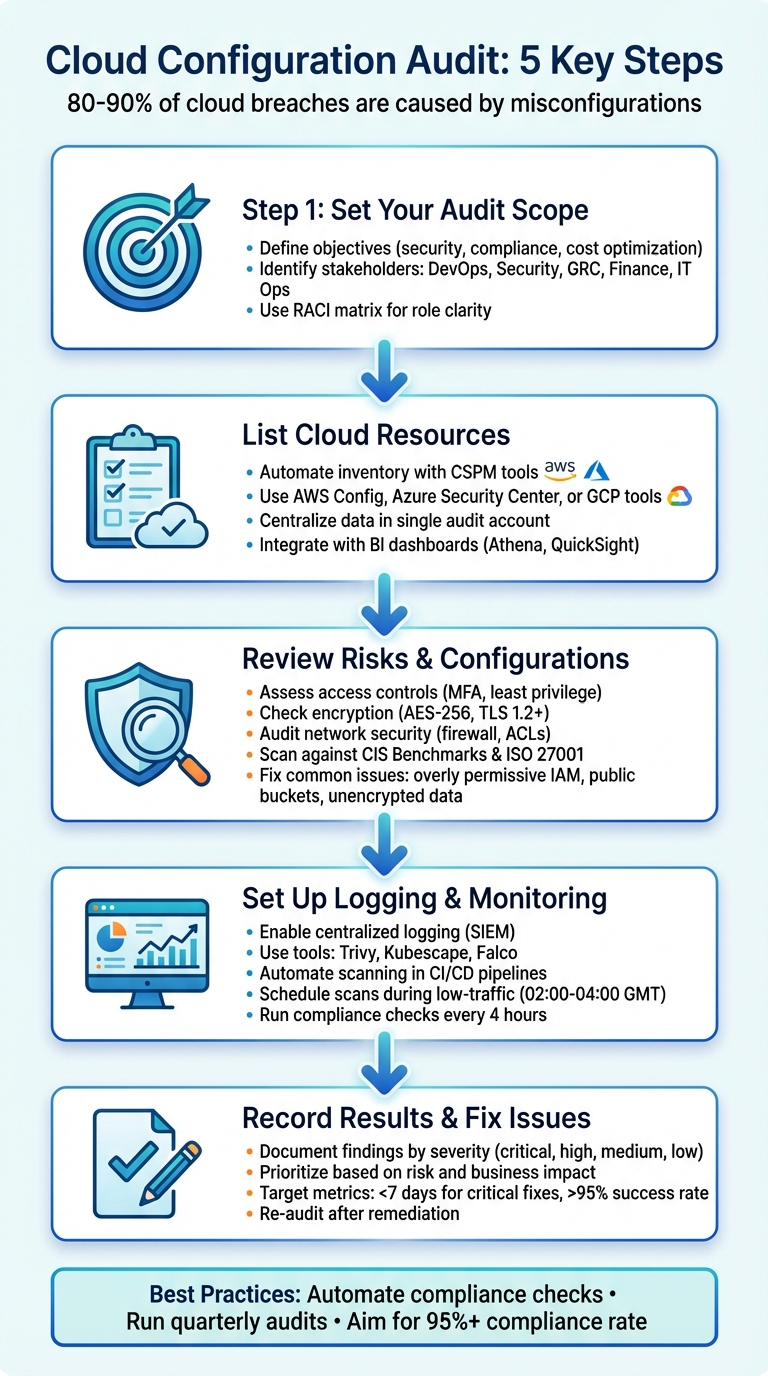 {5-Step Cloud Configuration Audit Process for Security and Compliance}
:::
{5-Step Cloud Configuration Audit Process for Security and Compliance}
:::
AWS Config Explained: Complete Guide to Resource Configuration & Compliance Monitoring
Step 1: Set Your Audit Scope and Identify Stakeholders
This step lays the groundwork for your audit by defining its scope and assembling the right team. It directly impacts how risks are assessed and configurations are reviewed later.
Define Your Objectives and Boundaries
Start by clarifying your audit's purpose. Are you aiming to spot security vulnerabilities, check regulatory compliance, optimise resources, or verify controls? For example, in a multi-cloud setup, you might focus on auditing AWS S3 buckets for public access, while excluding provider-managed infrastructure that isn't under your control [1][2][5].
Next, narrow down the scope by concentrating on customer-managed resources like virtual machines, storage, networks, and applications. Specify the environments you'll audit - whether that's production, staging, development, or a mix. For UK organisations, you might limit the audit to EU regions to ensure compliance with data residency laws [1][5]. Clearly document what systems, operations, and locations are included in your audit, as well as any exclusions, to keep efforts focused [2].
Once the scope is set, it's time to bring in the right people to make the audit process effective.
Involve the Right People
Getting the right team involved early is crucial to avoid gaps and ensure smoother issue resolution. Include DevOps, security, and GRC teams to address technical, risk, and compliance requirements [1][2][5]. DevOps can provide technical diagrams and insights into your environment, security teams can validate access controls and encryption, and GRC teams can define compliance needs and align them with your audit scope.
Use a RACI matrix (Responsible, Accountable, Consulted, Informed) to outline roles and responsibilities clearly. Share this through tools like Confluence or Microsoft Teams for transparency [2][4]. Proper documentation ensures everyone knows their role from the start. Early collaboration helps avoid blind spots, such as shadow IT assets or third-party vulnerabilities, which can lead to unmonitored attack surfaces if overlooked by DevOps or security teams [3][5].
| Stakeholder Group | Audit Responsibility | Priority |
|---|---|---|
| DevOps / Platform | Technical implementation and provisioning | Automation and deployment speed |
| Security & GRC | Defining control objectives and risk assessment | Strong controls and audit trails |
| Finance / FinOps | Budget adherence and cost allocation | Accurate tracking in GBP (£) |
| Business Owners | Balancing risk with delivery timelines | Speed-to-market and ROI |
| IT Operations | Infrastructure and day-to-day management | System reliability and uptime |
Step 2: List Your Cloud Resources and Collect Documentation
Once you've established the scope and identified your stakeholders, the next step is to create a detailed inventory of your cloud resources. At Hokstad Consulting (https://hokstadconsulting.com), the emphasis is on taking a systematic and automated approach to ensure your cloud environment remains secure and compliant. Automation is key to keeping your resource inventory current, and this should be followed by clearly outlining your configuration protocols.
Automate Your Resource Inventory
Relying on manual spreadsheets simply doesn't cut it in fast-changing cloud environments. Instead, turn to Cloud Security Posture Management (CSPM) tools or built-in cloud services to automate the process. For example, AWS users can leverage tools like AWS Config to gather data from multiple accounts and regions into a single Audit Account
or Log Archive Account
. This provides a centralised view, eliminating the need to manually check each environment [10].
Having a centralised inventory ensures that your technical data aligns with operational security requirements [10]. For organisations in the UK, this is especially critical when demonstrating compliance with data residency rules across EU regions.
To make your inventory more actionable, consider integrating it with query and business intelligence tools. For instance, AWS Config data can be combined with Amazon Athena and Amazon QuickSight to build interactive dashboards. These dashboards can help teams across infrastructure, security, and finance functions to identify risks, monitor costs in GBP (£), and locate untagged or orphaned resources [10]. This consolidated resource data forms the foundation for the risk assessments and configuration reviews that follow in later audit stages.
Once your inventory is automated and centralised, back it up with thorough documentation to strengthen your security practices.
Collect Required Documentation
In addition to your resource inventory, you'll need to gather essential documents that validate the configuration of your environment. This includes security policies, incident response plans, and RACI matrices, which define roles and responsibilities while ensuring compliance with GDPR and ISO standards. Asset registries, data maps, and tagging policies are also crucial for tracking resource ownership and confirming data residency.
You should also collect Infrastructure as Code (IaC) templates, CIS Benchmark alignments, and network diagrams to establish a clear gold standard
for secure configurations. Operational documents such as change logs, audit trails, disaster recovery plans, and SLA metrics provide a record of how your environment has evolved. Compliance-related documents, like risk assessments, policy mapping matrices, and exception logs, not only demonstrate adherence to regulations but also document any approved deviations.
Organising this documentation early on will make configuration reviews and audit processes far more efficient.
Step 3: Review Risks and Check Configurations
Now that you’ve organised your inventory and documentation, it’s time to assess the security posture of your cloud environment. This involves evaluating monitoring activities to ensure they cover your cloud setup. It’s also vital that those responsible for security can identify, escalate, and respond to risks promptly [1]. You’ll need to carefully examine system configurations, user access, and vulnerability management to identify any weaknesses in your safeguards against known risks [2].
Perform Risk Assessments
Start by reviewing access controls to ensure Multi-Factor Authentication (MFA) is enforced and that users operate under the principle of least privilege. Confirm that data encryption is in place for both data at rest and data in transit, with TLS 1.2 or higher being the standard [2].
For network security, carry out a thorough audit of firewall rules, network Access Control Lists (ACLs), and segmentation. A default-deny policy should be enforced, allowing only essential ports to remain open [2].
Given the limited visibility often associated with cloud environments, continuous automated monitoring is crucial. This helps identify attack surfaces and shadow IT quickly, with some tools capable of detecting misconfigurations in mere minutes [7][8]. Consider using Cloud Security Posture Management (CSPM) tools like AWS Config, Azure Security Center, or Google Cloud Security Command Center. These tools can scan your configurations against established standards, such as CIS Benchmarks or ISO 27001:2022 [2][9]. They’re particularly useful for uncovering vulnerabilities in IAM policies that might lead to unauthorised access, allowing you to prioritise and address higher-risk assets [7].
By addressing these risks, you’ll be better prepared to tackle common misconfigurations effectively.
Common Misconfigurations and How to Fix Them
Once risks are identified, focus on addressing common misconfigurations. Security misconfigurations are a major cause of cloud breaches, often resulting from weak IAM policies that leave systems vulnerable to account takeovers [11]. Below is a table highlighting typical misconfigurations and their fixes:
| Common Misconfiguration | Security Risk | Recommended Fix |
|---|---|---|
| Overly Permissive IAM Roles | Lateral movement and privilege escalation | Use Role-Based Access Control (RBAC) with fine-grained permissions; enforce MFA; conduct quarterly access reviews [2] |
| Publicly Accessible Storage Buckets | Data breach and unauthorised exposure | Enable Block Public Accessat the account level; use bucket policies; place resources in private subnets |
| Unencrypted Data Volumes | Data theft in the event of compromise | Enforce AES-256 encryption at rest using AWS KMS or equivalent; verify TLS 1.2+ for data in transit [2][6] |
| Default Security Groups | Unrestricted inbound/outbound traffic | Replace with tailored rules allowing only necessary ports and IP ranges; implement default-deny policies [2] |
| Disabled Logging/Monitoring | Inability to detect or respond to incidents | Enable centralised logging for authentication, data access, and changes; integrate with SIEM [1][2] |
| Unpatched Vulnerabilities | Exploitation of known security flaws | Automate vulnerability scanning and patching routines; confirm OS patching status regularly [2] |
For IAM-specific issues, tools like AWS IAM Access Analyzer can help you identify unused roles and users, which should be removed immediately [2]. Address encryption gaps by enabling default encryption on storage services, such as AWS S3 with SSE-S3, and managing keys through services like AWS KMS [2][6]. Additionally, cross-check your assessments against compliance standards like GDPR, PCI-DSS, or NERC to ensure you’re meeting requirements and avoiding compliance violations [2][6]. For organisations operating in the UK, ensuring data residency compliance within UK regions is particularly critical.
Step 4: Set Up Logging, Monitoring, and Testing
Once you've tackled risks, verified configurations, and addressed misconfigurations, the next step is to establish strong logging, monitoring, and testing processes. Without proper audit trails, detecting incidents and proving compliance becomes nearly impossible. A stark example of this is Memorial Healthcare Systems, which faced a £4.3 million fine due to inadequate log reviews [1].
Configure Centralised Logging
Start by enabling audit logs across your entire cloud setup. Different types of logs capture specific activities. For example, Google Cloud offers Admin Activity and System Event logs at no cost, while Data Access and Policy Denied logs may incur charges [12].
To streamline log management, consolidate all logs into a centralised SIEM (Security Information and Event Management) platform like Elasticsearch, Grafana Loki, or Splunk. Tools such as Fluent Bit or Filebeat can forward logs from individual nodes to your central system. This centralisation allows you to search, visualise, and correlate events across multiple cloud services and providers. For added security and compliance, store logs in an immutable format to prevent tampering - a critical requirement for forensic investigations and GDPR compliance. Properly secured logs not only enhance threat detection but also help demonstrate adherence to regulations like GDPR.
With your logging infrastructure in place, the next priority is continuous monitoring and testing.
Monitor and Test Continuously
Once logs are centralised, continuous monitoring becomes the backbone of a secure cloud environment. This involves automated scanning and testing to identify and address vulnerabilities proactively. Integrate CI/CD scanning tools and automate fixes using serverless functions. Tools such as Trivy, Kubescape, or kube-bench can scan container images, YAML files, and cluster configurations against standards like CIS Benchmarks or MITRE ATT&CK. For runtime security, deploy Falco to monitor system calls and flag suspicious activities like privilege escalation or unauthorised file access.
To minimise performance disruptions, schedule vulnerability scans during low-traffic periods (e.g., 02:00 to 04:00 GMT). Compliance checks should be frequent - every four hours is a good starting point. Use Policy as Code tools like Open Policy Agent (OPA) or HashiCorp Sentinel to enforce consistent security rules across all environments. For automated remediation, integrate monitoring tools with serverless functions such as AWS Lambda. For instance, if an S3 bucket is found unencrypted, the system can automatically apply encryption.
Beyond real-time alerts, conduct monthly trend analyses to spot recurring misconfigurations. This helps prioritise resources and address systemic issues more effectively.
Step 5: Record Results and Fix Issues
After thorough monitoring and testing, it’s time to summarise your audit findings and take action to address any issues uncovered.
Document Your Findings
Turning raw data into actionable insights is key. A well-structured report should outline the audit scope, methodologies, and findings, categorised by severity - critical, high, medium, and low. Include both strengths (like robust data encryption at rest) and weaknesses (such as open ports or unpatched virtual machines), along with any compliance gaps (e.g., failure to meet GDPR standards). Using templates, such as risk registers, can make your report clearer and more actionable. These templates should detail findings, assess their potential impact (e.g., risk of a data breach), and outline remediation steps.
Once your findings are documented, the next step is to prioritise and address the issues.
Prioritise and Apply Fixes
Not every issue demands immediate attention, so ranking them is essential. Use criteria like risk level, business impact, exploitability, and compliance urgency to determine where to start. For example, a Thales study revealed that 55% of cloud data breaches are caused by human error, emphasising the need to address easily fixable misconfigurations. Actions like enforcing multi-factor authentication or applying the principle of least privilege may involve reviewing IAM policies and removing unnecessary permissions using automated scripts. Similarly, closing open ports might require updating security group configurations.
To streamline this process, integrate fixes into your DevSecOps pipelines. CI/CD tools can automate compliance checks - tools like Checkov for Terraform are particularly useful. You can also gate deployments based on scan results and track progress using systems like Jira. Monitor key metrics to measure effectiveness, such as:
- Mean time to remediate: Aim to resolve critical issues within seven days.
- Fix success rate: Strive for a success rate above 95%.
- Reduction in misconfigurations: Target a drop from 20% to under 5% through regular monthly scans.
After implementing fixes, re-audit the affected areas to ensure improvements are effective. This ongoing process helps maintain alignment with standards like ISO 27001 and supports continuous improvement.
Best Practices for Configuration Management
Keeping your cloud configuration secure and resilient requires consistent effort. Cloud environments are constantly shifting - resources are added, modified, or removed daily. What’s secure today could become a risk tomorrow. That’s why embedding automation and scheduling regular reviews into your configuration management strategy is crucial. These best practices align with earlier audit steps to address risks and prevent misconfigurations, ensuring your cloud setup stays compliant and protected.
Automate Your Compliance Checks
Manual reviews simply can’t keep up with the speed of modern cloud deployments. That’s where tools like Cloud Security Posture Management (CSPM) come in. These tools continuously scan platforms like AWS, Azure, and Google Cloud, flagging misconfigurations before they turn into vulnerabilities. Built-in services such as AWS Config, Azure Security Center, and Google Cloud Security Command Center compare your configurations against benchmarks like CIS standards. For multi-cloud setups, third-party platforms like Wiz or SentinelOne provide additional support.
Automation catches issues that manual processes often miss - like public S3 buckets, outdated software, or weak access controls. By integrating these checks into your DevSecOps pipelines, you can enforce compliance for every deployment without slowing down development. This approach also reduces human error and offers better visibility into critical areas like encryption, multi-factor authentication, and permissions.
Run Regular Audits
Even with automation, regular audits are essential. Quarterly reviews help address risks from new deployments or changes in the threat landscape. For environments with higher stakes - like those managing HIPAA-compliant data - monthly scans add an extra layer of security.
To set up an effective audit schedule, start by defining the scope based on standards like CIS benchmarks. Involve both security and DevOps teams to ensure a comprehensive review. Use automated tools to gather data and track key metrics, such as the time it takes to resolve misconfigurations and compliance score improvements. Aim for a compliance rate of 95% or higher after remediation. Pre-audit checks can also highlight gaps early, making the formal audit process smoother.
For organisations looking to refine their approach, Hokstad Consulting offers tailored solutions. Their expertise in DevOps transformation, cloud cost optimisation, and automation can help you improve configurations across public, hybrid, and managed environments. Learn more about their services at hokstadconsulting.com.
Conclusion
Keeping an eye on your cloud configurations is a never-ending task, but it's one that pays off by protecting your organisation from security threats, ensuring compliance with regulations, and avoiding unnecessary expenses. By following the steps in this guide, you can establish a repeatable audit process that evolves alongside your cloud environment. With misconfigurations being a major gateway for attackers, regular audits are a must to maintain a secure setup[9].
The secret to effective cloud security lies in automation and consistency. Manual checks simply can't keep up with the speed and complexity of cloud environments. Automated tools, on the other hand, provide ongoing, near-instant insights into your configurations[8]. This kind of approach lays a strong foundation for your organisation's growth.
Regular configuration audits aren't just about security - they bring clear business benefits too. They help uncover shadow IT, cut down on wasted resources, and significantly lower cloud costs. By centralising logging, enforcing least privilege access, and ensuring encryption is in place for all workloads, you create a robust and secure framework. Combining automated tools with occasional manual reviews ensures every corner of your cloud setup stays protected.
For organisations looking to step up their cloud security while keeping costs in check, Hokstad Consulting offers tailored expertise. Whether it's setting up automated compliance checks or conducting thorough audits, their team can help you reduce infrastructure expenses and strengthen your cloud operations.
FAQs
How often should we audit cloud configurations?
The frequency of cloud configuration audits largely hinges on your organisation's operational demands and compliance obligations. Staying on top of these reviews is crucial for safeguarding security, maintaining compliance, and ensuring efficient operations.
Experts recommend performing audits on a quarterly or semi-annual basis, especially if no significant changes occur. However, it's equally important to conduct audits after any major updates or modifications to your cloud environment. Pairing these scheduled reviews with continuous monitoring and automated compliance checks can help reduce the risk of misconfigurations, keeping your cloud setup both secure and efficient.
What should be included in the audit scope?
The audit should focus on several critical areas, including security and compliance (such as GDPR and ISO 27001), configuration management, access controls, network security, monitoring and logging, resource optimisation, and governance policies. The goal is to ensure systems are securely configured, prevent unauthorised access, protect sensitive data, and adhere to UK-specific regulations. At the same time, it's important to optimise resource usage while staying compliant with established standards.
How do we automate fixes for misconfigurations?
To keep your infrastructure in check and fix misconfigurations automatically, set up workflows that can spot and correct deviations from your intended setup. Tools like Terraform plan, Puppet agents, or AWS Config Rules can help catch issues early on. For addressing these problems, you can use serverless functions like AWS Lambda or rely on infrastructure-as-code solutions to automate fixes. By integrating these workflows into your CI/CD pipelines, you ensure constant monitoring and quick responses to any misconfigurations.