
Kubernetes deployments often lack fine-grained control over updates. Argo Rollouts solves this by enabling advanced strategies like blue-green and canary deployments, offering precise traffic shaping, automated rollbacks, and seamless integration with tools like Istio, NGINX, and AWS ALB.
Here’s what you need to know:
- Advanced Deployment Strategies: Replace Kubernetes' basic rolling updates with blue-green and canary methods.
- Precise Traffic Control: Direct traffic in small increments (e.g., 1%, 5%) to new versions, reducing risks.
- Automated Rollbacks: Monitor metrics (e.g., error rates) to automatically revert faulty updates.
- Integration: Works with service meshes (Istio, Linkerd) and ingress controllers (NGINX, AWS ALB).
- Traffic Shaping Options: Choose from percentage-based splitting, header-based routing, or traffic mirroring.
Tutorial: Progressive Delivery with Argo Rollouts
Need help optimizing your cloud costs?
Get expert advice on how to reduce your cloud expenses without sacrificing performance.
Traffic Shaping Methods in Argo Rollouts
::: @figure 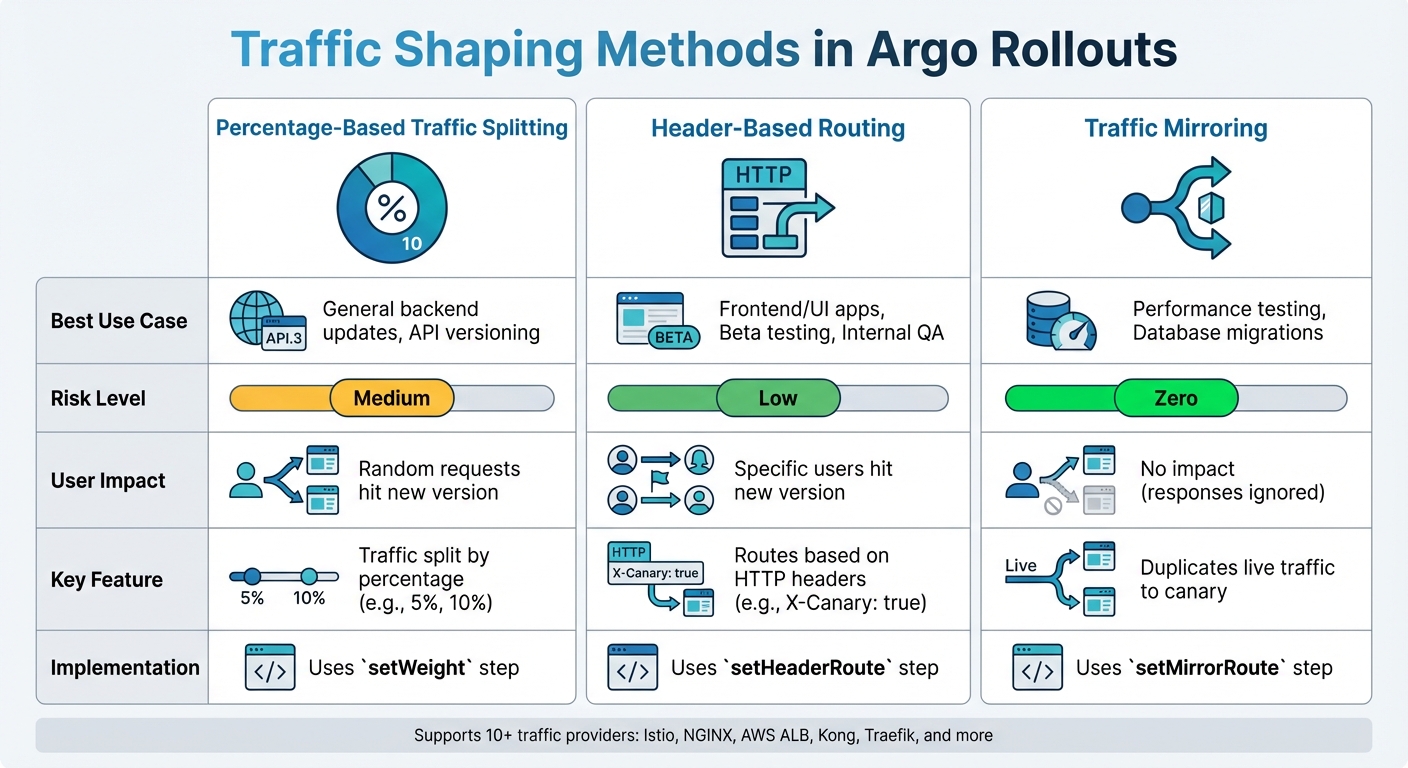 {Argo Rollouts Traffic Shaping Methods Comparison}
:::
{Argo Rollouts Traffic Shaping Methods Comparison}
:::
Argo Rollouts offers a variety of tools to precisely control traffic flow during deployments, building on the progressive delivery strategies discussed earlier. With support for over 10 traffic providers - including Istio, NGINX, AWS ALB, Kong, and Traefik [1] - it provides three core methods for shaping traffic. These methods help reduce deployment risks while keeping production environments stable.
Percentage-Based Traffic Splitting
This is the most commonly used method, where a set percentage of traffic - like 5% or 10% - is directed to the canary version, with the rest continuing to use the stable version. The setWeight step in the canary strategy is used to configure this. If no traffic router is available, Argo Rollouts approximates the split by adjusting the replica counts between the old and new ReplicaSets.
When integrated with traffic routers like Istio or NGINX, Argo Rollouts achieves precise traffic splitting by directly updating configurations, such as weights in an Istio VirtualService. It's important to note that Istio requires traffic weights in a VirtualService to total exactly 100% [5]. To ensure instant rollback capability, the stable ReplicaSet remains fully scaled during the rollout [1]. For more targeted traffic control, header-based routing can be employed, as explained next.
Header-Based Routing
Header-based routing allows traffic to be routed based on specific HTTP headers, enabling targeted user segmentation. Configured through the setHeaderRoute step, this method routes requests using exact matches, prefixes, or regex patterns. For example, internal users can access the canary version by including the header X-Canary: true during smoke tests [10].
By integrating header-based routing with Argo Rollout and ArgoCD, we've effectively safeguarded our production environment against potential bugs.- Mufaddal Shakir, Infraspec [6]
This method is particularly useful for frontend applications, as it prevents UI disruptions like flapping.
To implement it, users define managedRoutes in the trafficRouting specification, with the order of the array determining route precedence [8]. For scenarios requiring real production load testing without impacting users, traffic mirroring provides another option.
Traffic Mirroring
Traffic mirroring duplicates a portion of live traffic, sending it to the canary service without affecting the user experience. Using the setMirrorRoute step, live traffic is mirrored to the canary service, but its responses are ignored. This approach is ideal for testing high-risk changes, such as database migrations or performance updates, under real-world conditions.
Below is a quick reference table summarising the best use cases, risks, and user impact for each traffic shaping method:
| Method | Best Use Case | Risk Level | Impact on User |
|---|---|---|---|
| Percentage-Based | General backend updates, API versioning | Medium | Random requests hit new version |
| Header-Based | Frontend/UI apps, Beta testing, Internal QA | Low | Specific users hit new version |
| Traffic Mirroring | Performance testing, Database migrations | Zero | No impact (responses ignored) |
When using Argo CD along with Argo Rollouts, it’s essential to configure ignoreDifferences for resources like VirtualServices or Ingress objects. This prevents Argo CD from overriding traffic weight changes made by the Rollout controller during active deployments [5][6].
Integration with Service Meshes and Ingress Controllers
Argo Rollouts streamlines the process of updating service mesh and ingress configurations, turning basic Kubernetes setups into dynamic progressive delivery pipelines.
TrafficSplit with Service Mesh Interface (SMI)
The Service Mesh Interface (SMI) provides a standardised, vendor-neutral way to manage traffic splitting across various service mesh platforms. Argo Rollouts leverages the TrafficSplit custom resource to define the backends - canary and stable services - along with their traffic weights. Each service selector is assigned a distinct pod-template-hash to ensure traffic is routed to the correct version. The TrafficSplit resource designates a root service for client communication, while the service mesh handles the distribution of traffic between versions. This setup is particularly effective for managing east–west (service-to-service) traffic within the cluster.
It’s worth noting that the Cloud Native Computing Foundation has archived the SMI specification. The recommended alternative is the Gateway API, along with the Argo Rollouts Gateway API Plugin [7]. For those seeking more advanced traffic management, Istio integration expands on this approach with enhanced configurations for VirtualService and DestinationRule resources.
Argo Rollouts with Istio
Istio integration offers robust traffic management capabilities by automating the configuration of VirtualService and DestinationRule resources. Istio supports two main types of traffic splitting:
- Host-level splitting: Ideal for north–south traffic, using distinct DNS names.
- Subset-level splitting: Useful for service-to-service communication (east–west traffic), routing between subsets identified by updated
pod-template-hashlabels. However, this requires more complex Prometheus queries.
Istio’s features include header-based routing, traffic mirroring, and TCP traffic splitting, ensuring all VirtualService weights add up to 100% [5]. If you’re using Argo CD with Istio, it’s recommended to configure the ignoreDifferences field for HTTP route weights. This prevents resources from being flagged as OutOfSync
during deployments [5][11].
NGINX Ingress Controller Setup
The NGINX Ingress Controller provides precise control over external traffic, complementing service mesh solutions. To integrate NGINX with Argo Rollouts, your configuration must define three key fields: canaryService, stableService, and a reference to trafficRouting.nginx.stableIngress. The referenced Ingress resource should include a host rule pointing to the stable service [12][9].
The controller duplicates the stable Ingress to create a canary Ingress, named <rollout-name>-<ingress-name>-canary. This canary Ingress includes annotations such as nginx.ingress.kubernetes.io/canary: "true" and nginx.ingress.kubernetes.io/canary-weight, enabling traffic to be split dynamically based on percentages. This functionality makes NGINX particularly suited for managing north–south traffic [12][1].
Since version 1.2, Argo Rollouts has supported traffic management across multiple providers simultaneously. For example, you can use NGINX for external (north–south) traffic while relying on SMI for internal (east–west) service-to-service communication [13][9].
Configuring and Automating Traffic Shaping
Let’s explore how to configure and automate traffic shaping strategies, ensuring smooth and efficient progressive delivery.
Defining Canary Steps in YAML
Argo Rollouts uses the Rollout Custom Resource Definition (CRD) to manage updates. The spec.strategy.canary.steps field specifies an ordered list of update actions, such as directing traffic to the canary version. For example, the setWeight field determines what percentage of traffic goes to the canary, while the pause field can introduce a delay - either a fixed duration (e.g., 30m or 10s) or an indefinite pause requiring manual promotion by leaving it as pause: {} [3][4].
To enable precise traffic shaping, the trafficRouting field must reference a supported provider like Istio, NGINX Ingress, or AWS ALB [1][7]. Without a traffic router, weights are approximated by adjusting replica counts. For instance, a 20% weight on five replicas results in one canary pod and four stable pods [4]. The setCanaryScale step allows you to scale canary pods independently of traffic weight - helpful for testing before exposing the new version to users [3]. Additionally, enabling dynamicStableScale: true scales down the stable ReplicaSet as the canary scales up, reducing resource use during rollouts. This is especially useful in high-replica deployments [3].
Next, let’s see how metrics can drive automation in rollouts.
Automating Rollouts with Metric Analysis
Argo Rollouts supports automation through AnalysisTemplates, which define metrics to monitor (e.g., via Prometheus), how often to check them, and success/failure conditions [14]. There are two main types of analysis:
- Background analysis: Monitors health metrics continuously throughout the rollout.
- Inline analysis: Acts as a checkpoint, requiring metrics to meet specific conditions before the rollout progresses [14].
The Rollouts controller creates AnalysisRuns based on these templates. If the metrics meet the defined failureCondition or exceed the failureLimit, the rollout is aborted, and traffic is rolled back to the stable version [14]. For example, if a Prometheus query shows a success rate below 95% for three consecutive checks, the rollout is stopped [14].
Since version 1.8, you can use the consecutiveSuccessLimit field to require a set number of successful metric checks before considering the analysis successful [14]. Templates can also be parameterised with variables like service-name or prometheus-port using the args field [14].
With automation in place, here’s an example of traffic shaping in action.
Example Traffic Shaping Workflow
A typical canary rollout might start with five replicas. Traffic is progressively shifted using steps like setWeight: 20, followed by pause: {} for manual checks. Subsequent steps increase traffic to 40%, 60%, and 80%, with 10-second pauses between each [4]. Engineers can manually promote the rollout using kubectl argo rollouts promote <rollout-name> or abort it with kubectl argo rollouts abort if issues arise [4].
For production environments using Istio, a common approach involves DestinationRule subsets labelled canary
and stable.
The Rollout controller dynamically injects the rollouts-pod-template-hash into these labels and adjusts VirtualService weights. This setup enables east–west traffic shaping without requiring unique DNS entries [5]. If using Argo CD with Istio, you can configure ignoreDifferences to prevent VirtualService HTTP route weights from being flagged as OutOfSync [5]. Additionally, the default scaleDownDelaySeconds of 30 seconds ensures that IP table updates and traffic re-routing complete before old pods are terminated [8].
Best Practices for Production Deployments
Argo Rollouts offers advanced traffic shaping methods to improve production deployments. According to the Argo Project documentation, the end-goal for using Argo Rollouts is to have fully automated deployments that also include rollbacks when needed
[15]. To achieve this, you need careful planning to ensure reliability, maintain a seamless user experience, and establish strong observability practices.
Risk Mitigation Strategies
One key strategy is traffic mirroring, which lets you test new versions without risk. It works by duplicating live production traffic and sending it to the canary version, but without considering its responses. This allows you to validate performance using real-world data while keeping users unaffected [1]. Another approach, header-based routing, directs only specific users - like internal staff or beta testers - to the canary version by using HTTP headers [1]. For manual or automated testing, you can also configure preview URLs via Ingress host rules (e.g., app-preview.example.com) [15].
It’s important to keep rollout durations short, ideally between 15 minutes and 2 hours, as longer rollouts can add unnecessary complexity [15].
Once risks are mitigated, the focus shifts to ensuring users experience a consistent interface.
Maintaining UI Consistency
Instead of broadly splitting traffic between versions, use targeted routing for user-facing traffic. For example, header-based routing ensures that only specific requests reach the canary version before it’s exposed to general users. This helps avoid inconsistent behaviour between versions [1]. If you’re using GitOps tools like Argo CD with Istio, configure ignoreDifferences for VirtualService weights and enable ApplyOutOfSyncOnly. This prevents flapping
, where traffic weights are reset during an active rollout [5].
A consistent user interface depends heavily on effective monitoring, which ties into observability.
Monitoring and Observability
Metrics should provide clear success or failure signals within 5 to 15 minutes [15]. The documentation advises against relying on manual log checks, instead prioritising automated metrics for faster feedback: Do not rely on humans manually checking logs or traces for hours; prioritise automated metrics that provide rapid feedback
[15]. Use the analysis field to run background checks continuously. If any metric fails, the rollout will automatically abort [3]. Before deploying to production, dry-run these metrics to confirm their accuracy [15].
Leverage tools like Istio's service metrics dashboard to visualise traffic flow between stable and canary versions [5]. Monitor the .status.PauseConditions field in the Rollout object to track progress in real-time [3]. Additionally, use Kubernetes' Downward API to inject temporary labels into pods. This allows applications to identify whether they belong to the canary or stable set, improving internal observability [15].
Conclusion
Argo Rollouts transforms Kubernetes deployments by offering precise traffic control options that go beyond what native Kubernetes provides. For instance, while native Kubernetes restricts a five-replica deployment to 20% increments[4], Argo Rollouts - when integrated with service meshes or ingress controllers - enables much finer control, with traffic splits as granular as 1% increments[1]. This level of precision significantly reduces the impact of new releases by limiting exposure to a small subset of users during verification.
Its standout features - such as percentage-based traffic splitting, header-based routing, and traffic mirroring - empower teams to test changes directly in production without jeopardising the entire user base. Additionally, dynamic stable scaling optimises resource usage by scaling down the stable ReplicaSet as the canary version scales up[3]. This combination of control and efficiency helps teams adopt advanced deployment methods with greater confidence.
For teams new to Argo Rollouts, starting with blue-green deployments is recommended before progressing to canary strategies[2]. Once familiar with the tool and confident in automated metrics, teams can take advantage of header-based routing to target specific user groups and use analysis templates for automated decisions, such as rollbacks or promotions. This approach leads to shorter deployment cycles, reduced risks, and higher confidence in production releases. As Mufaddal Shakir from Infraspec remarked in May 2024:
The fear of introducing bugs into production has been significantly reduced, instilling confidence in our deployment process[6].
With compatibility across more than 10 native traffic providers - including Istio, AWS ALB, NGINX, and Traefik - Argo Rollouts offers the flexibility and control needed to make Kubernetes deployments safer and more agile[1].
FAQs
Which traffic shaping method should I use for my rollout?
The ideal traffic shaping method really hinges on what you need. If you're after detailed control, header-based routing is a great choice for managing specific user traffic. Alternatively, a Service Mesh like SMI or Istio can handle more advanced traffic distribution tasks. Both approaches work well for progressive delivery within Kubernetes setups.
What do I need to set up to get true 1% traffic splitting?
To achieve precise 1% traffic splitting with Argo Rollouts, you need to configure traffic management to adjust the data plane effectively. This often requires setting up percentage-based routing rules through tools like service meshes or using Custom Resource Definitions (CRDs) such as TrafficSplit. These configurations ensure traffic is properly divided between different application versions, making progressive delivery in Kubernetes environments both reliable and efficient.
How do I stop Argo CD from undoing traffic weights mid-rollout?
To stop Argo CD from interfering with traffic weights during a rollout, it's crucial to manage traffic routing configurations carefully. Ensure these settings aren't disrupted by automated workflows or external controllers. You can rely on Argo Rollouts' tools, such as traffic routing plugins or traffic splitting CRDs, to keep traffic weights steady during the deployment process.