
I’d choose by what holds up your release - not by the AI label. For staffing, start with monday.com or Jira with Tempo. For environment bookings, look at Plutora. For approvals and release workflows, consider Digital.ai Release.
I compare six options across forecasting, staff allocation, release coordination, CI/CD visibility and UK costs. The key distinction: planning capacity and automating deployments are not the same as predicting demand.
Quick Comparison
| Option | Forecasting and staff allocation | Release coordination | CI/CD visibility | UK costs and checks |
|---|---|---|---|---|
| monday.com | Visual workloads; predictive accuracy not confirmed | Boards and linked tasks | Connected status updates | Check plan limits, £ pricing, VAT and hosting |
| Jira with Tempo Capacity Planner | People, skills and availability planning | Jira-linked release plans | Pipeline data needs separate setup | Budget for both licences and administration |
| ONES.com | Allocation claims need testing | Cross-project schedules; booking features need checking | Connector coverage needs testing | Confirm deployment options, UK terms and £ quote |
| Plutora | Person-level capacity planning not confirmed | Release dependencies and environment bookings | Connected build and deployment records | Request licence, setup and hosting costs |
| Digital.ai Release | Stage timing rather than staff capacity | Approval gates and release workflows | Connected pipeline events | Check Release versus Deploy costs and hosting |
| Inferensys-style forecasting | Proposed predictions and assignment suggestions | Depends on connected calendars and bookings | Depends on input data | Not a verified product; budget for a custom pilot |
None of these options has verified GBP pricing in the supplied material. I’d request a three-year quote in £, check VAT and UK GDPR terms, then test one release train before buying. For custom forecasting, I’d first check whether 6–12 months of delivery data are fit for use - and keep staffing decisions under human review.
::: @figure 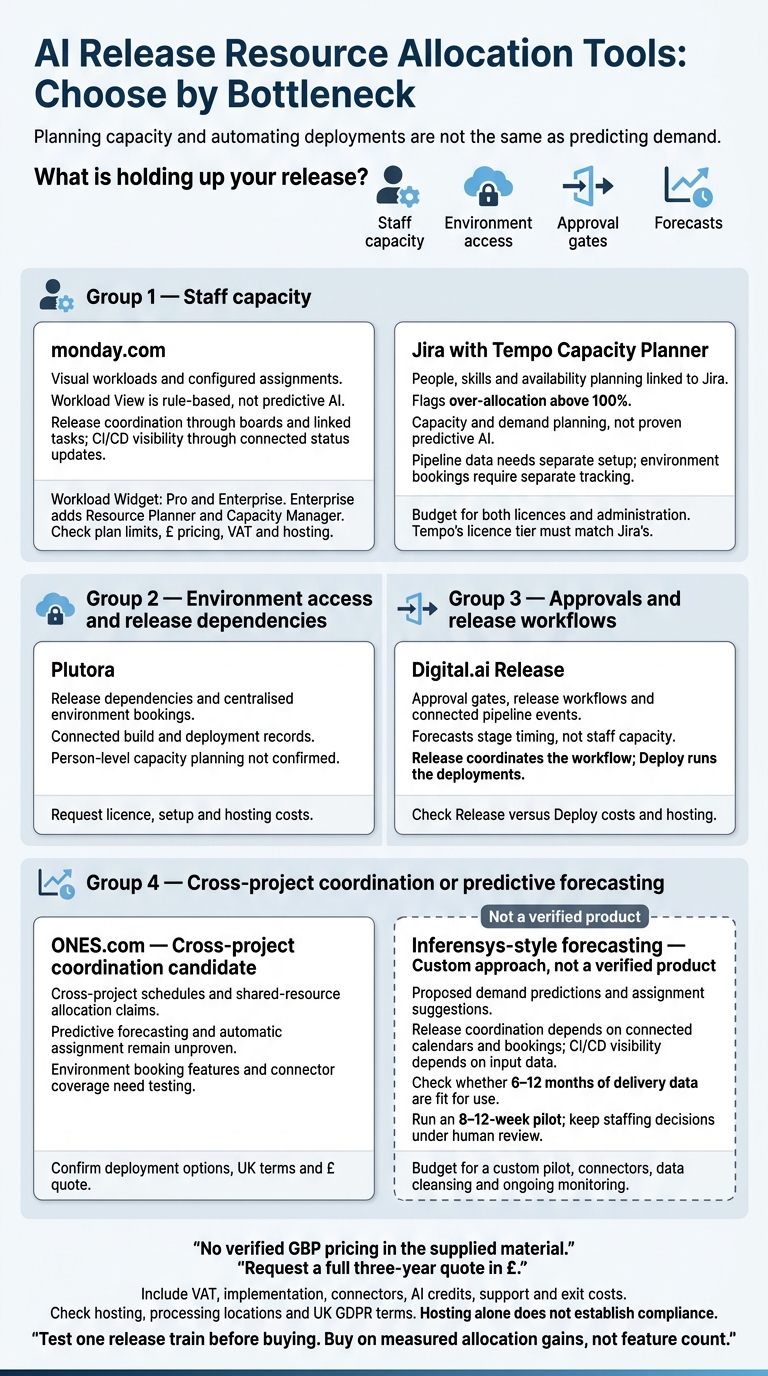 {AI Release Resource Allocation Tools: Choose by Bottleneck}
:::
{AI Release Resource Allocation Tools: Choose by Bottleneck}
:::
1. monday.com
Workload forecasting and assignment
monday.com uses its Workload View and Workload Widget to show assigned work and capacity in a colour-coded view. Managers can see who’s overloaded, where capacity is available and what’s holding up allocation.[7][10]
Assign work through a People Column, add dates and effort estimates, then set working hours, leave and UK bank holidays. Base capacity on a work schedule or use custom settings for part-time staff, contractors, on-call engineers and mixed delivery teams.[7]
Workload View is rule-based, not predictive AI. Check any AI-assisted forecasts against actual effort over two or three release cycles before using them to make commitments.[4][8] It helps you see workloads, but it isn’t enough for precise capacity planning.
Release and environment coordination
Use linked boards to track the environment, owner, dependencies and readiness for each release. Treat monday.com as a coordination layer, not a release-orchestration engine. Keep environment state, deployment evidence, test results and change records in engineering and change-management tools such as GitHub, GitLab, Azure DevOps, Jira or ServiceNow.[12][13]
CI/CD bottlenecks and integrations
Set up status fields and dashboards for build failures, review queues, test bottlenecks, security findings, deployment approvals and environment contention. Connect GitHub, GitLab, Bitbucket, Jira or Azure DevOps, and agree which system owns status, estimates and completion dates.[12][13]
The platform works best for spotting coordination bottlenecks, such as a release waiting for a test environment or approval. Import CI/CD metrics from engineering tools or calculate them externally. These include lead time for changes, deployment frequency, change failure rate, mean time to recovery, queue time and build duration.[12][13][15]
UK governance and commercial fit
Workload Widget is on Pro and Enterprise; Enterprise adds Resource Planner and Capacity Manager.[7][14] Before budgeting, check the live UK price in £, whether it includes VAT and the custom Enterprise pricing.[4][9] Integration and automation limits vary by plan. Test your expected synchronisation events, automation actions, boards and dashboards before scaling release allocation.
For UK GDPR, request details of hosting regions, subprocessors, transfer safeguards, retention controls and audit evidence. monday.com’s trust information describes region-bound residency for Enterprise accounts hosted in the EU region.[11] EU hosting is not UK hosting, and it doesn’t satisfy UK compliance on its own. Apply least-privilege access and keep unnecessary personnel data or sensitive production data out of release boards.
5 Best Capacity Planning Software in 2026 (AI Features Explained)
2. Jira with Tempo Capacity Planner
For teams already tracking delivery in Jira, Tempo adds a separate layer for capacity planning.
Workload forecasting and assignment
Jira stores issues, estimates and sprint commitments. Tempo Capacity Planner adds planning by person and skill across projects. You can assign several people to one issue and flag over-allocation above 100%. If you convert story points into hours, base the ratio on your own delivery history.[5][16]
Keep delivery records in Jira and capacity calculations in Tempo. Set up skills, leave, contractor availability and on-call duties explicitly. Otherwise, your plans will show more capacity than you have.[17][18][19][21]
Release and environment coordination
Set release scope using Jira versions and linked dependencies, then check Tempo for the people needed to deliver it. Jira Plans requires Premium or Enterprise for cross-team capacity and dependency views.[23][24][25]
Track environment bookings, deployment windows and change approvals separately. Available staff do not mean an environment is ready.[23][24][25]
CI/CD bottlenecks and integrations
Tempo plans people, not pipelines. Connect your delivery tools, then test the setup with a four- to six-week pilot on a cross-team release. Check Jira imports, sprint-date synchronisation and logged time against the plan. Record whether capacity warnings led to earlier reassignment.[18][19]
UK governance and commercial fit
Budget separately for Jira, Tempo and administration. Tempo’s licence tier must match the Jira licence tier. Request a current quote in £, including VAT and billing terms, rather than converting US-dollar list prices.[2][3][20][22]
Check Cloud or Data Center support, hosting, data-processing terms, permissions and retention with both suppliers. Do not assume your data will stay in the UK.[2][3][20][22]
3. ONES.com
Workload forecasting and assignment
ONES.com moves the comparison from planner-heavy tools to a shared workspace for releases.
It focuses on cross-project allocation, shared resources, capacity visualisation and utilisation tracking. Predictive forecasting and automatic assignment remain unproven.[32] Ask the supplier to show how one specialist’s commitments across two releases affect their available capacity.
Release and environment coordination
Use roadmaps, milestones, Gantt views and dependencies to build a shared release calendar.[26][28][31][32] Automatic date propagation and conflict alerts remain unverified.
Environment visibility also needs checking. Ask whether teams can record staging readiness, reserve deployment windows and flag booking clashes. Native what-if planning remains unverified.
CI/CD bottlenecks and integrations
Once you’ve mapped allocation, check whether ONES.com makes delivery delays clear enough for teams to act.
Its materials cite repository integration and CI/CD status tracking, including connections with GitHub, GitLab, Bitbucket and Jenkins.[27][30][32][33] Check whether these connectors show pipeline failures, queue times and approval delays. Bottleneck prediction remains unverified, so measure blocked environment time and approval wait time during the trial.
UK governance and commercial fit
For UK teams, commercial fit matters as much as planning depth.
ONES.com advertises cloud, on-premises, private-cloud and air-gapped deployment options. UK residency and UK GDPR terms remain unverified.[26][29][31] Request a current quote in £ covering VAT, modules, hosting, integration maintenance and upgrades. Don’t base procurement on an assumed free tier.
4. Plutora
Workload forecasting and assignment
Plutora moves the focus from team allocation to enterprise release control. Plutora suits enterprise release coordination better than standalone staff planning. Release tasks, owners and approval gates show who owns delivery, but not how much capacity each person has.
In a pilot, check who owns each release, which releases compete for specialists, which tasks lack an owner, and where dependencies or approvals hold up delivery.[35][36][38] Environment access is the main allocation constraint here.
Release and environment coordination
Plutora helps teams allocate scarce test environments and deployment windows across hybrid cloud and on-premises setups. Centralised bookings show clashes, while release dependencies and deployment plans clarify what needs to be ready before deployment. Use the pilot to check whether booking conflicts appear early enough to change the testing schedule.[34][37][38]
A February 2025 Planview case study reported that Telefónica UK’s O2 introduced centralised environment booking, dashboards, alerts and automated KPI reporting. Unplanned non-production downtime fell by 50% over one year. That supports the environment-coordination use case, not person-level capacity optimisation.[42]
CI/CD bottlenecks and integrations
Once teams can see bookings, the next step is traceability. Jenkins and GitHub integrations can link builds, commits and deployments to releases and environments.[39][40][41]
Trace one release from its commit through to the post-release record. Set a single source of truth for each field so conflicting updates don’t skew bottleneck reporting. Measure environment queue time, approval delay, failed deployment rate and traceability gaps.[35][39][41]
UK governance and commercial fit
For UK teams, allocation controls need to come with compliant data handling. Request a written quote in £ covering licences, integration, migration, training and administration.[6]
Confirm where tenant and backup data are stored, how access is controlled, whether audit histories can be exported and how data leaves the UK. Auditability alone does not prove compliance.[36]
5. Digital.ai Release
Workload forecasting and assignment
Digital.ai Release coordinates release flow across teams, tools and environments. It models releases as phases, tasks, triggers and workflows to manage approvals and dependencies.[43][45]
Use historical durations to forecast stage timing, not team capacity. For staffing decisions, check availability, skills, leave and on-call duties in a separate capacity source.[45][46] The tool fits situations where workflow control - not headcount planning - is the bottleneck.
Release and environment coordination
Release templates connect approvals and deployment dependencies across cloud and on-premises systems. Release coordinates the workflow; Deploy runs the deployments.[43][48] Check which product your planned implementation needs.
CI/CD bottlenecks and integrations
Integrations include Jenkins, GitHub Actions, GitLab, Azure DevOps, Jira and ServiceNow. Compare three to five releases against your current process. Measure waiting time between stages, manual hand-offs, approval duration, deployment failure rate and rollback frequency.[44][45][46][47]
If a release stalls, check process and dependency issues before treating it as a staffing gap.
UK governance and commercial fit
SaaS and customer-managed editions have different control, residency and support needs.[44] For your chosen setup, confirm access controls, segregation of duties, log retention, data residency and security review requirements.
Request a quote in £ that separates licences, implementation, support and hosting, and includes VAT and renewal uplifts.[44] These separate costs feed into the cost comparison that follows.
6. Inferensys-style AI Capacity Forecasting
Treat “Inferensys-style” as an AI capacity-planning approach, not a confirmed product. As you move from planning and orchestration to prediction, test whether it can forecast demand and bottlenecks before teams commit, map skills and suggest assignments.
Workload forecasting and assignment
Train a pilot on 6–12 months of delivery records. Include completed work, cycle time, throughput, estimation accuracy, scope changes, defects, incidents, leave and unplanned support. Check weekly forecasts for each team, service or skill against actual demand. Require each forecast to show shortfalls, confidence ranges and clear assumptions.
Check skills mapping against approved records, repository ownership, completed work and managers’ judgement. Assignment suggestions should show availability, role permissions, workload, on-call duties, leave and confidence. Managers must be able to accept, edit or reject them.
Identity matching must be reliable. Do not infer sensitive characteristics, assume past assignments define everything someone can do, or reallocate people without telling them.
Release and environment coordination
Capacity forecasts are useful only when release dependencies and windows line up. Test whether AI capacity forecasting connects releases to environment bookings and predicts delays in time for teams to act.
Each alert should name the affected release, dependency owner, expected delay and an alternative slot. Treat alerts as prompts to review the plan, not as schedule failures.
CI/CD bottlenecks and integrations
Separate engineering effort from time spent waiting. Start with read-only, least-privilege connections, then manually check identity joins and release-event mappings.
Assess interventions using DORA’s five measures: change lead time, deployment frequency, failed-deployment recovery time, change-failure rate and deployment rework rate.[49][50] Use the results to judge whether better release planning justifies the forecast’s cost.
UK governance and commercial fit
Before connecting personnel data, document the purpose, data minimisation, retention, processing location, security controls and correction processes under UK GDPR. Require explanations of the factors behind recommendations, human review, appeal rights and audit logs.
Request total costs in £, with and without VAT, covering connectors, data cleansing, identity resolution, monitoring, security review, support and administration. Run an 8–12-week pilot and measure forecast error, alert precision, blocked time and suggestion acceptance.
Capabilities and Costs Compared
The tables below bring the six tool profiles into one shortlist view, showing the differences set out above.
| Option | Workload allocation | Release coordination | CI/CD visibility | UK governance and commercial fit |
|---|---|---|---|---|
| monday.com | Moderate | Limited | Limited | Not established |
| Jira with Tempo Capacity Planner | Strong | Moderate | Requires configuration | Not established |
| ONES.com | Not established | Not established | Not established | Not established |
| Plutora | Not established | Strong | Requires configuration | Not established |
| Digital.ai Release | Not established | Strong | Moderate | Not established |
| Inferensys-style forecasting (not a product) | Requires configuration | Requires configuration | Requires configuration | Not established |
These are editorial ratings, not AI performance scores. Strong means a documented core function with usable native data. Moderate means narrower support or reliance on adjacent modules. Limited means basic or indirect support. Requires configuration means connectors, modelling or custom implementation are needed. Not established means the supplied evidence does not confirm the capability or terms.
Workload Forecasting and Team Assignment
| Option | Forecasting depth | Assignment support | Scenario planning | Evidence or prerequisites |
|---|---|---|---|---|
| monday.com | Visual capacity views; predictive accuracy not established | Workload boards and configured assignments | Board-based alternatives | Workload capability is associated with the Pro plan; AI claims do not establish validated forecasts.[8][9] |
| Jira with Tempo | Capacity and demand planning, not proven predictive AI | Availability, skills and utilisation planning | Revised Jira-linked plans | Two-way issue synchronisation; Tempo can compare planned time with actual time when Timesheets is used.[2][6] |
| ONES.com | Release forecasting claimed | Resource allocation claimed | What-if scenarios claimed | Verify inputs, allocation levels and forecast method.[17] |
| Plutora | People-demand forecasting not established | Staffing allocation not established | Focus on release and environment planning | Do not infer personnel planning from release coordination. |
| Digital.ai Release | People-demand forecasting not established | Staffing allocation not established | Focus on deployment-flow planning | Check whether adjacent products or custom reporting are needed. |
| Inferensys-style forecasting (not a product) | Proposed cross-system predictions | Recommendations depend on implementation | Modelled alternatives | Requires consistent estimates, actuals and team records; no verified software function. |
Use the same working-hours model when comparing planning at person, role and team level.
Release Schedules and Environment Coordination
| Option | Direct support evidenced | Connected-data requirements | Main limitation |
|---|---|---|---|
| monday.com | Boards, dashboards and automation | Release dates, dependencies and approval status | Dedicated environment reservations not established |
| Jira with Tempo | Jira-linked staffing plans | Release milestones and readiness records | Capacity plans do not establish environment access |
| ONES.com | Releases, dependencies and environments claimed | CI/CD and resource records | Verify the depth of reservations and readiness checks.[17] |
| Plutora | Enterprise release flow and environment tracking | Release trains, bookings and change records | People-capacity forecasting not established |
| Digital.ai Release | Deployment orchestration and pipeline coordination | Pipeline tasks, gates and deployment events | Shared-environment booking not established |
| Inferensys-style forecasting (not a product) | None natively | Calendars, reservations, dependencies and approval events | Predictions depend on source systems |
Staff availability, environment access and approval gates are separate constraints. Ask each shortlisted tool to show competing release trains, a deployment-window clash and an outstanding approval as separate cases.
CI/CD Bottlenecks and Data Integrations
| Option | Bottleneck visibility | Integration prerequisites | Implementation effort |
|---|---|---|---|
| monday.com | Connected work status; deep telemetry not established | Validate field mappings and automation limits | Board mapping and integration rules |
| Jira with Tempo | Work demand and allocation; pipeline queues not established | Jira issues plus separate pipeline data | Issue synchronisation first; telemetry needs additional work.[1][2] |
| ONES.com | Deployment-risk visibility claimed | Verify CI/CD event coverage | Connector and field validation.[17] |
| Plutora | Release and environment coordination; queue detail not established | Verify pipeline and incident feeds | Cross-system release mapping |
| Digital.ai Release | Orchestrated deployment-flow visibility | Verify events exposed by each connected pipeline | Pipeline and task mapping |
| Inferensys-style forecasting (not a product) | Only bottlenecks represented in its inputs | Pipeline, cloud and incident data | Custom ingestion, joins and monitoring |
Work-item synchronisation is not pipeline telemetry. For GitHub Actions, GitLab CI/CD and Azure Pipelines, check queue, start and finish timestamps separately.
Code-review waits need review events; incident delays need incident records. Azure DevOps work items alone cannot establish these timings. Hybrid and multi-cloud coverage depends on access to the data, not connector names.
UK Governance, Hosting and Pricing
For UK teams, commercial fit matters as much as planning depth.
| Option | Explainability, confidence and controls | Hosting, employee data and support | Pricing status |
|---|---|---|---|
| monday.com | Validate permissions, audit access and AI explanations | Retention, transfers and support terms not established | List prices are in US dollars; convert to £ and confirm VAT separately.[8][9][51] |
| Jira with Tempo | Planning inputs can be inspected; forecast confidence not established | Check both Jira and Tempo contracts and controls | Tempo pricing is in US dollars and scales with Jira user count.[2] |
| ONES.com | AI explanations and confidence not established | Private-cloud or on-premises deployments are described; larger deployments are quote-based.[16][17] | GBP terms not established |
| Plutora | Verify audit scope and access controls | Hosting, retention, transfers and support not established | Public GBP pricing not established |
| Digital.ai Release | Verify approval history and permissions | Hosting, retention, transfers and support not established | Public GBP pricing not established |
| Inferensys-style forecasting (not a product) | Must be specified and tested | Depends on the implementation and processors | No product list price; implementation cost not established |
Current terms still need checking, and the supplied evidence contains no verified GBP prices. Request billing frequency, minimum seats, commitment, AI add-ons and VAT treatment, alongside connector and support costs.
Assess lawful basis, processor contracts, employee-data access, deletion and transfer safeguards separately. UK or European hosting alone does not establish UK GDPR compliance.
The next section uses this comparison to narrow the pilot set.
Pilot Setup and Delivery Measures
Test the shortlisted approach on one live release train through a six-to-eight-week, read-only pilot. Use the pre-pilot period as your baseline. Define shared identifiers for people, skills, teams, services, environments, releases and work items. Record contracted capacity, leave, training, on-call duties and service ownership. For each work item, record its priority, dependencies, estimated effort, required skills, target environment and planned delivery window. Store timestamps in UTC, but display Europe/London time with GMT/BST labels.
Connect only authorised planning, source-control, pipeline, incident and cloud records. Give each feed a named owner and a clear purpose, and document missing fields or inconsistent identifiers. Before ingestion, set least-privilege connector permissions, audit logging and retention periods. Leave out personal data that isn't needed, especially health data. Delete or anonymise records once their planning use ends.[53][55]
Once the feeds are fixed, agree and lock the review rules before making any allocation changes. Require human approval for every material staffing change. Log the forecast date, horizon, inputs, tool version, assumptions, confidence, proposed assignment and reviewer decision. Low confidence should prompt a review - not automatic reassignment. Track override reasons each week.[52][54]
Agree measurement rules before the pilot starts. Measure assignment wait from “ready for assignment” to “assigned”, separately from environment and approval waits. Track absolute forecast error, sample size, DORA metrics, rework, incidents and workload.[49][50][56] Report results by service and risk band, and check whether higher-confidence forecasts are more accurate. Do not optimise for release volume alone. Stop if access controls or data quality are inadequate. Extend the pilot if there isn't enough evidence, and scale only if the approach improves allocation against the agreed accuracy, waiting-time and reliability thresholds.
If you need external delivery help, document it separately from the evaluation. Hokstad Consulting can support AI readiness, implementation and release-planning automation.
Conclusion: Choose by Your Allocation Needs
Choose by the bottleneck, not the AI label. Use monday.com for a clear view of people’s capacity, Jira with Tempo when estimates and work histories already sit in Jira, and ONES.com only for cross-project coordination and deployment flexibility.[57][58][5]
For release and environment coordination, choose Plutora when environment bookings and release dependencies block delivery. Use Digital.ai Release when approvals, workflow orchestration and cross-tool control are the main constraints. These are different needs from finding who has spare capacity.
If forecasting matters more than orchestration, check the data first. Consider Inferensys-style forecasting only when historical demand, capacity and availability data are complete and consistent. Otherwise, start with transparent capacity planning. Once you’ve settled on a forecasting approach, run a pilot before committing.
Test one measurable outcome, such as less time spent planning. Reject savings that add administration, overtime or failed changes.
Before signing, get written confirmation of the AI features included in your purchase, whether customer data trains the model, how integrations behave, hosting and AI-processing locations, and UK GDPR requirements. Confirm the full three-year cost in £, including VAT, implementation, connectors, AI credits, support and exit costs. Buy on measured allocation gains, not feature count.
FAQs
How can I tell whether release delays need AI or better planning?
Look for recurring problems that manual planning can’t solve: adding resources only after performance limits have been breached, delays at peak demand, or too much time spent checking logs across multi-cloud environments.
AI can forecast demand, pinpoint what’s causing delays and optimise where resources are placed. Over-provisioning and unstable performance during workload migrations are also signs that AI-driven scheduling could help.
Can AI forecasts help when our delivery data are incomplete?
Incomplete delivery data can lead to unreliable AI forecasts. Missing metrics or inconsistent monitoring can send models in the wrong direction, leading to costly errors such as poor resource allocation or systems that aren’t ready for demand [1].
To improve forecast accuracy, review how you collect data and fill any gaps. Prioritise clean, detailed and well-organised historical data so your forecasts provide a reliable view of delivery and resource needs [1].
How do I calculate the return on release allocation tools?
To calculate ROI for release allocation tools, compare the total cost of ownership - licence fees, infrastructure, maintenance and engineering time - with measurable gains. Feature lists alone won’t tell you whether a tool pays off.
Those gains may include a 30% to 50% improvement in operational efficiency, up to a 70% reduction in time to market, or 30% to 50% lower cloud expenses through automated resource management that eliminates over-provisioning and idle resources.