
If your service has the same traffic peaks each day or week, predictive scaling can cut slowdowns and trim cloud spend. In plain terms: instead of waiting for CPU, queue depth, or request rate to spike, you scale before the rush starts.
Here’s the short version:
- Predictive scaling fits repeatable demand
- weekday login surges
- payday or promo traffic
- batch windows
- CI/CD build peaks
- Reactive scaling fits random spikes
- sudden news-driven traffic
- one-off incidents
- demand with no clear pattern
- The safest setup is both together
- forecast-led scaling first
- threshold rules as backup
The article shows where this works best across cloud VMs, Kubernetes pods, worker queues, and build agents. It also makes one point clear: this only works when you have clean telemetry, clear SLOs, hard spend limits, and a fallback plan.
A few numbers stand out:
- teams often need 2–4 weeks of clean history to train a forecast
- a common safety rule is a 15-minute scale-down cooldown
- one example target is p95 latency under 300 ms
- one cited result showed 45% lower mean latency and 30% lower costs versus threshold-only autoscaling
::: @figure 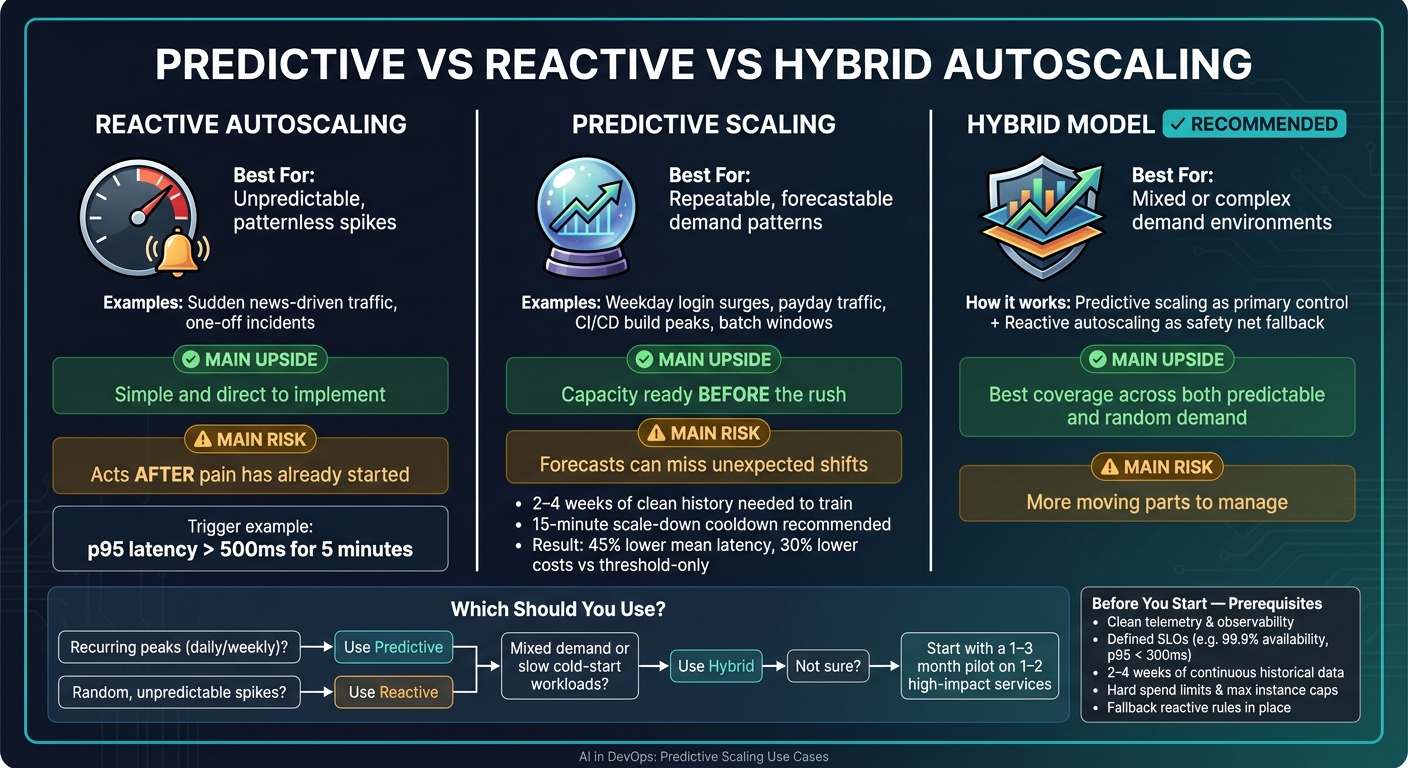 {Predictive vs Reactive vs Hybrid Autoscaling: Which Approach Fits Your Workload?}
:::
{Predictive vs Reactive vs Hybrid Autoscaling: Which Approach Fits Your Workload?}
:::
Lightning Talk: Predictive Autoscaling in Kubernetes With KEDA and Prophet - Snigdha Kanchana, IBM
Need help optimizing your cloud costs?
Get expert advice on how to reduce your cloud expenses without sacrificing performance.
Quick comparison
| Approach | Best for | Main upside | Main risk |
|---|---|---|---|
| Reactive autoscaling | Unpredictable spikes | Simple and direct | Acts after pain has started |
| Predictive scaling | Repeat traffic patterns | Capacity is ready earlier | Forecasts can miss |
| Hybrid model | Mixed demand | Better cover across both cases | More moving parts |
If I strip it down even further, the article’s message is this: use predictive scaling when start-up time hurts and demand is easy to forecast; keep reactive autoscaling in place for everything the model misses.
How AI forecasts scaling demand in DevOps environments
Predictive scaling uses observability data, a forecasting model, and a scaling controller to add capacity before demand shows up. In practice, the next job is simple to describe but harder to get right: pick the signals, models, and control rules that match the workload.
Workload signals and data used for forecasting
Forecasting usually draws on RPS, CPU, memory, queue depth, latency percentiles, and error rates. Teams also look at deployment schedules and recurring calendar patterns, such as business hours, payroll runs, campaigns, and weekend behaviour. That extra context helps because infrastructure metrics alone don't always show why demand is about to move.
Bad input data causes trouble fast. Noisy, missing, or misaligned metrics make seasonality harder to spot and drag down forecast accuracy. Teams tend to get better results when they focus on signals that map directly to saturation or user experience, instead of pulling in every metric they can find.
The inputs set the stage. But the model choice shapes how far ahead the system can move.
Common modelling approaches used in predictive autoscaling
Four common production models are ARIMA, Prophet, LSTM-based models, and reinforcement learning. Each one suits a different data pattern and response window.
| Method | Data Needs | Prediction Horizon | Operational Burden | Typical DevOps Scenario |
|---|---|---|---|---|
| ARIMA | Single-metric, clean time-series | Seconds to minutes | Low–medium; needs tuning | CPU forecasting 45 seconds ahead for Kubernetes pod scaling [5] |
| Prophet | Trend, seasonality, and calendar events | Hours to days | Low; simpler configuration | Forecasting daily traffic peaks, marketing campaigns, and scheduled capacity changes |
| LSTM/RNN | Multivariate, larger historical dataset | Medium to longer horizons | High; requires more data and operational effort | Complex microservice traffic with nonlinear patterns |
| Reinforcement learning | Feedback from scaling actions over time | Policy optimisation | High; mostly used in research and early trials | Dynamic policy tuning for cost and SLOs |
ARIMA works well when the signal is fairly clean and the look-ahead window is short. Prophet is often a good fit when traffic follows repeatable patterns and calendar events matter. LSTM and other RNN-based models can handle more tangled service behaviour, but they need more history and more effort to run well. Reinforcement learning goes a step further by tuning policy over time, though it's still seen more in research and early-stage testing than in day-to-day production use.
How forecasts turn into scaling actions
Forecasting does not replace autoscaling; it changes when the scaling decision happens. Say the forecast says CPU will hit 80% in ten minutes. That output is passed to an autoscaling controller, which turns it into an action: launching extra instances, adjusting Kubernetes pod replicas, or pre-provisioning nodes so pods don't sit in Pending during a spike.
Fallback reactive rules are essential. If forecast confidence drops or traffic shifts without warning, the system should switch back to threshold-based scaling. Cool-down periods, capacity limits, and drift monitoring help stop oscillation and overreaction [6][7].
Predictive scaling use cases across cloud platforms and Kubernetes
Predictive scaling works best when demand follows a pattern you can spot in advance and when start-up time is long enough to matter.
Managing cloud capacity for regular traffic peaks
These workloads are usually the easiest to plan for because the shape of demand tends to repeat.
A UK SaaS platform might see login surges between 08:00–09:30 and 16:30–18:00 on weekdays. E-commerce sites often get a lift on payday Fridays and during promotions. Those are strong fits for predictive scaling because past metrics make the next spike easier to estimate.
On AWS and Google Cloud, forecast-led scaling uses recent history to estimate the next capacity window and add instances before the spike arrives. That gives nodes time to warm up before traffic lands.[8][9][11][14][15][16][17]
Kubernetes microservices and event-driven workloads
The same idea applies inside clusters, where pod and worker capacity often follows patterns too.
Standard HPA and VPA react after load has already gone up. That means new pods may not be ready until latency is already climbing. Predictive controllers try to get there first by scaling ahead of the expected rise.
Take a microservice serving API requests for UK mobile banking customers. Demand jumps each weekday morning. If a predictive controller has learned that pattern, it can increase pod replicas at 07:45 so the service is ready for the 08:00 peak, instead of waiting for HPA to spot rising CPU at 08:10.[13] In practice, that means lower latency and fewer SLO breaches.
Event-driven workers follow a similar pattern, but the main signals are queue backlog and message rate. A UK logistics platform with parcel events peaking between 17:00–19:00 can use a predictive controller to scale worker pods from 5 to 20 before backlog passes a set threshold, which helps keep processing inside agreed SLAs.[13] A simple target helps here: process every message within five minutes.
CI/CD and platform engineering workloads
CI/CD demand tracks working hours pretty closely. Build activity tends to peak when developers start around 09:00, climb again before lunch, and spike near the end of the day as teams push changes before release windows. Overnight, agents are mostly idle.[11][12]
A build farm that usually runs 10 agents can scale predictively to 40 between 09:00–11:00 on weekdays and around planned fortnightly release windows. That can keep median build queue time below 30 seconds without paying to run 40 agents all day and night.[11][13]
The model works best when it uses a small set of clear signals:
Job tagging helps refine the forecast even more. If each job is tagged by project, team, and environment, you can spot patterns that would otherwise stay hidden. For example, if one frontend team tends to deploy more often on Thursdays, the platform can pre-provision for that specific bump.[11][13]
Predictive scaling keeps build capacity in step with working hours and release windows.
That said, the gains depend on a few basics being in place: reliable observability, steady training data, and a safe fallback policy.
What teams need in place before using predictive scaling
Before any of those use cases can run safely in production, teams need solid data and clear control points. Predictive scaling is only as good as the setup behind it. If observability, governance and historical data aren’t in good shape, automation can go wrong fast.
Observability, SLOs, and reliable training data
Forecast accuracy comes down to signal quality. In plain terms, the model needs clean, steady telemetry from critical services. That includes CPU, memory, request rate, latency, errors and saturation signals like queue length. When teams collect that data at a consistent resolution, the model has enough detail to spot shifts in demand[3][20].
If that data has gaps, especially during peak traffic, things can get messy. The model may read demand the wrong way and either over-provision or leave the service short of capacity.
SLOs give the model a target to aim for, while error budgets show how much risk the business is willing to accept. A well-set predictive scaler should keep latency, availability and error rates inside agreed thresholds. For instance, a team might set a target of 99.9% availability and p95 latency under 300 ms during trading hours[18][19].
Teams also need enough history to train on. In most cases, that means two to four weeks of clean, continuous data so the model can pick up daily and weekly patterns. Seasonal workloads usually need more[4][20].
Cost guardrails, drift monitoring, and fallback policies
Once the model is trained, production controls matter just as much as the forecast itself. Set hard limits in advance:
- maximum instance counts
- per-step scale-up caps
- minimum replicas for critical services
- scale-down cooldowns of at least 15 minutes[21]
Prediction error should be tracked over time and reviewed each month. If drift starts to show up, teams should retrain the model or tighten the guardrails[20][4].
It also helps to keep reactive scaling on standby. Think of it as the safety net. A clear trigger matters here, such as p95 latency above 500 ms for five minutes[1][21].
Where Hokstad Consulting can help
Hokstad Consulting can assess observability coverage, SLO maturity and data quality, then help design guardrails, fallback policies and scaling automation for predictive deployments. Once those foundations are in place, teams can make a clear call on whether predictive scaling is ready for production.
Conclusion: when predictive scaling is the right DevOps choice
Once you have observability, guardrails and fallback rules in place, the next step is simple: does predictive scaling earn back the engineering time it takes to build and run? Predictive scaling works best for workloads with repeatable peaks, such as daily traffic swings, weekly batch windows and scheduled releases, especially when cold-start delays make reactive autoscaling too slow.[22][10]
The safest setup is to use predictive scaling as the main control and keep reactive autoscaling as the fallback.[25][15] That mix tends to work well in practice. Research backs it up too: one ML-enhanced framework reported 45% lower mean latency and 30% lower costs compared with threshold-based autoscaling alone.[23]
Cost needs to be part of the discussion from day one. Predictive scaling moves spend towards planned capacity, so the test is not just “does it scale?” but “does it save more than it costs?” The right way to judge that is in pounds, over a few billing cycles, against the outages or SLO breaches you avoid.[22][24]
Across cloud, Kubernetes and CI/CD workloads, the rule of thumb is pretty clear:
- Use predictive scaling for recurring or slow-to-start workloads
- Use reactive autoscaling for sudden, patternless spikes
- Use both when demand is mixed[2][25][15]
In practice, predictive scaling is worth pursuing when the reliability gains and cost savings beat the engineering effort needed to build, integrate and maintain it.[22][4] A sensible way to test that is a one- to three-month pilot on one or two high-impact services, then keep it only if the reliability and cost results justify the added complexity.
FAQs
How do I know if predictive scaling will work for my workload?
Predictive scaling works best when your workload follows patterns you can spot in the data. Think regular traffic peaks at certain times of day, on specific days of the week, or during seasonal periods. It tends to suit applications with recurring trends, not traffic that jumps around for no clear reason.
Start by checking your historical data. Then test in a non-production environment with forecast-only mode for at least one week. If the forecast lines up closely with actual demand, that’s a strong sign it should perform well in production.
What data do I need before I can use predictive scaling?
You need a solid mix of historical data and real-time performance metrics. If the data is patchy, too narrow, or only covers a short period, the forecast will be off.
Key inputs usually include:
- performance metrics such as CPU utilisation, memory use, network throughput and response times
- workload-specific data such as active user sessions, database connection requests or inference latency
- historical patterns, including time of day, day of week and seasonal fluctuations
Think of it like reading a map while also checking live traffic. The past shows the usual route. Live metrics show what’s happening right now. You need both if you want a forecast that’s worth using.
Why use predictive and reactive scaling together?
Using predictive and reactive scaling together gives UK businesses a stronger setup.
Predictive scaling uses machine learning to get ahead of known patterns and past demand. Reactive scaling steps in when traffic jumps without warning.
Used side by side, they help businesses keep performance steady, avoid bottlenecks, and use cloud resources more efficiently. That can also cut overall cloud costs.