
I count saved coding time as cash savings only when spending falls. If AI frees 100 hours but payroll and invoices stay unchanged, that means extra capacity - not a cash saving.
Here’s how I separate the results:
- Realised savings: contractor invoices, paid overtime or payroll actually fall.
- Avoided costs: an approved hire or planned expense is cancelled. I report this separately.
- Redeployed capacity: saved hours go to named work, with an owner and a delivery target.
Before calculating ROI, I compare similar work before and after AI, checking delivery, quality and time. I subtract prompting, review, testing and rework from gross hours saved, then deduct AI and change costs from verified spending reductions.
For example, £15,000 in reduced spending minus £5,000 in AI costs gives £10,000 net financial benefit and 200% ROI. That’s an illustration, not a forecast.
My rule: count each outcome once, keep records, and report cash and capacity separately.
::: @figure 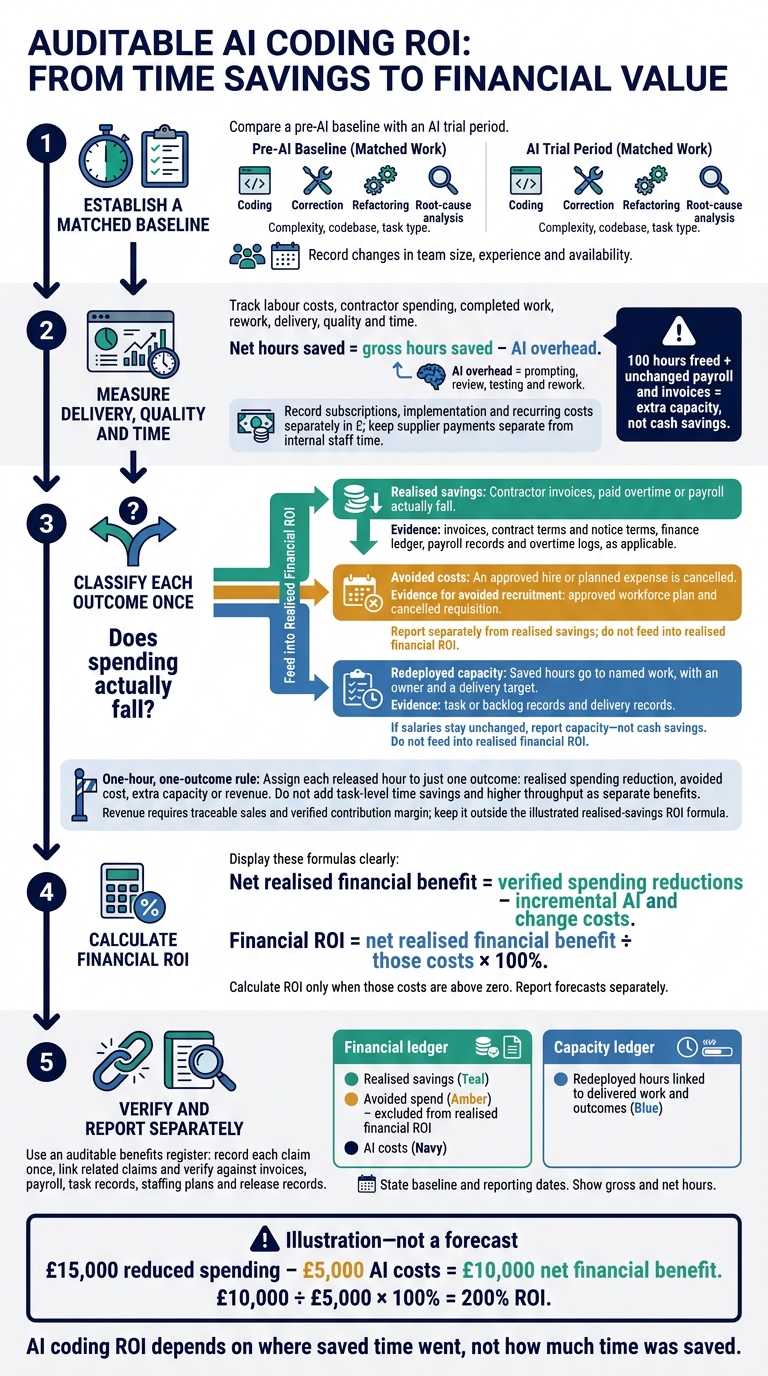 {AI Coding ROI: From Saved Hours to Real Savings}
:::
{AI Coding ROI: From Saved Hours to Real Savings}
:::
Measure Net Productivity Before ROI
Start with a matched baseline to separate extra capacity from cash savings.
Compare an AI trial period with a pre-AI baseline, matching work by complexity, codebase and task type: coding, correction, refactoring and root-cause analysis. Record changes in team size, experience and availability. This helps prevent shifts in workload or staffing from being mistaken for AI gains.
Track Delivery, Quality and Time
Track delivery, quality and time together across both periods. Include labour costs, contractor spending, completed work and rework. Faster delivery is not a gain if failures and repairs use up the time saved.
Keep Net Hours Separate from Costs
Net hours saved = gross hours saved − AI overhead. Count prompting, review, testing and rework as AI overhead - not cash savings.
Record subscriptions, implementation and recurring costs separately in £. Keep supplier payments separate from internal staff time, even when both support integration or governance.
Use these figures to distinguish staff time redirected to other work from savings actually realised.
Separate Cash Savings from Extra Capacity
Once you know the net hours released, work out their financial effect. Count those hours as cash savings only when spending falls. Otherwise, report them as redeployed capacity.
| Scenario | Time released | Spending effect | Capacity gain | Evidence required |
|---|---|---|---|---|
| Reduced contractor days | 20 days | Invoice reduction only | No capacity gain | Invoice, contract notice, finance ledger |
| Avoided recruitment | Enough internal time to cover the planned role | £0 realised; report avoided spending separately | Released time covers planned work | Approved workforce plan and cancelled requisition |
| Technical debt clearance | Net hours reassigned | £0 if salaries stay unchanged | Hours allocated; verify delivery separately | Backlog records and delivery target |
| Reduced paid overtime | Paid extra hours no longer needed | Actual reduction in overtime payments | No capacity gain | Payroll records, overtime logs |
How you classify each outcome depends on the contract terms and whether payments can change.
Check Contractor Savings and Avoided Spending
Check contract terms, chargeable days and notice terms before claiming contractor savings. Fewer hours do not automatically mean a smaller invoice. For avoided hires, check the approved workforce plan and cancelled requisition before reporting avoided spending.
| Resource type | Cost flexibility | Required records | Benefit timing |
|---|---|---|---|
| Permanent employees | Low (fixed salaries) | Payroll and time records | Capacity gain unless payroll later falls |
| Contractors | High (daily/hourly) | Invoices, contract terms and notice terms | When fewer days reduce charges |
| Overtime | High (variable pay) | Payroll records and overtime logs | When payments fall |
| Planned hires | Medium | Approved workforce plan and cancelled requisition | Avoided future spending, not a realised reduction |
Assign Saved Hours to Named Work
Assign redeployed hours to one named workstream, with an owner and a delivery target.
Calculate Net Financial Benefit and ROI
For the reporting period, use:
Net realised financial benefit = verified spending reductions − incremental AI and change costs.
Financial ROI = net realised financial benefit ÷ those costs × 100%, provided those costs are above zero.
Report forecasts separately. Record each benefit once before including it in ROI, and do not value the same hours twice.
Avoid Double Counting AI Benefits
Count Each Benefit Once
Once you’ve separated realised savings from capacity, apply a one-hour, one-outcome rule. Assign each released hour to just one outcome: realised spending reduction, avoided cost, extra capacity or revenue.
Count contractor reductions as realised savings only when invoices fall. Otherwise, report them as avoided cost. If saved hours help you avoid a hire, you can’t also claim those hours as spare capacity elsewhere.
Task-level time savings and higher throughput overlap, so don’t add them together as separate benefits. Count revenue only when you can trace it to specific sales and support it with a verified contribution margin.
Keep an Auditable Benefits Register
Use a benefits register to prevent the same hour from being claimed in several places. Record each claim once as a realised spending reduction, avoided cost, additional delivery capacity or revenue contribution. Link related claims so you can check for double counting.
Before reporting, verify claims against invoices, payroll, task records, staffing plans and release records. Keep non-cash capacity gains separate from financial ROI calculations.
Conclusion: Report Cash and Capacity Separately
Report clear metrics in two separate ledgers: one for realised savings, avoided spend and AI costs; the other for redeployed hours linked to delivered work and outcomes. If spend does not fall, report capacity - not cash savings.
Use the baseline and net-hour calculation from earlier sections, and state the baseline and reporting dates. Show gross hours saved alongside net hours after AI overhead. Keep supporting records to check the calculations, verify delivered work and prevent double counting.
AI coding ROI depends on where saved time went, not how much time was saved.
FAQs
How can I prove redeployed developer time creates value?
Record net hours saved after allowing for prompting, testing and corrections. Track how that time translates into additional accepted work, avoided hiring or increased sales margin. Compare like-for-like tasks against a 30- to 90-day baseline, with approval from finance and engineering.
Value saved hours at fully loaded rates, but count them as capacity, not cash savings, unless payroll or contractor spending falls. Report cash savings, avoided costs and additional delivery capacity separately to prevent double-counting.
When can I turn saved hours into lower contractor bills?
Saved developer hours only cut contractor bills if external spending falls. That means reducing contracted hours, cancelling planned engagements or ending specific roles. If invoices stay the same, the time saved adds capacity - not cash savings.
Track freed-up time and cost reductions separately. When AI-assisted capacity replaces a planned contractor engagement, count either the avoided cost or the value of the freed-up hours, never both.
How do I avoid double counting savings across teams?
Give each benefit its own identifier and record its dependencies. Count each gain once: use either additional contribution margin or saved hours, and either avoided contractor costs or saved hours. Deduct review time from savings or record it as a separate cost - never both.
Keep financial ROI separate from capacity gains, and track refund savings separately from reduced correction effort. Reconcile records monthly against agreed outcomes so the figures stay distinct and can be checked.