
I’d pause an AI agent before it moves money, exposes sensitive data or makes a change that could be hard to undo. For example, a £5,000 payment to a new supplier should wait for finance review - not because £5,000 is a legal threshold, but because the recipient and amount warrant a check.
I’d use three control levels:
- Automate low-risk work within fixed limits, such as drafting an unsent message.
- Pause for approval when harm, uncertainty or difficulty reversing the action calls for human judgement.
- Block actions that breach law, permissions or hard limits. Approval cannot make them acceptable.
My rule: let a qualified reviewer see the exact action, tie their approval to that version, then recheck permissions before execution. No reply is not approval. Keep an audit trail, prevent duplicate actions and test recovery before allowing more autonomy.
Does Your AI Human Approval Button
Actually Work?
Identify actions that need human review
Assess each action against seven factors: financial impact, reversibility, public exposure, data sensitivity, potential disruption, legal or regulatory exposure and uncertainty. If evidence is missing or records conflict, hold the action rather than guess. Set thresholds based on business risk and legal duties - not model confidence. The matrix provides policy guidance, not legal thresholds.[5]
Use it to decide which actions can stay automated and which must pause for review.
| Action | Consequence | Automated checks | Approval requirement | Approver | Fallback |
|---|---|---|---|---|---|
| £5,000 transfer to a new supplier | Financial loss | Supplier allowlist, bank-detail verification, duplicate-payment check, budget and amount threshold | Required; illustrative threshold only | Finance approver | Hold payment and verify supplier through a trusted channel |
| Routine order-status update | Limited customer impact | Approved template, recipient match, order-status validation and prohibited-content scan | None unless a check fails | - | Queue for support review |
| Unusual refund above the approved limit | Financial loss and possible fraud | Refund history, transaction match, velocity and amount checks | Required | Finance or operations manager | Reject or hold pending investigation |
| Service-wide production deployment | Outage, data corruption or customer disruption | Automated tests, security scans, staged deployment and health checks | Required | Technical owner or change approver | Roll back to the last known-good version |
| Destructive database migration | Potentially irreversible data loss | Backup verification, migration dry run, schema validation and rollback test | Required | Engineering owner plus independent reviewer | Do not execute; use a reversible migration or restore from backup |
| Export of sensitive personal data | Privacy breach, regulatory exposure and loss of trust | Data classification, masking, access control, destination allowlist and data-loss prevention check | Required | Data owner or privacy lead | Block export and minimise or anonymise the dataset |
Review payments and customer messages
Use the same test for every payment and message: can the agent act safely within fixed limits, or does a person need to make the call?
Flag new recipients, changed bank details, unusual refunds and payments above agreed limits. Set cumulative spending caps so repeated small payments cannot bypass controls. The agent must not add recipients or increase its own limits. Finance should verify changed bank details independently, then reconcile completed payments against invoices and bank statements.[6][9]
For customer messages, review the final wording, not just the agent’s summary. Contractual promises, compensation outside agreed limits, sensitive disclosures and complaints involving threatened legal action need an authorised reviewer. If policy or law prohibits a disclosure, block it - do not offer it for discretionary approval.
Review production changes and sensitive data use
Require review for destructive migrations, service-wide deployments, broad permission changes and changes to authentication or payment logic. Allow automatic execution only within an authorised scope, backed by tests, staged rollout, monitoring and a proven rollback. A backup alone is not enough: require a tested restore path before approval.
Before review, apply data classification, minimisation, masking, access controls and data-loss prevention checks. Show the data owner the fields, volume, destination, purpose, lawful basis and retention period. Check legal holds before deleting data. High-risk processing may require a data protection impact assessment.[7][8] Approval cannot override UK GDPR or permit a prohibited disclosure.[10][11]
Decide when automated checks are enough
Once you’ve classified the action, set its execution rule in policy before enabling the agent. Use the four factors below to choose the control mode. A single high-risk factor should rule out automatic execution.[12][13][14]
| Factor | Automatic execution | Run and notify | Pause for approval |
|---|---|---|---|
| Reversibility | Easily undone or regenerated | Reversible through a documented process | Irreversible or costly to reverse |
| Impact | Internal, with little consequence | Limited effect on operations or finances | Could affect customers, finances, production or rights |
| Sensitivity | Public or non-sensitive information | Internal business information | Personal, confidential, regulated or security-sensitive data |
| Uncertainty | Fixed workflow with tested inputs | Known workflow with tolerable variation | New, ambiguous or poorly validated case |
Automate low-risk tasks within fixed limits
Good candidates include drafting without sending, searching approved sources, creating internal tickets and formatting exports without changing the source.
Read-only access still needs boundaries. Limit the sources the agent can access, the fields it can retrieve and the outputs it can produce. Keep an audit trail of searches and results.[12][15]
Use notifications or audit-only logging when policy allows execution and live intervention adds little value. Notification is not approval: an alert records what happened; it cannot authorise an action that required consent beforehand. Log the agent identity or account, target, time, parameters, outcome, exceptions and rollback route.[12][15]
Enforce limits outside the model
Place controls in the execution layer. Use least-privilege credentials, separate read and write tools, allowlisted destinations, schema validation and policy checks. Set limits on spending, quantity, rate and time. Model confidence alone does not establish safety. Immediately before execution, verify the requesting agent’s authority, tool, target and parameters.[12][16][4]
Use sandboxes, automated tests and staged execution before extending access. Monitor outcomes, and provide ways to interrupt actions and roll them back where possible. Reject requests that breach hard limits; human approval must not bypass those limits. If rollback is unavailable, treat the action as higher risk and require approval before execution.[12][15][4]
Apply these controls to payments, customer messages, production changes and sensitive data use. Feed the controls into the approval workflow so that it pauses only the high-risk actions that remain.
Build approval workflows by risk level
::: @figure 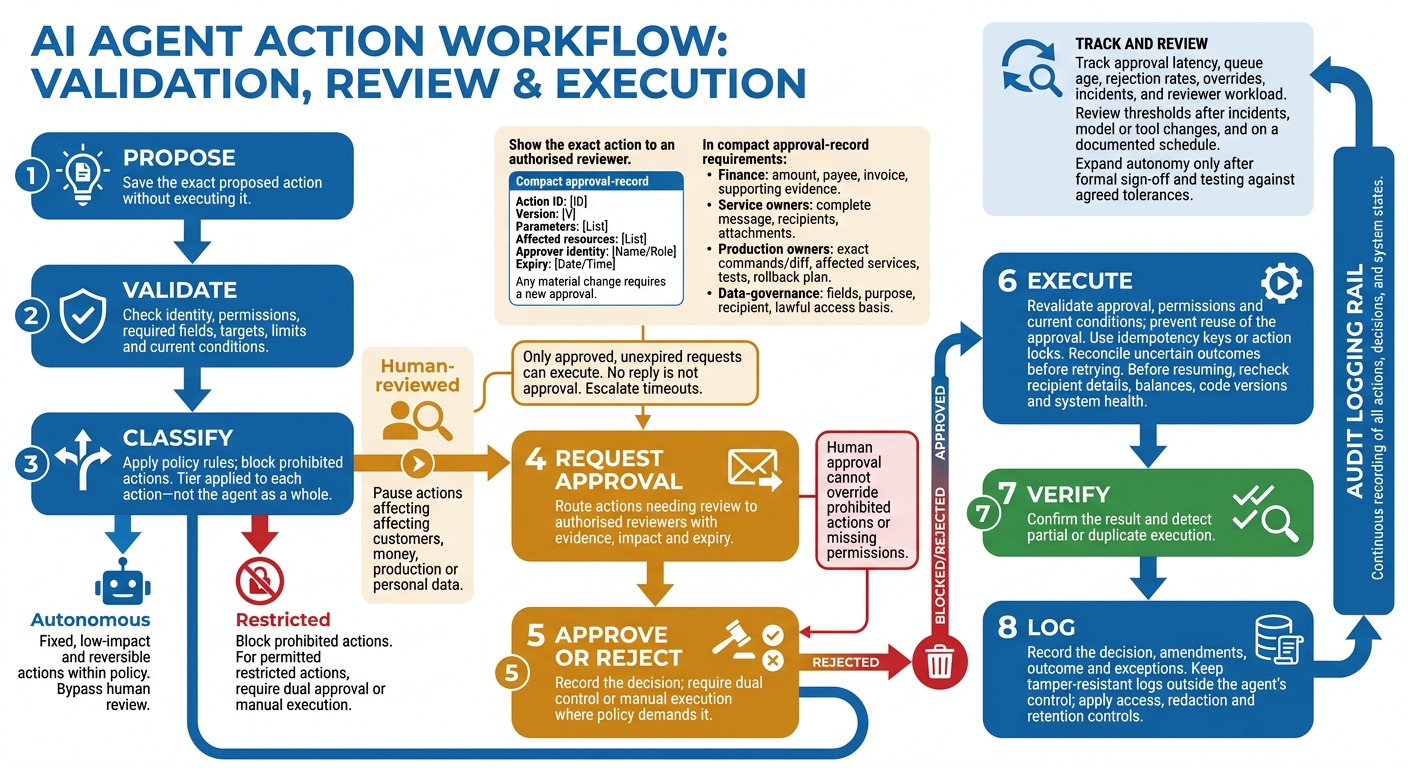 {AI Agent Approval Workflow: From Proposal to Execution}
:::
{AI Agent Approval Workflow: From Proposal to Execution}
:::
Once the control mode is set, turn policy into a workflow with three tiers: autonomous, human-reviewed and restricted. Keep autonomous actions fixed, low-impact and reversible. Pause human-reviewed actions that affect customers, money, production or personal data. Block restricted actions, or require dual approval where policy permits it.
Apply the tier to each action - not the agent as a whole. Prohibited actions stay blocked. Document each tier’s thresholds, owner and escalation route.[18][14][1][19][20]
Show authorised reviewers the exact action
Classify proposals using deterministic policy rules and validated inputs outside the model. Escalate missing or ambiguous risk information, and send only actions that cross the approval threshold for review.
Give reviewers the details they need to assess the action:
- Finance reviewers: amount, payee, invoice and supporting evidence.
- Service owners: complete message, recipients and attachments.
- Production owners: exact commands or diff, affected services, tests and rollback plan.
- Data-governance reviewers: fields, purpose, recipient and lawful access basis.
Reviewers need enough authority, expertise and independence to challenge the agent - not simply confirm its recommendation. Create an approval record tied to the exact action, including its ID, version, parameters, affected resources, approver identity and expiry. Execute only if the proposal still matches that record. Any material change requires a new approval. For high-risk actions, whoever configures the policy or prepares the change must not be its sole approver.[18][3][12][15]
Handle approval pauses and execution safely
Before building the queue, catalogue tools and permissions. Give each tool an owner and record its allowed resources, read/write access, reversibility and maximum potential impact. Follow a fixed sequence that keeps review, approval and execution separate.[19][20]
| Stage | Required control |
|---|---|
| Propose | Save the exact proposed action without executing it. |
| Validate | Check identity, permissions, required fields, targets, limits and current conditions. |
| Classify | Apply policy rules; block prohibited actions. |
| Request approval | Route actions needing review to authorised reviewers with evidence, impact and expiry. |
| Approve or reject | Record the decision; require dual control or manual execution where policy demands it. |
| Execute | Revalidate approval, permissions and current conditions; prevent reuse of the approval. |
| Verify | Confirm the result and detect partial or duplicate execution. |
| Log | Record the decision, amendments, outcome and exceptions. |
Retain the approval state until execution and verification are complete. Store paused proposals, evidence, policy results, approval status, expiry and execution state. Only approved, unexpired requests can execute. Escalate timeouts to a duty manager; never treat silence as approval.
When work resumes, recheck recipient details, balances, code versions and system health as relevant. Use idempotency keys or action locks to prevent duplicate payments, messages or deployments. Reconcile uncertain outcomes before retrying.[19][20]
Track results and adjust approval thresholds
Keep tamper-resistant logs outside the agent’s control. Record proposals, evidence references, policy results, approver identities, decisions, amendments, timestamps and execution outcomes. Apply access, redaction and retention controls, and exclude credentials and unnecessary personal data.
Track approval latency, queue age, rejection rates, overrides, incidents and reviewer workload to spot thresholds that need review. Before changing those thresholds, sample approved actions to investigate rushed decisions or near-zero rejection rates.[15][17][18][19][20]
Review thresholds after incidents, after model or tool changes, and on a documented schedule. Expand autonomy only after testing policy boundaries, interruption, rollback, expired approvals, duplicate requests, permission changes and partial failures against agreed tolerances. Require formal sign-off.[21]
Conclusion: Approve high-risk actions, not every task
Base human approval on what an action could cause, not whether an AI agent is involved. Automate reversible, low-risk work within fixed rules enforced outside the model. Require qualified review for actions that could cause material financial loss, customer harm, sensitive-data exposure or production disruption.[23][22]
Map the agent’s actions to risk tiers. Then pilot one high-impact approval workflow in shadow mode, with no actions executed. Test whether human review spots risky requests without needlessly escalating safe ones.
Assign a named owner and keep an audit trail. Stop any action that lacks the required permission or approval. The aim is to control high-risk actions, not seek approval for every task.
FAQs
How do I set approval limits for payments and customer messages?
Set approval limits by risk tier. Payments and customer messages need human sign-off. Payments also need a rationale and rollback plan. Tie each approval to the exact action, target, scope and arguments.
Record the reviewer’s identity, policy version, decision and expiry. Prevent approval reuse, then resume from the saved state. For medium-risk actions, run automated confidence or metric checks and send any action below the threshold to a human for review.
When can production changes or data exports run without approval?
Actions can run without human approval only if they are low-risk, read-only or non-production, easy to reverse, on an allow-list and safe to complete with a post-action audit.
Human approval is required beforehand for regulated actions or those that are hard to reverse. These include sensitive or regulated data exports, production changes that alter system state, deletion, permission grants, financial commitments, and transfers to destinations that could move restricted data. [1][2]
How can I prevent approval fatigue without weakening safeguards?
Use risk-based routing to group tasks by their impact and how easily they can be reversed. Require human approval for high-risk actions, such as payments, production configuration changes or access to sensitive data. Let low-risk tasks run on their own, with execution logs and post-action audits.
For medium-risk tasks, trigger a review when performance metrics or confidence scores drop below set thresholds. Apply controls centrally, prevent duplicate side effects, cap retries and test policies before enforcing them.