
I treat saved state as a restart point - not proof that an external action failed. If a £50 payment times out, I check its status before retrying: the money may already have moved.
To recover without repeating completed work, I use these controls:
- Save progress durably: keep inputs, decisions, results and receipts in checkpoints, event history or both.
- Replay recorded results: reuse saved tool outputs, timestamps and random values rather than generating them again.
- Control access and versions: isolate runs, block stale workers and keep older saved states readable.
- Check external actions: reuse stable idempotency keys and pause requests with unknown outcomes until they can be checked.
- Test the whole recovery path: simulate crashes, outages and failed writes; monitor recovery and plan how to undo external effects where possible.
My rule is simple: restore what is known, check what is uncertain, then resume unfinished work.
Why Crash Recovery Can Repeat an AI Agent's Action
Store the state needed for recovery
Save only the state needed to rebuild the run exactly once.
Save workflow progress and action results
Save run IDs, the definition version, the current stage and validated inputs. Keep decisions, outputs, tool results and receipts too, so a new worker can resume without repeating completed work.
Compare snapshots, event history and hybrid storage
Choose a persistence model based on how much history you need to replay and how much detail you must keep.
| Persistence model | Recovery speed | Audit trail | Storage cost | Implementation complexity |
|---|---|---|---|---|
| Snapshots (checkpoints) | Fast resume | Weak audit trail | Moderate cost | Low complexity |
| Event history | Slow replay | Full audit trail | High cost | Moderate complexity |
| Combined | Moderate resume speed | Strong audit trail | Moderate–high cost | High complexity |
Use the lightest model that still lets replay rebuild the exact state needed to resume.
Protect saved state and control worker access
Stale workers can break recovery by overwriting newer state. Keep each workflow isolated: never share state or memory across runs or tenants.
Where possible, write related state and events atomically. This keeps the saved stage consistent with its recorded results. Use version checks or fenced leases to reject updates from competing or stale workers.
Quarantine uncertain transactions for review rather than replaying them blindly after a failure.
Replay events and resume unfinished work
Once state is stored, recovery becomes a replay problem. Resume from the latest valid checkpoint, then replay events in order until you reach the first unfinished or unconfirmed transition. Quarantine that transition and pause the run until its outcome is known. After reconciliation, write a new checkpoint.
Make replay deterministic
Replay must reconstruct past decisions. Use the recorded timestamps, random values and external responses. Do not generate them again.
Keep older workflows compatible
Pin each run to a workflow version. Before changing definitions or state formats, add version markers or a tested migration that can read the stored history.
Record the last known good version and any rollback point that older code cannot read. Reverting code does not undo completed external actions, so design compensating actions separately. [1]
Handle service outages and corrupt or incompatible checkpoints
Check checkpoint integrity and version compatibility before loading it. If a service outage affects in-flight work, declare the outage, pause new work and snapshot the affected checkpoint. Reconcile duplicates before resuming queues in controlled batches.
Do not restart a run until every external action has a known outcome. [1]
Any external action that replay might revisit needs idempotency protection.
Prevent duplicate external actions
::: @figure 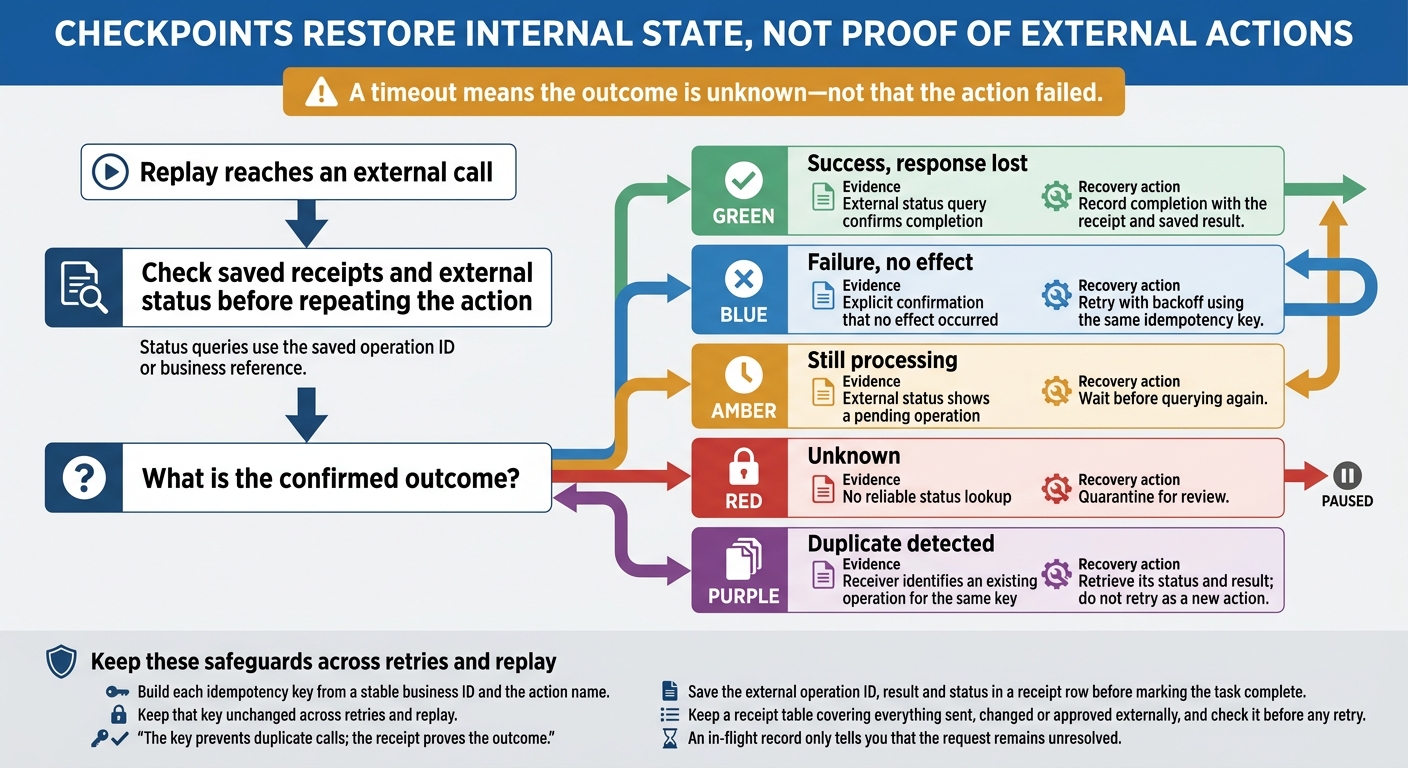 {AI Agent Recovery: Prevent Duplicate External Actions}
:::
{AI Agent Recovery: Prevent Duplicate External Actions}
:::
When replay reaches an external call, it must check whether the action has already happened outside the agent.
Checkpoints restore internal state, not proof of external actions. A payment or notification can succeed before the agent saves its result. Before repeating an action, replay must check receipts and external status to confirm what has already left the agent’s boundary.
Use stable idempotency keys and saved receipts
Build each idempotency key from a stable business ID and the action name. Keep that key unchanged across retries and replay. The key prevents duplicate calls; the receipt proves the outcome.
Save the external operation ID, result and status in a receipt row before marking the task complete. Keep a receipt table covering everything sent, changed or approved externally, and check it before any retry. An in-flight record only tells you that the request remains unresolved.[1]
Resolve requests with unknown outcomes
A timeout means the outcome is unknown - not that the action failed. If a payment or notification succeeds but its response is lost, query its status using the saved operation ID or business reference. Classify the outcome before retrying. Quarantine unresolved transactions rather than retrying them.[1]
Use the external status to decide whether to retry, wait or quarantine.
| Outcome | Evidence | Recovery action |
|---|---|---|
| Success, response lost | External status query confirms completion | Record completion with the receipt and saved result. |
| Failure, no effect | Explicit confirmation that no effect occurred | Retry with backoff using the same idempotency key. |
| Still processing | External status shows a pending operation | Wait before querying again. |
| Unknown | No reliable status lookup | Quarantine for review. |
| Duplicate detected | Receiver identifies an existing operation for the same key | Retrieve its status and result; do not retry as a new action. |
Test recovery and check production readiness
Test failures at every recovery boundary
Once you’ve defined recovery rules, test them under failure. Use synthetic traffic in pre-production to check that saved states resume cleanly. Terminate workers just before and after checkpoint writes, during external requests and during replay. Fail storage after an external request succeeds but before its receipt is saved. Check the final workflow state and external effects - not just whether the worker restarts.
Repeat these tests with stale workers, stale leases and workflows saved before a version update. Check that stale workers cannot write, older workflows stay compatible and replay produces the same state. Confirm that unresolved requests are reconciled or quarantined without duplicate calls.
Monitor recovery and review the checklist
Track checkpoint write failures, replay duration, unresolved operations and version mismatches. Set alert thresholds based on your recovery goals.
Use these controls for your production readiness check. Before production, verify durable checkpoints, saved state, deterministic replay, version compatibility, worker isolation, idempotency keys and reconciliation. Keep evidence that each failure test reached the expected final state without duplicate effects.
Also test rollback paths that cannot undo external effects [1]. Rolling back code does not reverse those effects, so recovery plans must include compensating actions [1]. Test the controls together: even a valid checkpoint cannot ensure recovery if replay, worker controls or reconciliation fail.
FAQs
How often should my agent save checkpoints?
For batch workloads and general AI tasks, checkpointing every 5–15 minutes usually strikes a balance between limiting rework and keeping storage overhead in check [1][2]. Depending on your requirements, some workloads can use 30-minute intervals [3].
If your cloud provider sends a two-minute interruption notice, always save a final checkpoint when it arrives to minimise lost progress [1]. Keep checkpoint overhead below 20% of your total execution time [2].
How can I replay non-deterministic AI decisions safely?
Prioritise idempotency and state management. AI agents may return different outputs when they retry. Make handlers idempotent so repeating an action produces the same outcome without duplicate side effects.
After a failure, quarantine transactions whose status is uncertain rather than replaying them blindly. Use compensating actions to reverse or correct side effects. For complex tasks, save the agent’s decision context and policy version in durable storage so it can resume from a known state.
What if an external service lacks idempotency support?
Without native idempotency, failed or timed-out steps can trigger duplicate calls or leave updates partly complete. Handle these cases manually: use compensating actions to undo unintended changes, or flag them for manual follow-up. Track progress with distinct identifiers and conditional writes so retries don’t corrupt the state.
Hokstad Consulting recommends designing these safeguards before production. Adding idempotency later is far more complex and prone to errors.