
When an AI agent’s tool call fails, choose the smallest safe fix: retry the call, switch tools or change the plan. First, check whether the action already happened. A timed-out payment, for example, may still have gone through.
The choice depends on 5 checks: error type, task risk, tool availability, execution state and recovery budget.
Quick Comparison
| Recovery | What changes? | When it fits | Main safeguard |
|---|---|---|---|
| Retry | Repeat the same call | A temporary fault; the tool still fits | Confirm it is safe to repeat and limit attempts |
| Re-route | Use another tool for the same subtask | A tool-specific fault or missing capability | Check permissions, data quality and shared dependencies |
| Replan | Change the remaining steps | A failed dependency or wrong assumption | Keep valid work and preserve the task’s constraints |
This is not a fixed ladder. Skip retries that cannot help, resolve uncertain writes before repeating them, and check results before continuing. Stop or seek approval when time, cost or safety limits are reached.
::: @figure 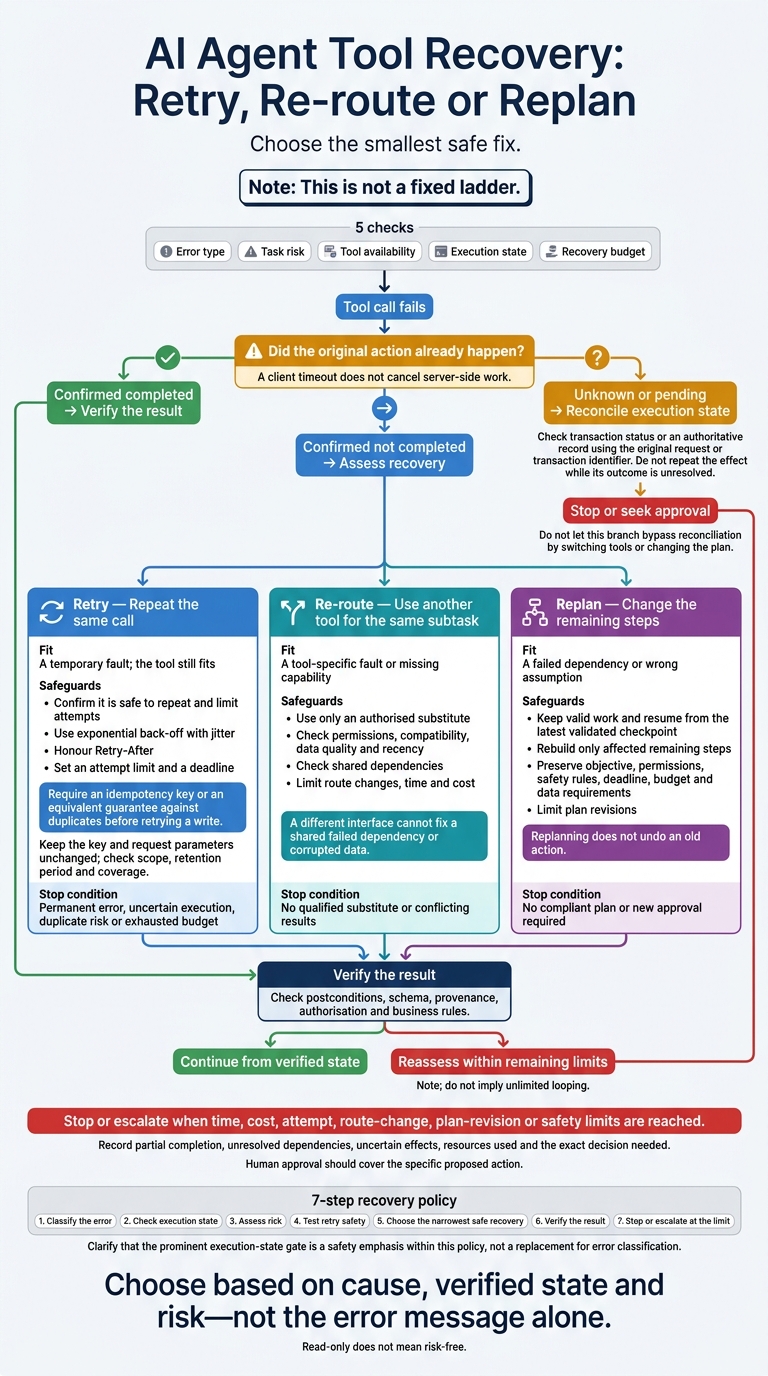 {AI Agent Tool Recovery: Retry, Re-route or Replan}
:::
Evidence-Guided Recovery for AI Agents with Ambiguous Tool Outcomes and Partial Execution
Retry: Repeat the Call Safely
Retry repeats the same call when a failure is temporary, the tool still fits the task and both task and duplicate risks are low. It costs little, but cannot fix bad inputs, missing permissions or the wrong tool.[1][2]
Before trying again, check whether the failure is likely to pass.
Set Limits for Temporary Failures
Network faults, rate limits, brief outages and temporary execution errors may justify a retry - but not every time. First, check the tool’s documented error classes and what the operation does. HTTP 429, 502, 503 or 504 may warrant another attempt.[1][3]
Set an attempt limit and a deadline. Use exponential back-off with jitter so retries do not all happen at once. Honour Retry-After; if the wait exceeds the remaining time, stop rather than retry early.[1][3][6]
If the call may have had side effects, check its state before repeating it.
Check State Before Repeating Writes
Require an idempotency key or an equivalent guarantee against duplicates before retrying a write. Keep the key and request parameters unchanged. Check the key’s scope, retention period and coverage: its protection may not cover the whole workflow.[2][5]
After an ambiguous timeout, check the operation’s status or whether the resource reached the expected state. A client timeout does not cancel server-side work. A status lookup may not settle the question if the write is still pending. Treat the outcome as unknown and resolve it before retrying. Do not generate a new key to force another submission.[2][5]
The failure type helps determine whether another attempt is safe - and when to stop.
Compare Retry Safety by Failure Type
| When the failure looks like… | Retry safety | Required check | Stop trigger |
|---|---|---|---|
| Confirmed failed read-only call | Usually safe | Temporary error, valid request, data recent enough for the task; follow Retry-After
|
Attempt limit or deadline reached, repeated identical failures or declining tool health |
| Write protected by idempotency | Conditional | Key scope, expiry, unchanged parameters and replay guarantees | Missing or expired protection, changed parameters, duplicate risk or exhausted budget |
| Ambiguous payment timeout | Unsafe until reconciled | Transaction status, amount, currency, merchant and final state | Unknown status or risk of another charge |
| Permanent authorisation error | Stop unchanged retries | Credentials, scopes, account and policy; correct only with authorisation | Invalid access or required approval |
If the failure comes from outside the call itself, switch tools for the same subtask - but resolve any uncertain write outcome first.
Re-route: Switch Tools for the Same Subtask
When retrying is no longer safe or useful, keep the task fixed and change the tool. Re-route swaps the tool, endpoint or source - not the subtask. Retry first when safe, re-route second and replan only when the workflow itself needs to change. Re-route when the original tool cannot perform the operation, its endpoint is unavailable, the agent picked the wrong tool or safe retries are exhausted. Use only an authorised substitute. Never bypass controls.[7][8]
Check Tool Fit, Access and Dependencies
Check whether the tool supports the operation, has the right permission scope and meets requirements for data quality, recency, interface compatibility and operating limits.
A live endpoint may still rely on the same broken backend or stale data. Check shared databases, credentials, identity services, network paths and source records. A different interface cannot fix a shared failed dependency or corrupted data. Record whether the fallback is independent, partly independent or just another interface.[10][12]
Compare Fallback Options
Choose the narrowest acceptable fallback based on the error type, task risk and available tools. Degraded operation is acceptable only if it still meets the task’s minimum requirements. Label any missing or incomplete information. Choose what fits the task rather than ranking tools for every situation.[12]
| Option | Availability | Dependency independence | Data quality and recency | Latency | Permissions | Running cost |
|---|---|---|---|---|---|---|
| Primary tool | Is the service healthy? | Which shared dependencies could fail? | Does the data meet accuracy and recency thresholds? | Can it meet the deadline? | Is the operation authorised? | Are call and processing costs acceptable? |
| Independent secondary tool | Is it working? | Are the relevant dependencies independent? | Are coverage and recency adequate? | Can it meet the remaining deadline? | Is the required scope authorised? | Are additional costs acceptable? |
| Degraded operation | Is reduced functionality available? | Which dependencies are still required? | Does reduced information meet minimum requirements? | Can it meet the remaining deadline? | Are restrictions preserved? | Is the cost proportionate? |
| Human escalation | Is an accountable person available? | Can they use an independent channel? | Can the result be reviewed and recorded? | Is the delay acceptable? | Are approval and segregation-of-duties rules maintained? | Is the human effort proportionate? |
Validate Results and Limit Tool Switching
Check both the output’s structure and its meaning: fields, types, units, identifiers, timestamps and business rules. These include valid currency, permitted quantity and the correct customer or region. Keep source details, request IDs, retrieval times and transformation steps. Retain conflicting results and flag unresolved disagreements - do not simply pick the easy answer.
For stock checks, use an authorised independent source with adequate coverage and freshness.[8][9]
Before switching write tools, check whether the original request may already have succeeded. Review an idempotency key, transaction status or authoritative record to resolve uncertain side effects. Set limits on route changes, time and cost, and log each switch.[11][12] Once selected, verify that the fallback still meets the task’s minimum requirements.
Replan: Change the Remaining Workflow
When retrying and re-routing no longer preserve the task’s intent, change the remaining workflow. Replanning rebuilds the remaining steps and their dependencies. Use it when a failure changes the workflow, not just one call or tool. It can address failed assumptions, but it also adds planning and validation work. That makes it a poor default for temporary faults.[13]
Identify Failures That Require a New Plan
Check how the failure affects later steps. Do they depend on unavailable or corrupted prerequisites, unresolved conflicting evidence, missing context, or semantic or schema errors?
Replan only when using the wrong tool changes the required sequence or assumptions. If the problem is an isolated malformed input, correct it locally rather than rebuilding valid work.
Keep Valid Work and Preserve Constraints
Once you understand the failure, keep valid work and resume from the latest validated checkpoint. Mark outputs as validated and reusable, pending, uncertain, or invalidated. Then rebuild only the affected remaining steps.
Track completed external actions separately from planned steps: replanning does not undo an old action. Check uncertain writes before planning another attempt at the same effect.
Keep the objective, permissions, safety rules, deadline, budget and data requirements unchanged. Only an authorised person can change those constraints.
Limit Plan Changes and Seek Approval
Set explicit limits on plan revisions, elapsed time, tool calls and spend. Each revision should resolve a named dependency or unmet requirement. Stop if successive plans rely on the same failed assumption, or if no plan meets the constraints.
If required validation remains unavailable, keep the action blocked. Send the completed work for human review rather than bypassing the control. Record partial completion, unresolved dependencies, uncertain effects, resources used and the exact decision needed.
Human approval should cover the specific proposed action, not blanket permission to continue.[7][8] Use the smallest plan change that still meets the remaining constraints.
Conclusion: Choose the Narrowest Safe Recovery
Choose based on cause, verified state and risk - not the error message alone. Retry temporary failures when the action is safe to repeat, re-route to a qualified substitute, and replan when dependencies or assumptions change.
Compare Retry, Re-route and Replan
Use this table when more than one recovery path appears safe.
| Recovery choice | Best-fit error | Tool condition | Main risk | Safeguards | Appropriate task profile | Stop or escalate trigger |
|---|---|---|---|---|---|---|
| Retry | Temporary overload, throttling or network fault | The same tool remains suitable; the operation is safe to repeat | Duplicate effects or increased load | State checks, idempotency, bounded back-off and jitter | Repeatable reads or idempotent writes | Retry budget exhausted, permanent error or uncertain execution |
| Re-route | Tool-specific outage or missing capability | An approved substitute meets access, schema, quality and security requirements | Incompatible output or data exposure | Compatibility, provenance and permission checks | The same subtask remains valid and risk is controlled | No qualified substitute or conflicting results |
| Replan | Failed prerequisite or invalid workflow assumption | Available tools support a safe remaining dependency graph | Scope drift or inconsistent state | Validated checkpoints, constraint checks and revision limits | A workflow that needs a different sequence | No compliant plan or new approval required |
Match Recovery Limits to Task Risk
| Risk dimension | Lower-risk condition | Higher-risk condition | Recovery control |
|---|---|---|---|
| Action type | Read-only catalogue lookup | Payment, deletion or permission change | Limit read retries; verify write state before repeating |
| Reversibility | Correctable effect | Irreversible effect | Require stronger approval and pre-action checks |
| Impact | Low-impact internal use | Sensitive data or a high-impact decision | Tighten access, validation and human oversight |
| Execution state | Confirmed non-execution | Timeout after submission | Reconcile using the original request or transaction identifier |
Read-only does not mean risk-free. A lookup can expose sensitive data or affect high-impact decisions. Set recovery budgets by the possible consequences, not just whether the tool writes data.
Apply a 7-Step Recovery Policy
If the choice is still unclear, follow this sequence.
- Classify the error: transient, capability, authorisation, validation, dependency or ambiguous execution.
- Check execution state: establish whether the original action completed.
- Assess risk: consider impact, reversibility, data sensitivity and downstream use.
- Test retry safety: check idempotency, transaction controls, rate limits and tool policy.
- Choose the narrowest safe recovery: bounded retry, qualified re-route or controlled replan.
- Verify the result: check postconditions, schema, provenance, authorisation and business rules.
- Stop or escalate at the limit: stop retries, tool switching or replanning when their limits are reached; record the outcome and the decision needed.
Build these rules into the architecture, not prompts alone.
FAQs
How do I set recovery budgets for different task risks?
Group tasks by risk and difficulty, with limits based on how easily an action can be reversed and its financial impact. For low-risk tasks, use bounded exponential back-off with jitter. For medium- to high-risk tasks, set per-request spending caps in pounds (£), define escalation paths when limits are breached, and require human sign-off for critical actions.
For each task class, specify verification methods, escalation triggers and approval requirements. Track cost per completion, including retries, and use past outcomes to adjust thresholds and minimise false positives.
What if a failed payment’s status stays unknown?
If a payment’s status is unknown, don’t assume it failed or retry it automatically. Move the task into a reconciling state, then check the provider’s records using the saved operation ID or business reference.
If the payment is still processing, wait before checking again. If you can’t confirm the outcome, quarantine the transaction for manual review to prevent duplicate charges. Always use a stable idempotency key to reconcile safely.
How can I test retry, re-route and replan decisions?
Simulate failures with repeatable tests in a controlled, non-production setting. Check that:
- Retries use bounded exponential back-off and idempotency keys to prevent duplicate effects.
- Re-routing selects approved, healthy fallbacks within shared budgets and timelines.
- Replanning preserves state without repeating completed work.
Use chaos testing to check for cascading failures and resource exhaustion. Track attempts, circuit transitions and cost per task (£). Confirm that each task either completes safely or is quarantined for human intervention.