
I track AI agent costs across every model call - not just the final answer. That means linking calls to a task, counting retries and sub-agents, and keeping missing usage unknown rather than recording £0.
My approach covers four steps:
- Record usage: log input, output and cached tokens once per call. Cached tokens are part of input, not extra tokens.
- Calculate costs in GBP: use the price at the time of each call, retain the source currency and exchange rate, and round only for display.
- Assign spend: group costs by run, task and team, keeping model, tool and infrastructure charges separate.
- Check and control spend: compare records with bills, monitor missing data and retries, and set alerts plus execution limits.
I measure cost per successful task using all relevant spend, including failed attempts. For example, £100 across 80 completed tasks gives £1.25 per success. My rule: count all the spend, but count each completed task only once.
::: @figure 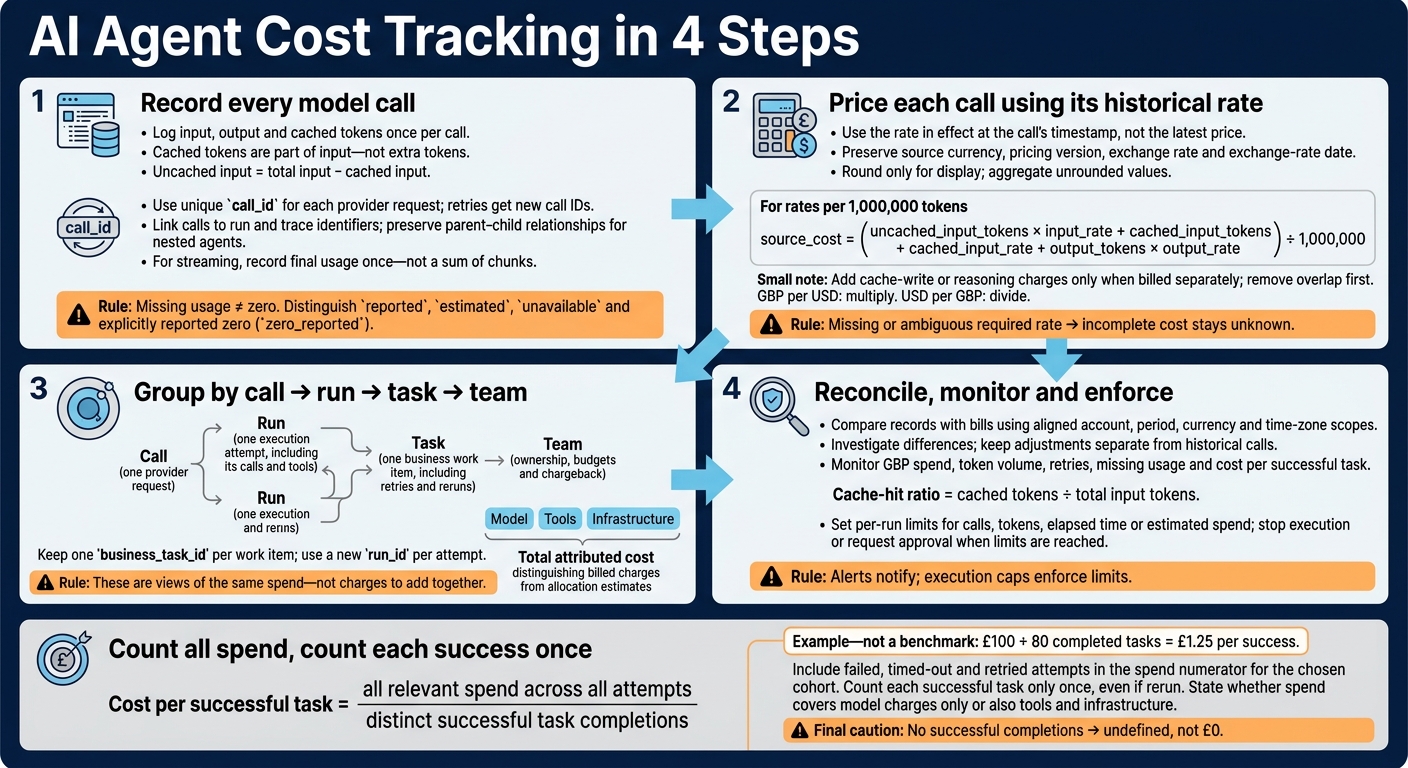 {AI Agent Cost Tracking in 4 Steps}
:::
{AI Agent Cost Tracking in 4 Steps}
:::
1. Record Tokens for Every Model Call
Record Usage and Trace Fields
Link each call record to the run-level identifiers defined in the introduction. Create run_id before execution starts, then create a new call_id and call span_id before each request.
Pass the same context through async jobs and nested agents, keeping parent_span_id. Retries retain the run and trace identifiers but get a new call identifier and retry span. OpenTelemetry’s parent–child span relationships support this structure.[5]
Rows marked † are required. Nullable fields can be left blank.
| Fields | Meaning | Source | Aggregation rule |
|---|---|---|---|
run_id, trace_id † |
Task execution and trace | Orchestrator/tracing | Group and link |
call_id, span_id, parent_span_id † |
Request and trace relationships; parent where applicable | Request wrapper/tracing | Count once per call; link spans |
task_type, workflow_phase, agent_id, team_id † |
Work and ownership; team optional | Execution context | Group by label |
provider, model, configuration_version † |
Model and configuration used | Request/configuration | Group only |
timestamp_utc, duration_ms, attempt † |
Start time, elapsed time and retry number | Wrapper/clock | Filter and analyse |
status, error_code † |
Execution outcome and failure type | Wrapper/response | Count by outcome |
input_tokens, cached_input_tokens, output_tokens † |
Normalised token counts; nullable | Provider usage | Sum distinct calls by category |
reasoning_tokens |
Separately disclosed reasoning usage; optional | Provider usage | Analyse separately; respect inclusion rules |
usage_status and per-category status fields † |
Reliability of each count | Collector | Count by state |
raw_usage_payload, provider request and response IDs † |
Original usage and audit reference; required when available | Provider response | Retain; do not sum |
Use reported, estimated and unavailable to separate provider-reported counts from local estimates and missing data. If the provider explicitly returns zero, use zero_reported. Track these states for each category where possible.
For streaming, record the final usage event rather than adding up chunks. If that event never arrives, mark the affected fields as unavailable and store any estimate separately.[3]
Normalise Tokens Without Double-Counting
Keep provider-specific mappings in a versioned adapter. Before calculating billable categories, check whether input totals include cached input and output totals include reasoning tokens.[7] Keep cache-read and cache-creation in separate billable fields when their rates differ.[6] Check subset relationships, and never replace missing counts with zero.
Sum individual provider-call records, not parent-span totals. Use call_id as the storage key so each provider request is counted once. A retry counts as a separate call - even if the earlier attempt failed but returned billable usage. Calculate parent-agent totals for reporting; do not store them as extra accounting rows.
Build a Minimum Tracking Record
Include the fields above, plus source_currency, pricing_version and nullable source_cost. If the source bill is not already in pounds sterling, also add gbp_cost, exchange_rate and exchange_rate_date alongside raw_usage_payload.
The pseudocode below leaves incomplete costs unknown and uses decimal arithmetic. Round only for display, not for storage or aggregation.
from decimal import Decimal

# ctx holds pre-created identifiers.
raw = extract_final_usage(response)  # None if unavailable
usage = adapter.normalise(raw) if raw is not None else None
raw_usage = response.raw_usage

if usage is None:
    status = "unavailable"
    input_tokens = cached_tokens = output_tokens = reasoning_tokens = None
else:
    adapter.validate(usage)
    status = "reported"
    input_tokens = usage.get("input_tokens")
    cached_tokens = usage.get("cached_input_tokens")
    output_tokens = usage.get("output_tokens")
    reasoning_tokens = usage.get("reasoning_tokens")

if input_tokens is not None and cached_tokens is not None:
    uncached_input = input_tokens - cached_tokens
    if uncached_input < 0:
        raise ValueError("cached input exceeds total input")
else:
    uncached_input = None

rate = rates.lookup(ctx.provider, ctx.model, ctx.timestamp_utc, ctx.pricing_version)

source_cost = None
if (
    status != "unavailable"
    and rate is not None
    and uncached_input is not None
    and cached_tokens is not None
    and output_tokens is not None
):
    source_cost = (
        Decimal(uncached_input) * rate.input_rate
        + Decimal(cached_tokens) * rate.cached_input_rate
        + Decimal(output_tokens) * rate.output_rate
    ) / Decimal("1000000")

record = {
    **ctx.identifiers_and_metadata(),
    "input_tokens": input_tokens,
    "cached_input_tokens": cached_tokens,
    "output_tokens": output_tokens,
    "reasoning_tokens": reasoning_tokens,
    "usage_status": status,
    "source_currency": getattr(rate, "currency", None),
    "pricing_version": getattr(rate, "version", None),
    "source_cost": source_cost,
    "gbp_cost": None,
    "exchange_rate": None,
    "exchange_rate_date": None,
    "raw_usage_payload": raw_usage,
}

store.upsert(key=ctx.call_id, record=record)
export_metrics(aggregate_unique_calls(ctx.run_id))
Store the record once and use it to price each call in GBP.
2. Calculate Model Costs and Report in GBP
Once you’ve recorded each call’s usage, calculate its cost using the rate in effect at the call’s timestamp.
Store Model Rates by Effective Date
Use the rate that applied when the call occurred, not the latest price. Keep versioned pricing records by provider, model/version, usage category, effective dates and billing conditions. Never overwrite historical rates.
| Field group | Fields to retain | Purpose |
|---|---|---|
| Published pricing |
provider, model, usage_category, effective_from, effective_to, billing conditions such as service tier or context length |
Match the call to the applicable rate |
| Published rates | Separate input, cached-input, output and independently billable cache-write or reasoning-token rates; currency, rate_unit
|
Specify the price per 1,000 or 1,000,000 tokens |
| Pricing evidence | Pricing source, retrieval time | Preserve the pricing reference |
| Calculated values | Category costs, source_cost, gbp_cost, exchange-rate reference, calculation status |
Keep a record of the calculation and conversion |
If a required rate is missing or more than one rate could apply, mark the record rate_missing. Leave incomplete totals unknown rather than showing them as complete. After correcting the rate record, recalculate using the original usage and call timestamp.
Calculate Cost by Token Category
For rates quoted per million tokens:[8][9]
source_cost = (
    uncached_input_tokens × input_rate
    + cached_input_tokens × cached_input_rate
    + output_tokens × output_rate
) / 1,000,000
Add cache-write or reasoning-token charges only if they’re billed separately. Subtract any overlap first to avoid double-counting.
Convert Costs to Pounds Sterling
Add GBP values without replacing the source-currency values. Record the exchange-rate source, date, retrieval time and direction so you can audit or recalculate the conversion later. Multiply when the rate is GBP per USD; divide when it’s USD per GBP.
Document whether exchange rates apply per call, day, invoice or reporting period. HMRC publishes exchange-rate information; specify the source and convention you use.[10]
Aggregate high-precision GBP values before rounding. Display rounded totals as £12.34, but keep stored values unrounded. State whether totals include VAT. Specify the reporting time zone, such as Europe/London, and retain timestamps with offsets.
Use these call-level GBP costs to calculate task, phase and team totals.
3. Assign Costs to Tasks and Teams
Label Tasks and Workflow Phases
Keep one business_task_id for each work item, and give each execution attempt a new run_id. Use the call-level GBP costs from the previous section to calculate task and team totals. At the agent-entry point, add business_task_id, team/cost centre and tenant/workspace ID to the existing call context. Pass these fields to every span, and keep the parent span ID and prompt-template or policy version in the trace record.[11][12][13]
Where the framework supports distributed tracing, record planning, execution, reflection and verification as separate spans or phases.
For support-ticket triage, use labels such as
intake,retrieval,classification,draft_responseandverification.
Store identifiers and prompt-template IDs or version numbers - not customer details or full prompts. Limit access to raw traces and apply retention rules. Keep task and tenant IDs in searchable records rather than dashboard metric labels. For aggregations, use lower-cardinality labels such as team, environment and workflow.[11][16]
Compare Call, Run, Task and Team Reporting
These reporting views show the same spend at different levels, from a single call to an entire team.
| Reporting level | Advantage | Limitation | Best use |
|---|---|---|---|
| Call | Pinpoints the model, token category, phase, latency and error behind the spend | Covers only part of one execution | Diagnosing expensive calls, prompts or retries |
| Run | Shows the full cost of one attempt, including all model calls and tools | A failed run may not show the full cost of completing the business task | Comparing successful and failed attempts or investigating a specific execution |
| Task | Combines retries and reruns for one business task, showing the cost of completing or abandoning it | Needs a stable task ID and a clear rule for counting reruns | Measuring cost per completed task and analysing workflow efficiency |
| Team | Supports ownership, chargeback, budgets and trend analysis | Can hide inefficient workflows or expensive individual tasks | Setting budgets and comparing spend across teams, products or cost centres |
Group the same records by workflow, agent, model and reporting period. Call, run, task and team totals are different views of the same spend - not charges to add together.
For task and team allocation, keep model_cost_gbp, tool_cost_gbp and infrastructure_cost_gbp separate. Assign hosted tools and code execution to the appropriate category. Label combined figures total_attributed_cost_gbp, and distinguish billed charges from infrastructure allocation estimates.[12][14]
Measure Cost per Successful Task
After grouping task-level costs, use one success rule to report efficiency. First, define the reporting window, environment, task cohort and cost categories. Then report total spend, average cost per distinct task, average and p95 tokens per run, retry and failure spend, completion rate and latency. Base success on a clear business completion rule - not simply a run that finished without errors.[15]
Cost per successful task = all relevant spend across all attempts ÷ distinct successful task completions.
Include failed, timed-out and retried attempts in the numerator for the chosen cohort. Count each successful task only once, even if it was rerun. State whether the metric covers model charges alone or combined operating costs, including tools and infrastructure. If there are no successful completions, report the metric as undefined - not £0.[15]
4. Check Cost Records and Control Spend
Use these checks to verify the usage records, pricing and GBP conversions set up above.
Test Tracking and Reconcile Bills
Test uncached and cached requests, streaming and non-streaming responses, retries, nested agents, failures, timeouts and cancellations. Check the tracking model against returned usage, matching identifiers, token categories and rate-card entries for the relevant effective date.
Deduplicate ingestion on stable call ID, not run ID. Genuine retries must remain chargeable records. Combine streaming usage into one call, reconcile child-call totals, and mark missing usage as delayed, estimated or unavailable - never record £0.[17][18]
Once you can trust the usage records, reconcile them against the bill using the same reporting dimensions.
For a defined period, check that both systems use the same organisation, project, account, currency and time zone when comparing GBP records. Compare total spend first, then break it down by model, token category and day. Use request IDs to investigate unmatched calls.
Record differences caused by reporting lag, discounts, credits, exchange rates, taxes and non-token charges. Assign each unresolved difference an owner and a resolution date. Keep adjustments separate rather than rewriting historical calls, and retain the original currency and conversion basis.[19]
Set Up Dashboards, Budgets and Alerts
After reconciliation, monitor the same records for drift, spikes and missing data.
Show token volume, GBP spend, retries, missing usage and cost per successful task. Track cached tokens ÷ total input tokens as the cache-hit ratio[2], alongside realised cost.[18]
Compare task-level changes with a defined baseline. Check call volume, model mix, prompt/configuration versions, pricing versions and exchange rates. Set alerts for unexpected run costs, token spikes, rising retries, missing usage and changes in cache-hit ratio.
Alerts notify; execution caps enforce limits. Set per-run limits for calls, tokens, elapsed time or estimated spend, with an explicit action to stop execution or request approval.
Before relying on the dashboard, check usage completeness, rate coverage, reconciliation status and alert routing. Retain model, application, prompt/configuration and pricing versions so investigations can tell workflow changes apart from rate changes.
Conclusion: Make Task Costs Reproducible
Hokstad Consulting helps design AI strategy, implementation and custom agent cost tracking. Start with one workflow: record every call, normalise billable categories, and preserve pricing and exchange rates so task costs remain reproducible.
FAQs
How can I budget for calls with missing usage data?
Build a stable baseline from at least 60–90 days of production metrics, including requests per minute and tokens per request. Then identify your usage floor: the minimum capacity you need during stable periods. This helps you forecast costs even when some data is missing.
Hokstad Consulting recommends a 20–30% buffer for exploratory iterations and failed runs. Set financial guardrails and budget alerts at 70% and 90% of your monthly spending limit, measured in pounds (£).
How should I allocate shared agent costs across tasks?
Use key-value tags such as project, team or environment to group costs. For complex AI inference workloads, automate cost attribution with Virtual Tags (VTags) or IAM principal-based attribution to track spending by project or user.
For shared infrastructure, track unit costs, such as the cost per agent task or per 1,000 inferences. Hokstad Consulting helps organisations optimise allocation models so costs align with business goals and budgets reflect spending accurately.
How can I cut token costs without reducing quality?
Focus on technical optimisations. INT8 quantisation can cut inference costs by approximately 50%, with less than 1% impact on quality. Continuous batching also increases throughput on the same hardware [1].
Choose the right model for the task. Smaller, specialised models often match larger ones on specific tasks. Cache frequent queries to avoid generating the same tokens again, and use structured logging to spot and remove inefficient prompt patterns [2][3][4].