
Spot instances can save you 60–90% on cloud costs, but not all workloads are suitable. Here's what you need to know:
- What are Spot Instances? Unused cloud resources sold at discounted rates by providers like AWS, Azure, and GCP. However, they can be reclaimed at short notice.
- Who benefits most? Workloads like batch processing, CI/CD pipelines, and machine learning training handle interruptions well and yield the highest savings (up to 90%).
- Who should avoid them? Stateful databases, real-time apps, and latency-sensitive workloads are better off using reserved or on-demand options.
- Key strategies: Use checkpointing, diversify instance types, and leverage tools like Auto Scaling Groups for reliability. Monitor costs closely to ensure savings.
Spot instances are a cost-effective way to optimise cloud spending when matched with the right workloads and strategies.
::: @figure 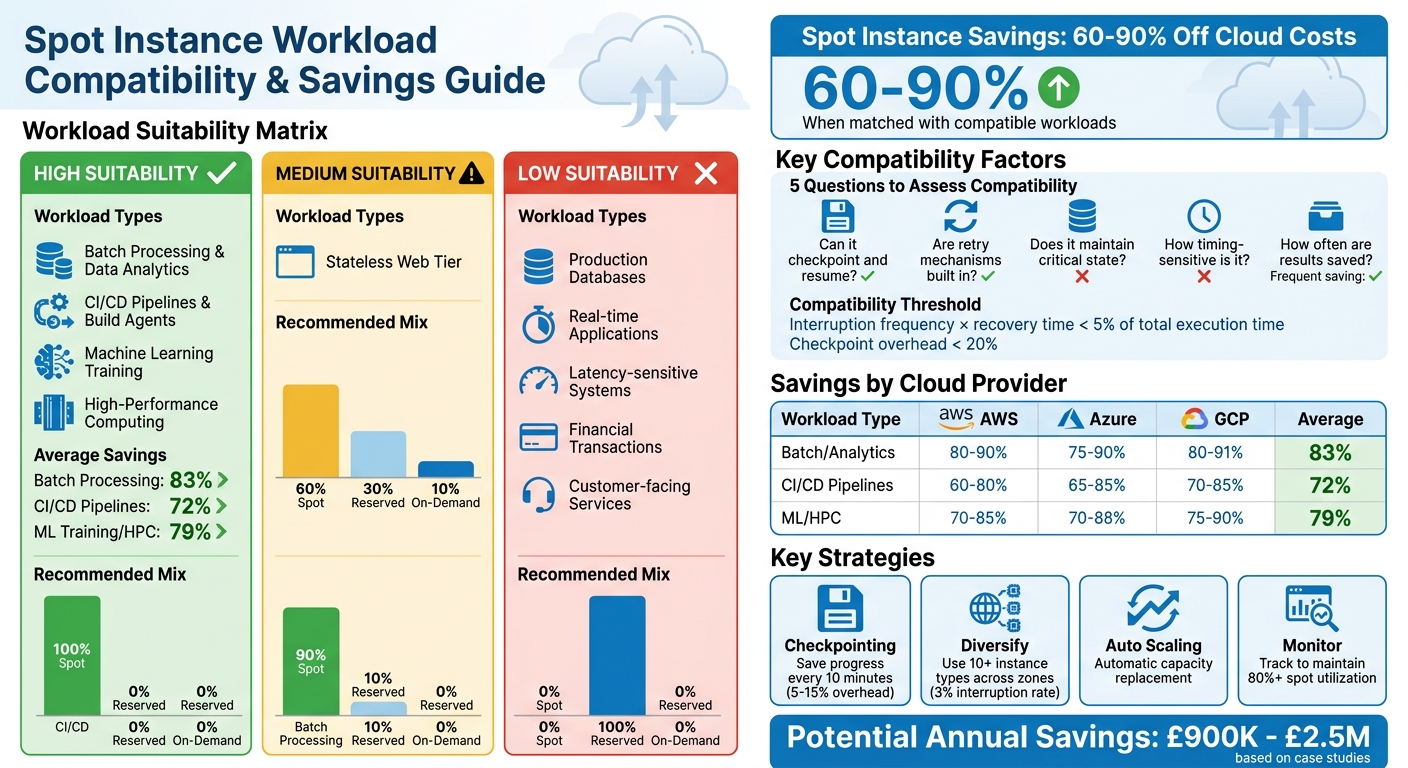 {Spot Instance Suitability and Savings by Workload Type}
:::
{Spot Instance Suitability and Savings by Workload Type}
:::
EC2 Pricing Models: On-Demand, Reserved & Spot Instances Explained
Assessing Workload Compatibility with Spot Instances
Understanding how well your workload can handle interruptions is key to using spot instances effectively. With the right evaluation, you could see savings of up to 70%. Here's how to assess your workloads and make smart choices.
Evaluating Workload Interruption Tolerance
The cornerstone of compatibility with spot instances is interruption tolerance - essentially, how well your workload can manage unexpected terminations without losing data or degrading performance. To determine this, consider these five factors:
- Does the workload maintain a state that could be lost if interrupted?
- Can it checkpoint (save progress) and later resume?
- Are retry mechanisms built in?
- How sensitive is it to timing?
- How often are results saved to durable storage?
For instance, periodic checkpointing helps ensure that work can resume from the last saved state. While this introduces a minor overhead of 5–15%, it pales in comparison to the potential savings of 70–90%.
Using strategies like exponential backoff, jitter, and capped retries can also reduce recovery time. To gauge compatibility, check if the interruption frequency multiplied by recovery time is less than 5% of the total execution time and if checkpoint overhead stays below 20%.
Once you've assessed interruption tolerance, the next step is identifying which workloads are ideal for spot instances.
In Q1 2023, Intuit transitioned its machine learning training workloads to Spot Instances and achieved an 85% reduction in compute costs - saving £2.5 million annually across 500+ jobs. They implemented TensorFlow checkpointing every 10 minutes, managing a 15% interruption rate without a single job failure. Priya Patel, Intuit's Data Science Director, led this initiative.
Workloads That Work Well with Spot Instances
Certain workloads are naturally suited to spot instances. Here are some examples:
- Batch processing and data analytics: These workloads are broken into discrete tasks, making them easy to pause, resume, or run in parallel.
- CI/CD pipelines and build agents: Stateless by design, these jobs can be retried if interrupted and typically finish within predictable timeframes.
- Machine learning training and high-performance computing: Checkpointing can be used to save progress, allowing these jobs to resume seamlessly after interruptions.
Additional compatible workloads include data processing workflows, log analysis, image rendering, scientific simulations, and scheduled reporting tasks. These tasks share common traits: they are non-interactive, tolerate interruptions, and save results persistently.
In 2022, Expedia Group moved their CI/CD pipelines to AWS Spot Instances, cutting compute costs by 90% (£1.8 million annually) over a year. By using Jenkins with retry logic and checkpointed builds, they reduced interruptions to less than 1% through multi-availability zone diversification. This project was spearheaded by Mark Smith, Expedia's Cloud Engineering Lead.
| Workload Type | Spot Suitability | Recommended Capacity Mix (Spot/Reserved/On-Demand) |
|---|---|---|
| CI/CD Pipelines | High | 100% / 0% / 0% |
| Batch/Data Processing | High | 90% / 10% / 0% |
| Stateless Web Tier | Medium | 60% / 30% / 10% |
| Production Database | Low | 0% / 100% / 0% |
For multi-cloud environments, combining spot instances with reserved or on-demand options ensures both cost efficiency and reliability.
Workloads That Don’t Suit Spot Instances
Not all workloads are a good fit for spot instances. Here are some that should steer clear:
- Continuous availability workloads: These require uninterrupted operation and can't handle interruptions.
- Latency-sensitive applications: Real-time systems, interactive web apps, and APIs serving end-users can suffer from poor performance if interrupted.
- Stateful databases and caches: These rely on in-memory states, which would be lost upon termination.
- Long-running processes without checkpointing: These risk losing hours of computation if interrupted.
- Financial transactions and compliance-critical systems: Interruptions could lead to regulatory or audit issues.
- Customer-facing services: Downtime here directly impacts revenue and user satisfaction.
For these workloads, on-demand or reserved instances are the safer choice.
At Hokstad Consulting, we've found that a tiered approach works best. Use spot instances for less critical workloads, combine spot with on-demand options for important tasks, and reserve on-demand instances for mission-critical systems. This strategy ensures cost savings while maintaining reliability.
In 2021, Zillow switched to Spot Instances for batch analytics, processing housing data. Over 18 months, they saved 73% (£900,000 annually) while handling 1 petabyte of data daily. Using Apache Spark with dynamic allocation and retries, they managed a 20% interruption rate without issues. The project was led by Quicken Wu, Zillow's VP of Engineering.
How to Maximise Spot Savings by Workload Type
Once you've pinpointed which workloads are a good fit for spot instances, you’ll need tailored strategies to fully realise the potential savings of 70–90%, all while maintaining reliability. Let’s break it down for batch jobs, CI/CD pipelines, and ML/HPC workloads.
Batch Processing and Data Analytics
Batch jobs and ETL pipelines are naturally well-suited for spot instances due to their fault-tolerant nature. By implementing checkpointing, you can ensure tasks resume from where they left off. Progress markers - like processed file lists, database offsets, or intermediate results - should be stored in reliable storage solutions such as S3 or RDS.
Use a price-capacity-optimised allocation strategy. This means selecting a variety of instance types across multiple Availability Zones - aim for at least 10 - to access diverse capacity pools. Scheduling non-essential jobs during off-peak hours or in regions with lower demand can also help secure better pricing stability.
For added reliability, enable Capacity Rebalancing. This feature ensures replacement instances are launched when AWS issues a rebalance recommendation, often well before the two-minute termination warning. For Kubernetes environments, tools like the AWS Node Termination Handler can stop new tasks from being assigned to vulnerable nodes. A good capacity mix for most batch processing workloads is 90% spot and 10% reserved instances, with no reliance on on-demand instances.
These strategies for batch processing also work well for other stateless workloads, such as CI/CD environments.
CI/CD Pipelines and Build Agents
CI/CD pipelines are another great use case for spot instances. Build jobs are short-lived and stateless, making them easy to manage. Configure your CI tools - like Jenkins, Buildkite, or GitHub Actions - to retry tasks automatically when instances are interrupted. For Jenkins, the EC2 Fleet Plugin is a handy tool to elastically scale agents down to zero during idle periods, saving costs.
Keep critical data in external storage. For instance, store the JENKINS_HOME directory on a persistent storage solution like Amazon EFS. This ensures replacement instances can immediately access build history and configurations. Implement a dynamic fallback system that switches to on-demand instances if spot capacity runs out, avoiding any build delays.
Start small by testing fault tolerance with a limited percentage of CI/CD traffic. Netflix, for example, achieved a 75% cost reduction for Jenkins build agents by using auto-scaling groups to quickly replace interrupted instances. Similarly, GitLab has reported savings of 60–90% by running non-critical pipelines on spot instances, using strategies like job queueing to retry on new instances. Typically, 20% of pipelines (often the main branch) account for the bulk of compute costs - making them ideal candidates for spot instance migration.
These stateless patterns also translate well to compute-heavy workloads like ML training and HPC.
Machine Learning Training and High-Performance Computing
Machine learning (ML) training and high-performance computing (HPC) workloads are excellent candidates for spot instances, particularly spot GPUs like AWS p3 or g4 instances, which offer significant cost savings. These workloads can handle interruptions by leveraging effective checkpointing. Save model weights, optimiser states, and training progress to S3 or FSx for Lustre, so training can resume smoothly.
Adopt attribute-based instance selection (ABS) to define your resource needs - such as vCPU, memory, and GPU type - without locking into specific instance names. This flexibility allows you to take advantage of newer or less popular instance types with better availability. Regularly poll the metadata service to detect the spot/instance-action signal and trigger an emergency checkpoint before termination.
In 2023, the National Football League (NFL) used around 4,000 EC2 Spot Instances across more than 20 instance types to run complex simulations for its season schedule. By diversifying instance types, managed by EC2 Specialists Pranaya Anshu and Sid Ambatipudi, the NFL saved £2 million per season while maintaining reliability for large-scale HPC workloads.
Since ML and HPC workloads are not latency-sensitive, they can be shifted to regions with lower spot pricing or better capacity availability. Use the price-capacity-optimised allocation strategy to prioritise instance pools with the lowest interruption risk. For ML training, an 80% spot and 20% reserved instance mix is recommended. Finally, test your setup thoroughly with tools like AWS Fault Injection Simulator to ensure checkpointing and resume mechanisms work seamlessly.
Best Practices for Managing Spot Instances
Diversifying Instance Types and Regions
Spreading workloads across various instance types and Availability Zones can greatly reduce the risk of interruptions. For instance, a price-capacity-optimised strategy brings interruption rates down to about 3%, compared to 20% with a lowest-price strategy, with only a slight 1% increase in costs [1].
Instead of hardcoding specific instance names, define your requirements based on vCPUs, memory, and network performance. This flexibility allows you to utilise newer or less commonly used instance types that often have better availability. In Kubernetes environments, you can configure the Cluster Autoscaler with a priority
expander, ensuring spot instance node groups are scaled first before falling back on on-demand capacity [1].
With proactive replacement in Capacity Rebalancing, you benefit from graceful continuity.- Amazon EC2 Auto Scaling Documentation [1]
Don’t overlook regional diversification. Spot pricing and capacity can differ significantly between regions, so running non-latency-sensitive workloads in regions with lower demand can improve both availability and cost efficiency. Establishing this diversified foundation is crucial before using tools like Spot Fleet and Auto Scaling Groups.
Using Spot Fleet and Auto Scaling Groups
Auto Scaling Groups (ASGs) and Spot Fleet are invaluable for managing spot capacity at scale. ASGs are particularly suited for workloads that integrate with load balancers and lifecycle hooks, while Spot Fleet is better for batch jobs that require capacity based on vCPUs or memory rather than a fixed number of instances [3].
Both services offer a price-capacity-optimised allocation strategy, helping you balance savings with availability for production workloads [2][3]. For critical workloads where uptime is non-negotiable, the capacity-optimised strategy ensures availability takes precedence over achieving the absolute lowest cost.
Spot Fleet also supports instance weighting, which helps you align target capacity with varying performance levels. For example, you could assign a weight of 2 to an m5.xlarge instance and 1 to an m5.large instance. This ensures your fleet meets the required capacity, regardless of which instance types are available [3].
Monitoring and Cost Tracking
Diversification and scaling are important, but ongoing monitoring is crucial for maintaining cost efficiency. Regular tracking helps you avoid unexpected expenses and optimise your spot instance usage. Tools like AWS Cost Explorer and the Spot Instance Data Feed allow you to monitor usage and costs effectively. AWS Cost Anomaly Detection can alert you to unusual spikes, while Kubecost provides detailed insights tailored to Kubernetes workloads [4][5].
It’s also essential to measure your actual savings against expectations. Fully spot-based clusters typically achieve cost reductions of around 77%, while mixed configurations with on-demand and spot instances average about 59% savings [6]. If your savings fall short, review your allocation strategy and instance diversification. The AWS Cost and Usage Report (CUR) offers detailed billing data - hourly, daily, or monthly - helping you identify areas for further optimisation [5].
Savings Analysis and Conclusion
Average Savings by Workload Type
The cost-saving potential of spot instances varies widely depending on the type of workload. Here's a breakdown of the average savings achieved across different workload types using AWS, Azure, and Google Cloud:
- Batch processing and data analytics lead the pack, with average savings of 83%. These workloads are particularly suited to spot instances due to their flexibility and tolerance for interruptions.
- CI/CD pipelines and build agents see an average cost reduction of 72%, making them another strong candidate for spot usage.
- Machine learning (ML) training and high-performance computing (HPC) workloads achieve average savings of 79%, provided they are configured with robust interruption management strategies.
| Workload Type | AWS Savings | Azure Savings | GCP Savings | Overall Average |
|---|---|---|---|---|
| Batch Processing/Data Analytics | 80–90% | 75–90% | 80–91% | 83% |
| CI/CD Pipelines/Build Agents | 60–80% | 65–85% | 70–85% | 72% |
| ML Training/HPC | 70–85% | 70–88% | 75–90% | 79% |
These figures highlight the substantial savings possible when spot instances are used effectively, particularly for workloads that can tolerate interruptions. The key is to align the workload type with the best practices for spot instance optimisation.
Summary of Spot Instance Optimisation
To maximise the benefits of spot instances, it's essential to match workload interruption tolerance with the right strategies. Workloads like batch processing, CI/CD pipelines, and ML training are well-suited for spot instances because they can handle interruptions through effective management techniques. However, workloads requiring constant availability - such as databases and stateful applications - are better suited for reserved or on-demand instances.
Key strategies to optimise spot usage include:
- Diversifying instance types and regions: This reduces the risk of interruptions while improving cost efficiency.
- Leveraging Auto Scaling Groups and Spot Fleet: These tools ensure automatic capacity management during spot interruptions.
- Regular cost monitoring: Maintaining over 80% spot utilisation ensures maximum savings without compromising reliability.
By implementing these strategies, organisations can achieve impressive cost reductions while maintaining performance. A multi-cloud approach further enhances cost efficiency, allowing businesses to take full advantage of spot instances across platforms.
For expert guidance on multi-cloud cost optimisation and spot instance strategies, visit Hokstad Consulting. Let them help you unlock the full potential of cloud savings without sacrificing performance.
FAQs
How do I know if my workload can handle Spot interruptions?
To determine if your workload can manage Spot interruptions, consider how well it handles disruptions and recovers from them. The best candidates are modular, delay-tolerant, and can be checkpointed effectively. Aim to design applications that are stateless, store essential data outside the instance, and use checkpointing to save progress. Workloads capable of withstanding abrupt stops and resuming automatically are ideal for Spot instances.
What’s the safest Spot-to-reserved mix for my workload?
When deciding on the right balance between Spot and Reserved Instances, it all comes down to how tolerant your workload is to interruptions and how crucial it is to your operations. For tasks that are flexible and not mission-critical - think batch processing or CI/CD pipelines - you can comfortably use 70-90% Spot Instances. However, for essential systems like databases, it's safer to lean more on Reserved or On-Demand Instances.
A good approach is to start by using Spot Instances for non-critical workloads. From there, you can gradually increase their usage, ensuring you have automation in place and designs that can handle faults. This way, you can strike the perfect balance between saving costs and maintaining reliability.
How can I cut Spot interruptions without losing savings?
To keep Spot Instance interruptions from derailing your operations while still enjoying cost savings, it's essential to focus on resilience and automated recovery. Here are some practical approaches:
Implement checkpointing and use external storage: This helps reduce the risk of data loss when an interruption occurs, as critical data is saved at regular intervals and stored outside the instance.
Automate recovery processes: Leverage tools like auto-scaling groups and Kubernetes autoscalers to quickly replace interrupted instances and maintain availability.
Design fault-tolerant, stateless applications: Stateless designs ensure your applications can recover and continue functioning seamlessly, even when disruptions happen.
Test and monitor interruption scenarios: Regularly simulate interruptions to verify that your recovery strategies are reliable and effective.
By integrating these strategies, you can strike the right balance between cost efficiency and operational stability.