
Cloud validation testing ensures your cloud systems work as intended - securely, reliably, and efficiently. It identifies potential issues early, reduces risks like downtimes or data breaches, and ensures performance under real conditions. Here's what you need to know:
- Why it matters: Prevent costly failures in distributed systems and meet uptime targets (like 99.99% availability).
- Who needs it: Organisations handling critical workloads, industries with strict compliance (e.g., finance, healthcare), and those migrating to cloud platforms.
- Key tests: Performance (load, stress, spike testing), security (penetration testing, breach simulations), and scalability (autoscaling, disaster recovery).
- Best practices: Define clear goals, simulate realistic environments, automate testing, and monitor continuously.
- Challenges: Address security risks, integrate legacy systems, and avoid unstable test environments.
Cloud validation testing is essential for maintaining system reliability, security, and scalability. By planning carefully, automating processes, and using robust testing strategies, you can ensure your cloud environment meets business needs while minimising risks.
Day 57 - A practical guide to Test-Driven Development of infrastructure code
Planning and Preparing for Cloud Validation Testing
::: @figure 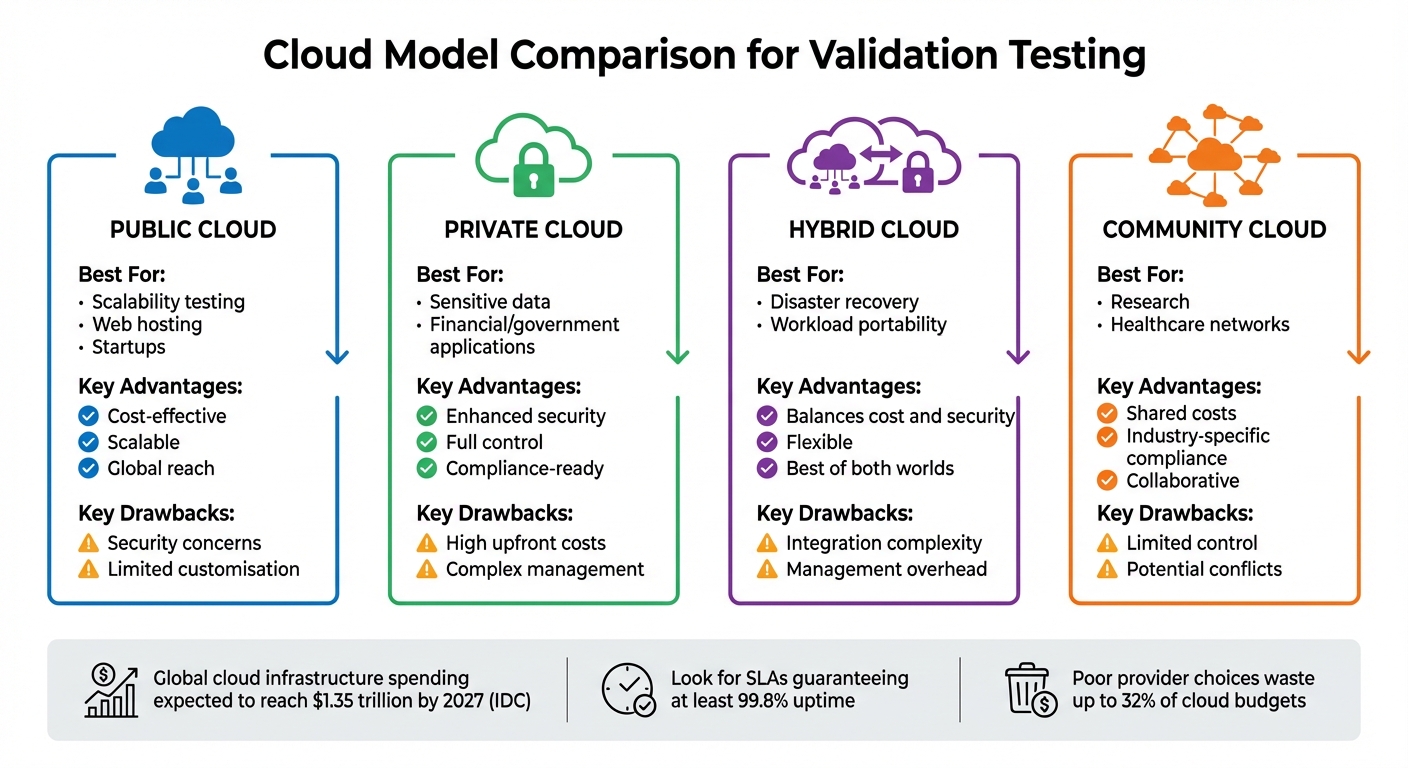 {Cloud Model Comparison: Public vs Private vs Hybrid vs Community}
:::
{Cloud Model Comparison: Public vs Private vs Hybrid vs Community}
:::
Defining the Scope of Testing
The first step in cloud validation involves capturing performance baselines - such as CPU usage, memory, storage, and network throughput - along with configuration snapshots before migration. These benchmarks make it easier to compare results after migration and identify any issues [5].
Set measurable Service Level Objectives (SLOs), like 99.99% uptime or specific response time limits, to ensure your testing aligns with business goals. The Microsoft Azure Well-Architected Framework emphasises this point:
Testing is a tactical form of validation to make sure controls are working as intended[4].
Incorporate security measures early on by using static code analysis for Infrastructure as Code (IaC). This proactive approach reduces the need for extensive checks later in the process [4]. Additionally, plan your data validation strategy carefully. Define acceptable risk levels for data migration and establish sampling methods to assess data quality for stored data, data in transit, and data in use [5].
Once your testing objectives are clear, the next step is selecting the most suitable cloud model for your needs.
Choosing the Right Cloud Model
The choice of cloud model significantly impacts your testing approach, as it must align with your performance and compliance goals. Here’s a quick breakdown of the main options:
- Public clouds: These are cost-efficient and highly scalable, making them ideal for testing scenarios involving heavy user traffic. However, shared infrastructure may raise compliance concerns.
- Private clouds: These offer greater security and control, which is often essential for industries like finance or government. The downside? High upfront costs and the need for skilled management.
- Hybrid models: These combine the benefits of public and private clouds, allowing sensitive data to stay in private environments while leveraging public cloud scalability for less critical tasks. However, this flexibility comes with added integration challenges [7].
According to IDC, global cloud infrastructure spending is expected to hit $1.35 trillion by 2027, highlighting the increasing adoption of diverse cloud strategies [6].
| Cloud Model | Best For | Key Advantages | Key Drawbacks |
|---|---|---|---|
| Public | Scalability testing, web hosting, startups | Cost-effective, scalable, global reach | Security concerns, limited customisation |
| Private | Sensitive data, financial/gov apps | Enhanced security, full control, compliance | High upfront costs, complex management |
| Hybrid | Disaster recovery, workload portability | Balances cost and security, flexible | Integration and management complexity |
| Community | Research, healthcare networks | Shared costs, industry-specific compliance | Limited control, potential conflicts |
When choosing a cloud provider, pay close attention to Service Level Agreements (SLAs). Look for guarantees of at least 99.8% uptime to ensure a stable testing environment [6]. Don’t overlook the total cost of ownership - hidden costs like data transfer fees, storage, and licensing can add up. In fact, poor provider choices can lead to wasted resources, with companies losing as much as 32% of their cloud budgets [8].
Developing Test Cases and Scenarios
Once you’ve selected a cloud model, the next step is to design tests that validate your objectives. These should include compliance checks, incident response drills, and security breach simulations [4]. Simulating breach conditions can be especially revealing, as this approach often uncovers vulnerabilities that more standard tests might miss [4].
Adopt a fail fast
strategy. Begin with lower-cost tests, such as static analysis to catch syntax or structural issues, before moving on to more expensive module integration and end-to-end testing [1]. As Google Cloud Documentation points out:
You cannot purely unit test an end-to-end architecture. The best approach is to break up your architecture into modules and test those individually[1].
To avoid conflicts and unnecessary expenses, ensure test isolation by generating unique resource identifiers and automating cleanup tasks (e.g., using terraform destroy) [1]. Also, keep testing environments separate from production to prevent accidental data loss or service interruptions [1].
Key Types of Cloud Validation Tests
Performance Testing
Performance testing is all about understanding how your cloud environment behaves under real-world conditions. It looks at response times, throughput, reliability, and scalability when the system is under load [9]. The goal? Spot bottlenecks before they become problems for your users. These bottlenecks could stem from slow database queries, network delays, or even insufficient memory allocation [9]. To get accurate results, it's crucial to replicate production conditions by matching hardware specs, software versions, network settings, and bandwidth. This helps establish baselines that make it easier to identify any regressions [9].
Microsoft's Azure Well-Architected Framework highlights the importance of performance testing:
Testing helps to prevent performance issues. It also helps ensure that your workload meets its service-level agreements. Without performance testing, a workload can experience performance degradations that are often preventable.[10]
There are several types of performance tests, each with a specific focus:
- Load testing measures how the system handles expected peak traffic.
- Stress testing pushes the system beyond normal limits to find breaking points.
- Soak testing runs for extended periods to uncover memory leaks or slow degradation.
- Spike testing evaluates how quickly the system scales in response to sudden traffic surges [9].
A great example of performance testing in action comes from Cloud Spectator's May 2024 Performance Analysis Report. This study compared virtual machines from Amazon Web Services, Google Compute Engine, and DigitalOcean. Using standardised tests for CPU, memory, and storage speeds, the report found that DigitalOcean's Droplets
outperformed competitors in most categories, showcasing how these tests can reveal the best performance-to-cost ratio [9].
It's also essential to test both inside and outside your network firewall. This helps pinpoint whether performance issues are caused by internal configurations or external factors [9]. With 43% of organisations reporting data loss from outages - and over 30% experiencing revenue loss - performance testing is not just helpful; it's critical for maintaining business continuity [9]. Pairing these tests with continuous monitoring ensures your system performs reliably under a variety of conditions.
Security Testing
Security testing is just as important as performance testing. It ensures your security controls work as intended and helps identify vulnerabilities before they can be exploited [4]. This process involves both internal assessments, which focus on your platform and infrastructure, and external evaluations that simulate potential threats [4]. As Microsoft's Azure Well-Architected Framework notes:
Rigorous testing is the foundation of good security design. Testing is a tactical form of validation to make sure controls are working as intended. Testing is also a proactive way to detect vulnerabilities in the system.[4]
When designing test cases, assume that breaches will happen. This mindset helps uncover vulnerabilities that might otherwise go unnoticed [4]. Involving your workload team ensures that security is seamlessly integrated with functionality [4]. To avoid disrupting your business, run destructive tests in isolated clones of your production environment [4].
Security testing often combines technology validation - like data encryption, network segmentation, and identity management - with simulated attacks such as penetration testing and war games [4]. Automating these tests within your CI/CD pipeline helps catch issues early and maintain ongoing validation [4]. Monitoring also plays a key role. For instance, a sudden spike in sign-in attempts - from 1,000 to 50,000 - could indicate a brute-force attack [11]. Together, performance, security, and scalability testing form the backbone of a resilient cloud environment.
Scalability and Compatibility Testing
Scalability testing is about ensuring your cloud environment can adapt as your business grows. It evaluates how the system handles different scenarios, from average usage to peak loads, sudden traffic spikes, and sustained high demand [12]. Testing elasticity and autoscaling is essential to ensure resources adjust dynamically. This involves validating scaling settings and service limits against measurable thresholds like requests per second or maximum concurrent users [12]. Stress testing also helps identify breaking points and assess recovery capabilities, especially for mission-critical workloads aiming for high availability levels like 99.9%, 99.99%, or even 99.999% uptime [2].
Compatibility testing, on the other hand, ensures consistent performance across various browsers, operating systems, and hardware configurations. Using real devices for these tests provides more accurate results [10]. Simulating realistic network conditions - such as bandwidth constraints, latency, and throttling - is particularly important for users spread across different regions [10]. Testing from multiple global locations helps verify latency and ensures a consistent user experience no matter where users are [10].
Finally, validating communication between microservices and external dependencies via APIs is crucial. Tests for High Availability (HA) and Disaster Recovery (DR) across geographically separated regions confirm your system's resilience during localised incidents [5]. Together, scalability and compatibility testing provide the confidence that your cloud environment can handle growth and deliver a seamless experience to users worldwide.
Best Practices for Executing Cloud Validation Tests
Simulating Realistic Test Environments
To achieve accurate testing, replicate your production workload to establish baselines and measure resource consumption effectively [13]. Testing directly in the cloud, as highlighted by AWS Prescriptive Guidance, offers unmatched reliability:
Testing in the cloud... provides the most reliable, accurate, and complete test coverage.[15]
Unlike emulators or mocks, cloud-based testing accounts for critical configurations like Lambda memory settings, IAM policies, and environment variables [15]. These aspects are often overlooked by emulators, making cloud testing essential for validating service integrations. To avoid conflicts, assign each developer their own cloud account and use randomised resource names or namespaces to prevent naming clashes [15][1].
Automating dynamic provisioning can cut testing time, reduce costs, and improve accuracy [14]. When creating test data, ensure it reflects diverse, real-world scenarios to mirror production environments [16]. Additionally, limit concurrent pipeline runs to minimise noise
that could complicate troubleshooting [16].
Using Automation Tools
Automation plays a key role in streamlining validation, particularly when integrated into CI/CD pipelines [18][19]. Running tests in parallel across various browsers, operating systems, and devices can drastically reduce regression testing times - from hours to just minutes [18][19].
Tools like AWS CloudFormation or AWS CDK enable you to programmatically set up and tear down test environments that mirror production, preventing configuration drift and eliminating unnecessary resources [21]. A well-structured automation pipeline typically includes five stages: setup, tool selection, test execution, reporting, and cleanup [16]. For example, running terraform destroy immediately after testing ensures resources are removed, avoiding unnecessary costs. Automated cleanup alone can reduce expenses by as much as 75% [21]. Additionally, leveraging AWS Spot Instances for tasks like load testing can save up to 90% compared to On-Demand pricing [21].
AI-driven tools are reshaping automation workflows. By late 2025, 81% of development teams had incorporated AI into their testing processes [20]. These tools, often referred to as self-healing tests
, adapt to changes in UI, reducing the need for manual updates [20][22]. This shift has led to noticeable improvements: 51% of QA teams reported better software quality, and 49% noted they could test more frequently [22]. To optimise resource tracking, tag all automated resources with labels like Environment, Owner, and CostCenter [21]. Adding unique test identifiers to request headers can also simplify log and trace filtering in monitoring tools [16][21].
By automating these processes, you can establish a foundation for continuous monitoring, ensuring your cloud environment is consistently validated.
Continuous Monitoring and Testing
Building on automation, continuous monitoring ensures performance remains stable throughout and after deployments. Shift-left testing - addressing bugs early in development - can significantly lower remediation costs later on [2][23]. Define measurable thresholds, such as requests per second or acceptable error rates, to create a performance health model that applies to both testing and production environments [2].
A comprehensive testing strategy combines unit, integration, and end-to-end tests to ensure individual components function properly in isolation and as part of a larger system [21]. Automated load testing and chaos engineering can be integrated into deployment pipelines, validating each change against established baselines [2]. Introducing controlled failures, such as instance shutdowns or latency increases, tests the effectiveness of self-healing mechanisms like autoscaling and retry logic [2][23].
Synthetic monitoring tools, like CloudWatch canaries, simulate user interactions to ensure ongoing application availability [17]. As noted in the AWS Well-Architected Framework:
Automation makes test teams more efficient by removing the effort of creating and initialising test environments, and less error prone by limiting human intervention.[21][23]
Maintain separate performance baselines for normal operations and failure scenarios, as tolerance for latency and errors may vary [2]. This continuous approach to validation helps keep your cloud environment dependable as it evolves.
For tailored strategies to implement these practices in your organisation's cloud setup, explore the expert solutions offered by Hokstad Consulting.
Overcoming Common Cloud Validation Challenges
Cloud validation testing often faces obstacles like data security issues, legacy system integration, and unstable environments.
Addressing Data Security Concerns
Cloud security incidents are becoming alarmingly frequent. By 2025, 88% of organisations reported at least one cloud-related security incident, with 85% seeing an uptick in attacks targeting cloud setups. What’s striking is that many of these breaches are preventable - 83% are linked to human error, and over 60% stem from misconfigurations [25].
Misconfigurations cause over 60% of cloud breaches. Default settings, unmanaged access controls, and human error can all expose sensitive assets.
The top security concerns include data loss and leakage (71%) and data privacy risks (68%), while credential abuse accounts for 52% of breaches [25]. Organisations can tackle these risks by adopting continuous configuration scanning tools like Checkov or AWS Config. These tools enable real-time monitoring and quick remediation of security issues. For managing test data, AI-powered tools can generate synthetic datasets that mimic real-world patterns, ensuring GDPR compliance without exposing sensitive information [26][29].
While securing data is vital, integrating legacy systems introduces another layer of complexity in cloud validation.
Managing Legacy System Integration
After addressing security, integrating legacy systems becomes critical to ensuring a smooth transition to the cloud. Legacy applications often bring compatibility challenges that can disrupt validation processes. These older systems may struggle to align with modern cloud environments, leading to time-consuming integration issues [24]. The shift from traditional IT testing - relying on manual setups and static infrastructure - to automated, dynamic approaches requires careful planning [29].
Containerisation tools like Docker can encapsulate legacy dependencies, creating consistent testing environments [28]. Before migration, conducting compatibility assessments can help uncover potential conflicts between legacy code and cloud-native services. Tackling these issues systematically through incremental testing phases can ease the process.
Once security and legacy integration are managed, maintaining a stable testing environment becomes the next priority.
Reducing Environment Instability
Flaky tests - tests that produce inconsistent results even when the code remains unchanged - are a common roadblock in validation pipelines. These inconsistencies often stem from timing issues, environmental variations, or unreliable external dependencies [29]. Automating environment management can cut setup times by as much as 70%, reducing the likelihood of manual errors [29].
Another challenge is the lack of centralised visibility, which makes it harder to track assets and detect unauthorised access or misconfigurations across distributed cloud systems [27]. Using Infrastructure as Code can help maintain consistent configurations and prevent drift between testing and production environments. Tagging resources with identifiers like Environment
, Owner
, or Purpose
and scheduling regular automated scans can quickly flag configuration drift. Additionally, containerisation ensures stable dependencies across test runs, further enhancing reliability [28].
Conclusion and Key Takeaways
Cloud validation testing plays a critical role in ensuring performance, security, and scalability within today’s cloud environments. Skipping proper validation can leave organisations vulnerable to data breaches, unexpected downtime during traffic surges, and expensive misconfigurations. These risks highlight the importance of having a well-structured testing strategy.
Summary of Key Points
Successful cloud validation starts with thorough preparation: set clear objectives, outline the testing scope, choose the right cloud model, and create realistic test scenarios. During the execution phase, it’s important to simulate authentic environments, combine automated scans with manual penetration testing, and maintain continuous monitoring to detect issues early on[4].
In short, your cloud environment needs rigorous checks for performance, security, and scalability. A tiered testing approach - starting with cost-effective static analysis and moving towards detailed end-to-end testing - can balance effectiveness with budget considerations[1].
Challenges like misconfigurations, compatibility issues with legacy systems, and inconsistent test results can disrupt the process. These can be mitigated by using automated configuration scans, containerising legacy systems, and employing Infrastructure as Code to ensure consistency. This approach builds a solid foundation for effective cloud validation.
The Role of Expert Guidance
Addressing advanced testing techniques - such as chaos engineering, blue/green deployments, and in-depth performance profiling - can be complex. This is where expert guidance becomes invaluable[3][5]. Hokstad Consulting specialises in refining cloud validation processes through DevOps transformation, cloud cost optimisation, and tailored automation. Their expertise supports shift-left testing strategies, reduces instability, and aligns validation efforts with long-term scalability goals. Whether you’re operating in public, private, or hybrid cloud environments, having expert support ensures your testing strategy delivers tangible improvements in reliability, security, and operational efficiency.
A structured, expert-led approach to cloud validation testing not only mitigates future risks but also fosters ongoing improvement. Partnering with experienced professionals can simplify the process and strengthen your cloud strategy for the challenges ahead.
FAQs
What are the key challenges in cloud validation testing?
Cloud validation testing can be a tough nut to crack, mainly because cloud environments are intricate and constantly changing. One of the biggest hurdles is creating a well-defined testing strategy and scope. This isn't just about ticking boxes - it’s about ensuring systems are resilient, meeting regulatory standards, and being ready for potential cloud migrations or exits.
Another pressing issue lies in tackling misconfigurations and insecure APIs. When juggling resources across different services and providers, it’s surprisingly easy for things to slip through the cracks. Add to that the dynamic, multi-cloud setups many organisations now use, and the challenge grows. These setups often demand highly specialised expertise to develop and maintain testing frameworks that can keep up with the rapid pace of infrastructure changes.
On top of that, there are practical barriers to contend with. Picking the right performance-testing tools, building realistic test environments, and sifting through mountains of test data are no small feats. To navigate these challenges, organisations in the UK need to focus on a few key areas: a well-documented and automated testing approach, rigorous security testing, and a team of skilled professionals who can handle the scale and flexibility of modern cloud systems.
How can I select the best cloud model for validation testing?
Choosing the right cloud model for validation testing boils down to your specific goals, compliance requirements, and budget constraints. If you need granular control over infrastructure, Infrastructure-as-a-Service (IaaS) is a solid choice. It gives you access to virtual machines, storage, and networking, offering flexibility to configure your testing environment. On the other hand, if you're focused on application-level testing and prefer managed services, Platform-as-a-Service (PaaS) might be a better fit. For scenarios where you're validating vendor-provided functionality with minimal customisation, Software-as-a-Service (SaaS) is the most practical option.
Regulatory compliance, such as adhering to GDPR, can play a major role in deciding whether a private or hybrid cloud is necessary. These models can help maintain data sovereignty while managing costs. Other considerations include integration with CI/CD pipelines, scalability, and cost efficiency. For instance, public clouds are often more economical for workloads that fluctuate, whereas private clouds may be more suitable for steady, high-volume operations.
By carefully matching your testing requirements with compliance needs, control preferences, and budget, you can select a cloud model that ensures a secure, scalable, and efficient foundation for your validation testing efforts.
Why is continuous monitoring important for cloud validation?
Continuous monitoring is essential for keeping a close eye on your cloud environment in real time. It helps spot misconfigurations, security weaknesses, compliance gaps, and unnecessary costs as they emerge, allowing you to take quick corrective action.
By staying on top of your cloud setup, you can ensure it remains reliable, secure, and cost-efficient while meeting both operational standards and regulatory demands.