
If I had to boil this guide down to one point, it’s this: a restarted pod does not mean your service is safe. To keep stateful containers running after failure, I need to plan for five separate things: workload restart, data survival, data correctness, movement between environments, and tested recovery against a set RPO and RTO.
Here’s the short version:
- Pods, volumes, and apps recover at different times
- PVCs show attachment, not data safety
- StatefulSets give identity and ordering, not data protection
- Replication choice sets data-loss risk and write delay
- Backups and snapshots only count after restore tests
- Cross-cloud failover fails fast when storage, IAM, or network details don’t match
- Recovery runbooks need to work at 03:00, not just in a diagram
- Costs go far beyond storage size, including transfer, standby capacity, and staff time
A few hard truths stand out:
- A service can pass health checks and still return stale or broken data
- Synchronous replication can push data loss towards 0 seconds, but usually adds write delay
- Asynchronous replication lowers write delay over distance, but adds a lag window
- A 15-minute RPO means your recovered copy must be no more than 15 minutes behind
- A 30-minute RTO needs much more automation than a 24-hour RTO
What I’d check first:
- Define RPO and RTO for each dataset
- Split data into authoritative, derived, cached, and disposable
- Match each dataset to the right storage type and failure domain
- Decide whether replication sits in the app, storage, snapshot, or backup layer
- Test restore, failover, and corruption recovery with production-scale data
::: @figure 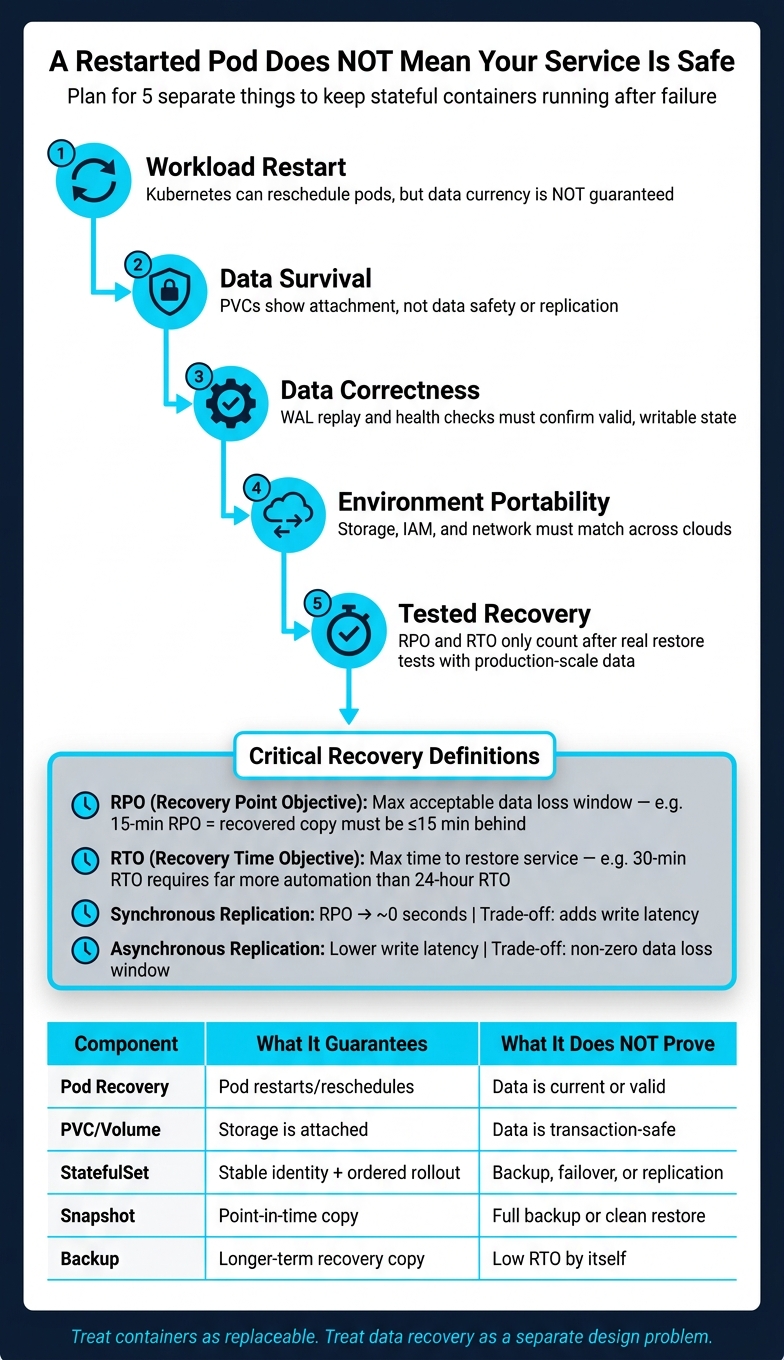 {Stateful Container Recovery: 5-Layer Design Checklist}
:::
{Stateful Container Recovery: 5-Layer Design Checklist}
:::
Stateful Workloads in Kubernetes: A Deep Dive - Kaslin Fields & Michelle Au, Google
Quick comparison
| Area | What it covers | What it does not prove |
|---|---|---|
| Pod recovery | Kubernetes can restart or reschedule a pod | Data is current, valid, or writable |
| Volume recovery | PVC/PV can be reattached or restored | App data is transaction-safe |
| Application recovery | WAL replay, health checks, safe writes | Cross-site failover is ready |
| StatefulSet | Stable identity, ordered rollout | Backup, failover, replication, split-brain control |
| Snapshot | Point-in-time copy | Full backup or clean app restore |
| Backup | Longer-term recovery copy | Low RTO by itself |
For me, the main lesson is simple: treat containers as replaceable, and treat data recovery as a separate design problem. That means clear storage choices, tested replication limits, fenced failover, and runbooks that people can follow under pressure.
Choose the right storage foundation for stateful containers
Every write passes through several layers before it lands on durable storage. That path matters. It’s the difference between a setup that holds up under failure and one that only looks safe.
Persistent data has to live on durable storage. Kubernetes objects describe intent, but they don’t guarantee durability. A bound PVC shows that storage has been attached. It does not prove replication, snapshot cover, or cross-cloud portability. Those depend on the CSI driver and the storage platform behind it. That’s why data classification comes first.
Map data types to storage layers and failure domains
Before you pick a StorageClass, classify every dataset the application touches.
Authoritative data - transaction records, write-ahead logs, and database files - needs persistent storage, clear recovery targets, encryption, and tested restore steps. This is the data that shapes your RPO and RTO. Cached or disposable data should not drive those decisions.
Derived data, such as search indices or materialised views, can be rebuilt from authoritative records. That means lower-cost storage may be fine, as long as rebuild time still fits your RTO.
Cached data can be dropped and repopulated. In many cases, local ephemeral storage or a separate cache service is the right fit.
Disposable data - temporary exports and scratch files - should never end up on a PVC just because the application writes to a filesystem.
Match each dataset to a storage layer with four checks:
- Access mode: Does the workload need one writer, multiple readers, or concurrent writers? Support for RWO, ROX, or RWX comes from the CSI driver, not Kubernetes by itself.
- Latency and throughput: High aggregate throughput with poor write latency is a bad match for a transactional database that depends on synchronous
fsync. - Topology: For each StorageClass, record exactly where the data is replicated and where a replacement pod can run.
- Reclaim behaviour: Use
Retainfor production and regulated data. Define who is allowed to release, inspect, and securely erase the retained volume.
Snapshot support needs close attention too. Volume snapshots require a compatible CSI driver and a VolumeSnapshotClass. And a snapshot is not a full backup until you’ve tested restore and confirmed application consistency. The same goes for encryption, key rotation, and backup-tool support: check them at the storage-platform level, not just in Kubernetes.
Use those four checks to choose the storage model below.
Storage comparison: persistence, performance and operational risk
The table below maps common storage models to durability and risk. Exact capabilities vary by provider, CSI driver, and configuration, so treat this as a starting point, not a final spec.
| Storage type | Persistence | Performance profile | Portability | Suitable workloads | Consistency considerations | Operational risks |
|---|---|---|---|---|---|---|
| Ephemeral | Pod- or node-lifetime; not durable | Fast local access, subject to node capacity | High at the application level | Caches, scratch files, temporary processing | Data may vanish during rescheduling or node failure | Silent data loss, disk pressure, eviction |
| Block | Persistent volume, often with zone or attachment limits | Predictable latency and strong random I/O when correctly sized | Medium; migration may require snapshots or exports | Databases, queues, single-writer state | Filesystem durability does not equal application-consistent recovery | Zonal dependency and replica drift |
| File | Persistent shared filesystem | Good for shared access; metadata latency varies | Medium to high if exposed through standard protocols | Shared content, RWX applications, user files | Locking, cache coherency, and concurrent writes need testing | Performance variability, permission errors, metadata bottlenecks |
| Object | Highly durable managed objects, subject to provider policy | High aggregate throughput; higher per-operation latency | High through standard APIs, but semantics differ | Backups, media, archives, data lakes | Object versioning and conditional writes must be designed explicitly | API incompatibility, lifecycle deletion, egress charges |
| Database-managed storage | Durability defined by the database design | Tuned for the database workload; replication adds write cost | Medium; logical replication is usually more portable than raw disks | Transactional records, replicated stateful services | Quorum, ordering, WAL, and failover semantics are application-defined | Operator complexity, split-brain risk, recovery mistakes |
Keep PVCs generic. Put provider-specific behaviour in the StorageClass. That way, you define the storage layer first, before you design orchestration and replication boundaries.
Storage choice sets the base; orchestration comes next.
Design StatefulSets with clear orchestration and replication boundaries
A StatefulSet is an orchestration tool, not a data-protection system. If you get that straight before writing any YAML, you avoid building something that looks resilient but falls over the moment storage, replication or failover is tested.
Know the limits of StatefulSet guarantees
StatefulSets give you stable identity and ordered orchestration. They do not give you data safety.
Those guarantees stop at orchestration. A StatefulSet cannot provide cross-cluster replication, database-consistent backups, storage-failure protection, automatic application failover or safe multi-site writes. [1][5] A pod can restart just fine while the service still comes back with missing, stale or broken data. Those are two different things, and it's safer to treat them that way.
Kubernetes keeps PVCs by default when a StatefulSet is deleted or scaled down. That default can save you from an accidental wipe. Use Delete only when you have verified backups, a restore process you've already tested, an approved destruction policy and an audit trail.
Pick the right stateful pattern for the workload
Choose the pattern that fits both the application's identity model and the team or system that owns recovery.
| Pattern | Identity guarantees | Storage ownership | Failover behaviour | Upgrade complexity | Portability |
|---|---|---|---|---|---|
| StatefulSet with per-replica PVCs | Stable ordinal, hostname and claim association | Kubernetes provisions and attaches one claim per replica | Implemented by the application or operator; not supplied by StatefulSet | Medium to high; ordering alone does not validate application safety | Generally good, but depends on CSI features and storage classes |
| Deployment with a shared claim | Pods are interchangeable; no stable ordinal identity | One shared claim | Deployment replaces pods; application must handle locking and recovery | Usually simpler for stateless or shared-filesystem workloads | Often good, but shared-write support varies across platforms |
| Operator-managed database cluster | Stable members combined with database-aware recovery control | Operator coordinates PVCs, replication and lifecycle | Database-aware election, recovery and sometimes backup/restore | Higher initial complexity, but repeatable upgrades | Variable; operator and storage integrations may be platform-specific |
| External managed or private-cloud database service | Identity abstracted behind service endpoints | Provider or platform owns storage and replication | Service supplies documented failover and recovery mechanisms | Lowest Kubernetes operational burden | Lowest application portability if APIs, networking or engine differ |
The line that matters most is this: a StatefulSet gives placement and identity primitives. An operator or managed service gives database-aware safety controls.
That means you should never assume ordinal 0 is always the primary. Failover may promote a different member, and if your app or automation hard-codes 0 as the write target, you can end up sending writes to a stale or fenced node. That's the sort of mistake that looks small in a diagram and painful in production.
Compare replication paths and consistency trade-offs
Match the replication layer to the recovery target before you start tuning for latency or bandwidth. If the recovery model is wrong, shaving milliseconds off the write path won't save you.
Each replication layer gives you a different mix of consistency and recovery behaviour.
| Replication path | Consistency | Typical recovery point | Latency and bandwidth | Operational complexity | Portability |
|---|---|---|---|---|---|
| Application replication | Strongly or eventually consistent, depending on the database or service | Near-zero to seconds | Adds write latency for synchronous designs; bandwidth follows logical changes | High; requires quorum, elections, fencing and lag monitoring | Often high at the application layer |
| Storage replication | Block-level consistency depends on the storage system and crash coordination | Near-zero to seconds | May require low-latency links and substantial bandwidth | High; tightly coupled to arrays, CSI and failover procedures | Often low across cloud and private-cloud platforms |
| Snapshot replication | Point-in-time and crash-consistent unless application quiescing is used | Snapshot interval, such as minutes or hours | Lower continuous bandwidth; bursty during snapshot transfer | Medium; restore sequence and validation are essential | Medium to high if snapshot formats are supported |
| Backup replication | Usually application-consistent only when coordinated with the database | Backup schedule and transfer lag | Efficient for long-distance transfer; recovery can be slower | Medium; requires catalogues, retention and restore testing | Usually high, especially with logical backups |
| Cluster-level replication | Replicates Kubernetes objects and possibly attached volumes | Depends on the product and scope | Control-plane and data-transfer costs can be significant | High; does not automatically guarantee database consistency | Variable and often platform-dependent |
Synchronous replication confirms a write at multiple members before it sends the acknowledgement. That can cut data loss to an RPO of zero, but it also adds write latency and links availability to quorum and network quality. [3] Asynchronous replication acknowledges the write locally before remote confirmation. That works better across longer distances and often improves write performance, but it also creates lag and a non-zero data-loss window if the primary fails before replicas catch up.
A simple rule of thumb helps here:
- Use synchronous replication when the write-latency hit still fits the RPO target.
- Use asynchronous replication when some lag is acceptable.
Whatever path you choose, set a clear maximum lag limit, expose it as a metric and block promotion when a replica goes past that limit, unless an authorised emergency procedure explicitly accepts the resulting RPO.
You also need split-brain protection. Use fencing, lease or quorum controls so an isolated primary stops taking writes once another member is promoted. Where you can, use an odd number of voting members, spread them across separate failure domains and make sure no surviving partition can form two valid majorities.
Be plain about failover as well. Say whether it is automatic, operator-assisted or manual. StatefulSet ordering on its own is not failover.
Once the orchestration boundary is clear, the next step is to test whether the same design can survive cloud-to-cloud failover and plain old operator error.
Plan for multi-cloud portability and tested recovery
Once your replication and failover boundaries are clear, the next step is simple in theory and brutal in practice: test whether the same setup still works in another cloud or site.
Portability isn't just “the manifest applied without errors”. That's the easy part. What matters is whether the target can support the workload in the same way the source does. That means storage, identity, networking, and recovery all need to line up. If one of those pieces fails, the whole move can fall apart.
A useful way to think about portability is through four layers: workload manifests, orchestration interfaces, storage interfaces and application data. Any one of them can break on its own. That’s why each layer needs its own checks before anyone attempts a migration or failover.
Build a portability matrix before migration or failover
The most practical way to spot gaps before an incident is to keep a version-controlled portability matrix. Put environments across the top and capability areas down the side. For each item, record the version, owner, prerequisites, and fallback path.
Use that matrix to find weak points before you write a runbook or call something a failover target.
| Capability | Primary public cloud | Secondary public cloud | Private-cloud cluster |
|---|---|---|---|
| Storage | CSI version, expansion support, topology limits, restore path | CSI version, expansion support, topology limits, restore path | CSI version or local storage, capacity and failure-domain limits |
| Networking | CNI, load balancer, ingress, private endpoints | CNI, load balancer, ingress, private endpoints | CNI, virtual IPs, firewall rules, north–south routing |
| Identity | Cloud IAM, workload identity, KMS integration | Provider IAM, workload identity, KMS integration | Internal identity provider, secrets management, key custody |
| Backup | Snapshot API, object-backup target, retention, immutability | Snapshot API, object-backup target, retention, immutability | Repository location, offline or immutable copies, restore tooling |
| Replication | Database or storage replication across zones and regions | Database or storage replication across regions | Site-to-site replication, bandwidth and latency constraints |
| Recovery | Cluster recreation, claim restoration, DNS failover, promotion process | Cluster recreation, claim restoration, DNS failover, promotion process | Capacity reservation, hardware recovery, manual dependencies |
Teams often miss two things. First, whether allowVolumeExpansion: true works in every target environment. Second, whether restored snapshots can actually be scheduled in the destination topology. [2][4]
Keep portable application manifests separate from environment overlays. StorageClasses, topology constraints, networking annotations, and provider-specific identity bindings should live in the overlay, not the shared base. That line in the sand makes the portability boundary clear and easy to test.
Write recovery runbooks operators can follow under pressure
When the matrix shows that a target is usable, write the exact recovery sequence operators will follow. No vague notes. No hand-waving. Spell out the steps people will need at 03:00 when stress is high and time is short.
Detect and declare. Name the incident commander and classify the failure: pod, node, volume, zone, cluster, site, corruption, or accidental deletion. That classification shapes every step that comes next.
Freeze writes and fence. Isolate the affected environment or fence nodes before touching data. If you skip this, you can end up with divergent updates and a split-brain problem that is painful to clean up.
Select the authoritative copy. Compare replication timestamps, transaction positions, and integrity checks. Pick the newest consistent copy, not just the newest timestamp. For a database, that usually means the replica with the latest committed log position.
Restore or attach storage. Provision replacement storage in a supported topology, recreate or rebind PVCs, and restore data from the chosen copy.
Recreate workloads and validate. Recreate namespaces, secrets, service accounts, network policies, and controllers before starting application pods. Check startup order, readiness probes, and external dependencies. Run application-level consistency checks before writes are turned back on. [6]
Re-enable writes gradually. Watch error rates, latency, and replication lag. Reconcile replication only after the recovered system is confirmed as authoritative, and log any data loss in the incident record.
Corruption and accidental deletion need a different playbook from plain infrastructure failure. Stop replication before it copies bad data over a clean copy. Restore into an isolated namespace or cluster, validate records at the application layer, and only then replace the production dataset. StatefulSet PVC retention can stop an immediate wipe when a workload is deleted, but that default only helps if retention has been set on purpose, and it does not replace independent, immutable backups. [1]
You also need to measure actual RPO and RTO during restore tests. Run those tests in a separate cluster or private-cloud environment and record the real numbers:
- time from incident declaration to write freeze
- time to get credentials and storage access
- time to restore volumes
- time to application readiness
- timestamp of the newest recoverable transaction
Test with production-scale data and the real destination topology.
Align software architecture, governance and cost controls with durability goals
Early architecture choices shape how calm or chaotic recovery will be. The core rule is simple: treat container images as disposable and data as precious. Keep durable state outside the container. If a pod fails, you should be able to replace it without depending on its writable filesystem.
Once storage is sorted, two application patterns make recovery far safer. First, write-ahead logging (WAL) makes sure data is written durably before a request is acknowledged, which gives you a replay path after a crash. Second, idempotent retries - through request IDs, deduplication keys or transactional outbox patterns - stop a timeout and retry from creating duplicate payments, jobs or other side effects. Add readiness checks on top of that. Those checks should confirm that the application has mounted its volume and finished WAL replay. Running is not the same as ready. Only serve traffic after WAL replay is done and the volume is healthy.
Schema changes need the same level of care. Use an expand-and-contract pattern: add compatible fields first, deploy code that can read both old and new versions, backfill the data, and remove old fields only when rollback is no longer needed. That avoids a messy situation where a container rollback hits a forward-only database migration.
Choose a write model the team can operate safely
Once the application can recover its own writes, decide who can write and how failover is controlled. Pick the write model your team can handle under pressure, not the one that sounds most advanced.
| Write model | Durability and availability | Main risks | Suitable for |
|---|---|---|---|
| Single-writer | Strong ordering; simple backup and recovery; writes pause during failover | Writer is a single point of risk; needs fencing and promotion procedures | Financial transactions, authoritative registries, low-conflict workloads |
| Leader–follower | Read scaling and a warm standby; recovery depends on replication lag | Replica freshness, promotion, fencing and client redirection must be tested | Transactional systems that need read scale or regional standby capacity |
| Multi-writer | Highest geographic write availability when engineered correctly | Conflict resolution, split-brain prevention and reconciliation are hard | Globally distributed workloads where the team has specialist expertise |
For most portability-led designs, a simpler write path with explicit failover is easier to run than provider-specific multi-region coordination. Write the decision down in a write-model decision record. Include the selected model, conflict policy, failover authority, acceptable lag, geographic scope and portability constraints.
AI systems often split state across more than one store. That state may sit in metadata, memory, indexes, logs and workflow state. Each store needs its own persistence, backup and recovery policy. For example, a vector index may need both a reproducible source-of-truth dataset and periodic snapshots if rebuild time is longer than your RTO. Audit logs often need append-only storage, restricted deletion and retention that matches regulatory duties.
Balance resilience against storage, transfer and staffing costs
Once the recovery model is fixed, put a price on the durability it needs. Cost modelling for resilience should cover more than provisioned capacity. Include primary storage, replicas, snapshots, backup retention, cross-cloud transfer, idle disaster recovery capacity and staff time for patching and recovery exercises. A design that looks cheap per GiB can get expensive fast once egress charges and operational effort are counted.
| Design | Durability and recovery | Replication overhead | Operational burden | Suitable for |
|---|---|---|---|---|
| Low-cost | Single failure domain or delayed backup; recovery may take hours and may lose data since the last backup | Low | Lower routine cost but high outage risk and potentially hard manual restoration | Development, non-critical analytics, regenerable data |
| Balanced | Redundant storage, scheduled application-consistent backups and a tested warm standby; recovery meets defined RPO/RTO targets | Moderate | Needs monitoring, runbooks and regular restore tests | Most production services with measurable business impact |
| High-resilience | Quorum-aware replication across independent failure domains or clouds, frequent backups and prepared failover capacity | High | Highest staffing, governance and testing demands; failure handling is complex | Critical transactions, regulated services and workloads with very low outage tolerance |
Make the trade-off plain so business owners approve the residual risk instead of inheriting it by accident. For UK organisations, governance should also state whether data can leave the UK, whether a sovereign or private-cloud location is needed, who can approve failover and how access is audited. It also helps to split primary storage, backup, replication and DR into separate cost centres.
Conclusion and implementation checklist
Before calling a service durable, check that the team has covered the following:
- Defined RPO and RTO for every data set
- Classified data and assigned named owners, retention periods and encryption requirements
- Selected storage by access pattern and failure domain
- Documented StatefulSet, PVC, Service and StorageClass assumptions
- Chosen and tested the replication layer, including fencing and split-brain prevention
- Validated WAL behaviour, transactional boundaries and idempotent retry logic
- Made all schema migrations rollback-safe
- Tested backups, snapshots and full restores with production-scale data
- Verified cross-cloud and private-cloud recovery against the portability matrix
- Monitored storage latency, capacity, backup age, replication lag and replica health
- Assigned operational ownership for storage, keys, schemas, failover and compliance evidence
- Scheduled re-testing after any infrastructure, storage-driver or application change
FAQs
How do I set realistic RPO and RTO targets?
Start by auditing your infrastructure to spot bottlenecks in databases, storage, and the rest of the architecture. Then set SLOs based on what users expect, and work backwards from those goals to define the storage metrics that matter.
Next, use fio to test loads that match how your systems are used in practice. That gives you a clearer view of whether your setup can hit those targets under pressure.
For replication, the trade-off is pretty simple:
- Choose synchronous replication when accuracy matters most
- Choose asynchronous replication when speed matters more
After that, put your targets to the test with regular disaster recovery drills or game days. It’s one thing to set goals on paper. It’s another to see if the system holds up when things go sideways.
When should I use synchronous or asynchronous replication?
Use synchronous replication when data accuracy matters most, such as in financial systems or inventory tracking, where even small mismatches aren't acceptable. It keeps data in sync by confirming writes across replicas before moving on, but that extra check adds latency.
Use asynchronous replication when speed, low latency and high throughput matter more, especially in geographically distributed systems. Many organisations use a hybrid approach, using one method for critical data and the other for data that can tolerate a short delay.
What should a stateful container recovery test include?
A stateful container recovery test should run every quarter in a non-production environment. The goal is simple: make sure your systems still meet the defined RTO and RPO.
The test should check that backups work, snapshots complete as expected, and failover succeeds. It should also confirm that data restoration needs little manual work and that alerts and metrics stay accurate during recovery.
It also helps to bake recovery workflows into your CI/CD pipelines. That way, validation runs with every code change instead of being left to chance.