
AI cloud costs can jump in a day, while finance may not see the cause until 24–48 hours later. From what I can see, a solid audit comes down to five jobs: list every spend source, tie costs to owners, spot spikes early, cut waste, and set rules so costs do not drift back up.
If I were explaining this simply, I’d put it like this:
- You need one view of spend across AWS, Azure, GCP, GPUs, training jobs, inference endpoints and LLM APIs.
- You need clear ownership using tags like CostCentre, Owner, Environment, Application and AI-specific fields such as ModelName and WorkloadType.
- You need to track AI usage data, not just cloud bills, because token costs and GPU time often sit outside the main billing view.
- You need alerts for things like 20–30% jumps above the 7-day average, idle GPUs, underused commitments, and always-on test environments.
- You need a short action plan with expected £ savings, named owners, and target dates.
- You need a review rhythm: monthly cost reviews and quarterly deep audits.
A few numbers stand out. GPU fleets should often stay above 70% use for training and 50% for inference. Shutting down test systems outside working hours can cut non-production compute costs by up to 65%. Downsizing oversized instances can trim costs by around 50% per instance.
::: @figure 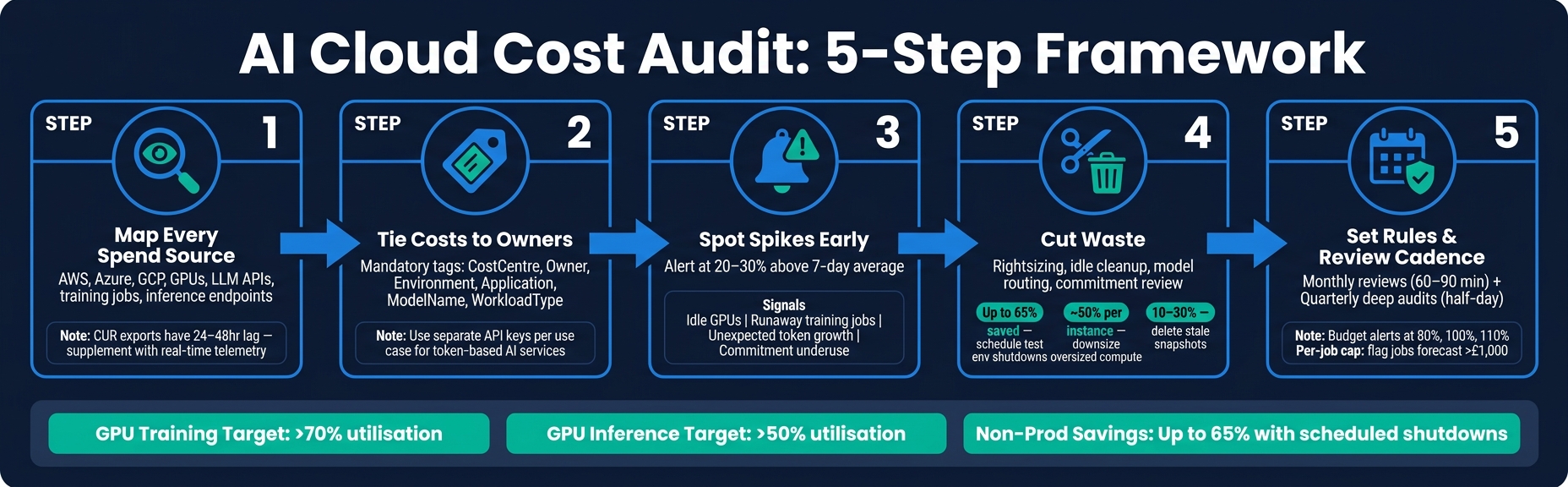 {AI Cloud Cost Audit: 5-Step Framework with Key Metrics}
:::
{AI Cloud Cost Audit: 5-Step Framework with Key Metrics}
:::
Manage & optimize the cost of your AI workloads | BRK1737
Quick comparison
| Area | What to check | What good looks like |
|---|---|---|
| Spend data | Billing exports, AI logs, monitoring data | One GBP view across all platforms |
| Ownership | Tags, labels, API key mapping | Each cost tied to a team, app or use case |
| Spike detection | Daily or near real-time alerts | Root cause found within hours, not month-end |
| Waste removal | Idle compute, storage, GPUs, model misuse | Action list with owners and dates |
| Governance | Budgets, policy rules, review cadence | Monthly reviews and quarterly audit sessions |
In short, this article shows how I’d turn a messy AI cloud bill into a clear list of who spent what, why it happened, and what to fix next.
Layer 1: Build your inventory, billing data and AI spend sources
An audit stands or falls on the data behind it. Before you make even one cost call, you need a complete, accurate and up-to-date view of every £ being spent. Miss a single account in your inventory, or let a billing export slip by a day or two, and the numbers you act on will be off.
Map every account, subscription, project and billing export
Start by pulling account lists straight from each cloud provider’s management layer: AWS Organisations, Azure Management Groups and Google Cloud Resource Manager. The aim is one register that covers every billing scope: production, staging, development, sandbox and legacy environments.
Give sandbox and test accounts extra attention. That’s often where AI teams spin up GPU instances or try out LLM APIs without standard tags in place. The result? Bills that blindside finance.
Once you’ve got the list, check that every account has an active billing export landing in a central data store. For AWS, that means Cost and Usage Reports (CUR) sent to S3. For Azure, it means Cost Management exports set up for all subscriptions. For GCP, it means the Cloud Billing export to BigQuery. And for AI workloads in GCP, you’ll want both the Standard export for top-level trends and the Detailed usage cost export for resource-level attribution.
One catch: AWS CUR exports can come with a 24–48 hour lag, so billing data on its own won’t support same-day anomaly detection.
Capture AI-specific cost sources alongside infrastructure
Standard billing views weren’t built for AI workloads. GPU and accelerator charges often show up as plain compute line items. Token usage from managed AI services can sit in a separate usage log. Training jobs, inference endpoints and vector databases often live in their own dashboards, away from the main billing view.
That’s where service-specific telemetry comes in. You need it alongside billing exports to fill the gaps.
In practice, that means pulling data from CloudWatch, Azure Monitor or Google Cloud Monitoring for GPU instance metrics. It also means exporting token and model call logs from AI APIs by project ID or application tag, and recording training job histories from platforms such as SageMaker, Azure Machine Learning or Vertex AI.
Track units that mean something to both engineering and finance, such as:
- Cost per training run
- GPU idle minutes
- Cost per 1,000 input/output tokens
- Cost per inference
Those figures turn a vague cloud bill into something you can trace and challenge.
Audit inputs reference table
Once you’ve pinned down the data sources, document them in a simple reference table. It makes gaps easier to spot and gives finance, DevOps and data science teams a shared view of what feeds the audit.
| Data Source | What It Reveals | Why It Matters |
|---|---|---|
| Billing exports (CUR, Azure Cost Management, GCP BigQuery) | Granular £ costs per resource, service, region and day, including discounts and commitments | Authoritative record used by finance; the foundation of every cost calculation |
| Resource inventory (VMs, GPUs, databases, AI services) | What is actually running, including idle and legacy resources | Exposes orphaned assets and environments sitting outside the audit perimeter |
| Tag and label coverage reports | How well resources are tagged with owner, environment and cost centre | High tag coverage is required to attribute AI and infrastructure spend to teams and products |
| AI usage logs (token counts, model calls, training job histories, inference requests) | How AI services are used, by whom and at what intensity | Links usage patterns to costs and surfaces expensive habits such as long-running training jobs |
| Commitment and discount reports (Reserved Instances, Savings Plans, committed use discounts) | Existing long-term commitments and their utilisation rates | Reveals where AI and GPU workloads are covered by discounts - or where under-used commitments are creating waste |
The table above is a starting point, not a limit. Many experienced teams also bring in access and identity logs to see who created AI resources, plus CI/CD deployment histories to tie cost spikes back to specific releases. Every extra source you include makes the attribution layer - covered next - more dependable.
Fix cost attribution: tags, ownership and business mapping
Raw billing data tells you what you spent. Attribution tells you who owns it, why it exists, and what to do next.
Define a minimum tagging and ownership model
Keep the tag set small and mandatory across AWS, Azure and GCP:
- CostCentre – tied to finance codes so spend reconciles with the ledger, including UK financial year budgets, which usually run from April to March.
- BusinessUnit – the business division, such as
Retail,CorporateorPublicSector. - Owner – a named person or team email, such as
[email protected], so every resource has a clear owner. - Environment –
prod,staging,testordev, which helps separate deployment-led spikes from underlying cost patterns. - Application – the main service or product, such as
claims-apiorrecommendation-service. - Project – for short-term work, such as
GenAI-Pilot-Claims.
A mandatory set of five to seven tags, enforced through AWS Tag Policies, Azure Policy or GCP Organisation Policy, tends to work better than a long tag list that people stop using. Put these rules into your Terraform, ARM or Bicep templates so engineers aren't filling them in by hand every time.
AI workloads need the same ownership setup, but they also need a few extra fields. Why? Because shared AI services often create costs that basic resource tags won't show on their own.
Add fields such as ModelName (for example, gpt-4o or custom-claims-bert), WorkloadType (training, fine-tuning, batch-inference, real-time-inference), UseCase (customer-support-chatbot, fraud-detection) and OwningTeam.
For token-based APIs like Azure OpenAI or Anthropic, use a separate API key for each use case. Then keep a mapping table that links each key to UseCase, OwningTeam and CostCentre. That simple step turns generic AI spend into spend you can actually charge to a team or use case.
Well-attributed spend vs unattributed spend
The gap between well-attributed and unattributed spend isn't just about nicer reports. It changes how fast you can act and how precise those actions are.
| Spend type | Ownership clarity | Reporting quality | Decision usefulness | Risk |
|---|---|---|---|---|
| Well-attributed | Every resource linked to a named team and cost centre | Granular; costs visible by product, environment and AI use case | High; supports ROI, rightsizing and chargeback | Low; anomalies traced quickly, orphaned resources visible |
| Unattributed | Spend pooled in shared accounts with no clear owner | Coarse totals by subscription or account only | Low; decisions default to blanket cuts | High; bill shock, compliance gaps and slow remediation |
In practice, well-attributed setups lead to cost reviews built around owner-specific actions. For example: the ML Platform team must rightsize training clusters and reduce idle GPU time by 30%.
That's direct. It gives a team a clear job to do.
Unattributed setups tend to do the opposite. Meetings drift into vague talk about reducing spend, but no one knows which team should act or which workload caused the problem. That's how savings efforts stall.
Once spend is attributed, anomaly detection can trace spikes back to a team, model or deployment.
Detect anomalies and remove waste across cloud and AI workloads
Once ownership is clear, the audit can compare actual spend with what you’d expect to see.
Use AI anomaly detection to find cost spikes and their causes
Good anomaly detection sets a baseline for each service, workload, team and project, then spots unusual changes early - often within 24 hours. The platform should show what changed, when it changed, how far spend moved from baseline, and who owns it. That’s the difference between an engineer finding the issue in minutes and losing half a day digging through logs.
| Signal | What it may indicate | Likely root cause | Recommended response |
|---|---|---|---|
| Sudden spend spike | Misconfigured service or traffic surge | Uncontrolled auto-scaling or a runaway training job | Immediate root cause analysis; stop non-essential workloads |
| Unattributed spend spike | Spend with no clear owner | Resources deployed outside CI/CD governance | Enforce mandatory tagging via policy; automate through IaC |
| Commitment underuse | Wasted prepaid capacity | Workload migration or over-estimated baseline needs | Reallocate reserved instances or review savings plan coverage |
| Idle GPU capacity | Paying for unused capacity | Always-on dev environments or oversized inference nodes | Implement scheduled shutdowns; rightsize to a smaller profile |
| Unexpected token-usage growth | Prompt or context bloat | Overlong prompts, poor model routing or excessive calls | Trim prompt length; switch to a smaller model for simpler tasks |
AI workloads add a tricky wrinkle here. Token use can grow fast even when infra metrics look steady, so spend rises while CPU, memory and throughput seem normal. That’s why logging token counts per request at the inference layer matters. It helps teams spot the problem early instead of noticing it only when the bill lands. [1][2]
Use these signals to work out which waste to tackle first.
Prioritise rightsizing, idle resource cleanup and commitment review
The fastest savings often come from a familiar set of issues: oversized compute, unattached storage, stale snapshots, always-on non-production environments and unused reserved capacity.
For AI workloads, the same idea shows up in slightly different ways: low GPU use, idle inference endpoints, inefficient training runs and poor model routing. Guidance for AI GPU fleets recommends tracking idle GPU cost as its own metric, with utilisation targets above 70% for training workloads and above 50% for inference. [1][2] If a GPU fleet sits below those levels most of the time, it’s usually a sign that the workload is too large for the job or scheduled badly.
Another common source of avoidable AI spend is using a high-cost model for every request. That includes simple classification or summarisation tasks that a smaller model could handle just fine. The audit should test whether model choice matches workload value, rather than defaulting to the easiest option.
Turn findings into a remediation table
Each finding should become one action, one owner and one target date. Keep it simple. If nobody owns the fix, it tends to drift.
| Waste pattern | Fix | Expected impact |
|---|---|---|
| Always-on test environment | Schedule shutdowns from 18:00–08:00 on weekdays and all weekend | Up to 65% reduction in non-production compute spend |
| Oversized compute instance | Downsize to the next smallest instance in the same family after measuring CPU and memory over two weeks | Around 50% reduction per instance |
| Stale snapshots and orphaned storage | Automate deletion of snapshots older than 30 days with no active parent volume | 10–30% reduction in storage spend |
| Overlong prompts or excess context | Trim system prompts; remove redundant context; test smaller models for low-complexity tasks | Lower token cost per request |
| Unused GPU capacity | Consolidate training windows; switch to spot or pre-emptible instances for non-urgent jobs | Higher utilisation and lower GPU spend |
| Unused reserved instances or savings plans | Reallocate to active workloads or review purchasing cadence quarterly | Eliminates wasted commitment spend |
Compare platform features and service options
What to look for in an AI cloud cost auditing platform
Once you’ve set up billing sources, attribution, and anomaly rules, the next job is picking the platform or support model that can actually put them to work.
That platform should do more than show a monthly bill. It needs to support the whole audit flow: spend visibility, attribution, anomaly detection, and remediation. If it falls short in one of those areas, teams end up filling gaps by hand, which usually means slower action and messier reporting.
Here’s what to check:
| Capability | Why it matters |
|---|---|
| Multi-cloud billing ingestion | Gives you one view of AWS, Azure, GCP, and AI service spend, instead of turning cost review into a manual data-gathering exercise |
| Near real-time cost data | Hourly data, or daily at the bare minimum. Monthly reporting is too slow when AI costs can jump fast |
| Tag and ownership analysis | Links spend to teams, products, and cost centres so showback and chargeback can work properly |
| AI workload visibility | Splits cost by model, training job, inference endpoint, and environment |
| Anomaly detection | Spots unusual patterns across services, accounts, regions, and tags |
| Commitment tracking | Watches Reserved Instances, Savings Plans, and committed use discounts |
| Policy controls and alerts | Flags untagged resources, budget overruns, and GPU usage outside approved hours |
| Exportable reports | Produces GBP-denominated outputs in UK date and number formats for finance teams |
A good platform should break AI spend down by model, job, endpoint, and the infrastructure around them. That level of detail matters. Without it, cost data looks neat on the surface but tells you very little about what is driving the bill.
In-house audits, software platforms and consulting support compared
The right model depends on your team, your cloud setup, and how much AI cost complexity you’re dealing with. Some organisations want full control. Others want automation. Some just need experienced hands to get the system in place without wasting months figuring it out.
Use the comparison below to decide whether the audit should stay in-house, run through software, or be supported by a consultancy.
| Option | Best for | Main strengths | Main limits | Typical internal effort |
|---|---|---|---|---|
| In-house audit | Organisations with mature FinOps and strong cloud/AI engineering teams | High control; tailored to your processes | Slower to build; higher ongoing maintenance; greater AI coverage risk | High - ongoing |
| Software-led audit | Mid-to-large organisations needing automated, multi-cloud visibility | Fast deployment; advanced anomaly detection; AI token and GPU tracking | Needs disciplined tagging and good data quality | Moderate - configuration and governance |
| Consulting-supported audit | Complex or fast-growing environments, or organisations new to AI cost management | Expert guidance; tailored attribution models; automation built into DevOps | Higher direct cost; dependency risk if internal capability is not built | Moderate but intensive during engagement |
There’s no one-size-fits-all answer here. An in-house setup can work well if your FinOps and engineering teams are already strong. Software-led audits make more sense when you need automation across multiple cloud platforms. Consulting support tends to fit best when the environment is complex, growing fast, or still early in its AI cost controls.
Providers and support options worth considering
If you need implementation support during rollout and remediation, Hokstad Consulting is a practical option.
They focus on cloud cost engineering, DevOps automation, and AI strategy. That makes them a good fit for teams that need cost controls built straight into CI/CD pipelines and infrastructure-as-code, rather than handled as a separate finance exercise.
Set governance, review cadence and next steps
Run monthly reviews and quarterly deep audits
Once remediation starts, the next job is simple: make the savings stick. That means setting a fixed review rhythm and backing it up with automated controls. Audits work best when they become part of the routine, not a one-off clean-up.
A practical setup is a monthly review alongside a quarterly deep audit. Monthly reviews should last 60–90 minutes and stay focused on the near term: budget variance, commitment coverage, anomaly trends, tag gaps and quick wins. Each item should finish with a named owner and a due date. The right people need to be in the room too:
- Product or engineering owners
- Platform or DevOps leads
- A FinOps lead
- A finance representative
- The data science or ML lead, where AI workloads matter [9][5]
Quarterly deep audits serve a different purpose. These half-day sessions should look at commitment renewals, such as Reserved Instances and Savings Plans, along with cost-heavy architecture patterns and AI usage trends. That includes model choice, the balance between training and inference, and any remediation work that needs a roadmap rather than a quick fix. The output should be a prioritised list of initiatives with estimated annual savings in £, required effort and agreed deadlines. Senior engineering, platform, finance and AI leadership should review that list. Then feed those priorities into budget rules, alerts and ownership workflows. [8][5][6]
Embed budgets, alerts and policy enforcement
Your review cycle should feed straight into automated controls. Set £ budgets at service, product and workload level, with alerts at 80%, 100% and 110%. For AI training jobs, use per-job caps. For example, flag any job forecast to exceed £1,000 and send that alert into the engineering channels teams already use. Daily anomaly alerts should trigger at 20–30% above the seven-day average. [3][4][12]
Policy enforcement should be automated wherever possible. Mandatory tags such as owner, cost_centre, environment and application should be enforced through CI/CD pipelines and infrastructure-as-code, so untagged resources never reach production. [13][11]
For costly AI jobs, keep approval flows light. A simple step inside the current workflow is usually enough, paired with a clear SLA, such as approval within one business day. The default should be automation. Manual approval is better kept for exceptions. [7][10]
Conclusion: the key steps in an AI cloud cost audit
An effective AI cloud cost audit follows five steps: build full visibility across all accounts and AI cost sources, attribute every meaningful cost to a team or workload, spot anomalies early before they snowball, cut waste through targeted remediation, and keep a regular review cadence so savings do not slip away.
Each step depends on the one before it. Visibility without attribution gives you data, but not a clear next move. Attribution without anomaly detection still leaves you open to month-end surprises. And even a thorough audit turns into a one-off exercise if the governance structure is missing.
FAQs
How do I start an AI cloud cost audit?
Start by gathering at least 90 days of billing data. That gives you a clear spending baseline and helps you standardise cost-allocation tags across departments, projects and environments.
Next, remove idle or duplicate assets and right-size underused compute. Then bring in an AI-powered platform for real-time anomaly detection, predictive scaling and continuous monitoring.
What should I tag for AI cost tracking?
Use a standardised tagging strategy that ties AI and cloud resources back to your organisational structure. Tag the fields that matter most, such as Owner, Project, Environment, Cost Centre, and Application.
When tags are applied in a consistent way, billing data becomes far more useful. It’s easier to split costs correctly, assign ownership, and keep teams accountable. If you can automate tagging, even better. That helps keep reporting accurate and auditable, without relying on people to remember every detail by hand.
How often should AI cloud costs be reviewed?
AI cloud costs need watching all the time, not just once a month or every quarter. AI-powered tools can track usage 24/7 and flag spikes or odd patterns straight away.
That day-to-day view should sit alongside a longer look back. Review at least 90 days of spend history, run a full 12-month audit in line with the UK financial year from April to March, and keep a steady meeting rhythm with monthly FinOps meetings and quarterly steering reviews.