
I treat tool schemas as contracts: define the inputs, reject invalid calls and check permissions before execution. Even a correctly formatted call must pass business checks before it changes an order or takes a payment.
I use these 7 practices to help an agent choose the right tool and supply usable arguments:
- Name tools clearly and explain their purpose, limits and results.
- Describe each parameter with its meaning, format, units and bounds.
- Use precise types, including rules for array items and object fields.
- Define required fields and what omission,
nulland defaults mean. - Use enums for fixed choices, such as
GBPandEUR. - Group related fields in nested objects, with rules at every level.
- Validate every call and reject extra fields before execution.
My rule is simple: valid data is not permission to act. I keep server-side checks in place, test rejected calls for zero side effects, and track failures and retries after schema changes.
🛠️ Give Your LLM Real Tools | Function Calling & Tool Schema in Agentic AI (Lab 3)
Separate Validation from Execution
::: @figure 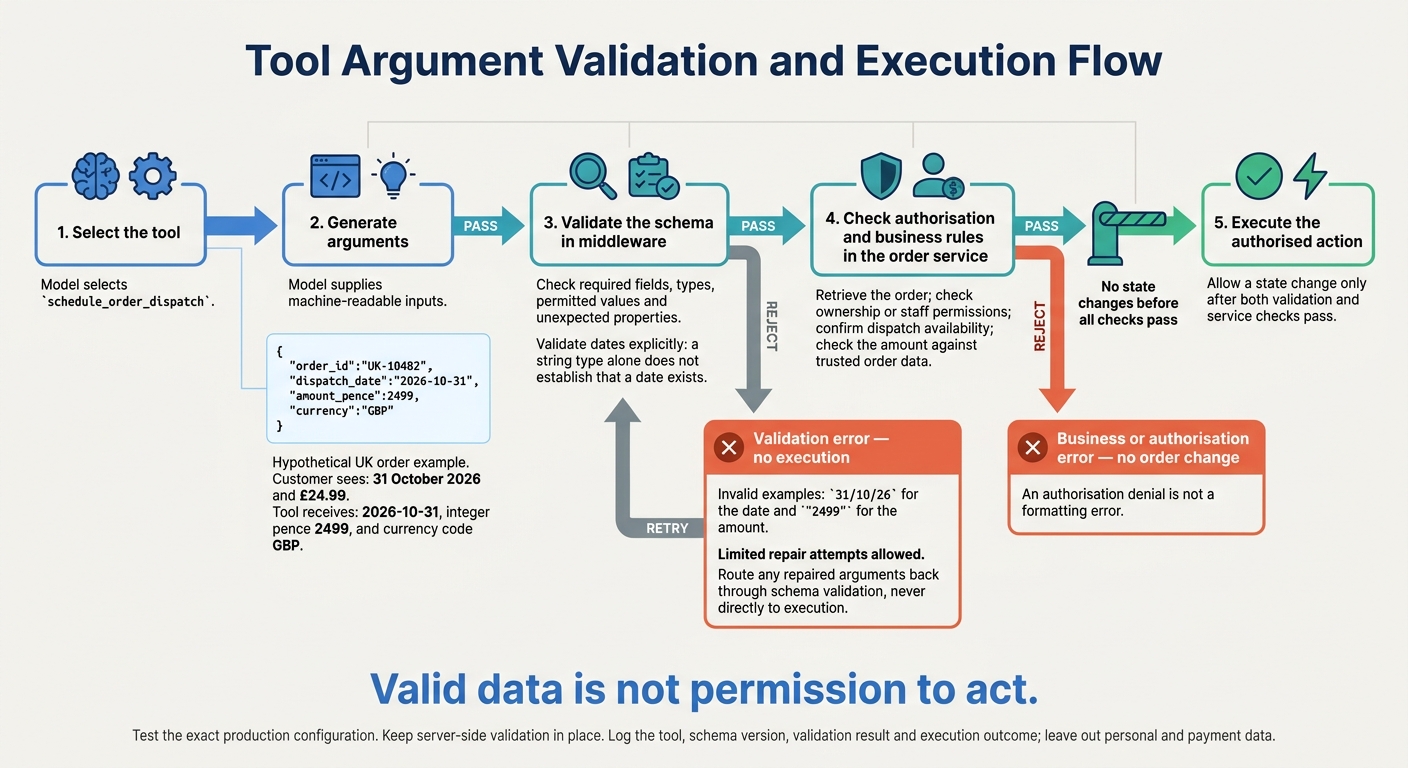 {Tool Call Validation: From Arguments to Authorised Execution}
:::
{Tool Call Validation: From Arguments to Authorised Execution}
:::
Keep tool selection, argument generation, schema validation and execution separate. Validate arguments in middleware, then enforce authorisation and business rules in the order service before any state change. This keeps the schema focused on data shape, not business judgement.
In a hypothetical UK order system, the model selects
schedule_order_dispatchand generates{"order_id":"UK-10482","dispatch_date":"2026-10-31","amount_pence":2499,"currency":"GBP"}. The customer sees 31 October 2026 and £24.99; the tool receives a machine-readable date and integer pence. Validation checks required fields, types, permitted values and unexpected properties. Configure date validation explicitly: a string type alone does not establish that a date exists.
A valid payload does not mean the call may run. The service must retrieve the order, check ownership or staff permissions, confirm dispatch availability and check the amount against trusted order data. If any check fails, return a business error without changing the order. An integer amount alone is not enough to trust.
Test the exact production configuration and keep server-side validation in place. Strict argument enforcement cannot establish order ownership or refund eligibility.
Reject invalid calls: return a validation error for
31/10/26or"2499"before execution.
Allow limited repair attempts, but never treat an authorisation denial as a formatting error. Log the tool, schema version, validation result and execution outcome. Leave out personal and payment data.
With execution gated, the next risk is an unclear tool name or purpose.
1. Name Tools Clearly and State Their Purpose
Name one operation, not a broad responsibility. get_order_status tells the model the action, resource and expected result. handle_order leaves it guessing: should it retrieve, amend, cancel or refund an order? Clear names help the model tell related tools apart.[4][5]
The description should cover what the tool does, when to call it, its limits and what it returns.[4][6]
For
get_order_status, specify read-only retrieval of an existing order’s fulfilment status using an identifiable order reference; exclude amendments, cancellations and refunds, and instruct the agent to ask for a missing reference rather than guess. Return the order reference, current status and latest update time, with carrier and tracking reference only when available. Document missing tracking data and failure states so the model does not invent data.[7]
Check the name, description and handler together. Make sure the registered name matches the handler and the response matches the schema. Test both routing and response shape, including requests for related actions: a cancellation request must not route to status lookup.
2. Describe Each Parameter Precisely
Explain meaning, format, units and limits - not just the type. A bare string does not tell the model whether a value identifies a customer, an order or something else. Use the parameter’s description to give that context, backed by constraints that software can enforce.
For customer_id and order_id, state the entity each identifies, its format and its source. Require exact identifiers from trusted session data; never ask the agent to guess. Both may be strings, but an order identifier must never pass as a customer identifier.
For money, specify pounds sterling or pence. For dates, give the exact representation, such as YYYY-MM-DD, and state the timezone convention where relevant.
Make inclusive and exclusive bounds explicit for numeric limits to reduce ambiguity in tool calls. JSON Schema’s minimum and maximum include their endpoints; exclusiveMinimum and exclusiveMaximum exclude them. Also distinguish “at most” from “fewer than”, and say whether empty strings are allowed.
Descriptions guide model output; schema rules enforce the constraints. Once the meaning is clear, encode it with precise JSON Schema types and supported pattern, length and range checks. Do not rely on format alone: validate dates explicitly.
3. Use Precise JSON Schema Types
Match each type to what the tool accepts. Use integer for whole-number counts, number for values that allow decimals, boolean for true/false switches and string for text or identifiers. Don’t treat everything as text: "false" is not the Boolean value false. Reject incorrect types rather than converting them automatically.[1][8]
Specify what goes inside arrays and objects. Every array should declare an items schema, and every object should define its expected fields under properties. Without these, the model has no guidance on the shape of the contents.[3][2]
Represent dates as strings with format: date and timestamps with format: date-time, but only when your platform and validator enforce those keywords. If format isn’t enforced, parse the date on the server before execution.[9][10]
4. Specify Required Fields and Omission Rules
After defining types, specify which fields must appear and which may be omitted. Require every field the model cannot safely infer by adding it to the schema’s required array. In JSON Schema, properties are optional unless listed there. Reject missing inputs that are needed rather than guessing them.[11]
Required and nullable mean different things. Required means the property must appear; nullable means its value may be null. An optional property does not automatically accept null.[12]
For each optional field, explain what omission does: leaves data unchanged, uses a fallback or disables a feature. To allow an explicit empty value, use a nullable type such as ["string", "null"] and define exactly what null means. If omission and null have different effects, keep those behaviours separate.[12][4]
Implement defaults; don’t just declare them. Treat the schema’s default as documentation unless your runtime explicitly applies it. Apply defined fallbacks in code, then test missing fields and explicit null separately to prevent accidental data changes. Once presence rules are set, use enums to restrict fields to fixed choices.
5. Use Enums for Fixed Choices
Use enum when a field accepts a fixed set of values. Give each value one spelling and casing, with no duplicates.
For a tool that supports only pounds sterling and euros, define
"currency": {"type": "string", "enum": ["GBP", "EUR"], "description": "Currency code: GBP means British pound sterling; EUR means euro."}. Keep machine-readable codes in tool arguments and currency symbols in user-facing amounts, such as £49.99.
Explain any side effects in the field description. This matters especially when choosing one value changes another field’s requirements or behaviour.
Reject unsupported values before execution, with a clear error:
currency must be one of GBP or EUR; received USD
Don’t coerce, normalise or convert unsupported values. "pounds" and "gbp" do not match "GBP": enum validation does not interpret synonyms or normalise casing.
Include only choices the implementation supports. If options change, validate them against configuration rather than a static enum. Test accepted values, unsupported values, synonyms and case variants so ambiguous arguments cannot slip through.
6. Group Related Fields in Nested Objects
Once you’ve fixed allowed values, group related inputs into nested objects. Keep addresses, search filters and line items separate from unrelated request fields. Clear object names explain each field’s role and reduce ambiguity in tool calls. This also makes requests easier to validate and repair before execution.
Give each nested object its own description, properties and required list. Requiring the parent does not require its children, so define the minimum complete structure within each object too.
For repeating groups such as line items, define the item schema as an object with required product identifiers and quantities. Set
minItems: 1on the array and require integer quantities withminimum: 1.
Validate relationships as well as structure. Specify whether filters combine with AND or OR, and whether date bounds are inclusive. This stops the model from inventing filter logic. Application validation must also reject reversed date ranges and check business rules that the schema cannot enforce.
Apply additionalProperties: false to every object that must reject unknown fields, including nested objects. Setting it on the parent does not apply it to its children.[14] Where strict validation requires it, mark every declared property as required.[1]
7. Validate Calls and Reject Extra Fields
Schema design sets the rules. Runtime validation enforces them. Apply additionalProperties: false to every object, including objects inside arrays. Use provider strict mode only when it matches server-side validation.
Parse incoming arguments and validate them against the live server schema. Reject wrong types, missing required fields, unsupported enum values and unknown properties. Don’t silently drop extra fields or guess what a misspelt parameter means.
A payload can pass validation and still change before execution. Revalidate after every transformation and before any side effect. Check permissions, tenant scope, ownership, approvals and business rules separately. A request with the correct structure does not prove that the action is authorised.
Test that rejected calls trigger no database write, payment attempt or other side effect. Return structured errors with a stable code, field path and correction message. Distinguish validation, permission, conflict and system errors.
Log the request ID, tool name, schema version and failure category, with secrets and personal data redacted. Give the model enough detail to correct its call without exposing secrets or sensitive policy information.
Tool Schema Validation Checklist
Run this checklist before releasing a tool schema or changing one that’s already live.
Review the tool schema contract: check that the name identifies one clear action. The description should explain its purpose, when to use it, what it excludes and the response shape. For every parameter, define its meaning, accepted format, units and what happens when it’s omitted. Define the success response too.
Review the field rules: confirm exact types, required fields, enums, nested structures and documented behaviour for omitted values and null. Check required fields and additionalProperties at every object level, including nested objects and objects within arrays.
Check the test coverage: test both minimal and fully populated valid calls. Cover malformed JSON, missing inputs, nulls, wrong types, unsupported enum values and unexpected nested fields. Test minimum and maximum values, values just below and above each limit, and empty strings and arrays. Test contradictory inputs separately: valid field types don’t guarantee valid business logic before execution.
Check provider-to-schema compatibility: confirm that types, required fields, enums and constraints survive conversion from the canonical schema. Test the exact API configuration used in production. JSON mode guarantees valid JSON, not schema compliance.[13] Strict modes add constraints, but server-side validation still applies. Check that the live server rejects anything the provider accepts that the schema does not.
Check the release validation record: every rejected test should return an error that explains how to fix the input and show that execution never started. Verify that retries using the same idempotency key cannot duplicate a state-changing action. Record the schema version, test inputs and expected outcomes. Reuse sanitised production failures as regression tests.
Conclusion: Define Inputs and Enforce the Rules
The seven practices define which tool to use, which arguments are valid and which calls to reject. Clear names help the model select the right function. Descriptions, precise types, required fields, enums and nested objects keep inputs within an explicit contract. Rules for extra fields block undeclared arguments, reducing tool-call ambiguity.
Treat failed calls as signs of ambiguity. Group them by cause, then refine names, fields and validation rules. After each change, track validation failure and retry rates.
Keep application-side authorisation, business-rule checks and execution safeguards in place: a valid call is not automatically authorised.[1][15]
FAQs
When should I split a tool into separate functions?
Split a tool into separate functions when its actions need different dependencies, permissions or execution orders.
For example, refunds need specific authorisation and must follow a set sequence. Keep them separate from simpler actions, such as fetching information.
Separate functions improve isolation and observability. They also let you apply stricter policies or human review to high-risk operations. Keep each function self-contained to avoid shared-state conflicts, race conditions and dependencies on the order in which functions run.
How can I update schemas without breaking existing agents?
Prioritise backward compatibility: add fields or tool versions instead of removing existing ones, and keep versioned endpoints running side by side.
For every pull request, compare OpenAPI or JSON Schema changes with a production baseline using consumer-driven contract tests. Check both request and response compatibility, including required fields, enums and supported formats after conversion.
Block incompatible deployments. Require explicit migrations with tested compatibility adapters - not waivers.
Which tool-call errors should trigger a retry?
Retry only transient failures or recoverable schema-validation errors when a correction is likely to work. Verify idempotency before retrying. For state-changing operations, check the external status using an operation ID or business reference to avoid duplicates. If you can’t verify the outcome, quarantine it for human review rather than retrying.
Typically, limit retries to three to five attempts, using exponential back-off and jitter. If failures persist, escalate to a human reviewer or send the item to a dead-letter queue.