
A response cap won’t stop an AI agent from overspending across repeated calls. I use five controls together to keep each run within its token and spending limits:
- Cap each call: Set separate input and output allowances.
- Track the whole run: Count input, output, retries and history sent again.
- Check before dispatch: Block calls that exceed the remaining token or cash budget.
- Limit iterations: Set a hard ceiling that retries cannot bypass.
- Define stop rules: Stop when the task is complete, limits are reached or progress stalls.
For a 10,000-token budget, I’d reserve 1,000–2,000 tokens (10–20%) for completion. That reserve must cover the final response’s input context and any final validation call - not just its output.
My rule: reserve capacity before calling, record usage afterwards, and never treat a timeout as free. If the next call cannot fit, trim the context or return a clearly labelled partial result.
::: @figure 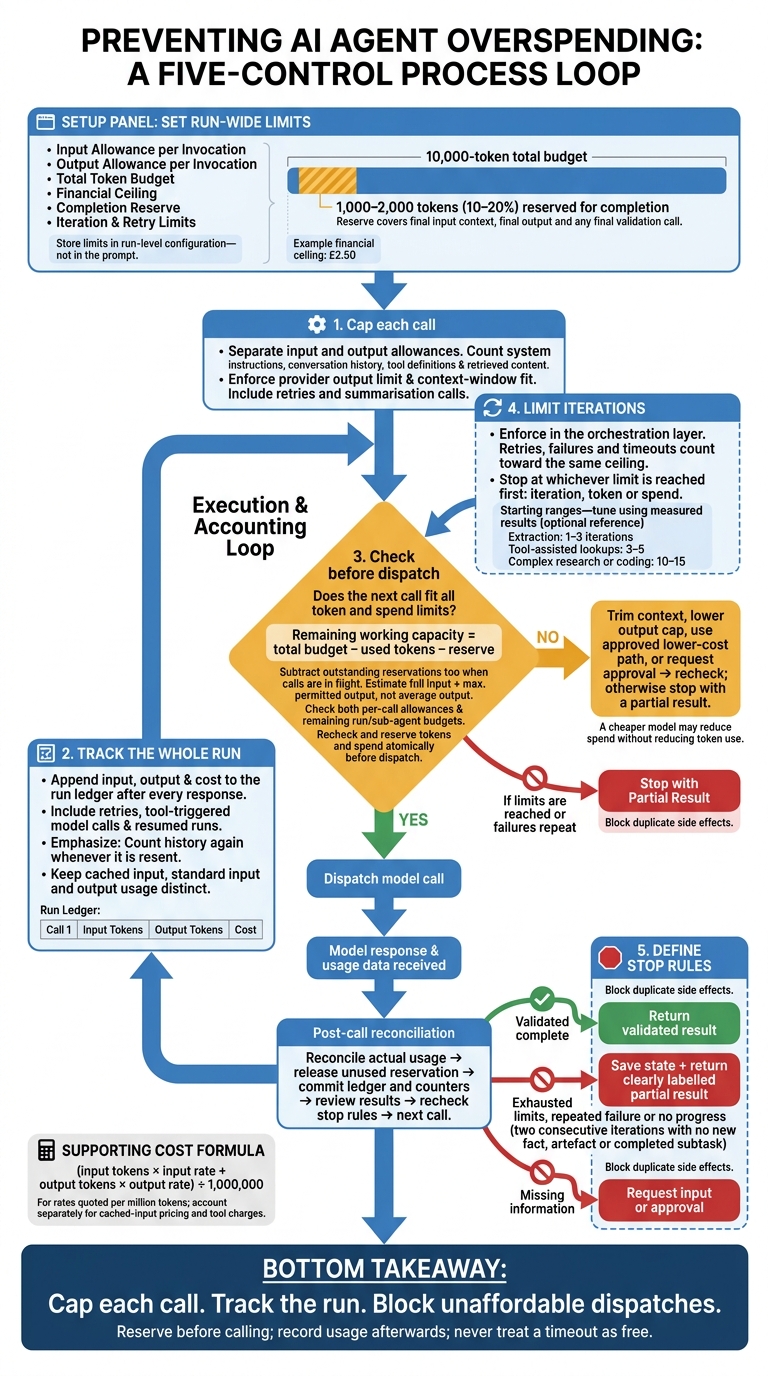 {5 Token Budget Controls for AI Agent Loops}
:::
{5 Token Budget Controls for AI Agent Loops}
:::
The Token Budget Problem Hiding Inside Production AI
Set the Budget Before the Run Starts
A run is one complete task, from start to finish. A model invocation is one request to the model. A loop iteration is one pass through reasoning, tool use and the next decision. Count turns consistently so budget controls apply across repeated execution.
Set five limits before the run starts: input allowance per invocation, output allowance per invocation, total token budget, financial ceiling and completion reserve. The input allowance must cover system instructions, conversation history, tool definitions and retrieved content. Store these limits in run-level configuration, not in the prompt.
Treat the total budget as a shared pool - not a per-call allowance multiplied by an expected number of calls. Keep the completion reserve off-limits until the final step so earlier work cannot use up the tokens needed for the final response.
For a 10,000-token budget, hold back 1,000–2,000 tokens for a concise completion, including its input context and any final validation call.
Tokens are not a fixed cash amount. When rates are quoted per million tokens, estimate the cost with this formula:
(input tokens × input rate + output tokens × output rate) ÷ 1,000,000
Model choice, cached-input rates and separately charged tools can change the bill. Keep the financial ceiling separate from the token ceiling, and reserve enough spend for the final response. Label any sample rates hypothetical, rather than presenting them as current prices.
A financial ceiling could be £2.50.
Before entering the loop, count the exact payload using the selected model’s token-counting method where available,[6] then add the intended output allowance. Start only if both the token budget and spending limit leave room for completion. Otherwise, trim the context, reduce retrieved passages or narrow the task. With the budget set, the next control is to cap every call.
1. Cap Tokens per Call
Enforcement Scope
Once the run budget is set, enforce separate input and output allowances before every call, including retries and summarisation calls. Count the entire request payload: system text, history, tools and retrieved content. Log the requested allowance, permitted cap and actual usage to spot calls that repeatedly use their full allowance.[10][1]
Budget Settings
Give routing, validation and tool selection smaller allowances than synthesis. Reserve the largest cap for synthesis.
Routing should return a short decision. Validation should return pass/fail and an error code, while tool selection needs enough room for structured arguments. Tune each role’s allowance using measured usage.[10]
Execution Safeguard
Reject, truncate or summarise oversized inputs before sending them. Summarisation calls count towards the same run budget and need their own caps.
Reject a request if removing information would make the answer unsafe. Otherwise, remove low-priority material and record what was discarded. Set the provider’s output limit on every request, and check that the request fits within the context window.[9][10][11]
Spending Protection and Limits
An output cap limits one response, not the full run.[12][13] Check the completion status where available instead of retrying automatically, and treat responses flagged as truncated as incomplete.
If a response is cut off, continue only if the remaining budget and iteration limits allow it. Send only the unresolved task and the minimum state needed for the next call.
2. Track Tokens Across the Run
Per-call caps only work if you update the run total after every response.
Enforcement Scope
After each response, record input, output and total tokens in an append-only ledger. Include retries, tool-triggered model calls and resumed runs. Link each entry to the run, agent, model and tenant, and include the response ID, timestamp, rate version and call status.[4][1]
Budget Settings
Record each call’s cost using the provider’s current rates.[5] Keep standard input, cached input and output tokens in separate fields.
For other currencies, store the original amount alongside its GBP conversion, the exchange-rate source and timestamp.[14][15]
Execution Safeguard
Use an idempotency key to prevent duplicate entries, and commit usage before advancing the checkpoint. On resume, reconcile the ledger rather than relying on the last loop counter.
If a timeout leaves usage uncertain, mark it as unknown and reconcile it before treating any remaining budget as available. For parallel calls, reserve budget atomically.
Use the ledger totals to decide when the run must stop.
Spending Protection and Limits
After every update, compare cumulative tokens and spend against the run limits. Stop the loop when cumulative usage reaches the cap.
Track non-token tool charges separately, but include them in the same spend check. Some tools charge per request or by compute time rather than tokens.[7][8] Reconcile ledger totals against provider billing to catch missing usage or pricing errors.
Use these totals in the next pre-call budget check.
3. Check the Budget Before Each Call
Enforcement Scope
Use the ledger totals from the previous step to check the budget immediately before every dispatch, including retries and sub-agent calls. Approve a request only if it fits both the remaining token budget and spend limit at run and sub-agent level. Passing one limit must never override failing the other.
Budget Settings
Count the full input: system prompt, conversation history, retrieved documents, tool results and formatting instructions. Add the maximum permitted output - not the average response length.
Include the pre-set completion reserve in the check:
Remaining working capacity = total budget − used tokens − reserve
Estimate cost using input, cached input and output tokens, plus known tool charges. Store rates in configuration rather than hard-coding them.
Execution Safeguard
Reserve tokens and spend atomically before dispatch. Keep that reservation active until reconciliation. After the response, reconcile actual usage, release any unused balance and log the variance.
Spending Protection and Limits
Block any request that does not fit. Follow a defined fallback: trim context, lower the output cap, switch to an approved lower-cost path or request approval.
When trimming context, remove redundant material while keeping task requirements and safety constraints intact. Then rerun the check. A cheaper model may cut spend without reducing token use, so both limits must still pass.
If repeated pre-call checks still fail, stop there. Cap loop iterations next.
4. Limit Loop Iterations
Enforcement Scope
Enforce the ceiling in the orchestration layer, rather than asking the model to stop. Count one model call, including its tool calls, as one iteration.
After per-call and pre-dispatch checks, cap the number of turns the loop can take.
Budget Settings
Use test results to set the lowest hard ceiling that repeated execution needs. Start with 1–3 iterations for extraction, 3–5 for tool-assisted lookups and 10–15 for complex research or coding. Adjust these limits based on completion rates, token use and failed-run costs - not just because runs hit the ceiling.[16][17]
Execution Safeguard
Start the counter at zero and block execution when it reaches the maximum. Count retries, failures and timeouts towards the same ceiling.
When no further turn is allowed, return iteration_limit_reached and preserve the current result. Log the iteration count, limit, last action and elapsed time.
Spending Protection and Limits
Stop at whichever limit is reached first: iteration, token or spend. Unused iterations do not authorise extra spend. If the task is unfinished, return a clearly labelled partial result or escalate. Never silently restart the loop or reset its counter.
If the loop still cannot finish within those limits, apply explicit stop rules.
5. Set Clear Stop Rules
When a loop has work left but no safe way forward, stop rules determine whether it halts, returns partial progress or escalates.
Enforcement Scope
Check stop conditions before dispatch, after logging usage and after reviewing results. Apply the same checks to sub-agents and tool-driven workers. Set task_complete only when a validator confirms that the acceptance criteria have been met.
Budget Settings
Tie stop rules to token, cost, iteration and retry limits. Stop with no_progress after two consecutive iterations produce no new fact, artefact or completed subtask. Set a separate rule for repeated tool or model failures.
Execution Safeguard
Assign each exit a fixed outcome:
-
task_completereturns the validated result.budget_exhausted,iteration_limit,repeated_failureandno_progresssave state and return a partial result. -
missing_informationrequests the missing input or approval. -
duplicate_actionblocks repeated side effects and records the tool, normalised arguments and target resource.
Block repeat side effects before they trigger more paid calls. Repeated reads may still be valid. Send unresolved failures for human review.
Spending Protection and Limits
Do not reset counters or spend on a retry. Save the reason, run ID, token and cost totals, iteration count, counters, last action and checkpoint reference.
Allow an authorised retry only after corrected input, approval or a new instruction, and carry over existing counters. Any extra allowance must be explicitly approved and recorded.
Per-Call vs Whole-Run Tracking
Tracking records usage; enforcement blocks the next call. Record input and output tokens for every request, then add both to the run total. Counting output alone understates spend.[1]
Per-call caps limit spikes from individual requests. Whole-run tracking measures total spend across the run - but it needs a pre-call check to stop the budget being exceeded.
| Tracking method | Scope | Value | Limit |
|---|---|---|---|
| Per-call tracking | One request: input plus output tokens | Flags oversized inputs and outputs | Many small calls can still overspend |
| Cumulative whole-run tracking | All model calls in one run | Measures total usage against run-wide ceilings | Detects overspend too late without a pre-call gate |
| Per-call cap plus cumulative tracking | Each request and the complete run | Controls individual spikes and total spend; supports audits | Requires accurate accounting across all calls and token categories |
The runtime gate therefore needs to work alongside the usage ledger.
Include retries, tool calls and resent history in the same run total. Count conversation history again whenever it is resent. Use model-specific token counts, not a fixed words-to-tokens estimate.[3][6]
Before each call, compare the estimated input tokens plus the maximum output tokens against both the per-call cap and the remaining run budget. Block or shrink the call if it exceeds either limit.[6][18]
Apply All 5 Controls in One Loop
Reserve capacity before dispatch, reconcile usage after the call, and update counters atomically. Recheck the budget inside the atomic block.
The loop below applies all five controls in one dispatch cycle.
while true:
    state = load_state()

    # Stop on completion or any fired stop rule.
    if state.completed or stop_rule_fired(state):
        save_state(state)
        return state.result

    if state.iterations >= MAX_ITERATIONS or state.retry_count >= MAX_RETRIES:
        return structured_stop("limit_reached")

    capacity = TOTAL_TOKEN_BUDGET
               - state.committed_tokens
               - state.reserved_tokens
               - SAFETY_RESERVE

    context = prepare_context(state, max_input_tokens=PER_CALL_INPUT_CAP)
    estimate = estimate_tokens(context, PER_CALL_OUTPUT_CAP)

    if estimate.total > PER_CALL_TOTAL_CAP:
        state = apply_fallback_or_stop(state, "per_call_cap")
        save_state(state)
        continue

    if estimate.total > capacity:
        state = apply_fallback_or_stop(state, "run_budget")
        save_state(state)
        continue

    atomically:
        reload_and_recheck_state_version()
        state.reserved_tokens += estimate.total
        state.call_count += 1
        state.iterations += 1
        persist(state)

    try:
        response = invoke_model(context, max_output_tokens=PER_CALL_OUTPUT_CAP)
        actual = provider_usage(response)
        state = reconcile(state, estimate.total, actual)
        state = process_response(state, response)
    except timeout_or_unknown_usage:
        state = mark_reservation_unknown(state, estimate.total)
    except error:
        state = reconcile_known_error_usage(state, estimate.total)

    save_state(state)
If a call cannot fit, use deterministic trimming or stop.
Keep context reduction deterministic: trim old observations, summarise state or reuse the latest summary. If a fallback needs a model, count it as another fallback call and run it through the same checks before invoking it.
A timeout does not mean zero usage. Keep the reservation marked as unknown until reconciliation resolves it, using provider-reported usage when available. Record the model, request ID, attempt ID and reconciliation status. Reconcile each attempt only once.[20]
Use one retry allowance across the SDK and agent loop. Track it in state.retry_count and enforce it through the shared limit_reached stop path. Disable overlapping automatic retries or account for every underlying attempt, and set a limit on total elapsed time.[19][21]
Every stop should directly save its reason, counters, outstanding reservations and partial result.
Conclusion: Enforce Limits Throughout the Run
Treat these controls as one loop, not five separate settings. Before execution, initialise a single run ledger with the total token budget, spend limit and iteration limit. Cap each call, log usage and check remaining capacity before dispatching the next call.[22][24]
Set stop rules in this order: safety or task completion; token or spend exhaustion; iteration limits; then no-progress runs, repeated retry failures or timeouts. Apply the first matching rule so unused capacity cannot keep a finished or failing task running.[23][24][25]
Enforce limits at dispatch, during logging and at stop time.
FAQs
How do I tune token caps without reducing answer quality?
Set a baseline with 20–50 representative tasks, covering successes, failures and complex edge cases. Measure median and 95th-percentile token usage. Set your cap above the 95th percentile, leaving room for longer valid responses [1].
Track completion rates, faithfulness and groundedness. Review median, 95th-percentile and peak usage alongside these quality metrics. Increase limits only when better results justify the extra spend, and keep separate budgets for tokens, iterations and cost (£) [1][2].
How can I test budget checks under parallel execution?
Reserve budget atomically before every model or tool call so parallel branches cannot spend the same funds. Test concurrent workloads to confirm that requests are blocked, queued or rejected as the shared budget approaches its limit, preventing overspending.
Use synthetic prices to check that limits set in pounds sterling (£) trigger as expected. After execution, reconcile reserved amounts against actual spend and return any unused funds to the shared pool.
How do I balance iteration limits with no-progress stop rules?
Keep loop controls separate from token and spending budgets. Set a progress window based on iterations, elapsed time or spend. Compare the best result within that window against a baseline to check for meaningful improvement.
Check controls before every model or tool call. When the iteration limit is reached, stop and report the best verified result. If progress stalls, stop the current approach. Allow only a limited number of recovery attempts, without resetting global token or cost counters.