
Test data automation can dramatically improve CI/CD pipelines by reducing delays, improving accuracy, and ensuring compliance. Here's how:
- Speed: Automating test data provisioning cuts setup times from hours (or even days) to minutes. For instance, Hone reduced regression testing from two weeks to four hours by automating data creation.
- Accuracy: Automation eliminates data contamination and ensures tests run on clean, consistent datasets. This reduces
flaky
tests and critical bugs. - Compliance: Using synthetic data or automated masking protects sensitive information and avoids regulatory risks like GDPR violations.
- Efficiency: Treating test data as code (e.g., YAML/JSON configurations) ensures datasets align with the application codebase, enabling seamless integration into pipelines.
Key techniques include:
- Version-controlling data configurations for reliability.
- Using ephemeral databases for isolation during tests.
- Employing synthetic data generation or masking for security.
Data Automation (CI/CD) with a Real Life Example
Test Data as Code
Bringing test data management in line with DevOps principles is a game-changer for optimising CI/CD pipelines. The secret? Treat test data like application code. Instead of relying on manual database setups or one-off scripts, teams define their data needs in configuration files - usually written in YAML or JSON - and store them alongside the application source code in version control. These files outline everything: table structures, column types, record volumes, transformation rules, and dataset relationships. This eliminates the guesswork and ensures consistency. For example, when a developer pulls a specific branch or commit, the associated data_config.yml file directs the CI/CD pipeline on how to provision the test data. This approach keeps the test environment perfectly aligned with the codebase, seamlessly integrating test data management into the development workflow.
Version Control for Test Data Management
Using Git (or similar version control systems) to store test data configurations adds layers of reliability and collaboration. It allows teams to track changes, roll back to earlier configurations, and ensure everyone is working with the same data setup. This is particularly valuable when a pipeline fails due to a change in data structure - teams can quickly revert to a previous version, which is also a huge benefit for regulatory compliance under frameworks like GDPR.
Take Paytient as an example. Jordan Stone, their VP of Engineering, shared how his team implemented automated test data delivery using version-controlled masking rules. This approach saved them 600 hours of development time and delivered a 3.7× return on investment [3].
Jordan Stone said,
If I think about what it would cost for us to build something even remotely viable for us to solve our test data problem in the way that Tonic has solved it for us, it's orders of magnitude more than what it costs us to run Tonic Cloud[3].
These configuration files also enforce anonymisation rules automatically during test runs. When QA engineers update data requirements in the YAML file, DevOps engineers can see the changes instantly. This shared configuration becomes a single source of truth, reducing miscommunications and keeping releases on schedule.
Defining Dataset Structure and Integrity
Clear dataset structure is essential for maintaining the integrity of test data. A data_config.yml file, for instance, might specify that for every 50 users in a users
table, there should be 100 corresponding entries in an orders
table, with the user_id foreign key ensuring proper relationships between the tables [1].
| YAML Attribute | Purpose | Example |
|---|---|---|
rows |
Specifies the amount of data to generate | rows: 100 |
type |
Defines the format of a column's data | type: "uuid" |
rule |
Applies a masking or transformation rule | rule: "masking.email" |
foreign_key |
Links related tables | foreign_key: "users.id" |
Adding Test Data Automation to CI/CD Pipelines
By applying the concept of test data as code, automating its integration into CI/CD pipelines eliminates manual steps and improves test precision. This process involves three main steps: defining datasets as code, using pipeline scripts to provision data, and employing API calls or container commands to set up test data [1]. This structured approach treats test data with the same level of care as application code, removing manual delays that could extend feedback loops by hours [4].
Pipeline Workflow Steps
When a pipeline is triggered, orchestration scripts interact with a test data management API to set up the required data. For instance, in February 2021, IRI showcased this integration using GitLab CI/CD to automate the provisioning of a MEMBER\_TB
table in an AWS RDS instance. They used IRI RowGen to generate synthetic data (e.g., names, addresses, dates of birth) and IRI FieldShield to encrypt sensitive information with AES. These jobs were executed via SSH commands, enabling a REST API hosted on AWS Elastic Beanstalk to access secure and realistic data for post-deployment testing [10].
Below is an example configuration for GitLab CI:
stages:
  - build
  - provision_data
  - test
  - cleanup

provision_job:
  stage: provision_data
  script:
    - |
      curl --request POST \
      --url https://api.gigantics.io/v1/provision \
      --header "Authorization: Bearer ${API_KEY}" \
      --data-binary "@data_config.yml"
    - ./scripts/verify-provisioning.sh

test_job:
  stage: test
  script:
    - pytest tests/functional_tests.py
For ephemeral database provisioning, GitHub Actions leverages service containers to create and clean up databases dynamically. In February 2025, Noel Benji demonstrated how Testcontainers could be used to provision a PostgreSQL instance. The process involved launching a containerised database, applying schema migrations with Flyway, running integration tests, and automatically tearing down the database to maintain isolation [4].
Here’s an example configuration for GitHub Actions:
jobs:
  test:
    runs-on: ubuntu-latest
    services:
      postgres:
        image: postgres:latest
        env:
          POSTGRES_DB: testdb
        ports:
          - 5432:5432
    steps:
      - name: Run Migrations
        run: flyway migrate -url=jdbc:postgresql://localhost:5432/testdb
      - name: Run Tests
        run: npm test
These examples highlight how automation can streamline test data provisioning across pipeline stages.
Pipeline Stages and Test Data Requirements
Each stage of the pipeline has distinct test data needs. The build stage typically requires minimal data such as schema definitions and configuration placeholders. The test stage, however, demands larger volumes of realistic and anonymised datasets. For the deploy stage, production-like subsets or masked real data are often used.
| Pipeline Stage | Test Data Requirements | Provisioning Method | Common Tools |
|---|---|---|---|
| Build | Schema definitions, metadata, configuration placeholders | Schema analysis, credential substitution | Flyway, Liquibase, sed [10][4] |
| Test (QA/Integration) | High-volume, realistic, anonymised or synthetic data | API-driven provisioning, ephemeral containers, snapshots | Gigantics, GenRocket, Testcontainers, Docker [1][9][4] |
| Deploy (Staging/Prod) | Real production data (masked) or production-like subsets | Database cloning, subsetting, masking on-the-fly | IRI FieldShield, AWS RDS Snapshots [10][4] |
A key principle is to minimise the amount of data used at each stage. For example, seed only the specific dataset needed for a test case - 100 rows instead of thousands - to save time and resources [4]. Always include cleanup steps to avoid data pollution and maintain efficiency when running parallel test suites [4].
Test Data Techniques and Security
::: @figure 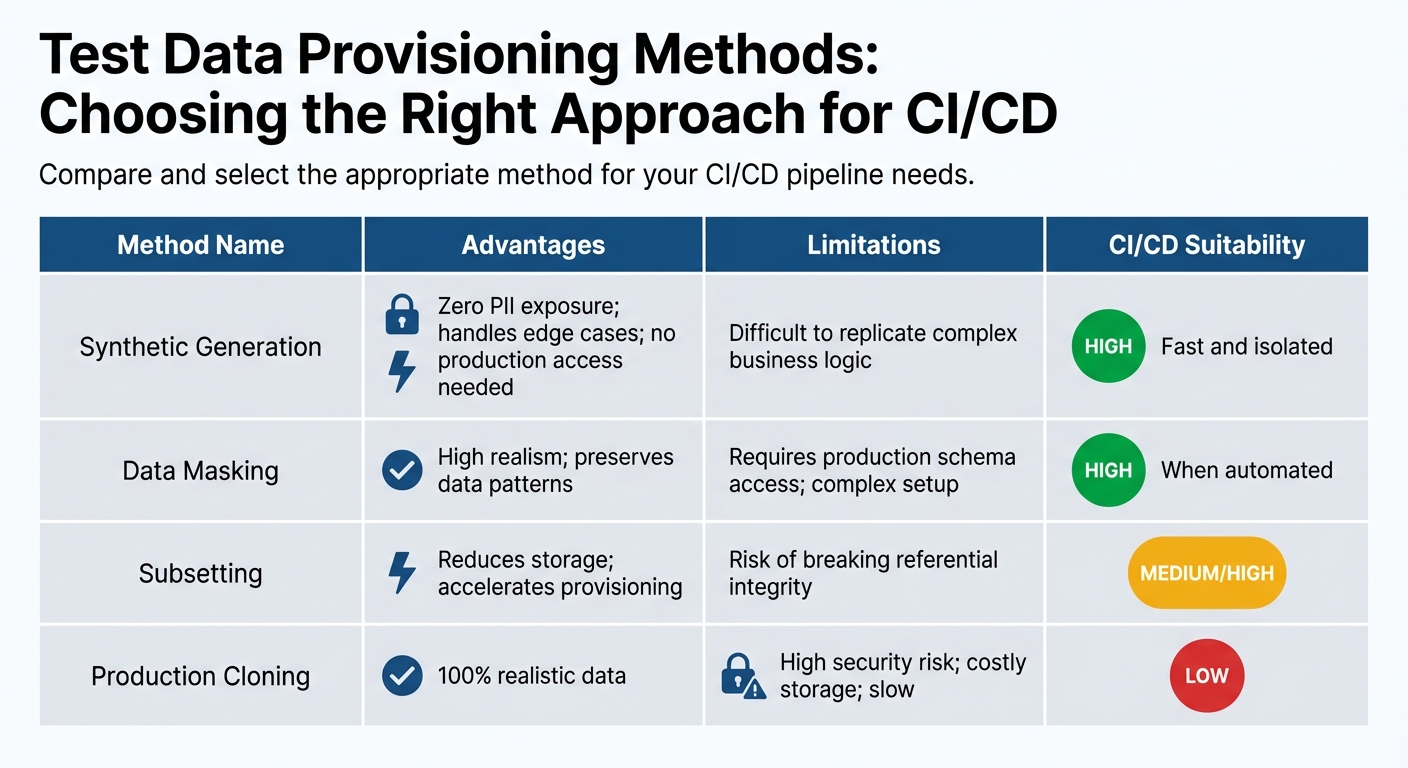 {Test Data Provisioning Methods Comparison for CI/CD Pipelines}
:::
{Test Data Provisioning Methods Comparison for CI/CD Pipelines}
:::
Methods for Test Data Provisioning
Choosing the right method to provision test data involves balancing security, realism, and performance. Synthetic data generation is a method where artificial datasets are created from scratch, eliminating any chance of exposing real personal information. It’s particularly effective for testing edge cases and boundary conditions. However, it can be tricky to replicate intricate business logic or maintain realistic data patterns [3][6].
Data masking is another approach, where actual production data is transformed by replacing sensitive fields with fictitious but realistic values. Techniques like shuffling, substitution, and redaction are commonly used. This method retains the relationships and patterns of production data but requires robust automation to identify every sensitive field, whether in schemas, JSON blobs, or unstructured logs [2][6][8].
Data subsetting involves extracting smaller, representative portions of production data - usually about 5–10% of the total dataset. This reduces storage needs and speeds up provisioning. However, maintaining referential integrity across tables and foreign key relationships can be challenging. For example, a US financial services company managed to cut their database provisioning time from over 20 hours to less than 45 minutes by using automated subsetting and masking. Ben Wiggin, Founder at DataPaws, remarked:
We took a process that ran for more than 20 hours and reduced it to under 45 minutes. We didn't just make it faster; we made it understandable and maintainable[11].
| Method | Advantages | Limitations | CI/CD Suitability |
|---|---|---|---|
| Synthetic Generation | Zero PII exposure; handles edge cases; no production access needed | Difficult to replicate complex business logic | High (fast and isolated) |
| Data Masking | High realism; preserves data patterns | Requires production schema access; complex setup | High (when automated) |
| Subsetting | Reduces storage; accelerates provisioning | Risk of breaking referential integrity | Medium/High |
| Production Cloning | 100% realistic data | High security risk; costly storage; slow | Low |
These methods directly impact security measures, as discussed in the next section.
Security and Compliance in Test Data
Effective security and compliance strategies are critical when working with test data. Under GDPR, test environments with personal data are subject to the same rules as production environments [12]. Synthetic data stands out as a compliance-friendly option since it contains no actual personal information, completely avoiding GDPR obligations. On the other hand, pseudonymisation methods like hashing or encryption still fall under GDPR rules because they are reversible [12][13].
Modern tools that leverage AI for automated PII discovery can achieve over 95% accuracy, far outperforming older regex-based approaches, which often miss 40–60% of sensitive data [12]. These advanced tools can scan schemas, metadata, and unstructured fields to pinpoint sensitive information. For instance, a European e-commerce company reduced its test data size from 2.4 TB (600 million customer records) to just 47 GB (8 million records), cutting GDPR liability and breach risks by 98% [12].
Role-based access control (RBAC) is essential to ensure only authorised team members can access or provision test data. Cryptographic keys should be stored separately from test data, with restricted access through formal key management systems [12]. Automating erasure workflows can also help meet GDPR Article 17 requirements (Right to Erasure). One organisation in Europe reduced their erasure process from 19 days of manual effort to just 6 hours through automation [12].
To demonstrate GDPR compliance under Article 5(2), maintain detailed, audit-ready logs. These logs should capture who accessed test data, what transformations were applied, and when the data was deleted [12][13]. Including automated cleanup steps in your pipeline is crucial to prevent lingering sensitive data and ensure it doesn’t persist longer than needed [3][6].
Best Practices for Scaling Test Data Automation
Using the Testing Pyramid
The testing pyramid is a practical way to balance speed and realism throughout your CI/CD pipeline. Here's how it works:
- Unit tests: Use lightweight, in-memory databases like SQLite or H2. These remove external dependencies and run in milliseconds, keeping things fast and efficient.
- Integration tests: Opt for containerised databases to ensure isolation without the heavy cost of full production clones.
- System and performance tests: Save these for virtualised, production-like datasets to validate complete workflows end-to-end [4].
By aligning the complexity of the data with the scope of the test, you can avoid slowdowns and bottlenecks. Pairing this strategy with test data factories takes automation a step further by enabling parallel execution.
Building Test Data Factories
Test data factories are a game-changer for scaling automation. They allow you to spin up isolated database instances on demand, ensuring tests run in parallel without stepping on each other's toes. Tools like Docker Compose or Kubernetes make it possible to launch multiple database pods simultaneously, giving each test its own clean slate [4].
To speed things up even more, you can use automated seeding scripts with tools like Flyway or Liquibase. These scripts establish predictable baselines and cut database initialisation times from minutes to just seconds [4].
Monitoring Metrics for Continuous Improvement
Once your automated environments and test data factories are up and running, the next step is tracking key metrics to keep improving. Monitoring helps you identify inefficiencies and optimise further.
Some metrics to focus on include:
- Provisioning time: If setting up your database eats up 40% of your pipeline's total duration, you're dealing with a
setup tax
that delays feedback. Switching to schema loads instead of full migrations can slash preparation times from 3–5 minutes to just 5–15 seconds [14]. - Data-related failures: Separate issues caused by stale snapshots or inconsistent datasets from actual code bugs. A downward trend in these failures over time shows that your automation efforts are paying off [8].
- Assertion-to-runtime ratio: This metric tells you how much time is spent on actual testing versus preparing the environment. A low ratio is a red flag for excessive setup overhead [14].
Conclusion
The methodologies we've explored highlight how test data automation can transform CI/CD pipelines into streamlined, secure systems. By adopting practices like treating test data as code, using ephemeral databases, and automating security processes such as data masking and synthetic generation, organisations can eliminate delays tied to manual test data management tasks [5][7].
Key steps include version-controlling data configurations, setting up isolated environments for parallel testing, and embedding compliance measures directly into the pipeline. As Sara Codarlupo from Gigantics aptly puts it:
Test data shouldn't be a blocker - or a risk. With the right automation, QA environments can be safely and instantly populated with anonymised data[2].
Building on concepts like the testing pyramid and test data factories, these strategies help maintain pipeline efficiency by aligning data complexity with test scope while supporting parallel execution. Tracking metrics such as provisioning time and assertion-to-runtime ratios ensures continuous improvement. Notably, organisations leveraging AI-driven test data management have reported achieving 70% faster data preparation and a 30% reduction in production bugs [7].
Automation goes beyond just speeding up processes - it lays the foundation for reliable, compliant pipelines that can scale effectively. Whether it's provisioning ephemeral databases in Docker containers or generating synthetic datasets for edge-case testing, the advantages are clear. Shifting from manual to automated, self-service test data management represents a transformative step in software delivery, enabling faster releases with improved quality.
FAQs
When should we use synthetic data vs masking?
Synthetic data is a great option for generating realistic, artificial datasets without depending on actual data. It’s particularly well-suited for machine learning, analytics, and privacy-focused testing, especially in environments with strict privacy regulations.
On the other hand, masking is ideal for maintaining the structure of real data while hiding sensitive information. This approach works well for legacy systems and staging environments. However, it’s limited to existing data patterns and doesn’t provide the same level of privacy as synthetic data.
How do we stop test data causing flaky CI runs?
To keep test data from disrupting your CI runs, it's essential to automate its cleanup and management. Clearing out outdated or conflicting data after each test ensures a stable and consistent environment. Techniques like data masking, subsetting, and secure provisioning can prevent conflicts and data build-up, which are common culprits behind unreliable test results. By adopting these methods, you can maintain a dependable and predictable CI/CD pipeline.
What’s the quickest way to add test data as code?
The quickest way to include test data as code in a CI/CD pipeline is through automated data generation or seeding using APIs or scripts. For instance, you can populate a database with test data in a single step via an API call, seamlessly integrating it into the pipeline. Another option is to use model-based tools, which let you define data structures and formats. These tools can generate and deploy test data directly, cutting down on manual work significantly.