
Managing secrets in Terraform is critical to protecting your cloud infrastructure. Here’s what you need to know:
- Avoid hardcoding secrets: Storing credentials in
.tffiles or committing them to version control increases exposure risks. - Use environment variables: Inject secrets securely using
TF_VAR_prefixes, but be cautious of shell history and lack of rotation features. - Opt for secret managers: Tools like AWS Secrets Manager (£0.33/month per secret) or HashiCorp Vault provide encryption, rotation, and audit capabilities.
- Leverage ephemeral resources: Introduced in Terraform 1.10, these prevent secrets from being saved in state files.
- Encrypt state files: Use S3 with KMS encryption and enable state locking to secure your data.
- Apply least-privilege access: Limit IAM permissions to reduce potential damage from compromised credentials.
- Automate secret rotation: Regularly update secrets to minimise risks and maintain compliance.
- Mark outputs as sensitive: Prevent secrets from appearing in logs or CLI outputs.
- Secure Terraform backends: Use strict IAM controls, encryption, and audit logging for remote state storage.
- Scan code and infrastructure: Tools like Checkov and AWS Security Hub help identify risks early.
Quick tip: Combine these practices for layered security, ensuring secrets are safe throughout your Terraform workflows.
::: @figure 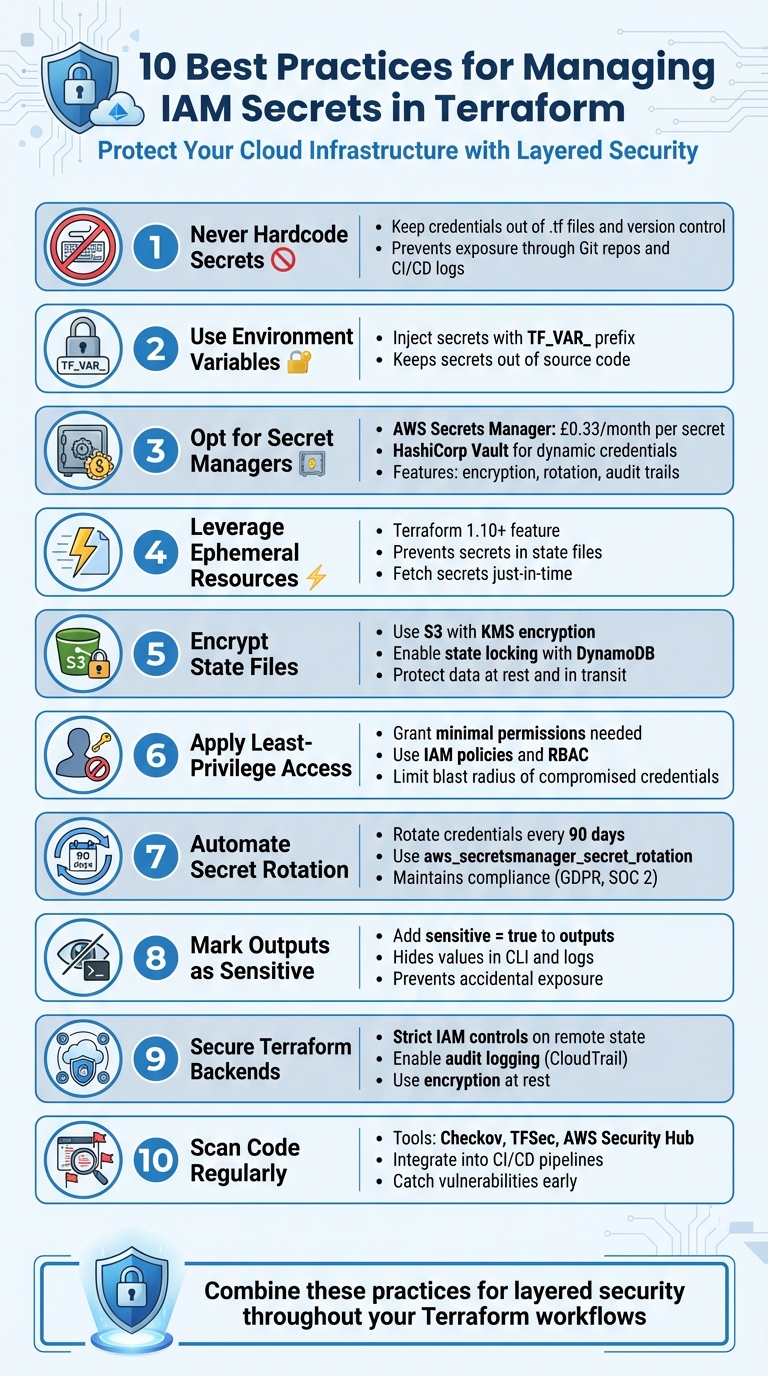 {10 Best Practices for Managing IAM Secrets in Terraform}
:::
{10 Best Practices for Managing IAM Secrets in Terraform}
:::
1. Never Hardcode Secrets in Terraform Configuration Files
Security and Risk Mitigation
Embedding secrets directly into .tf files poses serious security challenges. Anyone with access to the version control system - whether developers, CI/CD pipelines, or backup systems - can easily view these credentials in plain text [2]. Every cloned repository becomes a potential vulnerability, increasing the risk of exposure [2]. HashiCorp warns against this practice, stating:
If secrets are exposed or stored in plaintext (inside Terraform configuration), it creates serious risks: Unauthorized individuals with access to Git repos, CI/CD logs, or state files can retrieve secrets[2].
This makes it clear that secure, flexible methods for managing secrets are essential.
Operational Complexity
At first glance, hardcoding secrets might seem like a simple solution, but it quickly leads to operational headaches. For example, rotating a hardcoded secret requires modifying the code and redeploying it across all environments [9]. Without a centralised system for tracking credentials, meeting compliance requirements like GDPR or SOC 2 becomes an uphill battle [7]. Additionally, ensuring that every instance of a secret is removed from developer machines, CI/CD servers, and backups can be nearly impossible.
Support for Secret Rotation and Auditing
Hardcoded secrets lack essential features like lifecycle management, automated rotation, and audit capabilities, which are critical for maintaining compliance and operational efficiency [7]. Without a centralised secret management system, it’s difficult to monitor who accessed credentials and when - an issue that could lead to compliance failures during audits.
To address these challenges, consider using environment variables (prefixed with TF_VAR_), marking variables as sensitive, and integrating tools like AWS Secrets Manager (costing approximately £0.33/month per secret) or HashiCorp Vault. These solutions offer strong encryption, automated secret rotation, and detailed audit trails, ensuring better security and compliance.
2. Use Environment Variables for Secret Injection
Ease of Integration with Terraform
When it comes to avoiding hardcoded secrets, environment variables offer a straightforward and secure solution. They integrate seamlessly with Terraform, thanks to its built-in support for TF_VAR_-prefixed environment variables. For example, setting TF_VAR_db_password in your shell automatically maps to the corresponding variable in your Terraform configuration. This method keeps sensitive information out of version control with minimal effort - perfect for local testing or simpler CI/CD pipelines where a dedicated secret manager might not be necessary.
Another advantage is that CI/CD platforms can inject these TF_VAR_-prefixed variables without exposing them in build logs. However, it's worth noting that environment variables have the lowest priority among Terraform's variable assignment methods. If the same variable is defined in terraform.tfvars or passed via CLI flags, those values will override the environment variable.
Security and Risk Mitigation
While environment variables help keep secrets out of source control, they come with their own set of risks. For instance, entering secrets directly into the terminal can leave them exposed in .bash_history. To avoid this, rely on CLI-based secret managers to securely handle secrets and prevent them from being stored in shell history.
As highlighted in the HashiCorp Developer Documentation:
Marking variables as sensitive is not sufficient to secure them. You must also keep them secure while passing them into Terraform configuration, and protect them in your state file.
This means that while environment variables provide some level of security, additional precautions are necessary to ensure sensitive data remains protected throughout its lifecycle.
Support for Secret Rotation and Auditing
One drawback of environment variables is their lack of built-in support for secret rotation and auditing. Updating a secret requires manually changing its value in your shell or CI/CD environment and then re-running Terraform. This manual process can be error-prone and may leave room for oversight. Additionally, without a centralised logging system, it becomes difficult to track who accessed the credentials and when.
For production environments, consider leveraging Terraform's ephemeral resources to minimise the risk of storing sensitive data in state files. This approach can provide an extra layer of security for managing secrets effectively.
3. Use AWS Secrets Manager or HashiCorp Vault
Security and Risk Mitigation
If you're looking to avoid hardcoding credentials, tools like AWS Secrets Manager and HashiCorp Vault are excellent options. These secret managers encrypt sensitive information and ensure it remains secure. For instance, AWS Secrets Manager uses 256-bit Advanced Encryption Standard (AES) keys to encrypt secrets at rest [4]. On the other hand, HashiCorp Vault stands out by generating dynamic, short-lived credentials that automatically expire [11].
Vault’s temporary credentials come with a built-in Time-to-Live (TTL), which minimises risks if a credential is exposed [11][3]. AWS Secrets Manager takes a slightly different approach, using AWS Lambda functions to automate credential rotation, ensuring they are updated regularly and have a limited lifespan [8]. Both tools simplify secret retrieval, especially during Terraform operations.
Ease of Integration with Terraform
Integrating these tools with Terraform is straightforward, thanks to their official providers. For AWS Secrets Manager, you can use the aws_secretsmanager_secret_version data source to fetch secrets and decode JSON-formatted data. With HashiCorp Vault, you’ll need to configure the Vault provider using your Vault address and token. After that, you can use data sources like vault_generic_secret or vault_aws_access_credentials to retrieve credentials.
For AWS-centric workflows, AWS Secrets Manager is often the easier option. It’s fully managed, comes with a user-friendly interface, and requires no maintenance of underlying infrastructure [5]. In contrast, HashiCorp Vault offers more advanced features but demands more effort to manage. For example, setting up a high-availability Vault cluster often involves deploying 3–5 EC2 instances [5].
Operational Complexity
While both tools integrate well with Terraform, their operational demands differ. AWS Secrets Manager is a low-maintenance option, with costs around £0.32 per secret per month (about $0.40) and an additional £0.04 for every 10,000 API calls [5]. Since AWS manages the infrastructure, there’s little for you to handle.
HashiCorp Vault’s open-source version is free, but the trade-off is the need to manage its infrastructure. This includes tasks like unsealing the Vault after restarts, managing policies, and performing upgrades [5]. These responsibilities can add to your engineering workload, so your choice will depend on your team’s capacity and the complexity of your infrastructure.
Support for Secret Rotation and Auditing
One of the biggest advantages of centralised secret managers is their ability to automate credential rotation and provide detailed audit logs. AWS Secrets Manager, for example, supports daily credential rotation using the aws_secretsmanager_secret_rotation resource [15]. This aligns with the AWS Well-Architected Framework’s recommendation:
The AWS Well-Architected Framework recommends that you store and use secrets securely. This best practice recommends that you automate the rotation of credentials at regular intervals.[15]
Both AWS Secrets Manager and HashiCorp Vault provide extensive audit logging capabilities. AWS integrates seamlessly with CloudTrail for tracking access, while Vault has its own native audit logs [5]. For an extra layer of security, AWS Secrets Manager can be configured with VPC endpoints to ensure that sensitive data traffic stays within your private network [13].
4. Use Terraform Ephemeral Resources
Security and Risk Mitigation
Ephemeral resources offer a smart way to safeguard IAM secrets by ensuring sensitive data is never stored in plain text within state files. Unlike traditional methods, these resources fetch secrets only when needed and avoid persisting them. As HashiCorp Developer explains:
Ephemeral resources allow Terraform to reference external data, while guaranteeing that this data will not be persisted in plan or state.[6]
This security model relies on two core mechanisms. First, ephemeral blocks act as temporary tools, generating secrets on demand and discarding them immediately after use [12]. Second, write-only arguments (typically ending in _wo) allow sensitive values to be passed to providers without being stored, ensuring passwords, API keys, and tokens remain secure [16].
To enhance this further, you can combine the ephemeral = true argument with sensitive = true on variables. This prevents values from being saved in the state file and redacts them from CLI outputs [16]. As GitGuardian explains:
Ephemeral blocks fetch secrets just-in-time and leave no trace after execution. This significantly reduces the risk of leaking passwords, API keys, or tokens via state files or saved plans.[12]
Ease of Integration with Terraform
To use ephemeral resources, you'll need Terraform 1.10 or later for ephemeral blocks and variables, and version 1.11 or later to access write-only arguments for managed resources [16]. The syntax is intuitive. For example, you can replace:
data "aws_secretsmanager_secret_version" { ... }
with:
ephemeral "aws_secretsmanager_secret_version" { ... }
This simple change ensures secrets won’t be stored in the state file [12].
However, ephemeral values have specific usage limitations. They can only be referenced in certain contexts, such as locals blocks, provider configurations, write-only arguments of managed resources, and child module outputs explicitly marked as ephemeral. This means you’ll need to carefully plan your Terraform configuration to accommodate these constraints.
While the integration process is straightforward, there are operational factors to keep in mind.
Operational Complexity
One key challenge is provider support. Not all providers or resources currently support ephemeral blocks or write-only arguments, so it’s essential to check compatibility on the Terraform Registry [16]. For secret updates, use the relevant version argument, such as password_wo_version, to ensure seamless updates [16].
Since ephemeral values aren’t stored in the state file, any generated value that needs to be retained must be explicitly saved in a separate managed resource, like AWS Secrets Manager [16]. This extra step ensures secrets remain accessible while maintaining robust security measures.
5. Encrypt and Secure Terraform State Files
Security and Risk Mitigation
Protecting your Terraform state files is a critical step in safeguarding sensitive IAM secrets within your Infrastructure as Code workflows. These files store infrastructure metadata in plaintext, including IAM keys, database passwords, and API tokens [16]. If left unencrypted or stored locally, they become vulnerable to unauthorised access through the file system, Git history, or CI/CD logs. To mitigate this risk, encrypt state data at rest using tools like Amazon S3 Server-Side Encryption, and ensure data in transit is protected with TLS. Strengthen security further by enforcing access controls using IAM policies and RBAC, and monitor access through audit logs such as AWS CloudTrail. Amazon S3 provides highly reliable storage for remote state data, ensuring both durability and availability [18].
Integrating encryption into your Terraform backend not only enhances security but is also a straightforward process.
Ease of Integration with Terraform
To enable encryption, set the S3 backend's encrypt argument to true. If additional control over decryption is required, you can specify a kms_key_id [16]. HashiCorp highlights this capability:
The S3 backend can encrypt state at rest if you enable the encrypt option, and protects state with TLS in transit.[16]
For backend credentials, use environment variables to keep them secure. Enable S3 bucket versioning to allow recovery of previous state snapshots when needed. Additionally, implement state locking (introduced in Terraform 1.10.0+) to prevent concurrent write operations, which could lead to corruption [18].
Once encryption is in place, operational practices play a key role in maintaining state file security and integrity.
Operational Considerations
Setting up a remote state backend, such as an S3 bucket with state locking, requires some initial configuration but significantly reduces risks of corruption and unauthorised access. For added security, store state files in a dedicated, centralised administrative AWS account, separate from production environments [19]. AWS also advises rotating access keys every 90 days to minimise the impact of any compromised credentials [17]. To prevent accidentally exposing sensitive data, include *.tfstate and *.tfstate.backup in your .gitignore file. As HashiCorp emphasises:
Treat your state file as sensitive data by excluding it from Git workflows and following our recommendations to secure your state file.[16]
These encryption practices enhance the overall security of your Terraform workflows, complementing other IAM secret management strategies discussed earlier.
6. Apply Least-Privilege IAM Access Controls
Security and Risk Mitigation
To reduce risks when credentials are compromised, grant only the permissions absolutely necessary for specific tasks. This approach, known as least-privilege access, ensures that any potential damage remains contained. As HashiCorp puts it:
Instead of giving everyone full access, you grant just enough privileges for their tasks.[2]
Since Terraform state files often store plaintext secrets, it's crucial to limit backend access. Use IAM policies to ensure only authorised CI/CD systems and administrators can interact with state data.
Ease of Integration with Terraform
The principle of minimal permissions aligns seamlessly with Terraform workflows. Define specific roles at the workspace level - such as Plan, Apply, and Read-only - and use dynamic OIDC credentials to provide short-lived, scoped access for each Terraform run. HashiCorp explains:
Dynamic provider credentials... limit the blast radius of compromised credentials by using unique, short-lived credentials for each Terraform run.[21]
You can further refine access by leveraging OIDC claims, such as organisation, project, workspace, and run phase, ensuring each workspace is restricted to managing only its authorised resources. When working with HashiCorp Vault, assign tokens with narrowly defined capabilities, such as read for data sources and create or update for resource management.
Operational Complexity
While granular permissions significantly improve security, they can also add complexity to operations. To manage this effectively, codify and version IAM policies for each workspace. Automate policy checks and adjust credential time-to-live (TTL) settings to strike the right balance between security and usability. Regularly audit IAM policies to identify unused roles or permissions that may have drifted over time. Revoke any unnecessary access promptly. This disciplined approach to credential management complements the broader strategy for handling secrets securely.
Need help optimizing your cloud costs?
Get expert advice on how to reduce your cloud expenses without sacrificing performance.
7. Set Up Secret Rotation Policies and Procedures
Security and Risk Mitigation
Rotating credentials regularly is a key step in reducing the risk of compromised secrets. As AWS Prescriptive Guidance puts it:
Rotation is the process of periodically updating a secret to make it more difficult for an attacker to access the credentials.[15]
This practice not only boosts security but also ensures compliance with regulations like GDPR and SOC 2, which often require automated rotation at specific intervals [15]. By rotating credentials, any exposed secrets become useless, working alongside other IAM best practices to safeguard your Terraform workflows.
Ease of Integration with Terraform
Terraform simplifies secret rotation through built-in resources like aws_secretsmanager_secret_rotation. This integrates with AWS Lambda to handle rotations efficiently [15]. Another option is HashiCorp Vault's AWS Secrets Engine, which creates short-lived, dynamic credentials for each Terraform run, eliminating the need for static keys [14]. You can also use the automatically_after_days attribute in your configuration to automate rotation schedules seamlessly [15].
Support for Secret Rotation and Auditing
In 2024, AWS architects Tracy Hickey and team introduced an automated method for rotating IAM access keys at scale. Their solution uses Amazon EventBridge to trigger a Lambda function every 24 hours. This function identifies keys older than 90 days, generates new keys, stores them securely in AWS Secrets Manager, and notifies account owners via Amazon SES [22]. This setup not only automates key rotation but also creates a detailed audit trail for each rotation event - a level of transparency that's impossible with hardcoded credentials [2].
Operational Complexity
While setting up automated rotation might take some upfront effort, it significantly reduces ongoing maintenance. If you’re using dynamic secrets through Vault, ensure the Time-to-Live (TTL) is longer than your longest terraform apply duration to avoid mid-run credential expirations [14]. Running rotation scripts in audit mode first can also help you verify changes before implementing them [22]. These strategies create a secure, auditable secret management process for your Terraform environment, though you should account for potential additional operational costs.
8. Mark Terraform Outputs as Sensitive
Security and Risk Mitigation
Marking an output as sensitive in Terraform ensures its value is hidden in the CLI output, operation logs, and the HCP Terraform UI. Instead of displaying the actual value, Terraform replaces it with (sensitive value) or <sensitive> [16]. This approach reduces the risk of exposing sensitive information, such as database passwords or API tokens, which could otherwise end up in CI/CD pipeline logs or terminal histories - a common security oversight.
Terraform enforces a rule: if an output references sensitive values, it must also be marked as sensitive. As noted in HashiCorp's developer documentation:
Expressions used in outputs can only refer to sensitive values if the sensitive attribute is true[10].
However, it's important to remember that while this flag hides sensitive data in the CLI and UI, the actual values remain stored in the state file. This means commands like terraform output -json or terraform output -raw can still reveal the underlying values [16]. To maintain consistent redaction, ensure outputs are configured with this in mind.
Ease of Integration with Terraform
Adding sensitive = true to outputs containing credentials is straightforward. For Terraform 1.10 and later, you can go a step further by using the ephemeral = true argument in child module outputs. This prevents these values from appearing in state and plan files altogether.
Since sensitive outputs are still part of the state file, it's crucial to use a secure remote backend. Options like S3 with KMS encryption or HCP Terraform offer encryption at rest and strict access controls. These measures align with broader IAM and secrets management practices, ensuring sensitive data is handled securely within Terraform workflows.
9. Control Access to Terraform Backends and Remote State
Security and Risk Mitigation
Managing access to remote state storage is a critical step in maintaining secure Terraform workflows. Terraform state files often hold sensitive data - like database credentials, API tokens, and other secrets in plaintext - making them a potential target for attackers. As AWS Prescriptive Guidance highlights:
Failure to secure remote state can lead to serious issues such as loss of state data, inability to manage infrastructure, inadvertent resource deletion, and exposure of sensitive information that might be present in the state file.[17]
To safeguard this data, remote backends - such as Amazon S3, Google Cloud Storage, or HCP Terraform - should always have encryption at rest, state locking, and strict IAM controls in place. For instance, using DynamoDB for state locking alongside S3 or leveraging HCP Terraform's built-in locking mechanism can prevent concurrent modifications that might corrupt your infrastructure's source of truth [23].
Access to remote state should follow the principle of least privilege. Restrict permissions to only those systems and administrators who truly need them. Define granular roles using IAM policies or Role-Based Access Control (RBAC). Examples include Plan
roles that can read state files without making changes, Apply
roles limited to automated systems, and Read-only
roles for auditing purposes [2]. Backend credentials should be handled securely - use environment variables like AWS_ACCESS_KEY_ID or partial configuration files during initialisation to avoid hardcoding sensitive details [19]. Pair these controls with thorough audit logging to monitor and track all state file access.
Auditing and Logging
Strong access controls are only part of the equation. Enabling robust audit logging ensures visibility into who accessed or modified state files and when. Tools like S3 Bucket Logging, AWS CloudTrail, or HCP Terraform's built-in audit trails can provide this level of insight [16][17]. Additionally, IAM Access Analyzer can help identify overly permissive roles, while AWS Config and Security Hub can alert you to configuration drift.
To avoid accidental exposure, add *.tfstate, *.tfstate.backup, and .terraform/ to your .gitignore file. For teams sharing infrastructure, the terraform_remote_state data source can be used to share specific outputs in a read-only manner, eliminating the need for broad access to the full state file [20]. Finally, be cautious with commands like terraform state push. These should only be used as a last resort by administrators, as they can overwrite remote state and bypass critical safeguards [23].
10. Scan Infrastructure and Source Code Regularly
Security and Risk Mitigation
Automated scanning is a game-changer when it comes to catching vulnerabilities early in the development process. Tools like Checkov can be embedded directly into CI/CD pipelines to analyse Terraform HCL code for potential misconfigurations, such as overly permissive IAM policies. As highlighted in AWS Prescriptive Guidance:
Embed static analysers such as Checkov directly into CI/CD pipelines to scan Terraform configuration code (HCL) and identify risks preemptively before deployment.[17]
In addition to static code analysis, dynamic scanners monitor live infrastructure to detect threats and configuration drift. For instance, AWS Security Hub and Amazon GuardDuty are excellent at identifying malicious activity, while IAM Access Analyzer reviews policies to spot unused permissions. By running IAM credential reports, you can also revoke inactive keys promptly. These automated scans perfectly complement proactive secret management practices, helping to maintain a strong security framework.
Seamless Integration with Terraform
The good news? Integrating these scanning tools with Terraform workflows is straightforward. Pre-commit hooks, like TruffleHog or GitLeaks, can stop secrets from being committed to version control. CI/CD platforms such as GitHub Actions or GitLab CI can run terraform plan alongside automated security scans, ensuring deployments that violate policies are blocked before they go live.
Here’s a quick summary of common scanning methods and where they fit into your workflow:
| Scanning Type | Tools | Integration Point |
|---|---|---|
| Static Analysis (SAST) | Checkov, TFSec, Terrascan | CI/CD Pipeline, Pre-commit |
| Secret Detection | TruffleHog, GitLeaks | Pre-commit, Git Hooks |
| Dynamic Scanning | AWS Security Hub, GuardDuty | Runtime / Cloud Environment |
| Policy Enforcement | Sentinel, OPA | Terraform Plan/Apply |
Simplifying Operations
By embedding security scans early in the development lifecycle - what’s often referred to as shifting security left
- you can significantly reduce manual effort and the costs associated with fixing vulnerabilities post-deployment. Continuous scanning not only improves visibility into your security posture but also helps prevent configuration drift. Regularly updating Terraform configurations and IAM policies based on scan results ensures your infrastructure remains secure and well-aligned with best practices.
Finally, Zero Secrets in Terraform State, Here’s How
Conclusion
Protecting IAM secrets in Terraform requires a layered defence strategy. Plaintext state files have been a known weak point for years[5][12], making it critical to implement robust controls. The approaches outlined earlier work together to shield your Terraform setups from the risks of exposing sensitive IAM credentials.
Thankfully, modern tools have stepped up to address these challenges. Terraform 1.10 introduces ephemeral resources that retrieve secrets during runtime without saving them to state files[12]. Meanwhile, services like AWS Secrets Manager and HashiCorp Vault offer automated secret rotation and comprehensive audit trails[5]. These tools aren’t just about bolstering security - they’re essential for adhering to regulatory standards. As AWS Prescriptive Guidance highlights:
Protection of sensitive data is a prerequisite for security and compliance.[1]
FAQs
What are the best ways to manage Terraform secrets securely without hardcoding credentials?
To keep your Terraform secrets safe, it's best to rely on secret management tools like HashiCorp Vault. These tools can inject temporary, dynamic credentials straight into your Terraform configurations, eliminating the dangers of hardcoding sensitive data.
You could also use encrypted storage solutions or services like AWS Secrets Manager. These platforms come with handy features such as automatic key rotation and detailed access control, ensuring secrets are stored securely and only accessible to approved users or systems.
Incorporating these methods into your Terraform workflows greatly strengthens the security of your Infrastructure as Code processes.
Why should I use secret managers like AWS Secrets Manager or HashiCorp Vault with Terraform?
When working with Terraform, pairing it with secret management tools like AWS Secrets Manager or HashiCorp Vault ensures secure handling of sensitive information. These tools encrypt and store critical data - such as API keys or database credentials - minimising the chances of accidental leaks.
One standout feature is their ability to automatically rotate secrets, which boosts security by refreshing credentials regularly without requiring manual updates. Plus, these secret managers integrate effortlessly with Terraform, allowing for programmatic access and streamlined automation. This makes managing secrets across intricate infrastructure setups much more efficient.
How do ephemeral resources improve the security of IAM secrets in Terraform?
Ephemeral resources play a key role in securing IAM secrets within Terraform by making sure sensitive information is only accessible temporarily during runtime. This approach prevents secrets from being stored in Terraform state or plan files, which greatly lowers the chances of unauthorised access or accidental leaks.
By leveraging ephemeral resources, you ensure that sensitive data is managed securely and exists only for the exact duration it’s needed. This aligns perfectly with best practices for handling secrets in Infrastructure as Code environments.